light LEXUS UX250H 2019 Owner's Guide
[x] Cancel search | Manufacturer: LEXUS, Model Year: 2019, Model line: UX250H, Model: LEXUS UX250H 2019Pages: 476, PDF Size: 10.51 MB
Page 71 of 476
711-5. Theft deterrent system
1
For safety and security
■Items to check before locking the
vehicle
To prevent unexpected triggering of
the alarm and vehicle theft, make sure
of the following:
Nobody is in the vehicle.
The windows and moon roof (if
equipped) are closed before the
alarm is set.
No valuables or other personal
items are left in the vehicle.
■Setting
Close the doors and hood, and lock all
the doors. The system will be set auto-
matically after 30 seconds.
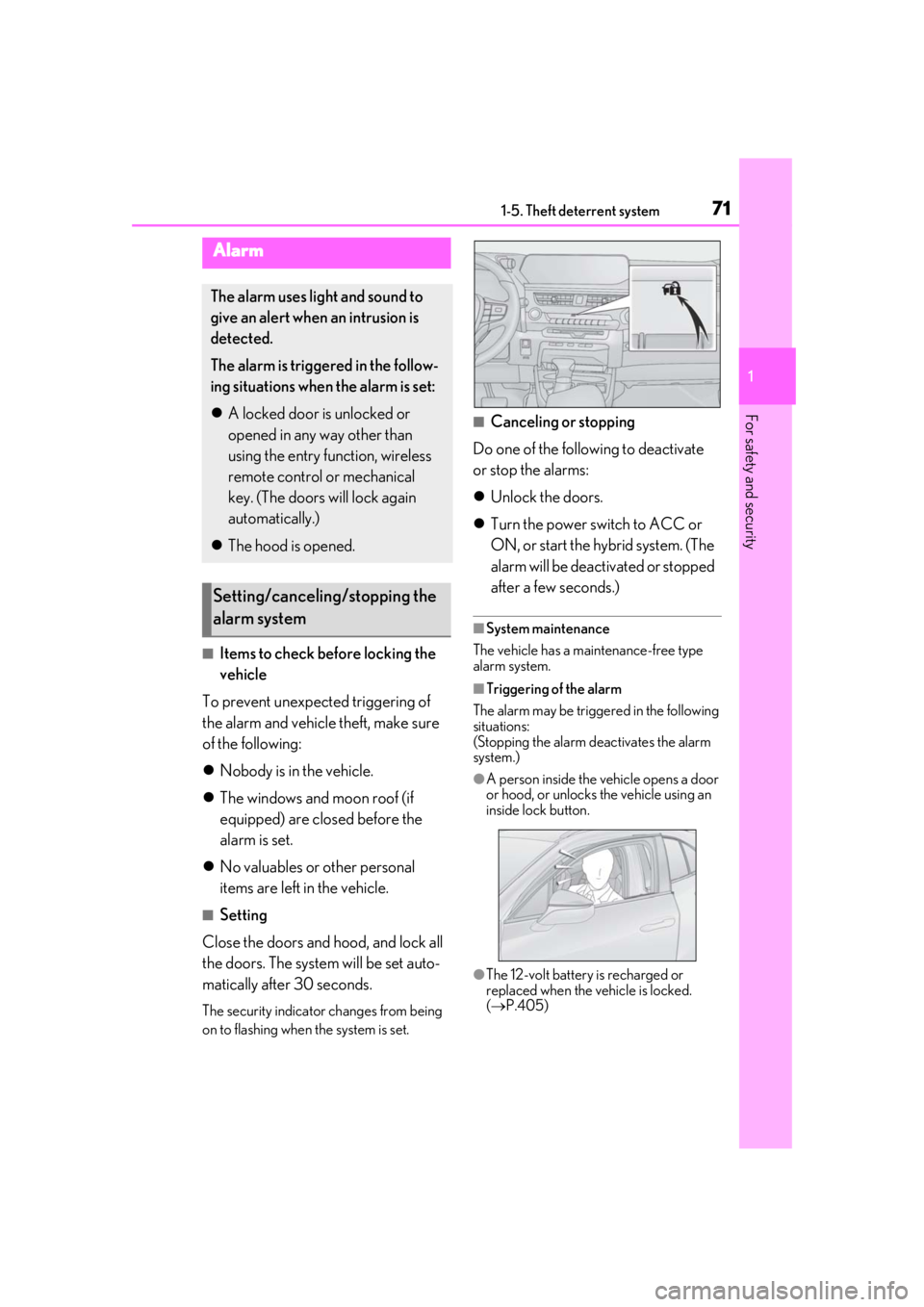
The security indicator changes from being
on to flashing when the system is set.
■Canceling or stopping
Do one of the following to deactivate
or stop the alarms:
Unlock the doors.
Turn the power switch to ACC or
ON, or start the hybrid system. (The
alarm will be deactivated or stopped
after a few seconds.)
■System maintenance
The vehicle has a maintenance-free type
alarm system.
■Triggering of the alarm
The alarm may be triggered in the following
situations:
(Stopping the alarm deactivates the alarm
system.)
●A person inside the vehicle opens a door
or hood, or unlocks the vehicle using an
inside lock button.
●The 12-volt battery is recharged or
replaced when the vehicle is locked.
( P.405)
Alarm
The alarm uses light and sound to
give an alert when an intrusion is
detected.
The alarm is triggered in the follow-
ing situations when the alarm is set:
A locked door is unlocked or
opened in any way other than
using the entry function, wireless
remote control or mechanical
key. (The doors will lock again
automatically.)
The hood is opened.
Setting/canceling/stopping the
alarm system
Page 73 of 476
73
2
2
Vehicle status information and indicators
Vehicle status informationand indicators
2-1. Instrument cluster
Warning lights and indicators . 74
Gauges and meters (except F SPORT models) ........................ 78
Gauges and meters (F SPORT models) .......................................... 82
Multi-information display.......... 87
Head-up display ........................... 93
Energy monitor/consumption screen ............................................ 97
Page 74 of 476
742-1. Instrument cluster
2-1.Instrument cluster
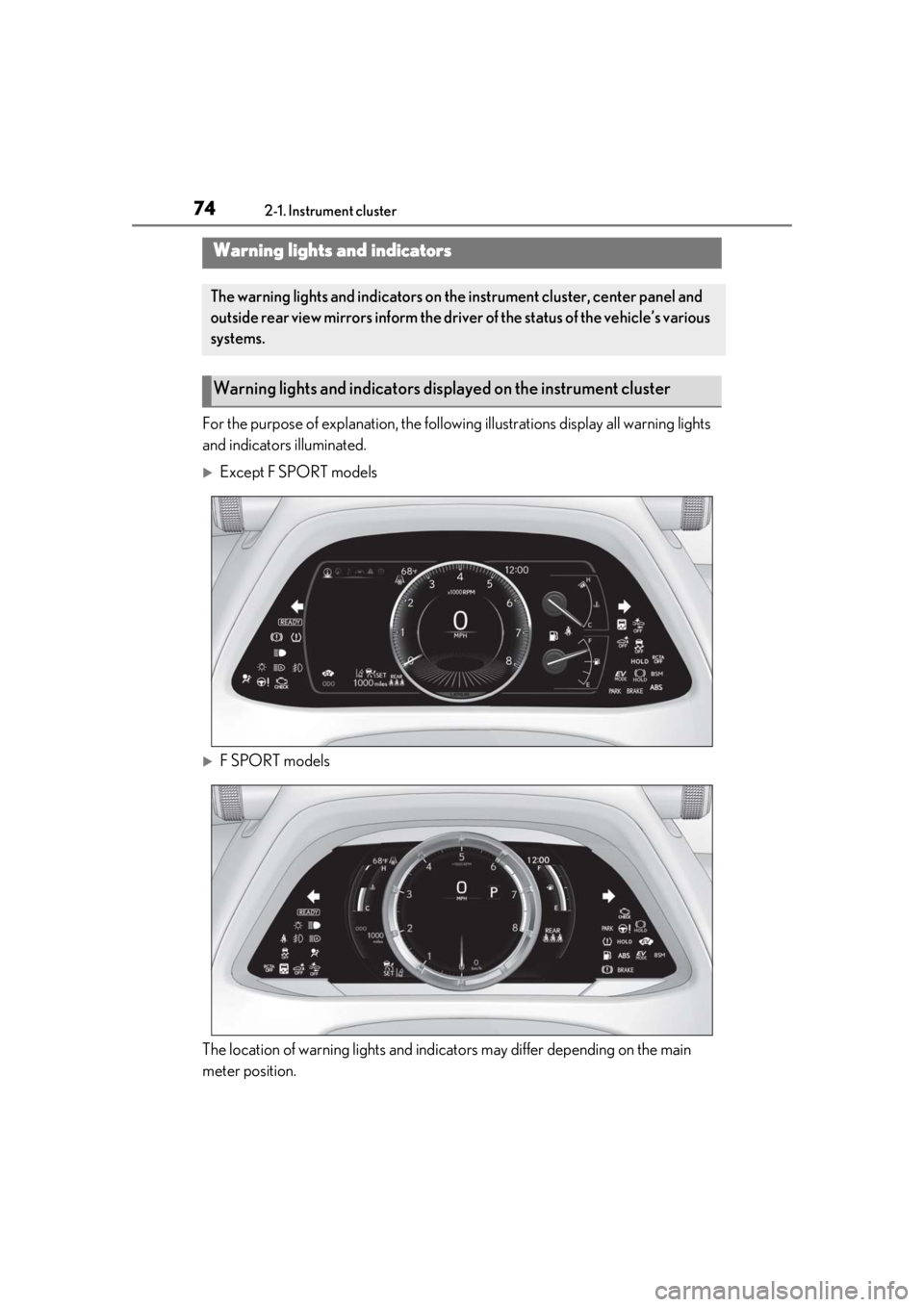
For the purpose of explanation, the following illustrations display all warning lights
and indicators illuminated.
Except F SPORT models
F SPORT models
The location of warning lights and indicat ors may differ depending on the main
meter position.
Warning lights and indicators
The warning lights and indicators on th e instrument cluster, center panel and
outside rear view mirrors inform the driver of the status of the vehicle’s various
systems.
Warning lights and indicators displayed on the instrument cluster
Page 75 of 476
752-1. Instrument cluster
2
Vehicle status information and indicators
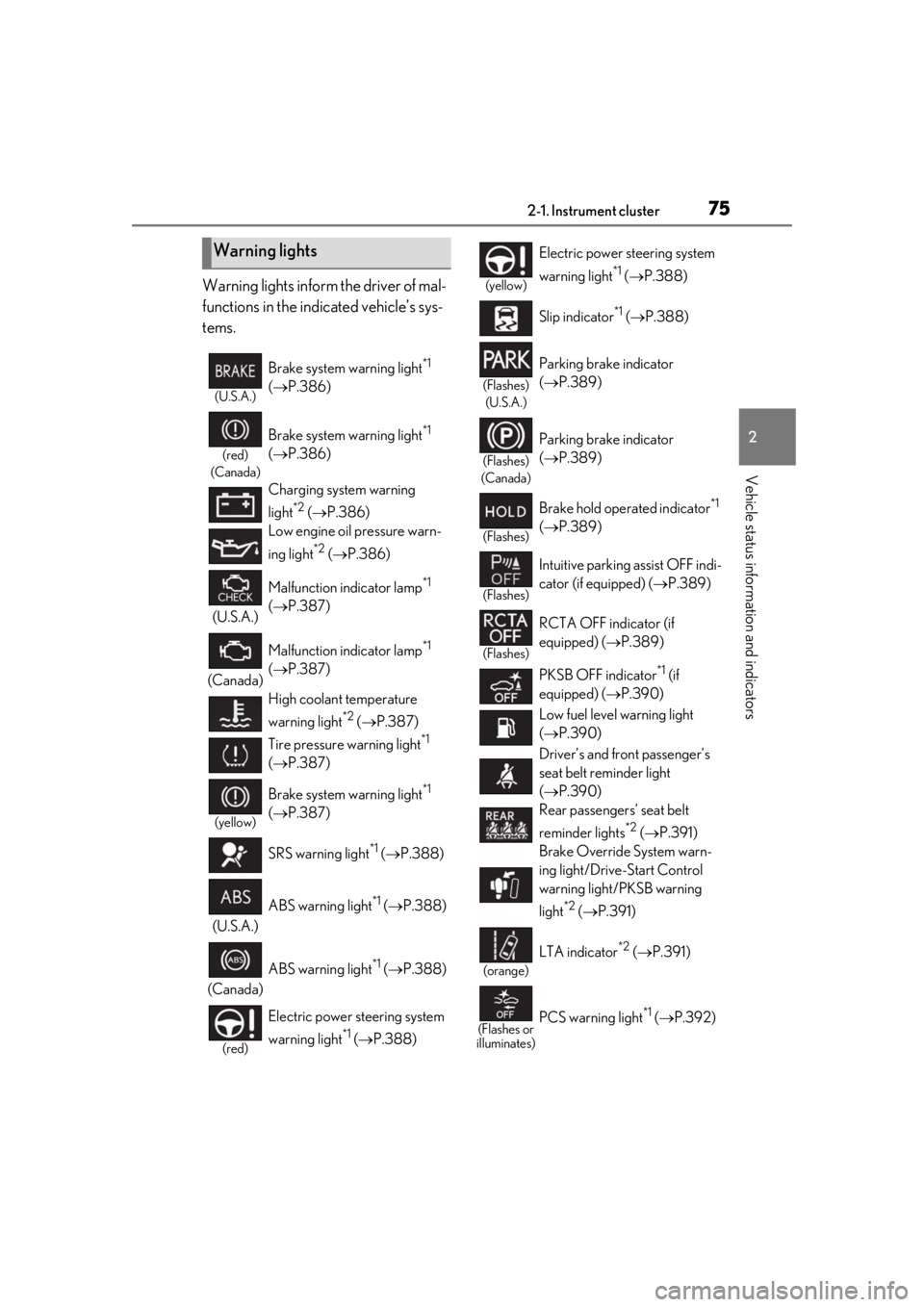
Warning lights inform the driver of mal-
functions in the indicated vehicle’s sys-
tems.
Warning lights
(U.S.A.)
Brake system warning light*1
( P.386)
(red)
(Canada)
Brake system warning light*1
( P.386)
Charging system warning
light
*2 ( P.386)
Low engine oil pressure warn-
ing light
*2 ( P.386)
(U.S.A.) Malfunction indicator lamp
*1
( P.387)
(Canada) Malfunction indicator lamp
*1
( P.387)
High coolant temperature
warning light
*2 ( P.387)
Tire pressure warning light
*1
( P.387)
(yellow)
Brake system warning light*1
( P.387)
SRS warning light
*1 ( P.388)
(U.S.A.) ABS warning light
*1 (
P.388)
(Canada) ABS warning light
*1 (
P.388)
(red)
Electric power st eering system
warning light
*1 ( P.388)
(yellow)
Electric power steering system
warning light
*1 ( P.388)
Slip indicator
*1 ( P.388)
(Flashes)
(U.S.A.)
Parking brake indicator
( P.389)
(Flashes)
(Canada)
Parking brake indicator
( P.389)
(Flashes)
Brake hold operated indicator*1
( P.389)
(Flashes)
Intuitive parking assist OFF indi-
cator (if equipped) ( P.389)
(Flashes)
RCTA OFF indicator (if
equipped) ( P.389)
PKSB OFF indicator
*1 (if
equipped) ( P.390)
Low fuel level warning light
( P.390)
Driver’s and front passenger’s
seat belt re minder light
( P.390)
Rear passengers’ seat belt
reminder lights
*2 ( P.391)
Brake Override System warn-
ing light/Drive-Start Control
warning light/PKSB warning
light
*2 ( P.391)
(orange)
LTA indicator*2 ( P.391)
(Flashes or
illuminates)PCS warning light*1 ( P.392)
Page 76 of 476
762-1. Instrument cluster
*1: These lights come on when the power switch is turned to ON to indicate that a
system check is being performed. They
will go off after the hybrid system is on,
or after a few seconds. There may be a
malfunction in a system if the lights do
not come on, or go off. Have the vehicle
inspected by your Lexus dealer.
*2: This light illuminates on the multi-infor-
mation display.
The indicators inform the driver of the
operating state of the vehicle’s various
systems.
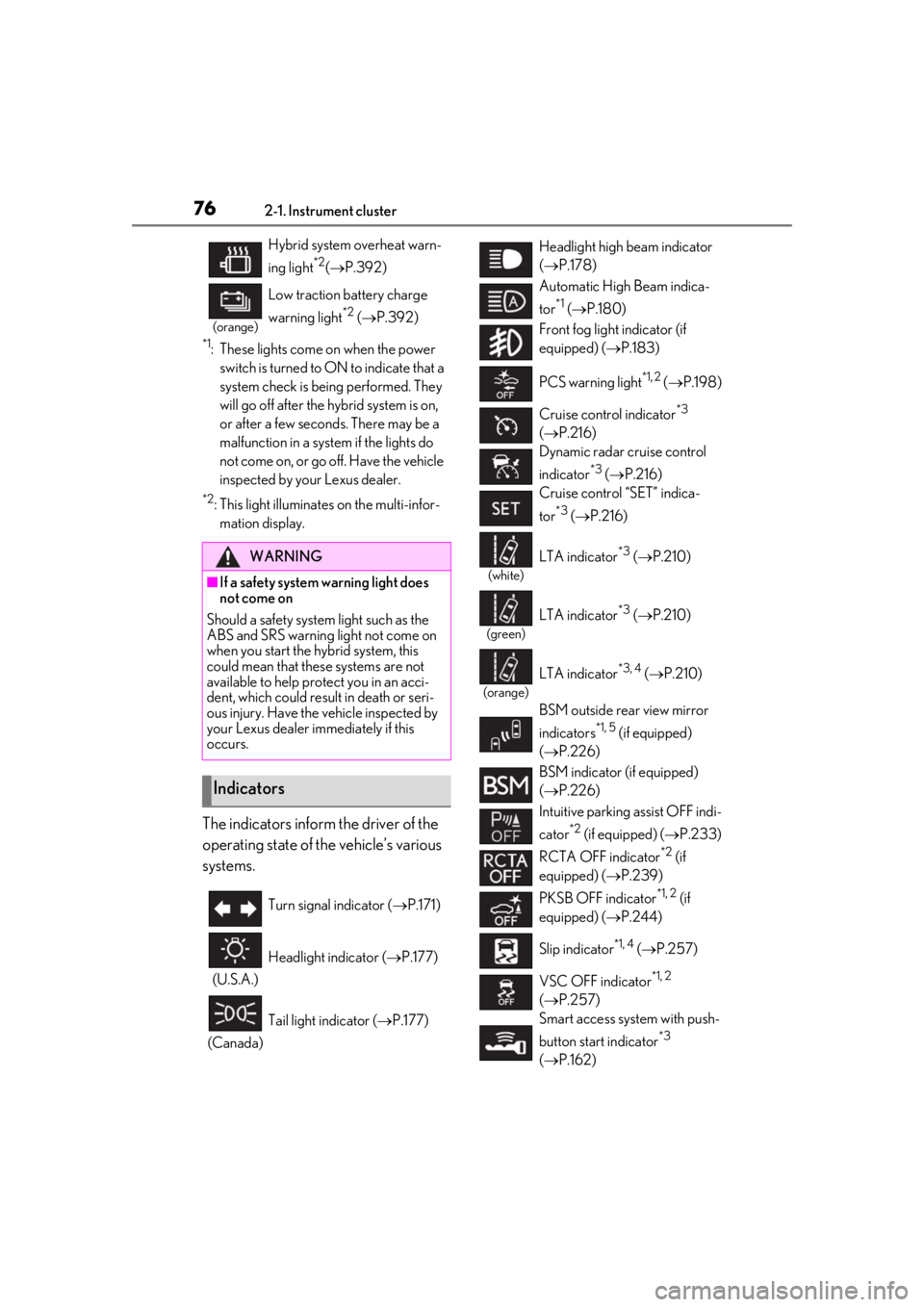
Hybrid system overheat warn-
ing light
*2( P.392)
(orange)
Low traction battery charge
warning light
*2 ( P.392)
WARNING
■If a safety system warning light does
not come on
Should a safety system light such as the
ABS and SRS warning light not come on
when you start the hybrid system, this
could mean that these systems are not
available to help pr otect you in an acci-
dent, which could result in death or seri-
ous injury. Have the vehicle inspected by
your Lexus dealer immediately if this
occurs.
Indicators
Turn signal indicator ( P.171)
(U.S.A.) Headlight indicator (
P.177)
(Canada) Tail light indicator (
P.177)
Headlight high beam indicator
( P.178)
Automatic High Beam indica-
tor
*1 ( P.180)
Front fog light indicator (if
equipped) ( P.183)
PCS warning light
*1, 2 ( P.198)
Cruise control indicator
*3
( P.216)
Dynamic radar cruise control
indicator
*3 ( P.216)
Cruise control “SET” indica-
tor
*3 ( P.216)
(white)
LTA indicator*3 ( P.210)
(green)
LTA indicator*3 ( P.210)
(orange)
LTA indicator*3, 4 ( P.210)
BSM outside rear view mirror
indicators
*1, 5 (if equipped)
( P.226)
BSM indicator (if equipped)
( P.226)
Intuitive parking assist OFF indi-
cator
*2 (if equipped) ( P.233)
RCTA OFF indicator
*2 (if
equipped) ( P.239)
PKSB OFF indicator
*1, 2 (if
equipped) ( P.244)
Slip indicator
*1, 4 ( P.257)
VSC OFF indicator
*1, 2
( P.257)
Smart access system with push-
button start indicator
*3
( P.162)
Page 77 of 476
772-1. Instrument cluster
2
Vehicle status information and indicators
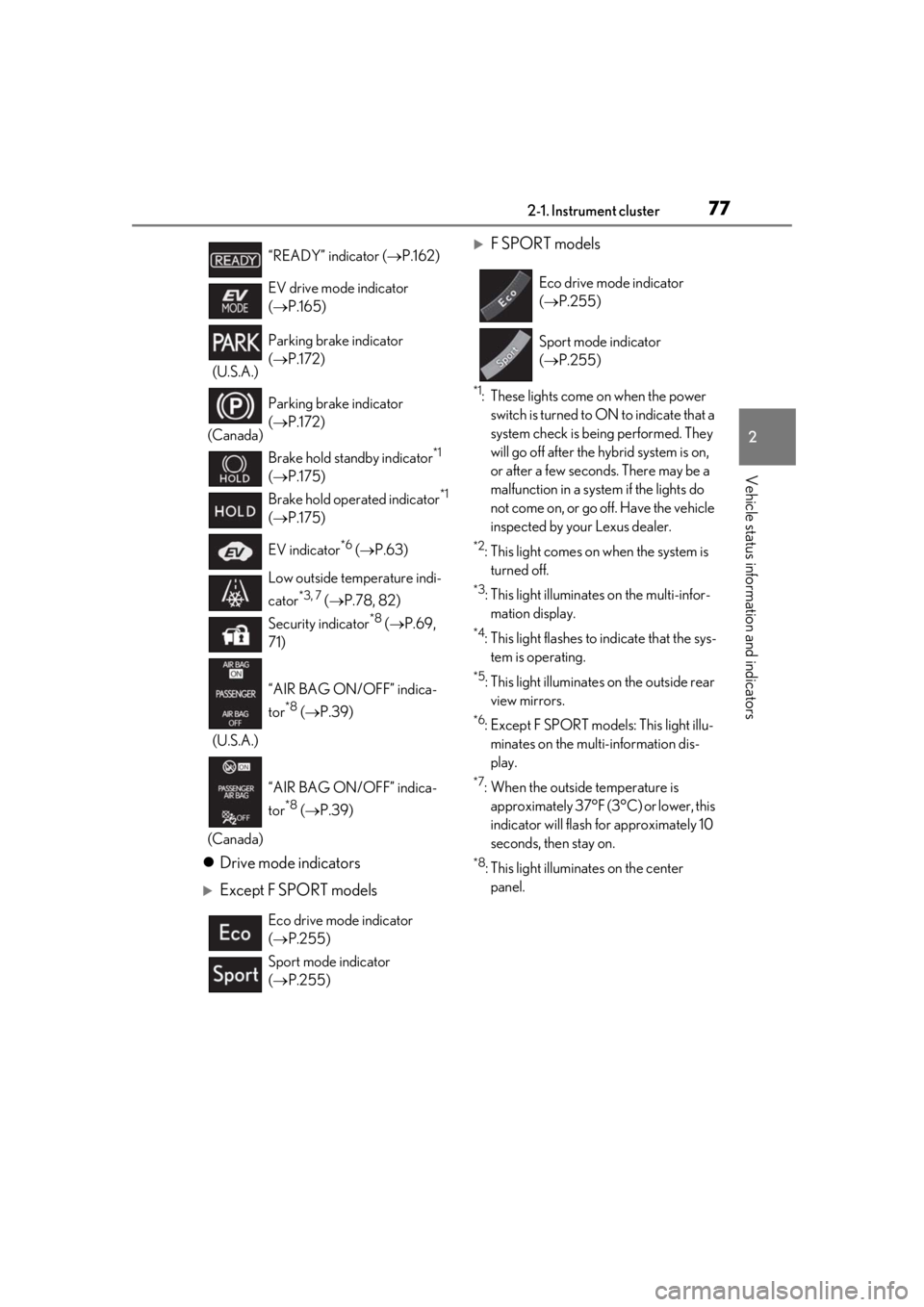
Drive mode indicators
Except F SPORT models
F SPORT models
*1: These lights come on when the power
switch is turned to ON to indicate that a
system check is being performed. They
will go off after the hybrid system is on,
or after a few second s. There may be a
malfunction in a system if the lights do
not come on, or go off. Have the vehicle
inspected by your Lexus dealer.
*2: This light comes on when the system is turned off.
*3: This light illuminates on the multi-infor-mation display.
*4: This light flashes to indicate that the sys- tem is operating.
*5: This light illuminates on the outside rear view mirrors.
*6: Except F SPORT models: This light illu- minates on the multi-information dis-
play.
*7: When the outside temperature is approximately 37°F (3°C) or lower, this
indicator will flash for approximately 10
seconds, then stay on.
*8: This light illuminates on the center panel.
“READY” indicator (
P.162)
EV drive mode indicator
( P.165)
(U.S.A.) Parking brake indicator
(
P.172)
(Canada) Parking brake indicator
(
P.172)
Brake hold standby indicator
*1
( P.175)
Brake hold operated indicator
*1
( P.175)
EV indicator
*6 ( P.63)
Low outside temperature indi-
cator
*3, 7 ( P.78, 82)
Security indicator
*8 ( P.69,
71)
(U.S.A.) “AIR BAG ON/OFF” indica-
tor
*8 (
P.39)
(Canada) “AIR BAG ON/OFF” indica-
tor
*8 (
P.39)
Eco drive mode indicator
( P.255)
Sport mode indicator
( P.255)
Eco drive mode indicator
( P.255)
Sport mode indicator
( P.255)
Page 80 of 476
802-1. Instrument cluster
( P.435)
■Display items
Odometer
Displays the total distance the vehicle has
been driven.
Trip meter A/trip meter B
Displays the distance the vehicle has been
driven since the meter was last reset. Trip
meters A and B can be used to record and display different distances independently.
Distance until next engine oil
change
Displays the distance the vehicle can be
driven until an oil change is necessary.
■Changing the display
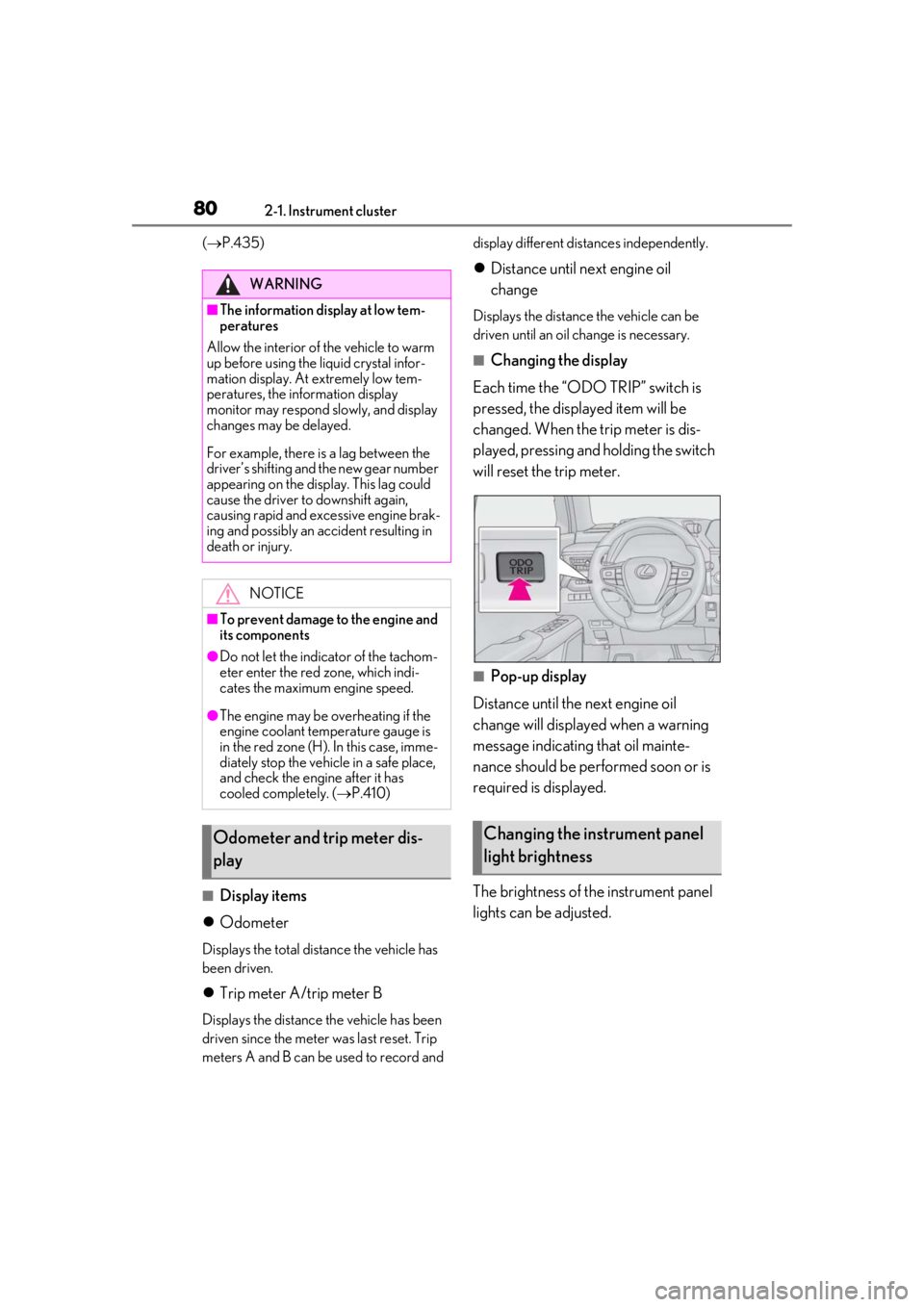
Each time the “ODO TRIP” switch is
pressed, the displayed item will be
changed. When the trip meter is dis-
played, pressing and holding the switch
will reset the trip meter.
■Pop-up display
Distance until the next engine oil
change will displayed when a warning
message indicating that oil mainte-
nance should be performed soon or is
required is displayed.
The brightness of the instrument panel
lights can be adjusted.
WARNING
■The information display at low tem-
peratures
Allow the interior of the vehicle to warm
up before using the liquid crystal infor-
mation display. At extremely low tem-
peratures, the information display
monitor may respond slowly, and display
changes may be delayed.
For example, there is a lag between the
driver’s shifting and the new gear number
appearing on the display. This lag could
cause the driver to downshift again,
causing rapid and excessive engine brak-
ing and possibly an accident resulting in
death or injury.
NOTICE
■To prevent damage to the engine and
its components
●Do not let the indicator of the tachom-
eter enter the red zone, which indi-
cates the maximum engine speed.
●The engine may be overheating if the
engine coolant temperature gauge is
in the red zone (H). In this case, imme-
diately stop the vehicle in a safe place,
and check the engine after it has
cooled completely. ( P.410)
Odometer and trip meter dis-
playChanging the instrument panel
light brightness
Page 86 of 476
862-1. Instrument cluster
■Display items
Odometer
Displays the total distance the vehicle has
been driven.
Trip meter A/trip meter B
Displays the distance the vehicle has been
driven since the meter was last reset. Trip
meters A and B can be used to record and
display different distances independently.
Distance until next engine oil
change
Displays the distance the vehicle can be
driven until an oil change is necessary.
■Changing the display
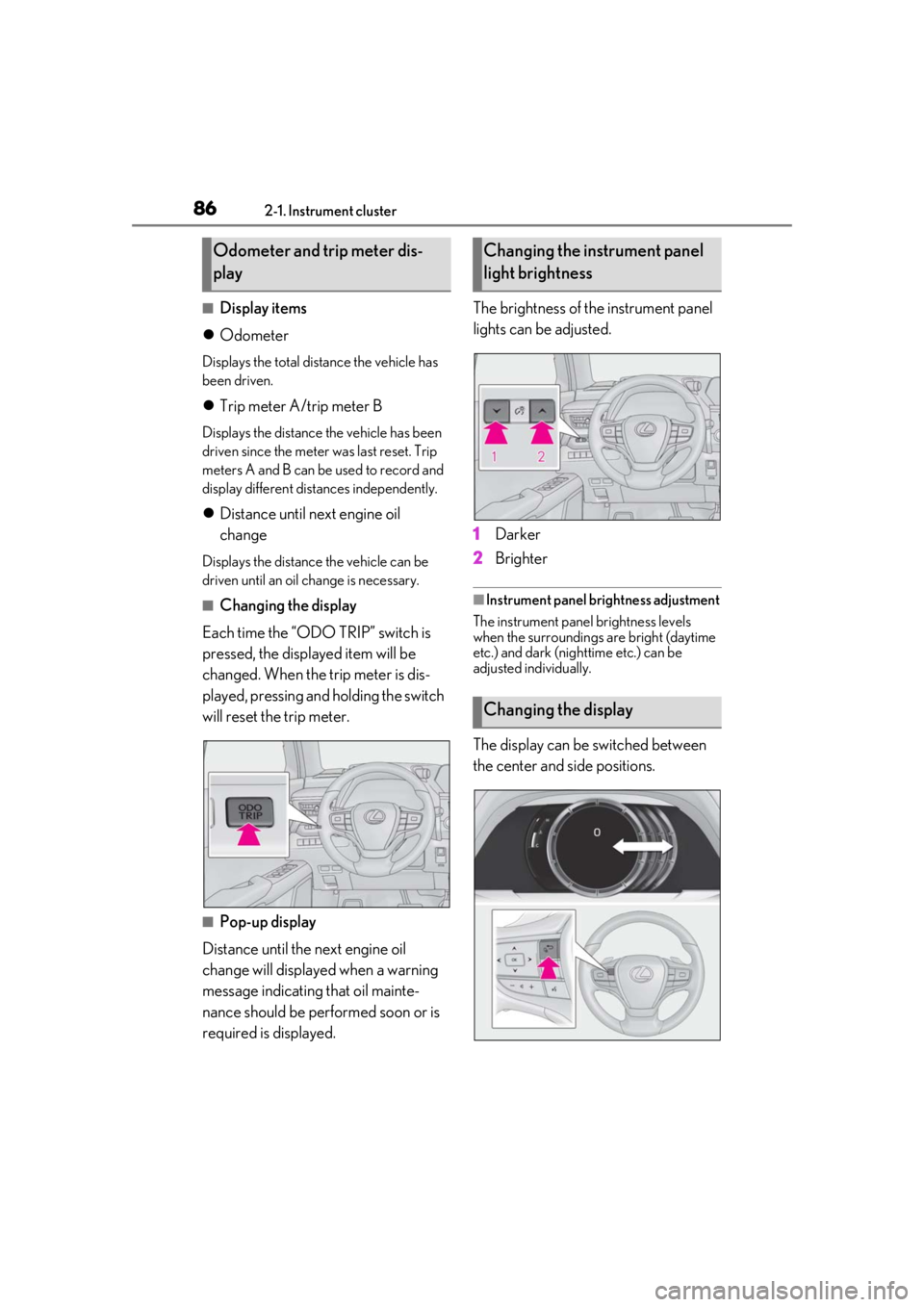
Each time the “ODO TRIP” switch is
pressed, the displayed item will be
changed. When the trip meter is dis-
played, pressing and holding the switch
will reset the trip meter.
■Pop-up display
Distance until the next engine oil
change will displayed when a warning
message indicating that oil mainte-
nance should be performed soon or is
required is displayed. The brightness of the instrument panel
lights can be adjusted.
1
Darker
2 Brighter
■Instrument panel brightness adjustment
The instrument panel brightness levels
when the surroundings are bright (daytime
etc.) and dark (nighttime etc.) can be
adjusted individually.
The display can be switched between
the center and side positions.
Odometer and trip meter dis-
playChanging the instrument panel
light brightness
Changing the display
Page 88 of 476
882-1. Instrument cluster
■Opening image display
When the power switch is in ACC or ON,
the opening image is di splayed on the multi-
information display.
While the opening image is being dis-
played, the meter display cannot be
changed even if the drive mode is changed.
When the opening image is finished, the
meter display for the currently selected
mode will be displayed.
■Liquid crystal display
Small spots or light spots may appear on the
display. This phenomenon is characteristic
of liquid crystal displays, and there is no
problem continuing to use the display.
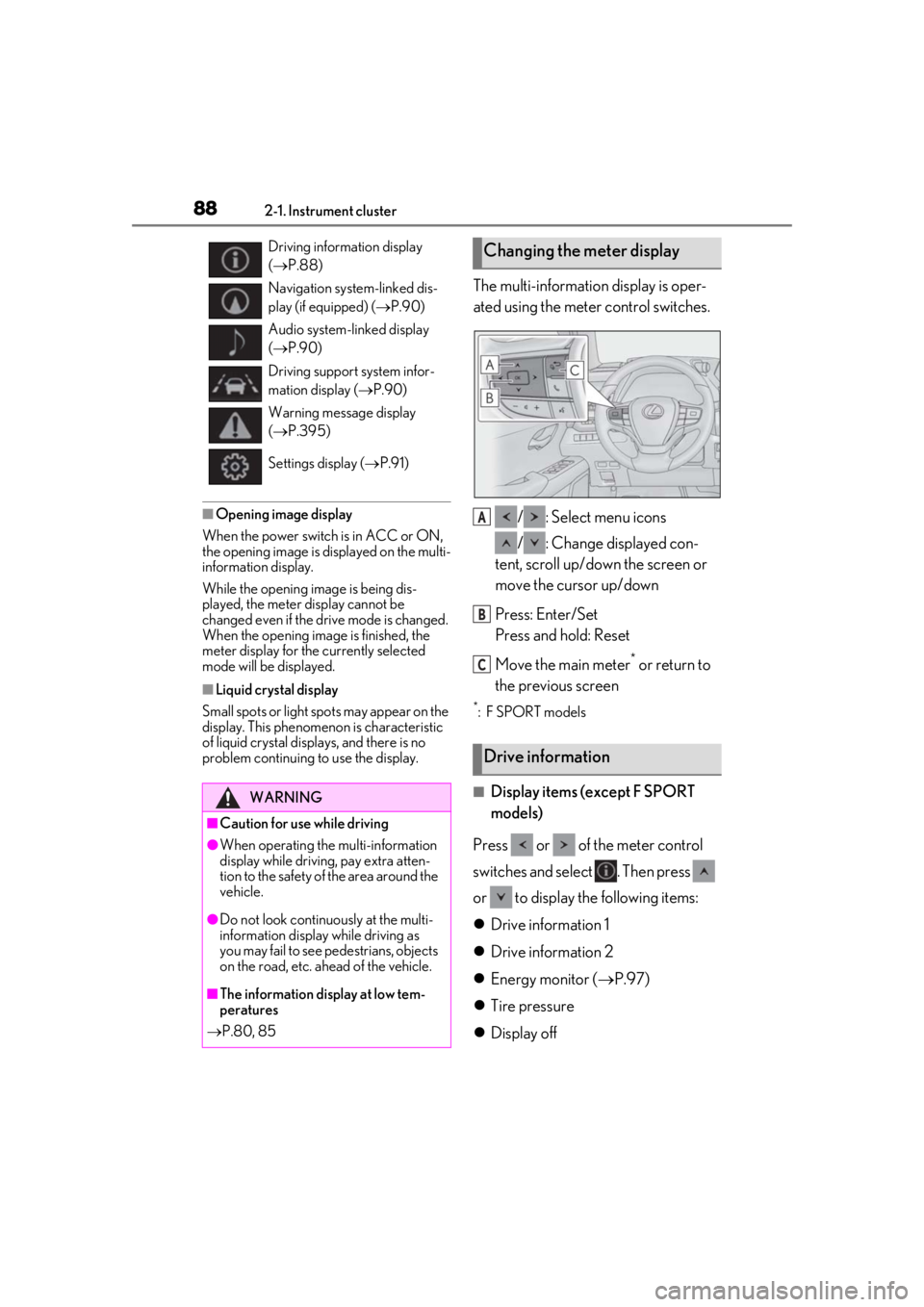
The multi-information display is oper-
ated using the meter control switches.
/ : Select menu icons
/ : Change displayed con-
tent, scroll up/down the screen or
move the cursor up/down
Press: Enter/Set
Press and hold: Reset
Move the main meter
* or return to
the previous screen
*: F SPORT models
■Display items (except F SPORT
models)
Press or of the meter control
switches and select . Then press
or to display the following items:
Drive information 1
Drive information 2
Energy monitor ( P.97)
Tire pressure
Display off
Driving information display
( P.88)
Navigation system-linked dis-
play (if equipped) ( P.90)
Audio system-linked display
( P.90)
Driving support system infor-
mation display ( P.90)
Warning message display
( P.395)
Settings display ( P.91)
WARNING
■Caution for use while driving
●When operating the multi-information
display while driving, pay extra atten-
tion to the safety of the area around the
vehicle.
●Do not look continuously at the multi-
information display while driving as
you may fail to see pedestrians, objects
on the road, etc. ahead of the vehicle.
■The information display at low tem-
peratures
P.80, 85
Changing the meter display
Drive information
A
B
C
Page 92 of 476
922-1. Instrument cluster
Displays suggestions to the driver in
the following situations. To select a
response to a displayed suggestion,
use the meter control switches.
■Suggestion to enable the power
back door
If the power back door system is dis-
abled on of the multi-information
display ( P.87) and the power back
door switch on the instrument panel is
operated, a suggestion message will be
displayed asking if you wish to enable
the power back door system. To enable
the power back door system, select
“Yes”.
After enabling the power back door
system, press the power back door
switch again to open or close the
power back door.
■Suggestion to turn on the head-
lights
If the headlight switch is in other than
or position, and the vehicle
speed is 3 mph (5 km/h) or higher for
a certain amount of time when the sur-
roundings are dark, a suggestion mes-
sage will be displayed.
■Suggestion to turn off the head-
lights
If the headlights are left on for a certain
amount of time with the headlight
switch in or position after the
power switch has been turned off, a
suggestion message will be displayed
asking if you wish to turn the headlights off.
To turn the headlight
s off, select “Yes”.
If a front door is opened after the power
switch is turned off, this suggestion mes-
sage will not be displayed.
■Customization
Some functions can be customized.
( P.435)
Suggestion function