Advance LINCOLN AVIATOR 2004 User Guide
[x] Cancel search | Manufacturer: LINCOLN, Model Year: 2004, Model line: AVIATOR, Model: LINCOLN AVIATOR 2004Pages: 336, PDF Size: 3.69 MB
Page 126 of 336

System warnings
System warnings alert you to possible problems or malfunctions in your
vehicle's operating systems.
In the event of a multiple warning situation, the message center will
cycle the display to show all warnings by displaying each one for 4
seconds.
The message center will display the last selected feature if there are no
more warning messages. This allows you to use the full functionality of
the message center after you acknowledge the warning by pressing the
RESET control and clearing the warning message.
Warning messages that have been reset are divided into three categories:
²They will reappear on the display every minute from the reset.
²They will reappear on the display ten minutes from the reset.
²They will not reappear until an ignition OFF-ON cycle has been
completed.
This acts as a reminder that these warning conditions still exist within
the vehicle.
Warning display Status
Check park assist Warning displays when R (reverse)
gear is selected.
AdvTrac ON (if equipped) Displays for 4 seconds
AdvTrac OFF (if equipped)
Change Oil Soon
Temporary AWD locked
(vehicles equipped with
AdvanceTracyonly)
AWD lock OFF AWD auto ON
(vehicles equipped with
AdvanceTracyonly)
Warning-tire very low Warning returns after 10 minutes
Driver Controls
126
Page 127 of 336
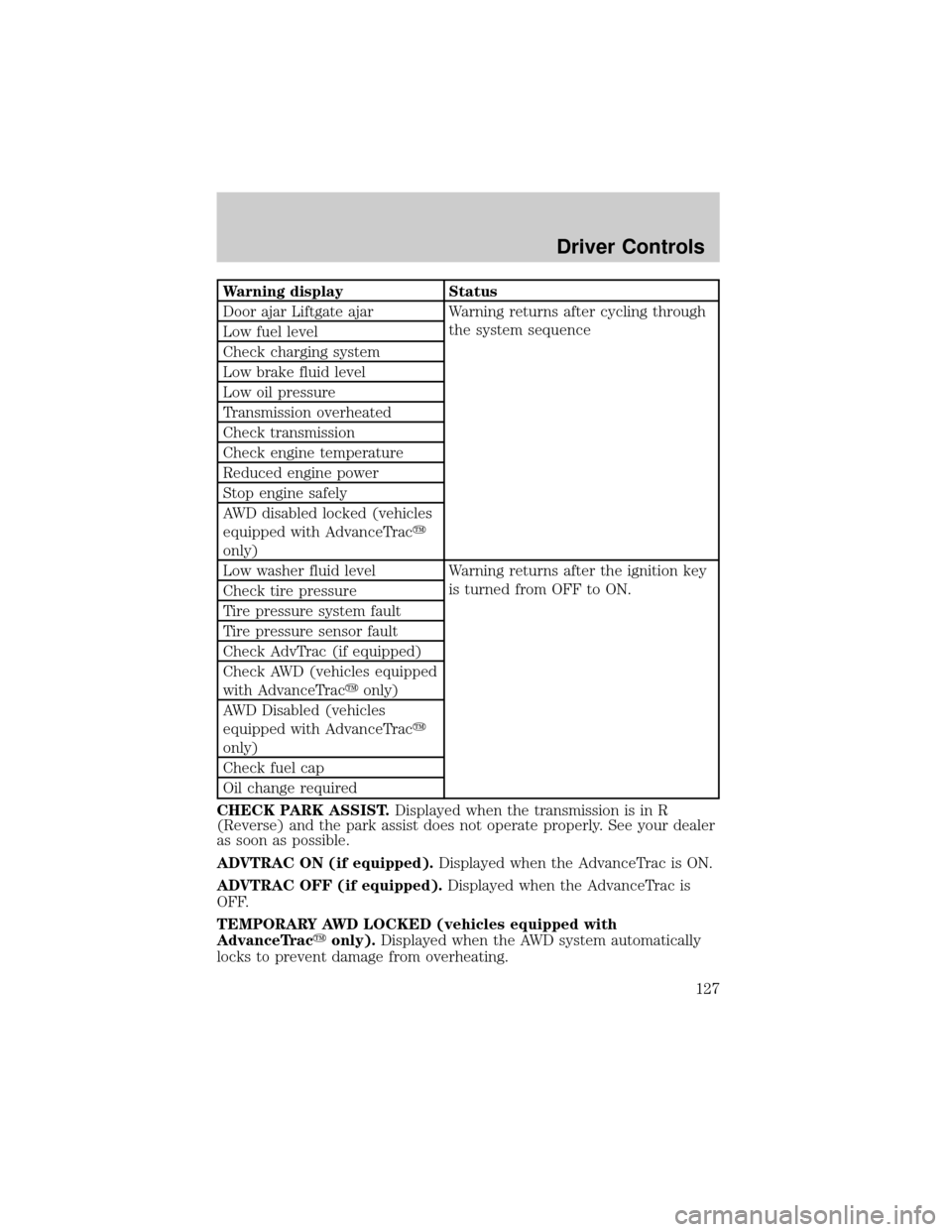
Warning display Status
Door ajar Liftgate ajar Warning returns after cycling through
the system sequence
Low fuel level
Check charging system
Low brake fluid level
Low oil pressure
Transmission overheated
Check transmission
Check engine temperature
Reduced engine power
Stop engine safely
AWD disabled locked (vehicles
equipped with AdvanceTracy
only)
Low washer fluid level Warning returns after the ignition key
is turned from OFF to ON.
Check tire pressure
Tire pressure system fault
Tire pressure sensor fault
Check AdvTrac (if equipped)
Check AWD (vehicles equipped
with AdvanceTracyonly)
AWD Disabled (vehicles
equipped with AdvanceTracy
only)
Check fuel cap
Oil change required
CHECK PARK ASSIST.Displayed when the transmission is in R
(Reverse) and the park assist does not operate properly. See your dealer
as soon as possible.
ADVTRAC ON (if equipped).Displayed when the AdvanceTrac is ON.
ADVTRAC OFF (if equipped).Displayed when the AdvanceTrac is
OFF.
TEMPORARY AWD LOCKED (vehicles equipped with
AdvanceTracyonly).Displayed when the AWD system automatically
locks to prevent damage from overheating.
Driver Controls
127
Page 128 of 336

AWD LOCK OFF and AWD AUTO ON (vehicles equipped with
AdvanceTracyonly).Displayed when the AWD system is completely
cooled down from being overheated.
DOOR AJAR LIFTGATE AJAR.Displayed when a door or liftgate is
not completely closed.
CHECK ENGINE TEMPERATURE.Displayed when the engine
coolant is overheating. Stop the vehicle as soon as safely possible, turn
off the engine and let it cool. Check the coolant and coolant level. Refer
toEngine coolantin theMaintenance and specificationschapter. If
the warning stays on or continues to come on, contact your dealer as
soon as safely possible.
REDUCED ENGINE POWER.Displayed when the engine is
overheating. Stop the vehicle as soon as safely possible, turn off the
engine. If the warning stays on or continues to come on, contact your
dealer as soon as safely possible.
STOP ENGINE SAFELY.Displayed when the engine is overheating.
Stop the vehicle as soon as safely possible, turn off the engine. If the
warning stays on or continues to come on, contact your dealer as soon as
safely possible.
AWD DISABLED LOCKED (vehicles equipped with AdvanceTracy
only).Displayed when the AWD system begins to overheat placing itself
in the autolock mode. If the warning stays on or continues to come on,
contact your dealer as soon as safely possible.
WARNING-TIRE VERY LOW.Displayed when one or more tires have
very low pressure. When this warning message is displayed, a warning
chime will sound reminding you to stop the vehicle as soon as safely
possible and check your tires for proper pressure, leaks and damage.
Refer toServicing your tiresin theMaintenance and specifications
chapter.
CHECK TIRE PRESSURE.Displayed when any of the tire pressures
are low. Refer toChecking the tire pressurein theMaintenance and
specificationschapter.
TIRE PRESSURE SYSTEM FAULT.Displayed when a tire pressure
monitoring system is malfunctioning. If the warning stays on or continues
to come on, have the system checked by your dealer.
TIRE PRESSURE SENSOR FAULT.Displayed when a tire pressure
sensor is malfunctioning. If the warning stays on or continues to come
on, have the system checked by your dealer.
LOW FUEL LEVEL.Displayed as an early reminder of a low fuel
condition.
Driver Controls
128
Page 129 of 336

CHECK CHARGING SYSTEM.Displayed when the electrical system is
not maintaining proper voltage. If you are operating electrical accessories
when the engine is idling at a low speed, turn off as many of the
electrical loads as soon as possible. If the warning stays on or comes on
when the engine is operating at normal speeds, have the electrical
system checked as soon as possible.
LOW BRAKE FLUID LEVEL.Indicates the brake fluid level is low and
the brake system should be inspected immediately. Refer toChecking
and adding brake fluidin theMaintenance and specifications
chapter.
LOW OIL PRESSURE.Displayed when the engine oil pressure is low. If
this warning message is displayed, check the level of the engine oil.
Refer toEngine oilin theMaintenance and specificationschapter for
information about adding engine oil.
TRANSMISSION OVERHEATED.Indicates the transmission is
overheating. This warning may appear when towing heavy loads, city
driving, when driving in a low gear at a high speed for an extended
period of time or due to a loss of transmission fluid. Stop the vehicle as
soon as safely possible, place the shift lever into P (Park) or N (Neutral)
and raise the engine RPM. If this does not cool the transmission, turn off
the engine and let it cool. If the warning stays on or continues to come
on, contact your dealer for transmission service as soon as possible.
Continued operation in this condition may cause internal transmission
damage.
CHECK TRANSMISSION.Indicates the transmission is not operating
properly. If this warning stays on, contact your dealer as soon as possible
to prevent additional transmission damage. Refer to the instrument
cluster warning lamps in theInstrument clusterchapter.
LOW WASHER FLUID LEVEL.Indicates the washer fluid reservoir is
less than one quarter full. Check the washer fluid level. Refer to
Windshield washer fluidin theMaintenance and specifications
chapter.
CHECK ADVTRAC (if equipped).Displayed when the AdvanceTracy
system is not operating properly. If this message is displayed on the
message center the AdvanceTracysystem will be partially operable. If
this warning stays on while the engine is running, contact your dealer as
soon as possible. For further information, refer toAdvanceTracy
stability enhancement systemin theDrivingchapter.
Driver Controls
129
Page 130 of 336
AWD DISABLED (vehicles equipped with AdvanceTracyonly).
Displayed for 4 seconds then SEE OWNER'S MANUAL will display
indicating that the AWD system is not operating properly. For further
information, refer toDisabling AWDin theDrivingchapter. See your
dealer as soon as possible
CHECK AWD (vehicles equipped with AdvanceTracyonly).
Displayed when the AWD system is not operating properly. If the warning
stays on or continues to come on, contact your dealer immediately.
CHECK FUEL CAP.Displayed when the fuel filler cap is not properly
installed. Check the fuel filler cap for proper installation. Refer toFuel
filler capin theMaintenance and specificationschapter.
CHANGE OIL SOON/OIL CHANGE REQUIRED.Displayed when the
engine oil life remaining is 5 percent or less. When oil life left is between
5% and 0%, the CHANGE OIL SOON message will be displayed. When oil
life left reaches 0%, the OIL CHANGE REQUIRED message will be
displayed.
An oil change is required whenever indicated by the message center and
according to the recommended maintenance schedule. USE ONLY
RECOMMENDED ENGINE OILS.
To reset the oil monitoring system to 100% after each oil change
[approximately 8,000 km (5,000 miles) or 180 days] perform the
following:
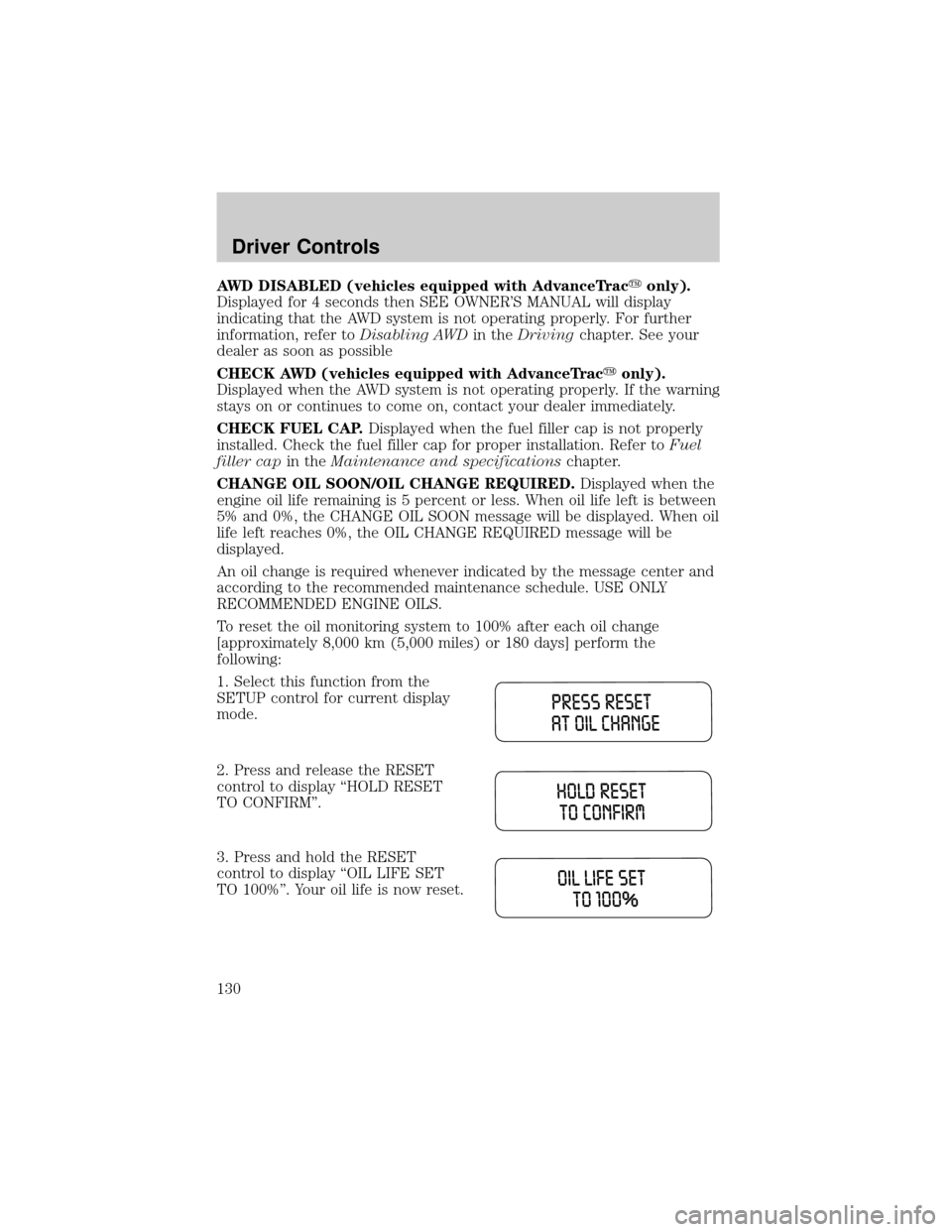
1. Select this function from the
SETUP control for current display
mode.
2. Press and release the RESET
control to display ªHOLD RESET
TO CONFIRMº.
3. Press and hold the RESET
control to display ªOIL LIFE SET
TO 100%º. Your oil life is now reset.
Driver Controls
130
Page 199 of 336
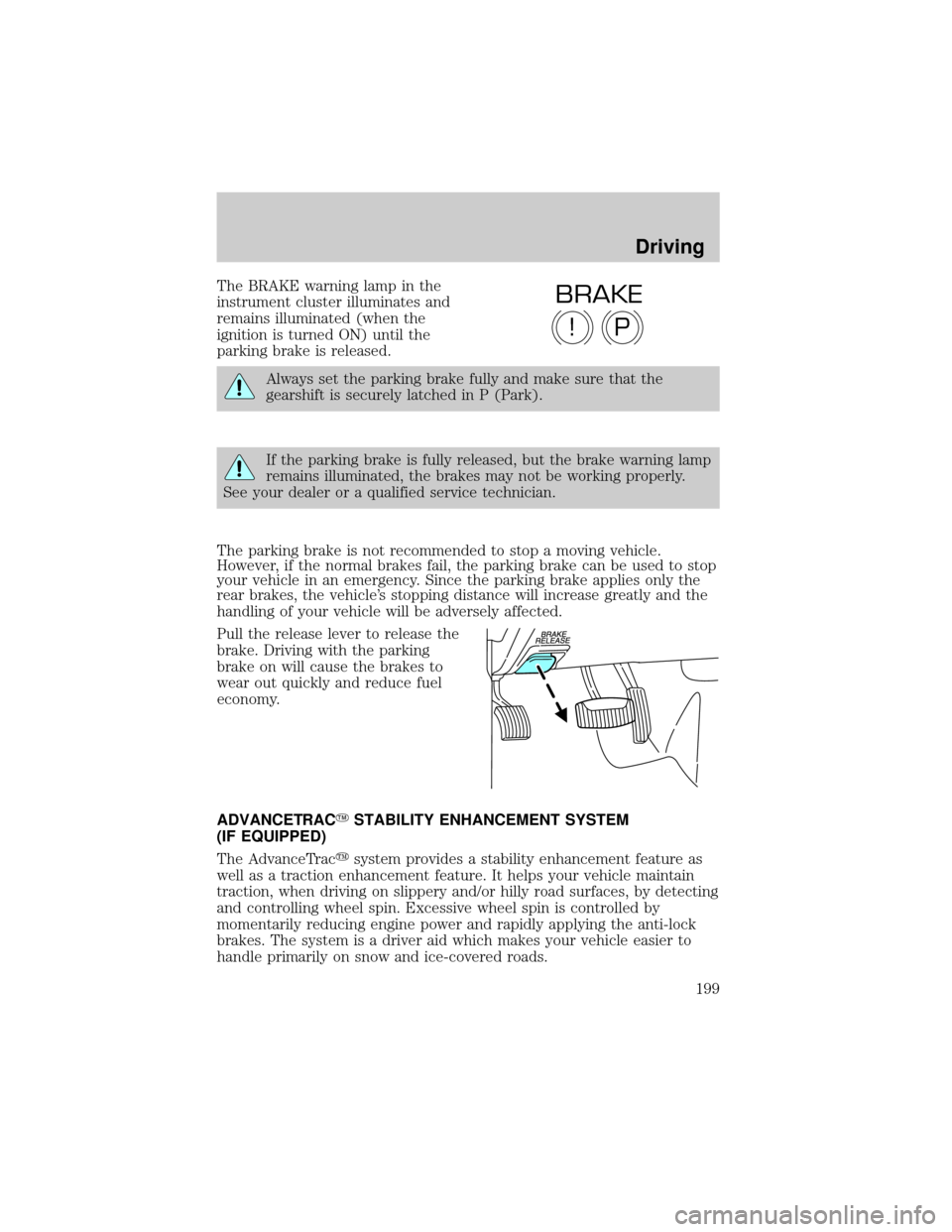
The BRAKE warning lamp in the
instrument cluster illuminates and
remains illuminated (when the
ignition is turned ON) until the
parking brake is released.
Always set the parking brake fully and make sure that the
gearshift is securely latched in P (Park).
If the parking brake is fully released, but the brake warning lamp
remains illuminated, the brakes may not be working properly.
See your dealer or a qualified service technician.
The parking brake is not recommended to stop a moving vehicle.
However, if the normal brakes fail, the parking brake can be used to stop
your vehicle in an emergency. Since the parking brake applies only the
rear brakes, the vehicle's stopping distance will increase greatly and the
handling of your vehicle will be adversely affected.
Pull the release lever to release the
brake. Driving with the parking
brake on will cause the brakes to
wear out quickly and reduce fuel
economy.
ADVANCETRACYSTABILITY ENHANCEMENT SYSTEM
(IF EQUIPPED)
The AdvanceTracysystem provides a stability enhancement feature as
well as a traction enhancement feature. It helps your vehicle maintain
traction, when driving on slippery and/or hilly road surfaces, by detecting
and controlling wheel spin. Excessive wheel spin is controlled by
momentarily reducing engine power and rapidly applying the anti-lock
brakes. The system is a driver aid which makes your vehicle easier to
handle primarily on snow and ice-covered roads.
P!
BRAKE
Driving
199
Page 200 of 336

If your vehicle should become stuck in deep snow or mud, try switching
the AdvanceTracysystem off by pressing the AdvanceTracybutton.
This will allow your tires to ªdigº for traction. Pressing the control once
will disable the AdvanceTracystability enhancement and the engine
power reduction portion of the traction enhancement feature; the brake
portion of the traction enhancement feature will still function normally.
Pressing and holding the control for more than five seconds will disable
the AdvanceTracystability enhancement and traction enhancement
feature. If the AdvanceTracysystem is activated excessively for an
extended period of time, the brake portion of the system will shut down
to allow the brakes to cool down.
A limited AdvanceTracyfunction using only engine power reduction will
still help control the wheels from over-spinning. When the brakes have
cooled down, the system will again function normally. Anti-lock braking is
not affected by this condition and will function normally during the
cool-down period.
AdvanceTracyenhances your vehicle's stability during maneuvers that
require all available tire traction, like in wet/snowy/icy road conditions
and/or when performing emergency maneuvers. In an emergency
lane-change, the driver will experience better overall vehicle traction,
and have better control of the vehicle.
The AdvanceTracysystem helps the driver maintain steering control if
the vehicle begins to slide excessively left or right or spin out.
AdvanceTracywill attempt to correct the sliding motion by applying
brake force at individual tires and, if necessary, by reducing engine
power.
Driving conditions which may activate AdvanceTracyinclude:
²Taking a turn too fast
²Maneuvering quickly to avoid an accident, pedestrian or obstacle
²Hitting a patch of ice
²Changing lanes on a snow-rutted road
²Entering a snow-free road from a snow-covered side street, or vice
versa
²Entering a paved road from a gravel road, or vice versa
²Hitting a curb while turning
²Driving on slick surfaces
²Cornering while towing a heavily loaded trailer (refer toTrailer
Towingin this chapter)
Driving
200
Page 201 of 336

Roll Stability Control System (4x2 vehicles only)
The Roll Stability Control system works in conjunction with the
AdvanceTracysystem to further enhance the vehicle's overall stability
during aggressive maneuvers. The system helps maintain roll stability of
the vehicle during aggressive maneuvers by applying brake force to one
or more wheels.
Driving conditions that may activate Roll Stability Control include:
²Emergency lane-change
²Taking a turn too fast
²Quick maneuvering to avoid an accident, pedestrian or obstacle
²Hitting a curb while turning
The AdvanceTracy/Roll Stability Control system automatically turns on
when the engine is started. However, the system does not function when
the vehicle is traveling in R (Reverse). In R (Reverse), ABS and the
traction enhancement feature will continue to function.
The AdvanceTracy/Roll Stability
Control button allows the driver to
control the availability of the
AdvanceTracy/Roll Stability Control
system. AdvanceTracy/Roll Stability
Control system status is indicated by a warning indicator light with a
ªsliding carº icon in the instrument cluster that will flash when the
system is active and an indicator light in the control button that will
illuminate when the system is turned off. In vehicles with a message
center, the message ªADVANCETRAC OFFº will be displayed.
If a failure is detected in the AdvanceTracy/Roll Stability Control
system, the warning indicator light in the instrument cluster will stay on.
If the warning indicator light in the instrument cluster remains on while
the engine is running, have the system serviced immediately.
Pressing the control once will disable the AdvanceTracystability
enhancement/Roll Stability Control and the engine power reduction
portion of the traction enhancement feature; the brake portion of the
traction enhancement feature will still function normally. Pressing and
holding the control for more than five seconds will disable the
AdvanceTracystability enhancement/Roll Stability Control and traction
enhancement feature. If the vehicle is stuck in snow or mud or when
driving in deep sand, switching off the AdvanceTracysystem may be
beneficial so the wheels are allowed to spin. If your vehicle seems to lose
engine power while driving in deep sand or very deep snow, switching off
the AdvanceTracystability enhancement feature will restore full engine
power and will enhance momentum through the obstacle.
Driving
201
Page 202 of 336
Some drivers may notice a slight movement of the brake pedal when the
AdvanceTracyperforms a system self-check. During AdvanceTracy/Roll
Stabilty Control operation you may experience the following:
²A rumble or grinding noise
²A slight deceleration of the vehicle
²The AdvanceTracyindicator light will flash
²If your foot is on the brake pedal, you will feel a vibration in the
pedal.
²If the driving condition is severe and your foot is not on the brake, the
brake pedal will move to apply higher brake forces. You may also hear
a whoosh of air from under the instrument panel during this severe
condition.
All these conditions are normal during AdvanceTracy/Roll Stability
Control operation.
Do not alter or modify your vehicle's suspension or steering; the
resulting changes to the vehicle's handling can adversely affect
the AdvanceTracy/Roll Stability Control system. Also, do not
install a stereo loudspeaker near the rear console or either rear
seat. The speaker vibrations can adversely affect the
AdvanceTracy/Roll Stability Control sensors located in this area.
Note:Pressing the AdvanceTracybutton will disable AdvanceTracyand
Roll Stability Control.
Aggressive driving in any road conditions can cause you to lose
control of your vehicle increasing the risk of severe personal
injury or property damage. The occurrence of a AdvanceTracy/Roll
Stability Control event is an indication that at least some of the tires
have exceeded their ability to grip the road; this may lead to an
increased risk of loss of vehicle control, vehicle rollover, personal injury
and death. If you experience a severe road event, SLOW DOWN.
STEERING
To prevent damage to the power steering system, never hold the steering
wheel at its furthest turning points (until it stops) for more than a few
seconds when the engine is running.
It is also important to maintain a proper power steering fluid level in the
power steering fluid reservoir:
²Do not operate the vehicle with a low power steering pump fluid level
(below the MIN mark on the reservoir).
Driving
202
Page 211 of 336
ALL WHEEL DRIVE (AWD) SYSTEM (IF EQUIPPED)
Your vehicle may be equipped with an All Wheel Drive (AWD) transfer
case. With the AWD option, power is supplied to all four wheels
automatically with no need to shift between two-wheel drive and
four-wheel drive. If your vehicle is equipped with the AdvanceTracy
stability enhancement feature, you can change AWD modes, if desired,
by selecting AWD options through the message center.
For the lubricant specification and refill capacity of the AWD transfer
case refer toMaintenance and specificationschapter.
If your vehicle is equipped with AWD, a spare tire of a different
diameter than the road tires should never be used. Such a tire
could make the vehicle difficult to control as well as result in damage
to driveline components.
Utility and four-wheel drive vehicles arenotdesigned for cornering
at speeds as high as passenger cars any more than low-slung sports
cars are designed to perform satisfactorily under off-road conditions.
Avoid sharp turns or abrupt maneuvers in these vehicles.
The following sections,Normal operation,Autolock operationand
Disabling AWD, apply only to vehicles which allow the driver to change
AWD modes through the message center.
Normal operation (vehicles equipped with AdvanceTracYonly)
During normal operation:
²the AWD system is in AWD AUTO mode (AWD LOCKED will
illuminate in the message center for four seconds when you first start
your vehicle). The AWD LOCKED indicator in the instrument cluster
will also come on.
²AWD AUTO mode can be overridden by pressing SETUP in the
message center. When you first press SETUP, AWD
displayed, then if you press RESET within four seconds of pressing
SETUP, AWD
power to all four wheels constantly which allows you to operate your
vehicle in severe winter or off-road conditions such as deep snow, ice
or shallow sand. It is not recommended that you use AWD
on dry pavement.
²AWD
center. (The AWD LOCKED display in the message center will then
turn off and the display will return to AWD
when the shift is complete.)
Driving
211