lock LINCOLN AVIATOR 2004 Manual PDF
[x] Cancel search | Manufacturer: LINCOLN, Model Year: 2004, Model line: AVIATOR, Model: LINCOLN AVIATOR 2004Pages: 336, PDF Size: 3.69 MB
Page 207 of 336
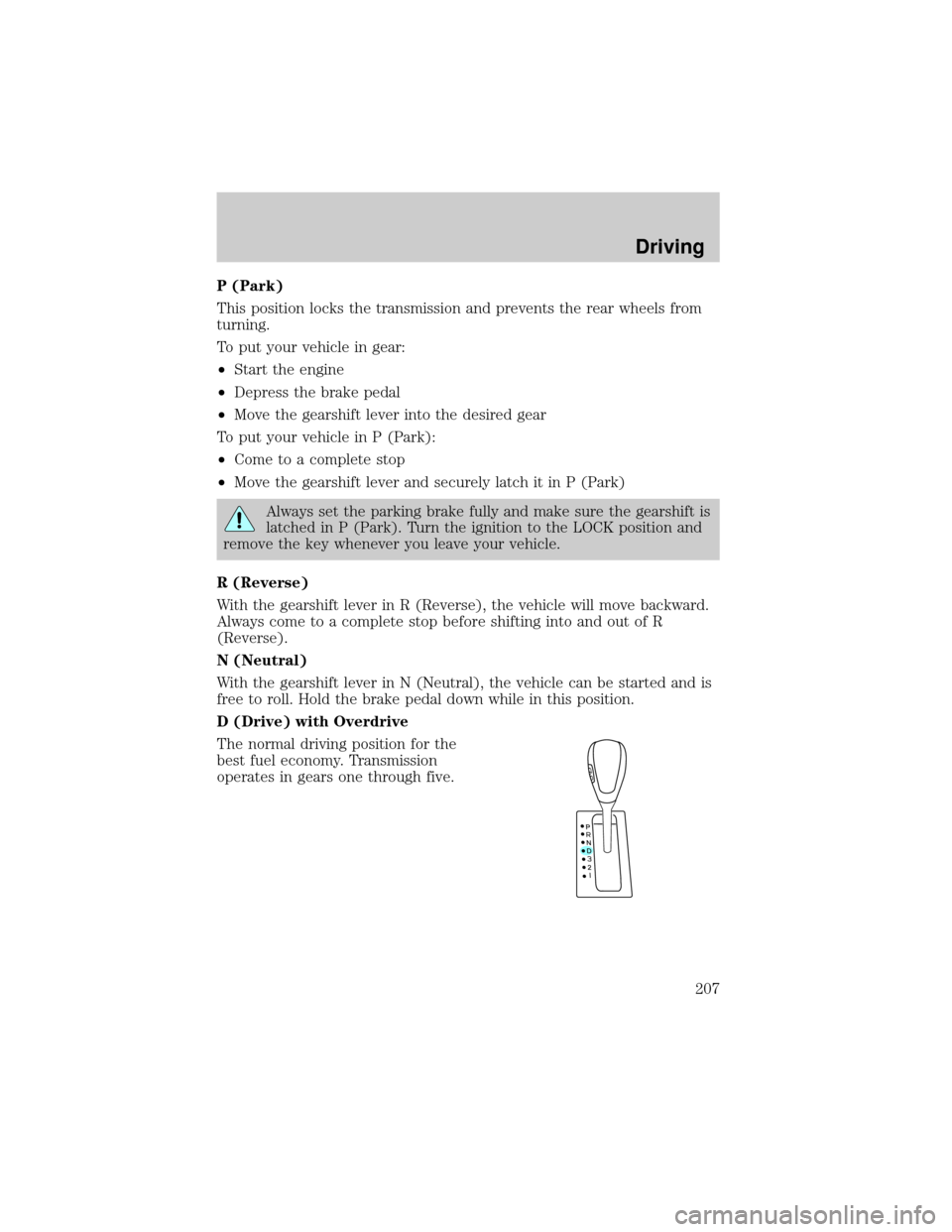
P (Park)
This position locks the transmission and prevents the rear wheels from
turning.
To put your vehicle in gear:
²Start the engine
²Depress the brake pedal
²Move the gearshift lever into the desired gear
To put your vehicle in P (Park):
²Come to a complete stop
²Move the gearshift lever and securely latch it in P (Park)
Always set the parking brake fully and make sure the gearshift is
latched in P (Park). Turn the ignition to the LOCK position and
remove the key whenever you leave your vehicle.
R (Reverse)
With the gearshift lever in R (Reverse), the vehicle will move backward.
Always come to a complete stop before shifting into and out of R
(Reverse).
N (Neutral)
With the gearshift lever in N (Neutral), the vehicle can be started and is
free to roll. Hold the brake pedal down while in this position.
D (Drive) with Overdrive
The normal driving position for the
best fuel economy. Transmission
operates in gears one through five.
Driving
207
Page 209 of 336
Forced downshifts
²Allowed in D (Drive) with Overdrive or D (Drive) without Overdrive.
²Depress the accelerator to the floor.
²Allows transmission to select an appropriate gear.
REAR PARK ASSIST
The Rear Park Assist sounds a tone to warn the driver of obstacles near
the rear bumper when the R (Reverse) is selected and the vehicle is
moving at speeds less than 5 km/h (3 mph). The system is not effective
at speeds above 5 km/h (3 mph) and may not detect certain angular or
moving objects.
To help avoid personal injury, please read and understand the
limitations of the Rear Park Assist system as contained in this
section. The Rear Park Assist is only an aid for some (generally large
and fixed) objects when moving in reverse on a flat surface at ªparking
speedsº. Inclement weather may also affect the function of the system;
this may include reduced performance or a false activation.
To help avoid personal injury, always use caution when in
reverse and when using the system.
This system is not designed to prevent contact with small or
moving objects. The system is designed to provide a warning to
assist the driver in detecting large stationary objects to avoid damaging
the vehicle. The system may not detect smaller objects, particularly
those close to the ground.
Certain add-on devices such as large trailer hitches, bike or
surfboard racks and any device that may block the normal
detection zone of the Rear Park Assist system may create false beeps.
Driving
209
Page 211 of 336
ALL WHEEL DRIVE (AWD) SYSTEM (IF EQUIPPED)
Your vehicle may be equipped with an All Wheel Drive (AWD) transfer
case. With the AWD option, power is supplied to all four wheels
automatically with no need to shift between two-wheel drive and
four-wheel drive. If your vehicle is equipped with the AdvanceTracy
stability enhancement feature, you can change AWD modes, if desired,
by selecting AWD options through the message center.
For the lubricant specification and refill capacity of the AWD transfer
case refer toMaintenance and specificationschapter.
If your vehicle is equipped with AWD, a spare tire of a different
diameter than the road tires should never be used. Such a tire
could make the vehicle difficult to control as well as result in damage
to driveline components.
Utility and four-wheel drive vehicles arenotdesigned for cornering
at speeds as high as passenger cars any more than low-slung sports
cars are designed to perform satisfactorily under off-road conditions.
Avoid sharp turns or abrupt maneuvers in these vehicles.
The following sections,Normal operation,Autolock operationand
Disabling AWD, apply only to vehicles which allow the driver to change
AWD modes through the message center.
Normal operation (vehicles equipped with AdvanceTracYonly)
During normal operation:
²the AWD system is in AWD AUTO mode (AWD LOCKED will
illuminate in the message center for four seconds when you first start
your vehicle). The AWD LOCKED indicator in the instrument cluster
will also come on.
²AWD AUTO mode can be overridden by pressing SETUP in the
message center. When you first press SETUP, AWD
displayed, then if you press RESET within four seconds of pressing
SETUP, AWD
power to all four wheels constantly which allows you to operate your
vehicle in severe winter or off-road conditions such as deep snow, ice
or shallow sand. It is not recommended that you use AWD
on dry pavement.
²AWD
center. (The AWD LOCKED display in the message center will then
turn off and the display will return to AWD
when the shift is complete.)
Driving
211
Page 212 of 336

Autolock operation (vehicles equipped with AdvanceTracYonly)
If the AWD system begins to overheat, the system will place itself in the
Autolock mode:
²the AWD LOCKED indicator light will illuminate in the instrument
cluster and AWD DISABLED
message center.
²AWD LOCKED will be displayed in the message center for four
seconds and a warning chime will sound. This condition may clear
without any action being taken by the driver.
²the AWD LOCKED indicator light in the instrument cluster will turn
off when the AWD system cools down.
²When the system is sufficiently cooled down, AWD AUTO RESTORED
will appear in the message center for four seconds and a warning
chime will sound.
Disabling AWD (vehicles equipped with AdvanceTracYonly)
When a problem is detected in the AWD system:
²the AWD LOCKED indicator light in the instrument cluster will flash
eight times every two minutes in the message center.
²The message center will then display AWD DISABLED for four
seconds, then SEE OWNER'S MANUAL. A warning chime will also
sound. The warning displays and chime will continue until RESET is
pressed (which will clear the message from the display).
²AWD LOCKED can still be engaged by pressing SETUP (the message
center will display AWD
RESET. The AWD LOCKED indicator light will illuminate in the
instrument cluster and the message center will display AWD
DISABLED
²To disable AWD, press RESET. The system will go back to AWD AUTO
mode momentarily, then the AWD LOCKED indicator light will flash in
the instrument cluster eight times every two minutes. The display will
then show AWD
turn off.
²If a serious problem occurs with the AWD system, the AWD LOCKED
indicator light in the instrument cluster will flash 10 times every two
minutes. The message center will also display CHECK AWD and a
warning chime will sound. You can press SETUP to check the status of
the AWD system (which will display AWD
but the AWD system will be disabled until the system is serviced.
Driving
212
Page 214 of 336
²It often may be less risky to strike small objects, such as highway
reflectors, with minor damage to your vehicle rather than attempt a
sudden return to the pavement which could cause the vehicle to slide
sideways out of control or rollover. Remember, your safety and the
safety of others should be your primary concern.
Vehicles with a higher center of gravity such as utility and
four-wheel drive vehicles handle differently than vehicles with a
lower center of gravity. Utility and four-wheel drive vehicles arenot
designed for cornering at speeds as high as passenger cars any more
than low-slung sports cars are designed to perform satisfactorily under
off-road conditions. Avoid sharp turns, excessive speed and abrupt
maneuvers in these vehicles. Failure to drive cautiously could result in
an increased risk of loss of vehicle control, vehicle rollover, personal
injury and death.
If your vehicle gets stuck
If your vehicle gets stuck in mud or snow it may be rocked out by
shifting between forward and reverse gears, stopping between shifts, in a
steady pattern. Press lightly on the accelerator in each gear.
Do not rock the vehicle if the engine is not at normal operating
temperature or damage to the transmission may occur.
Do not rock the vehicle for more than a few minutes or damage
to the transmission and tires may occur or the engine may
overheat.
Always set the parking brake fully and make sure the gearshift is
latched in P (Park). Turn the ignition to the LOCK position and
remove the key whenever you leave your vehicle.
If the parking brake is fully released, but the brake warning lamp
remains illuminated, the brakes may not be working properly.
See your dealer or a qualified service technician.
Do not spin the wheels at over 56 km/h (35 mph). The tires may
fail and injure a passenger or bystander.
Driving
214
Page 218 of 336
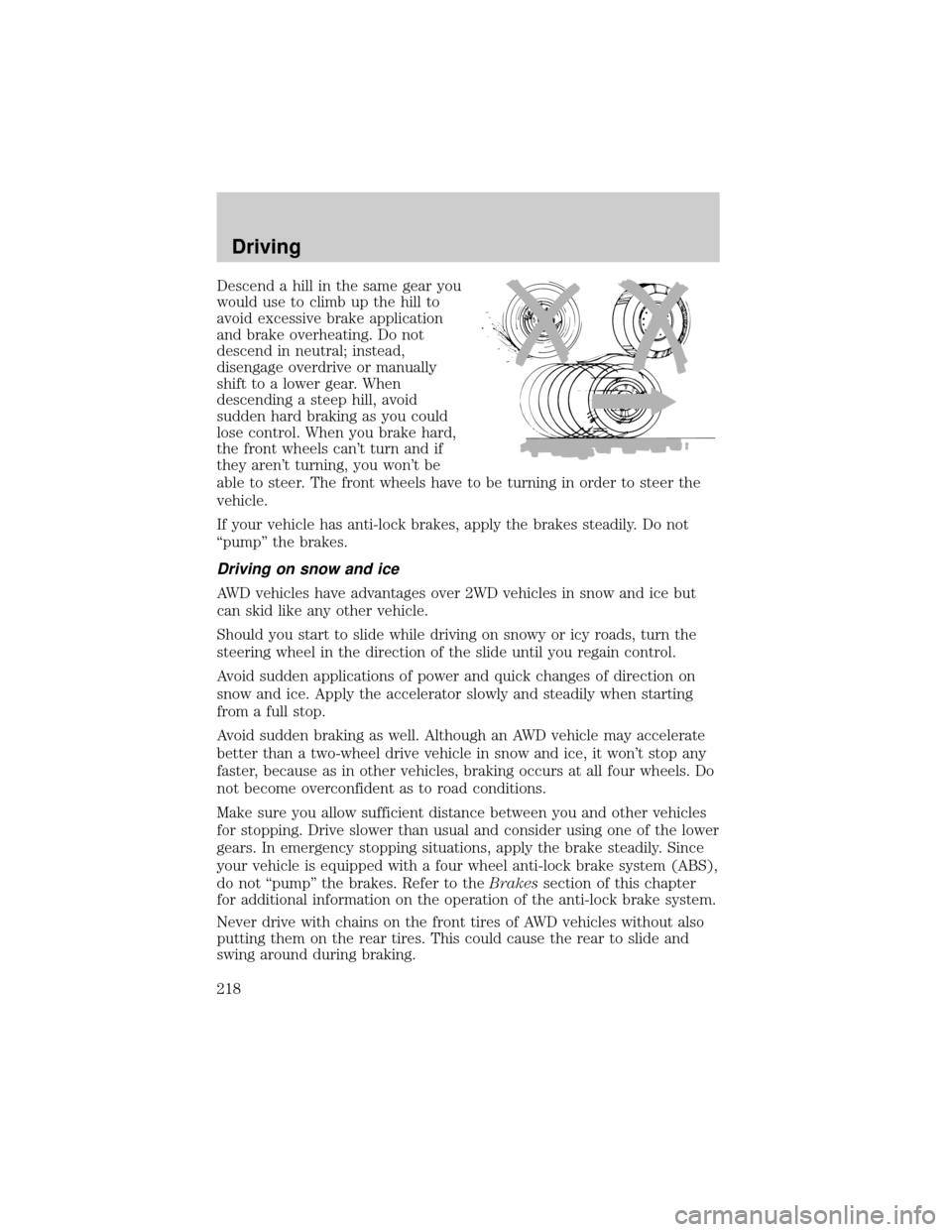
Descend a hill in the same gear you
would use to climb up the hill to
avoid excessive brake application
and brake overheating. Do not
descend in neutral; instead,
disengage overdrive or manually
shift to a lower gear. When
descending a steep hill, avoid
sudden hard braking as you could
lose control. When you brake hard,
the front wheels can't turn and if
they aren't turning, you won't be
able to steer. The front wheels have to be turning in order to steer the
vehicle.
If your vehicle has anti-lock brakes, apply the brakes steadily. Do not
ªpumpº the brakes.
Driving on snow and ice
AWD vehicles have advantages over 2WD vehicles in snow and ice but
can skid like any other vehicle.
Should you start to slide while driving on snowy or icy roads, turn the
steering wheel in the direction of the slide until you regain control.
Avoid sudden applications of power and quick changes of direction on
snow and ice. Apply the accelerator slowly and steadily when starting
from a full stop.
Avoid sudden braking as well. Although an AWD vehicle may accelerate
better than a two-wheel drive vehicle in snow and ice, it won't stop any
faster, because as in other vehicles, braking occurs at all four wheels. Do
not become overconfident as to road conditions.
Make sure you allow sufficient distance between you and other vehicles
for stopping. Drive slower than usual and consider using one of the lower
gears. In emergency stopping situations, apply the brake steadily. Since
your vehicle is equipped with a four wheel anti-lock brake system (ABS),
do not ªpumpº the brakes. Refer to theBrakessection of this chapter
for additional information on the operation of the anti-lock brake system.
Never drive with chains on the front tires of AWD vehicles without also
putting them on the rear tires. This could cause the rear to slide and
swing around during braking.
Driving
218
Page 219 of 336
Tires, Replacement Requirements
Do not use a size and type of tire and wheel other than that
originally provided by Ford Motor Company because it can affect
the safety and performance of your vehicle, which could result in an
increased risk of loss of vehicle control, vehicle rollover, and/or serious
personal injury or death.
AWD vehicles are equipped with tires designed to provide for safe ride
and handling capability.
Make sure all tires and wheels on the vehicle are of the same size, type,
tread design and load-carrying capacity. If you have questions regarding
tire replacement, see an authorized Ford or Lincoln Mercury dealer.
If you nevertheless decide to equip your AWD for off-road use with tires
larger than what Ford Motor Company recommends, you should not use
these tires for highway driving.
If you use any tire/wheel combination not recommended by Ford Motor
Company, it may adversely affect vehicle handling and could cause
steering, suspension, axle or transfer case failure as well as the increased
risk of loss of vehicle control.
Do not use ªaftermarket lift kitsº or other suspension modifications,
whether or not they are used with larger tires and wheels.
These ªaftermarket lift kitsº could adversely affect the vehicle's handling
characteristics, which could lead to loss of vehicle control or rollover and
serious injury.
Tires can be damaged during off-road use. For your safety, tires that are
damaged should not be used for highway driving because they are more
likely to blow out or fail.
You should carefully observe the recommended tire inflation pressure
found on the safety compliance certification label attached to the left
front door lock facing or door latch post pillar. Failure to follow tire
pressure recommendations can adversely affect the way your vehicle
handles. Do not exceed the Ford Motor Company recommended pressure
even if it is less than the maximum pressure allowed for the tire.
Driving
219
Page 227 of 336
Do not exceed the GVWR or the GAWR specified on the
certification label.
Towing trailers beyond the maximum recommended gross trailer
weight exceeds the limit of the vehicle and could result in
engine damage, transmission damage, structural damage, loss of vehicle
control, vehicle rollover and personal injury.
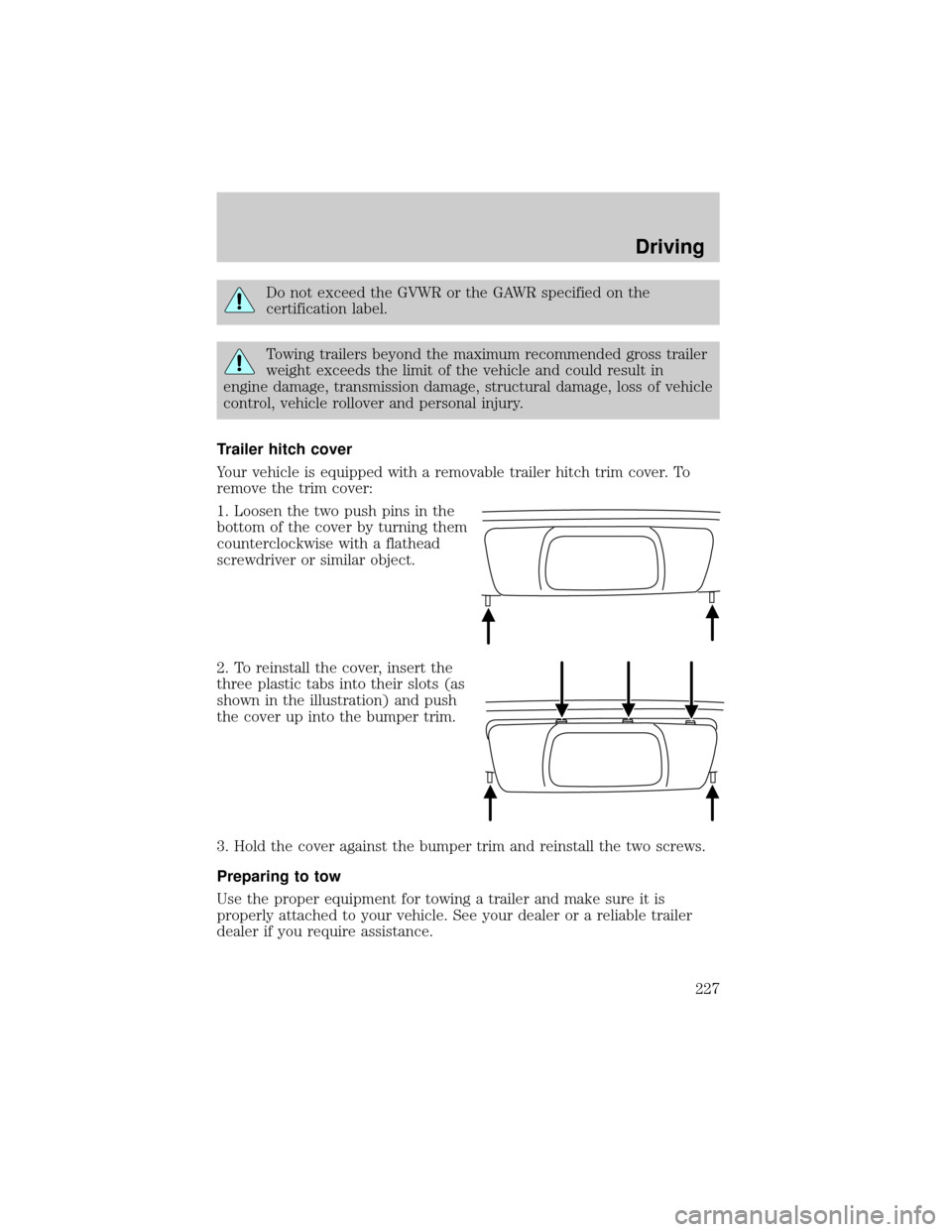
Trailer hitch cover
Your vehicle is equipped with a removable trailer hitch trim cover. To
remove the trim cover:
1. Loosen the two push pins in the
bottom of the cover by turning them
counterclockwise with a flathead
screwdriver or similar object.
2. To reinstall the cover, insert the
three plastic tabs into their slots (as
shown in the illustration) and push
the cover up into the bumper trim.
3. Hold the cover against the bumper trim and reinstall the two screws.
Preparing to tow
Use the proper equipment for towing a trailer and make sure it is
properly attached to your vehicle. See your dealer or a reliable trailer
dealer if you require assistance.
Driving
227
Page 231 of 336

GETTING ROADSIDE ASSISTANCE
To fully assist you should you have a vehicle concern, Ford Motor
Company offers a complimentary roadside assistance program. This
program is separate from the New Vehicle Limited Warranty. The service
is available:
²24±hours, seven days a week
²for the New Vehicle Limited Warranty period of three years or 60,000
km (36,000 miles), whichever occurs first on Ford and Mercury
vehicles, and four years or 80,000 km (50,000 miles) on Lincoln
vehicles.
Roadside assistance will cover:
²changing a flat tire
²jump-starts
²lock-out assistance
²limited fuel delivery
²towing of your disabled vehicle to the nearest Ford Motor Company
dealership, or your selling dealer if within 56.3 km (35 miles) of the
nearest Ford Motor Company dealership (one tow per disablement).
Even non-warranty related tows, like accidents or getting stuck in the
mud or snow, are covered (some exclusions apply, such as impound
towing or repossession).
Canadian customers refer to your Owner Information Guide for
information on:
²coverage period
²exact fuel amounts
²towing of your disabled vehicle
²emergency travel expense reimbursement
²travel planning benefits
USING ROADSIDE ASSISTANCE
Complete the roadside assistance identification card and place it in your
wallet for quick reference. In the United States, this card is found in the
Owner Guide portfolio in the glove compartment in Ford vehicles and is
mailed to you if you own a Mercury or Lincoln. In Canada, the card is
found in the Owner Information Guide in the glove compartment.
U.S. Ford or Mercury vehicle customers who require roadside assistance,
call 1±800±241±3673; Lincoln vehicle customers call 1±800±521±4140.
Roadside Emergencies
Roadside Emergencies
231
Page 235 of 336
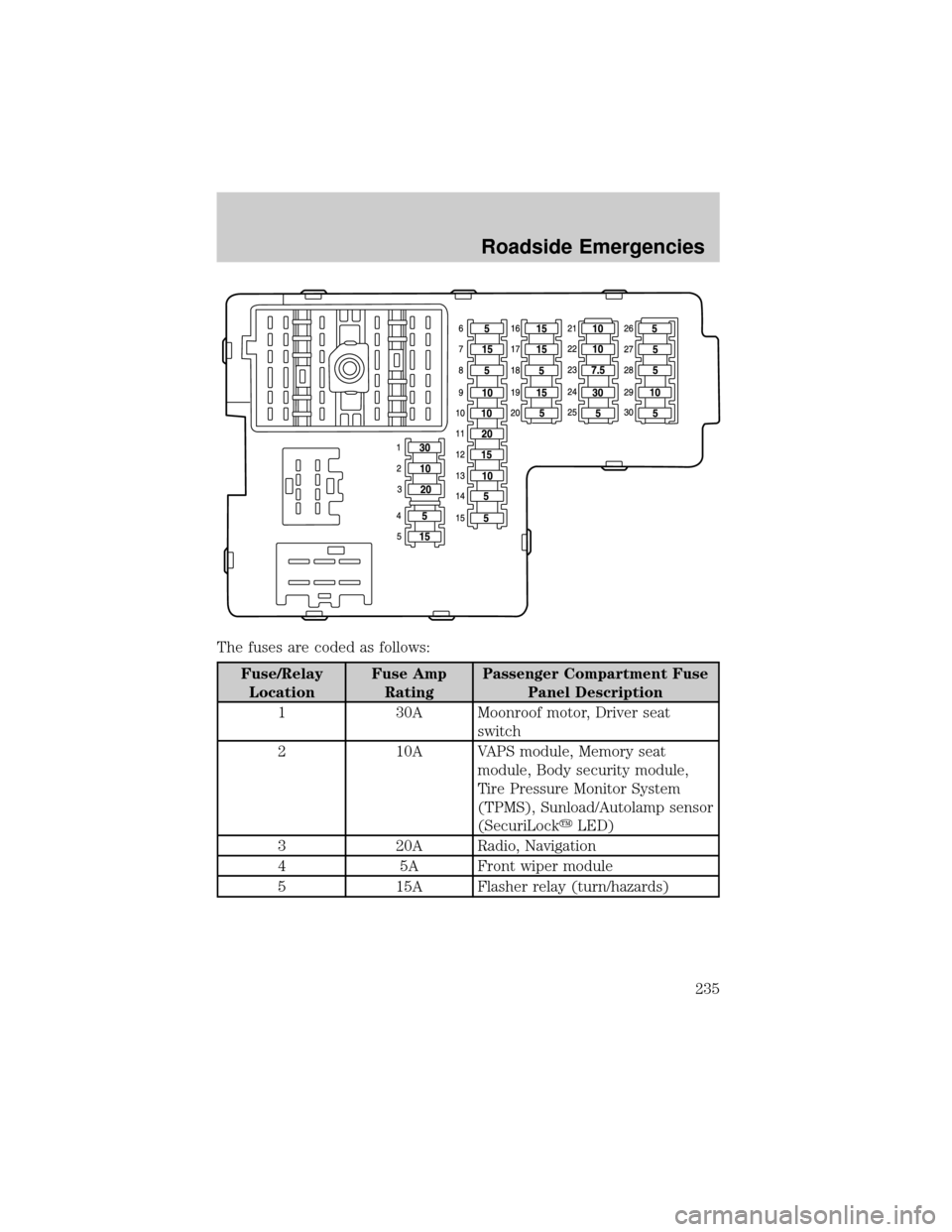
The fuses are coded as follows:
Fuse/Relay
LocationFuse Amp
RatingPassenger Compartment Fuse
Panel Description
1 30A Moonroof motor, Driver seat
switch
2 10A VAPS module, Memory seat
module, Body security module,
Tire Pressure Monitor System
(TPMS), Sunload/Autolamp sensor
(SecuriLockyLED)
3 20A Radio, Navigation
4 5A Front wiper module
5 15A Flasher relay (turn/hazards)
Roadside Emergencies
235