change time LINCOLN AVIATOR 2004 Owners Manual
[x] Cancel search | Manufacturer: LINCOLN, Model Year: 2004, Model line: AVIATOR, Model: LINCOLN AVIATOR 2004Pages: 336, PDF Size: 3.69 MB
Page 26 of 336

CD/CD PLAYER CARE
Do:
²Handle discs by their edges only. Never touch the playing surface.
²Inspect discs before playing. Clean only with an approved CD cleaner
and wipe from the center out.
Don't:
²Expose discs to direct sunlight or heat sources for extended periods
of time.
²Insert more than one disc into each slot of the CD changer magazine.
²Clean using a circular motion.
CD units are designed to play commercially pressed 12 cm (4.75
in) audio compact discs only. Due to technical incompatibility,
certain recordable and re-recordable compact discs may not
function correctly when used in Ford CD players. Irregular
shaped CDs, CDs with a scratch protection film attached, and CDs
with homemade paper (adhesive) labels should not be inserted
into the CD player. The label may peel and cause the CD to
become jammed. It is recommended that homemade CDs be
identified with permanent felt tip marker rather than adhesive
labels. Ball point pens may damage CDs. Please contact your
dealer for further information.
AUDIO SYSTEM WARRANTY AND SERVICE
Refer to theWarranty Guidefor audio system warranty information. If
service is necessary, see your dealer or qualified technician.
LINCOLN NAVIGATION SYSTEM (IF EQUIPPED)
Your vehicle may be equipped with a Lincoln Navigation System which
allows you to listen to the radio, play CDs and also navigate the vehicle
using a navigation DVD.
Your system has a large range of features, yet is easy to use. Guidance is
shown on the display screen and is supplemented with voice prompts.
The display screen provides full information for operating the system
through use of menus, text screens and map displays. Screen selections
are made by touching the desired selection on the screen.
Entertainment Systems
26
Page 31 of 336

Press and hold VOICE briefly (on your steering wheel controls) until the
voice icon
appears on the Navigation display to use the Navigation
voice command. Press RPT (repeat) to hear the previous command
repeated from the navigation system.
The voice activated command feature will not operate if a map DVD is
not inserted into the navigation DVD unit.
At any time, you may say these commands to change modes:
²Radio²Audio on
²AM²Audio off
²FM1²Power off
²FM2²CD Changer (if equipped)
²CD²DVD (if equipped)
²Power on
During normal radio operation, you may say:
²Seek up²Seek down
Disc operation commands you may say when using a rear seat DVD (if
equipped):
²Track up²Track down
²Previous track²Disc up
²Disc down²Next disc
²Previous disc
During CDDJ or in-dash CD play, you may say:
²Track up²Track down
²Previous track²Disc up
²Next disc²Disc down
²Previous disc
To change the screen display, you may say the following commands:
²Screen off²Screen day mode
²Day mode on²Screen night mode
²Night mode on²Screen auto mode
²Auto mode on
Entertainment Systems
31
Page 34 of 336
²Change to arrow guidance²Change to arrow guide
²Turn list guidance²Turn list guide
²Change to turn list guidance²Change to turn list guide
²Entire route map²Entire route
²Route overview²Reroute
²Detour²Detour entire route
Navigation help commands you may speak at any time:
²Help²Map
²Destination²Guidance
²Radio²Disc
²Map help²Destination help
²Guidance help²Radio help
²Disc help
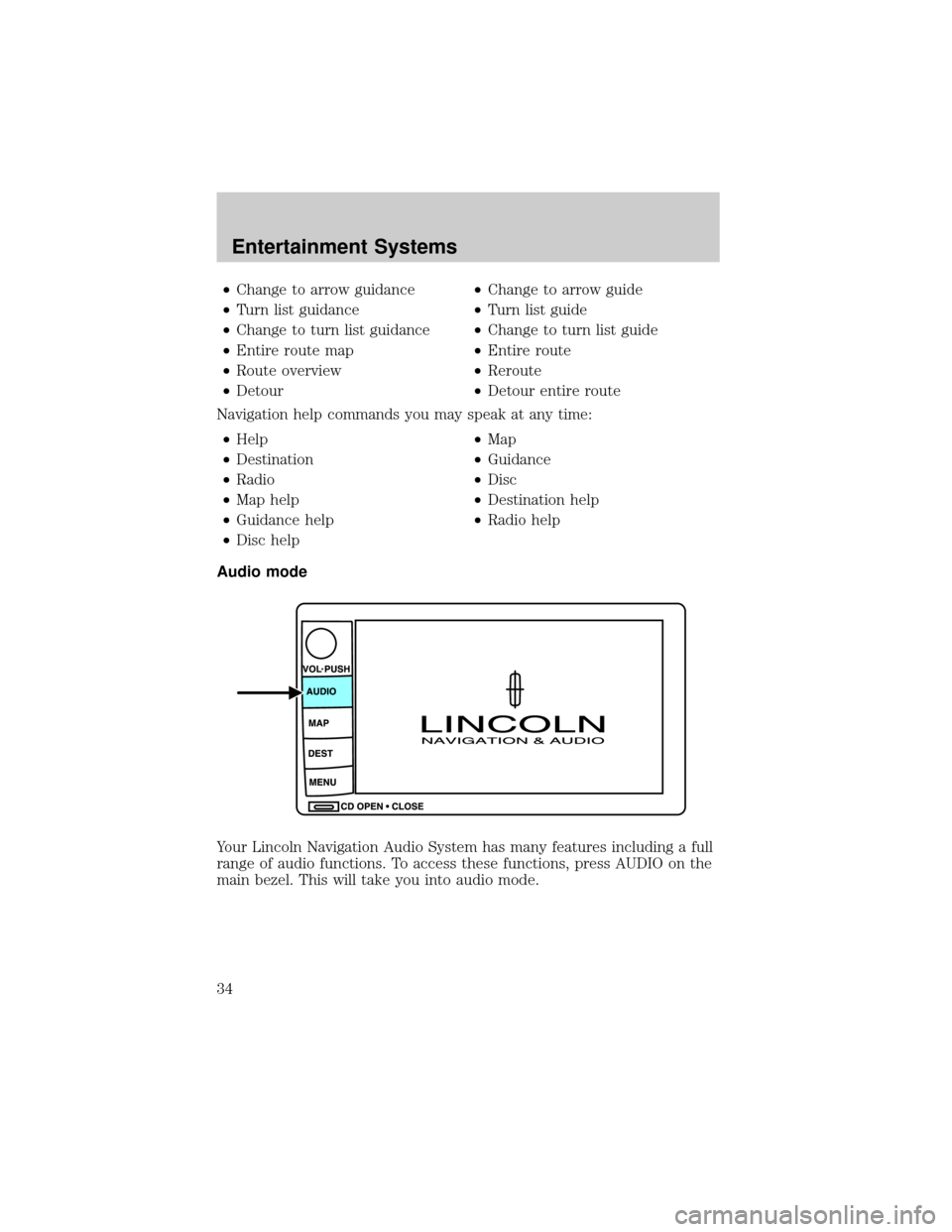
Audio mode
Your Lincoln Navigation Audio System has many features including a full
range of audio functions. To access these functions, press AUDIO on the
main bezel. This will take you into audio mode.
Entertainment Systems
34
Page 83 of 336

Autolamp exit time delay, manual sequence
This option allows you to change the length of the autolamp exit delay.
To program the auto lamp exit time delay:
1. Start with the ignition in OFF and the autolamps selected.
2. Deselect the auto lamps.
3. Put the ignition on ON position.
4. Put the ignition in OFF.
5. Select the autolamps.
²Note:Steps 2 through 5 must be performed within a 10 second
period.
²At this point, the headlamps and park lamps will turn on.
6. Deselect the auto lamps after the desired auto lamp delay time
(maximum of 3 minutes).
²At this point, the headlamps and park lamps will turn off.
The default for autolamp exit delay time is 20 seconds. Following a
vehicle battery disconnect/reconnect auto lamp delay exit time will be
retained.
Autolamp exit time delay, message center sequence
This option allows you to change the length of time of the autolamp exit
delay using the message center. You will have the ability to change the
autolamp exit delay time of the autolamp ON time when the instrument
cluster message center is enabled (ignition in ON or accessory position).
There are 8 distinct and separate set points or values for auto lamp delay
exit time in seconds. The following are predefined set points or auto
lamp exit delay time values: 0, 10, 20, 30, 60, 90, 120, 180, seconds (i.e.
0 to 3 minutes).
The following steps are used to program the autolamp exit time delay
using the message center:
1. The message center will display the last autolamp exit delay time in
seconds.
2. You can respond to this message by 1 of 4 methods:
²No Response- The message center then times out after 4 seconds
and displays it's normal text information.
²Press the info button- The message center then displays its normal
text information.
Lights
83
Page 91 of 336
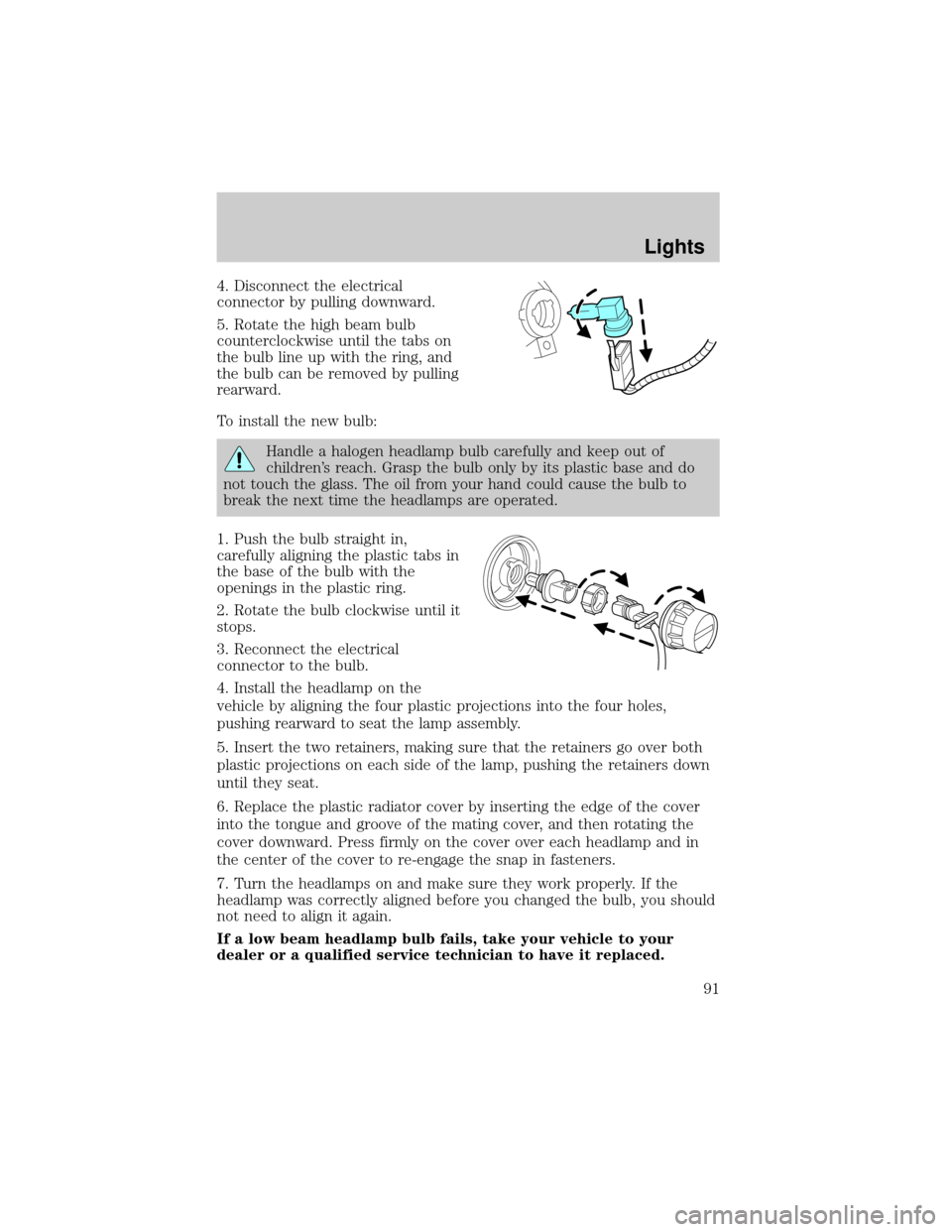
4. Disconnect the electrical
connector by pulling downward.
5. Rotate the high beam bulb
counterclockwise until the tabs on
the bulb line up with the ring, and
the bulb can be removed by pulling
rearward.
To install the new bulb:
Handle a halogen headlamp bulb carefully and keep out of
children's reach. Grasp the bulb only by its plastic base and do
not touch the glass. The oil from your hand could cause the bulb to
break the next time the headlamps are operated.
1. Push the bulb straight in,
carefully aligning the plastic tabs in
the base of the bulb with the
openings in the plastic ring.
2. Rotate the bulb clockwise until it
stops.
3. Reconnect the electrical
connector to the bulb.
4. Install the headlamp on the
vehicle by aligning the four plastic projections into the four holes,
pushing rearward to seat the lamp assembly.
5. Insert the two retainers, making sure that the retainers go over both
plastic projections on each side of the lamp, pushing the retainers down
until they seat.
6. Replace the plastic radiator cover by inserting the edge of the cover
into the tongue and groove of the mating cover, and then rotating the
cover downward. Press firmly on the cover over each headlamp and in
the center of the cover to re-engage the snap in fasteners.
7. Turn the headlamps on and make sure they work properly. If the
headlamp was correctly aligned before you changed the bulb, you should
not need to align it again.
If a low beam headlamp bulb fails, take your vehicle to your
dealer or a qualified service technician to have it replaced.
Lights
91
Page 122 of 336
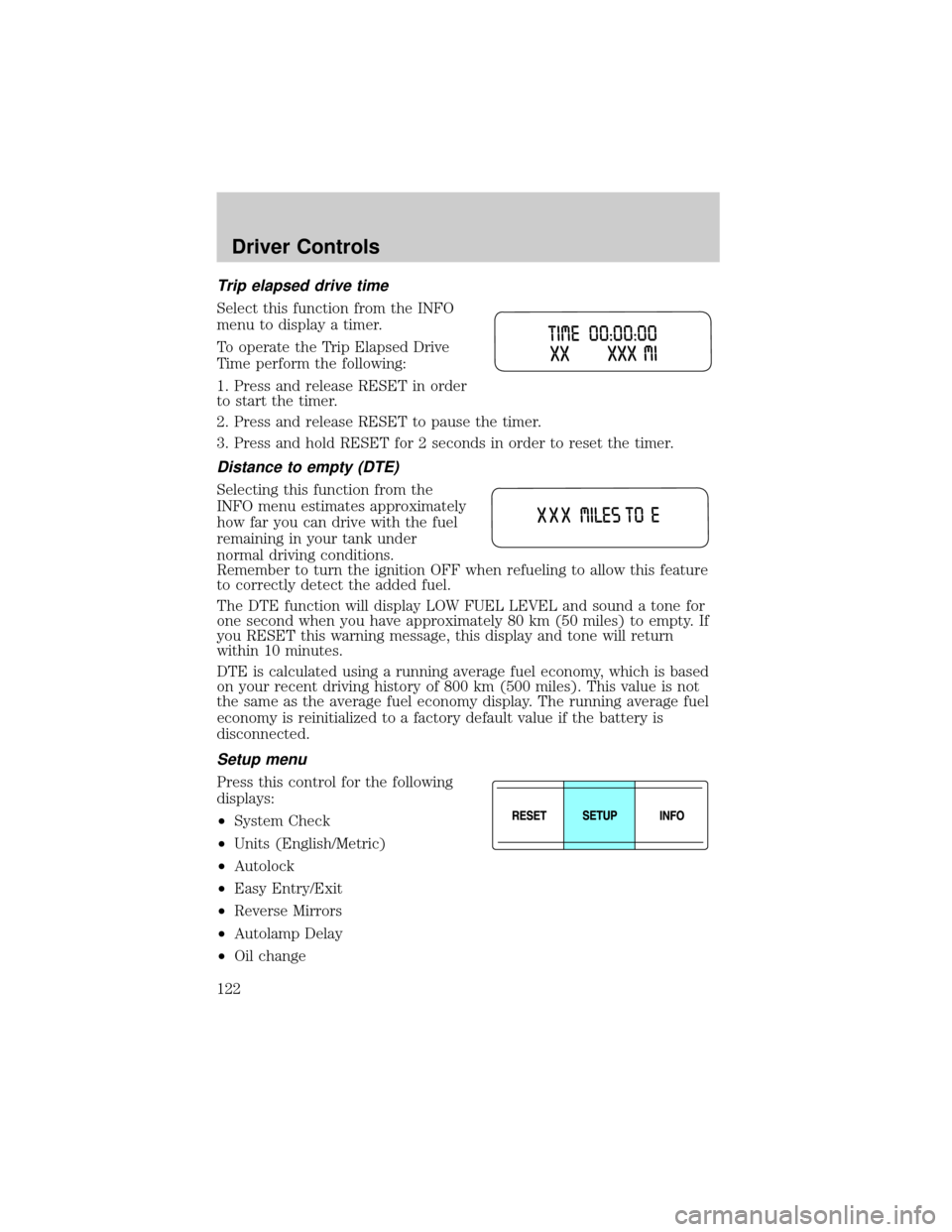
Trip elapsed drive time
Select this function from the INFO
menu to display a timer.
To operate the Trip Elapsed Drive
Time perform the following:
1. Press and release RESET in order
to start the timer.
2. Press and release RESET to pause the timer.
3. Press and hold RESET for 2 seconds in order to reset the timer.
Distance to empty (DTE)
Selecting this function from the
INFO menu estimates approximately
how far you can drive with the fuel
remaining in your tank under
normal driving conditions.
Remember to turn the ignition OFF when refueling to allow this feature
to correctly detect the added fuel.
The DTE function will display LOW FUEL LEVEL and sound a tone for
one second when you have approximately 80 km (50 miles) to empty. If
you RESET this warning message, this display and tone will return
within 10 minutes.
DTE is calculated using a running average fuel economy, which is based
on your recent driving history of 800 km (500 miles). This value is not
the same as the average fuel economy display. The running average fuel
economy is reinitialized to a factory default value if the battery is
disconnected.
Setup menu
Press this control for the following
displays:
²System Check
²Units (English/Metric)
²Autolock
²Easy Entry/Exit
²Reverse Mirrors
²Autolamp Delay
²Oil change
Driver Controls
122
Page 124 of 336
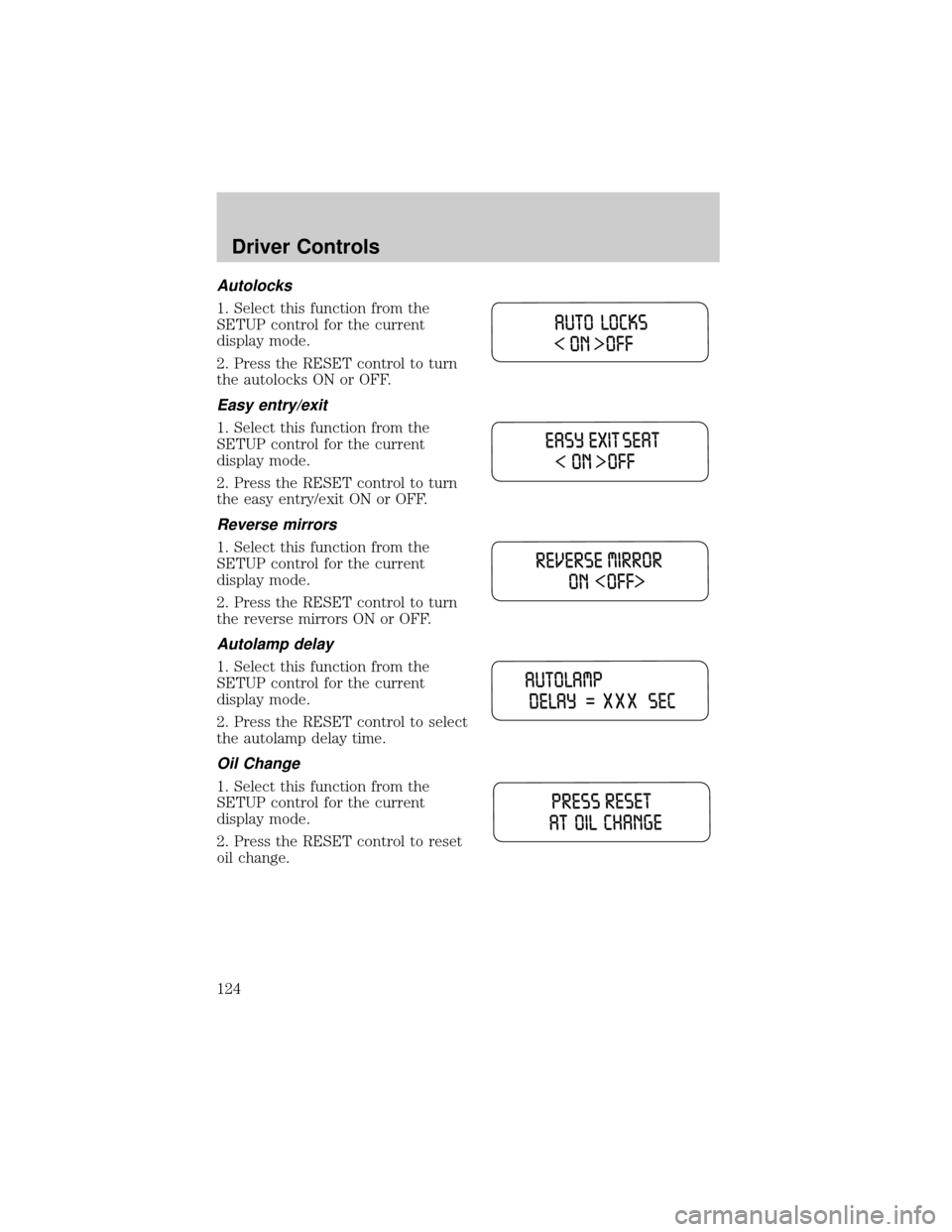
Autolocks
1. Select this function from the
SETUP control for the current
display mode.
2. Press the RESET control to turn
the autolocks ON or OFF.
Easy entry/exit
1. Select this function from the
SETUP control for the current
display mode.
2. Press the RESET control to turn
the easy entry/exit ON or OFF.
Reverse mirrors
1. Select this function from the
SETUP control for the current
display mode.
2. Press the RESET control to turn
the reverse mirrors ON or OFF.
Autolamp delay
1. Select this function from the
SETUP control for the current
display mode.
2. Press the RESET control to select
the autolamp delay time.
Oil Change
1. Select this function from the
SETUP control for the current
display mode.
2. Press the RESET control to reset
oil change.
Driver Controls
124
Page 173 of 336
5. Buckle then unbuckle the safety belt three times, ending with the
safety belt unbuckled.
²After step 5 the safety belt warning light will be turned on for three
seconds.
6. Within seven seconds of the safety belt warning light turning off,
buckle then unbuckle the safety belt.
²This will disable BeltMinder if it is currently enabled, or enable
BeltMinder if it is currently disabled.
7. Confirmation of disabling BeltMinder is provided by flashing the safety
belt warning light four times per second for three seconds.
8. Confirmation of enabling BeltMinder is provided by flashing the safety
belt warning light four times per second for three seconds, followed by
three seconds with the safety belt warning light off, then followed by
flashing the safety belt warning light four times per second for three
seconds again.
9. After receiving confirmation, the deactivation/activation procedure is
complete.
Safety belt extension assembly
If the safety belt is too short when fully extended, there is a 20 cm (8
inch) safety belt extension assembly that can be added (part number
611C22). This assembly can be obtained from your dealer at no cost.
Use only extensions manufactured by the same supplier as the safety
belt. Manufacturer identification is located at the end of the webbing on
the label. Also, use the safety belt extension only if the safety belt is too
short for you when fully extended.
Do not use extensions to change the fit of the shoulder belt
across the torso.
Safety belt maintenance
Inspect the safety belt systems periodically to make sure they work
properly and are not damaged. Inspect the safety belts to make sure
there are no nicks, tears or cuts. Replace if necessary. All safety belt
assemblies, including retractors, buckles, front seat belt buckle
assemblies, buckle support assemblies (slide bar-if equipped), shoulder
belt height adjusters (if equipped), shoulder belt guide on seatback (if
equipped), child safety seat LATCH and tether anchors, and attaching
hardware, should be inspected after a collision. Ford Motor Company
Seating and Safety Restraints
173
Page 200 of 336

If your vehicle should become stuck in deep snow or mud, try switching
the AdvanceTracysystem off by pressing the AdvanceTracybutton.
This will allow your tires to ªdigº for traction. Pressing the control once
will disable the AdvanceTracystability enhancement and the engine
power reduction portion of the traction enhancement feature; the brake
portion of the traction enhancement feature will still function normally.
Pressing and holding the control for more than five seconds will disable
the AdvanceTracystability enhancement and traction enhancement
feature. If the AdvanceTracysystem is activated excessively for an
extended period of time, the brake portion of the system will shut down
to allow the brakes to cool down.
A limited AdvanceTracyfunction using only engine power reduction will
still help control the wheels from over-spinning. When the brakes have
cooled down, the system will again function normally. Anti-lock braking is
not affected by this condition and will function normally during the
cool-down period.
AdvanceTracyenhances your vehicle's stability during maneuvers that
require all available tire traction, like in wet/snowy/icy road conditions
and/or when performing emergency maneuvers. In an emergency
lane-change, the driver will experience better overall vehicle traction,
and have better control of the vehicle.
The AdvanceTracysystem helps the driver maintain steering control if
the vehicle begins to slide excessively left or right or spin out.
AdvanceTracywill attempt to correct the sliding motion by applying
brake force at individual tires and, if necessary, by reducing engine
power.
Driving conditions which may activate AdvanceTracyinclude:
²Taking a turn too fast
²Maneuvering quickly to avoid an accident, pedestrian or obstacle
²Hitting a patch of ice
²Changing lanes on a snow-rutted road
²Entering a snow-free road from a snow-covered side street, or vice
versa
²Entering a paved road from a gravel road, or vice versa
²Hitting a curb while turning
²Driving on slick surfaces
²Cornering while towing a heavily loaded trailer (refer toTrailer
Towingin this chapter)
Driving
200
Page 213 of 336

Driving off-road with truck and utility vehicles
AWD vehicles are specially equipped for driving on sand, snow, mud and
rough terrain and have operating characteristics that are somewhat
different from conventional vehicles, both on and off the road.
When driving at slow speeds off-road under high outside temperatures,
use 1 (First) gear when possible. 1 (First) gear operation will maximize
the engine and transmission cooling capability.
Under severe operating conditions, the A/C may cycle on and off to
protect overheating of the engine.
How your vehicle differs from other vehicles
Truck and utility vehicles can differ from some other vehicles. Your
vehicle may be higher to allow it to travel over rough terrain without
getting hung up or damaging underbody components.
The differences that make your vehicle so versatile also make it handle
differently than an ordinary passenger car.
Maintain steering wheel control at all times, especially in rough terrain.
Since sudden changes in terrain can result in abrupt steering wheel
motion, make sure you grip the steering wheel from the outside. Do not
grip the spokes.
Drive cautiously to avoid vehicle damage from concealed objects such as
rocks and stumps.
You should either know the terrain or examine maps of the area before
driving. Map out your route before driving in the area. To maintain
steering and braking control of your vehicle, you must have all four
wheels on the ground and they must be rolling, not sliding or spinning.
Basic operating principles
²Drive slower in strong crosswinds which can affect the normal steering
characteristics of your vehicle.
²Be extremely careful when driving on pavement made slippery by
loose sand, water, gravel, snow or ice.
If your vehicle goes off the edge of the pavement
²If your vehicle goes off the edge of the pavement, slow down, but
avoid severe brake application, ease the vehicle back onto the
pavement only after reducing your speed. Do not turn the steering
wheel too sharply while returning to the road surface.
²It may be safer to stay on the apron or shoulder of the road and slow
down gradually before returning to the pavement. You may lose
control if you do not slow down or if you turn the steering wheel too
sharply or abruptly.
Driving
213