liftgate LINCOLN AVIATOR 2004 Owners Manual
[x] Cancel search | Manufacturer: LINCOLN, Model Year: 2004, Model line: AVIATOR, Model: LINCOLN AVIATOR 2004Pages: 336, PDF Size: 3.69 MB
Page 13 of 336
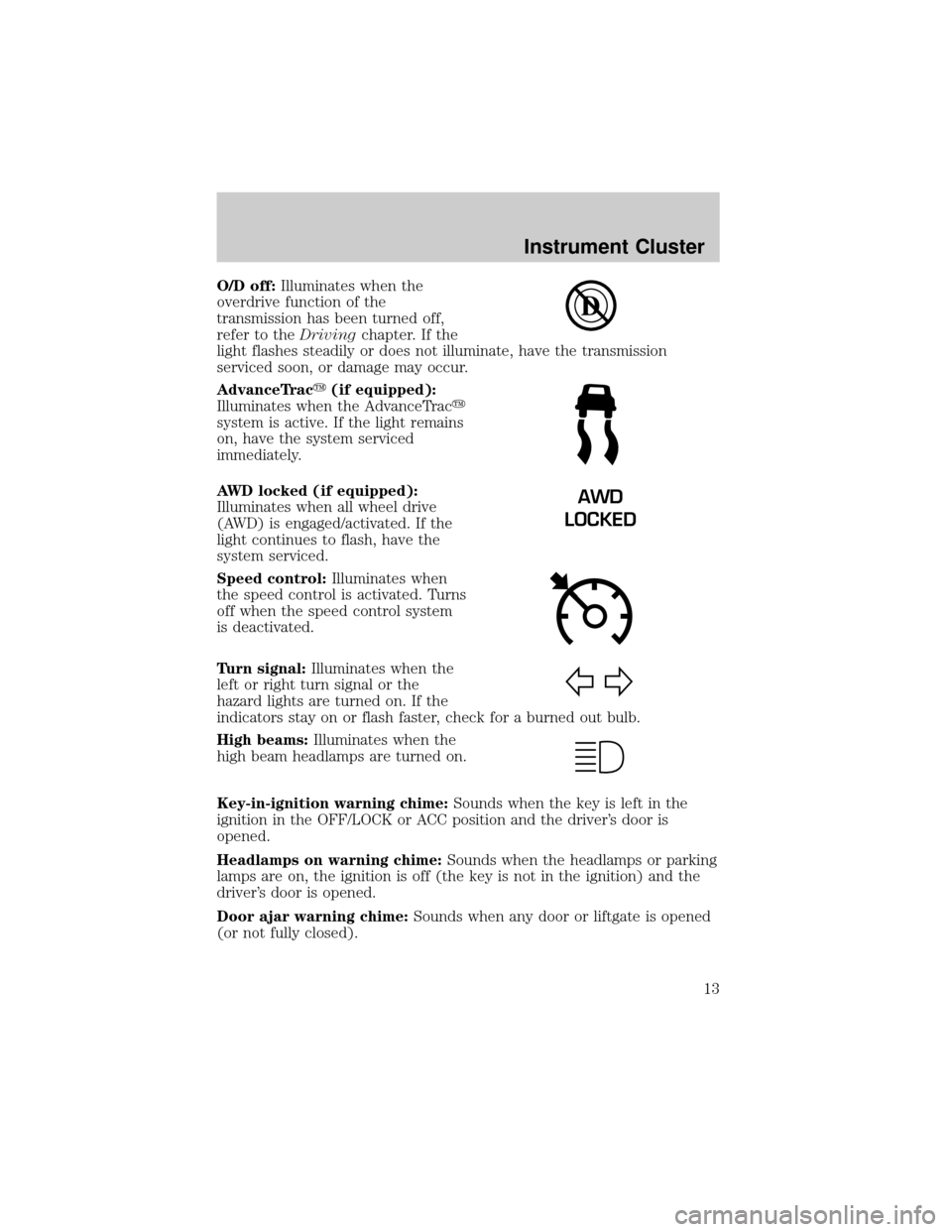
O/D off:Illuminates when the
overdrive function of the
transmission has been turned off,
refer to theDrivingchapter. If the
light flashes steadily or does not illuminate, have the transmission
serviced soon, or damage may occur.
AdvanceTracy(if equipped):
Illuminates when the AdvanceTracy
system is active. If the light remains
on, have the system serviced
immediately.
AWD locked (if equipped):
Illuminates when all wheel drive
(AWD) is engaged/activated. If the
light continues to flash, have the
system serviced.
Speed control:Illuminates when
the speed control is activated. Turns
off when the speed control system
is deactivated.
Turn signal:Illuminates when the
left or right turn signal or the
hazard lights are turned on. If the
indicators stay on or flash faster, check for a burned out bulb.
High beams:Illuminates when the
high beam headlamps are turned on.
Key-in-ignition warning chime:Sounds when the key is left in the
ignition in the OFF/LOCK or ACC position and the driver's door is
opened.
Headlamps on warning chime:Sounds when the headlamps or parking
lamps are on, the ignition is off (the key is not in the ignition) and the
driver's door is opened.
Door ajar warning chime:Sounds when any door or liftgate is opened
(or not fully closed).
AWD
LOCKED
Instrument Cluster
13
Page 89 of 336
Function Number of bulbs Trade number
Fog lamp 2 9140
Liftgate lamp 4 916
High-mount stop lamp 32 LEDS 2C54±13A613**
Rear license plate
lamp2
168
Mirror turn signal
lamp2
906
Approach lamp 2 912
Cargo lamp 1 211-2
Interior overhead lamp 1 912 (906)
Map lamps 2 168 (T10)
Front footwell light 2 194
All replacement bulbs are clear in color except where noted.
To replace all instrument panel lights see your dealer.
*For vehicles with HID lamps see your dealer.
**The entire LED display must be replaced.
Replacing the interior bulbs
Check the operation of all bulbs frequently.
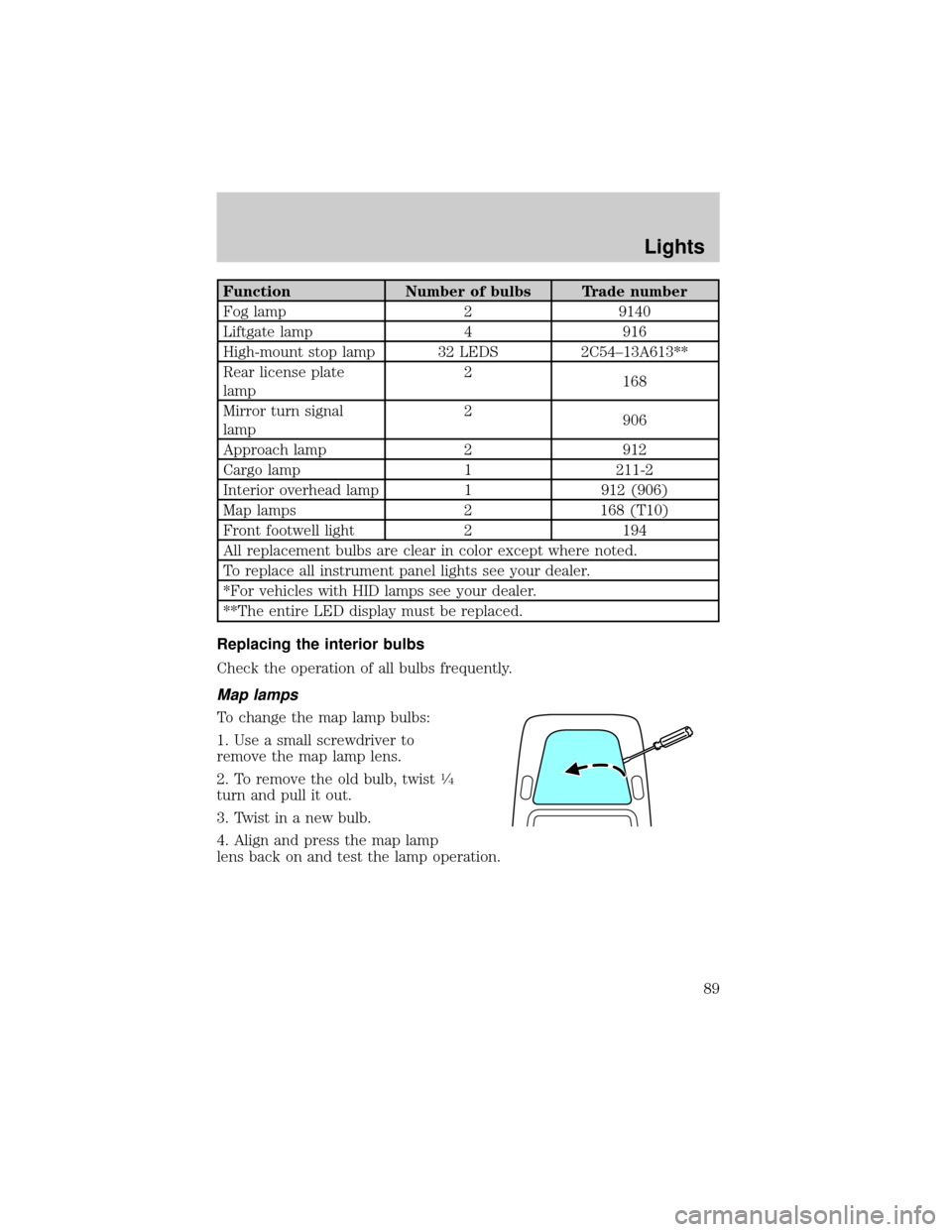
Map lamps
To change the map lamp bulbs:
1. Use a small screwdriver to
remove the map lamp lens.
2. To remove the old bulb, twist
1¤4
turn and pull it out.
3. Twist in a new bulb.
4. Align and press the map lamp
lens back on and test the lamp operation.
Lights
89
Page 90 of 336
Liftgate lamps
To change the liftgate lamp bulbs:
1. Use a small screwdriver to
remove the liftgate lamp lens.
2. To remove the old bulb, twist
1¤4
turn and pull it out.
3. Twist in a new bulb.
4. Align and press the liftgate lamp
lens back on and test the lamp
operation.
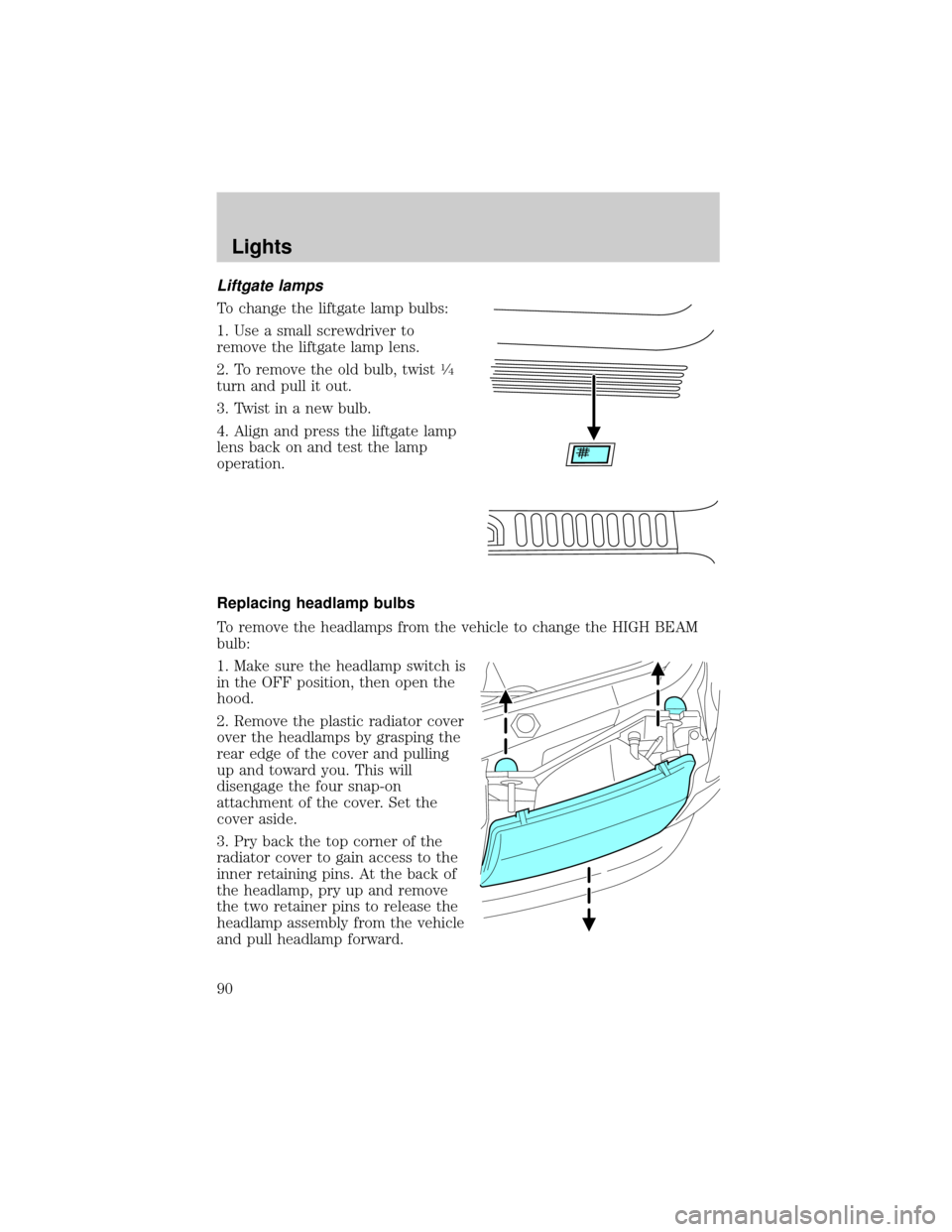
Replacing headlamp bulbs
To remove the headlamps from the vehicle to change the HIGH BEAM
bulb:
1. Make sure the headlamp switch is
in the OFF position, then open the
hood.
2. Remove the plastic radiator cover
over the headlamps by grasping the
rear edge of the cover and pulling
up and toward you. This will
disengage the four snap-on
attachment of the cover. Set the
cover aside.
3. Pry back the top corner of the
radiator cover to gain access to the
inner retaining pins. At the back of
the headlamp, pry up and remove
the two retainer pins to release the
headlamp assembly from the vehicle
and pull headlamp forward.
Lights
90
Page 94 of 336
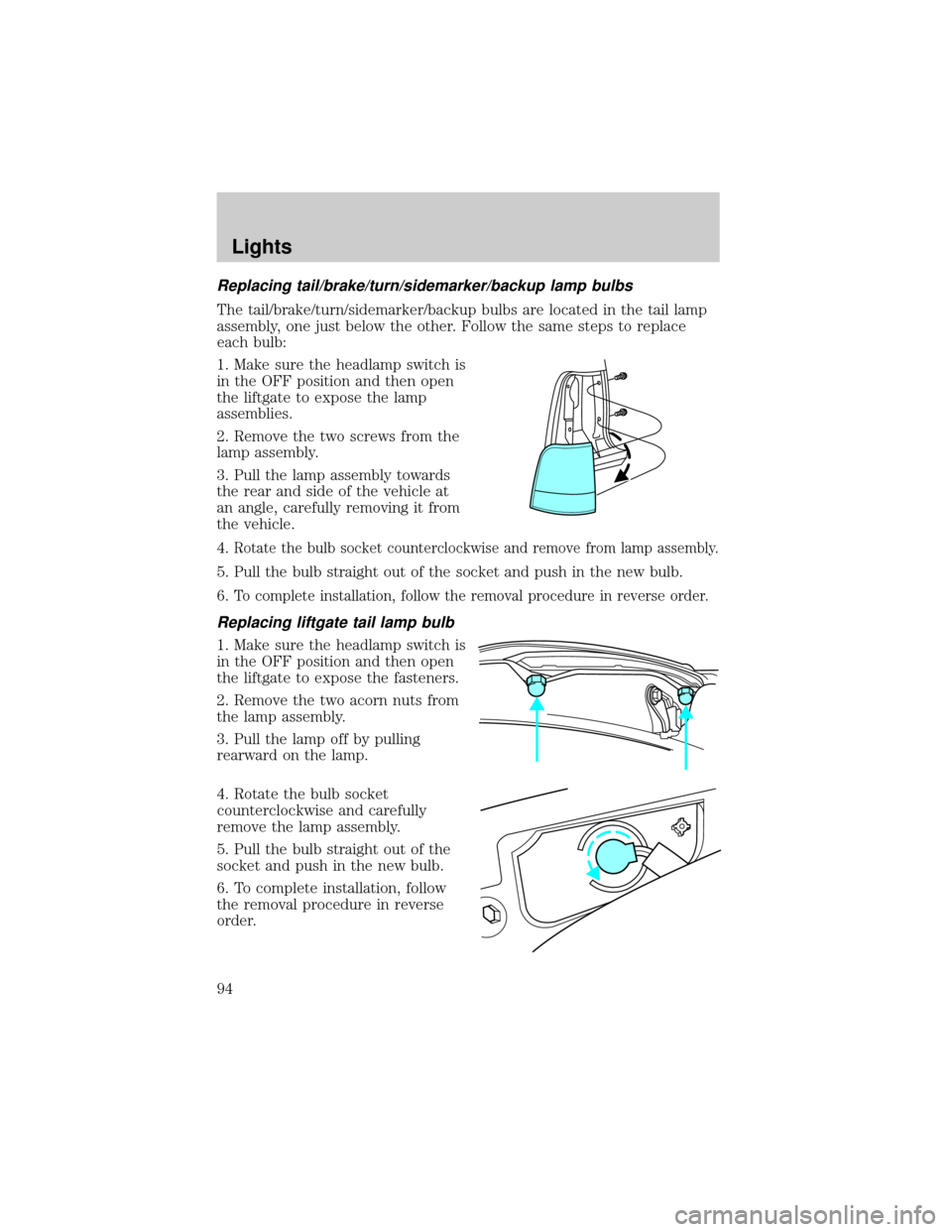
Replacing tail/brake/turn/sidemarker/backup lamp bulbs
The tail/brake/turn/sidemarker/backup bulbs are located in the tail lamp
assembly, one just below the other. Follow the same steps to replace
each bulb:
1. Make sure the headlamp switch is
in the OFF position and then open
the liftgate to expose the lamp
assemblies.
2. Remove the two screws from the
lamp assembly.
3. Pull the lamp assembly towards
the rear and side of the vehicle at
an angle, carefully removing it from
the vehicle.
4.
Rotate the bulb socket counterclockwise and remove from lamp assembly.
5. Pull the bulb straight out of the socket and push in the new bulb.
6.
To complete installation, follow the removal procedure in reverse order.
Replacing liftgate tail lamp bulb
1. Make sure the headlamp switch is
in the OFF position and then open
the liftgate to expose the fasteners.
2. Remove the two acorn nuts from
the lamp assembly.
3. Pull the lamp off by pulling
rearward on the lamp.
4. Rotate the bulb socket
counterclockwise and carefully
remove the lamp assembly.
5. Pull the bulb straight out of the
socket and push in the new bulb.
6. To complete installation, follow
the removal procedure in reverse
order.
Lights
94
Page 95 of 336
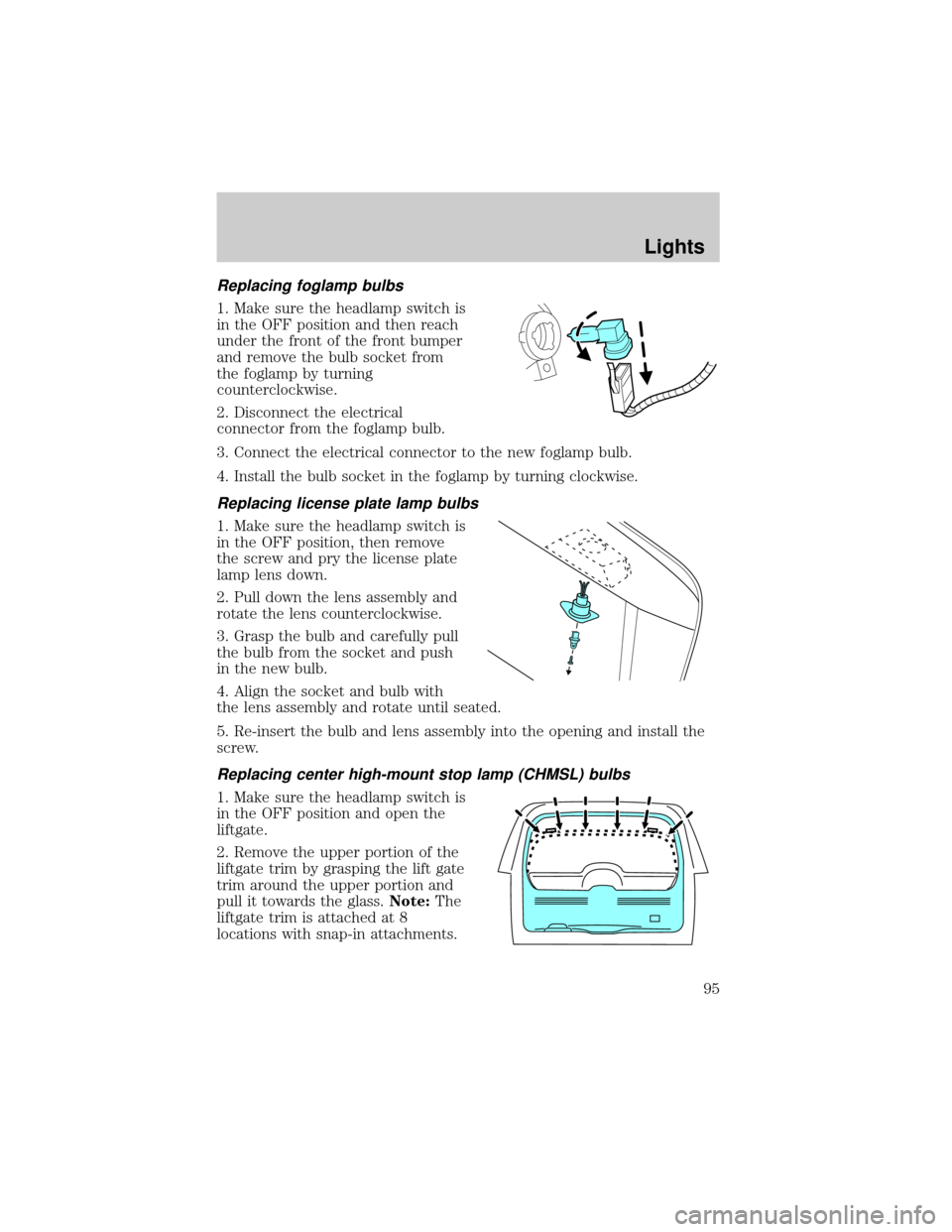
Replacing foglamp bulbs
1. Make sure the headlamp switch is
in the OFF position and then reach
under the front of the front bumper
and remove the bulb socket from
the foglamp by turning
counterclockwise.
2. Disconnect the electrical
connector from the foglamp bulb.
3. Connect the electrical connector to the new foglamp bulb.
4. Install the bulb socket in the foglamp by turning clockwise.
Replacing license plate lamp bulbs
1. Make sure the headlamp switch is
in the OFF position, then remove
the screw and pry the license plate
lamp lens down.
2. Pull down the lens assembly and
rotate the lens counterclockwise.
3. Grasp the bulb and carefully pull
the bulb from the socket and push
in the new bulb.
4. Align the socket and bulb with
the lens assembly and rotate until seated.
5. Re-insert the bulb and lens assembly into the opening and install the
screw.
Replacing center high-mount stop lamp (CHMSL) bulbs
1. Make sure the headlamp switch is
in the OFF position and open the
liftgate.
2. Remove the upper portion of the
liftgate trim by grasping the lift gate
trim around the upper portion and
pull it towards the glass.Note:The
liftgate trim is attached at 8
locations with snap-in attachments.
Lights
95
Page 96 of 336
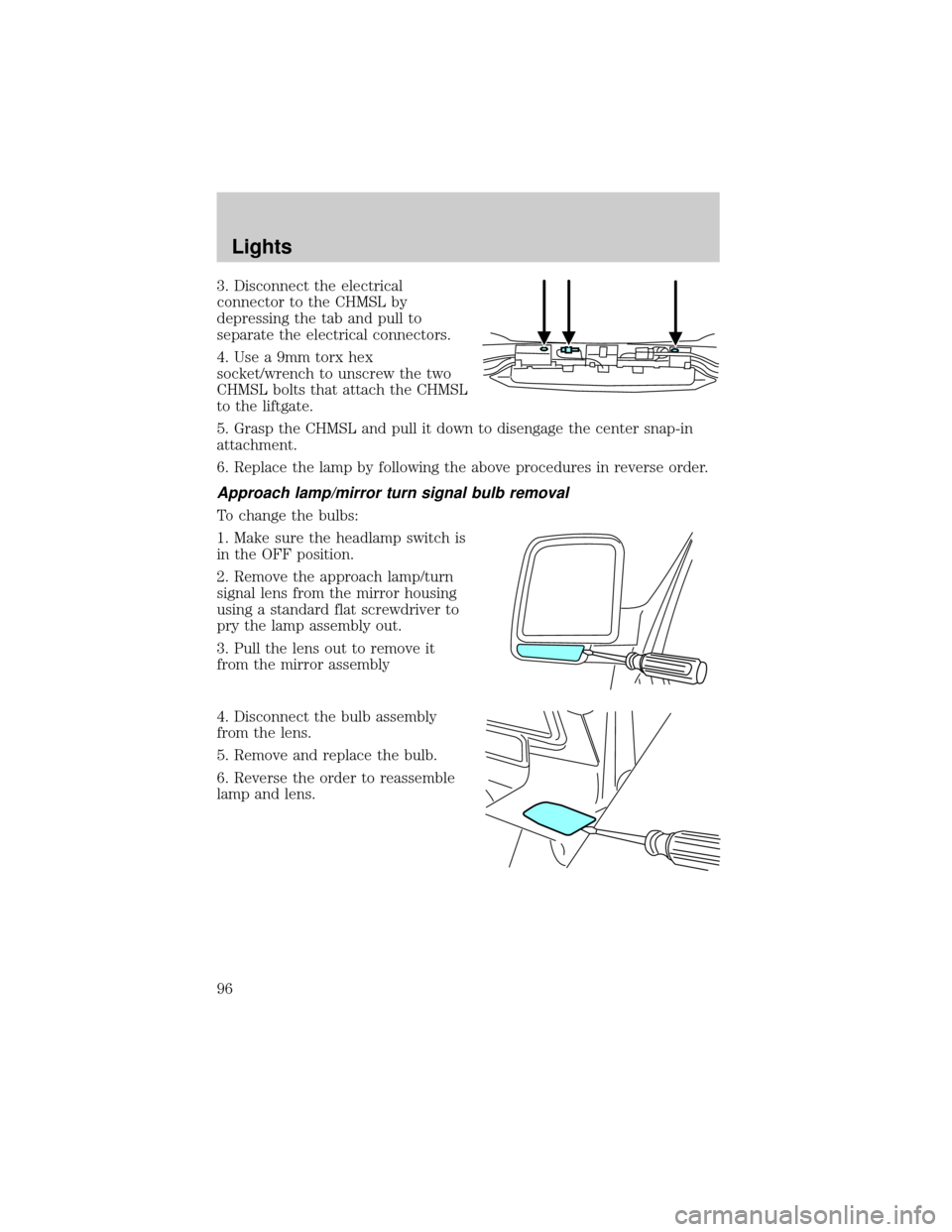
3. Disconnect the electrical
connector to the CHMSL by
depressing the tab and pull to
separate the electrical connectors.
4. Use a 9mm torx hex
socket/wrench to unscrew the two
CHMSL bolts that attach the CHMSL
to the liftgate.
5. Grasp the CHMSL and pull it down to disengage the center snap-in
attachment.
6. Replace the lamp by following the above procedures in reverse order.
Approach lamp/mirror turn signal bulb removal
To change the bulbs:
1. Make sure the headlamp switch is
in the OFF position.
2. Remove the approach lamp/turn
signal lens from the mirror housing
using a standard flat screwdriver to
pry the lamp assembly out.
3. Pull the lens out to remove it
from the mirror assembly
4. Disconnect the bulb assembly
from the lens.
5. Remove and replace the bulb.
6. Reverse the order to reassemble
lamp and lens.
Lights
96
Page 102 of 336
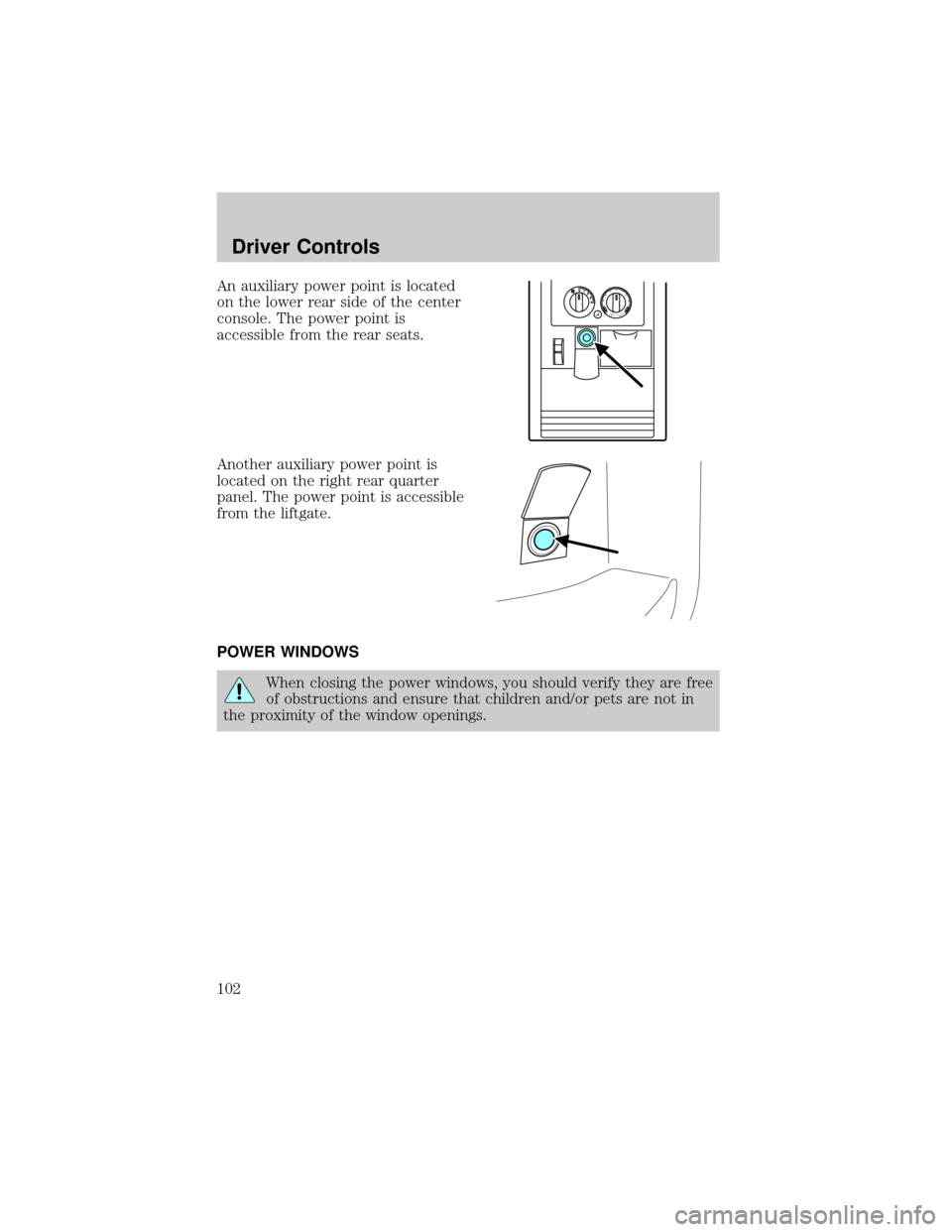
An auxiliary power point is located
on the lower rear side of the center
console. The power point is
accessible from the rear seats.
Another auxiliary power point is
located on the right rear quarter
panel. The power point is accessible
from the liftgate.
POWER WINDOWS
When closing the power windows, you should verify they are free
of obstructions and ensure that children and/or pets are not in
the proximity of the window openings.
Driver Controls
102
Page 127 of 336
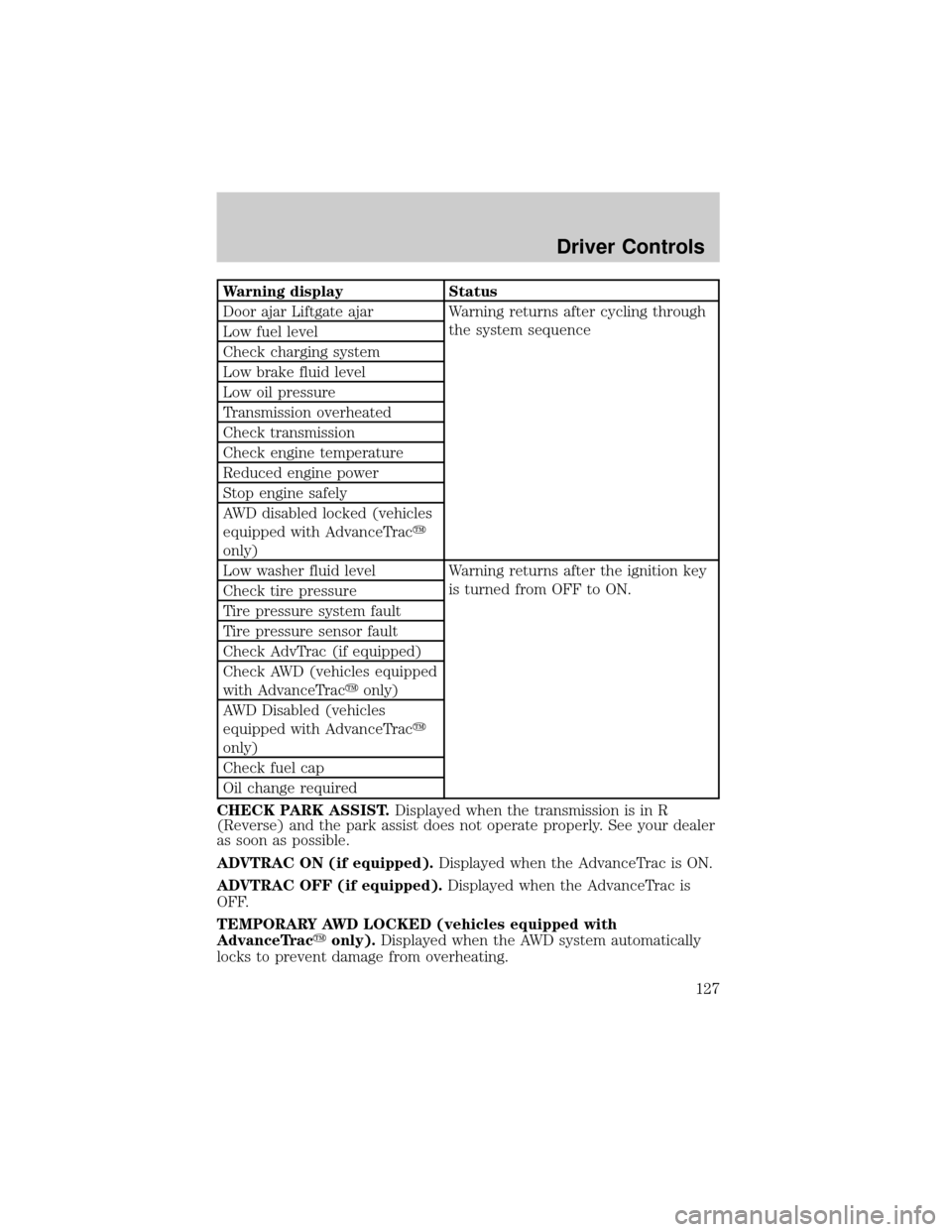
Warning display Status
Door ajar Liftgate ajar Warning returns after cycling through
the system sequence
Low fuel level
Check charging system
Low brake fluid level
Low oil pressure
Transmission overheated
Check transmission
Check engine temperature
Reduced engine power
Stop engine safely
AWD disabled locked (vehicles
equipped with AdvanceTracy
only)
Low washer fluid level Warning returns after the ignition key
is turned from OFF to ON.
Check tire pressure
Tire pressure system fault
Tire pressure sensor fault
Check AdvTrac (if equipped)
Check AWD (vehicles equipped
with AdvanceTracyonly)
AWD Disabled (vehicles
equipped with AdvanceTracy
only)
Check fuel cap
Oil change required
CHECK PARK ASSIST.Displayed when the transmission is in R
(Reverse) and the park assist does not operate properly. See your dealer
as soon as possible.
ADVTRAC ON (if equipped).Displayed when the AdvanceTrac is ON.
ADVTRAC OFF (if equipped).Displayed when the AdvanceTrac is
OFF.
TEMPORARY AWD LOCKED (vehicles equipped with
AdvanceTracyonly).Displayed when the AWD system automatically
locks to prevent damage from overheating.
Driver Controls
127
Page 128 of 336

AWD LOCK OFF and AWD AUTO ON (vehicles equipped with
AdvanceTracyonly).Displayed when the AWD system is completely
cooled down from being overheated.
DOOR AJAR LIFTGATE AJAR.Displayed when a door or liftgate is
not completely closed.
CHECK ENGINE TEMPERATURE.Displayed when the engine
coolant is overheating. Stop the vehicle as soon as safely possible, turn
off the engine and let it cool. Check the coolant and coolant level. Refer
toEngine coolantin theMaintenance and specificationschapter. If
the warning stays on or continues to come on, contact your dealer as
soon as safely possible.
REDUCED ENGINE POWER.Displayed when the engine is
overheating. Stop the vehicle as soon as safely possible, turn off the
engine. If the warning stays on or continues to come on, contact your
dealer as soon as safely possible.
STOP ENGINE SAFELY.Displayed when the engine is overheating.
Stop the vehicle as soon as safely possible, turn off the engine. If the
warning stays on or continues to come on, contact your dealer as soon as
safely possible.
AWD DISABLED LOCKED (vehicles equipped with AdvanceTracy
only).Displayed when the AWD system begins to overheat placing itself
in the autolock mode. If the warning stays on or continues to come on,
contact your dealer as soon as safely possible.
WARNING-TIRE VERY LOW.Displayed when one or more tires have
very low pressure. When this warning message is displayed, a warning
chime will sound reminding you to stop the vehicle as soon as safely
possible and check your tires for proper pressure, leaks and damage.
Refer toServicing your tiresin theMaintenance and specifications
chapter.
CHECK TIRE PRESSURE.Displayed when any of the tire pressures
are low. Refer toChecking the tire pressurein theMaintenance and
specificationschapter.
TIRE PRESSURE SYSTEM FAULT.Displayed when a tire pressure
monitoring system is malfunctioning. If the warning stays on or continues
to come on, have the system checked by your dealer.
TIRE PRESSURE SENSOR FAULT.Displayed when a tire pressure
sensor is malfunctioning. If the warning stays on or continues to come
on, have the system checked by your dealer.
LOW FUEL LEVEL.Displayed as an early reminder of a low fuel
condition.
Driver Controls
128
Page 133 of 336
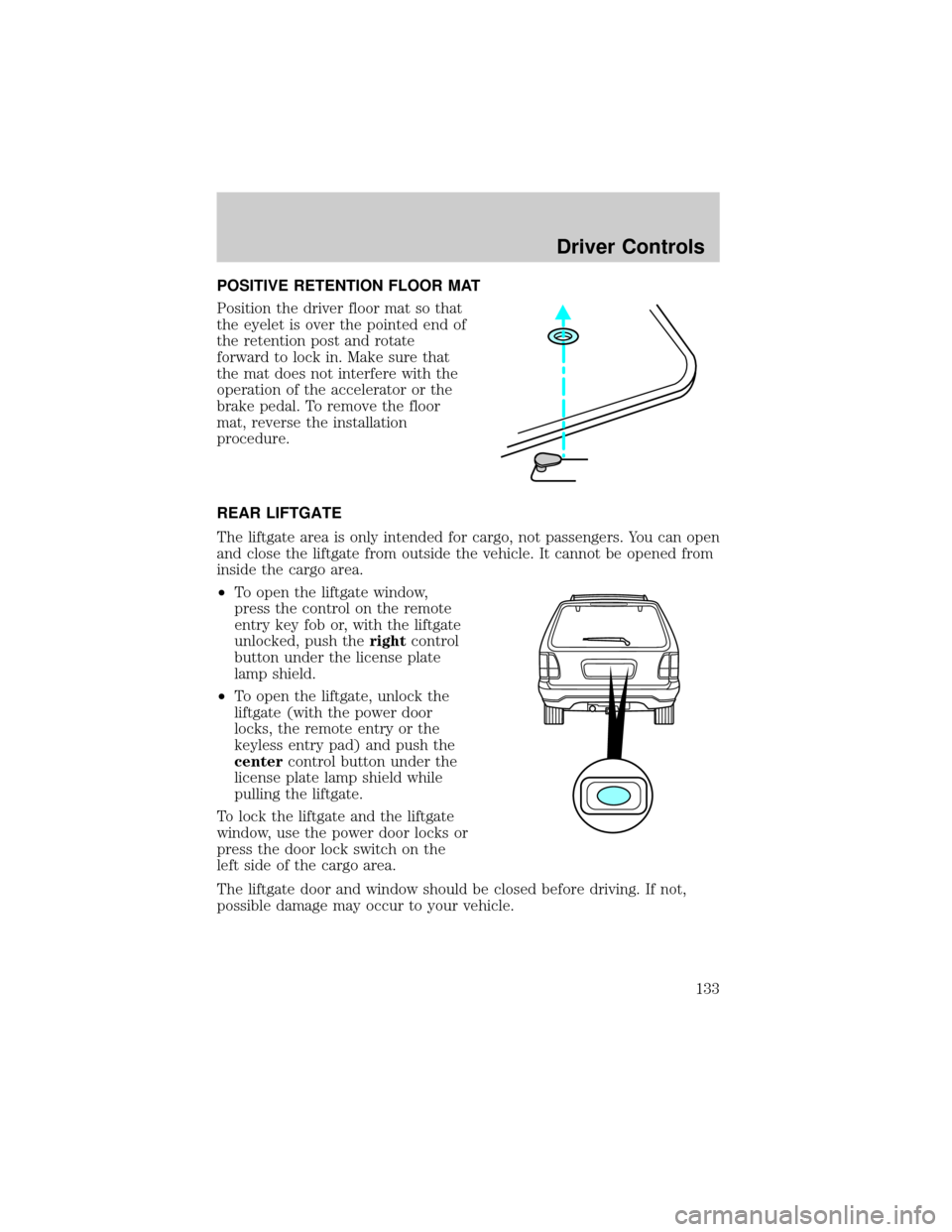
POSITIVE RETENTION FLOOR MAT
Position the driver floor mat so that
the eyelet is over the pointed end of
the retention post and rotate
forward to lock in. Make sure that
the mat does not interfere with the
operation of the accelerator or the
brake pedal. To remove the floor
mat, reverse the installation
procedure.
REAR LIFTGATE
The liftgate area is only intended for cargo, not passengers. You can open
and close the liftgate from outside the vehicle. It cannot be opened from
inside the cargo area.
²To open the liftgate window,
press the control on the remote
entry key fob or, with the liftgate
unlocked, push therightcontrol
button under the license plate
lamp shield.
²To open the liftgate, unlock the
liftgate (with the power door
locks, the remote entry or the
keyless entry pad) and push the
centercontrol button under the
license plate lamp shield while
pulling the liftgate.
To lock the liftgate and the liftgate
window, use the power door locks or
press the door lock switch on the
left side of the cargo area.
The liftgate door and window should be closed before driving. If not,
possible damage may occur to your vehicle.
Driver Controls
133