instrument cluster LINCOLN AVIATOR 2020 Owner's Manual
[x] Cancel search | Manufacturer: LINCOLN, Model Year: 2020, Model line: AVIATOR, Model: LINCOLN AVIATOR 2020Pages: 609, PDF Size: 5.4 MB
Page 282 of 609
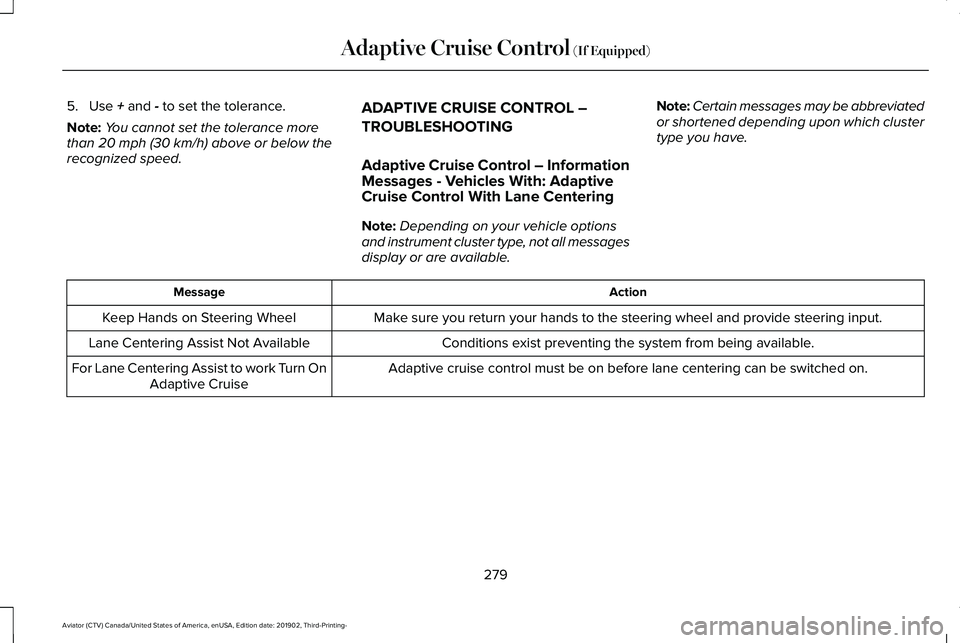
5. Use + and - to set the tolerance.
Note: You cannot set the tolerance more
than
20 mph (30 km/h) above or below the
recognized speed. ADAPTIVE CRUISE CONTROL –
TROUBLESHOOTING
Adaptive Cruise Control – Information
Messages - Vehicles With: Adaptive
Cruise Control With Lane Centering
Note:
Depending on your vehicle options
and instrument cluster type, not all messages
display or are available. Note:
Certain messages may be abbreviated
or shortened depending upon which cluster
type you have. Action
Message
Make sure you return your hands to the steering wheel and provide steering \
input.
Keep Hands on Steering Wheel
Conditions exist preventing the system from being available.
Lane Centering Assist Not Available
Adaptive cruise control must be on before lane centering can be switched\
on.
For Lane Centering Assist to work Turn On
Adaptive Cruise
279
Aviator (CTV) Canada/United States of America, enUSA, Edition date: 201902, Third-Printing- Adaptive Cruise Control
(If Equipped)
Page 283 of 609
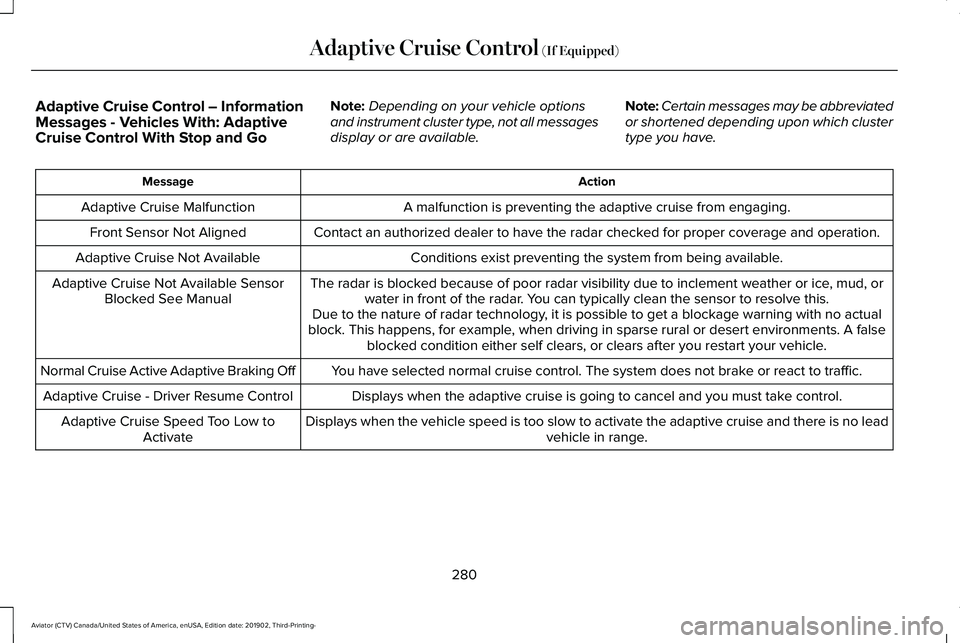
Adaptive Cruise Control – Information
Messages - Vehicles With: Adaptive
Cruise Control With Stop and Go
Note:
Depending on your vehicle options
and instrument cluster type, not all messages
display or are available. Note:
Certain messages may be abbreviated
or shortened depending upon which cluster
type you have. Action
Message
A malfunction is preventing the adaptive cruise from engaging.
Adaptive Cruise Malfunction
Front Sensor Not Aligned Contact an authorized dealer to have the radar checked for proper coverage and operation. Conditions exist preventing the system from being available.
Adaptive Cruise Not Available
The radar is blocked because of poor radar visibility due to inclement weather or ice, mud, orwater in front of the radar. You can typically clean the sensor to resolve this.
Adaptive Cruise Not Available Sensor
Blocked See Manual Due to the nature of radar technology, it is possible to get a blockage warning with no actual
block. This happens, for example, when driving in sparse rural or desert environments. A false blocked condition either self clears, or clears after you restart your vehicl\
e.
You have selected normal cruise control. The system does not brake or react to traffic.
Normal Cruise Active Adaptive Braking Off
Displays when the adaptive cruise is going to cancel and you must take control.
Adaptive Cruise - Driver Resume Control
Displays when the vehicle speed is too slow to activate the adaptive cru\
ise and there is no leadvehicle in range.
Adaptive Cruise Speed Too Low to
Activate
280
Aviator (CTV) Canada/United States of America, enUSA, Edition date: 201902, Third-Printing- Adaptive Cruise Control (If Equipped)
Page 284 of 609
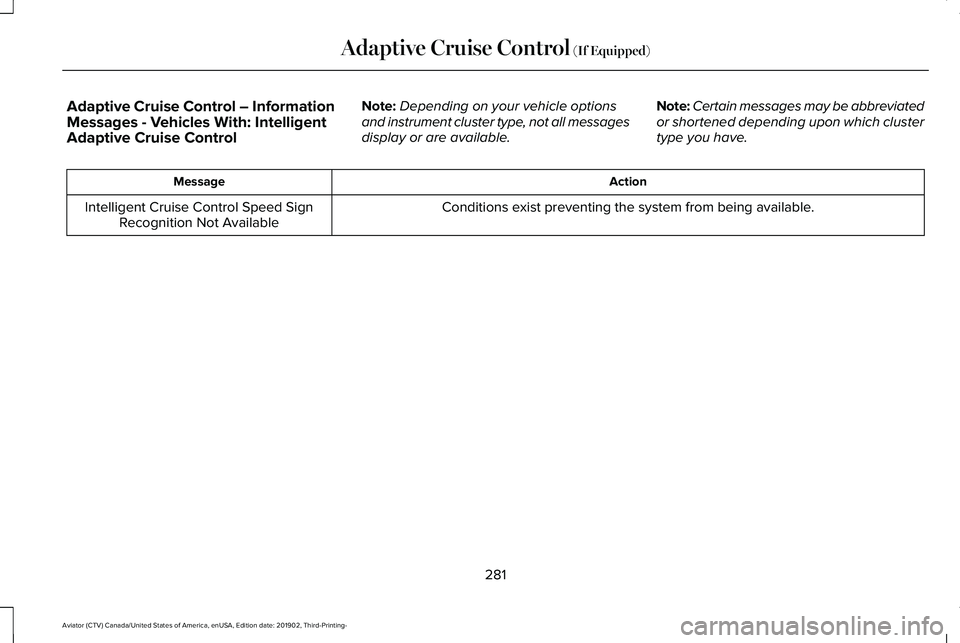
Adaptive Cruise Control – Information
Messages - Vehicles With: Intelligent
Adaptive Cruise Control
Note:
Depending on your vehicle options
and instrument cluster type, not all messages
display or are available. Note:
Certain messages may be abbreviated
or shortened depending upon which cluster
type you have. Action
Message
Conditions exist preventing the system from being available.
Intelligent Cruise Control Speed Sign
Recognition Not Available
281
Aviator (CTV) Canada/United States of America, enUSA, Edition date: 201902, Third-Printing- Adaptive Cruise Control (If Equipped)
Page 300 of 609
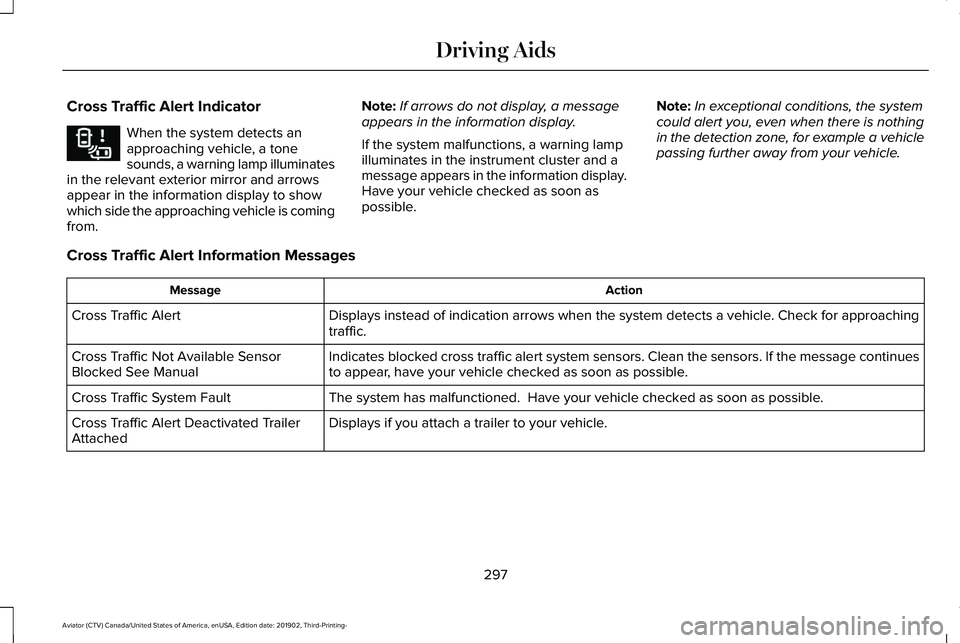
Cross Traffic Alert Indicator
When the system detects an
approaching vehicle, a tone
sounds, a warning lamp illuminates
in the relevant exterior mirror and arrows
appear in the information display to show
which side the approaching vehicle is coming
from. Note:
If arrows do not display, a message
appears in the information display.
If the system malfunctions, a warning lamp
illuminates in the instrument cluster and a
message appears in the information display.
Have your vehicle checked as soon as
possible. Note:
In exceptional conditions, the system
could alert you, even when there is nothing
in the detection zone, for example a vehicle
passing further away from your vehicle.
Cross Traffic Alert Information Messages Action
Message
Displays instead of indication arrows when the system detects a vehicle. Check for approaching
traffic.
Cross Traffic Alert
Indicates blocked cross traffic alert system sensors. Clean the sensors. If the message\
continues
to appear, have your vehicle checked as soon as possible.
Cross Traffic Not Available Sensor
Blocked See Manual
The system has malfunctioned. Have your vehicle checked as soon as possible.
Cross Traffic System Fault
Displays if you attach a trailer to your vehicle.
Cross Traffic Alert Deactivated Trailer
Attached
297
Aviator (CTV) Canada/United States of America, enUSA, Edition date: 201902, Third-Printing- Driving AidsE268294
Page 356 of 609
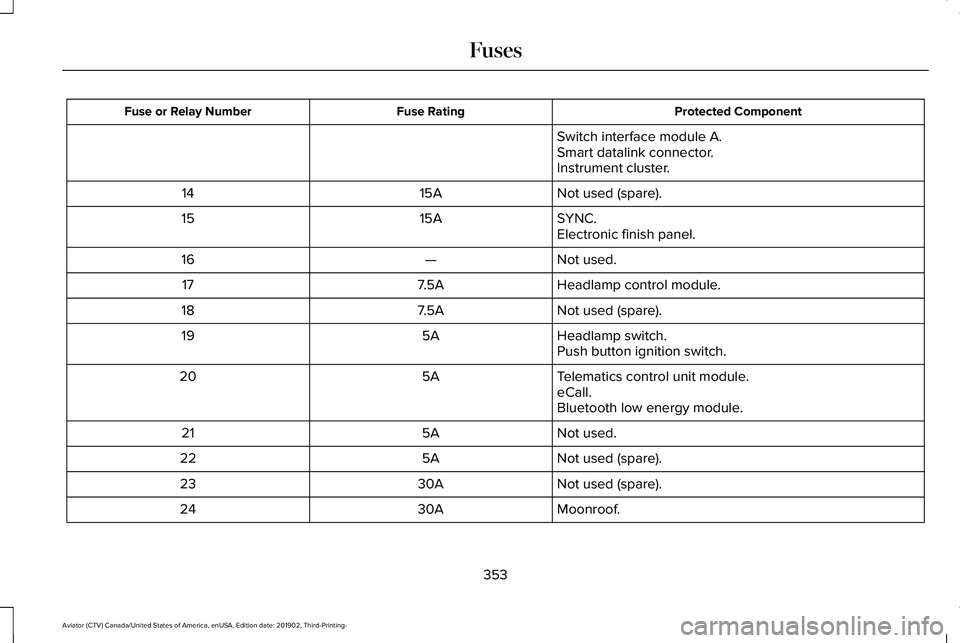
Protected Component
Fuse Rating
Fuse or Relay Number
Switch interface module A.
Smart datalink connector.
Instrument cluster.
Not used (spare).
15A
14
SYNC.
15A
15
Electronic finish panel.
Not used.
—
16
Headlamp control module.
7.5A
17
Not used (spare).
7.5A
18
Headlamp switch.
5A
19
Push button ignition switch.
Telematics control unit module.
5A
20
eCall.
Bluetooth low energy module.
Not used.
5A
21
Not used (spare).
5A
22
Not used (spare).
30A
23
Moonroof.
30A
24
353
Aviator (CTV) Canada/United States of America, enUSA, Edition date: 201902, Third-Printing- Fuses
Page 366 of 609
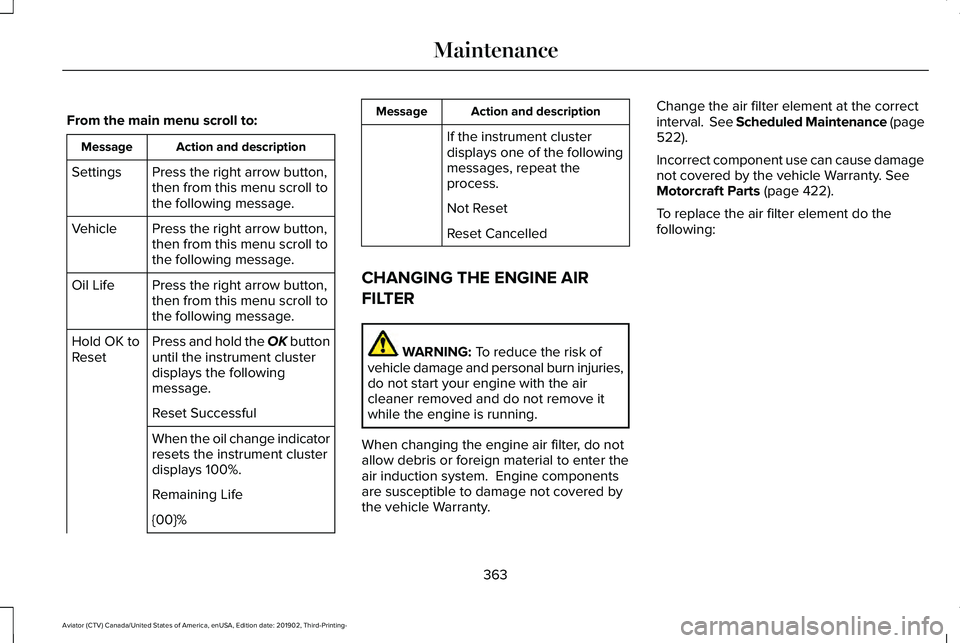
From the main menu scroll to:
Action and description
Message
Press the right arrow button,
then from this menu scroll to
the following message.
Settings
Press the right arrow button,
then from this menu scroll to
the following message.
Vehicle
Press the right arrow button,
then from this menu scroll to
the following message.
Oil Life
Press and hold the OK button
until the instrument cluster
displays the following
message.
Hold OK to
Reset
Reset Successful
When the oil change indicator
resets the instrument cluster
displays 100%.
Remaining Life
{00}% Action and description
Message
If the instrument cluster
displays one of the following
messages, repeat the
process.
Not Reset
Reset Cancelled
CHANGING THE ENGINE AIR
FILTER WARNING: To reduce the risk of
vehicle damage and personal burn injuries,
do not start your engine with the air
cleaner removed and do not remove it
while the engine is running.
When changing the engine air filter, do not
allow debris or foreign material to enter the
air induction system. Engine components
are susceptible to damage not covered by
the vehicle Warranty. Change the air filter element at the correct
interval. See Scheduled Maintenance (page
522
).
Incorrect component use can cause damage
not covered by the vehicle Warranty.
See
Motorcraft Parts (page 422).
To replace the air filter element do the
following:
363
Aviator (CTV) Canada/United States of America, enUSA, Edition date: 201902, Third-Printing- Maintenance
Page 385 of 609
Note:
Do not use razor blades or other
sharp objects to clean or remove decals from
the inside of the heated rear window. The
vehicle warranty does not cover damage
caused to the heated rear window grid lines.
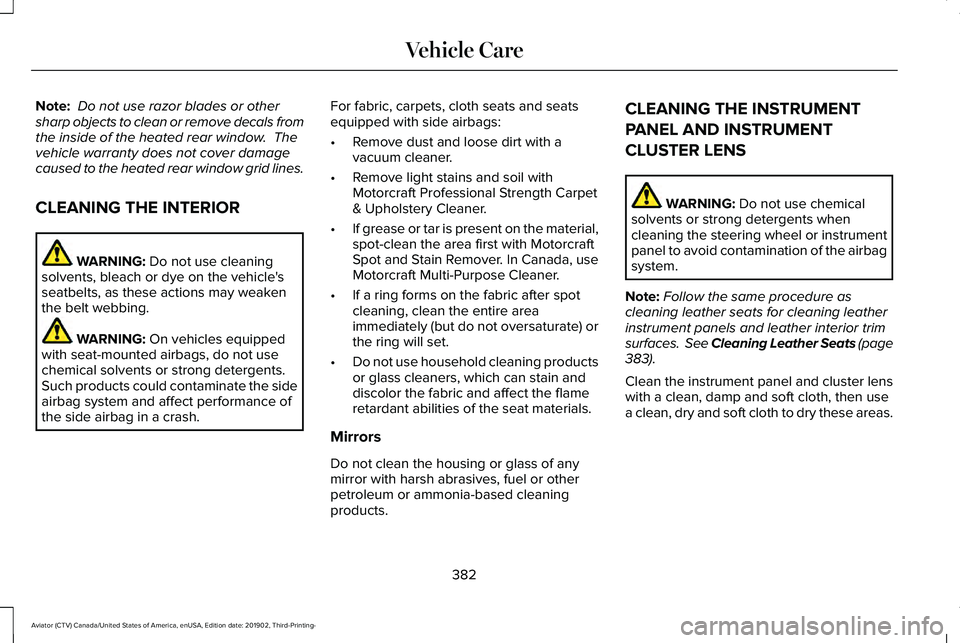
CLEANING THE INTERIOR WARNING: Do not use cleaning
solvents, bleach or dye on the vehicle's
seatbelts, as these actions may weaken
the belt webbing. WARNING:
On vehicles equipped
with seat-mounted airbags, do not use
chemical solvents or strong detergents.
Such products could contaminate the side
airbag system and affect performance of
the side airbag in a crash. For fabric, carpets, cloth seats and seats
equipped with side airbags:
•
Remove dust and loose dirt with a
vacuum cleaner.
• Remove light stains and soil with
Motorcraft Professional Strength Carpet
& Upholstery Cleaner.
• If grease or tar is present on the material,
spot-clean the area first with Motorcraft
Spot and Stain Remover. In Canada, use
Motorcraft Multi-Purpose Cleaner.
• If a ring forms on the fabric after spot
cleaning, clean the entire area
immediately (but do not oversaturate) or
the ring will set.
• Do not use household cleaning products
or glass cleaners, which can stain and
discolor the fabric and affect the flame
retardant abilities of the seat materials.
Mirrors
Do not clean the housing or glass of any
mirror with harsh abrasives, fuel or other
petroleum or ammonia-based cleaning
products. CLEANING THE INSTRUMENT
PANEL AND INSTRUMENT
CLUSTER LENS
WARNING:
Do not use chemical
solvents or strong detergents when
cleaning the steering wheel or instrument
panel to avoid contamination of the airbag
system.
Note: Follow the same procedure as
cleaning leather seats for cleaning leather
instrument panels and leather interior trim
surfaces. See Cleaning Leather Seats
(page
383).
Clean the instrument panel and cluster lens
with a clean, damp and soft cloth, then use
a clean, dry and soft cloth to dry these areas.
382
Aviator (CTV) Canada/United States of America, enUSA, Edition date: 201902, Third-Printing- Vehicle Care
Page 386 of 609
•
Avoid cleaners or polishes that increase
the gloss of the upper portion of the
instrument panel. The dull finish in this
area helps protect you from undesirable
windshield reflection.
• Do not use any household cleaning
products or glass cleaners as these may
damage the finish of the instrument
panel, interior trim and cluster lens.
• Wash or wipe your hands clean if you
have been in contact with certain
products such as insect repellent and
suntan lotion to avoid possible damage
to the interior painted surfaces.
• Do not allow air fresheners and hand
sanitizers to spill onto interior surfaces.
If a spill occurs, wipe off immediately.
Your warranty may not cover these
damages.
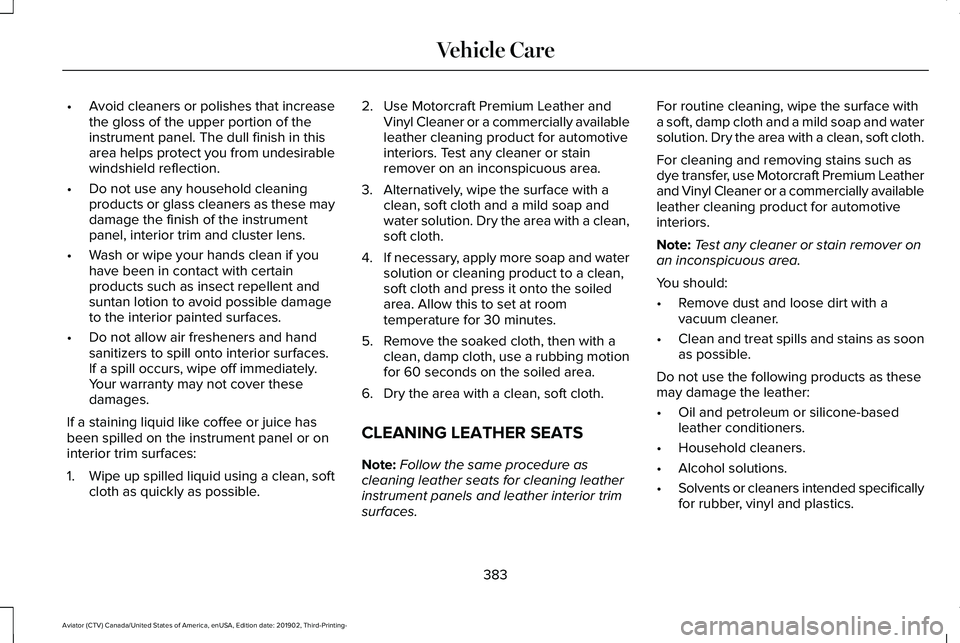
If a staining liquid like coffee or juice has
been spilled on the instrument panel or on
interior trim surfaces:
1. Wipe up spilled liquid using a clean, soft
cloth as quickly as possible. 2. Use Motorcraft Premium Leather and
Vinyl Cleaner or a commercially available
leather cleaning product for automotive
interiors. Test any cleaner or stain
remover on an inconspicuous area.
3. Alternatively, wipe the surface with a clean, soft cloth and a mild soap and
water solution. Dry the area with a clean,
soft cloth.
4. If necessary, apply more soap and water
solution or cleaning product to a clean,
soft cloth and press it onto the soiled
area. Allow this to set at room
temperature for 30 minutes.
5. Remove the soaked cloth, then with a clean, damp cloth, use a rubbing motion
for 60 seconds on the soiled area.
6. Dry the area with a clean, soft cloth.
CLEANING LEATHER SEATS
Note: Follow the same procedure as
cleaning leather seats for cleaning leather
instrument panels and leather interior trim
surfaces. For routine cleaning, wipe the surface with
a soft, damp cloth and a mild soap and water
solution. Dry the area with a clean, soft cloth.
For cleaning and removing stains such as
dye transfer, use Motorcraft Premium Leather
and Vinyl Cleaner or a commercially available
leather cleaning product for automotive
interiors.
Note:
Test any cleaner or stain remover on
an inconspicuous area.
You should:
• Remove dust and loose dirt with a
vacuum cleaner.
• Clean and treat spills and stains as soon
as possible.
Do not use the following products as these
may damage the leather:
• Oil and petroleum or silicone-based
leather conditioners.
• Household cleaners.
• Alcohol solutions.
• Solvents or cleaners intended specifically
for rubber, vinyl and plastics.
383
Aviator (CTV) Canada/United States of America, enUSA, Edition date: 201902, Third-Printing- Vehicle Care
Page 597 of 609
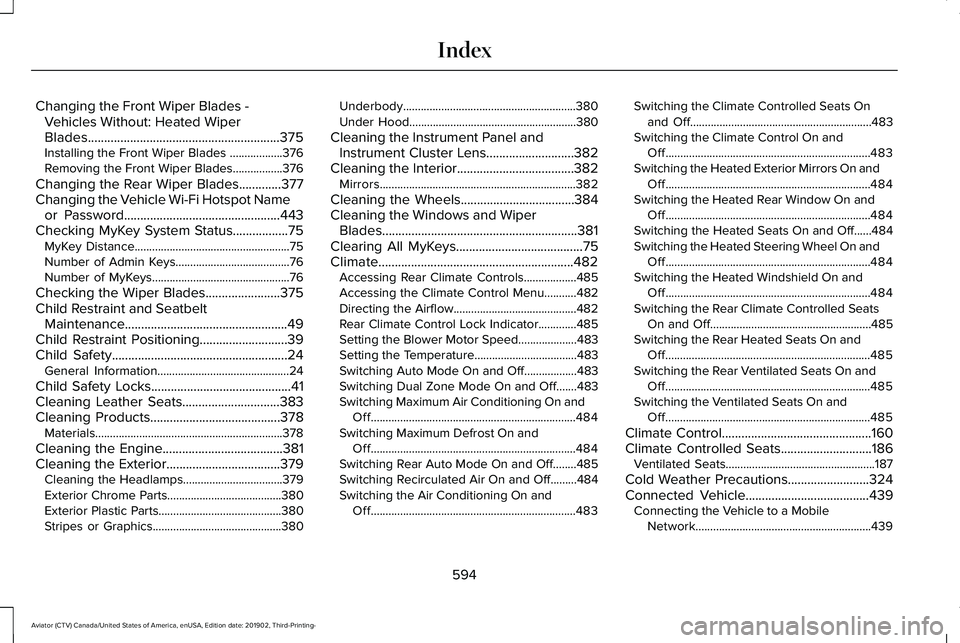
Changing the Front Wiper Blades -
Vehicles Without: Heated Wiper
Blades...........................................................375
Installing the Front Wiper Blades ..................376
Removing the Front Wiper Blades.................376
Changing the Rear Wiper Blades.............377
Changing the Vehicle Wi-Fi Hotspot Name or Password................................................443
Checking MyKey System Status.................75 MyKey Distance.....................................................75
Number of Admin Keys.......................................76
Number of MyKeys...............................................76
Checking the Wiper Blades.......................375
Child Restraint and Seatbelt Maintenance..................................................49
Child Restraint Positioning
...........................39
Child Safety......................................................24
General Information.............................................24
Child Safety Locks...........................................41
Cleaning Leather Seats..............................383
Cleaning Products
........................................378
Materials................................................................378
Cleaning the Engine
.....................................381
Cleaning the Exterior...................................379 Cleaning the Headlamps..................................379
Exterior Chrome Parts.......................................380
Exterior Plastic Parts..........................................380
Stripes or Graphics............................................380 Underbody...........................................................380
Under Hood.........................................................380
Cleaning the Instrument Panel and Instrument Cluster Lens...........................382
Cleaning the Interior
....................................382
Mirrors...................................................................382
Cleaning the Wheels
...................................384
Cleaning the Windows and Wiper Blades............................................................381
Clearing All MyKeys.......................................75
Climate............................................................482 Accessing Rear Climate Controls..................485
Accessing the Climate Control Menu...........
482
Directing the Airflow..........................................482
Rear Climate Control Lock Indicator.............485
Setting the Blower Motor Speed....................483
Setting the Temperature...................................483
Switching Auto Mode On and Off..................483
Switching Dual Zone Mode On and Off.......483
Switching Maximum Air Conditioning On and Off......................................................................484
Switching Maximum Defrost On and Off......................................................................484
Switching Rear Auto Mode On and Off........485
Switching Recirculated Air On and Off.........484
Switching the Air Conditioning On and Off......................................................................483 Switching the Climate Controlled Seats On
and Off..............................................................483
Switching the Climate Control On and Off......................................................................483
Switching the Heated Exterior Mirrors On and Off......................................................................484
Switching the Heated Rear Window On and Off......................................................................484
Switching the Heated Seats On and Off......484
Switching the Heated Steering Wheel On and Off......................................................................484
Switching the Heated Windshield On and Off......................................................................484
Switching the Rear Climate Controlled Seats On and Off.......................................................485
Switching the Rear Heated Seats On and Off......................................................................485
Switching the Rear Ventilated Seats On and Off......................................................................485
Switching the Ventilated Seats On and Off......................................................................485
Climate Control
..............................................160
Climate Controlled Seats............................186
Ventilated Seats...................................................187
Cold Weather Precautions.........................324
Connected Vehicle
......................................439
Connecting the Vehicle to a Mobile
Network............................................................439
594
Aviator (CTV) Canada/United States of America, enUSA, Edition date: 201902, Third-Printing- Index
Page 602 of 609
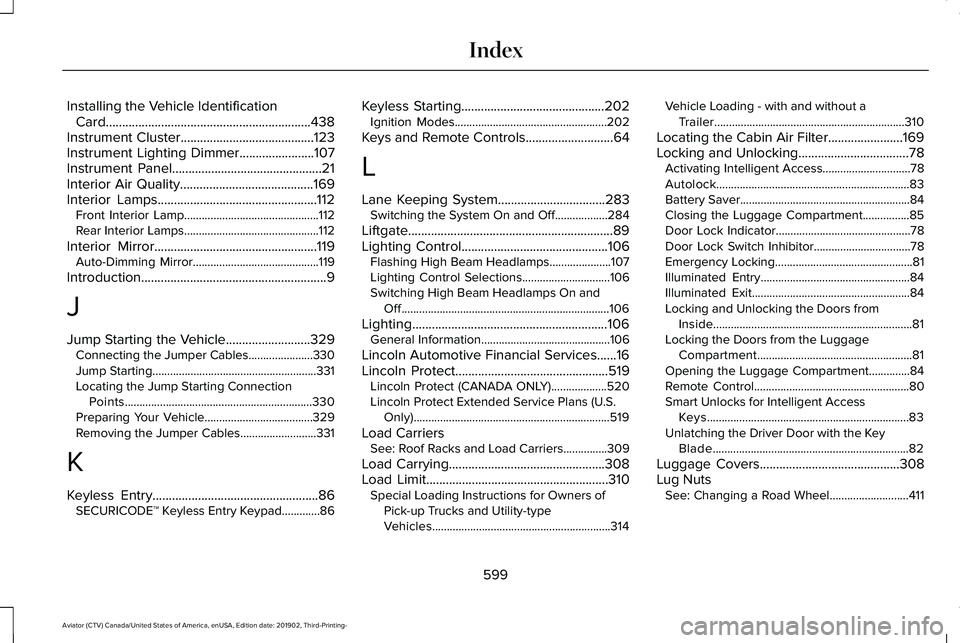
Installing the Vehicle Identification
Card...............................................................438
Instrument Cluster.........................................123
Instrument Lighting Dimmer.......................107
Instrument Panel..............................................21
Interior Air Quality.........................................169
Interior Lamps.................................................112 Front Interior Lamp..............................................112
Rear Interior Lamps..............................................112
Interior Mirror..................................................119 Auto-Dimming Mirror...........................................119
Introduction.........................................................9
J
Jump Starting the Vehicle
..........................329
Connecting the Jumper Cables......................330
Jump Starting........................................................331
Locating the Jump Starting Connection
Points................................................................330
Preparing Your Vehicle.....................................329
Removing the Jumper Cables..........................331
K
Keyless Entry...................................................86 SECURICODE™ Keyless Entry Keypad.............86 Keyless Starting
............................................202
Ignition Modes....................................................202
Keys and Remote Controls...........................64
L
Lane Keeping System.................................283 Switching the System On and Off..................284
Liftgate...............................................................89
Lighting Control.............................................106 Flashing High Beam Headlamps.....................107
Lighting Control Selections..............................106
Switching High Beam Headlamps On and
Off.......................................................................106
Lighting............................................................106 General Information............................................106
Lincoln Automotive Financial Services......16
Lincoln Protect...............................................519 Lincoln Protect (CANADA ONLY)...................520
Lincoln Protect Extended Service Plans (U.S.
Only)...................................................................519
Load Carriers See: Roof Racks and Load Carriers...............309
Load Carrying................................................308
Load Limit
........................................................310
Special Loading Instructions for Owners of
Pick-up Trucks and Utility-type
Vehicles.............................................................314 Vehicle Loading - with and without a
Trailer.................................................................310
Locating the Cabin Air Filter.......................169
Locking and Unlocking..................................78 Activating Intelligent Access..............................
78
Autolock..................................................................83
Battery Saver..........................................................84
Closing the Luggage Compartment................85
Door Lock Indicator..............................................78
Door Lock Switch Inhibitor.................................78
Emergency Locking...............................................81
Illuminated Entry...................................................84
Illuminated Exit......................................................84
Locking and Unlocking the Doors from Inside....................................................................81
Locking the Doors from the Luggage Compartment.....................................................81
Opening the Luggage Compartment..............84
Remote Control.....................................................80
Smart Unlocks for Intelligent Access Keys.....................................................................83
Unlatching the Driver Door with the Key Blade...................................................................82
Luggage Covers...........................................308
Lug Nuts See: Changing a Road Wheel...........................411
599
Aviator (CTV) Canada/United States of America, enUSA, Edition date: 201902, Third-Printing- Index