battery location LINCOLN AVIATOR 2023 User Guide
[x] Cancel search | Manufacturer: LINCOLN, Model Year: 2023, Model line: AVIATOR, Model: LINCOLN AVIATOR 2023Pages: 681, PDF Size: 9.33 MB
Page 432 of 681
Plugging in Your HYBRID
We recommend the following options for
your plug-in vehicle (PHEV) :
• Leave your vehicle plugged in. The 12
volt battery maintains power if left
plugged in. However, this periodically
uses electricity from the household
outlet.
• Connect a battery charger to your 12 volt
battery and leave it on a continuous, slow
charge.
• Disconnect the 12 volt battery. If your 12
volt battery is located in the luggage
compartment, do not fully shut the
luggage compartment after
disconnecting the 12 volt battery. Only
leave the luggage compartment open if
your vehicle is stored in a locked
location.
Brakes
• Make sure the brakes and parking brake
release fully.
Tires
• Maintain recommended air pressure.
Miscellaneous
• Make sure all linkages, cables, levers and
pins under your vehicle are covered with
grease to prevent rust.
• Move vehicles at least 25 ft (7.5 m) every
15 days to lubricate working parts and
prevent corrosion.
Removing Vehicle From Storage
When your vehicle is ready to come out of
storage, do the following:
• Wash your vehicle to remove any dirt or
grease film build-up on window surfaces.
• Check windshield wipers for any
deterioration.
• Check under the hood for any foreign
material that may have collected during
storage such as mice or squirrel nests.
• Check the exhaust for any foreign
material that may have collected during
storage.• Check tire pressures and set tire inflation
per the Tire Label.
• Check brake pedal operation. Drive your
vehicle 15 ft (4.5 m) back and forth to
remove rust build-up.
• Check fluid levels (including coolant, oil
and gas) to make sure there are no leaks,
and fluids are at recommended levels.
• If you remove the battery, clean the
battery cable ends and check for
damage.
Contact an authorized dealer if you have any
concerns or issues.
BODY STYLING KITS (IF EQUIPPED)
The distance between the underside of your
vehicle and the ground is less than that of
other models. Drive with extreme care to
avoid damage to your vehicle.
429
Vehicle Care
Page 550 of 681
• Heater Setting: The engine is on because
of the heater setting. Reduce or switch
off the heater setting to return to electric
operation.
• Neutral Gear: The engine is on because
the vehicle is in neutral (N). Shift out of
neutral gear to return to electric
operation.
• Engine Cold: The engine is on because
it is cold. The vehicle returns to electric
operation once the engine is sufficiently
warm.
• Battery Charging: The engine is on to
charge the high-voltage battery. The
vehicle returns to electric operation once
the battery is sufficiently charged.
• Low Gear: The engine is on because the
vehicle is in low gear. Shift out of low
gear to return to electric operation.
• Normal Operation: The engine is on to
optimize vehicle operation. The vehicle
returns to electric operation when
possible.• Low Use: The engine is on to maintain
engine oil quality. The vehicle returns to
electric operation when low engine use
mode is complete. See Plug-In Hybrid
Vehicle Operation (page 219).
• Fuel Maintenance: The engine is on to
maintain fuel freshness. The vehicle
returns to electric operation when fuel
freshness mode is complete. See Fuel
Quality (page 224).
• Engine Braking Active: The engine is on
to provide increased powertrain braking.
This can occur when you turn on the
grade assist feature, when speed control
is on or when driving with your foot off
the accelerator pedal. Turning off grade
assist or speed control may allow the
vehicle to return to electric operation.
• Battery Temperature: The engine is on
due to high or low high-voltage battery
temperature. This is a normal operating
condition. The vehicle returns to electric
operation when possible.
• Drive Mode: The engine is on due to the
drive mode selection. Select an
appropriate drive mode for electric only
operation.Charge Settings
E304452
The Charge Settings information
for your plug-in hybrid vehicle is
available through the Home screen
or under Vehicle Settings. To Improve your
charging experience, your vehicle has the
following convenience features.
Charge Times
Once you set up Charge Times for a specific
charging location, your vehicle prioritizes
charging based on your preferred time
settings. You can set two preferred charging
time windows for weekdays and two for
weekends. This feature allows you to take
advantage of electric utility rate plans that
offer lower pricing during certain times of
day. Contact your utility company to see what
plans are available.
Note:You can also set up and use these
features using the Lincoln Way app.
547
SYNC™ 3
Page 552 of 681
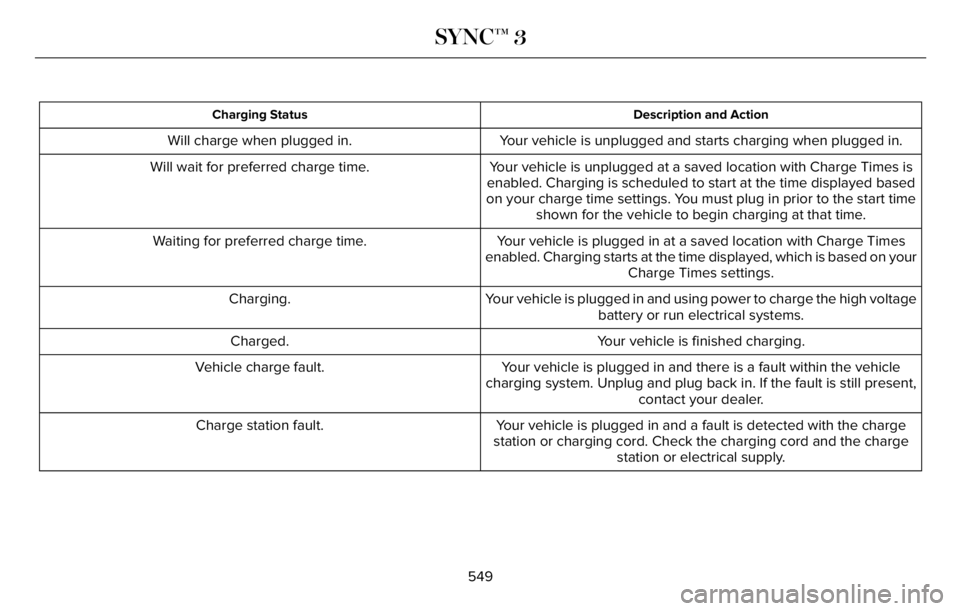
Description and Action Charging Status
Your vehicle is unplugged and starts charging when plugged in. Will charge when plugged in.
Your vehicle is unplugged at a saved location with Charge Times is
enabled. Charging is scheduled to start at the time displayed based
on your charge time settings. You must plug in prior to the start time
shown for the vehicle to begin charging at that time. Will wait for preferred charge time.
Your vehicle is plugged in at a saved location with Charge Times
enabled. Charging starts at the time displayed, which is based on your
Charge Times settings. Waiting for preferred charge time.
Your vehicle is plugged in and using power to charge the high voltage
battery or run electrical systems. Charging.
Your vehicle is finished charging. Charged.
Your vehicle is plugged in and there is a fault within the vehicle
charging system. Unplug and plug back in. If the fault is still present,
contact your dealer. Vehicle charge fault.
Your vehicle is plugged in and a fault is detected with the charge
station or charging cord. Check the charging cord and the charge
station or electrical supply. Charge station fault.
549
SYNC™ 3
Page 553 of 681
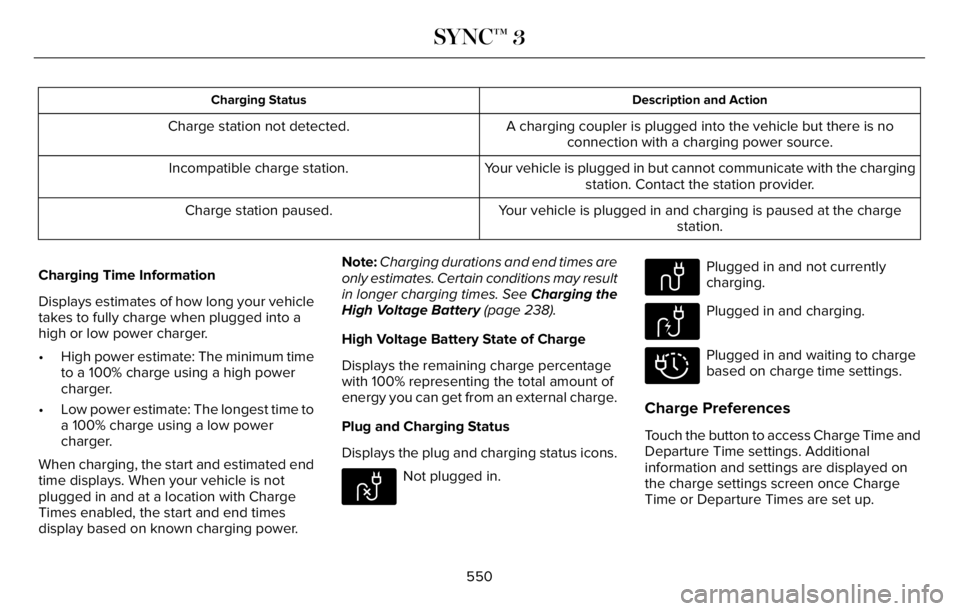
Description and Action Charging Status
A charging coupler is plugged into the vehicle but there is no
connection with a charging power source. Charge station not detected.
Your vehicle is plugged in but cannot communicate with the charging
station. Contact the station provider. Incompatible charge station.
Your vehicle is plugged in and charging is paused at the charge
station. Charge station paused.
Charging Time Information
Displays estimates of how long your vehicle
takes to fully charge when plugged into a
high or low power charger.
• High power estimate: The minimum time
to a 100% charge using a high power
charger.
• Low power estimate: The longest time to
a 100% charge using a low power
charger.
When charging, the start and estimated end
time displays. When your vehicle is not
plugged in and at a location with Charge
Times enabled, the start and end times
display based on known charging power.Note:Charging durations and end times are
only estimates. Certain conditions may result
in longer charging times. See Charging the
High Voltage Battery (page 238).
High Voltage Battery State of Charge
Displays the remaining charge percentage
with 100% representing the total amount of
energy you can get from an external charge.
Plug and Charging Status
Displays the plug and charging status icons.
E304458
Not plugged in.
E304459
Plugged in and not currently
charging.
E304460
Plugged in and charging.
E304461
Plugged in and waiting to charge
based on charge time settings.
Charge Preferences
Touch the button to access Charge Time and
Departure Time settings. Additional
information and settings are displayed on
the charge settings screen once Charge
Time or Departure Times are set up.
550
SYNC™ 3
Page 673 of 681
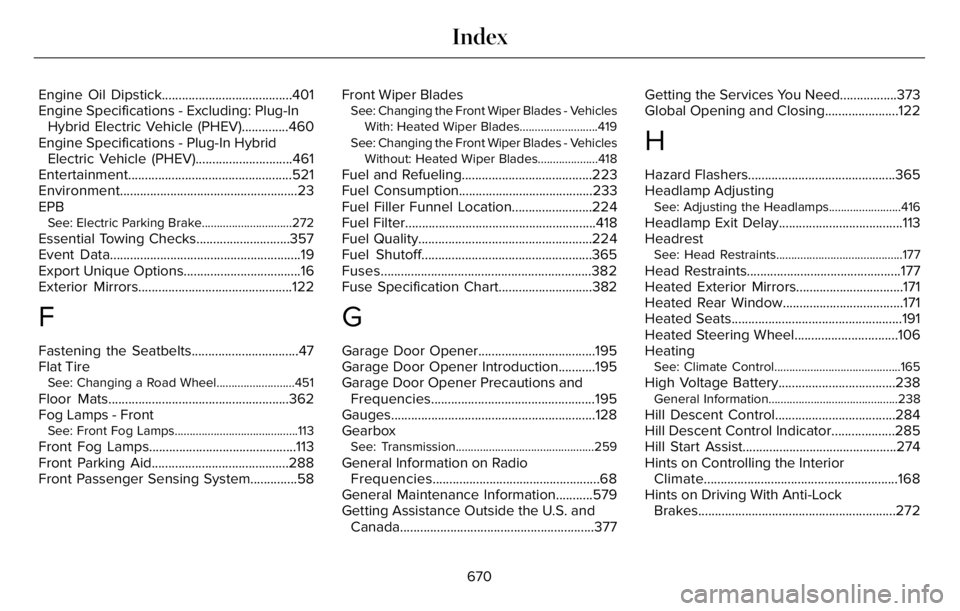
Engine Oil Dipstick.......................................401
Engine Specifications - Excluding: Plug-In
Hybrid Electric Vehicle (PHEV)..............460
Engine Specifications - Plug-In Hybrid
Electric Vehicle (PHEV).............................461
Entertainment.................................................521
Environment.....................................................23
EPB
See: Electric Parking Brake..............................272
Essential Towing Checks............................357
Event Data.........................................................19
Export Unique Options...................................16
Exterior Mirrors..............................................122
F
Fastening the Seatbelts................................47
Flat Tire
See: Changing a Road Wheel..........................451
Floor Mats......................................................362
Fog Lamps - Front
See: Front Fog Lamps.........................................113
Front Fog Lamps............................................113
Front Parking Aid.........................................288
Front Passenger Sensing System..............58Front Wiper Blades
See: Changing the Front Wiper Blades - Vehicles
With: Heated Wiper Blades..........................419
See: Changing the Front Wiper Blades - Vehicles
Without: Heated Wiper Blades....................418
Fuel and Refueling.......................................223
Fuel Consumption........................................233
Fuel Filler Funnel Location........................224
Fuel Filter.........................................................418
Fuel Quality....................................................224
Fuel Shutoff...................................................365
Fuses...............................................................382
Fuse Specification Chart............................382
G
Garage Door Opener...................................195
Garage Door Opener Introduction...........195
Garage Door Opener Precautions and
Frequencies.................................................195
Gauges.............................................................128
Gearbox
See: Transmission..............................................259
General Information on Radio
Frequencies..................................................68
General Maintenance Information...........579
Getting Assistance Outside the U.S. and
Canada..........................................................377Getting the Services You Need.................373
Global Opening and Closing......................122
H
Hazard Flashers............................................365
Headlamp Adjusting
See: Adjusting the Headlamps........................416
Headlamp Exit Delay.....................................113
Headrest
See: Head Restraints..........................................177
Head Restraints..............................................177
Heated Exterior Mirrors................................171
Heated Rear Window....................................171
Heated Seats...................................................191
Heated Steering Wheel...............................106
Heating
See: Climate Control..........................................165
High Voltage Battery...................................238General Information...........................................238
Hill Descent Control....................................284
Hill Descent Control Indicator...................285
Hill Start Assist..............................................274
Hints on Controlling the Interior
Climate..........................................................168
Hints on Driving With Anti-Lock
Brakes...........................................................272
670
Index