height LINCOLN AVIATOR 2023 User Guide
[x] Cancel search | Manufacturer: LINCOLN, Model Year: 2023, Model line: AVIATOR, Model: LINCOLN AVIATOR 2023Pages: 681, PDF Size: 9.33 MB
Page 99 of 681
Stopping the Liftgate Movement
Note: Do not apply sudden excessive force
to the liftgate while it is in motion. This could
damage the power liftgate and its
components.
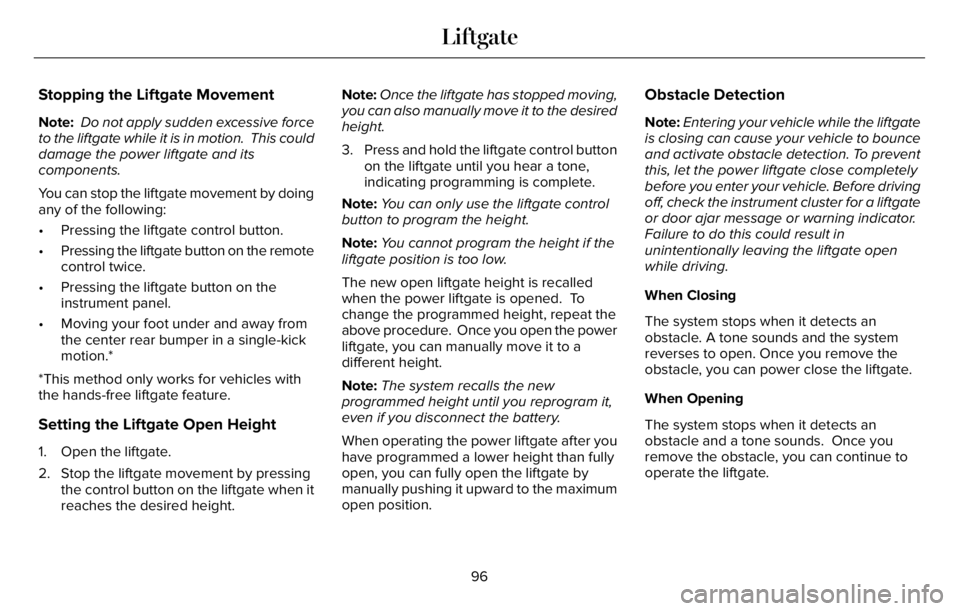
You can stop the liftgate movement by doing
any of the following:
• Pressing the liftgate control button.
• Pressing the liftgate button on the remote
control twice.
• Pressing the liftgate button on the
instrument panel.
• Moving your foot under and away from
the center rear bumper in a single-kick
motion.*
*This method only works for vehicles with
the hands-free liftgate feature.
Setting the Liftgate Open Height
1. Open the liftgate.
2. Stop the liftgate movement by pressing
the control button on the liftgate when it
reaches the desired height.Note:Once the liftgate has stopped moving,
you can also manually move it to the desired
height.
3. Press and hold the liftgate control button
on the liftgate until you hear a tone,
indicating programming is complete.
Note:You can only use the liftgate control
button to program the height.
Note:You cannot program the height if the
liftgate position is too low.
The new open liftgate height is recalled
when the power liftgate is opened. To
change the programmed height, repeat the
above procedure. Once you open the power
liftgate, you can manually move it to a
different height.
Note:The system recalls the new
programmed height until you reprogram it,
even if you disconnect the battery.
When operating the power liftgate after you
have programmed a lower height than fully
open, you can fully open the liftgate by
manually pushing it upward to the maximum
open position.
Obstacle Detection
Note:Entering your vehicle while the liftgate
is closing can cause your vehicle to bounce
and activate obstacle detection. To prevent
this, let the power liftgate close completely
before you enter your vehicle. Before driving
off, check the instrument cluster for a liftgate
or door ajar message or warning indicator.
Failure to do this could result in
unintentionally leaving the liftgate open
while driving.
When Closing
The system stops when it detects an
obstacle. A tone sounds and the system
reverses to open. Once you remove the
obstacle, you can power close the liftgate.
When Opening
The system stops when it detects an
obstacle and a tone sounds. Once you
remove the obstacle, you can continue to
operate the liftgate.
96
Liftgate
Page 122 of 681
WHAT IS AUTOMATIC HIGH BEAM
CONTROL
The system turns on high beams if it is dark
enough and no other traffic is present. If it
detects an approaching vehicle’s headlamps
or tail lamps, or street lighting ahead, the
system turns the high beams off. Low beams
remain on.
A camera sensor, centrally mounted behind
the windshield of your vehicle, continuously
monitors conditions to turn the high beams
on and off.
SWITCHING AUTOMATIC HIGH
BEAM CONTROL ON AND OFF
WARNING: Do not use the system in
poor visibility, for example fog, heavy rain,
spray or snow.
Use the touchscreen to select the following:
1. Select Settings.
2. Select Vehicle.3. Select Lighting.
Activating the Automatic High Beam
Control
E281240
Switch the lighting control to the
autolamps position. See
Autolamps (page 112).
Note:The lighting control defaults to
autolamps each time you switch your vehicle
on.
When active, the high beams turn on if all
the following conditions occur:
• The ambient light level is low enough.
• There is no traffic in front of your vehicle.
• The vehicle speed is greater than
approximately 25 mph (40 km/h).
When active, the high beams turn off if at
least one of the following conditions occur:
• The ambient light level is high enough
that you do not require high beams.
• The system detects an approaching
vehicle's headlamps or tail lamps.
• The system detects severe rain, snow or
fog.• A blocked vehicle camera.
• The vehicle speed falls below
approximately 19 mph (30 km/h).
Note:The deactivation speed is lower on
curves.
Note:Certain curvy road situations may
delay high beam reactivation.
Note:If you have a blocked sensor, the
system may not operate properly. Keep the
windshield free from obstruction or damage.
Note:The system may not operate properly
in cold or inclement conditions. You can
switch on the high beams by overriding the
system.
Note:If the system detects a blockage, for
example bird droppings, bug splatter, snow
or ice, the system goes into low beam mode
until you clear the blockage. If you have a
blocked camera, a message may appear in
the information display.
Note:Using much larger tires or equipping
vehicle accessories such as snowplows can
modify your vehicle's ride height and
degrade automatic high beam control
performance.
119
Automatic High Beam Control
Page 182 of 681
Removing the Head Restraint
1. Press and hold the C buttons.
2. Pull the head restraint up.
Installing the Head Restraint
Align the steel stems into the guide sleeves
and push the head restraint down until it
locks.
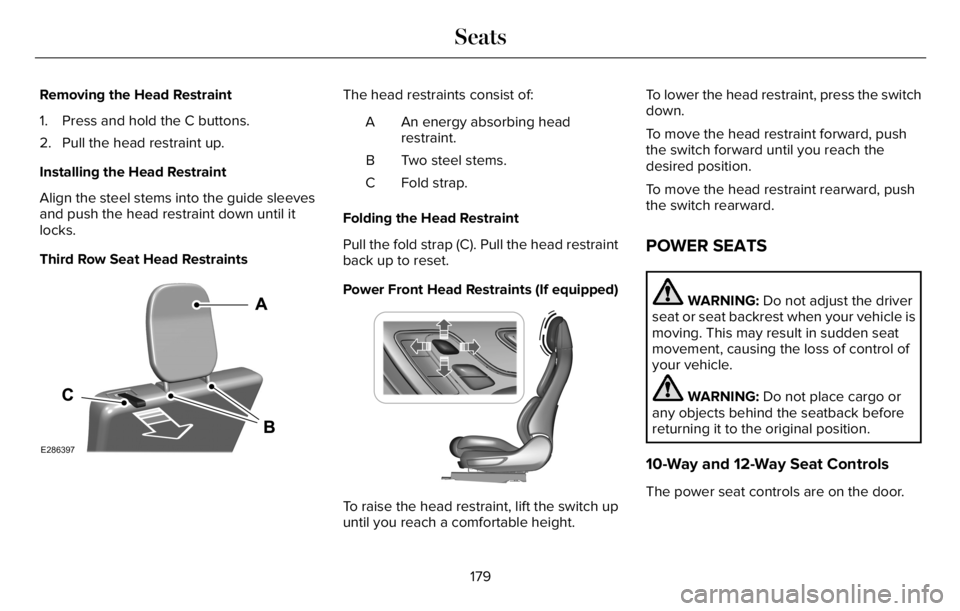
Third Row Seat Head Restraints
E286397
The head restraints consist of:
An energy absorbing head
restraint. A
Two steel stems. B
Fold strap. C
Folding the Head Restraint
Pull the fold strap (C). Pull the head restraint
back up to reset.
Power Front Head Restraints (If equipped)
E222280
To raise the head restraint, lift the switch up
until you reach a comfortable height.To lower the head restraint, press the switch
down.
To move the head restraint forward, push
the switch forward until you reach the
desired position.
To move the head restraint rearward, push
the switch rearward.
POWER SEATS
WARNING: Do not adjust the driver
seat or seat backrest when your vehicle is
moving. This may result in sudden seat
movement, causing the loss of control of
your vehicle.
WARNING: Do not place cargo or
any objects behind the seatback before
returning it to the original position.
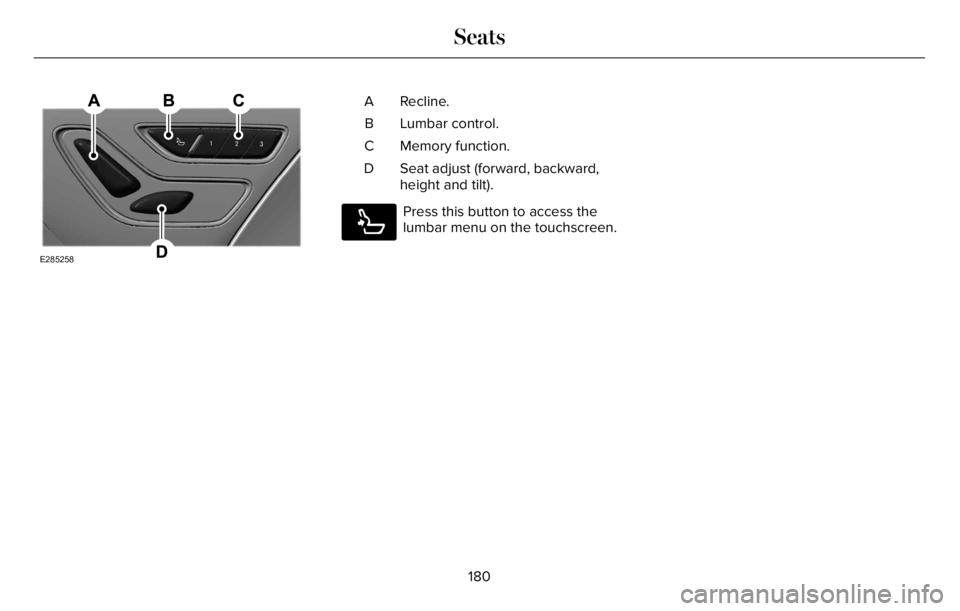
10-Way and 12-Way Seat Controls
The power seat controls are on the door.
179
Seats
Page 183 of 681
E285258
Recline. A
Lumbar control. B
Memory function. C
Seat adjust (forward, backward,
height and tilt). D
E285278
Press this button to access the
lumbar menu on the touchscreen.
180
Seats
Page 185 of 681
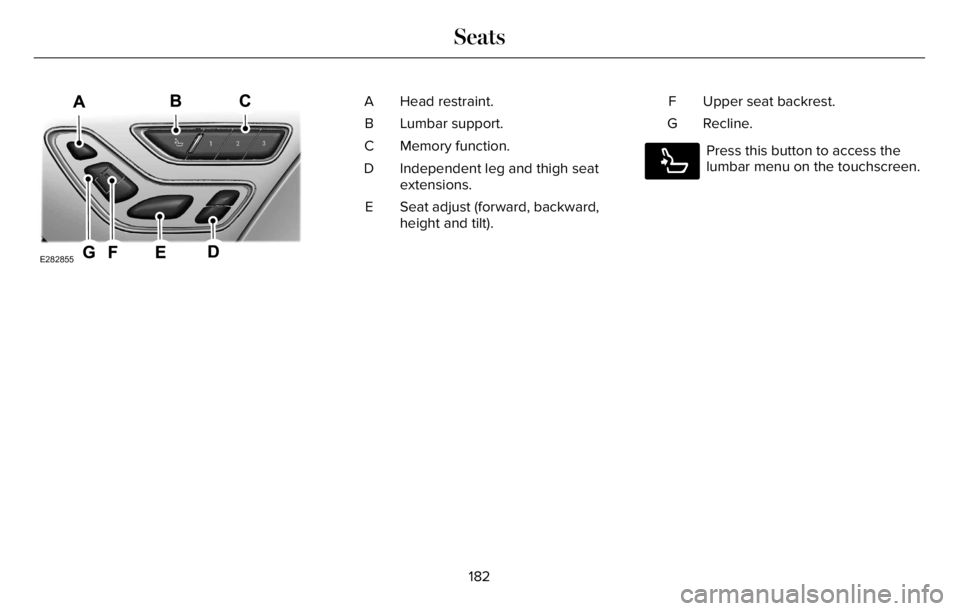
E282855
Head restraint. A
Lumbar support. B
Memory function. C
Independent leg and thigh seat
extensions. D
Seat adjust (forward, backward,
height and tilt). EUpper seat backrest. F
Recline. G
E285278
Press this button to access the
lumbar menu on the touchscreen.
182
Seats
Page 355 of 681
Special Loading Instructions for
Owners of Pick-up Trucks and Utility-
type Vehicles
WARNING: When loading the
roof racks, we recommend you evenly
distribute the load, as well as maintain
a low center of gravity. Loaded
vehicles, with higher centers of gravity,
may handle differently than unloaded
vehicles. Take extra precautions, such
as slower speeds and increased
stopping distance, when driving a
heavily loaded vehicle.
AIR SUSPENSION (IF EQUIPPED)
WARNING: If your vehicle has
self-leveling air suspension, you must
switch the system off before carrying out
any maintenance or repair. Failure to follow
this warning could result in serious
personal injury or death.The air suspension system automatically
adjusts to maintain a constant frame height,
allows for ease of vehicle loading, provides
improved vehicle ride, and increased driver
comfort.
You can adjust different ride settings through
the selectable drive modes. See Selecting
a Drive Mode (page 343).
Note:The air suspension system may not
operate properly if you exceed the load limit.
See Load Limit (page 348).
Note:When your vehicle is off, the air
compressor may run for a short time. This is
normal.
Switching the systems on or off
You can access the air suspension, liftgate
and easy entry features through the
information display menu settings. See
General Information (page 136).
Using the Service Mode
When the service mode is active, the air
suspension does not make any adjustments
while your vehicle is stationary.Note:Always switch the air suspension
service mode to on before servicing your
vehicle.
Using Cargo Loading
The air suspension cargo loading feature
lowers your vehicle for easier access when
the system detects the liftgate is opening.
When the liftgate is closed your vehicle
returns to its normal height after a short time.
Note:To preserve your vehicle battery, your
vehicle may only lower for cargo mode one
to two times per ignition cycle.
Using Easy Entry
The air suspension can lower your vehicle
to an easier access entry height when the
system detects the intelligent access key,
you press the unlock button, use the remote
start, or use Phone as a Key.
The leveling process stops when you open
a door or the target level is achieved.
Note:To stop the leveling process, press the
lock button on the intelligent access key.
352
Load Carrying
Page 419 of 681
6. Remove the battery securing clamp.
7. Remove the battery.
8. To install, reverse the removal procedure.
Note:Before reconnecting the battery, make
sure the ignition remains switched off.
Note:Make sure to fully tighten the battery
cables.
If you disconnect or replace the vehicle
battery, you must reset the following
features:
• Window bounce-back. See Power
Windows (page 121).
• Clock Settings.
• Pre-set radio stations.
Battery Disposal
E107998
Make sure that you dispose of old
batteries in an environmentally
friendly way. Seek advice from
your local authority about recycling old
batteries.
ADJUSTING THE HEADLAMPS
Vertical Aim Adjustment
If your vehicle has been involved in a crash,
have the aim of the headlamp beam checked
by an authorized dealer.
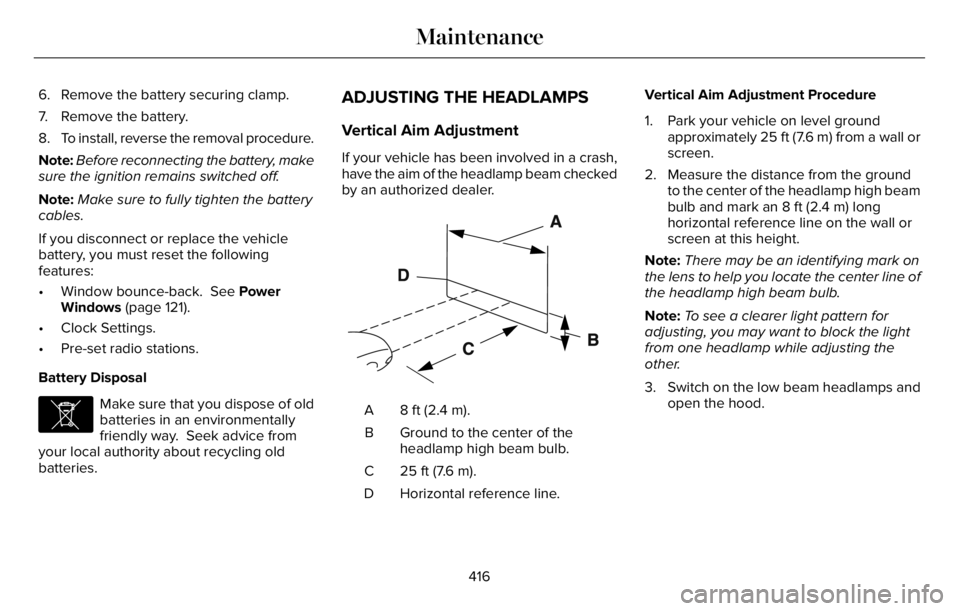
E142592
8 ft (2.4 m). A
Ground to the center of the
headlamp high beam bulb. B
25 ft (7.6 m). C
Horizontal reference line. DVertical Aim Adjustment Procedure
1. Park your vehicle on level ground
approximately 25 ft (7.6 m) from a wall or
screen.
2. Measure the distance from the ground
to the center of the headlamp high beam
bulb and mark an 8 ft (2.4 m) long
horizontal reference line on the wall or
screen at this height.
Note:There may be an identifying mark on
the lens to help you locate the center line of
the headlamp high beam bulb.
Note:To see a clearer light pattern for
adjusting, you may want to block the light
from one headlamp while adjusting the
other.
3. Switch on the low beam headlamps and
open the hood.
416
Maintenance
Page 438 of 681
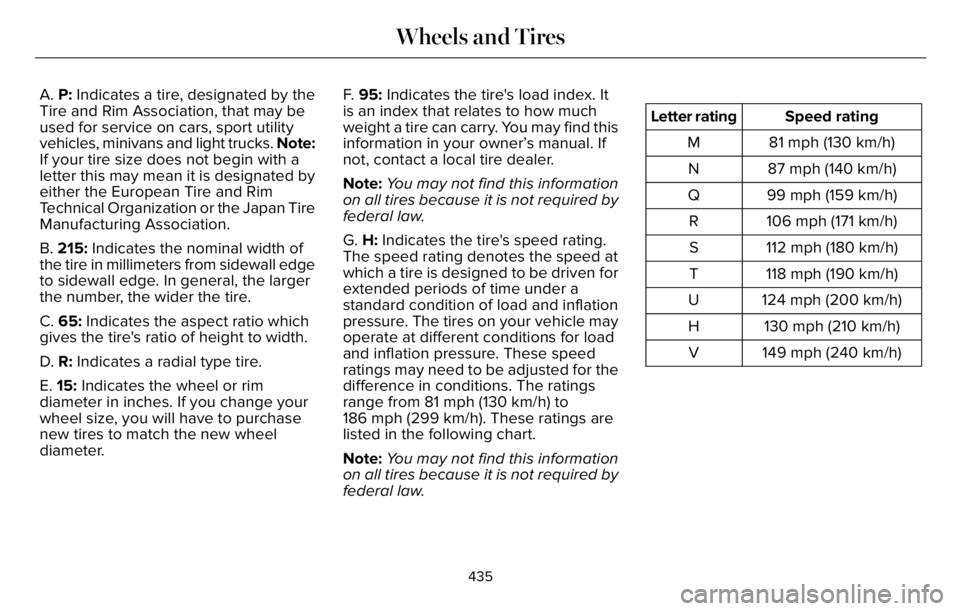
A. P: Indicates a tire, designated by the
Tire and Rim Association, that may be
used for service on cars, sport utility
vehicles, minivans and light trucks. Note:
If your tire size does not begin with a
letter this may mean it is designated by
either the European Tire and Rim
Technical Organization or the Japan Tire
Manufacturing Association.
B. 215: Indicates the nominal width of
the tire in millimeters from sidewall edge
to sidewall edge. In general, the larger
the number, the wider the tire.
C. 65: Indicates the aspect ratio which
gives the tire's ratio of height to width.
D. R: Indicates a radial type tire.
E. 15: Indicates the wheel or rim
diameter in inches. If you change your
wheel size, you will have to purchase
new tires to match the new wheel
diameter.F. 95: Indicates the tire's load index. It
is an index that relates to how much
weight a tire can carry. You may find this
information in your owner’s manual. If
not, contact a local tire dealer.
Note:You may not find this information
on all tires because it is not required by
federal law.
G. H: Indicates the tire's speed rating.
The speed rating denotes the speed at
which a tire is designed to be driven for
extended periods of time under a
standard condition of load and inflation
pressure. The tires on your vehicle may
operate at different conditions for load
and inflation pressure. These speed
ratings may need to be adjusted for the
difference in conditions. The ratings
range from 81 mph (130 km/h) to
186 mph (299 km/h). These ratings are
listed in the following chart.
Note:You may not find this information
on all tires because it is not required by
federal law.
Speed rating Letter rating
81 mph (130 km/h) M
87 mph (140 km/h) N
99 mph (159 km/h) Q
106 mph (171 km/h) R
112 mph (180 km/h) S
118 mph (190 km/h) T
124 mph (200 km/h) U
130 mph (210 km/h) H
149 mph (240 km/h) V
435
Wheels and Tires
Page 441 of 681
B. Load Range and Load Inflation
Limits: Indicates the tire's load-carrying
capabilities and its inflation limits.
C. Maximum Load Dual lb (kg) at psi
(kPa) cold: Indicates the maximum load
and tire pressure when the tire is used
as a dual, defined as four tires on the
rear axle (a total of six or more tires on
the vehicle).
D. Maximum Load Single lb (kg) at psi
(kPa) cold: Indicates the maximum load
and tire pressure when the tire is used
as a single, defined as two tires (total)
on the rear axle.
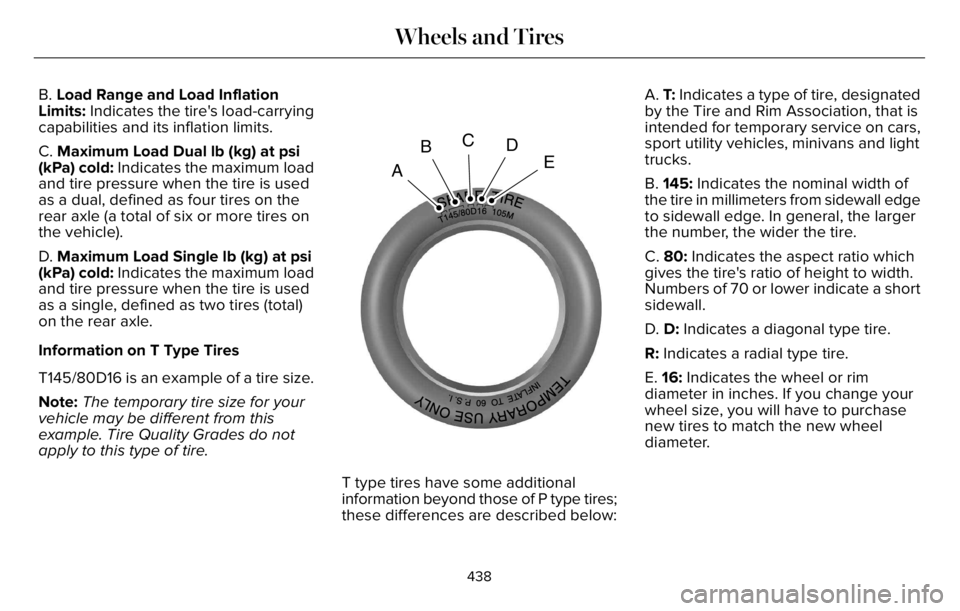
Information on T Type Tires
T145/80D16 is an example of a tire size.
Note:The temporary tire size for your
vehicle may be different from this
example. Tire Quality Grades do not
apply to this type of tire.
A
BCD
E
T type tires have some additional
information beyond those of P type tires;
these differences are described below:A. T: Indicates a type of tire, designated
by the Tire and Rim Association, that is
intended for temporary service on cars,
sport utility vehicles, minivans and light
trucks.
B. 145: Indicates the nominal width of
the tire in millimeters from sidewall edge
to sidewall edge. In general, the larger
the number, the wider the tire.
C. 80: Indicates the aspect ratio which
gives the tire's ratio of height to width.
Numbers of 70 or lower indicate a short
sidewall.
D. D: Indicates a diagonal type tire.
R: Indicates a radial type tire.
E. 16: Indicates the wheel or rim
diameter in inches. If you change your
wheel size, you will have to purchase
new tires to match the new wheel
diameter.
438
Wheels and Tires
Page 443 of 681
Inspecting Your Tires and Wheel Valve
Stems
Periodically inspect the tire treads for
uneven or excessive wear and remove
objects such as stones, nails or glass
that may be wedged in the tread
grooves. Check the tire and valve stems
for holes, cracks, or cuts that may permit
air leakage and repair or replace the tire
and replace the valve stem. Inspect the
tire sidewalls for cracking, cuts, bruises
and other signs of damage or excessive
wear. If internal damage to the tire is
suspected, have the tire demounted and
inspected in case it needs to be repaired
or replaced. For your safety, tires that
are damaged or show signs of excessive
wear should not be used because they
are more likely to blow out or fail.
Improper or inadequate vehicle
maintenance can cause tires to wear
abnormally. Inspect all your tires,
including the spare, frequently, and
replace them if one or more of the
following conditions exist:Tire Wear
E142546
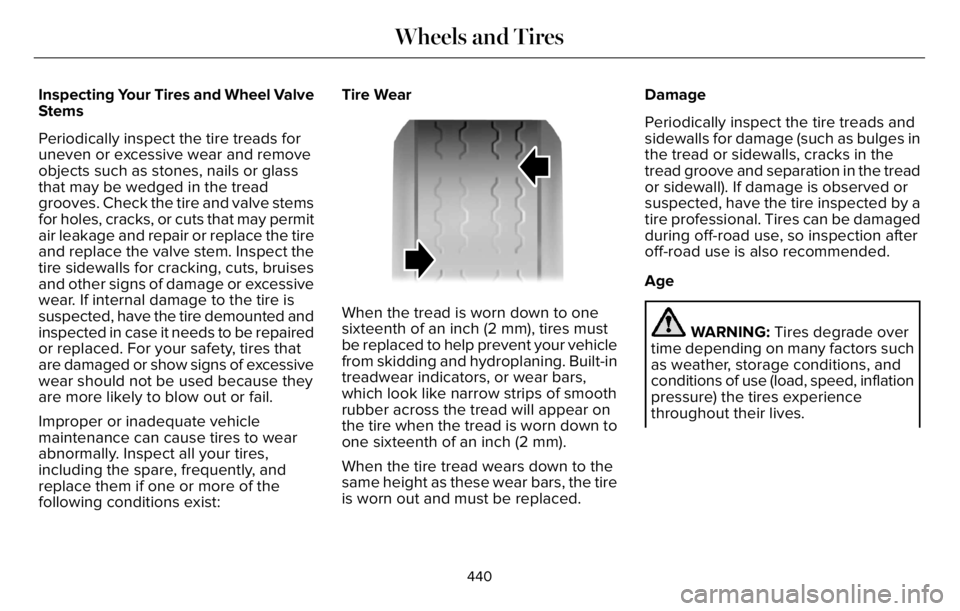
When the tread is worn down to one
sixteenth of an inch (2 mm), tires must
be replaced to help prevent your vehicle
from skidding and hydroplaning. Built-in
treadwear indicators, or wear bars,
which look like narrow strips of smooth
rubber across the tread will appear on
the tire when the tread is worn down to
one sixteenth of an inch (2 mm).
When the tire tread wears down to the
same height as these wear bars, the tire
is worn out and must be replaced.Damage
Periodically inspect the tire treads and
sidewalls for damage (such as bulges in
the tread or sidewalls, cracks in the
tread groove and separation in the tread
or sidewall). If damage is observed or
suspected, have the tire inspected by a
tire professional. Tires can be damaged
during off-road use, so inspection after
off-road use is also recommended.
Age
WARNING: Tires degrade over
time depending on many factors such
as weather, storage conditions, and
conditions of use (load, speed, inflation
pressure) the tires experience
throughout their lives.
440
Wheels and Tires