ignition LINCOLN AVIATOR 2023 User Guide
[x] Cancel search | Manufacturer: LINCOLN, Model Year: 2023, Model line: AVIATOR, Model: LINCOLN AVIATOR 2023Pages: 681, PDF Size: 9.33 MB
Page 79 of 681
Note:If the backup start passcode screen
does not appear, press the brake pedal and
push button ignition switch again.
2. Use the touchscreen to enter your
backup start passcode.
3. After entering your backup start
passcode, press Enter within 30 seconds.
4. Once the system validates the backup
start passcode, a message alerts you to
start your vehicle.
5. Press the brake pedal and the push
button ignition switch within 20 seconds
to start the vehicle.
6. If your vehicle does not start, repeat
steps 1-5.
System Lockout
The system locks after five combined
incorrect attempts of the following:
• Entering a backup start passcode.
• Resetting a current passcode.
• Entering a valet mode passcode.Note:The system remains locked for five
minutes. After five minutes the system allows
codes to be entered again.
PHONE AS A KEY –
TROUBLESHOOTING
PHONE AS A KEY – FREQUENTLY
ASKED QUESTIONS
How can I tell if my vehicle has Phone as a
Key?
The touchscreen shows the Phone as a
Key reset option if your vehicle has
Phone as a Key. If you have registered
your vehicle through the Lincoln Way
app, a control button appears on the
home screen of the Lincoln Way app.What happens if I cannot unlock the vehicle
with Phone as a Key?
Attempt to move your phone closer to
the vehicle. Check that the Lincoln Way
app is still running and that the Phone
as a Key control screen shows
connected. If the phone is connected,
attempt to press the remote unlock
button in the Lincoln Way app. If the
phone is not connected or the remote
unlock button does not work in the
Lincoln Way app, attempt to force close
and restart the app.
Why do I get a No Key Detected message
in the instrument cluster display when I am
using Phone as a Key and my phone is in
the car?
Your phone’s Bluetooth connection has
been disrupted or is not connected. Try
reconnecting your phone's Bluetooth
connection. Move the phone closer to
the center of the vehicle near the cup
holder or center console. Verify your
Phone as a Key is still active, enabled
and has not been revoked.
76
Phone as a Key (If Equipped)
Page 82 of 681
Note:Not every feature applies to every
vehicle in every market. When they are
available for your vehicle, then they appear
in the information display, providing choices
to switch them on or off, or to select a more
specific setting.
• Various vehicle speed limits so the
MyKey driver cannot exceed certain
speeds. The information display shows
warnings followed by an audible tone
when the MyKey driver reaches the set
speed. You cannot override the set
speed by fully depressing the accelerator
pedal.
WARNING: Do not set MyKey
maximum speed limit to a limit that will
prevent the driver from maintaining a safe
speed considering posted speed limits and
prevailing road conditions. The driver is
always responsible to drive in accordance
with local laws and prevailing conditions.
Failure to do so could result in accident or
injury.• Various vehicle speed reminders so
MyKey drivers know when their vehicle
speed approaches the limits. Warnings
appear in the information display and a
tone sounds when the MyKey drivers
exceed the set vehicle speed.
• The audio system's maximum volume
limits to 45% so MyKey drivers can
concentrate on the road. A message
appears in the information display when
MyKey drivers attempt to exceed the
limited volume. MyKey also disables the
automatic volume control. Note: If your
vehicle includes an AM/FM radio or a
very basic audio system, then the radio
may not limit.
• Always on setting. This setting forces
certain features to remain on and active
for MyKey drivers. For example, E911 or
emergency assistance and the do not
disturb features stay on even if a MyKey
driver uses the feature's control to switch
it off. When selected, you will not be able
to turn off Advance Trac or traction
control (if your vehicle has this feature).
CREATING A MYKEY
Use the touchscreen to create a MyKey:
1. Insert the key you want to program into
the ignition. If your vehicle has a push
button start, place the remote control into
the backup slot. See Starting a Gasoline
Engine (page 206).
2. Switch the ignition on.
3. Press SETTINGS.
4. Press Vehicle.
5. Press MyKey.
6. Press Create MyKey.
7. Press Ye s.
8. Switch the ignition off.
You have successfully created a MyKey.
Make sure you label it so you can distinguish
it from the admin keys.
You can also program configurable settings
for the key.
79
MyKey™
Page 83 of 681
Programming and Changing
Configurable Settings
Use the touchscreen to access your
configurable MyKey settings.
1. Switch the ignition on using an admin key
or the remote control you want to
program.
2. Press SETTINGS.
3. Press Vehicle.
4. Press MyKey.
5. Select a setting and configure it by
following the instructions on the
touchscreen.
The programmed restrictions apply when
you switch the vehicle off, open and close
the driver door and restart your vehicle with
the programmed key or remote control.Note: You can clear or change your MyKey
settings at any time during the same key
cycle as you created the MyKey. Once you
have switched the vehicle off, you need an
admin key to change or clear your MyKey
settings. When you make any changes to
your MyKey settings, you change the settings
for every MyKey. You cannot make
individual changes to apply to specific
MyKeys.
CLEARING ALL MYKEYS
When you clear your MyKeys, you remove
all restrictions and return all MyKeys to their
original admin key status at once. To clear
all MyKeys of all MyKey settings, use the
touchscreen.
1. Switch the ignition on using an admin
key.
2. Press SETTINGS.
3. Press Vehicle.
4. Press MyKey.
5. Press Clear All MyKeys.
6. Press Ye s.7. A confirmation message appears in the
display after you finish clearing your
MyKeys.
CHECKING MYKEY SYSTEM
STATUS
You can find information about your
programmed MyKeys by using the
touchscreen. See Settings (page 555).
MyKey Distance
Tracks the distance when drivers use a
MyKey. The only way to delete the
accumulated distance is by using an admin
key to clear all MyKeys. If the distance does
not accumulate as expected, then the
intended user is not using the MyKey, or an
admin key user recently cleared and then
recreated a MyKey.
80
MyKey™
Page 86 of 681
LOCKING AND UNLOCKING
Your vehicle has an intelligent electronically
controlled door system that is in constant
communication with overall vehicle systems.
When you lock your vehicle using either the
lock switch on each door interior trim panel,
the keyless entry keypad or the lock sensor
on each exterior door trim panel, the exterior
door handle switches do not release the
doors. This helps secure your vehicle and
prevent unauthorized entry. Also, when your
vehicle reaches a speed greater than 12 mph
(20 km/h), the exterior door handle switches
do not release the doors.
If the airbags deploy or the fuel pump shutoff
switch activates, all interior and exterior
unlock switches do not unlock your door for
six seconds. This helps secure the doors in
the event of a crash. After six seconds, all
switches reset and you can open the doors
using the interior and exterior unlatch
switches.
Door Lock Indicator
An LED on each door lock switch illuminates
when you lock the doors. It remains on for
2 to 5 seconds after you switch the ignition
off.
Door Lock Switch Inhibitor
When you electronically lock your vehicle,
the door lock switches and the interior
luggage compartment release switch do not
operate after 20 seconds. To restore
function to these switches, you must unlock
your vehicle with the remote control or
keyless entry keypad, or switch the ignition
on.
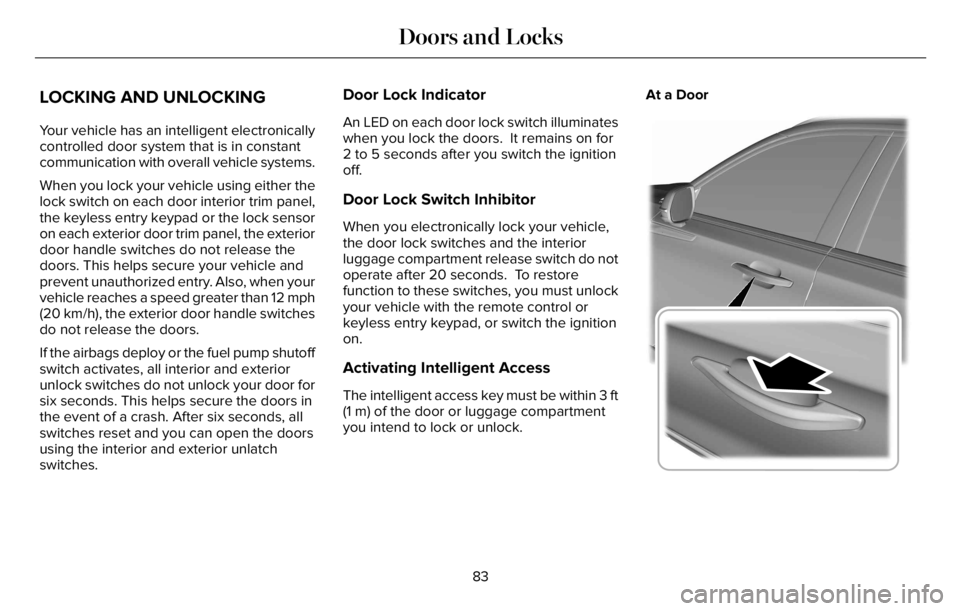
Activating Intelligent Access
The intelligent access key must be within 3 ft
(1 m) of the door or luggage compartment
you intend to lock or unlock.At a Door
E295769
83
Doors and Locks
Page 91 of 681
Smart Unlocks for Intelligent Access
Keys
This prevents you from locking your
intelligent access key inside your vehicle’s
passenger compartment or rear cargo area.
When you electronically lock your vehicle
with any door open, the transmission is in
park (P) and the ignition is off, the system
searches for an intelligent access key inside
your vehicle after you close the last door. If
the system finds a key, all the doors
immediately unlock and the horn sounds
twice, indicating that a key is inside.
You can override the smart unlock feature
and intentionally lock the intelligent access
key inside your vehicle.
To do this, lock your vehicle after you have
closed all the doors by:
• Using the keyless entry keypad.
• Pressing the lock button on another
intelligent access key.
• Touching the locking sensor on the door
window trim with another intelligent
access key in your hand.When you open one of the front doors and
lock your vehicle using the power door lock
control, all doors lock then unlock if:
• The ignition is on.
• The ignition is off, and the transmission
is not in park (P).
Autolock (If Equipped)
Autolock locks all the doors when:
• All doors are closed.
• The ignition is on.
• You shift into any gear putting your
vehicle in motion.
• Your vehicle reaches a speed greater
than 12 mph (20 km/h).
Autolock repeats when:
• You open then close any door while the
ignition is on and your vehicle speed is
9 mph (15 km/h) or lower.
• Your vehicle reaches a speed greater
than 12 mph (20 km/h).
Autounlock
Autounlock unlocks all the doors when:
• The ignition is on, all the doors are
closed, and your vehicle has been
moving at a speed greater than 12 mph
(20 km/h).
• Your vehicle comes to a stop and you
switch the ignition off or to the accessory
position.
• You open the driver door within 10
minutes of switching the ignition off or to
accessory.
Note:The doors do not autounlock if you
electronically lock your vehicle after you
switch the ignition off and before you open
the driver door.
Switching Autounlock On and Off
Use the touchscreen to select the following:
1. Select Settings.
2. Select Vehicle.
3. Select Locks.
4. Switch Autounlock on or off.
88
Doors and Locks
Page 92 of 681
Illuminated Entry
The interior lamps and some exterior lamps
illuminate when you unlock the doors with
the remote control.
The illuminated entry system turns off the
lights if:
• The ignition is on.
• You press the remote control lock button.
• More than 25 seconds have elapsed.
The lights do not turn off if:
• You turn them on with the lamp control.
• Any door is open.
Illuminated Exit
The interior lamps and some exterior lamps
illuminate when all doors are closed and you
switch the ignition off.
The lamps turn off if all the doors remain
closed and:
• More than 25 seconds have elapsed.
• You press the push button ignition
switch.
Battery Saver
If you leave the courtesy lamps, interior
lamps or headlamps on, the battery saver
shuts them off 10 minutes after you switch
the ignition off.
Battery Saver for Intelligent Access Keys
If you leave the ignition switched on, it shuts
off when it detects a certain amount of
battery drain, or after 30 minutes.
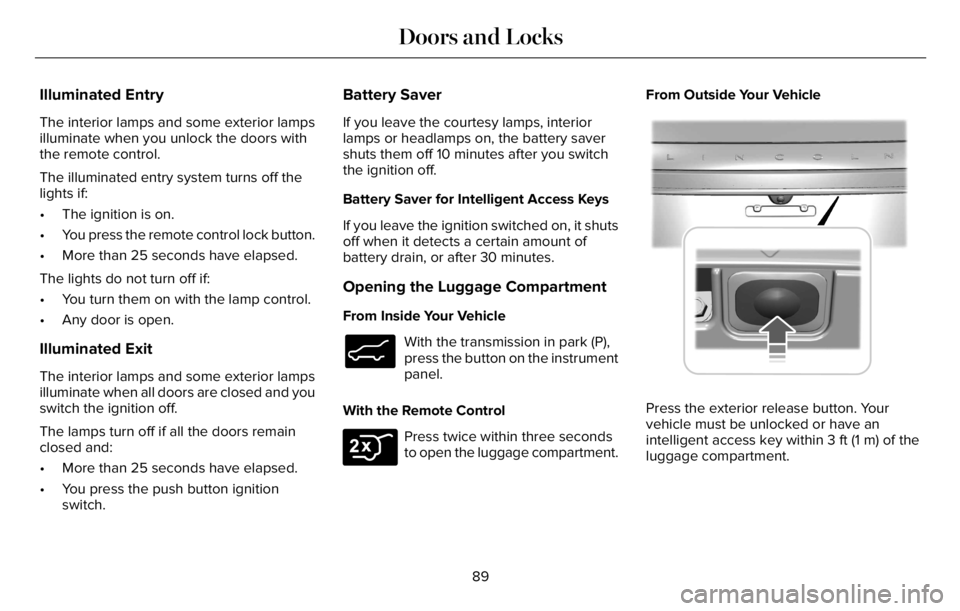
Opening the Luggage Compartment
From Inside Your Vehicle
E138633
With the transmission in park (P),
press the button on the instrument
panel.
With the Remote Control
E306276
Press twice within three seconds
to open the luggage compartment.From Outside Your Vehicle
E291416E291416
Press the exterior release button. Your
vehicle must be unlocked or have an
intelligent access key within 3 ft (1 m) of the
luggage compartment.
89
Doors and Locks
Page 94 of 681
EMERGENCY DOOR RELEASE
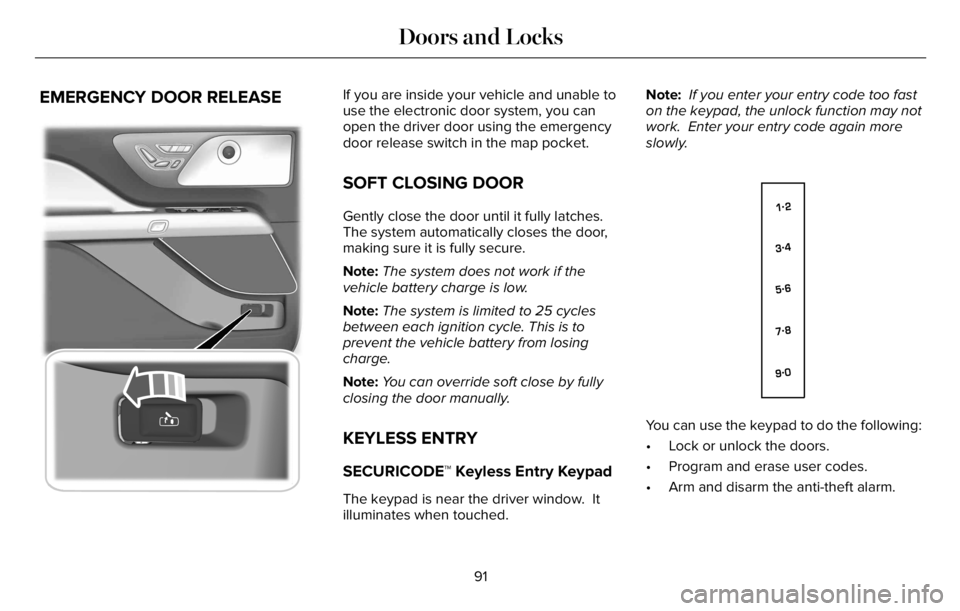
E2995773E295773295773
If you are inside your vehicle and unable to
use the electronic door system, you can
open the driver door using the emergency
door release switch in the map pocket.
SOFT CLOSING DOOR
Gently close the door until it fully latches.
The system automatically closes the door,
making sure it is fully secure.
Note:The system does not work if the
vehicle battery charge is low.
Note:The system is limited to 25 cycles
between each ignition cycle. This is to
prevent the vehicle battery from losing
charge.
Note:You can override soft close by fully
closing the door manually.
KEYLESS ENTRY
SECURICODE™ Keyless Entry Keypad
The keypad is near the driver window. It
illuminates when touched.Note: If you enter your entry code too fast
on the keypad, the unlock function may not
work. Enter your entry code again more
slowly.
E138637
You can use the keypad to do the following:
• Lock or unlock the doors.
• Program and erase user codes.
• Arm and disarm the anti-theft alarm.
91
Doors and Locks
Page 97 of 681
POWER LIFTGATE
WARNING: It is extremely dangerous
to ride in a cargo area, inside or outside of
a vehicle. In a crash, people riding in these
areas are more likely to be seriously
injured or killed. Do not allow people to
ride in any area of your vehicle that is not
equipped with seats and seatbelts. Make
sure everyone in your vehicle is in a seat
and properly using a seatbelt. Failure to
follow this warning could result in serious
personal injury or death.
WARNING: Make sure that you fully
close the liftgate to prevent exhaust fumes
from entering your vehicle. If you are
unable to fully close the liftgate, open the
air vents or the windows to allow fresh air
to enter your vehicle. Failure to follow this
instruction could result in personal injury
or death.
WARNING: Keep keys out of reach
of children. Do not allow children to
operate or play near an open or moving
power liftgate. You should supervise the
operation of the power liftgate at all times.
Note: Make sure that you close the liftgate
before operating or moving your vehicle,
especially in an enclosure, like a garage or
a parking structure. This could damage the
liftgate and its components.
Note: Do not hang anything, for example a
bike rack, from the glass or liftgate. This
could damage the liftgate and its
components.
Note:Make sure that you fully close the
liftgate to prevent cargo from falling out
The liftgate only operates with the
transmission in park (P).
If there is a problem with the open or close
request, a tone sounds for one of the
following reasons:• The ignition is on and the transmission
is not in park (P).
• The battery voltage is below the
minimum operating voltage.
• The liftgate is not fully closed and your
vehicle speed is at or above 3 mph
(5 km/h).
If the liftgate starts to close after it has fully
opened, this indicates there could be
excessive weight on the liftgate or a possible
strut failure. A repetitive tone sounds and
the liftgate closes under control. If the liftgate
continues to close after opening, have the
system checked by an authorized dealer.
Remove any excessive weight from the
liftgate.
Opening and Closing the Liftgate
WARNING: Make sure all persons
are clear of the power liftgate area before
using the power liftgate control.
94
Liftgate
Page 102 of 681
PASSIVE ANTI-THEFT SYSTEM
Note: The system is not compatible with
non-Ford aftermarket remote start systems.
Use of these systems may result in vehicle
starting problems and a loss of security
protection.
Note:Metallic objects, electronic devices or
a second coded key on the same key chain
may cause vehicle starting problems if they
are too close to the key when starting the
engine. Prevent these objects from touching
the coded key while starting the engine.
Switch the ignition off, move all objects on
the key chain away from the coded key and
restart the engine if a problem occurs.
Note:Do not leave a duplicate coded key
in the vehicle. Always take your keys and
lock all doors when leaving the vehicle.
SecuriLock®
The system is an engine immobilization
system. It is designed to help prevent the
engine from being started unless a coded
key programmed to your vehicle is used.
Using the wrong key may prevent the engine
from starting. A message may appear in the
information display.
If you are unable to start the engine with a
correctly coded key, a malfunction has
happened and a message may appear in the
information display.
Automatic Arming
The vehicle arms immediately after you
switch the ignition off.
Automatic Disarming
Switching the ignition on with a coded key
disarms the vehicle.
Replacement Keys
Note:Your vehicle comes equipped with two
intelligent access keys.The intelligent access key functions as a
programmed key that operates the driver
door lock and activates the intelligent access
with push button start system, as well as a
remote control.
If your programmed transmitters are lost or
stolen and you do not have an extra coded
key, you will need to have your vehicle
towed to an authorized dealer. You need to
erase the key codes from your vehicle and
program new coded keys.
Store an extra programmed key away from
the vehicle in a safe place to help prevent
any inconveniences. See your authorized
dealer to purchase additional spare or
replacement keys.
Programming a Spare Intelligent Access
Key
See your authorized dealer to have
additional keys programmed to your vehicle.
99
Security
Page 103 of 681
ANTI-THEFT ALARM
The active anti-theft system is designed to
warn you in the event of unauthorized
vehicle entry and is also designed to help
prevent unwanted towing of your vehicle.
You can choose what is monitored by arming
the system in different ways. See
Information Displays (page 136).
The turn signals flash and the horn sounds
if the system triggers while the alarm is
armed.
Take all remote controls to an authorized
dealer if there is any potential alarm problem
with your vehicle.
Using the System
You can select two levels of alarm security.
You can change the level of security when
the ignition is switched off through the
information display with the two options
below:Perimeter Sensing (If Equipped)
Perimeter sensing monitors the following:
• Doors.
• Hood.
• Liftgate.
All Sensors (If Equipped)
All sensors monitors the following:
• Doors.
• Hood.
• Liftgate.
• Movement inside your vehicle.
• Change in vehicle inclination, for
example, unwanted towing.
Note:Do not choose all sensors monitor
mode when the vehicle is in transport or if
movement within the vehicle is likely to
occur.Note:For correct operation of the interior
motion detection system, make sure you
close all the windows prior to arming the
system. This helps prevent accidental alarm
activation due to external influences.
Additionally, the interior motion sensing
system does not arm if any door is ajar.
Arming the Alarm
The alarm is ready to arm when there is not
a key in the ignition. Lock your vehicle using
the remote control or keyless entry keypad.
You can also lock your vehicle using the lock
sensor on the exterior door handle if your
vehicle is equipped with intelligent access.
See Locking and Unlocking (page 83).
The turn signals flash once after you lock
your vehicle. This indicates the alarm is in
the pre-armed mode. It fully arms after 20
seconds.
100
Security