lights LINCOLN AVIATOR 2023 User Guide
[x] Cancel search | Manufacturer: LINCOLN, Model Year: 2023, Model line: AVIATOR, Model: LINCOLN AVIATOR 2023Pages: 681, PDF Size: 9.33 MB
Page 259 of 681
Note:Put your vehicle in park (P) to charge,
and for the charge status indicator to
illuminate.
Note:Pump and fan noise could be present
when charging the high voltage battery. The
pump and fan noise is normal as it circulates
liquid and keeps your high voltage battery
cool while charging.
E295257E295257E2952295222992952929529529522995295952952959959529529595295295522257225722252572572577252575772525772257
4. Verify that the cord acknowledgment
feature activates. This indicates the
beginning of a normal charge cycle. The
charge status indicator lights up each
zone alternately from bottom to top and
from bottom to top again.5. If using a charging station, follow the
instructions on the charge station to
begin the charging process.
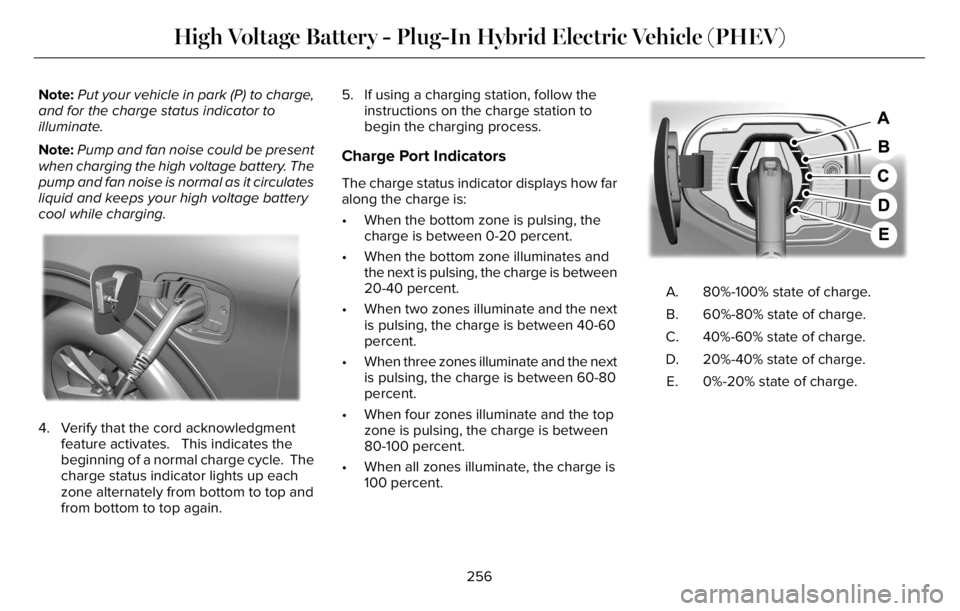
Charge Port Indicators
The charge status indicator displays how far
along the charge is:
• When the bottom zone is pulsing, the
charge is between 0-20 percent.
• When the bottom zone illuminates and
the next is pulsing, the charge is between
20-40 percent.
• When two zones illuminate and the next
is pulsing, the charge is between 40-60
percent.
• When three zones illuminate and the next
is pulsing, the charge is between 60-80
percent.
• When four zones illuminate and the top
zone is pulsing, the charge is between
80-100 percent.
• When all zones illuminate, the charge is
100 percent.
E301E301E301E301E301E301E301301330101971971971971971971979197
80%-100% state of charge. A.
60%-80% state of charge. B.
40%-60% state of charge. C.
20%-40% state of charge. D.
0%-20% state of charge. E.
256
High Voltage Battery - Plug-In Hybrid Electric Vehicle (PHEV)
Page 260 of 681
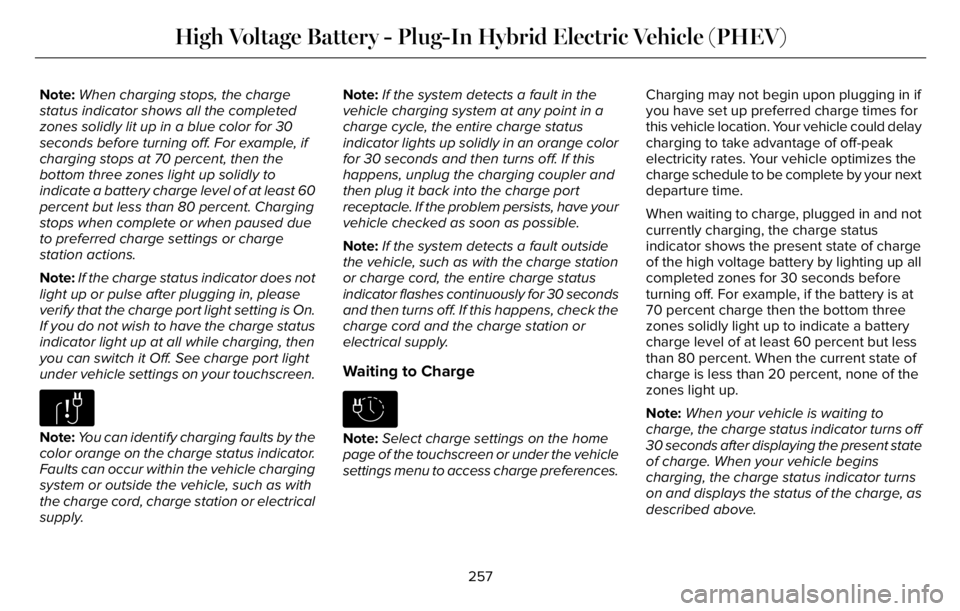
Note:When charging stops, the charge
status indicator shows all the completed
zones solidly lit up in a blue color for 30
seconds before turning off. For example, if
charging stops at 70 percent, then the
bottom three zones light up solidly to
indicate a battery charge level of at least 60
percent but less than 80 percent. Charging
stops when complete or when paused due
to preferred charge settings or charge
station actions.
Note:If the charge status indicator does not
light up or pulse after plugging in, please
verify that the charge port light setting is On.
If you do not wish to have the charge status
indicator light up at all while charging, then
you can switch it Off. See charge port light
under vehicle settings on your touchscreen.
E306677
Note:You can identify charging faults by the
color orange on the charge status indicator.
Faults can occur within the vehicle charging
system or outside the vehicle, such as with
the charge cord, charge station or electrical
supply.Note:If the system detects a fault in the
vehicle charging system at any point in a
charge cycle, the entire charge status
indicator lights up solidly in an orange color
for 30 seconds and then turns off. If this
happens, unplug the charging coupler and
then plug it back into the charge port
receptacle. If the problem persists, have your
vehicle checked as soon as possible.
Note:If the system detects a fault outside
the vehicle, such as with the charge station
or charge cord, the entire charge status
indicator flashes continuously for 30 seconds
and then turns off. If this happens, check the
charge cord and the charge station or
electrical supply.
Waiting to Charge
E306678
Note:Select charge settings on the home
page of the touchscreen or under the vehicle
settings menu to access charge preferences.Charging may not begin upon plugging in if
you have set up preferred charge times for
this vehicle location. Your vehicle could delay
charging to take advantage of off-peak
electricity rates. Your vehicle optimizes the
charge schedule to be complete by your next
departure time.
When waiting to charge, plugged in and not
currently charging, the charge status
indicator shows the present state of charge
of the high voltage battery by lighting up all
completed zones for 30 seconds before
turning off. For example, if the battery is at
70 percent charge then the bottom three
zones solidly light up to indicate a battery
charge level of at least 60 percent but less
than 80 percent. When the current state of
charge is less than 20 percent, none of the
zones light up.
Note:When your vehicle is waiting to
charge, the charge status indicator turns off
30 seconds after displaying the present state
of charge. When your vehicle begins
charging, the charge status indicator turns
on and displays the status of the charge, as
described above.
257
High Voltage Battery - Plug-In Hybrid Electric Vehicle (PHEV)
Page 274 of 681
GENERAL INFORMATION
Note: Occasional brake noise is normal. If
a metal-to-metal, continuous grinding or
continuous squeal sound is present, the
brake linings may be worn. Have your
vehicle checked. If your vehicle has
continuous vibration or shudder in the
steering wheel when braking, have your
vehicle checked.
Note: Brake dust may accumulate on the
wheels, even under normal driving
conditions. Some dust is inevitable as the
brakes wear and does not contribute to
brake noise. Wet brakes result in reduced
braking efficiency. Gently press the brake
pedal a few times when driving from a car
wash or standing water to dry the brakes.
See Cleaning the Wheels (page 427).
Brake Over Accelerator
In the event the accelerator pedal becomes
stuck or entrapped, apply steady and firm
pressure to the brake pedal to slow the
vehicle and reduce engine power. If you
experience this condition, apply the brakes
and bring your vehicle to a safe stop. Move
the transmission to park (P), switch the
engine off and apply the parking brake.
Inspect the accelerator pedal for any
interference. If none are found and the
condition persists, have your vehicle
checked. If your vehicle has to be towed,
we recommend that you contact a
professional towing service.
Emergency Brake Assist
Emergency brake assist detects when you
brake heavily by measuring the rate at which
you press the brake pedal. It provides
maximum braking efficiency as long as you
press the pedal. Emergency brake assist
can reduce stopping distances in critical
situations.Note:Depending on applicable laws and
regulations in the country for which your
vehicle was originally built, your brake lamps
may flash during heavy braking. Following
this, your hazard lights may also flash when
your vehicle comes to a stop.
Anti-lock Brake System
This system helps you maintain steering
control during emergency stops by keeping
the brakes from locking.
This lamp illuminates momentarily
when you switch the ignition on to
confirm the lamp is functional.
If the warning lamp does not illuminate
during start up, remains on or flashes, the
system may be disabled. Have the system
checked. If the anti-lock brake system is
disabled, normal braking is still operational.
See Warning Lamps and Indicators (page
131).
Note:Indicators vary depending on region.
271
Brakes
Page 277 of 681
HILL START ASSIST
WARNING: The system does not
replace the parking brake. When you leave
your vehicle, always apply the parking
brake.
WARNING: You must remain in your
vehicle when the system turns on. At all
times, you are responsible for controlling
your vehicle, supervising the system and
intervening, if required. Failure to take care
may result in the loss of control of your
vehicle, serious personal injury or death.
WARNING: The system will turn off
if a malfunction is apparent or if you rev
the engine excessively. Failure to take care
may result in the loss of control of your
vehicle, serious personal injury or death.
The system makes it easier to pull away
when your vehicle is on a slope without the
need to use the parking brake.When the system is active, your vehicle
remains stationary on the slope for two to
three seconds after you release the brake
pedal. This allows time to move your foot
from the brake to the accelerator pedal. The
system releases the brakes automatically
once the engine has developed sufficient
torque to prevent your vehicle from rolling
down the slope. This is an advantage when
pulling away on a slope, for example from a
car park ramp, traffic lights or when reversing
uphill into a parking space.
The system activates on any slope that
causes your vehicle to roll.
Note:There is no warning light to indicate
the system is either on or off.
Using Hill Start Assist
1. Press the brake pedal to bring your
vehicle to a complete standstill. Keep the
brake pedal pressed and shift into first
gear when facing uphill or reverse (R)
when facing downhill.
2. If the sensors detect that your vehicle is
on a slope, the system activates
automatically.3. When you remove your foot from the
brake pedal, your vehicle remains on the
slope without rolling away for about two
to three seconds. This hold time
automatically extends if you are in the
process of driving off.
4. Drive off in the normal manner. The
system releases the brakes automatically.
Note:When you remove your foot from the
brake pedal and press the pedal again when
the system is active, you will experience
significantly reduced brake pedal travel. This
is normal.
Switching the System On and Off
Vehicles with Manual Transmission
You can switch this feature on or off in the
information display. The system remembers
the last setting when you start your vehicle.
Vehicles with Automatic Transmission
You cannot turn the system on or off. When
you switch the ignition on, the system
automatically turns on.
274
Brakes
Page 284 of 681
PRINCIPLE OF OPERATION
The traction control system helps avoid drive
wheel spin and loss of traction.
If your vehicle begins to slide, the system
applies the brakes to individual wheels and,
when needed, reduces engine power at the
same time. If the wheels spin when
accelerating on slippery or loose surfaces,
the system reduces engine power in order
to increase traction.
USING TRACTION CONTROL
WARNING: Operating your vehicle
with the traction control disabled could
lead to an increased risk of loss of vehicle
control, vehicle rollover, personal injury
and death.
The system turns on each time you switch
on the ignition.
If your vehicle is stuck in mud or snow,
switching traction control off may be
beneficial as this allows the wheels to spin.Note:When you switch traction control off,
stability control remains fully active.
Switching the System Off
When you switch the system off or on, a
message appears in the information display
showing system status.
You can switch the system off by accessing
the traction control settings through the
touchscreen. See Settings (page 555).
Note:If your vehicle detects a loss of traction
due to excessive wheel spin or deceleration,
a display message appears on the
touchscreen prompting you to disable
traction control if needed.
Using the Information Display Controls
You can switch this feature off or on in the
information display. See General
Information (page 136).
System Indicator Lights and Messages
E138639
The stability and traction control
light:• Temporarily illuminates on engine
start-up.
• Flashes when a driving condition
activates either of the systems.
• Illuminates if a problem occurs in either
of the systems.
E130458
The stability and traction control
off light temporarily illuminates on
engine start-up and stays on when
you switch the traction control system off.
281
Traction Control
Page 311 of 681
WARNING: The system only warns
of vehicles detected by the radar sensor.
In some cases there may be no warning
or a delayed warning. Apply the brakes
when necessary. Failure to follow this
instruction could result in personal injury
or death.
WARNING: The system may not
detect stationary or slow moving vehicles
below 6 mph (10 km/h).
WARNING: The system does not
detect pedestrians or objects in the road.
WARNING: The system does not
detect oncoming vehicles in the same lane.
WARNING: The system may not
operate properly if the sensor is blocked.
Keep the windshield free from obstruction.
WARNING: The sensor may
incorrectly track lane markings as other
structures or objects. This can result in a
false or missed warning.
E307893E307893
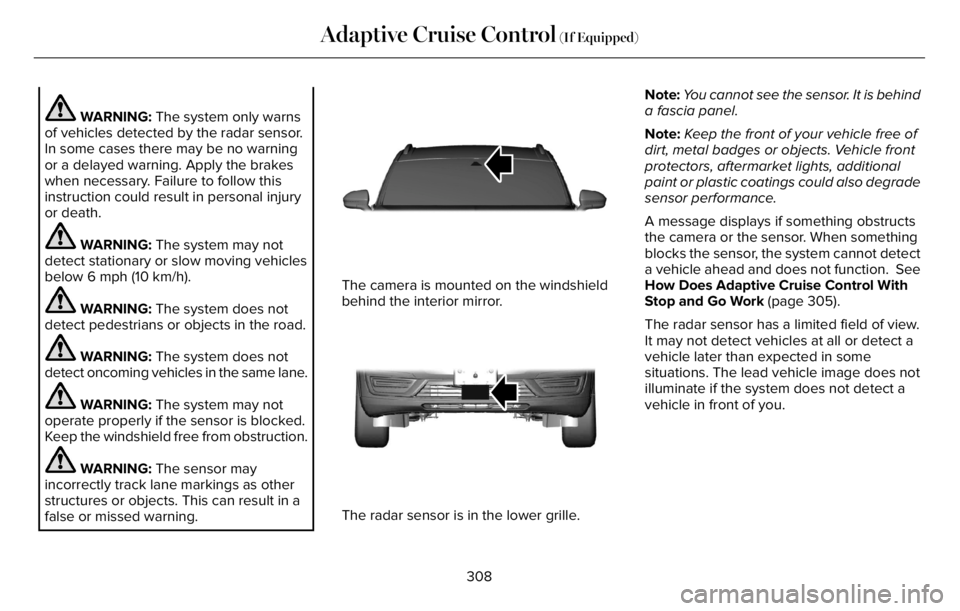
The camera is mounted on the windshield
behind the interior mirror.
E307892E307892
The radar sensor is in the lower grille.Note:You cannot see the sensor. It is behind
a fascia panel.
Note:Keep the front of your vehicle free of
dirt, metal badges or objects. Vehicle front
protectors, aftermarket lights, additional
paint or plastic coatings could also degrade
sensor performance.
A message displays if something obstructs
the camera or the sensor. When something
blocks the sensor, the system cannot detect
a vehicle ahead and does not function. See
How Does Adaptive Cruise Control With
Stop and Go Work (page 305).
The radar sensor has a limited field of view.
It may not detect vehicles at all or detect a
vehicle later than expected in some
situations. The lead vehicle image does not
illuminate if the system does not detect a
vehicle in front of you.
308
Adaptive Cruise Control (If Equipped)
Page 329 of 681
BLIND SPOT INFORMATION
SYSTEM
WARNING: Do not use the blind spot
information system as a replacement for
using the interior and exterior mirrors or
looking over your shoulder before
changing lanes. The blind spot information
system is not a replacement for careful
driving.
WARNING: The system may not
operate properly during severe weather
conditions, for example snow, ice, heavy
rain and spray. Always drive with due care
and attention. Failure to take care may
result in a crash.
55695E255695
The design of the system is to detect
vehicles that could have entered the blind
spot zone. The detection area is on both
sides of your vehicle, extending rearward
from the exterior mirrors to approximately
13 ft (4 m) beyond the rear bumper. The
detection area extends to approximately
59 ft (18 m) beyond the rear bumper when
the vehicle speed is greater than 30 mph
(48 km/h) to alert you of faster approaching
vehicles.
Note:The system does not prevent contact
with other vehicles. It does not detect parked
vehicles, pedestrians, animals or other
infrastructures.
Using the Blind Spot Information
System
Vehicles with Automatic Transmission
The system turns on when all of the following
occur:
• You start your vehicle.
• You shift into drive (D).
• The vehicle speed is greater than 6 mph
(10 km/h).
Note:The system does not operate in park
(P) or reverse (R).
System Lights and Messages
326
Driving Aids
Page 341 of 681
WARNING: In situations where the
vehicle camera has limited detection
capability, this may reduce system
performance. These situations include but
are not limited to direct or low sunlight,
vehicles at night without tail lights,
unconventional vehicle types, pedestrians
with complex backgrounds, running
pedestrians, partly obscured pedestrians,
or pedestrians that the system cannot
distinguish from a group. Failure to take
care may result in the loss of control of
your vehicle, serious personal injury or
death.
WARNING: The system cannot help
prevent all crashes. Do not rely on this
system to replace driver judgment and the
need to maintain a safe distance and
speed.
Using the Pre-Collision Assist System
The system is active at speeds above
approximately3 mph (5 km/h)and pedestrian
detection is active at speeds up to 50 mph
(80 km/h).
E156130
If your vehicle is rapidly approaching another
stationary vehicle, a vehicle traveling in the
same direction as yours, or a pedestrian
within your driving path, the system is
designed to provide three levels of
functionality:
1. Alert.
2. Brake Support.
3. Active Braking.
E255268E255268
Alert: When active, a flashing visual warning
appears and an audible warning tone
sounds.
Brake Support: The system is designed to
help reduce the impact speed by preparing
the brakes for rapid braking. Brake support
does not automatically apply the brakes. If
you press the brake pedal, the system could
apply additional braking up to maximum
braking force, even if you lightly press the
brake pedal.
Active Braking: Active braking may activate
if the system determines that a collision is
imminent. The system may help the driver
reduce impact damage or avoid the crash
completely.
Note:Brake support and active braking are
active at speeds up to 75 mph (120 km/h). If
your vehicle has a radar sensor included
with adaptive cruise control, then brake
support and active braking are active up to
the maximum speed of the vehicle.
338
Driving Aids
Page 361 of 681
Trailer Lamps
WARNING: Never connect any trailer
lamp wiring to the vehicle's tail lamp wiring;
this may damage the electrical system
resulting in fire. Contact your authorized
dealer as soon as possible for assistance
in proper trailer tow wiring installation.
Additional electrical equipment may be
required.
Most towed vehicles require trailer lamps.
Make sure all running lights, brake lights,
direction indicators and hazard flashers are
working.
Before Towing a Trailer
Practice turning, stopping and backing up to
get the feel of your vehicle-trailer
combination before starting on a trip. When
turning, make wider turns so the trailer
wheels clear curbs and other obstacles.
When Towing a Trailer
• Do not drive faster than 70 mph
(113 km/h) during the first 500 mi
(800 km).
• Do not make full-throttle starts.
• Check your hitch, electrical connections
and trailer wheel lug nuts thoroughly after
you have traveled 50 mi (80 km).
• When stopped in congested or heavy
traffic during hot weather, place the
gearshift in park (P) to aid engine and
transmission cooling and to help A/C
performance.
• Turn off the speed control with heavy
loads or in hilly terrain. The speed control
may turn off automatically when you are
towing on long, steep grades.
• Shift to a lower gear when driving down
a long or steep hill. Do not apply the
brakes continuously, as they may
overheat and become less effective.• If your transmission is equipped with a
Grade Assist or Tow/Haul feature, use
this feature when towing. This provides
engine braking and helps eliminate
excessive transmission shifting for
optimum fuel economy and transmission
cooling.
• Allow more distance for stopping with a
trailer attached. Anticipate stops and
brake gradually.
• Avoid parking on a grade. However, if
you must park on a grade:
1. Turn the steering wheel to point your
vehicle tires away from traffic flow.
2. Set your vehicle parking brake.
3. Place the automatic transmission in park
(P).
4. Place wheel chocks in front and back of
the trailer wheels. (Chocks not included
with vehicle.)
Launching or Retrieving a Boat or
Personal Watercraft (PWC)
Note:Disconnect the wiring to the trailer
before backing the trailer into the water.
358
Towing
Page 365 of 681
• Do not add unnecessary accessories to
the exterior of your vehicle, for example
running boards. If you use a roof rack,
remember to fold it down or remove it
when not in use.
• Do not shift into neutral when you are
braking or when your vehicle is slowing
down.
• Shut all windows when driving at high
speeds.
• Switch off all electric systems when not
in use, for example air conditioning. Make
sure that you unplug any accessories
from the auxiliary power points when not
in use.
DRIVING THROUGH SHALLOW
WATER
WARNING: Do not attempt to cross
a deep or flowing body of water. Failure to
follow this instruction could result in the
loss of control of your vehicle, personal
injury or death.Note:Driving through standing water can
cause vehicle damage.
Note:Engine damage can occur if water
enters the air filter.
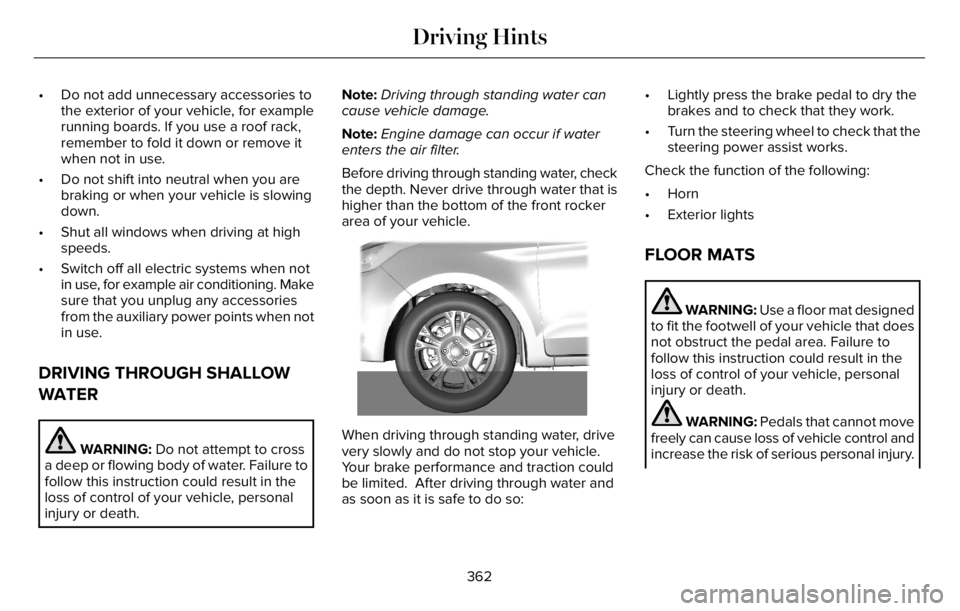
Before driving through standing water, check
the depth. Never drive through water that is
higher than the bottom of the front rocker
area of your vehicle.
66E266447
When driving through standing water, drive
very slowly and do not stop your vehicle.
Your brake performance and traction could
be limited. After driving through water and
as soon as it is safe to do so:• Lightly press the brake pedal to dry the
brakes and to check that they work.
• Turn the steering wheel to check that the
steering power assist works.
Check the function of the following:
• Horn
• Exterior lights
FLOOR MATS
WARNING: Use a floor mat designed
to fit the footwell of your vehicle that does
not obstruct the pedal area. Failure to
follow this instruction could result in the
loss of control of your vehicle, personal
injury or death.
WARNING: Pedals that cannot move
freely can cause loss of vehicle control and
increase the risk of serious personal injury.
362
Driving Hints