park assist LINCOLN AVIATOR 2023 User Guide
[x] Cancel search | Manufacturer: LINCOLN, Model Year: 2023, Model line: AVIATOR, Model: LINCOLN AVIATOR 2023Pages: 681, PDF Size: 9.33 MB
Page 279 of 681
E197934
Illuminates when the system is
active. Your vehicle remains
stationary after you release the
brake pedal.
Illuminates when the system is on but
unavailable to hold your vehicle at a
standstill.
The system could be unavailable when any
of the following occur:
• During an active park assist maneuver.
• Your vehicle is in stay in neutral mode.
• The driver door is open.
• You shift into reverse (R) before the
system is active.
276
Brakes
Page 280 of 681
WHAT IS REVERSE BRAKING
ASSIST
E205199E205199
Reverse braking assist is designed to reduce
impact damage or assist in avoiding a
collision while in reverse (R). Using sensors
on the rear of the vehicle, it can detect a
possible collision and apply the brakes. If full
braking occurs, the system attempts to stop
the vehicle a safe distance from the obstacle.
HOW DOES REVERSE BRAKING
ASSIST WORK
Reverse braking assist functions when in
reverse (R) and traveling at a speed of
1–7 mph (2–12 km/h).If the system detects an obstacle behind your
vehicle, it provides a warning through the
rear parking aid or cross traffic alert system.
REVERSE BRAKING ASSIST
PRECAUTIONS
WARNING: You are responsible for
controlling your vehicle at all times. The
system is designed to be an aid and does
not relieve you of your responsibility to
drive with due care and attention. Failure
to follow this instruction could result in the
loss of control of your vehicle, personal
injury or death.
WARNING: To help avoid personal
injury, always use caution when in reverse
(R) and when using the sensing system.
WARNING: The system may not
operate properly during severe weather
conditions, for example snow, ice, heavy
rain and spray. Always drive with due care
and attention. Failure to take care may
result in a crash.
WARNING: Traffic control systems,
fluorescent lamps, inclement weather, air
brakes, external motors and fans may
affect the correct operation of the sensing
system. This may cause reduced
performance or false alerts.
WARNING: Some situations and
objects prevent hazard detection. For
example low or direct sunlight, inclement
weather, unconventional vehicle types, and
pedestrians. Apply the brakes when
necessary. Failure to follow this instruction
could result in the loss of control of your
vehicle, personal injury or death.
277
Reverse Braking Assist (If Equipped)
Page 281 of 681
WARNING: Do not use the system
with accessories that extend beyond the
front or rear of your vehicle, for example a
trailer hitch or bike rack. The system is not
able to make corrections for the additional
length of the accessories.
The system only applies the brakes for a
short period of time when an event occurs.
Act as soon as you notice the brakes apply
to remain in control of the vehicle. If you do
not intervene the vehicle may start to move
again.
Note:Certain add-on devices around the
bumper or fascia may create false alerts. For
example, large trailer hitches, bicycle or
surfboard racks, license plate brackets,
bumper covers or any other device that may
block the normal detection zone of the
system. Remove the add-on device to
prevent false alerts.
Note:The system does not react to small or
moving objects, particularly those close to
the ground.Note:The system does not operate during
hard acceleration or steering.
Note:If your vehicle sustains damage to the
bumper or fascia leaving it misaligned or
bent, it could alter the sensing zone causing
inaccurate measurement of obstacles or
false alerts.
Note:Vehicle loading and suspension
changes can impact the angle of the sensors
and may change the normal detection zone
of the system resulting in inaccurate
measurement of obstacles or false alerts.
Note:When you connect a trailer, the system
may detect the trailer and provide an alert,
or the system turns off. If the system does
not turn off, manually switch the system off
after you connect the trailer.
Note:You may experience reduced system
performance on road surfaces that limit
deceleration. For example, roads with ice,
loose gravel, mud or sand.
SWITCHING REVERSE BRAKING
ASSIST ON AND OFF
You can switch the system on or off through
the touchscreen. See Settings (page 555).
Note:The system is unavailable when rear
parking aid or cross traffic alert is off.
OVERRIDING REVERSE BRAKING
ASSIST
There could be instances when unexpected
or unwanted braking occurs. Firmly pressing
the accelerator pedal or switching the feature
off overrides the system.
REVERSE BRAKING ASSIST
INDICATORS
If the system determines that a collision with
an obstacle may occur, full braking may
apply.
E293490
A message and warning indicator
appear when the system applies
the brakes.
278
Reverse Braking Assist (If Equipped)
Page 282 of 681
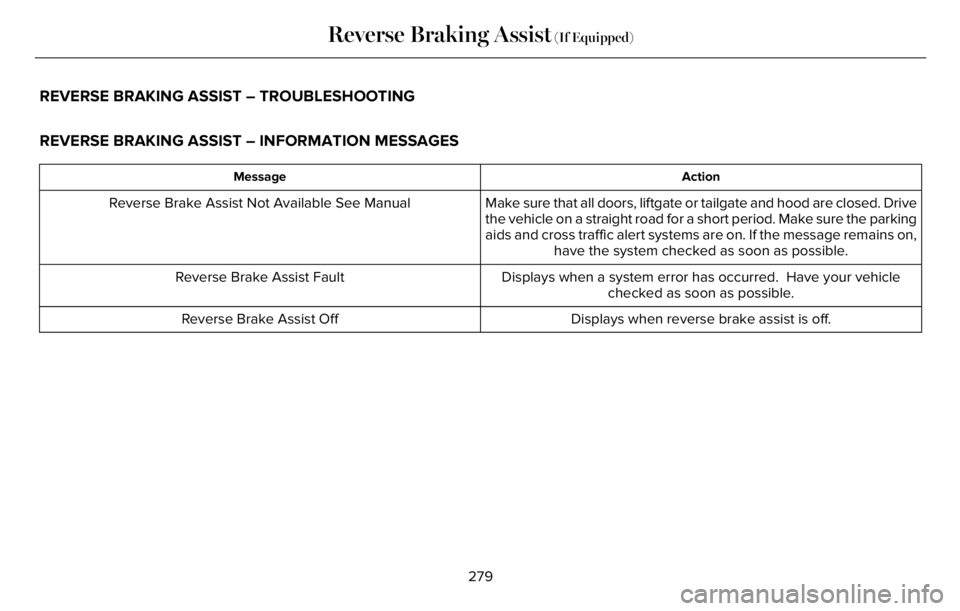
REVERSE BRAKING ASSIST – TROUBLESHOOTING
REVERSE BRAKING ASSIST – INFORMATION MESSAGES
Action Message
Make sure that all doors, liftgate or tailgate and hood are closed. Drive
the vehicle on a straight road for a short period. Make sure the parking
aids and cross traffic alert systems are on. If the message remains on,
have the system checked as soon as possible. Reverse Brake Assist Not Available See Manual
Displays when a system error has occurred. Have your vehicle
checked as soon as possible. Reverse Brake Assist Fault
Displays when reverse brake assist is off. Reverse Brake Assist Off
279
Reverse Braking Assist (If Equipped)
Page 283 of 681
REVERSE BRAKING ASSIST –
FREQUENTLY ASKED QUESTIONS
Why is reverse braking assist unavailable?
• Make sure you switch the system on.
See Switching Reverse Braking Assist
On and Off (page 278).
• Make sure that the liftgate, hood and all
doors are closed.
• Make sure the cross traffic alert system
is on. See Cross Traffic Alert (page 330).
• Make sure the rear parking aid system is
on. See Rear Parking Aid (page 286).
• Make sure traction control is on. See
Using Traction Control (page 281).
• The vehicle has sustained a rear end
impact. Have the sensors checked for
proper coverage and operation.
• An ABS, traction control or stability
control event may have occurred. The
system resumes operation when the
event is complete.• Make sure the rear view camera and 360
degree camera are not dirty or
obstructed. If it is dirty, clean the camera.
See Rear View Camera (page 297). See
360 Degree Camera (page 300). If the
message still appears after cleaning the
camera, wait a short time and the
message should clear. If the message
does not clear, have the system checked.
• Make sure the sensors are not blocked
or faulted. See Cross Traffic Alert (page
330). See Rear Parking Aid (page 286).
• You recently had your vehicle serviced,
or the battery disconnected. Drive your
vehicle a short distance to resume
system operation.
• The system does not function when you
connect a trailer. Operation resumes
when you disconnect the trailer.
Note:If the answers to why the system is
unavailable do not assist in returning reverse
braking assist to available, have the system
checked as soon as possible.
280
Reverse Braking Assist (If Equipped)
Page 287 of 681
WHAT IS HILL DESCENT CONTROL
WARNING: Hill descent control
cannot control descent in all surface
conditions and circumstances, such as ice
or extremely steep grades. Hill descent
control is a driver assist system and cannot
substitute for good judgment by the driver.
Failure to do so may result in loss of
vehicle control, crash or serious injury.
WARNING: The system does not
replace the parking brake. When you leave
your vehicle, always apply the parking
brake.
Note:The system does not function below
3 mph (5 km/h).
Hill descent control allows the driver to set
and maintain vehicle speed while
descending steep slopes in various surface
conditions.The system can maintain vehicle speeds on
downhill slopes between 3–20 mph
(5–32 km/h). Above 20 mph (32 km/h), the
system remains on but the descent speed
cannot be set or maintained.
The system requires a cool down interval
after a period of sustained use. The amount
of time that the system can remain active
before cooling varies with conditions. The
system provides a warning in the message
center and a tone sounds when the system
is about to disengage for cooling. At this
time, manually apply the brakes as needed
to maintain descent speed.
SWITCHING HILL DESCENT
CONTROL ON AND OFF
You can switch the hill descent control on
and off through the touchscreen.
SETTING THE HILL DESCENT
SPEED
WARNING: The system does not
replace the parking brake. When you leave
your vehicle, always apply the parking
brake.
WARNING: The system does not
control speed in low traction conditions or
extremely steep slopes. The system is
designed to be an aid and does not relieve
you of your responsibility to drive with due
care and attention. Failure to follow this
instruction could result in personal injury.
To increase the descent speed, press the
accelerator pedal until you reach the speed
you prefer.
To decrease the descent speed, press the
brake pedal until you reach the speed you
prefer.
284
Hill Descent Control (If Equipped)
Page 290 of 681
WARNING: To help avoid personal
injury, always use caution when in reverse
(R) and when using the sensing system.
WARNING: The parking aid system
can only assist you to detect objects when
your vehicle is moving at parking speeds.
To help avoid personal injury you must
take care when using the parking aid
system.
Note:Keep the sensors free from snow, ice
and large accumulations of dirt.
Note:Do not cover up the sensors.
Note:Do not clean the sensors with sharp
objects.
Note:If your vehicle sustains damage
leaving the sensors misaligned, this may
cause inaccurate measurements or false
alerts.
Note:Some accessories, for example large
trailer hitches or bike or surfboard racks, can
cause reduced performance or false alerts.
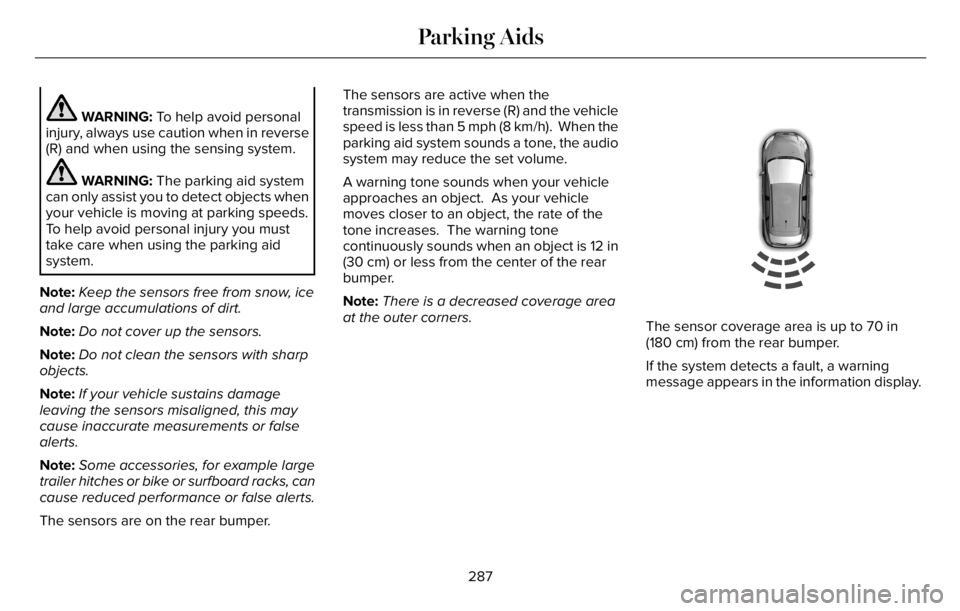
The sensors are on the rear bumper.The sensors are active when the
transmission is in reverse (R) and the vehicle
speed is less than 5 mph (8 km/h). When the
parking aid system sounds a tone, the audio
system may reduce the set volume.
A warning tone sounds when your vehicle
approaches an object. As your vehicle
moves closer to an object, the rate of the
tone increases. The warning tone
continuously sounds when an object is 12 in
(30 cm) or less from the center of the rear
bumper.
Note:There is a decreased coverage area
at the outer corners.
E130178
The sensor coverage area is up to 70 in
(180 cm) from the rear bumper.
If the system detects a fault, a warning
message appears in the information display.
287
Parking Aids
Page 292 of 681
WARNING: The parking aid system
can only assist you to detect objects when
your vehicle is moving at parking speeds.
To help avoid personal injury you must
take care when using the parking aid
system.
Note:Keep the sensors free from snow, ice
and large accumulations of dirt.
Note:Do not cover up the sensors.
Note:Do not clean the sensors with sharp
objects.
Note:If your vehicle sustains damage
leaving the sensors misaligned, this may
cause inaccurate measurements or false
alerts.
Note:Some accessories, for example large
trailer hitches or bike or surfboard racks can
cause reduced performance or false alerts.
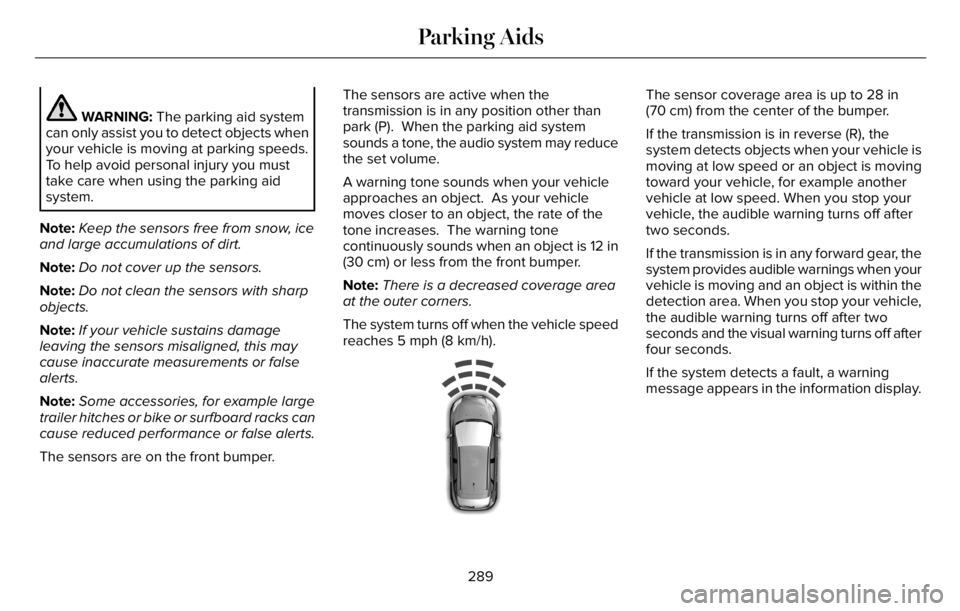
The sensors are on the front bumper.The sensors are active when the
transmission is in any position other than
park (P). When the parking aid system
sounds a tone, the audio system may reduce
the set volume.
A warning tone sounds when your vehicle
approaches an object. As your vehicle
moves closer to an object, the rate of the
tone increases. The warning tone
continuously sounds when an object is 12 in
(30 cm) or less from the front bumper.
Note:There is a decreased coverage area
at the outer corners.
The system turns off when the vehicle speed
reaches 5 mph (8 km/h).
E187330
The sensor coverage area is up to 28 in
(70 cm) from the center of the bumper.
If the transmission is in reverse (R), the
system detects objects when your vehicle is
moving at low speed or an object is moving
toward your vehicle, for example another
vehicle at low speed. When you stop your
vehicle, the audible warning turns off after
two seconds.
If the transmission is in any forward gear, the
system provides audible warnings when your
vehicle is moving and an object is within the
detection area. When you stop your vehicle,
the audible warning turns off after two
seconds and the visual warning turns off after
four seconds.
If the system detects a fault, a warning
message appears in the information display.
289
Parking Aids
Page 293 of 681
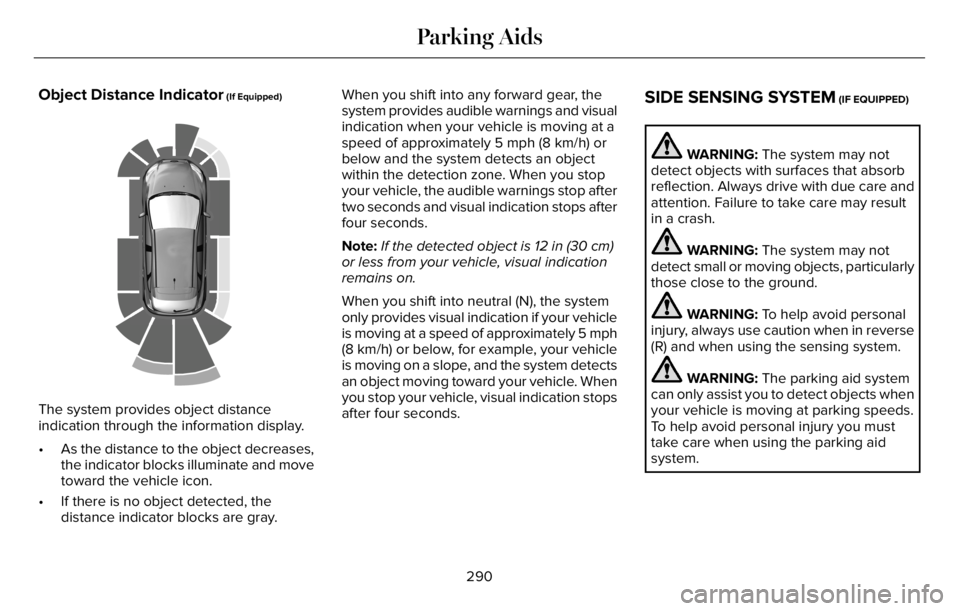
Object Distance Indicator (If Equipped)
E190459
The system provides object distance
indication through the information display.
• As the distance to the object decreases,
the indicator blocks illuminate and move
toward the vehicle icon.
• If there is no object detected, the
distance indicator blocks are gray.When you shift into any forward gear, the
system provides audible warnings and visual
indication when your vehicle is moving at a
speed of approximately 5 mph (8 km/h) or
below and the system detects an object
within the detection zone. When you stop
your vehicle, the audible warnings stop after
two seconds and visual indication stops after
four seconds.
Note:If the detected object is 12 in (30 cm)
or less from your vehicle, visual indication
remains on.
When you shift into neutral (N), the system
only provides visual indication if your vehicle
is moving at a speed of approximately 5 mph
(8 km/h) or below, for example, your vehicle
is moving on a slope, and the system detects
an object moving toward your vehicle. When
you stop your vehicle, visual indication stops
after four seconds.
SIDE SENSING SYSTEM (IF EQUIPPED)
WARNING: The system may not
detect objects with surfaces that absorb
reflection. Always drive with due care and
attention. Failure to take care may result
in a crash.
WARNING: The system may not
detect small or moving objects, particularly
those close to the ground.
WARNING: To help avoid personal
injury, always use caution when in reverse
(R) and when using the sensing system.
WARNING: The parking aid system
can only assist you to detect objects when
your vehicle is moving at parking speeds.
To help avoid personal injury you must
take care when using the parking aid
system.
290
Parking Aids
Page 295 of 681
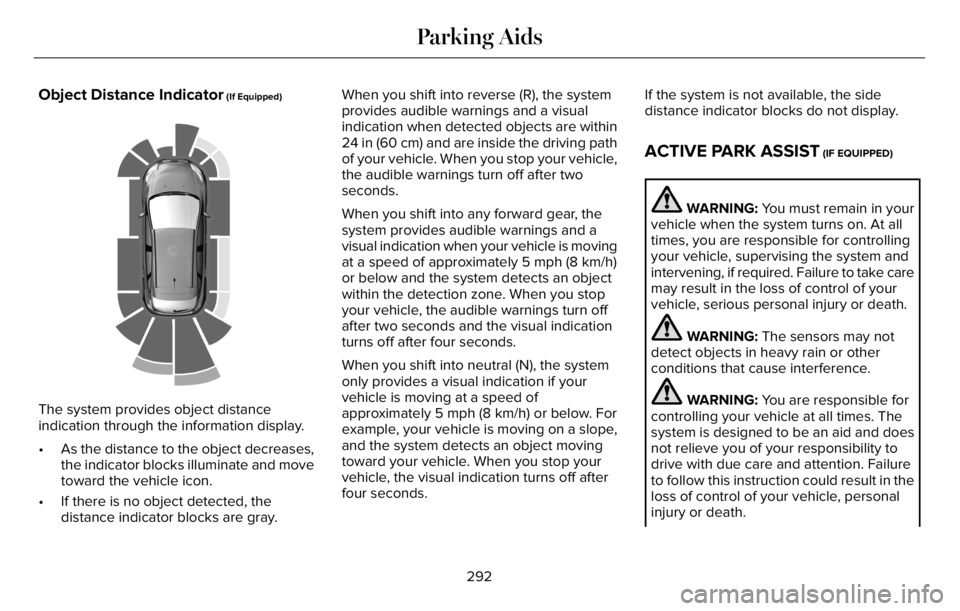
Object Distance Indicator (If Equipped)
E190459
The system provides object distance
indication through the information display.
• As the distance to the object decreases,
the indicator blocks illuminate and move
toward the vehicle icon.
• If there is no object detected, the
distance indicator blocks are gray.When you shift into reverse (R), the system
provides audible warnings and a visual
indication when detected objects are within
24 in (60 cm) and are inside the driving path
of your vehicle. When you stop your vehicle,
the audible warnings turn off after two
seconds.
When you shift into any forward gear, the
system provides audible warnings and a
visual indication when your vehicle is moving
at a speed of approximately 5 mph (8 km/h)
or below and the system detects an object
within the detection zone. When you stop
your vehicle, the audible warnings turn off
after two seconds and the visual indication
turns off after four seconds.
When you shift into neutral (N), the system
only provides a visual indication if your
vehicle is moving at a speed of
approximately 5 mph (8 km/h) or below. For
example, your vehicle is moving on a slope,
and the system detects an object moving
toward your vehicle. When you stop your
vehicle, the visual indication turns off after
four seconds.If the system is not available, the side
distance indicator blocks do not display.
ACTIVE PARK ASSIST (IF EQUIPPED)
WARNING: You must remain in your
vehicle when the system turns on. At all
times, you are responsible for controlling
your vehicle, supervising the system and
intervening, if required. Failure to take care
may result in the loss of control of your
vehicle, serious personal injury or death.
WARNING: The sensors may not
detect objects in heavy rain or other
conditions that cause interference.
WARNING: You are responsible for
controlling your vehicle at all times. The
system is designed to be an aid and does
not relieve you of your responsibility to
drive with due care and attention. Failure
to follow this instruction could result in the
loss of control of your vehicle, personal
injury or death.
292
Parking Aids