park assist LINCOLN AVIATOR 2023 Owner's Manual
[x] Cancel search | Manufacturer: LINCOLN, Model Year: 2023, Model line: AVIATOR, Model: LINCOLN AVIATOR 2023Pages: 681, PDF Size: 9.33 MB
Page 296 of 681
WARNING: Do not use the system
with accessories that extend beyond the
front or rear of your vehicle, for example a
trailer hitch, bike rack or side mirror
extensions such as telescoping mirrors or
towing mirrors. The system is not able to
make corrections for the additional length
of the accessories.
The system assists parking into and out of
parking spaces. Sensors are used to detect
parking spaces. The system then steers,
accelerates, brakes and shifts gear as
required to maneuver into or out of a parking
space.
Using Active Park Assist
E301E301111212
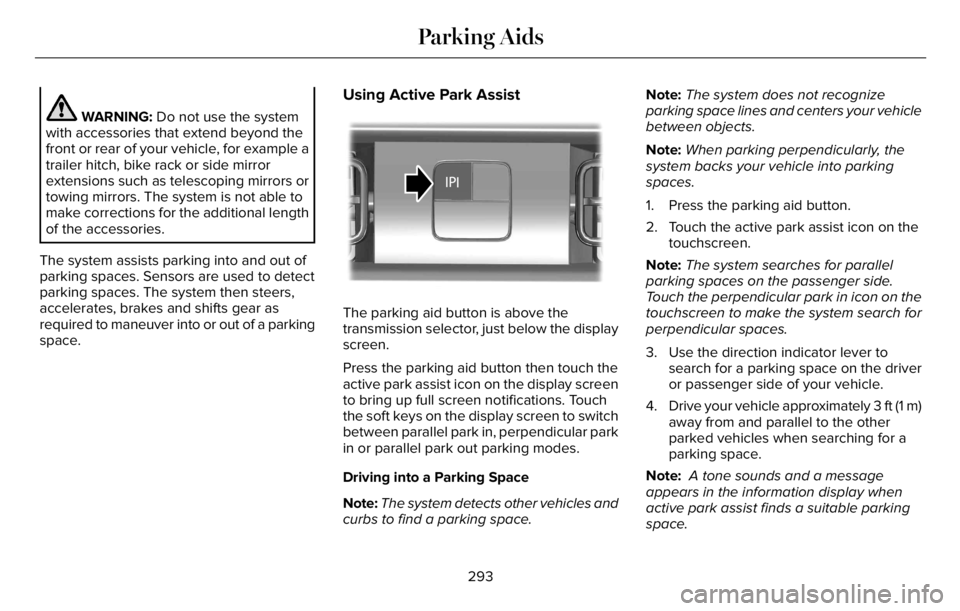
The parking aid button is above the
transmission selector, just below the display
screen.
Press the parking aid button then touch the
active park assist icon on the display screen
to bring up full screen notifications. Touch
the soft keys on the display screen to switch
between parallel park in, perpendicular park
in or parallel park out parking modes.
Driving into a Parking Space
Note:The system detects other vehicles and
curbs to find a parking space.Note:The system does not recognize
parking space lines and centers your vehicle
between objects.
Note:When parking perpendicularly, the
system backs your vehicle into parking
spaces.
1. Press the parking aid button.
2. Touch the active park assist icon on the
touchscreen.
Note:The system searches for parallel
parking spaces on the passenger side.
Touch the perpendicular park in icon on the
touchscreen to make the system search for
perpendicular spaces.
3. Use the direction indicator lever to
search for a parking space on the driver
or passenger side of your vehicle.
4. Drive your vehicle approximately 3 ft (1 m)
away from and parallel to the other
parked vehicles when searching for a
parking space.
Note: A tone sounds and a message
appears in the information display when
active park assist finds a suitable parking
space.
293
Parking Aids
Page 297 of 681
5. Press and hold the brake pedal.
6. Release the steering wheel and shift into
neutral (N).
7. Press and hold the active park assist
button.
8. Release the brake pedal to allow the
vehicle to park.
Note:When parallel parking between
objects, the system parks closer to the object
in front of your vehicle to allow easier access
to your trunk.
Note:When perpendicular parking, the
system aligns the front end of your vehicle
with the lane side of the object next to it.
Note:When perpendicular parking, if the
system detects only one object, it allows
enough distance to open the door on either
side.
Note:You can slow down your vehicle at
any time by pressing the brake pedal.Note:When parking is complete the vehicle
shifts into park (P).
Leaving a Parking Space
The system assists leaving only parallel
parking spaces.
1. Press the parking aid button.
2. Use the direction indicator lever to
choose the direction to leave.
3. Press and hold the brake pedal.
4. Release the steering wheel and shift into
neutral (N).
5. Release the parking brake.
6. Press and hold the active park assist
button.
7. Release the brake pedal to allow the
vehicle to move.
Note: You can slow down your vehicle at
any time by pressing the brake pedal.Note:After the system drives your vehicle
to a position where you can exit the parking
space in a forward movement, a message
appears instructing you to take full control
of your vehicle.
Canceling Active Park Assist
To cancel parking assistance at any time,
shift out of neutral (N).
Note:If you turn the steering wheel or open
the driver door, the parking assistance also
cancels.
Pausing Active Park Assist
To pause parking assistance at any time,
release the parking aid button.
The vehicle stops moving until you press and
hold the parking aid button again.
Note:If you open the passenger or rear
doors, the parking assistance also pauses.
294
Parking Aids
Page 298 of 681
Active Park Assist Information Messages
Action Message
The system requires service due to a malfunction. Have the system
checked as soon as possible. Active Park Fault
Active Park Assist Troubleshooting
Possible Cause Symptom
The system is unable to detect a vehicle, curb or object to park next to or in-between. The system does not correctly operate.
You may have switched traction control off. The system does not search for a parking space.
The transmission is in reverse (R). Your vehicle must be moving forward to be able to
detect a parking space.
The sensors may be blocked. For example, snow, ice or large accumulations of dirt.
Blocked sensors can affect how the system functions. The system does not offer a parking space.
The sensors in the front or rear bumper could be damaged.
There is not enough room in the parking space for your vehicle to safely park.
There is not enough space for the parking maneuver on the opposite side of the parking
space.
The parking space is more than 5 ft (1.5 m) or less than 2 ft (0.5 m) away.
295
Parking Aids
Page 305 of 681
Note:The system turns off the front video
image when your vehicle is in motion at low
speed, except when in reverse (R).
E288873
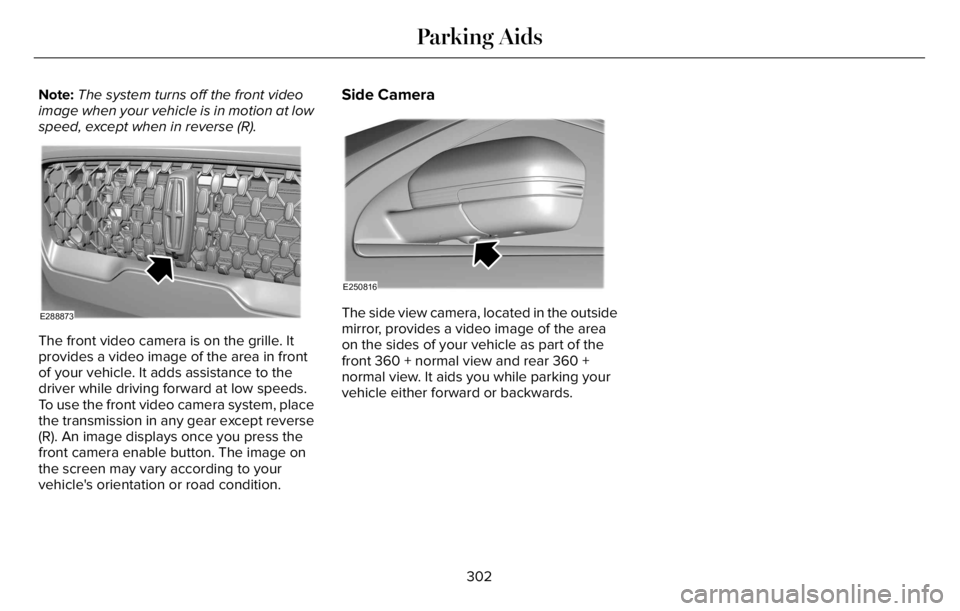
The front video camera is on the grille. It
provides a video image of the area in front
of your vehicle. It adds assistance to the
driver while driving forward at low speeds.
To use the front video camera system, place
the transmission in any gear except reverse
(R). An image displays once you press the
front camera enable button. The image on
the screen may vary according to your
vehicle's orientation or road condition.
Side Camera
E250816
The side view camera, located in the outside
mirror, provides a video image of the area
on the sides of your vehicle as part of the
front 360 + normal view and rear 360 +
normal view. It aids you while parking your
vehicle either forward or backwards.
302
Parking Aids
Page 319 of 681
Note:Under certain conditions, the system
may not adjust the vehicle speed until after
your vehicle passes the speed limit sign.
ADJUSTING THE SET SPEED
TOLERANCE
You can set a permanent speed tolerance
that is above or below the detected speed
limit.
1. Press Settings on the touchscreen.
2. Press Driver Assistance.
3. Press Cruise Control.4. Press Intelligent.
5. Press Tolerance.
6. Use + and - to set the tolerance.
Note:You cannot set the tolerance more
than 20 mph (30 km/h) above or below the
recognized speed.
ADAPTIVE CRUISE CONTROL –
TROUBLESHOOTING
ADAPTIVE CRUISE CONTROL –
INFORMATION MESSAGES - VEHICLES
WITH: ADAPTIVE CRUISE CONTROL
WITH LANE CENTERING
Note:Depending on your vehicle options
and instrument cluster type, not all messages
display or are available.
Note:The system could abbreviate or
shorten certain messages depending upon
which cluster type you have.
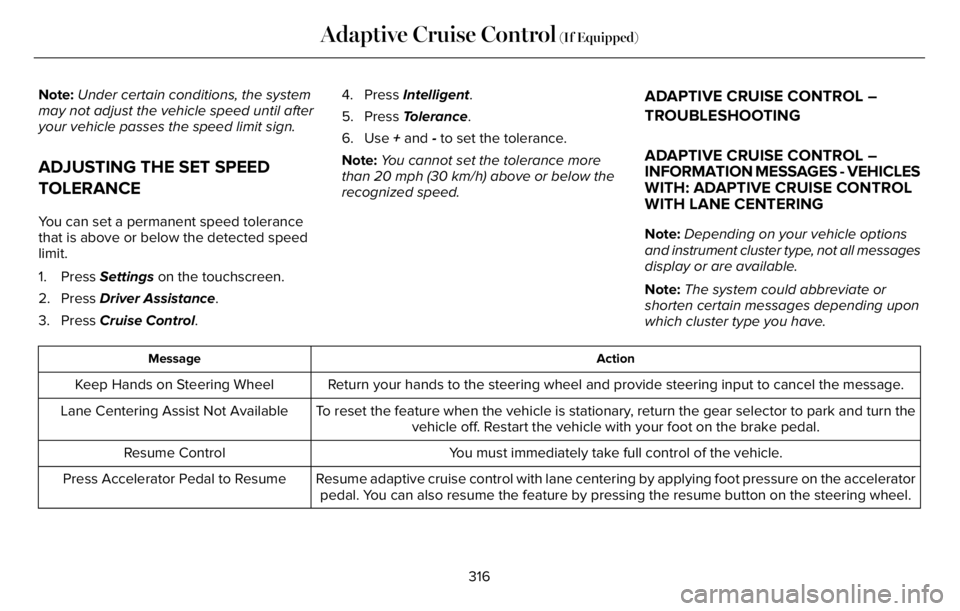
Action Message
Return your hands to the steering wheel and provide steering input to cancel the message. Keep Hands on Steering Wheel
To reset the feature when the vehicle is stationary, return the gear selector to park and turn the
vehicle off. Restart the vehicle with your foot on the brake pedal. Lane Centering Assist Not Available
You must immediately take full control of the vehicle. Resume Control
Resume adaptive cruise control with lane centering by applying foot pressure on the accelerator
pedal. You can also resume the feature by pressing the resume button on the steering wheel. Press Accelerator Pedal to Resume
316
Adaptive Cruise Control (If Equipped)
Page 361 of 681
Trailer Lamps
WARNING: Never connect any trailer
lamp wiring to the vehicle's tail lamp wiring;
this may damage the electrical system
resulting in fire. Contact your authorized
dealer as soon as possible for assistance
in proper trailer tow wiring installation.
Additional electrical equipment may be
required.
Most towed vehicles require trailer lamps.
Make sure all running lights, brake lights,
direction indicators and hazard flashers are
working.
Before Towing a Trailer
Practice turning, stopping and backing up to
get the feel of your vehicle-trailer
combination before starting on a trip. When
turning, make wider turns so the trailer
wheels clear curbs and other obstacles.
When Towing a Trailer
• Do not drive faster than 70 mph
(113 km/h) during the first 500 mi
(800 km).
• Do not make full-throttle starts.
• Check your hitch, electrical connections
and trailer wheel lug nuts thoroughly after
you have traveled 50 mi (80 km).
• When stopped in congested or heavy
traffic during hot weather, place the
gearshift in park (P) to aid engine and
transmission cooling and to help A/C
performance.
• Turn off the speed control with heavy
loads or in hilly terrain. The speed control
may turn off automatically when you are
towing on long, steep grades.
• Shift to a lower gear when driving down
a long or steep hill. Do not apply the
brakes continuously, as they may
overheat and become less effective.• If your transmission is equipped with a
Grade Assist or Tow/Haul feature, use
this feature when towing. This provides
engine braking and helps eliminate
excessive transmission shifting for
optimum fuel economy and transmission
cooling.
• Allow more distance for stopping with a
trailer attached. Anticipate stops and
brake gradually.
• Avoid parking on a grade. However, if
you must park on a grade:
1. Turn the steering wheel to point your
vehicle tires away from traffic flow.
2. Set your vehicle parking brake.
3. Place the automatic transmission in park
(P).
4. Place wheel chocks in front and back of
the trailer wheels. (Chocks not included
with vehicle.)
Launching or Retrieving a Boat or
Personal Watercraft (PWC)
Note:Disconnect the wiring to the trailer
before backing the trailer into the water.
358
Towing
Page 372 of 681
Vehicle information and general safety
practices:
• Know the make and model of your
vehicle.
• Review the owner’s manual and become
familiar with your vehicle’s safety
information and recommended safety
practices.
• Do not attempt to repair damaged
electric and hybrid-electric vehicles
yourself.
Contact an authorized dealer.Crashes
A crash or impact significant enough to
require an emergency response for
conventional vehicles would also require the
same response for an electric or
hybrid-electric vehicle.
If possible:
• Move your vehicle to a safe, nearby
location and remain on the scene.
• Roll down the windows before switching
your vehicle off.
• Place your vehicle in park (P), set the
parking brake, switch off the vehicle,
activate the hazard warning flashers and
move your key(s) at least 15 ft (5 m) away
from the vehicle.
Always:
• Call emergency assistance if needed and
advise that an electric or hybrid-electric
vehicle is involved.
• Exposed electrical components, wires,
and high-voltage batteries present
potential high-voltage shock hazards.• Avoid contact with leaking fluids and
gases, and remain out of the way of
oncoming traffic until emergency
responders arrive.
• When emergency responders arrive, tell
them that the vehicle involved is an
electric vehicle or hybrid-electric vehicle.
Fires
As with any vehicle, call emergency
assistance immediately if you see sparks,
smoke or flames coming from the vehicle.
Remain a safe distance from the vehicle and
try to stay clear of the smoke.
• Exit the vehicle immediately.
• Advise emergency assistance that an
electric or hybrid-electric vehicle is
involved.
• As with any vehicle fire, do not inhale
smoke, vapors or gas from the vehicle,
as they may be hazardous.
• Stay out of the roadway and stay out of
the way of any oncoming traffic while
awaiting the arrival of emergency
responders.
369
Roadside Emergencies
Page 373 of 681
Post-Incident
• Do not store a severely damaged vehicle
with a lithium-ion battery inside a
structure or within 49 ft (15 m) of any
structure or vehicle.
• Make sure that passenger and luggage
compartments remain ventilated.
• Call emergency assistance if you observe
leaking fluids, sparks, smoke or flames,
or hear gurgling or bubbling from the
high-voltage battery.
POST-CRASH ALERT SYSTEM
The system flashes the direction indicators
and sounds the horn (intermittently) in the
event of a serious impact that deploys an
airbag (front, side, side curtain or Safety
Canopy) or the seatbelt pretensioners.
The horn and indicators turn off when:
• You press the hazard control button.
• You press the panic button on the remote
entry transmitter (if equipped).• Your vehicle runs out of power.
• Sounding of the horn is only enabled in
specific markets.
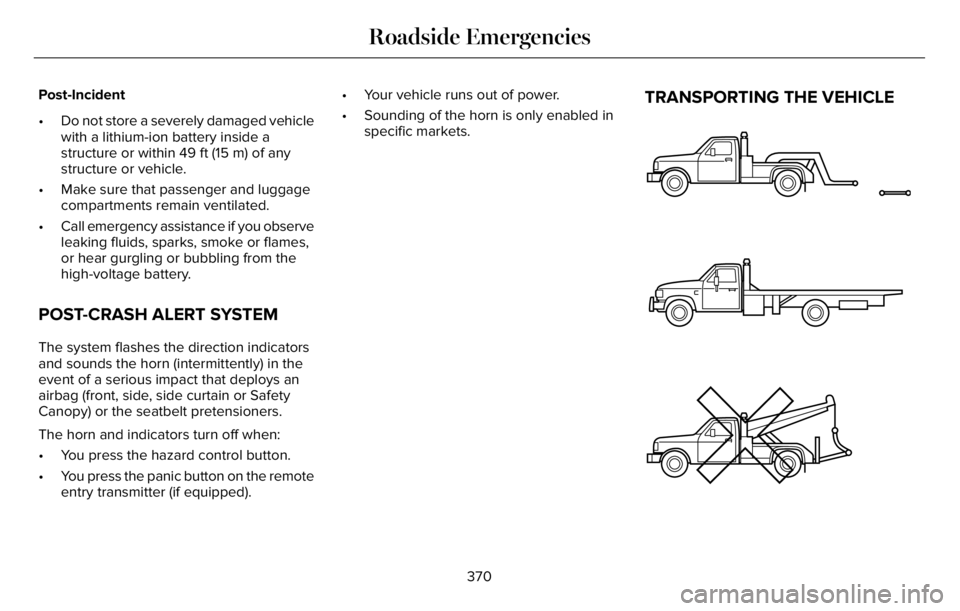
TRANSPORTING THE VEHICLE
E143886
370
Roadside Emergencies
Page 388 of 681
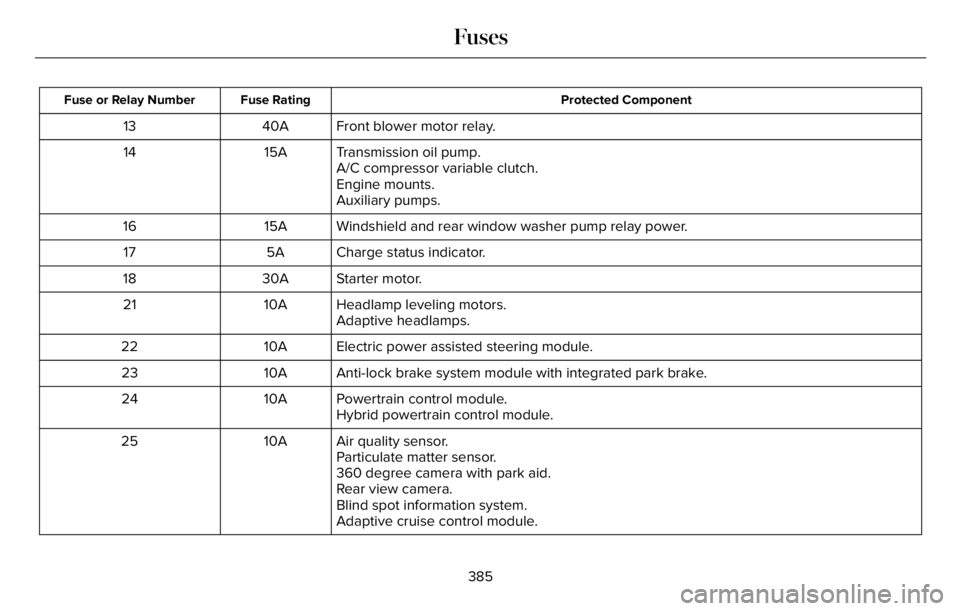
Protected Component Fuse Rating Fuse or Relay Number
Front blower motor relay. 40A 13
Transmission oil pump. 15A 14
A/C compressor variable clutch.
Engine mounts.
Auxiliary pumps.
Windshield and rear window washer pump relay power. 15A 16
Charge status indicator. 5A 17
Starter motor. 30A 18
Headlamp leveling motors. 10A 21
Adaptive headlamps.
Electric power assisted steering module. 10A 22
Anti-lock brake system module with integrated park brake. 10A 23
Powertrain control module. 10A 24
Hybrid powertrain control module.
Air quality sensor. 10A 25
Particulate matter sensor.
360 degree camera with park aid.
Rear view camera.
Blind spot information system.
Adaptive cruise control module.
385
Fuses
Page 397 of 681
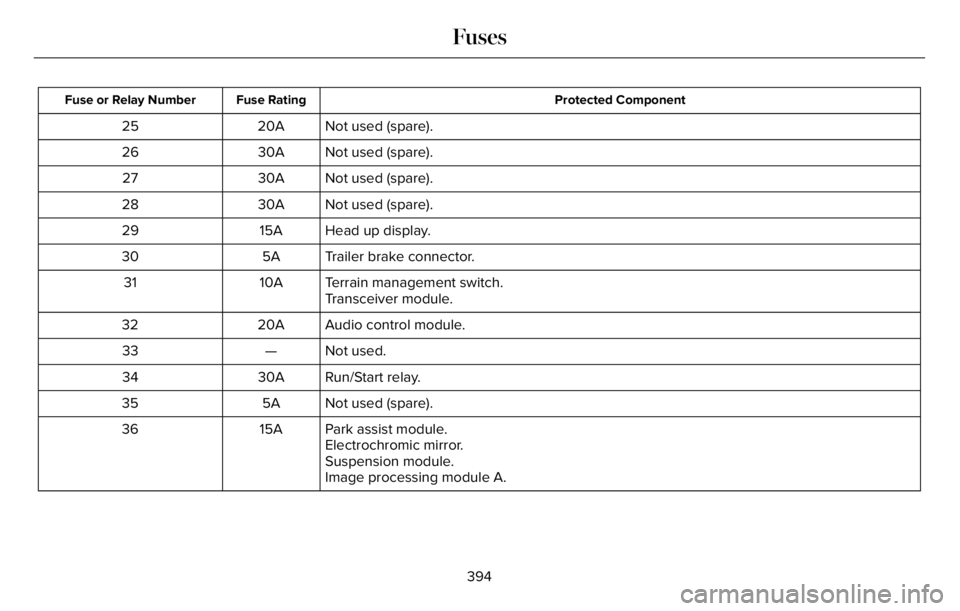
Protected Component Fuse Rating Fuse or Relay Number
Not used (spare). 20A 25
Not used (spare). 30A 26
Not used (spare). 30A 27
Not used (spare). 30A 28
Head up display. 15A 29
Trailer brake connector. 5A 30
Terrain management switch. 10A 31
Transceiver module.
Audio control module. 20A 32
Not used. — 33
Run/Start relay. 30A 34
Not used (spare). 5A 35
Park assist module. 15A 36
Electrochromic mirror.
Suspension module.
Image processing module A.
394
Fuses