park assist LINCOLN AVIATOR 2023 Owners Manual
[x] Cancel search | Manufacturer: LINCOLN, Model Year: 2023, Model line: AVIATOR, Model: LINCOLN AVIATOR 2023Pages: 681, PDF Size: 9.33 MB
Page 8 of 681
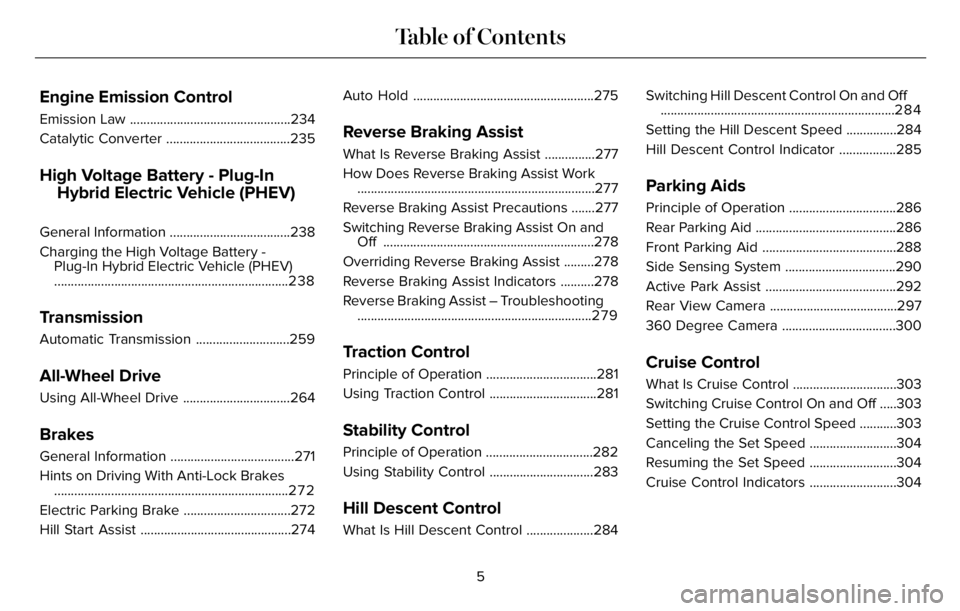
Engine Emission Control
Emission Law ................................................234
Catalytic Converter .....................................235
High Voltage Battery - Plug-In
Hybrid Electric Vehicle (PHEV)
General Information ....................................238
Charging the High Voltage Battery -
Plug-In Hybrid Electric Vehicle (PHEV)
......................................................................238
Transmission
Automatic Transmission ............................259
All-Wheel Drive
Using All-Wheel Drive ................................264
Brakes
General Information .....................................271
Hints on Driving With Anti-Lock Brakes
......................................................................2 7 2
Electric Parking Brake ................................272
Hill Start Assist .............................................274Auto Hold ......................................................275
Reverse Braking Assist
What Is Reverse Braking Assist ...............277
How Does Reverse Braking Assist Work
.......................................................................277
Reverse Braking Assist Precautions .......277
Switching Reverse Braking Assist On and
Off ...............................................................278
Overriding Reverse Braking Assist .........278
Reverse Braking Assist Indicators ..........278
Reverse Braking Assist – Troubleshooting
......................................................................2 7 9
Traction Control
Principle of Operation .................................281
Using Traction Control ................................281
Stability Control
Principle of Operation ................................282
Using Stability Control ...............................283
Hill Descent Control
What Is Hill Descent Control ....................284Switching Hill Descent Control On and Off
......................................................................284
Setting the Hill Descent Speed ...............284
Hill Descent Control Indicator .................285
Parking Aids
Principle of Operation ................................286
Rear Parking Aid ..........................................286
Front Parking Aid ........................................288
Side Sensing System .................................290
Active Park Assist .......................................292
Rear View Camera ......................................297
360 Degree Camera ..................................300
Cruise Control
What Is Cruise Control ...............................303
Switching Cruise Control On and Off .....303
Setting the Cruise Control Speed ...........303
Canceling the Set Speed ..........................304
Resuming the Set Speed ..........................304
Cruise Control Indicators ..........................304
5
Table of Contents
Page 28 of 681
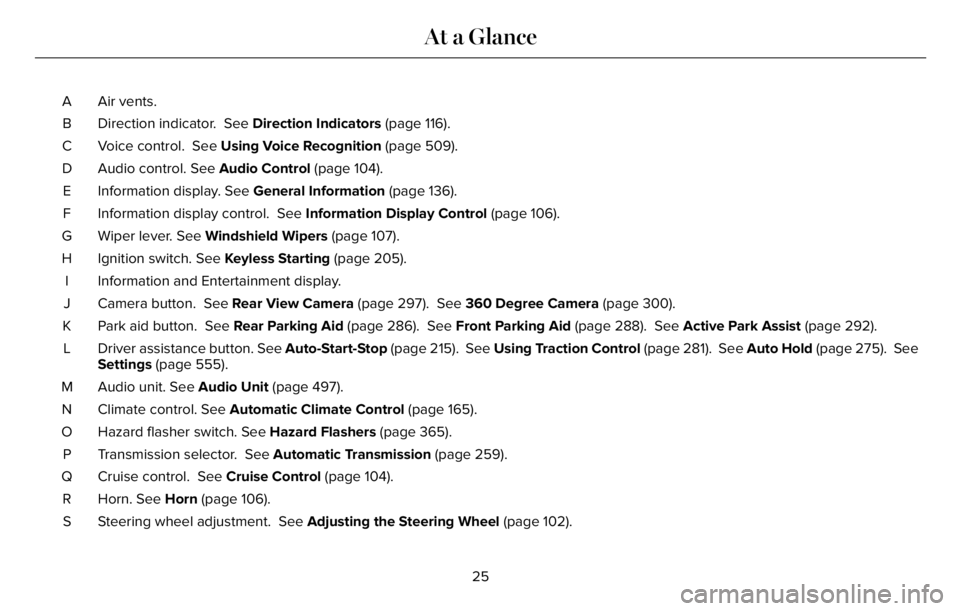
Air vents. A
Direction indicator. See Direction Indicators (page 116). B
Voice control. See Using Voice Recognition (page 509). C
Audio control. See Audio Control (page 104). D
Information display. See General Information (page 136). E
Information display control. See Information Display Control (page 106). F
Wiper lever. See Windshield Wipers (page 107). G
Ignition switch. See Keyless Starting (page 205). H
Information and Entertainment display. I
Camera button. See Rear View Camera (page 297). See 360 Degree Camera (page 300). J
Park aid button. See Rear Parking Aid (page 286). See Front Parking Aid (page 288). See Active Park Assist (page 292). K
Driver assistance button. See Auto-Start-Stop (page 215). See Using Traction Control (page 281). See Auto Hold (page 275). See
Settings (page 555). L
Audio unit. See Audio Unit (page 497). M
Climate control. See Automatic Climate Control (page 165). N
Hazard flasher switch. See Hazard Flashers (page 365). O
Transmission selector. See Automatic Transmission (page 259). P
Cruise control. See Cruise Control (page 104). Q
Horn. See Horn (page 106). R
Steering wheel adjustment. See Adjusting the Steering Wheel (page 102). S
25
At a Glance
Page 135 of 681
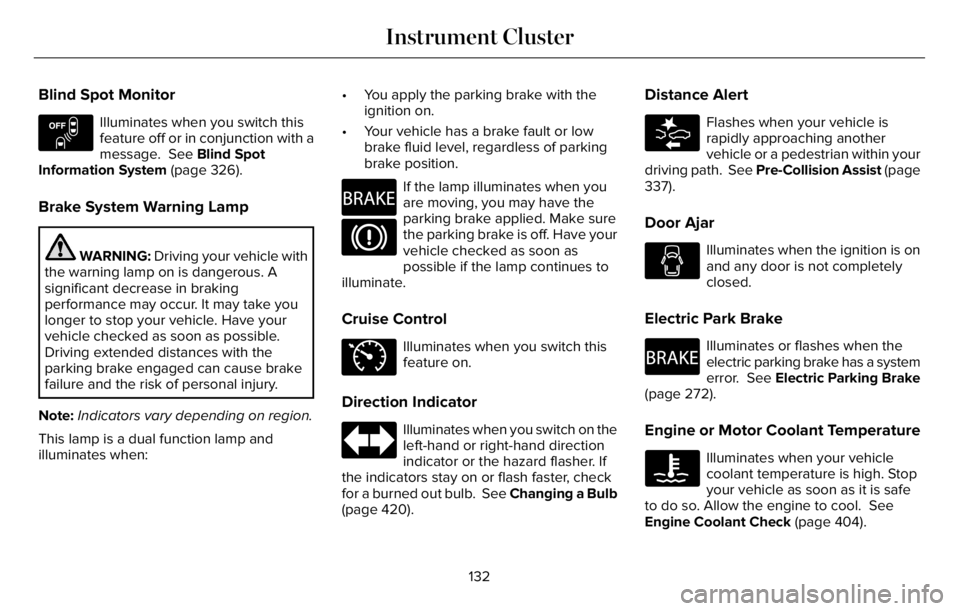
Blind Spot Monitor
E151262
Illuminates when you switch this
feature off or in conjunction with a
message. See Blind Spot
Information System (page 326).
Brake System Warning Lamp
WARNING: Driving your vehicle with
the warning lamp on is dangerous. A
significant decrease in braking
performance may occur. It may take you
longer to stop your vehicle. Have your
vehicle checked as soon as possible.
Driving extended distances with the
parking brake engaged can cause brake
failure and the risk of personal injury.
Note:Indicators vary depending on region.
This lamp is a dual function lamp and
illuminates when:• You apply the parking brake with the
ignition on.
• Your vehicle has a brake fault or low
brake fluid level, regardless of parking
brake position.
E270480
If the lamp illuminates when you
are moving, you may have the
parking brake applied. Make sure
the parking brake is off. Have your
vehicle checked as soon as
possible if the lamp continues to
illuminate.
Cruise Control
E71340
Illuminates when you switch this
feature on.
Direction Indicator
Illuminates when you switch on the
left-hand or right-hand direction
indicator or the hazard flasher. If
the indicators stay on or flash faster, check
for a burned out bulb. See Changing a Bulb
(page 420).
Distance Alert
E281485
Flashes when your vehicle is
rapidly approaching another
vehicle or a pedestrian within your
driving path. See Pre-Collision Assist (page
337).
Door Ajar
Illuminates when the ignition is on
and any door is not completely
closed.
Electric Park Brake
E270480
Illuminates or flashes when the
electric parking brake has a system
error. See Electric Parking Brake
(page 272).
Engine or Motor Coolant Temperature
Illuminates when your vehicle
coolant temperature is high. Stop
your vehicle as soon as it is safe
to do so. Allow the engine to cool. See
Engine Coolant Check (page 404).
132
Instrument Cluster
Page 162 of 681
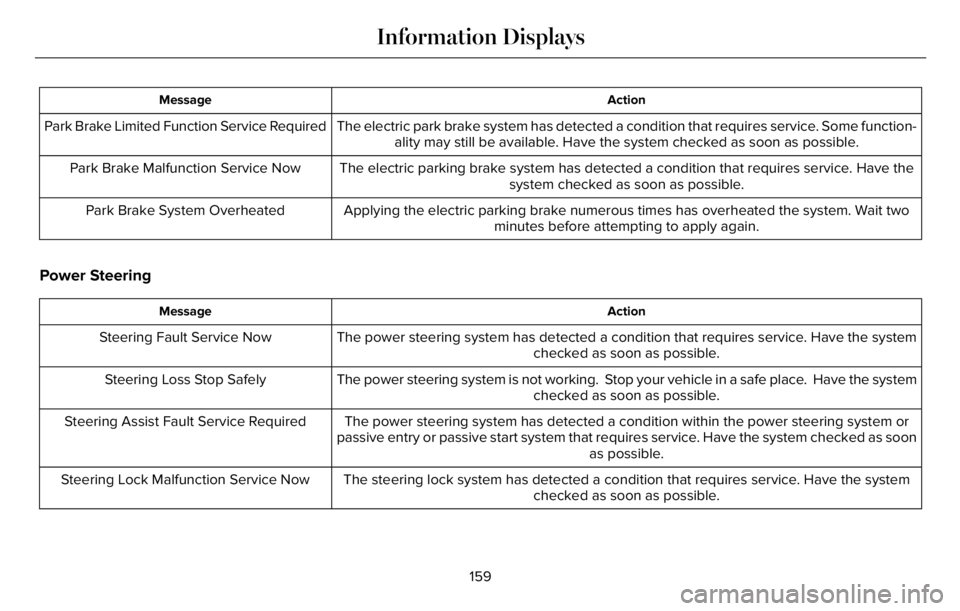
Action Message
The electric park brake system has detected a condition that requires service. Some function-
ality may still be available. Have the system checked as soon as possible. Park Brake Limited Function Service Required
The electric parking brake system has detected a condition that requires service. Have the
system checked as soon as possible. Park Brake Malfunction Service Now
Applying the electric parking brake numerous times has overheated the system. Wait two
minutes before attempting to apply again. Park Brake System Overheated
Power Steering
Action Message
The power steering system has detected a condition that requires service. Have the system
checked as soon as possible. Steering Fault Service Now
The power steering system is not working. Stop your vehicle in a safe place. Have the system
checked as soon as possible. Steering Loss Stop Safely
The power steering system has detected a condition within the power steering system or
passive entry or passive start system that requires service. Have the system checked as soon
as possible. Steering Assist Fault Service Required
The steering lock system has detected a condition that requires service. Have the system
checked as soon as possible. Steering Lock Malfunction Service Now
159
Information Displays
Page 189 of 681
Linking a Personal Profile to Your Remote
Control or Mobile Device
You can save preset memory positions for
up to three remote controls, by assigning a
remote control to a personal profile in your
SYNC 3. You can assign three additional
remote controls set up as Phone as a Key.
See Keys and Remote Controls (page 68).
Use the SYNC display to link a remote
control, mobile device or both to a personal
profile.
1. Switch the ignition on and leave the
vehicle in park (P).
2. Select the Personal Profiles button under
Settings.
3. Touch the arrow for the profile you wish
to link to a remote control or mobile
device.
4. Select the correct button to link a remote
control, mobile device, or both.
5. Follow the instructions on the display.Note:To successfully link a mobile device,
the mobile device must be present in your
vehicle, and must have previously been
setup as a remote control for your vehicle.
Note:If more than one linked remote control
is in range, the memory function moves to
the settings of the first key to initiate a
memory recall.
Note:The guest profile consists of existing
settings when there is no driver profile
created. After you create a driver profile, the
guest profile serves as an additional driver
profile.
Note:You cannot link a personalized name,
a memory seat button or a remote control
to a guest profile.
Personal Settings
Personal Profiles allow you to personalize
positional settings such as seats and mirrors,
as well as non-positional settings such as
radio, navigation, driver assist and system
settings. See SYNC™ 3 (page 507). You
cannot change the menu locations and
settings of those personalized features with
Personal Profiles.Note:Non-positional settings are saved to
the active driver profile whenever you
change a setting.
Note:You can save positional settings if you
press and hold a memory seat button.
Recalling and Changing a Profile
You can recall a profile by:
• Using a remote control or mobile device
that has been linked to a driver profile to
access the remote start feature, press an
unlock button or open the door with the
exterior door handle.
• Pressing a memory seat button that has
been linked to a driver profile.
• Using the Personal Profiles menu on the
SYNC touchscreen.
Note:The recalled profile replaces the
previously active profile. If the active profile
is not your preferred profile, you can change
it using any of the three methods listed.
186
Seats
Page 212 of 681
Note:If the engine is idling for 30 minutes,
the ignition and engine shut down.
Vehicles using Phone as a Key
1. Shift into park (P).
2. Press the push button ignition switch.
3. Apply the parking brake.
Note:The ignition, all electrical circuits and
all warning lamps and indicators will be
turned off.
Note:If the engine is idling for 30 minutes,
the ignition and engine shut down.
Stopping the Engine When Your
Vehicle is Moving
WARNING: Switching off the engine
when your vehicle is still moving results in
a significant decrease in braking
assistance. Higher effort is required to
apply the brakes and to stop your vehicle.
A significant decrease in steering
assistance could also occur. The steering
does not lock, but higher effort could be
required to steer your vehicle. When you
switch the ignition off, some electrical
circuits, for example airbags, also turn off.
If you unintentionally switch the ignition
off, shift into neutral (N) and restart the
engine.
1. Press and hold the push button ignition
switch, or press it three times within two
seconds.
2. Put the transmission into neutral (N) and
use the brakes to bring your vehicle to a
safe stop.
3. When your vehicle has stopped, shift into
park (P).
4. Apply the parking brake.
Vehicles using Phone as a Key
1. Press and hold the push button ignition
switch, or press it three times within two
seconds.
2. Put the transmission into neutral (N) and
use the brakes to bring your vehicle to a
safe stop.3. When your vehicle has stopped, shift into
park (P).
4. Apply the parking brake.
Guarding Against Exhaust Fumes
WARNING: Exhaust leaks may result
in entry of harmful and potentially lethal
fumes into the passenger compartment. If
you smell exhaust fumes inside your
vehicle, have your vehicle inspected
immediately. Do not drive if you smell
exhaust fumes.
Important Ventilating Information
If you stop your vehicle and then leave the
engine idling for long periods, we
recommend that you do one of the following:
• Open the windows at least 1 in (3 cm).
• Set your climate control to outside air.
209
Starting and Stopping the Engine
Page 215 of 681
30 seconds. If you do not intervene within
30 seconds, your vehicle shuts down.
Another message appears in the information
display to inform you that your vehicle has
shut down to save fuel. Start your vehicle as
you normally do.
Note:Automatic Engine Shutdown may be
more frequent for hybrid vehicles.
Automatic Engine Shutdown Override
Note: You cannot permanently switch off
the automatic shutdown feature. When you
switch it off temporarily, it turns on at the
next ignition cycle.You can stop the shutdown, or reset the
timer, at any point before the 30-second
countdown has expired by doing any of the
following:
• You can reset the timer by interacting
with your vehicle, for example pressing
the brake or accelerator pedal.
• You can temporarily switch off the
shutdown feature any time the ignition is
on using the information display. See
Information Displays (page 136). The
feature only remains off for the current
ignition cycle.
• During the 30-second countdown, the
system prompts you to press OK or
RESET to temporarily switch the feature
off for the current ignition cycle only.
Switching Off Your Vehicle When It Is
Stationary
1. Put the transmission in park (P).
2. Press the push button ignition switch
once.
3. Apply the parking brake.Note:This switches off the ignition, warning
lamps and indicators.
Vehicles Using Phone as a Key
1. Shift into park (P).
2. Press the push button ignition switch.
3. Apply the parking brake.
Note:The ignition, all electrical circuits and
all warning lamps and indicators turn off.
Note:If the engine is idling for 30 minutes,
the ignition and engine automatically shut
down.
Switching Off Your Vehicle When It Is
Moving
WARNING: Switching off the engine
when your vehicle is still moving results in
a significant decrease in braking
assistance. Higher effort is required to
apply the brakes and to stop your vehicle.
A significant decrease in steering
assistance could also occur. The steering
does not lock, but higher effort could be
212
Starting and Stopping the Engine
Page 218 of 681
AUTO-START-STOP - EXCLUDING:
PLUG-IN HYBRID ELECTRIC
VEHICLE (PHEV)
The system helps reduce fuel consumption
by automatically stopping and restarting the
engine when your vehicle has stopped. The
engine restarts automatically when you
release the brake pedal.
In some situations, your vehicle may restart
automatically, for example:
• To maintain interior comfort.
• To recharge the battery.
Note:Power assist steering turns off when
the engine is off.
Note:If your vehicle is flex fuel capable,
Auto-Start-Stop will be inhibited for a short
time after a refuel event while the system is
verifying the fuel type being used.
WARNING: Apply the parking brake,
shift into park (P), switch the ignition off
and remove the key before you leave your
vehicle. Failure to follow this instruction
could result in personal injury or death.
WARNING: Apply the parking brake,
shift into park (P), switch the ignition off
and remove the key before you open the
hood or have any service or repair work
completed. If you do not switch the ignition
off, the engine could restart at any time.
Failure to follow this instruction could result
in personal injury or death.
WARNING: The system may require
the engine to automatically restart when
the auto-start-stop indicator illuminates
green or flashes amber. Failure to follow
this instruction could result in personal
injury.
The Auto-Start-Stop system status is
available at a glance within the information
display. See Information Displays (page
136).
Enabling Auto-Start-Stop
The system automatically enables every time
you start your vehicle if:
• Your vehicle exceeds an initial speed of
3 mph (5 km/h) after you have initially
started your vehicle.
• You have stopped your vehicle.
• Your foot is on the brake pedal.
• The driver door is closed.
• The interior compartment has cooled or
warmed to an acceptable level.
• The front windshield defroster is off.
• You have not turned the steering wheel
rapidly or you do not have it at a sharp
angle.
• The vehicle is not on a steep road grade.
• The battery is within optimal operating
conditions (battery state of charge and
temperature in range).
• The engine coolant is near operating
temperature.
• Elevation is below about 12,000 ft
(3,650 m).
• Ambient temperature is moderate.
215
Unique Driving Characteristics
Page 274 of 681
GENERAL INFORMATION
Note: Occasional brake noise is normal. If
a metal-to-metal, continuous grinding or
continuous squeal sound is present, the
brake linings may be worn. Have your
vehicle checked. If your vehicle has
continuous vibration or shudder in the
steering wheel when braking, have your
vehicle checked.
Note: Brake dust may accumulate on the
wheels, even under normal driving
conditions. Some dust is inevitable as the
brakes wear and does not contribute to
brake noise. Wet brakes result in reduced
braking efficiency. Gently press the brake
pedal a few times when driving from a car
wash or standing water to dry the brakes.
See Cleaning the Wheels (page 427).
Brake Over Accelerator
In the event the accelerator pedal becomes
stuck or entrapped, apply steady and firm
pressure to the brake pedal to slow the
vehicle and reduce engine power. If you
experience this condition, apply the brakes
and bring your vehicle to a safe stop. Move
the transmission to park (P), switch the
engine off and apply the parking brake.
Inspect the accelerator pedal for any
interference. If none are found and the
condition persists, have your vehicle
checked. If your vehicle has to be towed,
we recommend that you contact a
professional towing service.
Emergency Brake Assist
Emergency brake assist detects when you
brake heavily by measuring the rate at which
you press the brake pedal. It provides
maximum braking efficiency as long as you
press the pedal. Emergency brake assist
can reduce stopping distances in critical
situations.Note:Depending on applicable laws and
regulations in the country for which your
vehicle was originally built, your brake lamps
may flash during heavy braking. Following
this, your hazard lights may also flash when
your vehicle comes to a stop.
Anti-lock Brake System
This system helps you maintain steering
control during emergency stops by keeping
the brakes from locking.
This lamp illuminates momentarily
when you switch the ignition on to
confirm the lamp is functional.
If the warning lamp does not illuminate
during start up, remains on or flashes, the
system may be disabled. Have the system
checked. If the anti-lock brake system is
disabled, normal braking is still operational.
See Warning Lamps and Indicators (page
131).
Note:Indicators vary depending on region.
271
Brakes
Page 277 of 681
HILL START ASSIST
WARNING: The system does not
replace the parking brake. When you leave
your vehicle, always apply the parking
brake.
WARNING: You must remain in your
vehicle when the system turns on. At all
times, you are responsible for controlling
your vehicle, supervising the system and
intervening, if required. Failure to take care
may result in the loss of control of your
vehicle, serious personal injury or death.
WARNING: The system will turn off
if a malfunction is apparent or if you rev
the engine excessively. Failure to take care
may result in the loss of control of your
vehicle, serious personal injury or death.
The system makes it easier to pull away
when your vehicle is on a slope without the
need to use the parking brake.When the system is active, your vehicle
remains stationary on the slope for two to
three seconds after you release the brake
pedal. This allows time to move your foot
from the brake to the accelerator pedal. The
system releases the brakes automatically
once the engine has developed sufficient
torque to prevent your vehicle from rolling
down the slope. This is an advantage when
pulling away on a slope, for example from a
car park ramp, traffic lights or when reversing
uphill into a parking space.
The system activates on any slope that
causes your vehicle to roll.
Note:There is no warning light to indicate
the system is either on or off.
Using Hill Start Assist
1. Press the brake pedal to bring your
vehicle to a complete standstill. Keep the
brake pedal pressed and shift into first
gear when facing uphill or reverse (R)
when facing downhill.
2. If the sensors detect that your vehicle is
on a slope, the system activates
automatically.3. When you remove your foot from the
brake pedal, your vehicle remains on the
slope without rolling away for about two
to three seconds. This hold time
automatically extends if you are in the
process of driving off.
4. Drive off in the normal manner. The
system releases the brakes automatically.
Note:When you remove your foot from the
brake pedal and press the pedal again when
the system is active, you will experience
significantly reduced brake pedal travel. This
is normal.
Switching the System On and Off
Vehicles with Manual Transmission
You can switch this feature on or off in the
information display. The system remembers
the last setting when you start your vehicle.
Vehicles with Automatic Transmission
You cannot turn the system on or off. When
you switch the ignition on, the system
automatically turns on.
274
Brakes