lock LINCOLN AVIATOR 2023 Workshop Manual
[x] Cancel search | Manufacturer: LINCOLN, Model Year: 2023, Model line: AVIATOR, Model: LINCOLN AVIATOR 2023Pages: 681, PDF Size: 9.33 MB
Page 162 of 681
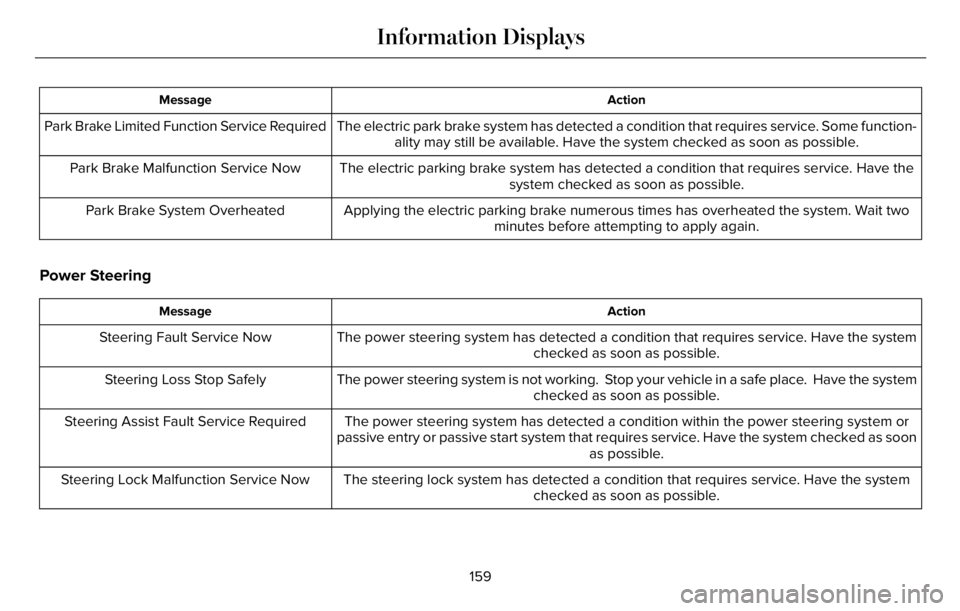
Action Message
The electric park brake system has detected a condition that requires service. Some function-
ality may still be available. Have the system checked as soon as possible. Park Brake Limited Function Service Required
The electric parking brake system has detected a condition that requires service. Have the
system checked as soon as possible. Park Brake Malfunction Service Now
Applying the electric parking brake numerous times has overheated the system. Wait two
minutes before attempting to apply again. Park Brake System Overheated
Power Steering
Action Message
The power steering system has detected a condition that requires service. Have the system
checked as soon as possible. Steering Fault Service Now
The power steering system is not working. Stop your vehicle in a safe place. Have the system
checked as soon as possible. Steering Loss Stop Safely
The power steering system has detected a condition within the power steering system or
passive entry or passive start system that requires service. Have the system checked as soon
as possible. Steering Assist Fault Service Required
The steering lock system has detected a condition that requires service. Have the system
checked as soon as possible. Steering Lock Malfunction Service Now
159
Information Displays
Page 163 of 681
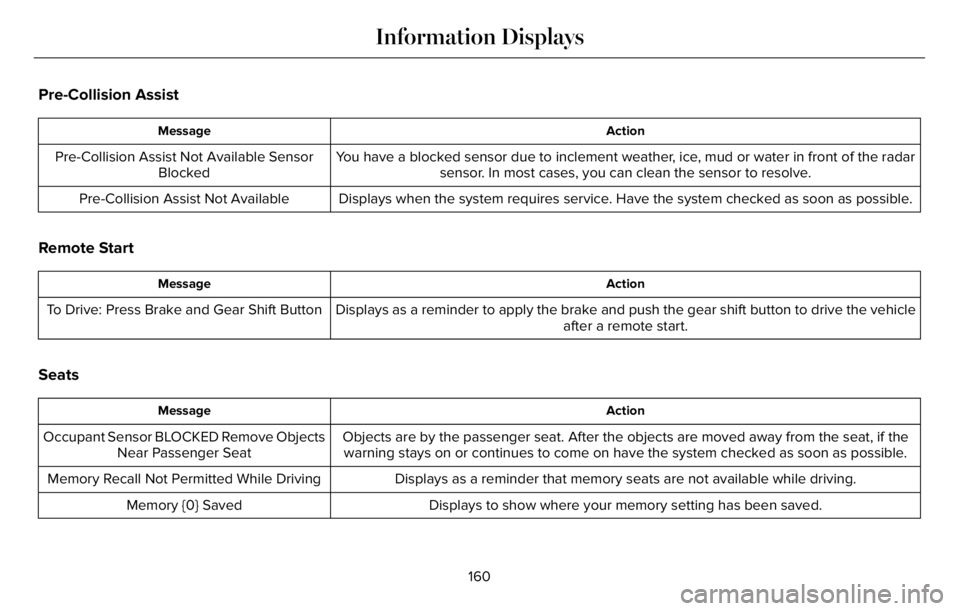
Pre-Collision Assist
Action Message
You have a blocked sensor due to inclement weather, ice, mud or water in front of the radar
sensor. In most cases, you can clean the sensor to resolve. Pre-Collision Assist Not Available Sensor
Blocked
Displays when the system requires service. Have the system checked as soon as possible. Pre-Collision Assist Not Available
Remote Start
Action Message
Displays as a reminder to apply the brake and push the gear shift button to drive the vehicle
after a remote start. To Drive: Press Brake and Gear Shift Button
Seats
Action Message
Objects are by the passenger seat. After the objects are moved away from the seat, if the
warning stays on or continues to come on have the system checked as soon as possible. Occupant Sensor BLOCKED Remove Objects
Near Passenger Seat
Displays as a reminder that memory seats are not available while driving. Memory Recall Not Permitted While Driving
Displays to show where your memory setting has been saved. Memory {0} Saved
160
Information Displays
Page 173 of 681
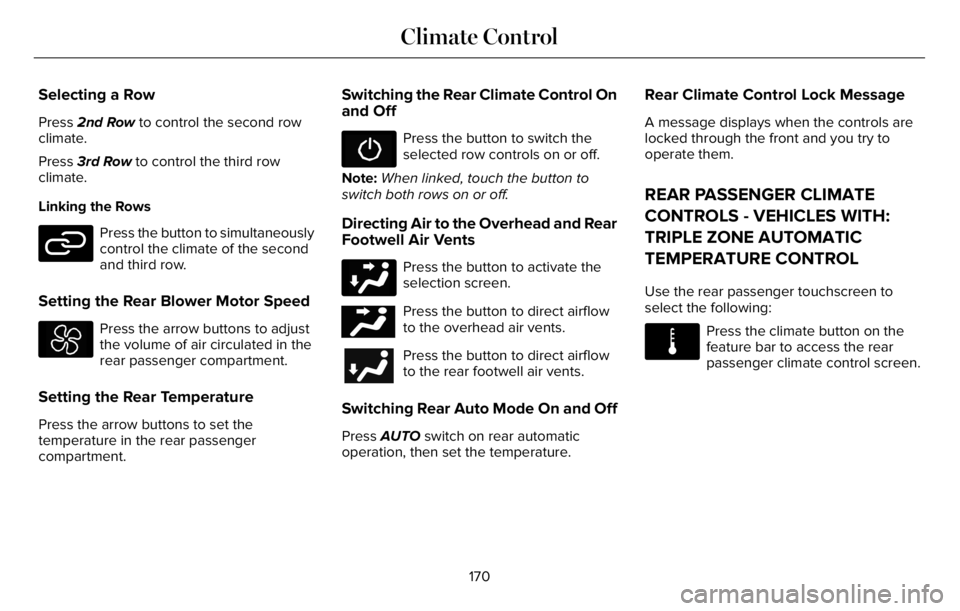
Selecting a Row
Press 2nd Row to control the second row
climate.
Press 3rd Row to control the third row
climate.
Linking the Rows
E282078
Press the button to simultaneously
control the climate of the second
and third row.
Setting the Rear Blower Motor Speed
Press the arrow buttons to adjust
the volume of air circulated in the
rear passenger compartment.
Setting the Rear Temperature
Press the arrow buttons to set the
temperature in the rear passenger
compartment.
Switching the Rear Climate Control On
and Off
Press the button to switch the
selected row controls on or off.
Note:When linked, touch the button to
switch both rows on or off.
Directing Air to the Overhead and Rear
Footwell Air Vents
Press the button to activate the
selection screen.
E244097Press the button to direct airflow
to the overhead air vents.
Press the button to direct airflow
to the rear footwell air vents.
Switching Rear Auto Mode On and Off
Press AUTO switch on rear automatic
operation, then set the temperature.
Rear Climate Control Lock Message
A message displays when the controls are
locked through the front and you try to
operate them.
REAR PASSENGER CLIMATE
CONTROLS - VEHICLES WITH:
TRIPLE ZONE AUTOMATIC
TEMPERATURE CONTROL
Use the rear passenger touchscreen to
select the following:
E283811
Press the climate button on the
feature bar to access the rear
passenger climate control screen.
170
Climate Control
Page 174 of 681
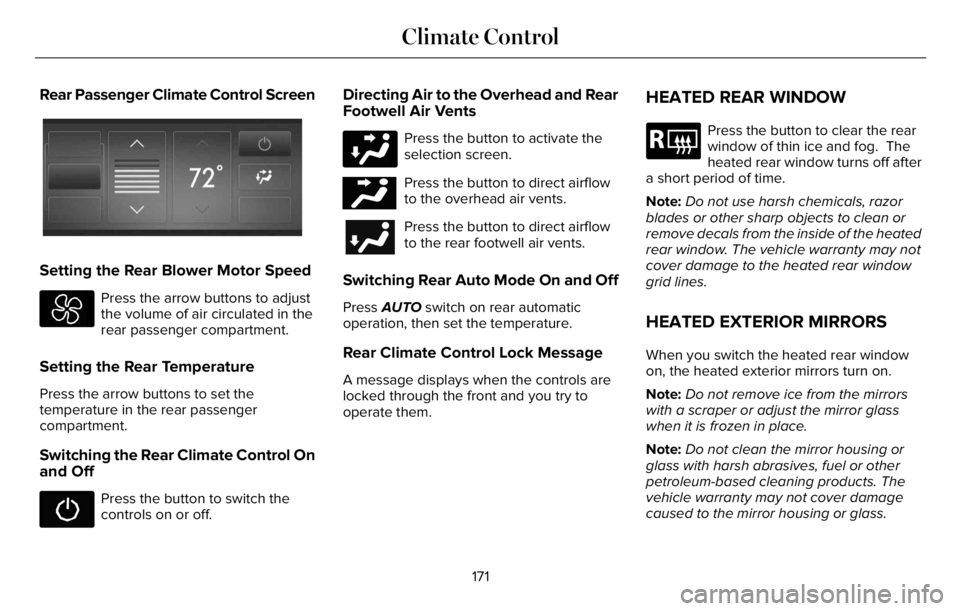
Rear Passenger Climate Control Screen
E368025E368025
Setting the Rear Blower Motor Speed
Press the arrow buttons to adjust
the volume of air circulated in the
rear passenger compartment.
Setting the Rear Temperature
Press the arrow buttons to set the
temperature in the rear passenger
compartment.
Switching the Rear Climate Control On
and Off
Press the button to switch the
controls on or off.
Directing Air to the Overhead and Rear
Footwell Air Vents
Press the button to activate the
selection screen.
E244097Press the button to direct airflow
to the overhead air vents.
Press the button to direct airflow
to the rear footwell air vents.
Switching Rear Auto Mode On and Off
Press AUTO switch on rear automatic
operation, then set the temperature.
Rear Climate Control Lock Message
A message displays when the controls are
locked through the front and you try to
operate them.
HEATED REAR WINDOW
E184884
Press the button to clear the rear
window of thin ice and fog. The
heated rear window turns off after
a short period of time.
Note:Do not use harsh chemicals, razor
blades or other sharp objects to clean or
remove decals from the inside of the heated
rear window. The vehicle warranty may not
cover damage to the heated rear window
grid lines.
HEATED EXTERIOR MIRRORS
When you switch the heated rear window
on, the heated exterior mirrors turn on.
Note:Do not remove ice from the mirrors
with a scraper or adjust the mirror glass
when it is frozen in place.
Note:Do not clean the mirror housing or
glass with harsh abrasives, fuel or other
petroleum-based cleaning products. The
vehicle warranty may not cover damage
caused to the mirror housing or glass.
171
Climate Control
Page 180 of 681
HEAD RESTRAINTS
WARNING: Fully adjust the head
restraint before you sit in or operate your
vehicle. This will help minimize the risk of
neck injury in the event of a crash. Do not
adjust the head restraint when your vehicle
is moving.
WARNING: The head restraint is a
safety device. Whenever possible it should
be installed and properly adjusted when
the seat is occupied. Failure to adjust the
head restraint properly could reduce its
effectiveness during certain impacts.
Note:Adjust the seat backrest to an upright
driving position before adjusting the head
restraint. Adjust the head restraint so that
the top of it is level with the top of your head
and as far forward as possible. Make sure
that you remain comfortable. If you are
extremely tall, adjust the head restraint to
its highest position.
Adjusting the Head Restraints
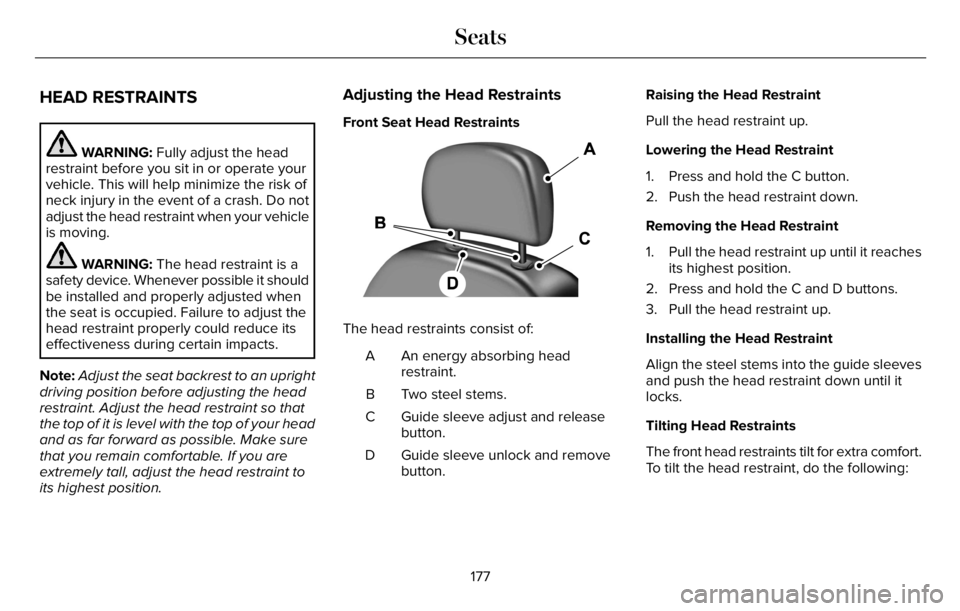
Front Seat Head Restraints
The head restraints consist of:
An energy absorbing head
restraint. A
Two steel stems. B
Guide sleeve adjust and release
button. C
Guide sleeve unlock and remove
button. DRaising the Head Restraint
Pull the head restraint up.
Lowering the Head Restraint
1. Press and hold the C button.
2. Push the head restraint down.
Removing the Head Restraint
1. Pull the head restraint up until it reaches
its highest position.
2. Press and hold the C and D buttons.
3. Pull the head restraint up.
Installing the Head Restraint
Align the steel stems into the guide sleeves
and push the head restraint down until it
locks.
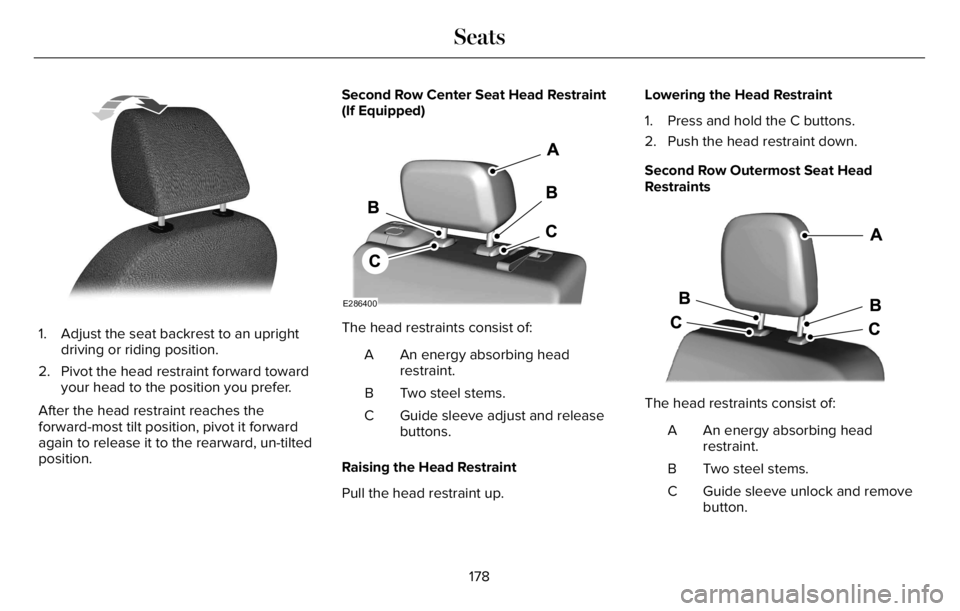
Tilting Head Restraints
The front head restraints tilt for extra comfort.
To tilt the head restraint, do the following:
177
Seats
Page 181 of 681
E144727
1. Adjust the seat backrest to an upright
driving or riding position.
2. Pivot the head restraint forward toward
your head to the position you prefer.
After the head restraint reaches the
forward-most tilt position, pivot it forward
again to release it to the rearward, un-tilted
position.Second Row Center Seat Head Restraint
(If Equipped)
E286400
The head restraints consist of:
An energy absorbing head
restraint. A
Two steel stems. B
Guide sleeve adjust and release
buttons. C
Raising the Head Restraint
Pull the head restraint up.Lowering the Head Restraint
1. Press and hold the C buttons.
2. Push the head restraint down.
Second Row Outermost Seat Head
Restraints
E3333322253E333332222253222222222222253222253225332253232533225333225353
The head restraints consist of:
An energy absorbing head
restraint. A
Two steel stems. B
Guide sleeve unlock and remove
button. C
178
Seats
Page 182 of 681
Removing the Head Restraint
1. Press and hold the C buttons.
2. Pull the head restraint up.
Installing the Head Restraint
Align the steel stems into the guide sleeves
and push the head restraint down until it
locks.
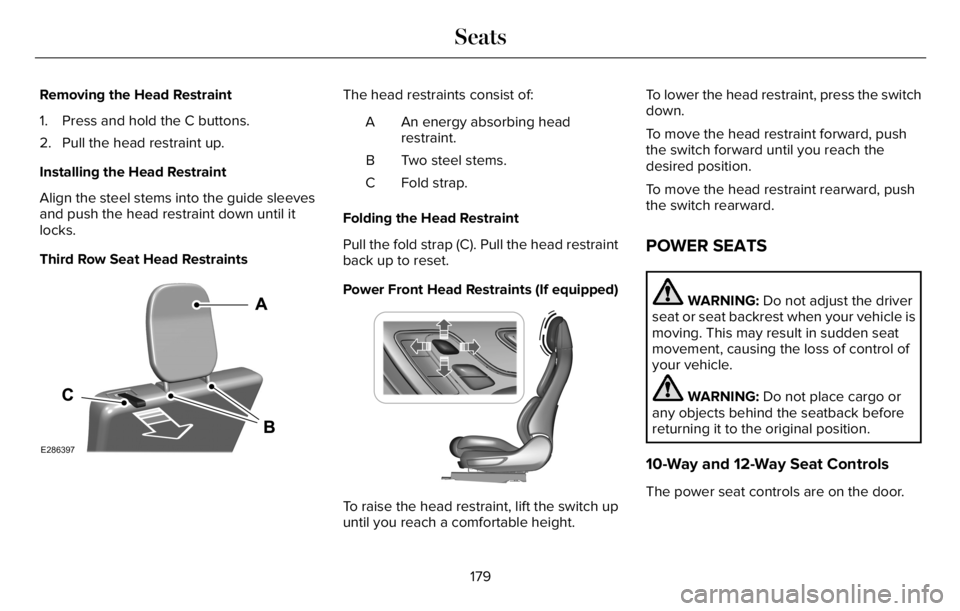
Third Row Seat Head Restraints
E286397
The head restraints consist of:
An energy absorbing head
restraint. A
Two steel stems. B
Fold strap. C
Folding the Head Restraint
Pull the fold strap (C). Pull the head restraint
back up to reset.
Power Front Head Restraints (If equipped)
E222280
To raise the head restraint, lift the switch up
until you reach a comfortable height.To lower the head restraint, press the switch
down.
To move the head restraint forward, push
the switch forward until you reach the
desired position.
To move the head restraint rearward, push
the switch rearward.
POWER SEATS
WARNING: Do not adjust the driver
seat or seat backrest when your vehicle is
moving. This may result in sudden seat
movement, causing the loss of control of
your vehicle.
WARNING: Do not place cargo or
any objects behind the seatback before
returning it to the original position.
10-Way and 12-Way Seat Controls
The power seat controls are on the door.
179
Seats
Page 188 of 681
Recalling a Preset Position
Press and release the preset button
associated with your preferred driving
position. The memory features move to the
position stored for that preset.
Note:You can only recall a preset memory
position when the ignition is off, or when the
transmission is in park (P) or neutral (N) and
the vehicle is not moving if the ignition is on.
You can also recall a preset memory position
by:
• Pressing the unlock button on your
remote control if it is linked to a preset
position.
• Unlocking the intelligent driver door
handle if a linked remote control is
present.
• Recalling a personal profile in your SYNC
3 menu.
Note:Using a linked remote control to recall
your memory position when the ignition is
off moves the seat to the easy entry position.Note:Pressing any active memory feature
adjustment control, or any memory button
during a memory recall, cancels the
operation.
Easy Entry and Exit Feature
If you enable the easy entry and exit feature,
it moves the driver seat position rearward up
to 2 in (5 cm) when you switch the ignition
off.
The driver seat returns to the previous
position when you switch the ignition on.
You can enable or disable this feature
through the touchscreen. See Settings
(page 555).
Personal Profiles
This feature allows you to create multiple
personal profiles enabling users to
personalize vehicle’s settings. You can
create one profile for each preset memory
seat button along with a guest profile. You
can recall a profile using SYNC 3 or the
preset button you selected when you created
your profile. You can also link a remote
control and a mobile device to your profile,
which are used to recall it.
Creating a Personal Profile
Use the SYNC display to create a personal
profile.
1. Switch the ignition on and leave the
vehicle in park (P).
2. Select the Personal Profiles button under
Settings.
3. Follow the instructions on the display.
185
Seats
Page 189 of 681
Linking a Personal Profile to Your Remote
Control or Mobile Device
You can save preset memory positions for
up to three remote controls, by assigning a
remote control to a personal profile in your
SYNC 3. You can assign three additional
remote controls set up as Phone as a Key.
See Keys and Remote Controls (page 68).
Use the SYNC display to link a remote
control, mobile device or both to a personal
profile.
1. Switch the ignition on and leave the
vehicle in park (P).
2. Select the Personal Profiles button under
Settings.
3. Touch the arrow for the profile you wish
to link to a remote control or mobile
device.
4. Select the correct button to link a remote
control, mobile device, or both.
5. Follow the instructions on the display.Note:To successfully link a mobile device,
the mobile device must be present in your
vehicle, and must have previously been
setup as a remote control for your vehicle.
Note:If more than one linked remote control
is in range, the memory function moves to
the settings of the first key to initiate a
memory recall.
Note:The guest profile consists of existing
settings when there is no driver profile
created. After you create a driver profile, the
guest profile serves as an additional driver
profile.
Note:You cannot link a personalized name,
a memory seat button or a remote control
to a guest profile.
Personal Settings
Personal Profiles allow you to personalize
positional settings such as seats and mirrors,
as well as non-positional settings such as
radio, navigation, driver assist and system
settings. See SYNC™ 3 (page 507). You
cannot change the menu locations and
settings of those personalized features with
Personal Profiles.Note:Non-positional settings are saved to
the active driver profile whenever you
change a setting.
Note:You can save positional settings if you
press and hold a memory seat button.
Recalling and Changing a Profile
You can recall a profile by:
• Using a remote control or mobile device
that has been linked to a driver profile to
access the remote start feature, press an
unlock button or open the door with the
exterior door handle.
• Pressing a memory seat button that has
been linked to a driver profile.
• Using the Personal Profiles menu on the
SYNC touchscreen.
Note:The recalled profile replaces the
previously active profile. If the active profile
is not your preferred profile, you can change
it using any of the three methods listed.
186
Seats
Page 190 of 681
When you switch on the Personal Profiles
feature:
• Unlocking a door with a remote control
or mobile device that is not linked to a
driver profile does not change the active
profile, but remains the last known
profile. It will not change the positional
settings.
• Pressing a memory seat button that is
not linked to a driver profile or has not
been saved to a preset setting does not
change active profile, but remains in the
last known profile. It will not change the
positional settings.
• Pressing a memory seat button that is
not linked to a driver profile but has been
saved to a preset setting does not recall
any non-positional settings, but recalls
the positional settings that you saved to
that memory seat button.
See SYNC™ 3 Troubleshooting (page 557).When you switch off a Personal Profiles
feature:
• Unlocking a door with a remote control
or mobile device does not recall any
non-positional settings, but still recalls
positional settings from the driver profile
which the remote control or mobile
device had been linked to.
• Pressing a memory seat button that has
not been linked to a driver profile or has
not been saved to a preset setting does
not recall any settings, positional or
non-positional.
• Pressing a memory seat button that has
been linked to a driver profile or has
saved to a preset setting does not recall
any non-positional settings, but recalls
the positional settings that you saved to
that memory seat button.
REAR SEATS
WARNING: Always drive and ride
with your seatback upright and the lap belt
snug and low across the hips.
WARNING: Do not recline the seat
backrest too far as this can cause the
occupant to slide under the seatbelt,
resulting in personal injury in the event of
a crash.
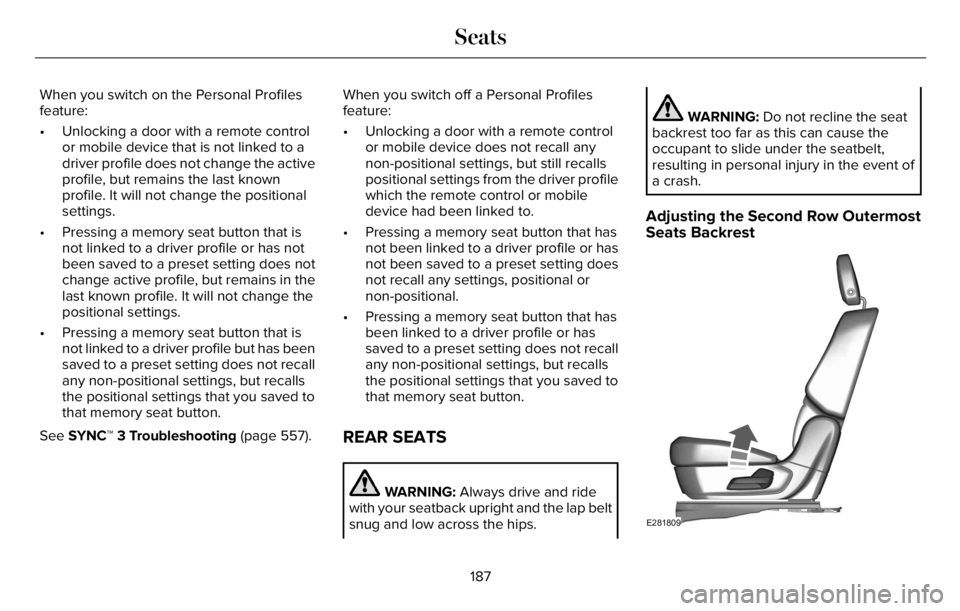
Adjusting the Second Row Outermost
Seats Backrest
E281809
187
Seats