lock LINCOLN AVIATOR 2023 Manual Online
[x] Cancel search | Manufacturer: LINCOLN, Model Year: 2023, Model line: AVIATOR, Model: LINCOLN AVIATOR 2023Pages: 681, PDF Size: 9.33 MB
Page 283 of 681
REVERSE BRAKING ASSIST –
FREQUENTLY ASKED QUESTIONS
Why is reverse braking assist unavailable?
• Make sure you switch the system on.
See Switching Reverse Braking Assist
On and Off (page 278).
• Make sure that the liftgate, hood and all
doors are closed.
• Make sure the cross traffic alert system
is on. See Cross Traffic Alert (page 330).
• Make sure the rear parking aid system is
on. See Rear Parking Aid (page 286).
• Make sure traction control is on. See
Using Traction Control (page 281).
• The vehicle has sustained a rear end
impact. Have the sensors checked for
proper coverage and operation.
• An ABS, traction control or stability
control event may have occurred. The
system resumes operation when the
event is complete.• Make sure the rear view camera and 360
degree camera are not dirty or
obstructed. If it is dirty, clean the camera.
See Rear View Camera (page 297). See
360 Degree Camera (page 300). If the
message still appears after cleaning the
camera, wait a short time and the
message should clear. If the message
does not clear, have the system checked.
• Make sure the sensors are not blocked
or faulted. See Cross Traffic Alert (page
330). See Rear Parking Aid (page 286).
• You recently had your vehicle serviced,
or the battery disconnected. Drive your
vehicle a short distance to resume
system operation.
• The system does not function when you
connect a trailer. Operation resumes
when you disconnect the trailer.
Note:If the answers to why the system is
unavailable do not assist in returning reverse
braking assist to available, have the system
checked as soon as possible.
280
Reverse Braking Assist (If Equipped)
Page 289 of 681
PRINCIPLE OF OPERATION
WARNING: To help avoid personal
injury, always use caution when in reverse
(R) and when using the sensing system.
WARNING: The system may not
detect objects with surfaces that absorb
reflection. Always drive with due care and
attention. Failure to take care may result
in a crash.
WARNING: Traffic control systems,
inclement weather, air brakes, external
motors and fans may affect the correct
operation of the sensing system. This may
cause reduced performance or false alerts.
WARNING: The system may not
detect small or moving objects, particularly
those close to the ground.
Note:If your vehicle has MyKey™, the sensing
system cannot be switched off when a
MyKey™ is present. See Principle of
Operation (page 78).Note:Keep the sensors on the bumper or
fascia free from snow, ice and large
accumulations of dirt. If the sensors are
covered, the system’s accuracy can be
affected. Do not clean the sensors with sharp
objects.
Note:If your vehicle sustains damage to the
bumper or fascia, leaving it misaligned or
bent, the sensing zone may be altered
causing inaccurate measurement of
obstacles or false alerts.
Note:Certain add-on devices installed
around the bumper or fascia may create
false alerts. For example, large trailer
hitches, bike or surfboard racks, license plate
brackets, bumper covers or any other device
that may block the normal detection zone
of the system. Remove the add-on device to
prevent false alerts.
Note:When you connect a trailer to your
vehicle, the rear parking aid may detect the
trailer and therefore provide an alert. Disable
the rear parking aid when you connect a
trailer to prevent the alert.The sensing system warns the driver of
obstacles within a certain range of your
vehicle. The system turns on automatically
whenever you switch the ignition on.
You can switch the system off through the
touchscreen, information display or from the
pop-up message that appears once you shift
the transmission into reverse (R). If your
vehicle has a parking aid button, you can
switch the system off by pressing the button.
If a fault is present in the system, a warning
message appears in the information display.
See Information Messages (page 142).
REAR PARKING AID
WARNING: The system may not
detect objects with surfaces that absorb
reflection. Always drive with due care and
attention. Failure to take care may result
in a crash.
WARNING: The system may not
detect small or moving objects, particularly
those close to the ground.
286
Parking Aids
Page 291 of 681
The system detects large objects when you
shift into reverse (R) and any of the following
occur:
• Your vehicle is moving backward at low
speed.
• Your vehicle is stationary, but an object
is approaching the rear of your vehicle
at low speed.
• Your vehicle is moving backward at low
speed and an object is moving toward
your vehicle, for example another vehicle,
at low speed.
If your vehicle remains stationary for two
seconds, the audible warning turns off. If your
vehicle moves backward, the tone sounds
again.
Note:If the detected object is 12 in (30 cm)
or less from the rear bumper, the audible
warning does not turn off.Object Distance Indicator (If Equipped)
E190459
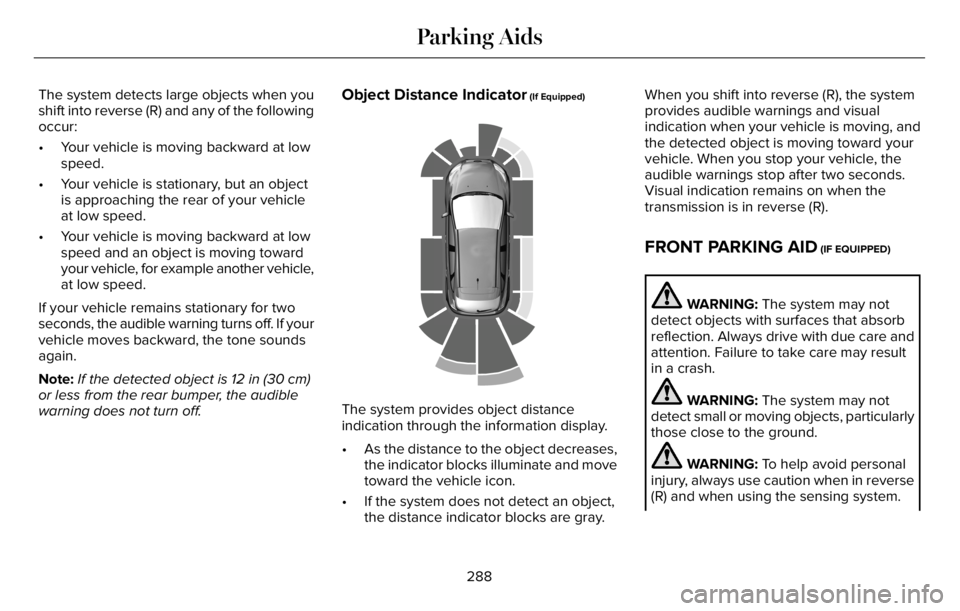
The system provides object distance
indication through the information display.
• As the distance to the object decreases,
the indicator blocks illuminate and move
toward the vehicle icon.
• If the system does not detect an object,
the distance indicator blocks are gray.When you shift into reverse (R), the system
provides audible warnings and visual
indication when your vehicle is moving, and
the detected object is moving toward your
vehicle. When you stop your vehicle, the
audible warnings stop after two seconds.
Visual indication remains on when the
transmission is in reverse (R).
FRONT PARKING AID (IF EQUIPPED)
WARNING: The system may not
detect objects with surfaces that absorb
reflection. Always drive with due care and
attention. Failure to take care may result
in a crash.
WARNING: The system may not
detect small or moving objects, particularly
those close to the ground.
WARNING: To help avoid personal
injury, always use caution when in reverse
(R) and when using the sensing system.
288
Parking Aids
Page 293 of 681
Object Distance Indicator (If Equipped)
E190459
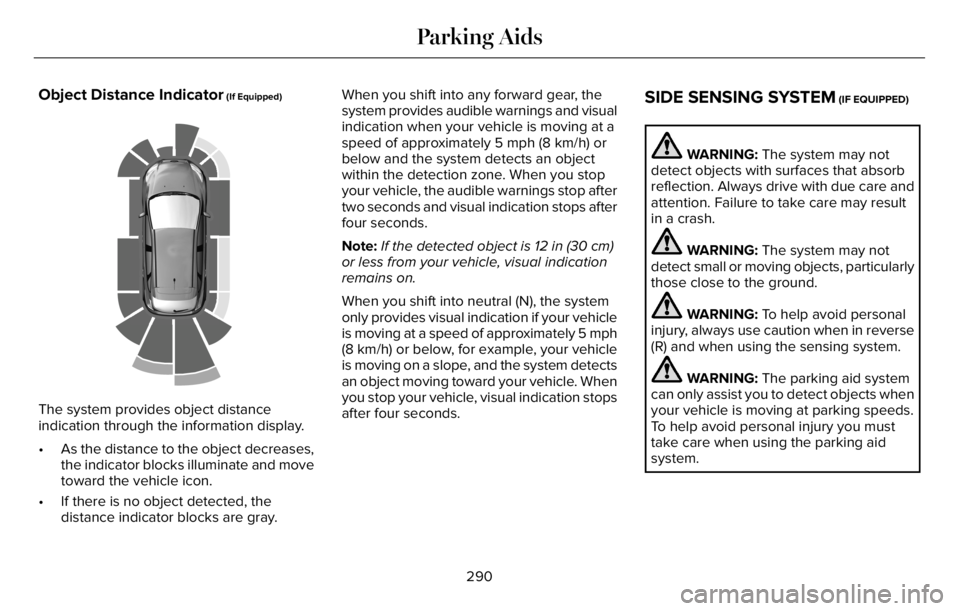
The system provides object distance
indication through the information display.
• As the distance to the object decreases,
the indicator blocks illuminate and move
toward the vehicle icon.
• If there is no object detected, the
distance indicator blocks are gray.When you shift into any forward gear, the
system provides audible warnings and visual
indication when your vehicle is moving at a
speed of approximately 5 mph (8 km/h) or
below and the system detects an object
within the detection zone. When you stop
your vehicle, the audible warnings stop after
two seconds and visual indication stops after
four seconds.
Note:If the detected object is 12 in (30 cm)
or less from your vehicle, visual indication
remains on.
When you shift into neutral (N), the system
only provides visual indication if your vehicle
is moving at a speed of approximately 5 mph
(8 km/h) or below, for example, your vehicle
is moving on a slope, and the system detects
an object moving toward your vehicle. When
you stop your vehicle, visual indication stops
after four seconds.
SIDE SENSING SYSTEM (IF EQUIPPED)
WARNING: The system may not
detect objects with surfaces that absorb
reflection. Always drive with due care and
attention. Failure to take care may result
in a crash.
WARNING: The system may not
detect small or moving objects, particularly
those close to the ground.
WARNING: To help avoid personal
injury, always use caution when in reverse
(R) and when using the sensing system.
WARNING: The parking aid system
can only assist you to detect objects when
your vehicle is moving at parking speeds.
To help avoid personal injury you must
take care when using the parking aid
system.
290
Parking Aids
Page 294 of 681
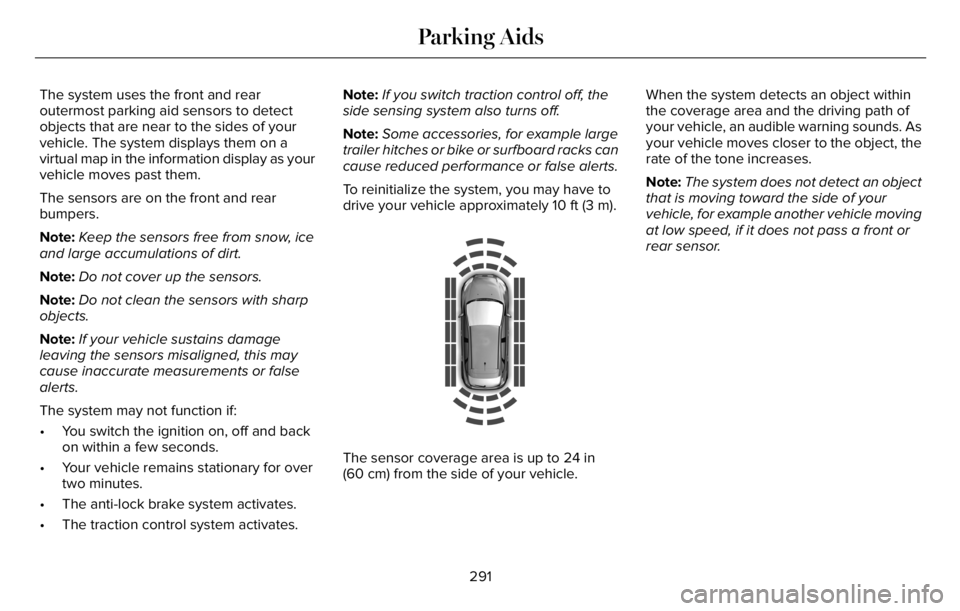
The system uses the front and rear
outermost parking aid sensors to detect
objects that are near to the sides of your
vehicle. The system displays them on a
virtual map in the information display as your
vehicle moves past them.
The sensors are on the front and rear
bumpers.
Note:Keep the sensors free from snow, ice
and large accumulations of dirt.
Note:Do not cover up the sensors.
Note:Do not clean the sensors with sharp
objects.
Note:If your vehicle sustains damage
leaving the sensors misaligned, this may
cause inaccurate measurements or false
alerts.
The system may not function if:
• You switch the ignition on, off and back
on within a few seconds.
• Your vehicle remains stationary for over
two minutes.
• The anti-lock brake system activates.
• The traction control system activates.Note:If you switch traction control off, the
side sensing system also turns off.
Note:Some accessories, for example large
trailer hitches or bike or surfboard racks can
cause reduced performance or false alerts.
To reinitialize the system, you may have to
drive your vehicle approximately 10 ft (3 m).
E190458
The sensor coverage area is up to 24 in
(60 cm) from the side of your vehicle.When the system detects an object within
the coverage area and the driving path of
your vehicle, an audible warning sounds. As
your vehicle moves closer to the object, the
rate of the tone increases.
Note:The system does not detect an object
that is moving toward the side of your
vehicle, for example another vehicle moving
at low speed, if it does not pass a front or
rear sensor.
291
Parking Aids
Page 295 of 681
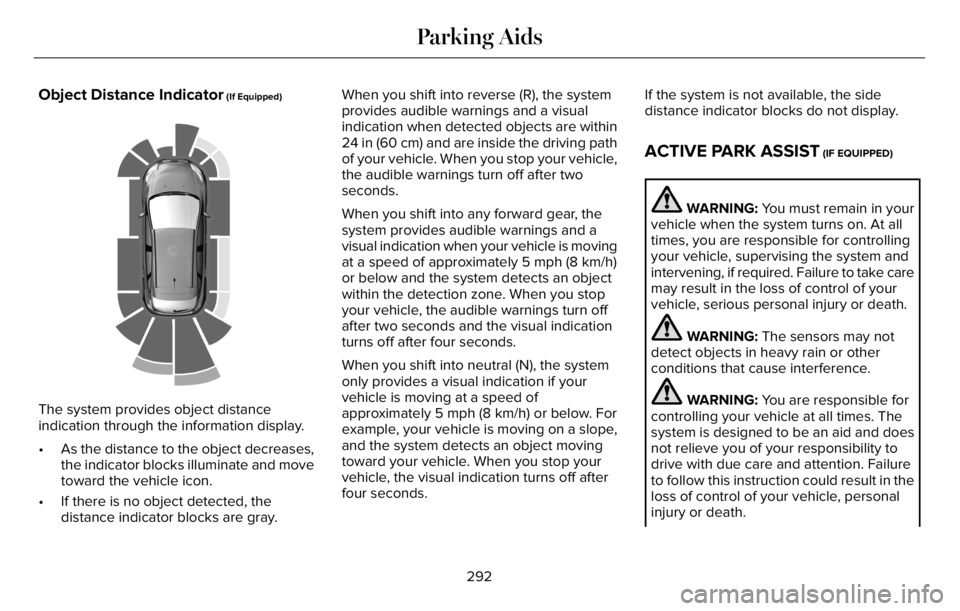
Object Distance Indicator (If Equipped)
E190459
The system provides object distance
indication through the information display.
• As the distance to the object decreases,
the indicator blocks illuminate and move
toward the vehicle icon.
• If there is no object detected, the
distance indicator blocks are gray.When you shift into reverse (R), the system
provides audible warnings and a visual
indication when detected objects are within
24 in (60 cm) and are inside the driving path
of your vehicle. When you stop your vehicle,
the audible warnings turn off after two
seconds.
When you shift into any forward gear, the
system provides audible warnings and a
visual indication when your vehicle is moving
at a speed of approximately 5 mph (8 km/h)
or below and the system detects an object
within the detection zone. When you stop
your vehicle, the audible warnings turn off
after two seconds and the visual indication
turns off after four seconds.
When you shift into neutral (N), the system
only provides a visual indication if your
vehicle is moving at a speed of
approximately 5 mph (8 km/h) or below. For
example, your vehicle is moving on a slope,
and the system detects an object moving
toward your vehicle. When you stop your
vehicle, the visual indication turns off after
four seconds.If the system is not available, the side
distance indicator blocks do not display.
ACTIVE PARK ASSIST (IF EQUIPPED)
WARNING: You must remain in your
vehicle when the system turns on. At all
times, you are responsible for controlling
your vehicle, supervising the system and
intervening, if required. Failure to take care
may result in the loss of control of your
vehicle, serious personal injury or death.
WARNING: The sensors may not
detect objects in heavy rain or other
conditions that cause interference.
WARNING: You are responsible for
controlling your vehicle at all times. The
system is designed to be an aid and does
not relieve you of your responsibility to
drive with due care and attention. Failure
to follow this instruction could result in the
loss of control of your vehicle, personal
injury or death.
292
Parking Aids
Page 298 of 681
Active Park Assist Information Messages
Action Message
The system requires service due to a malfunction. Have the system
checked as soon as possible. Active Park Fault
Active Park Assist Troubleshooting
Possible Cause Symptom
The system is unable to detect a vehicle, curb or object to park next to or in-between. The system does not correctly operate.
You may have switched traction control off. The system does not search for a parking space.
The transmission is in reverse (R). Your vehicle must be moving forward to be able to
detect a parking space.
The sensors may be blocked. For example, snow, ice or large accumulations of dirt.
Blocked sensors can affect how the system functions. The system does not offer a parking space.
The sensors in the front or rear bumper could be damaged.
There is not enough room in the parking space for your vehicle to safely park.
There is not enough space for the parking maneuver on the opposite side of the parking
space.
The parking space is more than 5 ft (1.5 m) or less than 2 ft (0.5 m) away.
295
Parking Aids
Page 311 of 681
WARNING: The system only warns
of vehicles detected by the radar sensor.
In some cases there may be no warning
or a delayed warning. Apply the brakes
when necessary. Failure to follow this
instruction could result in personal injury
or death.
WARNING: The system may not
detect stationary or slow moving vehicles
below 6 mph (10 km/h).
WARNING: The system does not
detect pedestrians or objects in the road.
WARNING: The system does not
detect oncoming vehicles in the same lane.
WARNING: The system may not
operate properly if the sensor is blocked.
Keep the windshield free from obstruction.
WARNING: The sensor may
incorrectly track lane markings as other
structures or objects. This can result in a
false or missed warning.
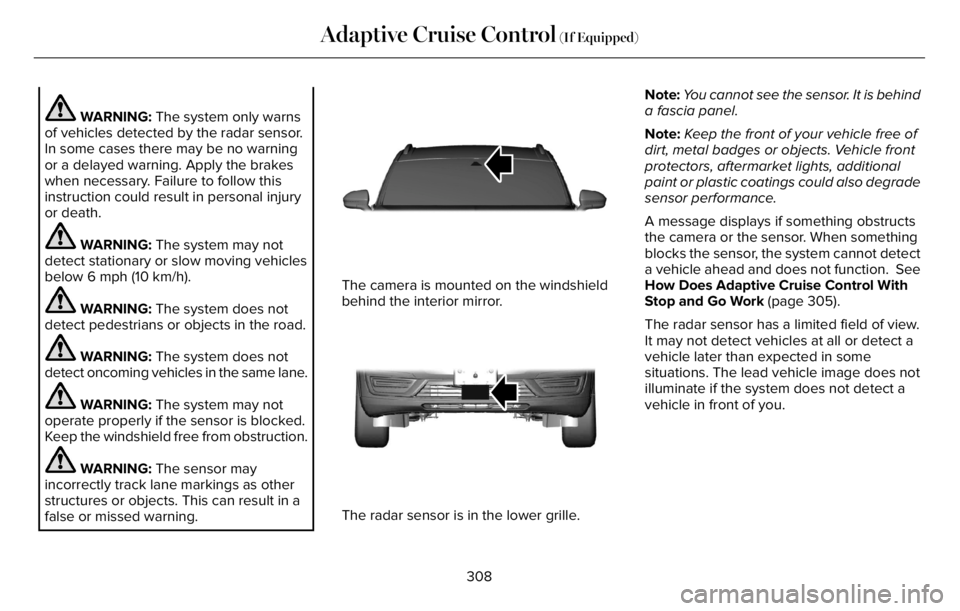
E307893E307893
The camera is mounted on the windshield
behind the interior mirror.
E307892E307892
The radar sensor is in the lower grille.Note:You cannot see the sensor. It is behind
a fascia panel.
Note:Keep the front of your vehicle free of
dirt, metal badges or objects. Vehicle front
protectors, aftermarket lights, additional
paint or plastic coatings could also degrade
sensor performance.
A message displays if something obstructs
the camera or the sensor. When something
blocks the sensor, the system cannot detect
a vehicle ahead and does not function. See
How Does Adaptive Cruise Control With
Stop and Go Work (page 305).
The radar sensor has a limited field of view.
It may not detect vehicles at all or detect a
vehicle later than expected in some
situations. The lead vehicle image does not
illuminate if the system does not detect a
vehicle in front of you.
308
Adaptive Cruise Control (If Equipped)
Page 312 of 681
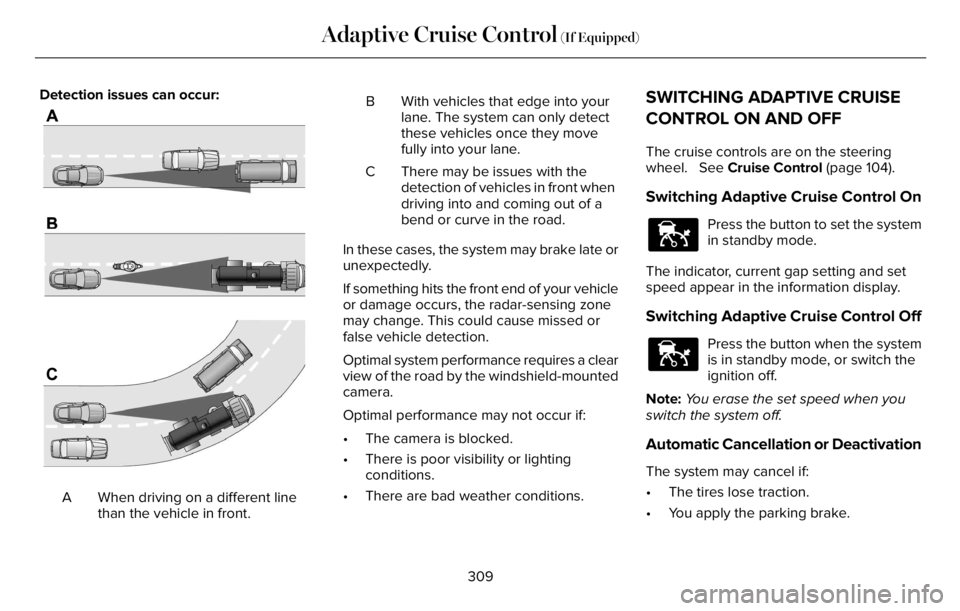
Detection issues can occur:
E71621
When driving on a different line
than the vehicle in front. AB With vehicles that edge into your
lane. The system can only detect
these vehicles once they move
fully into your lane.
There may be issues with the
detection of vehicles in front when
driving into and coming out of a
bend or curve in the road. C
In these cases, the system may brake late or
unexpectedly.
If something hits the front end of your vehicle
or damage occurs, the radar-sensing zone
may change. This could cause missed or
false vehicle detection.
Optimal system performance requires a clear
view of the road by the windshield-mounted
camera.
Optimal performance may not occur if:
• The camera is blocked.
• There is poor visibility or lighting
conditions.
• There are bad weather conditions.
SWITCHING ADAPTIVE CRUISE
CONTROL ON AND OFF
The cruise controls are on the steering
wheel. See Cruise Control (page 104).
Switching Adaptive Cruise Control On
E144529
Press the button to set the system
in standby mode.
The indicator, current gap setting and set
speed appear in the information display.
Switching Adaptive Cruise Control Off
E144529
Press the button when the system
is in standby mode, or switch the
ignition off.
Note:You erase the set speed when you
switch the system off.
Automatic Cancellation or Deactivation
The system may cancel if:
• The tires lose traction.
• You apply the parking brake.
309
Adaptive Cruise Control (If Equipped)
Page 313 of 681
The system may cancel and set the parking
brake if:
• You unbuckle the seatbelt and open the
driver door after you stop your vehicle.
• Your vehicle is at a stop continuously for
more than three minutes.
The system may turn off or prevent activating
when requested if:
• The vehicle has a blocked sensor.
• The brake temperature is too high.
• There is a failure in the system or a
related system.
SETTING THE ADAPTIVE CRUISE
CONTROL SPEED
Drive to the speed you prefer.
Press either button to set the
current speed.
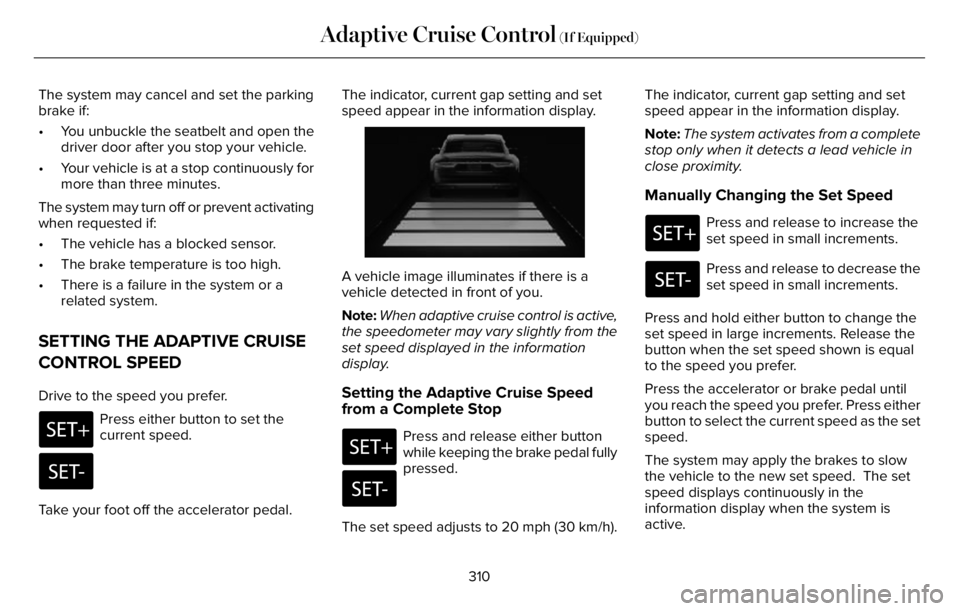
Take your foot off the accelerator pedal.The indicator, current gap setting and set
speed appear in the information display.
E2556686E25566866
A vehicle image illuminates if there is a
vehicle detected in front of you.
Note:When adaptive cruise control is active,
the speedometer may vary slightly from the
set speed displayed in the information
display.
Setting the Adaptive Cruise Speed
from a Complete Stop
Press and release either button
while keeping the brake pedal fully
pressed.
The set speed adjusts to 20 mph (30 km/h).The indicator, current gap setting and set
speed appear in the information display.
Note:The system activates from a complete
stop only when it detects a lead vehicle in
close proximity.
Manually Changing the Set Speed
Press and release to increase the
set speed in small increments.
Press and release to decrease the
set speed in small increments.
Press and hold either button to change the
set speed in large increments. Release the
button when the set speed shown is equal
to the speed you prefer.
Press the accelerator or brake pedal until
you reach the speed you prefer. Press either
button to select the current speed as the set
speed.
The system may apply the brakes to slow
the vehicle to the new set speed. The set
speed displays continuously in the
information display when the system is
active.
310
Adaptive Cruise Control (If Equipped)