display LINCOLN CONTINENTAL 1996 Customer Assistance Guide
[x] Cancel search | Manufacturer: LINCOLN, Model Year: 1996, Model line: CONTINENTAL, Model: LINCOLN CONTINENTAL 1996Pages: 320, PDF Size: 1.8 MB
Page 63 of 320

The Instrument Cluster
In addition to warning lights, the instrument
cluster has a message center/odometer, a
speedometer, tachometer, fuel and coolant
temperature gauges.
The Electronic Message Center (M/C)
The Electronic Message Center only works
when the ignition is in the ON position.
Each time the WC is powered the display goes
through a self test by displaying the PLEASE
FASTEN SEATBELT message. This self test
is used to stabilize the systems before reporting
the status to you.
60The message center tells you about the
condition of your vehicle by two methods: operator selectable features continuous warning reporting of
monitored systems
You can select different features for the M/C to
display by using the message center control
buttons located to the right of the instrument
cluster. You will hear a tone when you press one
of these buttons. However, if the M/C detects a
warning from any of the monitored systems, then
the M/C will display the appropriate warning
message.
Page 65 of 320
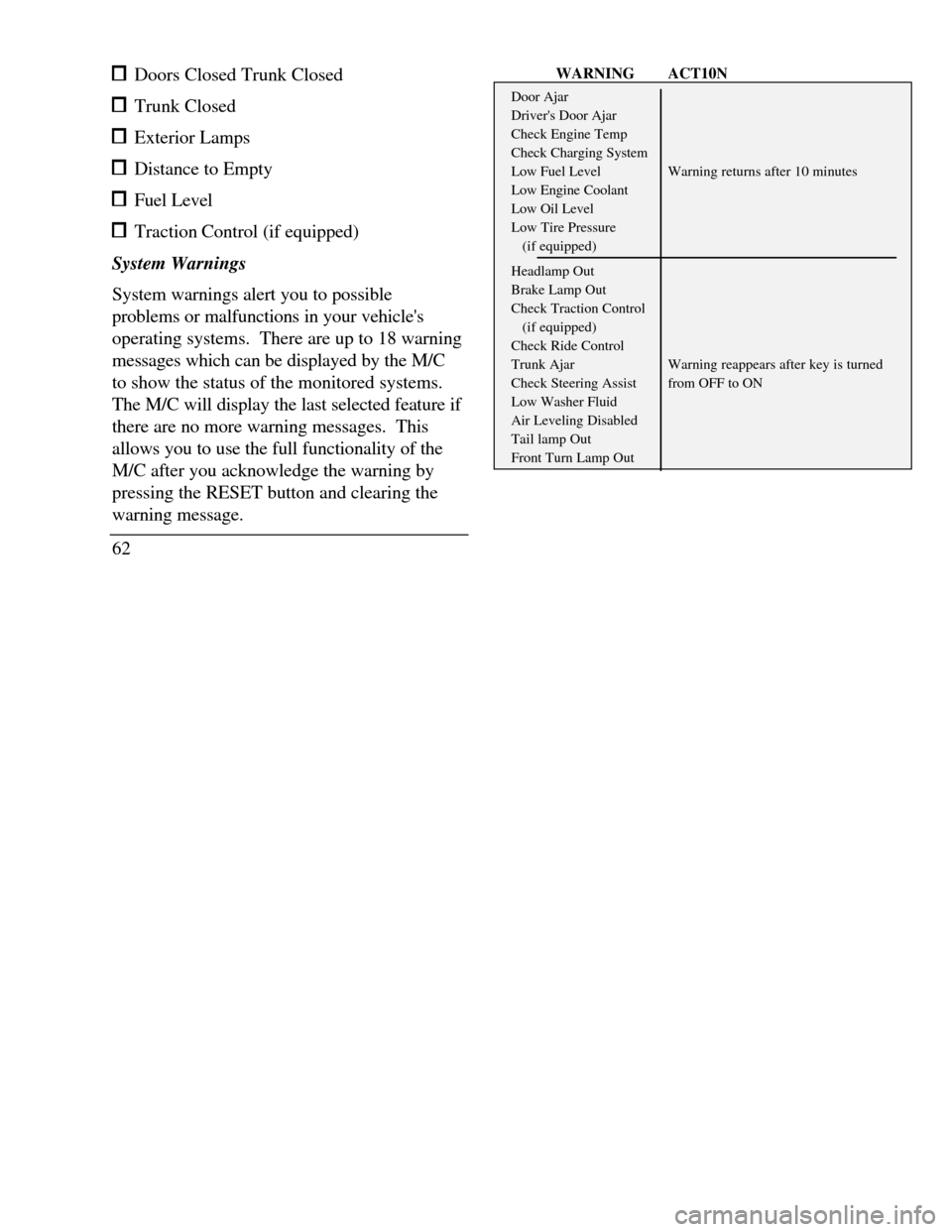
Doors Closed Trunk Closed Trunk Closed Exterior Lamps Distance to Empty Fuel Level TractionControl (if equipped)
System Warnings
System warnings alert you to possible
problems or malfunctions in your vehicle's
operating systems. There are up to 18 warning
messages which can be displayed by the M/C
to show the status of the monitored systems.
The M/C will display the last selected feature if
there are no more warning messages. This
allows you to use the full functionality of the
M/C after you acknowledge the warning by
pressing the RESET button and clearing the
warning message.
62WARNINGACT10NDoor AjarDriver's Door AjarCheck Engine TempCheck Charging SystemLow Fuel LevelWarning returns after 10 minutesLow Engine CoolantLow Oil LevelLow Tire Pressure(if equipped)Headlamp OutBrake Lamp OutCheck Traction Control(if equipped)Check Ride ControlTrunk AjarWarning reappears after key is turnedCheck Steering Assistfrom OFF to ONLow Washer FluidAir Leveling DisabledTail lamp OutFront Turn Lamp Out
Page 66 of 320

Warning messages that have been reset are
divided into two categories. They will
reappear on the display ten minutes from the
reset or they will not reappear until an ignition
OFF-ON cycle has been completed. This
reappearing of warning messages is a reminder
that these warning conditions still exist within
the vehicle.
EIM
A press of this button allows you to change the
M/C and the Electronic Climate control unit
from English to Metric Units. When you press
this button all displays change from English to
Metric or Metric to English units. The
displays remain in the units you have chosen
until you change them again even after you
turn off the vehicle and start it again.
TRIP
Pressing this button will display the first of two
trip odometers. Pressing it again will display
the second Trip Odometer. Pressing RESET
will clear only that Trip odometer which is
displayed.DTE/ECON
Pressing this button a first time will display
approximately how many miles you can drive before
you run out of fuel, or in other words the Distance
To Empty (DTE). To ensure accuracy, turn the
ignition OFF when you fill the tank.
Pressing this button a second time will allow you to
display your Average Fuel Economy in miles/gallon
or Uters/100 kilometers. Your WC computes this
figure using the distance traveled and rate of fuel
used information. If you want to reset this feature,
press the RESET button while the Average Fuel
Economy feature is displayed.
NOTE: DTE (Distance to Empty) is calculated
using a "Running Average Fuel Economy" initialized
by the factory. This value is not the same as the
Average Fuel Economy Display. The Running
Average Economy is based on more than 500 miles
(800 km) of driving history. Also the factory default
for Running Average Economy is reinitialized if the
battery is disconnected.
63
Page 67 of 320

If the FUEL LEVEL ERROR message is
displayed this means that there is a problem
with the fuel indication system and you should
contact your dealer for service as soon as
possible.
RESET
A press of the RESET button will allow you to
reset the current feature displayed. Warnings,
Average Fuel Economy, and Trip odometers
are the only features which respond to the
RESET button. Distance to Empty (DTE),
RIDE/STEER and MENU are unaffected by
pressing the RESET switch.
DISPLAY
Pressing this button will cause the message
center display to turn off. Pressing it again will
cause the display to come on again. Warnings
override an off display and must be reset in
order for the display to be off again.
64RIDE/STEER
Pressing this button once will allow you to
adjust your RIDE CONTROL settings, between
NORMAL, PLUSH and FIRM. The settings are
changed by pressing the SELECT button while
RIDE CONTROL is displayed.
Pressing the RIDE/STEER button a second time
will allow you to adjust the STEERING
EFFORT settings between NORMAL, LOW,
and HIGH. The settings are changed by
pressing the SELECT button while STEERING
EFFORT is displayed.
NOTE: The combination of FIRM RIDE
CONTROL and LOW STEERING EFFORT is
undesirable and cannot be selected.
MENU
Pressing this button will allow You to change
various convenience settings throughout the
vehicle. The settings for each feature are
changed by pressing the SELECT button-
Page 68 of 320

Pressing the MENU button once will allow you
to enable or disable the EXPRESS WINDOW
feature. This feature allows one tap down
operation on the driver's window using the
window switch on the driver's door armrest.
Pressing MENU again will allow you to enable
or disable the AUTO DOOR LOCK feature.
This feature automatically locks all doors when
the driver shifts out of PARK, all doors are
closed, the driver's seat is occupied, and the
vehicle is traveling over three mph (5 km/h).
Pressing MENU again will allow you to
enable or disable the HORN CHIRP feature.
When HORN CHIRP is ON the horn will
briefly sound when the Remote Entry Key
Fob LOCK button is pressed. This verifies
the doors have been locked and the ANTI-
THEFT system has been armed (if equipped).
Pressing MENU again will allow you to
enable or disable the SEAT ACCESS feature.
When ON, the driver's seat will move back 2
inches (5 cm) or toend of seat track travel when the vehicle is
turned off and the ignition key is removed.
Upon the driver entering the vehicle and
closing the door, the seat will move
forward to its previous position.
Pressing MENU again will allow you to enable or
disable the REVERSE MIRRORS feature. When
ON, the outside rearview mirrors tilt down when
the gearshift is placed in R (Reverse). This
provides for an improved view of the side of the
vehicle and curb area when backing up. When
you shift out of REVERSE the mirrors return to
their previous positions.
Odometer
The odometer tells you the total number of miles
(kilometers) your vehicle has been driven.
If the odometer displays the word Error, please
contact your dealer for service.
65
Page 69 of 320

Speedometer
The speedometer tells you how many miles
(kilometers) per hour your vehicle is moving.
Tachometer
The tachometer displays the approximate
engine revolutions per minute (rpm), or how
fast the engine is running.
You can drive your vehicle at most rpm points
on the tachometer but you must stay out of the
red zone.
If you drive with the tachometer in the red
zone, you may damage the engine.
Engine Coolant Temperature Gauge
This gauge indicates the temperature of the
engine coolant, not the coolant level. If the
coolant is not at its proper level or mixture, the
gauge indication will not be accurate.
66The pointer moves from the C (cold) mark into the
NORMAL band as the engine coolant warms up. It
is acceptable for the pointer to fluctuate within the
NORMAL band under normal driving conditions.
Under certain driving conditions such as, heavy stop
and go traffic, or driving up hills in hot weather, the
pointer may indicate at the top of the NORMAL
band.
If, under any circumstances, the pointer moves above
the NORMAL band, the engine coolant is
overheating and continued operation may cause
engine damage.
If your engine coolant overheats:
1.Pull off the road as soon as it is safely possible.
2.Turn off the engine.
3.Let the engine cool. DO NOT REMOVE
COOLANT SYSTEM FILL CAP UNTIL
THE ENGINE IS COOL.
Page 70 of 320
4. Check the coolant level following the
instructions on checking and adding coolant
to your engine, see the Engine Coolant in
the Index. If you do not follow these
instructions, you or others could be injured.
If the coolant continues to overheat, have the
coolant system serviced as soon as possible.
Fuel Gauge
The fuel gauge displays approximately how
much fuel you have in the fuel tank. The
ignition switch must be in the OFF position
while filling the tank with at least three gallons
(I I liters) for the fuel gauge to indicate the
new level. If the ignition is left ON or less than
3 gallons (I 1 liters) of fuel are added the fuel
gauge will not immediately indicate the new
fuel level. The gauge will gradually correct
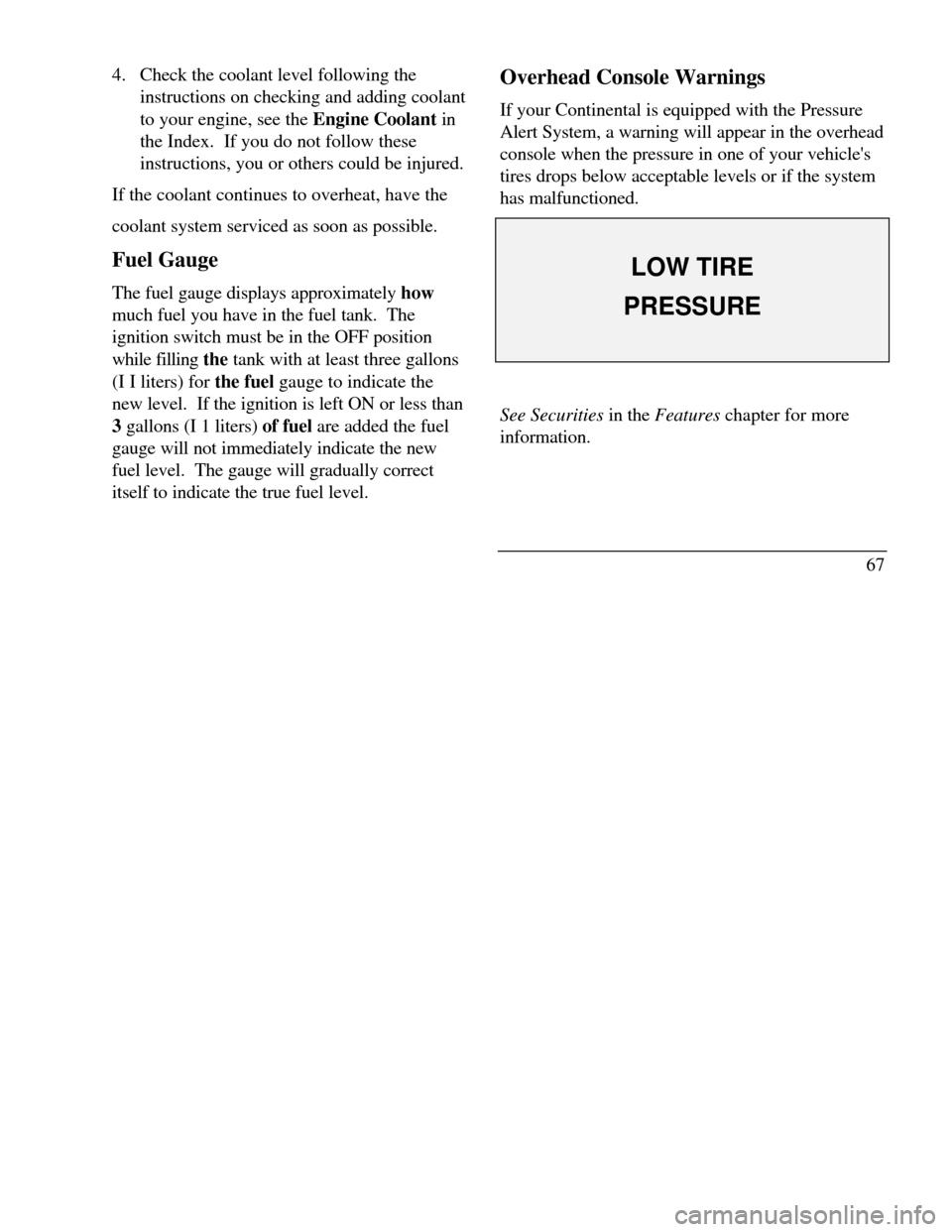
itself to indicate the true fuel level.Overhead Console Warnings
If your Continental is equipped with the Pressure
Alert System, a warning will appear in the overhead
console when the pressure in one of your vehicle's
tires drops below acceptable levels or if the system
has malfunctioned.LOW TIREPRESSURESee Securities in the Features chapter for more
information.
67
Page 71 of 320

Lincoln RESCU System
(If equipped)
Lincoln RESCU runs a self-test when you start
your vehicle. During this test, the Lincoln RESCU
warning light, located in the overhead console, will
briefly illuminate. If a problem is detected during
the self-check, the light will remain lit and the
message "RESCU FAILURE" will be displayed on
the vehicle's message center for several seconds.If the warning light fails to briefly illuminate
when you start your vehicle or if it remains
lit, have your Lincoln RESCU System
checked by an authorized Lincoln/Mercury
dealer as soon as possible. Your system may
be inoperative.
68
Page 75 of 320

To turn your EATC on, push the AUTOMATIC
button or any of the six override buttons along
the bottom of the control.
To turn your EATC off, press the OFF button.
When the system is off, the display window will
be blank (dark) except when OUTSIDE TEMP
has been selected. Then, OUTSIDE TEMP and
the temperature will appear in the window.
If you select AUTOMATIC, the system will
automatically determine fan speed and airflow
location. If an override button is selected, your
selection determines airflow location only. Fan
speed remains automatic unless you override it
by rotating the vertical thumbwheel located at
the extreme right of the control panel.
To change the temperature in the display
window, select any temperature between 65°F (I
8°C) and 85°F (29°C) using the BLUE (cooler)
or RED (warmer) buttons. The Electronic
Automatic Temperature Control will do the rest.
72If you want continuous maximum cooling, push the
BLUE button until 60°F (16°C) is shown in the
display window. Your EATC will cool at
maximum and disregard the 60°F (16°C) setting
until you select a warmer temperature with the
RED button. If you want continuous maximum
heating, push the RED button until 90°F (32°C) is
shown in the display window. Your EATC wifl
provide maximum heat regardless of the 90°F
(32°C) setting until you select a cooler temperature
with the BLUE button.
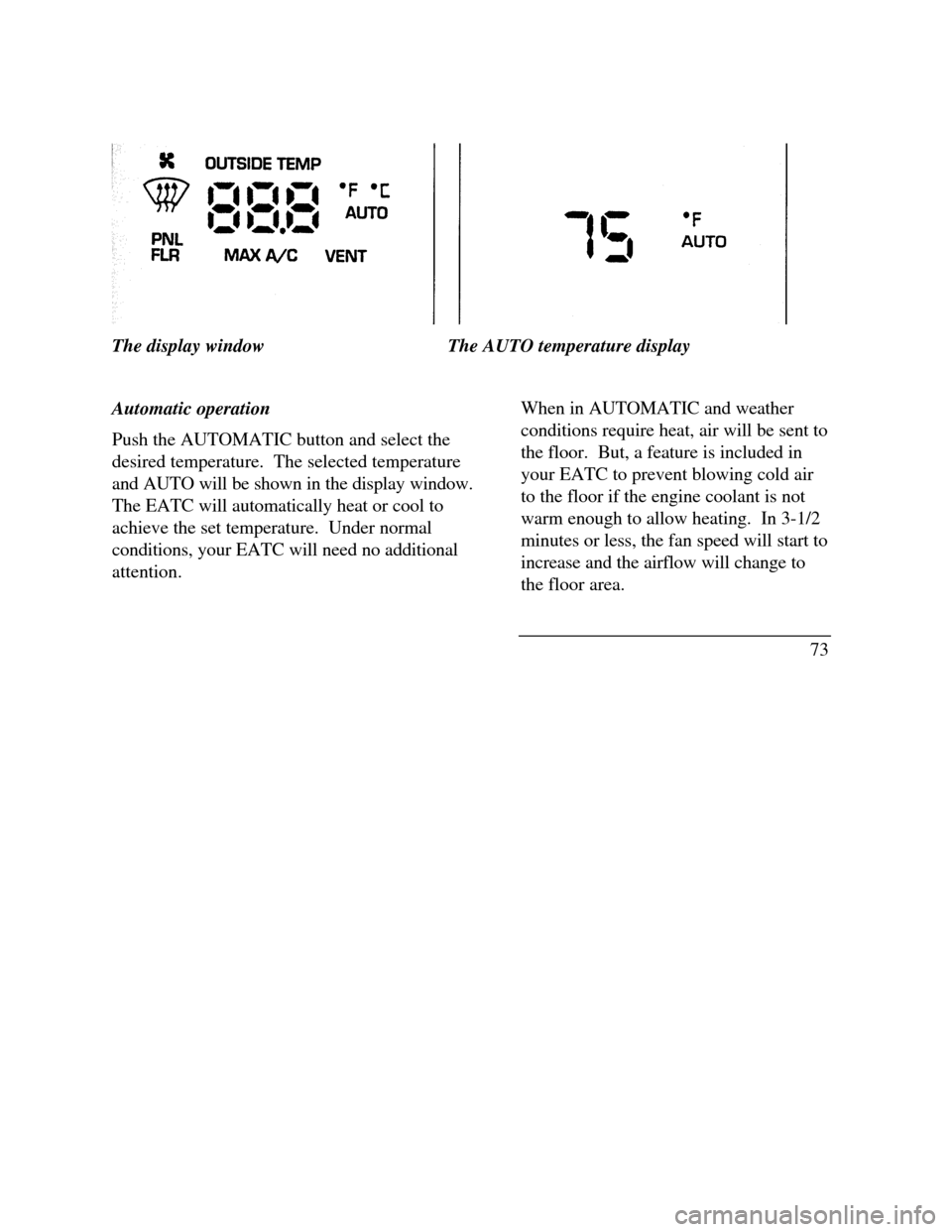
The display window tells you how the system is
operating. It will indicate the selected temperature
and the operating function you have chosen; AUTO
or one of the six manual overrides. It will also
indicate manual (thumbwheel) control of the fan
speed with the symbol. The display window
with all possible displays and their positions are
shown here. Normally not aU are shown at the
same time but are included here to familiarize you
with the names and symbols.
Page 76 of 320
The display windowThe AUTO temperature display
Automatic operation
Push the AUTOMATIC button and select the
desired temperature. The selected temperature
and AUTO will be shown in the display window.
The EATC will automatically heat or cool to
achieve the set temperature. Under normal
conditions, your EATC will need no additional
attention.When in AUTOMATIC and weather
conditions require heat, air will be sent to
the floor. But, a feature is included in
your EATC to prevent blowing cold air
to the floor if the engine coolant is not
warm enough to allow heating. In 3-1/2
minutes or less, the fan speed will start to
increase and the airflow will change to
the floor area.
73