engine LINCOLN CONTINENTAL 1996 Customer Assistance Guide
[x] Cancel search | Manufacturer: LINCOLN, Model Year: 1996, Model line: CONTINENTAL, Model: LINCOLN CONTINENTAL 1996Pages: 320, PDF Size: 1.8 MB
Page 201 of 320

Driving While You Tow
Be especially careful when driving while you tow a
trailer. Never drive faster than 45 mph (70 km/h)
when you tow in hilly country on hot days. Also,
anticipate stops so that you can brake gradually.
Towing a trailer increases the load on the engine and
transaxle, particularly in hilly country and with
heavier trailers. Under these conditions you may
experience an excessive amount of shifting between
Overdrive and Third gears. Moving the shift selector
to D (Overdrive Lockout) will keep this from
happening and will provide better engine braking.
When driving in less hilly country or with a lighter
trailer load. you may move the gearshift selector
lever to (Overdrive) without experiencing
excessive shifting.
198When driving down steep hills, you should put
the gearshift selector lever in the I (First)
position to shift the transaxle into second gear.
This will provide additional engine braking.
The automatic transaxle will automatically
downshift to the proper gear for driving up a
grade.
If you use the speed control while you are
towing on very long, steep grades, the speed
control may shut off.
Servicing your vehicle if you tow
If you tow a trailer for a long distance, your
vehicle will need to be serviced more frequently
than usual. See the Maintenance Schedule and
Record booklet.
Page 202 of 320
Roadside EmergenciesJump-Starting Your Vehicle
Your vehicle's battery may die if you leave the lights
on or any electrical equipment on after you turn the
engine off. If this happens, you may be able to
jump-start from a booster battery to start your
vehicle./! WARNINGThe gases around the battery can explode ifexposed to flames, sparks, or lit cigarettes.An explosion could result in injury or vehicledamage./! WARNINGTo protect yourself when charging a battery,always shield your face and eyes. Make surethat you can breathe fresh air./! WARNINGApplying too much pressure on the ends whenlifting a battery could cause acid to spill. Liftthe battery with a carrier or with your handson the opposite comers.199
Page 203 of 320

/! WARNINGBatteries contain sulfuric acid which bumsskin, eyes, and clothing.If the acid touches someone's skin, eyes, or clothing,
immediately flush the area with water for at least 15
minutes. If someone swallows the acid, have him or
her drink lots of milk or water first, then Milk of
Magnesia, a beaten egg, or vegetable oil. Call a
doctor immediately.
To avoid damaging your vehicle or your battery, and
to avoid injury to yourself, follow these directions
for preparing your vehicle to jump-start and
connecting the jumper cables in the order they are
given. If in doubt, call for road service.
200Preparing Your Vehicle
1 .Your vehicle has a 12-volt starting system, so
you need to use a 12-volt jumper system. You
will damage your starting motor, ignition system,
and other electrical parts if you connect them to a
24-volt power supply (either two 12-volt
batteries in series,or a 24-volt generator set).
2.Do not disconnect the battery of the disabled
vehicle. You could damage the vehicle's
electrical system.
3.Park the booster vehicle close to the hood of the
disabled vehicle. Make sure the vehicles do not
touch each other. Set the parking brake on both
vehicles and stay clear of the engine cooling fan
and other moving parts.
4.Check all battery terminals and remove any
excessive corrosion before you attach the jumper
cables.
Page 204 of 320
5.Turn on the heater fan in both vehicles. Press the
DEFROST button. Turn off all other switches
and gauges.
Connecting the jumper cables
1. Connect one end of the first jumper cable to the
positive (+) terminal of the discharged battery.
(You can connect either jumper cable to the
positive (+) terminal, as long as you use the
same cable for both positive terminals.) Most
jumper cables have a red cable and a black cable.
The red cable is generally used for the positive
terminals and the black for the negative ones.
2. Connect the other end of the first cable to the
positive (+) terminal of the booster battery.3. Connect one end of the second cable to the
negative (-) terminal of the booster battery NOT
to the discharged battery.
4. Connect the other end of the second cable to a
good metallic surface on the engine or frame of
the disabled vehicle./! WARNINGDo not connect the end of the second cable tothe negative (-) terminal of the battery to bejumped. A spark may cause an explosion ofthe gases that surround the battery.201
Page 205 of 320
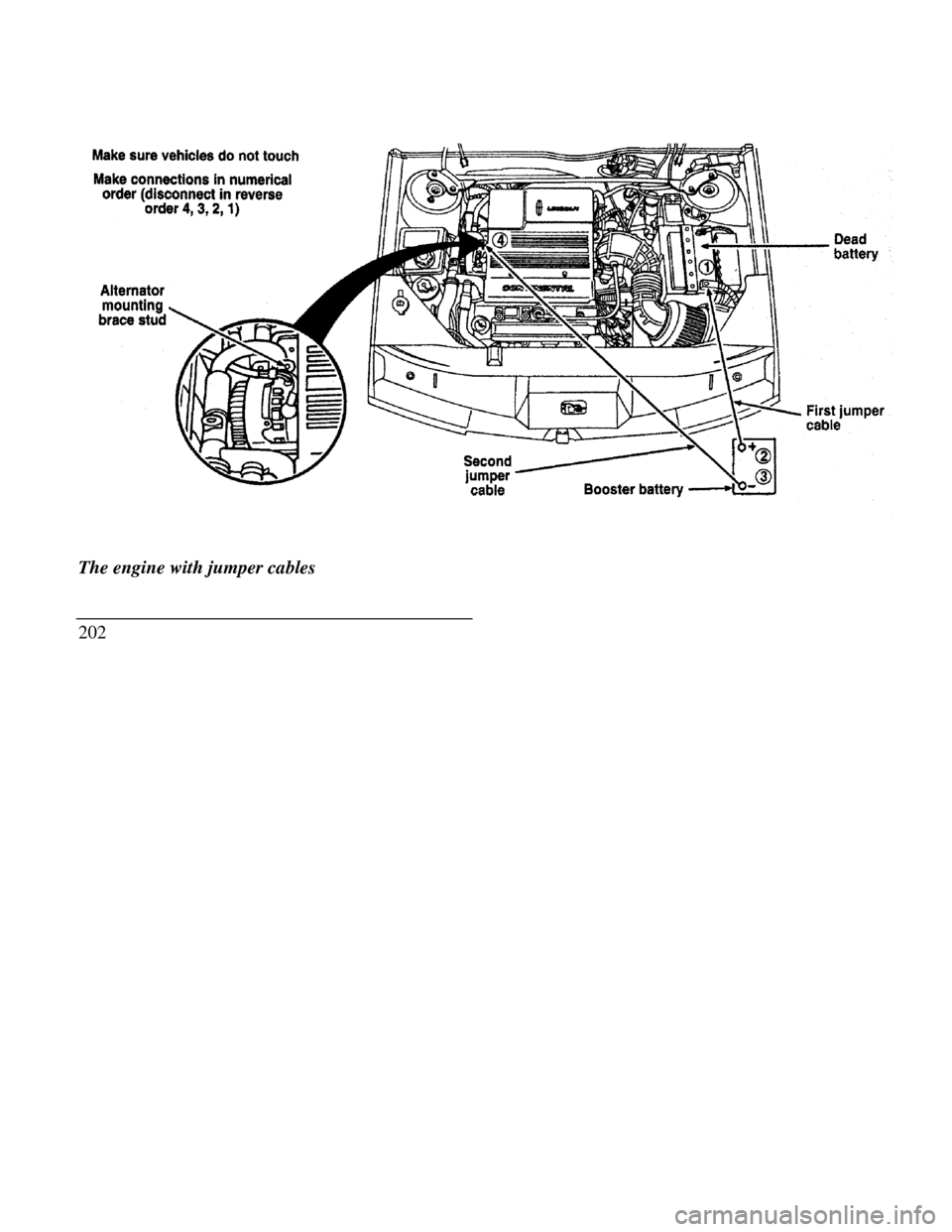
Alternator mounting brace stud jumper cable
The engine with jumper cables
202 Booster battery
Page 206 of 320

Jump-Starting
1.Make sure that the jumper cables are not in the
way of moving engine parts, then start the
booster vehicle. Run the engine at a moderate
speed.
2.Let the discharged battery charge for a few
minutes and then start the disabled vehicle. It
may take a couple of tries before the vehicle
starts. If the vehicle does not start after several
attempts, there may be a different problem.
3.When both vehicles are running, let them idle
for a few minutes to charge the discharged
battery.
Removing jumper cables
1.Always remove the jumper cables in the
reverse order. Remove the negative (-) end of
the jumper cable from the metallic surface on
the engine or frame of the disabled vehicle.2.Remove the negative (-) cable from the booster
battery.
3.Remove the positive (+) cable from the booster
battery.
4.Remove the other end of the positive (+) cable
from the discharged battery.
After the vehicle is started, let it idle for a while to let
the engine "relearn" its idle conditions. Drive it
around for a while with all electrical accessories
turned off to let the battery recharge. You may need
to use a battery charger to fully recharge the
battery.
If you need to replace your battery, see Battery in the
Servicing Your Vehicle chapter.
203
Page 210 of 320
2. Get out the spare tire and jack./! WARNINGTo avoid injury, never run the engine withone wheel off the ground, such as whenchanging a tire.3. Remove the center ornament from the aluminum
wheel with the tapered end of the wheel nut
wrench which came with your vehicle. Insert
and twist the handle, then pry against the wheel.
4. Loosen each wheel lug nut one-half turn
counterclockwise, but do not remove them until
the tire is raised off the ground. You should pull
up on the handle rather than push to develop
maximum force to loosen wheel lug nuts. See
Anti-Theft Wheel Lug Nuts later in this chapter
for information on removing anti-theft lug nuts.Removing and Replacing the Tire
I -Place the scissors-type jack under the side of the
vehicle and adjust the jack height with the jack
handle. The jack should fit in the notch in the
vertical rocker panel flange which is nearest to
the wheel to be changed./! WARNINGTo lessen the risk of personal injury, do notput any part of your body under the vehiclewhile changing a tire. Do not start the enginewhen your vehicle is on the jack. The jack isonly meant for changing the tire.207
Page 213 of 320
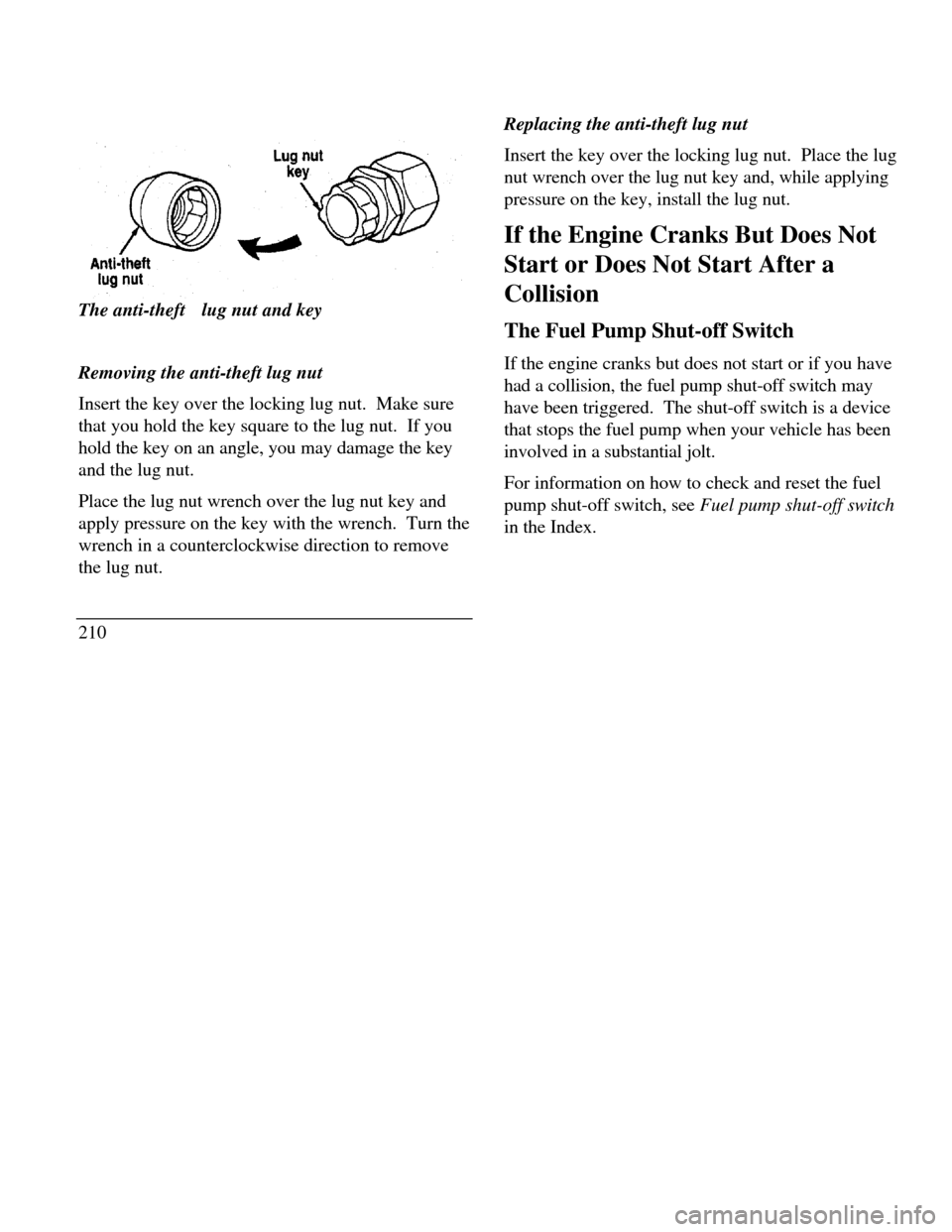
Lug nut key Anti-theft lug nutThe anti-theftft lug nut and key
Removing the anti-theft lug nut
Insert the key over the locking lug nut. Make sure
that you hold the key square to the lug nut. If you
hold the key on an angle, you may damage the key
and the lug nut.
Place the lug nut wrench over the lug nut key and
apply pressure on the key with the wrench. Turn the
wrench in a counterclockwise direction to remove
the lug nut.
210Replacing the anti-theft lug nut
Insert the key over the locking lug nut. Place the lug
nut wrench over the lug nut key and, while applying
pressure on the key, install the lug nut.
If the Engine Cranks But Does Not
Start or Does Not Start After a
Collision
The Fuel Pump Shut-off Switch
If the engine cranks but does not start or if you have
had a collision, the fuel pump shut-off switch may
have been triggered. The shut-off switch is a device
that stops the fuel pump when your vehicle has been
involved in a substantial jolt.
For information on how to check and reset the fuel
pump shut-off switch, see Fuel pump shut-off switch
in the Index.
Page 224 of 320
Getting Help Outside the U.S. and
Canada
Before you export your vehicle to a foreign country,
contact the appropriate foreign embassy or consulate
to make sure local regulations do not prevent you
from registering your vehicle. Officials at the
embassy can also help you decide whether you
should import your vehicle to that country.
Officials at the embassy or consulate can tell you
where to get unleaded fuel. If you cannot get
unleaded fuel or can get only fuel with an anti-knock
index that is lower than your vehicle needs, contact
a district or owner relations office before you leave
the U.S. or Canada.
Use of leaded fuel in your vehicle without a proper
conversion may damage the effectiveness of your
emissions control system and may cause engine
knocking or serious engine damage. Ford Motor
Company is not responsible for any damage that is
caused by use of improper fuel.You may also have difficulty importing your vehicle
back into the U.S. if you use leaded fuel.
If your vehicle must be serviced while you are
traveling or living in Central or South America, the
Caribbean, or the Middle East, contact the nearest
Ford dealership. If the dealership cannot help you,
write to:Ford Motor CompanyExport Operations1555 Fairlane BusinessPark #3Allen Park, MI 481 olU.S.A.Phone: 313-317-4282Fax: 313-390-0804221
Page 226 of 320

AccessoriesFord Accessories for Your Vehicle
A wide selection of accessories is available through
your local authorized dealer. These fine accessories
have been engineered specifically to fulfill your
automotive needs. They are custom designed to
complement the style and aerodynamic appearance
of your Ford-built vehicle. In addition, each
accessory is made from high quality materials and
meets or exceeds Ford's rigid engineering and safety
specifications. That is why Ford brand accessories
are warranted for up to 3 years or 36,000 miles
(60,000 km), whichever comes first. See your
dealer for complete warranty information and
accessory availability.
Ford has many fine products available from your
dealer to clean your vehicle and protect its finishes.
For best results, use the following, or products of
equivalent quality:Ford Custom Clear Coat Polish
Ford Custom Silicone Gloss Polish
Ford Custom Vinyl Protectant
Ford Deluxe Leather and Vinyl Cleaner
Ford Extra Strength Spot and Stain Remover
Ford Extra Strength Tar and Road Oil Remover
Ford Extra Strength Upholstery Cleaner
Ford Extra Strength Whitewall Tire Cleaner
Ford Multi-Purpose Cleaner
Ford Premium Car Wash Concentrate
Ford Triple Clean
Ford Ultra-Clear Spray Glass Cleaner
223