headlamp LINCOLN CONTINENTAL 2018 User Guide
[x] Cancel search | Manufacturer: LINCOLN, Model Year: 2018, Model line: CONTINENTAL, Model: LINCOLN CONTINENTAL 2018Pages: 615, PDF Size: 5.31 MB
Page 116 of 615
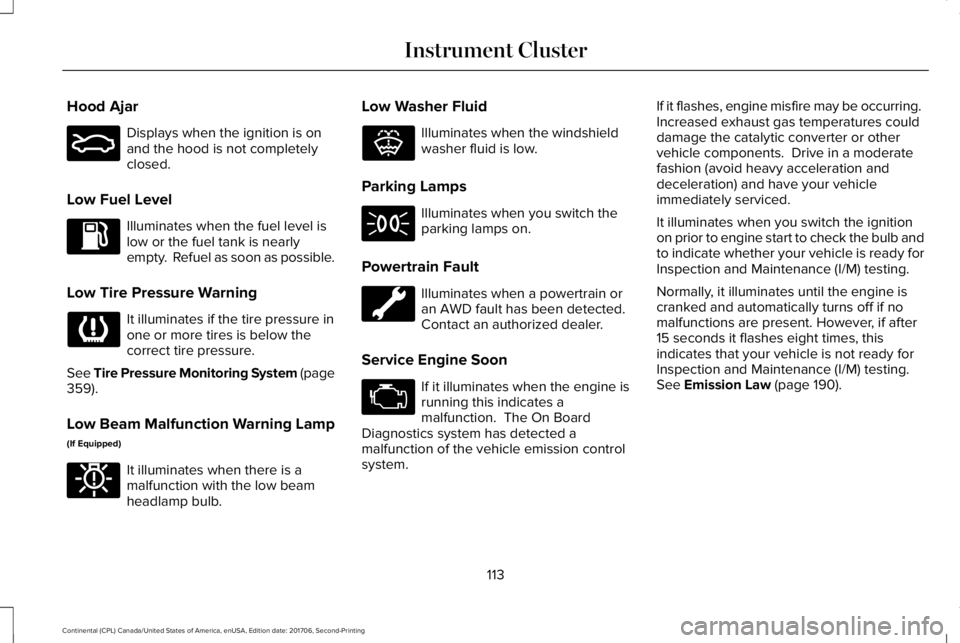
Hood Ajar
Displays when the ignition is onand the hood is not completelyclosed.
Low Fuel Level
Illuminates when the fuel level islow or the fuel tank is nearlyempty. Refuel as soon as possible.
Low Tire Pressure Warning
It illuminates if the tire pressure inone or more tires is below thecorrect tire pressure.
See Tire Pressure Monitoring System (page359).
Low Beam Malfunction Warning Lamp
(If Equipped)
It illuminates when there is amalfunction with the low beamheadlamp bulb.
Low Washer Fluid
Illuminates when the windshieldwasher fluid is low.
Parking Lamps
Illuminates when you switch theparking lamps on.
Powertrain Fault
Illuminates when a powertrain oran AWD fault has been detected. Contact an authorized dealer.
Service Engine Soon
If it illuminates when the engine isrunning this indicates amalfunction. The On BoardDiagnostics system has detected amalfunction of the vehicle emission controlsystem.
If it flashes, engine misfire may be occurring. Increased exhaust gas temperatures coulddamage the catalytic converter or othervehicle components. Drive in a moderatefashion (avoid heavy acceleration anddeceleration) and have your vehicleimmediately serviced.
It illuminates when you switch the ignitionon prior to engine start to check the bulb andto indicate whether your vehicle is ready forInspection and Maintenance (I/M) testing.
Normally, it illuminates until the engine iscranked and automatically turns off if nomalfunctions are present. However, if after15 seconds it flashes eight times, thisindicates that your vehicle is not ready forInspection and Maintenance (I/M) testing.See Emission Law (page 190).
113
Continental (CPL) Canada/United States of America, enUSA, Edition date: 201706, Second-Printing
Instrument ClusterE159324 E181350 E132353
Page 117 of 615
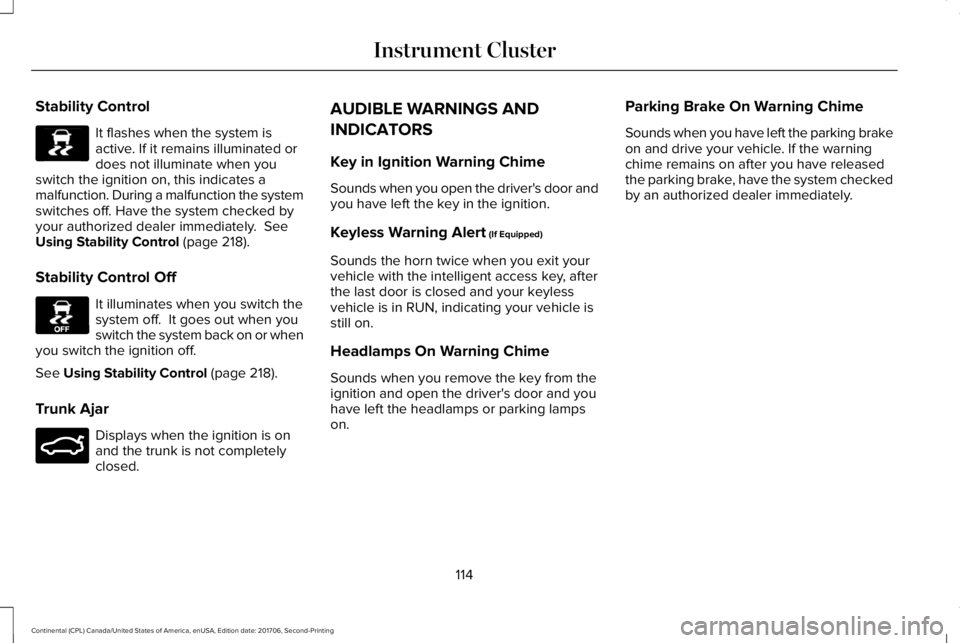
Stability Control
It flashes when the system isactive. If it remains illuminated ordoes not illuminate when youswitch the ignition on, this indicates amalfunction. During a malfunction the systemswitches off. Have the system checked byyour authorized dealer immediately. SeeUsing Stability Control (page 218).
Stability Control Off
It illuminates when you switch thesystem off. It goes out when youswitch the system back on or whenyou switch the ignition off.
See Using Stability Control (page 218).
Trunk Ajar
Displays when the ignition is onand the trunk is not completelyclosed.
AUDIBLE WARNINGS AND
INDICATORS
Key in Ignition Warning Chime
Sounds when you open the driver's door andyou have left the key in the ignition.
Keyless Warning Alert (If Equipped)
Sounds the horn twice when you exit yourvehicle with the intelligent access key, afterthe last door is closed and your keylessvehicle is in RUN, indicating your vehicle isstill on.
Headlamps On Warning Chime
Sounds when you remove the key from theignition and open the driver's door and youhave left the headlamps or parking lampson.
Parking Brake On Warning Chime
Sounds when you have left the parking brakeon and drive your vehicle. If the warningchime remains on after you have releasedthe parking brake, have the system checkedby an authorized dealer immediately.
114
Continental (CPL) Canada/United States of America, enUSA, Edition date: 201706, Second-Printing
Instrument ClusterE138639 E130458 E159323
Page 128 of 615
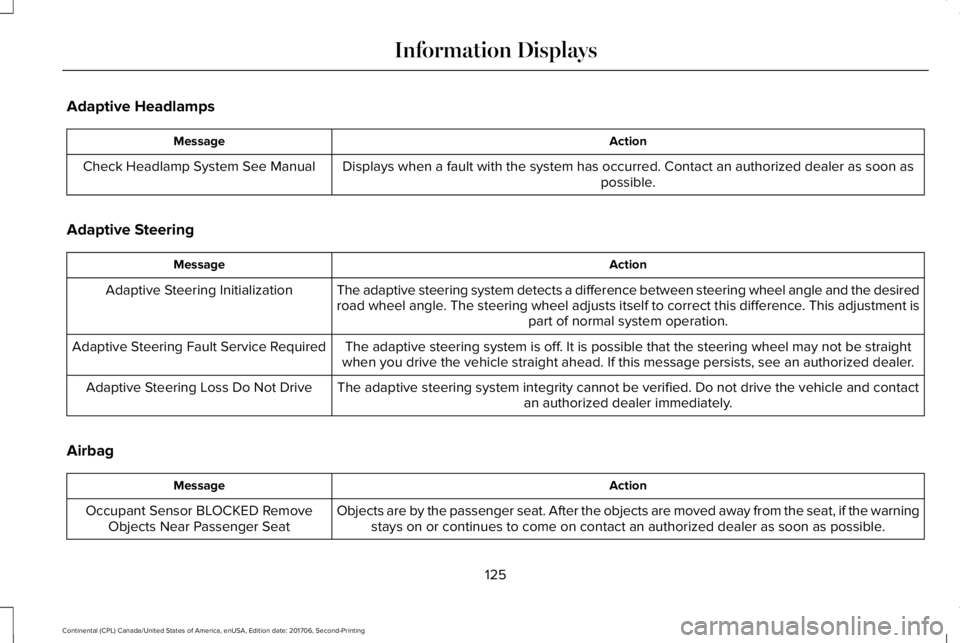
Adaptive Headlamps
ActionMessage
Displays when a fault with the system has occurred. Contact an authorized dealer as soon aspossible.Check Headlamp System See Manual
Adaptive Steering
ActionMessage
The adaptive steering system detects a difference between steering wheel angle and the desiredroad wheel angle. The steering wheel adjusts itself to correct this difference. This adjustment ispart of normal system operation.
Adaptive Steering Initialization
The adaptive steering system is off. It is possible that the steering wheel may not be straightwhen you drive the vehicle straight ahead. If this message persists, see an authorized dealer.Adaptive Steering Fault Service Required
The adaptive steering system integrity cannot be verified. Do not drive the vehicle and contactan authorized dealer immediately.Adaptive Steering Loss Do Not Drive
Airbag
ActionMessage
Objects are by the passenger seat. After the objects are moved away from the seat, if the warningstays on or continues to come on contact an authorized dealer as soon as possible.Occupant Sensor BLOCKED RemoveObjects Near Passenger Seat
125
Continental (CPL) Canada/United States of America, enUSA, Edition date: 201706, Second-Printing
Information Displays
Page 148 of 615
Maintaining Your Head Up Display
•Do not place objects onto the transparentcover, as they may block you from seeingportions of the image. These objectscould also damage the cover and affectthe quality of the projected image.
•The system uses a special windshielddesigned to provide the optimum imagequality. You must replace the windshieldin a vehicle with this system with acertified original equipmentmanufactured (OEM) head up displaywindshield. Replacing this system'swindshield with a non-head up displaywindshield causes a double image ordistorted image. Have an authorizeddealer or authorized repair facility replacethe windshield.
•Light conditions such as oncomingheadlamps, sunrise, sunset or reflectionsoff of wet road surfaces can affect thedriver's ability to see the HUD image.
•Clean the windshield often for optimalHUD performance. See Cleaning theWindows and Wiper Blades (page 337).
145
Continental (CPL) Canada/United States of America, enUSA, Edition date: 201706, Second-Printing
Information Displays
Page 182 of 615
Start: Starts your vehicle. The engine maynot start when your vehicle starts.
•Press the brake pedal, and then pressthe button for any length of time. Anindicator light on the button illuminateswhen the ignition is on and when yourvehicle starts.
STARTING A GASOLINE ENGINE
When you start the engine, the idle speedincreases. This helps to warm up the engine.
If the engine idle speed does not slow downby itself, have your vehicle checked as soonas possible.
Note:You can only attempt to start theengine for a limited amount of time beforethe starting system temporarily disables. Ifyou exceed the starting time limit, a messagemay appear and you cannot attempt to startthe engine for at least 15 minutes.
Before starting your vehicle, check thefollowing:
•Make sure all occupants have fastenedtheir seatbelts.
•Make sure the headlamps and electricalaccessories are off.
•Make sure the parking brake is on.
•Make sure the transmission is in park (P).
Starting Your Vehicle
Note:Do not touch the accelerator pedal.
1. Press the brake pedal.
2. Press the push button ignition switch.
Failure to Start
The system does not function if:
•The passive key frequencies are jammed.
•The key battery has no charge.
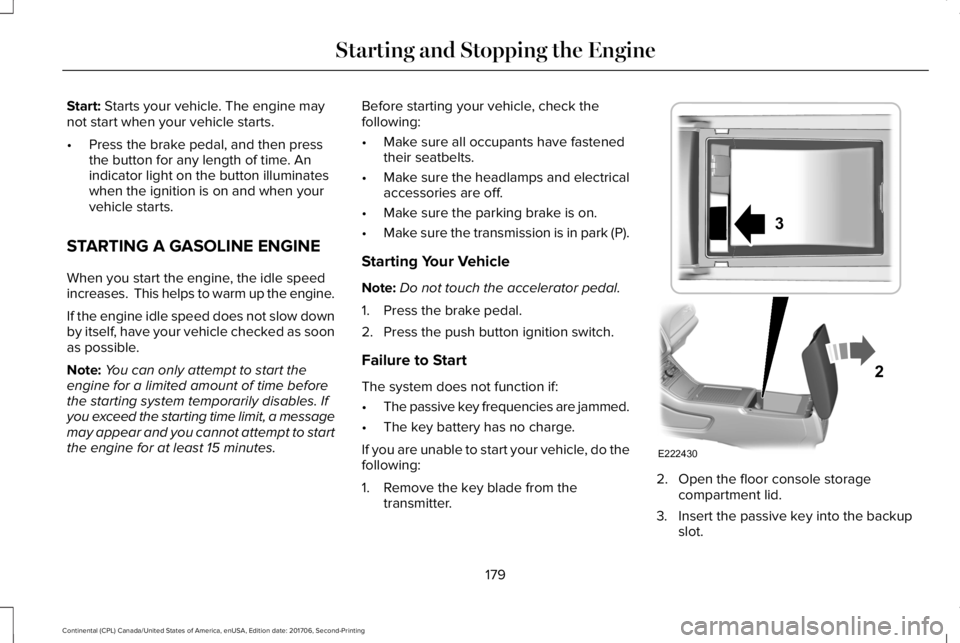
If you are unable to start your vehicle, do thefollowing:
1. Remove the key blade from thetransmitter.
2. Open the floor console storagecompartment lid.
3. Insert the passive key into the backupslot.
179
Continental (CPL) Canada/United States of America, enUSA, Edition date: 201706, Second-Printing
Starting and Stopping the EngineE222430
2
3
Page 253 of 615
Intensity: This setting affects the intensity ofthe steering wheel vibration used for the alertand alert + aid modes. This setting does notaffect the aid mode.
•Low.
•Normal.
•High.
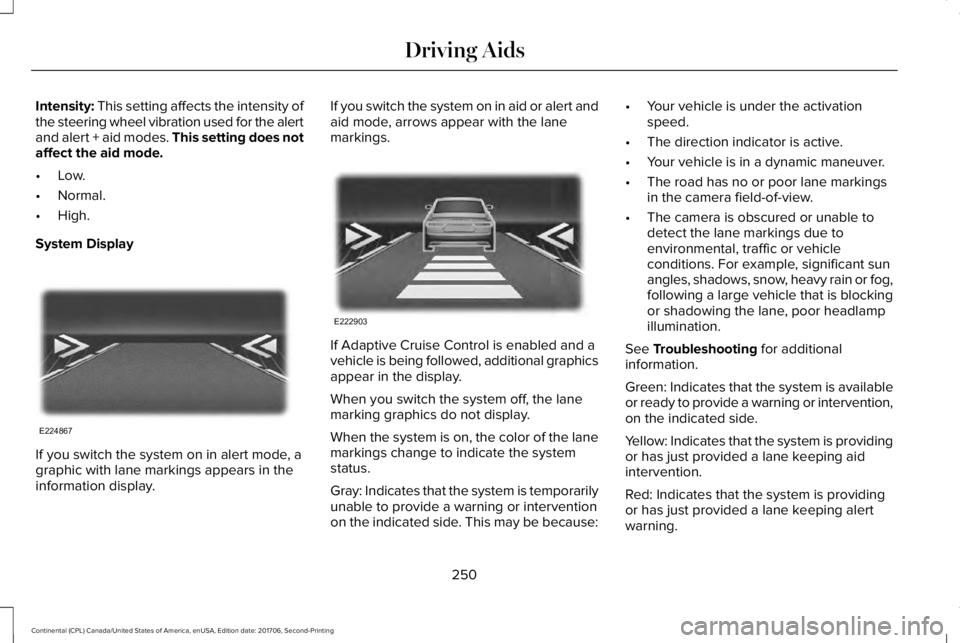
System Display
If you switch the system on in alert mode, agraphic with lane markings appears in theinformation display.
If you switch the system on in aid or alert andaid mode, arrows appear with the lanemarkings.
If Adaptive Cruise Control is enabled and avehicle is being followed, additional graphicsappear in the display.
When you switch the system off, the lanemarking graphics do not display.
When the system is on, the color of the lanemarkings change to indicate the systemstatus.
Gray: Indicates that the system is temporarilyunable to provide a warning or interventionon the indicated side. This may be because:
•Your vehicle is under the activationspeed.
•The direction indicator is active.
•Your vehicle is in a dynamic maneuver.
•The road has no or poor lane markingsin the camera field-of-view.
•The camera is obscured or unable todetect the lane markings due toenvironmental, traffic or vehicleconditions. For example, significant sunangles, shadows, snow, heavy rain or fog,following a large vehicle that is blockingor shadowing the lane, poor headlampillumination.
See Troubleshooting for additionalinformation.
Green: Indicates that the system is availableor ready to provide a warning or intervention,on the indicated side.
Yellow: Indicates that the system is providingor has just provided a lane keeping aidintervention.
Red: Indicates that the system is providingor has just provided a lane keeping alertwarning.
250
Continental (CPL) Canada/United States of America, enUSA, Edition date: 201706, Second-Printing
Driving AidsE224867 E222903
Page 306 of 615
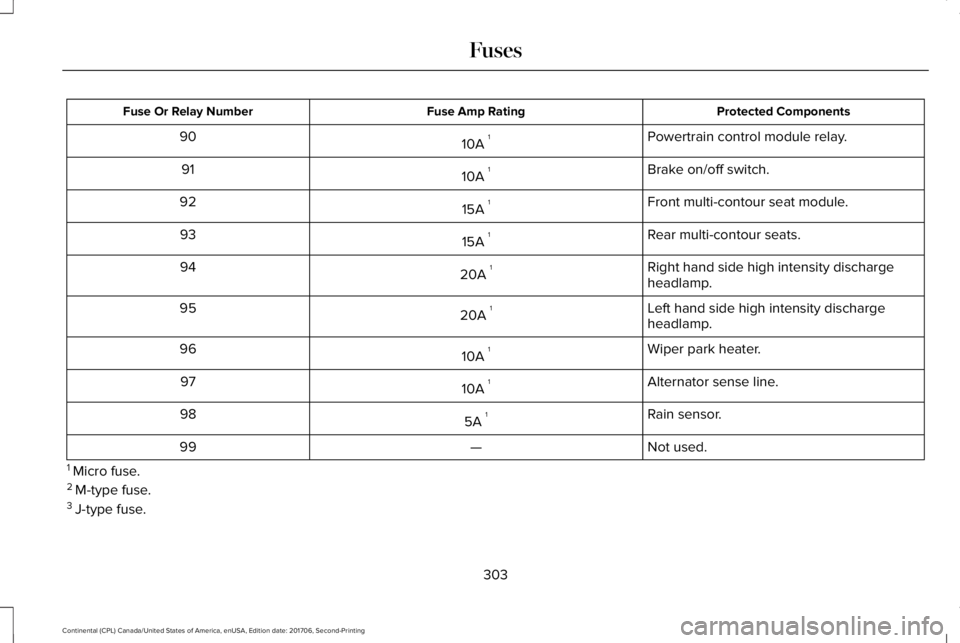
Protected ComponentsFuse Amp RatingFuse Or Relay Number
Powertrain control module relay.10A 190
Brake on/off switch.10A 191
Front multi-contour seat module.15A 192
Rear multi-contour seats.15A 193
Right hand side high intensity dischargeheadlamp.20A 194
Left hand side high intensity dischargeheadlamp.20A 195
Wiper park heater.10A 196
Alternator sense line.10A 197
Rain sensor.5A 198
Not used.—99
1 Micro fuse.2 M-type fuse.3 J-type fuse.
303
Continental (CPL) Canada/United States of America, enUSA, Edition date: 201706, Second-Printing
Fuses
Page 309 of 615
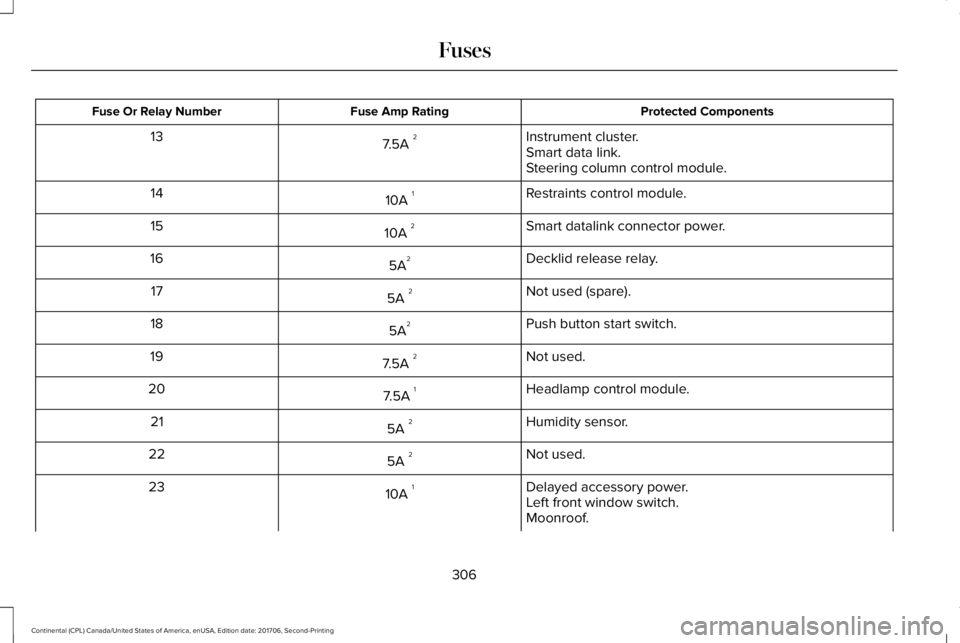
Protected ComponentsFuse Amp RatingFuse Or Relay Number
Instrument cluster.7.5A 213Smart data link.Steering column control module.
Restraints control module.10A 114
Smart datalink connector power.10A 215
Decklid release relay.5A216
Not used (spare).5A 217
Push button start switch.5A218
Not used.7.5A 219
Headlamp control module.7.5A 120
Humidity sensor.5A 221
Not used.5A 222
Delayed accessory power.10A 123Left front window switch.Moonroof.
306
Continental (CPL) Canada/United States of America, enUSA, Edition date: 201706, Second-Printing
Fuses
Page 331 of 615
Changing the Windshield Wiper Blades
Note:Do not hold the wiper blade whenlifting the wiper arm.
Note:Make sure that the wiper arm doesnot spring back against the glass when thewiper blade is not attached.
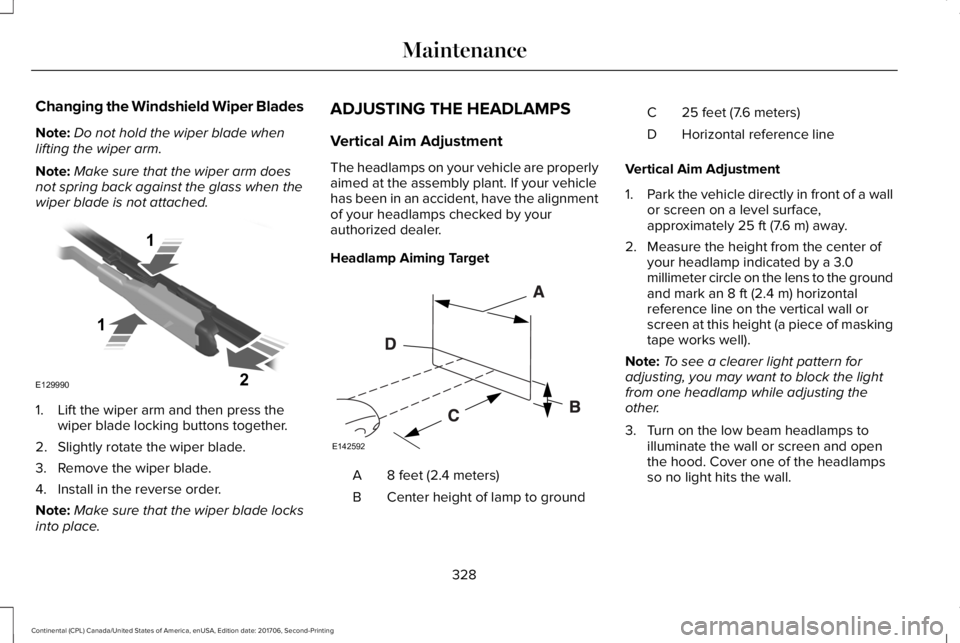
1. Lift the wiper arm and then press thewiper blade locking buttons together.
2. Slightly rotate the wiper blade.
3. Remove the wiper blade.
4. Install in the reverse order.
Note:Make sure that the wiper blade locksinto place.
ADJUSTING THE HEADLAMPS
Vertical Aim Adjustment
The headlamps on your vehicle are properlyaimed at the assembly plant. If your vehiclehas been in an accident, have the alignmentof your headlamps checked by yourauthorized dealer.
Headlamp Aiming Target
8 feet (2.4 meters)A
Center height of lamp to groundB
25 feet (7.6 meters)C
Horizontal reference lineD
Vertical Aim Adjustment
1.Park the vehicle directly in front of a wallor screen on a level surface,approximately 25 ft (7.6 m) away.
2. Measure the height from the center ofyour headlamp indicated by a 3.0millimeter circle on the lens to the groundand mark an 8 ft (2.4 m) horizontalreference line on the vertical wall orscreen at this height (a piece of maskingtape works well).
Note:To see a clearer light pattern foradjusting, you may want to block the lightfrom one headlamp while adjusting theother.
3. Turn on the low beam headlamps toilluminate the wall or screen and openthe hood. Cover one of the headlampsso no light hits the wall.
328
Continental (CPL) Canada/United States of America, enUSA, Edition date: 201706, Second-Printing
MaintenanceE129990
1
1 2 E142592
Page 332 of 615
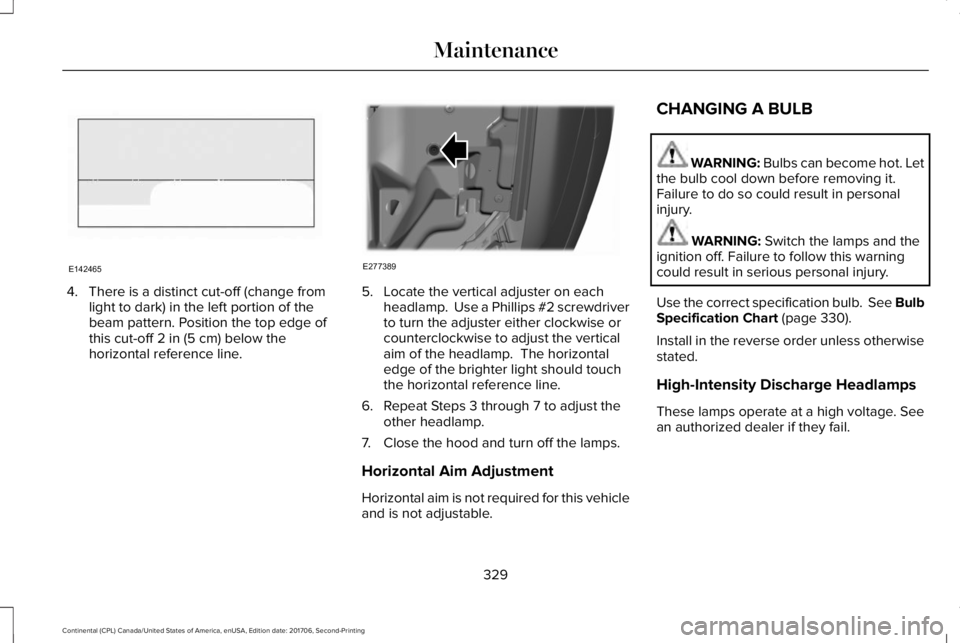
4. There is a distinct cut-off (change fromlight to dark) in the left portion of thebeam pattern. Position the top edge ofthis cut-off 2 in (5 cm) below thehorizontal reference line.
5. Locate the vertical adjuster on eachheadlamp. Use a Phillips #2 screwdriverto turn the adjuster either clockwise orcounterclockwise to adjust the verticalaim of the headlamp. The horizontaledge of the brighter light should touchthe horizontal reference line.
6. Repeat Steps 3 through 7 to adjust theother headlamp.
7. Close the hood and turn off the lamps.
Horizontal Aim Adjustment
Horizontal aim is not required for this vehicleand is not adjustable.
CHANGING A BULB
WARNING: Bulbs can become hot. Letthe bulb cool down before removing it.Failure to do so could result in personalinjury.
WARNING: Switch the lamps and theignition off. Failure to follow this warningcould result in serious personal injury.
Use the correct specification bulb. See BulbSpecification Chart (page 330).
Install in the reverse order unless otherwisestated.
High-Intensity Discharge Headlamps
These lamps operate at a high voltage. Seean authorized dealer if they fail.
329
Continental (CPL) Canada/United States of America, enUSA, Edition date: 201706, Second-Printing
MaintenanceE142465 E277389