towing LINCOLN CONTINENTAL 2018 Owner's Manual
[x] Cancel search | Manufacturer: LINCOLN, Model Year: 2018, Model line: CONTINENTAL, Model: LINCOLN CONTINENTAL 2018Pages: 615, PDF Size: 5.31 MB
Page 369 of 615
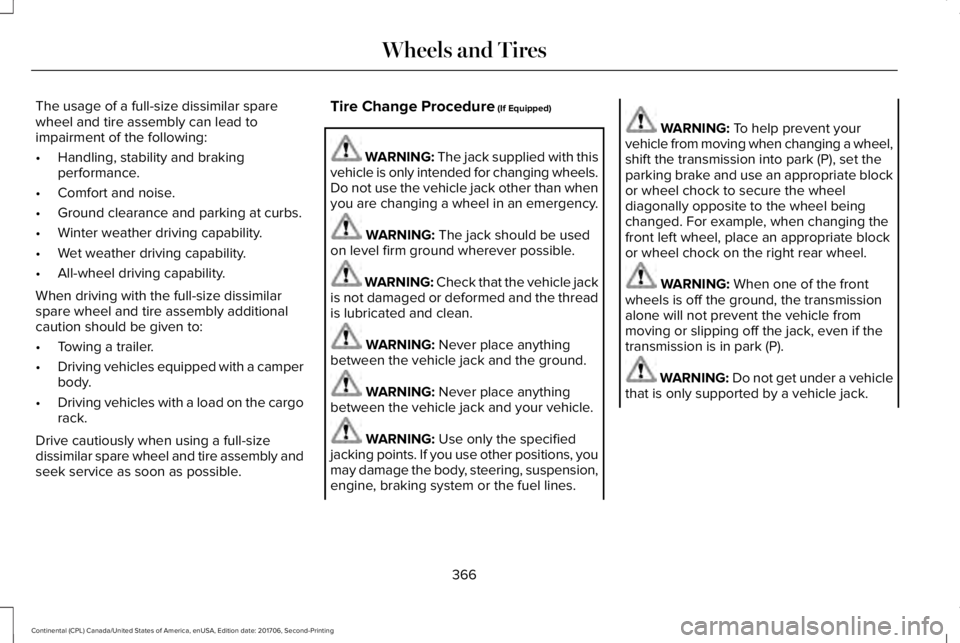
The usage of a full-size dissimilar sparewheel and tire assembly can lead toimpairment of the following:
•Handling, stability and brakingperformance.
•Comfort and noise.
•Ground clearance and parking at curbs.
•Winter weather driving capability.
•Wet weather driving capability.
•All-wheel driving capability.
When driving with the full-size dissimilarspare wheel and tire assembly additionalcaution should be given to:
•Towing a trailer.
•Driving vehicles equipped with a camperbody.
•Driving vehicles with a load on the cargorack.
Drive cautiously when using a full-sizedissimilar spare wheel and tire assembly andseek service as soon as possible.
Tire Change Procedure (If Equipped)
WARNING: The jack supplied with thisvehicle is only intended for changing wheels.Do not use the vehicle jack other than whenyou are changing a wheel in an emergency.
WARNING: The jack should be usedon level firm ground wherever possible.
WARNING: Check that the vehicle jackis not damaged or deformed and the threadis lubricated and clean.
WARNING: Never place anythingbetween the vehicle jack and the ground.
WARNING: Never place anythingbetween the vehicle jack and your vehicle.
WARNING: Use only the specifiedjacking points. If you use other positions, youmay damage the body, steering, suspension,engine, braking system or the fuel lines.
WARNING: To help prevent yourvehicle from moving when changing a wheel,shift the transmission into park (P), set theparking brake and use an appropriate blockor wheel chock to secure the wheeldiagonally opposite to the wheel beingchanged. For example, when changing thefront left wheel, place an appropriate blockor wheel chock on the right rear wheel.
WARNING: When one of the frontwheels is off the ground, the transmissionalone will not prevent the vehicle frommoving or slipping off the jack, even if thetransmission is in park (P).
WARNING: Do not get under a vehiclethat is only supported by a vehicle jack.
366
Continental (CPL) Canada/United States of America, enUSA, Edition date: 201706, Second-Printing
Wheels and Tires
Page 372 of 615
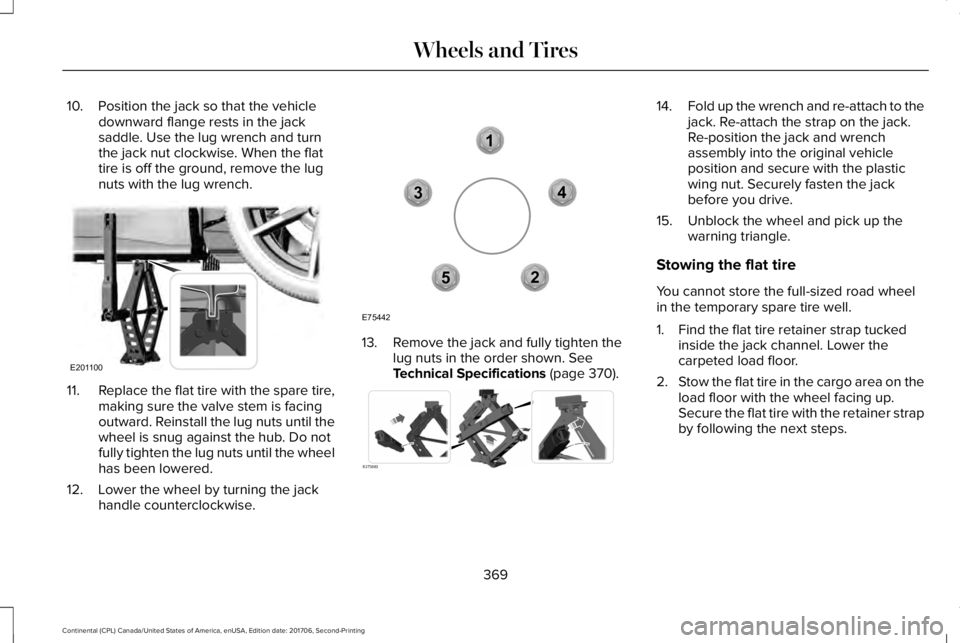
10. Position the jack so that the vehicledownward flange rests in the jacksaddle. Use the lug wrench and turnthe jack nut clockwise. When the flattire is off the ground, remove the lugnuts with the lug wrench.
11.Replace the flat tire with the spare tire,making sure the valve stem is facingoutward. Reinstall the lug nuts until thewheel is snug against the hub. Do notfully tighten the lug nuts until the wheelhas been lowered.
12. Lower the wheel by turning the jackhandle counterclockwise.
13. Remove the jack and fully tighten thelug nuts in the order shown. SeeTechnical Specifications (page 370).
14.Fold up the wrench and re-attach to thejack. Re-attach the strap on the jack.Re-position the jack and wrenchassembly into the original vehicleposition and secure with the plasticwing nut. Securely fasten the jackbefore you drive.
15. Unblock the wheel and pick up thewarning triangle.
Stowing the flat tire
You cannot store the full-sized road wheelin the temporary spare tire well.
1. Find the flat tire retainer strap tuckedinside the jack channel. Lower thecarpeted load floor.
2.Stow the flat tire in the cargo area on theload floor with the wheel facing up.Secure the flat tire with the retainer strapby following the next steps.
369
Continental (CPL) Canada/United States of America, enUSA, Edition date: 201706, Second-Printing
Wheels and TiresE201100 12
3
4
5
E75442 E273683
Page 523 of 615
PROTECT YOURSELF FROM THE RISINGCOST OF VEHICLE REPAIRS WITHLINCOLN PROTECT EXTENDED SERVICEPLAN.
Lincoln Protect Extended Service Plans(U.S. Only)
Lincoln Protect means peace of mind. It’s theextended service plan backed by the LincolnMotor Company, and provides moreprotection beyond the New Vehicle LimitedWarranty coverage. When you visit yourLincoln Dealer, insist on genuine LincolnProtect extended service plans!
Lincoln Protect Extended Service Plan CanQuickly Pay for Itself
One trip to the Service Center could easilyexceed the price of your Lincoln Protectextended service plan. With Lincoln Protectyou minimize your risk for unexpected repairbills and rising repair costs.
Up to 1000+ Covered Vehicle Components
There are four mechanical Lincoln Protectextended service plans with different levelsof coverage. Ask your authorized dealer fordetails.
1.PremiumCARE - Our most comprehensivecoverage. With over 1,000 coveredcomponents, this plan is so complete it’sprobably easier to list what’s not covered.
2.ExtraCARE - Covers 113 components, andincludes many high-tech items.
3. BaseCARE - Covers 84 components.
4. PowertrainCARE - Covers 29 criticalcomponents.
Lincoln Protect extended service plans arehonored by all authorized Lincoln dealers inthe U.S., Canada and Mexico.
That means you get:
•Reliable, quality service at any Lincoln orFord dealership.
•Repairs performed by factory trainedtechnicians, using genuine parts.
Rental Car Reimbursement
1st day Rental Benefit
If you bring your car into your dealer forservice, we’ll give you a loaner to use for theday.
Extended Rental Benefits
If your vehicle is kept overnight for coveredrepairs, you are eligible for rental carcoverage, including bumper to bumperwarranty repairs, and Field Service Actions.
Roadside Assistance
Exclusive 24/7 roadside assistance, including:
•Towing, flat-tire change and battery jumpstarts.
•Out of fuel and lock-out assistance.
•Travel expense reimbursement forlodging, meals and rental car.
•Assistance for taxi, shuttle, rental carcoverage and other transportation.
520
Continental (CPL) Canada/United States of America, enUSA, Edition date: 201706, Second-Printing
Lincoln Protect
Page 525 of 615
There are several Lincoln Protect extendedservice plans available in various time,distance and deductible combinations. Eachplan is tailored to fit your own driving needs,including reimbursement for towing andrental. When you purchase Lincoln Protectextended service plan, you receive addedpeace-of-mind protection throughoutCanada, the United States and Mexico,provided by a network of participatingauthorized Lincoln Motor Company dealers.
Note:Repairs performed outside of Canada,the United States and Mexico are not eligiblefor Lincoln Protect extended service plancoverage.
This information is subject to change. Formore information, visit your local Lincoln ofCanada dealer or www.Lincoln.ca to find theLincoln Protect extended service plan thatis right for you.
522
Continental (CPL) Canada/United States of America, enUSA, Edition date: 201706, Second-Printing
Lincoln Protect
Page 531 of 615
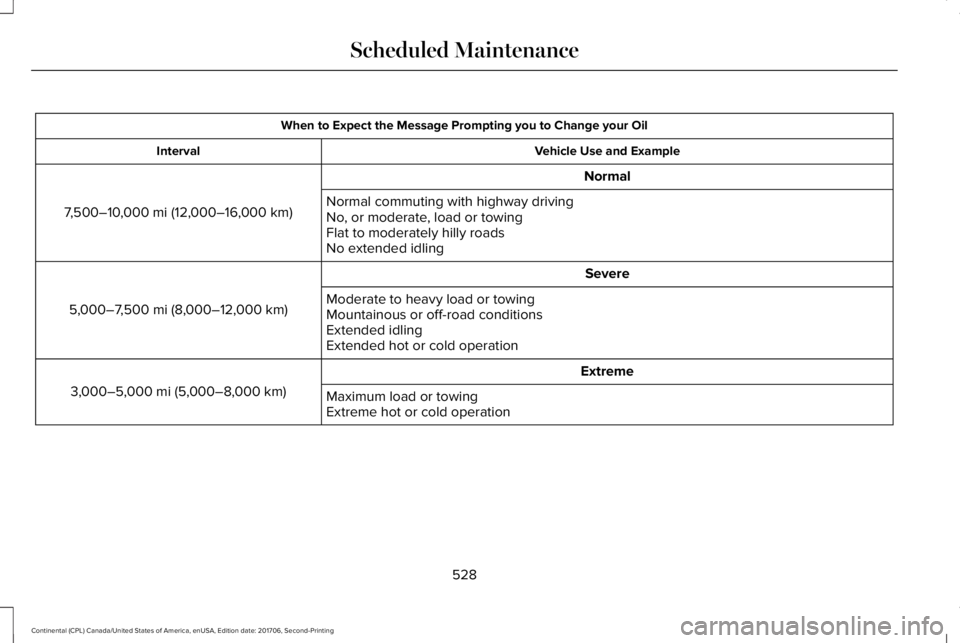
When to Expect the Message Prompting you to Change your Oil
Vehicle Use and ExampleInterval
Normal
7,500–10,000 mi (12,000–16,000 km)Normal commuting with highway drivingNo, or moderate, load or towingFlat to moderately hilly roadsNo extended idling
Severe
5,000–7,500 mi (8,000–12,000 km)Moderate to heavy load or towingMountainous or off-road conditionsExtended idlingExtended hot or cold operation
Extreme
3,000–5,000 mi (5,000–8,000 km)Maximum load or towingExtreme hot or cold operation
528
Continental (CPL) Canada/United States of America, enUSA, Edition date: 201706, Second-Printing
Scheduled Maintenance
Page 535 of 615
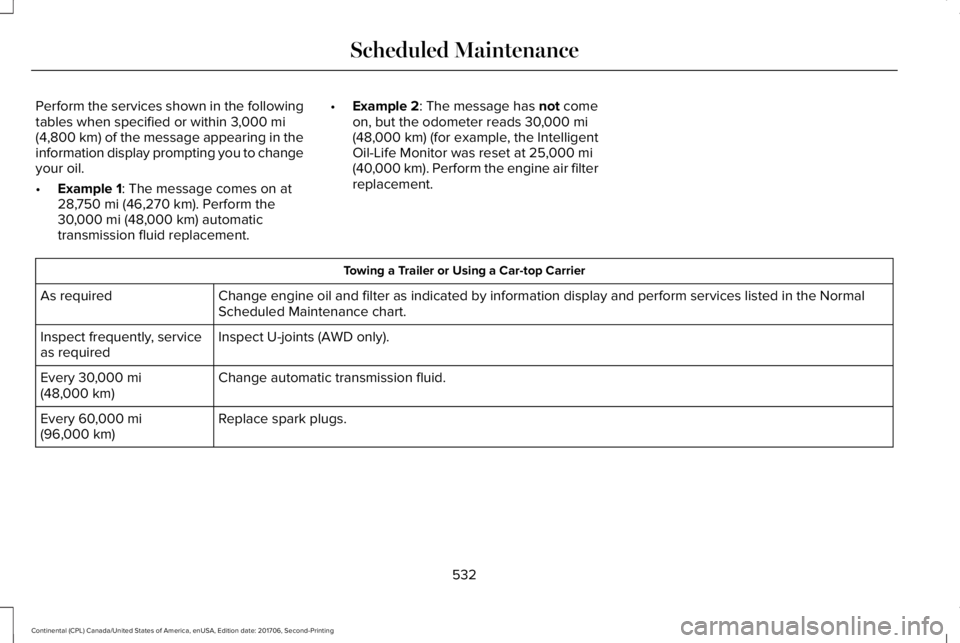
Perform the services shown in the followingtables when specified or within 3,000 mi(4,800 km) of the message appearing in theinformation display prompting you to changeyour oil.
•Example 1: The message comes on at28,750 mi (46,270 km). Perform the30,000 mi (48,000 km) automatictransmission fluid replacement.
•Example 2: The message has not comeon, but the odometer reads 30,000 mi(48,000 km) (for example, the IntelligentOil-Life Monitor was reset at 25,000 mi(40,000 km). Perform the engine air filterreplacement.
Towing a Trailer or Using a Car-top Carrier
Change engine oil and filter as indicated by information display and perform services listed in the NormalScheduled Maintenance chart.As required
Inspect U-joints (AWD only).Inspect frequently, serviceas required
Change automatic transmission fluid.Every 30,000 mi(48,000 km)
Replace spark plugs.Every 60,000 mi(96,000 km)
532
Continental (CPL) Canada/United States of America, enUSA, Edition date: 201706, Second-Printing
Scheduled Maintenance
Page 606 of 615
Changing a Fuse..........................................309Fuses.....................................................................309
Changing a Road Wheel.............................364Dissimilar Spare Wheel and Tire AssemblyInformation......................................................365Stowing the flat tire ...........................................369Tire Change Procedure....................................366
Changing the 12V Battery..........................325Changing the Engine Air Filter - 2.7LEcoBoost™/3.0L EcoBoost™.....................332Changing the Engine Air Filter - 3.7L......332Changing the Wiper Blades.......................327Changing the Windshield Wiper Blades......328
Checking MyKey System Status.................64MyKey Distance.....................................................64Number of Admin Keys.......................................65Number of MyKeys...............................................64
Checking the Wiper Blades.......................327Child Restraint and SeatbeltMaintenance..................................................44Child Restraint Positioning...........................33Child Safety.......................................................19General Information..............................................19
Child Safety Locks..........................................34Child Seats........................................................21Cleaning Leather Seats...............................341Cleaning Products........................................334Materials................................................................334
Cleaning the Engine....................................337Cleaning the Exterior...................................335Cleaning the Headlamps..................................335Exterior Chrome Parts.......................................336Exterior Plastic Parts..........................................336Stripes or Graphics............................................336Underbody...........................................................336Under Hood.........................................................336
Cleaning the Instrument Panel andInstrument Cluster Lens...........................340Cleaning the Interior....................................338Cleaning Black Label or PresidentialInterior...............................................................338
Cleaning the Wheels....................................341Cleaning the Windows and WiperBlades...........................................................337Clearing All MyKeys.......................................64Climate............................................................454Climate Control..............................................146Climate Controlled Seats............................168Ventilated Seats...................................................168
Coolant CheckSee: Engine Coolant Check..............................319
Crash Sensors and Airbag Indicator..........55Creating a MyKey...........................................63Programming/Changing ConfigurableSettings...............................................................64
Cross Traffic Alert.........................................255Blocked Sensors................................................258Switching the System Off and On..................258System Errors......................................................258System Lights, Messages and AudibleAlerts.................................................................258System Limitations.............................................258Using the Cross Traffic Alert System............255
Cruise Control.................................................86Principle of Operation.......................................237Type One................................................................86Type Two.................................................................87
Cruise controlSee: Using Cruise Control................................237
Customer Assistance..................................286
D
Data Recording................................................10Event Data Recording...........................................10Service Data Recording.......................................10
Daytime Running Lamps...............................94Type One - Conventional(Non-Configurable)..........................................95Type Two - Configurable....................................95
Direction Indicators........................................97Indicating a Lane Change...................................97
Doors and Locks.............................................67
603
Continental (CPL) Canada/United States of America, enUSA, Edition date: 201706, Second-Printing
Index
Page 607 of 615
Drive Control.................................................264LINCOLN DRIVE CONTROL............................264
Driver Alert.....................................................246Using Driver Alert...............................................247
Driver and Passenger Airbags....................48Children and Airbags...........................................49Proper Driver and Front Passenger SeatingAdjustment.........................................................49
Driver and Passenger Knee Airbags.........53Driving Aids...................................................246Driving Hints..................................................276Driving Through Water................................276DRLSee: Daytime Running Lamps...........................94
E
Economical Driving......................................276Electric Parking Brake..................................210Applying the Electric Parking Brake...............210Battery With No Charge....................................212Releasing the Electric Parking Brake..............211
Electromagnetic Compatibility.................555Emergency Door Release.............................74Emission Law..................................................190Noise Emissions Warranty, ProhibitedTampering Acts and Maintenance..............191
Tampering With a Noise ControlSystem...............................................................190
End User License Agreement..................560VEHICLE SOFTWARE END USER LICENSEAGREEMENT (EULA) ....................................560
Engine Block Heater.....................................181Using the Engine Block Heater.......................182
Engine Coolant Check.................................319Adding Coolant...................................................320Coolant Change..................................................322Engine Coolant TemperatureManagement...................................................323Fail-Safe Cooling................................................322Recycled Coolant................................................321Severe Climates...................................................321
Engine Emission Control.............................190Engine ImmobilizerSee: Passive Anti-Theft System........................82
Engine Oil Check...........................................317Adding Engine Oil...............................................318
Engine Oil Dipstick - 2.7L EcoBoost™/3.0LEcoBoost™.....................................................317Engine Oil Dipstick - 3.7L.............................317Engine Specifications - 2.7L.......................373Drivebelt Routing................................................373
Engine Specifications - 3.0L......................374Drivebelt Routing................................................375
Engine Specifications - 3.7L.......................375Drivebelt Routing................................................376
Entertainment................................................440AM/FM Radio.......................................................443Apps.......................................................................454Bluetooth Stereo or USB..................................452CD (If equipped)...................................................451HD Radio™ Information (If Available)..............447SiriusXM® Satellite Radio (If Activated).........443Sources.................................................................442Supported Media Players, Formats andMetadata Information...................................454USB Ports.............................................................454
Environment......................................................16EPBSee: Electric Parking Brake..............................210
Essential Towing Checks............................273Before Towing a Trailer.....................................274Hitches..................................................................273Launching or Retrieving a Boat or PersonalWatercraft (PWC)............................................274Safety Chains.......................................................273Trailer Brakes.......................................................273Trailer Lamps........................................................273When Towing a Trailer.......................................274
Event Data RecordingSee: Data Recording.............................................10
Export Unique Options...................................14
604
Continental (CPL) Canada/United States of America, enUSA, Edition date: 201706, Second-Printing
Index
Page 612 of 615
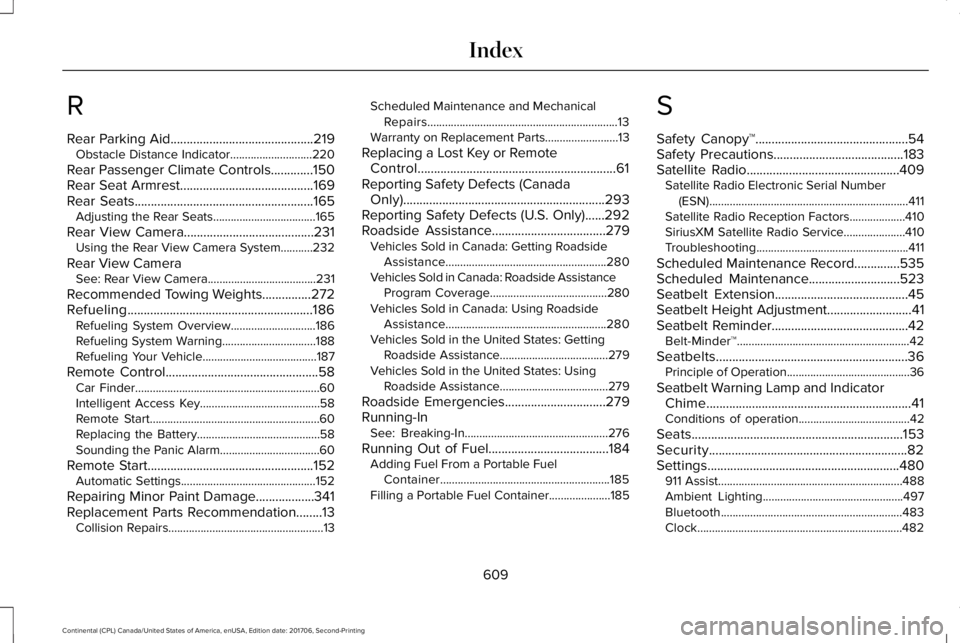
R
Rear Parking Aid............................................219Obstacle Distance Indicator............................220
Rear Passenger Climate Controls.............150Rear Seat Armrest.........................................169Rear Seats.......................................................165Adjusting the Rear Seats...................................165
Rear View Camera........................................231Using the Rear View Camera System...........232
Rear View CameraSee: Rear View Camera.....................................231
Recommended Towing Weights...............272Refueling.........................................................186Refueling System Overview.............................186Refueling System Warning................................188Refueling Your Vehicle.......................................187
Remote Control...............................................58Car Finder...............................................................60Intelligent Access Key.........................................58Remote Start..........................................................60Replacing the Battery..........................................58Sounding the Panic Alarm..................................60
Remote Start...................................................152Automatic Settings..............................................152
Repairing Minor Paint Damage..................341Replacement Parts Recommendation........13Collision Repairs.....................................................13
Scheduled Maintenance and MechanicalRepairs.................................................................13Warranty on Replacement Parts.........................13
Replacing a Lost Key or RemoteControl.............................................................61Reporting Safety Defects (CanadaOnly)..............................................................293Reporting Safety Defects (U.S. Only)......292Roadside Assistance...................................279Vehicles Sold in Canada: Getting RoadsideAssistance.......................................................280Vehicles Sold in Canada: Roadside AssistanceProgram Coverage........................................280Vehicles Sold in Canada: Using RoadsideAssistance.......................................................280Vehicles Sold in the United States: GettingRoadside Assistance.....................................279Vehicles Sold in the United States: UsingRoadside Assistance.....................................279
Roadside Emergencies...............................279Running-InSee: Breaking-In.................................................276
Running Out of Fuel.....................................184Adding Fuel From a Portable FuelContainer..........................................................185Filling a Portable Fuel Container.....................185
S
Safety Canopy™...............................................54Safety Precautions........................................183Satellite Radio...............................................409Satellite Radio Electronic Serial Number(ESN)....................................................................411Satellite Radio Reception Factors...................410SiriusXM Satellite Radio Service.....................410Troubleshooting....................................................411
Scheduled Maintenance Record..............535Scheduled Maintenance............................523Seatbelt Extension.........................................45Seatbelt Height Adjustment..........................41Seatbelt Reminder..........................................42Belt-Minder™...........................................................42
Seatbelts...........................................................36Principle of Operation..........................................36
Seatbelt Warning Lamp and IndicatorChime...............................................................41Conditions of operation......................................42
Seats.................................................................153Security.............................................................82Settings...........................................................480911 Assist...............................................................488Ambient Lighting................................................497Bluetooth..............................................................483Clock......................................................................482
609
Continental (CPL) Canada/United States of America, enUSA, Edition date: 201706, Second-Printing
Index
Page 614 of 615
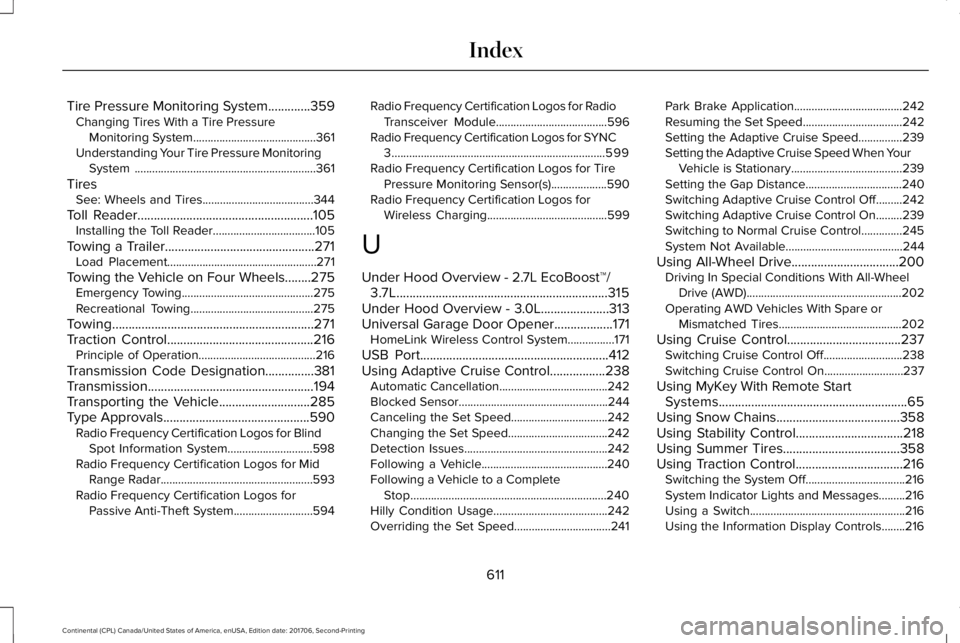
Tire Pressure Monitoring System.............359Changing Tires With a Tire PressureMonitoring System..........................................361Understanding Your Tire Pressure MonitoringSystem ..............................................................361
TiresSee: Wheels and Tires......................................344
Toll Reader......................................................105Installing the Toll Reader...................................105
Towing a Trailer..............................................271Load Placement...................................................271
Towing the Vehicle on Four Wheels........275Emergency Towing.............................................275Recreational Towing..........................................275
Towing..............................................................271Traction Control.............................................216Principle of Operation........................................216
Transmission Code Designation...............381Transmission...................................................194Transporting the Vehicle............................285Type Approvals.............................................590Radio Frequency Certification Logos for BlindSpot Information System.............................598Radio Frequency Certification Logos for MidRange Radar....................................................593Radio Frequency Certification Logos forPassive Anti-Theft System...........................594
Radio Frequency Certification Logos for RadioTransceiver Module......................................596Radio Frequency Certification Logos for SYNC3.........................................................................599Radio Frequency Certification Logos for TirePressure Monitoring Sensor(s)...................590Radio Frequency Certification Logos forWireless Charging.........................................599
U
Under Hood Overview - 2.7L EcoBoost™/3.7L.................................................................315Under Hood Overview - 3.0L.....................313Universal Garage Door Opener..................171HomeLink Wireless Control System................171
USB Port..........................................................412Using Adaptive Cruise Control.................238Automatic Cancellation.....................................242Blocked Sensor...................................................244Canceling the Set Speed.................................242Changing the Set Speed..................................242Detection Issues.................................................242Following a Vehicle...........................................240Following a Vehicle to a CompleteStop...................................................................240Hilly Condition Usage.......................................242Overriding the Set Speed.................................241
Park Brake Application.....................................242Resuming the Set Speed..................................242Setting the Adaptive Cruise Speed...............239Setting the Adaptive Cruise Speed When YourVehicle is Stationary......................................239Setting the Gap Distance.................................240Switching Adaptive Cruise Control Off.........242Switching Adaptive Cruise Control On.........239Switching to Normal Cruise Control..............245System Not Available........................................244
Using All-Wheel Drive.................................200Driving In Special Conditions With All-WheelDrive (AWD).....................................................202Operating AWD Vehicles With Spare orMismatched Tires..........................................202
Using Cruise Control...................................237Switching Cruise Control Off...........................238Switching Cruise Control On...........................237
Using MyKey With Remote StartSystems..........................................................65Using Snow Chains......................................358Using Stability Control.................................218Using Summer Tires....................................358Using Traction Control.................................216Switching the System Off..................................216System Indicator Lights and Messages.........216Using a Switch.....................................................216Using the Information Display Controls........216
611
Continental (CPL) Canada/United States of America, enUSA, Edition date: 201706, Second-Printing
Index