engine LINCOLN CONTINENTAL 2018 Workshop Manual
[x] Cancel search | Manufacturer: LINCOLN, Model Year: 2018, Model line: CONTINENTAL, Model: LINCOLN CONTINENTAL 2018Pages: 615, PDF Size: 5.31 MB
Page 202 of 615
3. Using a tool, press and hold the brakeshift interlock switch. The shift buttonson the instrument panel will flash whenyour vehicle is in override mode.
4. With the override switch still held, pressthe neutral (N) button to shift from park.
5. Release the override button.
6. Your vehicle will remain in neutral forwrecker towing purposes or can beshifted to the desired gear and driven (ifpossible).
7. Release the parking brake.
Automatic Transmission AdaptiveLearning
This feature increases durability and providesconsistent shift feel over the life of yourvehicle. A new vehicle or transmission mayhave firm or soft shifts. This operation willnot affect function or durability of yourtransmission and is normal. Over time, theadaptive learning process will fully updatetransmission operation. Additionally, thestrategy must be relearned whenever thebattery is disconnected or a new battery isinstalled.
If Your Vehicle Gets Stuck In Mud orSnow
Note:Do not rock your vehicle if your engineis not at normal operating temperature ordamage to your transmission may occur.
Note:Do not rock your vehicle for more thana minute or damage to your transmissionand tires may occur, or your engine mayoverheat.
If your vehicle gets stuck in mud or snow,you can help rock your vehicle out by shiftingbetween forward and reverse gears,stopping between shifts in a steady pattern.Press lightly on the accelerator in each gear.
199
Continental (CPL) Canada/United States of America, enUSA, Edition date: 201706, Second-Printing
Transmission
Page 203 of 615
USING ALL-WHEEL DRIVE
All-Wheel Drive (AWD) uses all four wheelsto power the vehicle. This increases traction,enabling you to drive over terrain and roadconditions that a conventional two-wheeldrive vehicle cannot. The AWD system isactive all the time and requires no input fromthe operator.
Note:Your vehicle may be equipped withDynamic Torque Vectoring. This feature usesall four wheels to power the vehicle andindependently controls the torque to eachrear wheel. In addition, the system has theability to over speed the outside rear wheelin a turn. This increases traction andhandling performance, allowing the vehicleto travel through road conditions and havepath following capability superior toconventional two-wheel drive and AWDvehicles. The Dynamic Torque Vectoringsystem is active all the time and requires noinput from the operator.
Note:Your AWD vehicle is not intended foroff-road use. The AWD feature gives yourvehicle some limited off-road capabilities inwhich driving surfaces are relatively level,obstruction-free and otherwise similar tonormal on-road driving conditions. Operatingyour vehicle under other than thoseconditions could subject the vehicle toexcessive stress which might result indamage which is not covered under yourwarranty.
Note:When an AWD system fault is present,the warning AWD Malfunction ServiceRequired displays in the information display.The AWD system is not functioning correctlyand defaulted to front-wheel drive. Whenthis warning displays, have your vehicleserviced at an authorized dealer.
Note: The AWD OFF message may alsoappear in the information display if the AWDsystem overheats and defaults to front-wheeldrive. This may occur if the vehicle isoperated in extreme conditions withexcessive wheel slip, such as deep sand. To resume normal AWD function as soon aspossible, stop the vehicle in a safe locationand stop the engine for at least 10 minutes. After the engine has been restarted and theAWD system has adequately cooled, theAWD OFF message will turn off and normalAWD function returns. If the engine is notstopped, the AWD OFF message turns offwhen the system cools and normal AWDfunction returns.
200
Continental (CPL) Canada/United States of America, enUSA, Edition date: 201706, Second-Printing
All-Wheel Drive (If Equipped)
Page 205 of 615
Operating AWD Vehicles With Spareor Mismatched Tires
WARNING: Only use replacement tiresand wheels that are the same size, loadindex, speed rating and type (such asP-metric versus LT-metric or all-seasonversus all-terrain) as those originally providedby Ford. The recommended tire and wheelsize may be found on either the SafetyCompliance Certification Label (affixed toeither the door hinge pillar, door-latch post,or the door edge that meets the door-latchpost, next to the driver’s seating position), orthe Tire Label which is located on the B-Pillaror edge of the driver’s door. If thisinformation is not found on these labels, thenyou should contact your authorized dealeras soon as possible. Use of any tire or wheelnot recommended by Ford can affect thesafety and performance of your vehicle,which could result in an increased risk of lossof vehicle control, vehicle rollover, personalinjury and death.
A spare tire of a different size other than thetire provided should never be used. TheAWD system may disable automatically andenter front-wheel drive only mode to protectdriveline components if a non-full sized tireis installed. This condition may display anAWD OFF message in the informationdisplay. If there is an AWD OFF message inthe information display from using a non-fullsized spare tire, this indicator should turn offafter reinstalling the repaired or replacednormal road tire and cycling the ignition offand on. It is recommended to reinstall therepaired or replaced road tire as soon aspossible.
Major dissimilar tire sizes between the frontand rear axles (for example, 17 inch lowprofile tires on the front axle and 22 inch highprofile tires on the rear axle) could cause theAWD system to stop functioning and defaultto front-wheel drive or damage the AWDsystem. However, the AWD system iscapable of tolerating any combination of newand worn tires of the same original tire size.For example, using 3 worn tread tires and 1new tread tire all of the same original tiresize, can be tolerated by the AWD system.
Driving In Special Conditions With All-Wheel Drive (AWD)
AWD vehicles are equipped for driving onsand, snow, mud and rough roads and haveoperating characteristics that are somewhatdifferent from conventional vehicles, both onand off the highway.
When driving at slow speeds in deep sandunder high outside temperatures, use a lowgear when possible. Lower gear operationwill maximize the engine and transmissioncooling capability.
Under severe operating conditions, the A/Cmay cycle on and off to protect overheatingof the engine.
Basic operating principles in specialconditions
•Drive slower in strong crosswinds whichcan affect the normal steeringcharacteristics of your vehicle.
•Be extremely careful when driving onpavement made slippery by loose sand,water, gravel, snow or ice.
202
Continental (CPL) Canada/United States of America, enUSA, Edition date: 201706, Second-Printing
All-Wheel Drive (If Equipped)
Page 206 of 615
If Your Vehicle Goes Off the Edge of thePavement
•If your vehicle goes off the edge of thepavement, slow down, but avoid severebrake application, ease the vehicle backonto the pavement only after reducingyour speed. Do not turn the steeringwheel too sharply while returning to theroad surface.
•It may be safer to stay on the apron orshoulder of the road and slow downgradually before returning to thepavement. You may lose control if youdo not slow down or if you turn thesteering wheel too sharply or abruptly.
•It often may be less risky to strike smallobjects, such as highway reflectors, withminor damage to your vehicle rather thanattempt a sudden return to the pavementwhich could cause the vehicle to slidesideways out of control or rollover.Remember, your safety and the safety ofothers should be your primary concern.
If Your Vehicle Gets Stuck
WARNING: Always set the parkingbrake fully and make sure you shift thegearshift lever to park (P). Switch the ignitionoff and remove the key whenever you leaveyour vehicle.
WARNING: If the parking brake is fullyreleased, but the brake warning lampremains illuminated, the brakes may not beworking properly. Have your vehicle checkedas soon as possible.
WARNING: Do not spin the wheels atover 34 mph (55 km/h). The tires may fail andinjure a passenger or bystander.
Note:Do not rock the vehicle if the engineis not at normal operating temperature ordamage to the transmission may occur.
Note:Do not rock the vehicle for more thana few minutes or damage to the transmissionand tires may occur or the engine mayoverheat.
If your vehicle gets stuck in mud or snow itmay be rocked out by shifting betweenforward and reverse gears, stoppingbetween shifts, in a steady pattern. Presslightly on the accelerator in each gear.
If your vehicle is equipped withAdvanceTrac® with Roll Stability Control™, itmay be beneficial to disengage theAdvanceTrac® with Roll Stability Control™system while attempting to rock the vehicle.
Emergency Maneuvers
•In an unavoidable emergency situationwhere a sudden sharp turn must bemade, remember to avoid "over-driving"your vehicle (that is, turn the steeringwheel only as rapidly and as far asrequired to avoid the emergency).Excessive steering will result in lessvehicle control, not more. Additionally,smooth variations of the acceleratorand/or brake pedal pressure should beutilized if changes in vehicle speed arecalled for. Avoid abrupt steering,
203
Continental (CPL) Canada/United States of America, enUSA, Edition date: 201706, Second-Printing
All-Wheel Drive (If Equipped)
Page 207 of 615
acceleration or braking which could resultin an increased risk of loss of vehiclecontrol, vehicle rollover and/or personalinjury. Use all available road surface toreturn the vehicle to a safe direction oftravel.
•In the event of an emergency stop, avoidskidding the tires and do not attempt anysharp steering wheel movements.
•If the vehicle goes from one type ofsurface to another (that is, from concreteto gravel) there will be a change in theway the vehicle responds to a maneuver(steering, acceleration or braking). Again,avoid these abrupt inputs.
Sand
Most of the time traction control improvestire traction by managing wheel slip throughBrake, Engine, and AWD calibrations.However, during low speed driving, disablingtraction control in deep sand can help keepthe wheels moving to maintain vehiclemomentum.
When driving over sand, try to keep all fourwheels on the most solid area of the trail.Avoid reducing the tire pressures but shiftto a lower gear and drive steadily throughthe terrain. Apply the accelerator slowly andavoid spinning the wheels.
Do not drive your vehicle in deep sand foran extended period of time. This could causethe AWD system to overheat and default tofront-wheel drive. If this occurs, an AWD OFFmessage displays in the information display.To resume normal AWD function as soon aspossible, stop the vehicle in a safe locationand stop the engine for at least 10 minutes.After the engine has been restarted and theAWD system has adequately cooled, theAWD OFF message turns off and normalAWD function returns. In the event theengine is not stopped, the AWD OFFmessage turns off when the system coolsand normal AWD function returns.
When driving at slow speeds in deep sandunder high outside temperatures, use L (Low)gear when possible. L (Low) gear operationwill maximize the engine and transmissioncooling capability.
Under severe operating conditions, the A/Cmay cycle on and off to protect overheatingof the engine.
Avoid excessive speed because vehiclemomentum can work against you and causethe vehicle to become stuck to the point thatassistance may be required from anothervehicle. Remember, you may be able to backout the way you came if you proceed withcaution.
Mud and Water
If you must drive through high water, driveslowly. Traction or brake capability may belimited.
When driving through water, determine thedepth; avoid water higher than the bottomof the wheel rims (for cars) or the bottom ofthe hubs (for trucks) (if possible) and proceedslowly. If the ignition system gets wet, thevehicle may stall.
204
Continental (CPL) Canada/United States of America, enUSA, Edition date: 201706, Second-Printing
All-Wheel Drive (If Equipped)
Page 208 of 615
Once through water, always try the brakes.Wet brakes do not stop the vehicle aseffectively as dry brakes. Drying can beimproved by moving your vehicle slowlywhile applying light pressure on the brakepedal.
Be cautious of sudden changes in vehiclespeed or direction when you are driving inmud. Even AWD vehicles can lose tractionin slick mud. As when you are driving oversand, apply the accelerator slowly and avoidspinning your wheels. If the vehicle doesslide, steer in the direction of the slide untilyou regain control of the vehicle.
After driving through mud, clean off residuestuck to rotating driveshafts and tires. Excessmud stuck on tires and rotating driveshaftscauses an imbalance that could damagedrive components.
Note:Driving through deep water maydamage the transmission.
If the front or rear axle is submerged in water,have the power transfer unit (PTU) or rearaxle serviced by an authorized dealer.
Driving on Hilly or Sloping Terrain
Note:Avoid driving crosswise or turning onsteep slopes or hills. A danger lies in losingtraction, slipping sideways and possiblyrolling over. Whenever driving on a hill,determine beforehand the route you will use.Do not drive over the crest of a hill withoutseeing what conditions are on the other side.Do not drive in reverse over a hill withoutthe aid of an observer.
Although natural obstacles may make itnecessary to travel diagonally up or down ahill or steep incline, you should always try todrive straight up or straight down.
When climbing a steep slope or hill, start ina lower gear rather than downshifting to alower gear from a higher gear once theascent has started. This reduces strain onthe engine and the possibility of stalling.
If you do stall out, do not try to turnaroundbecause you might roll over. It is better toback down to a safe location.
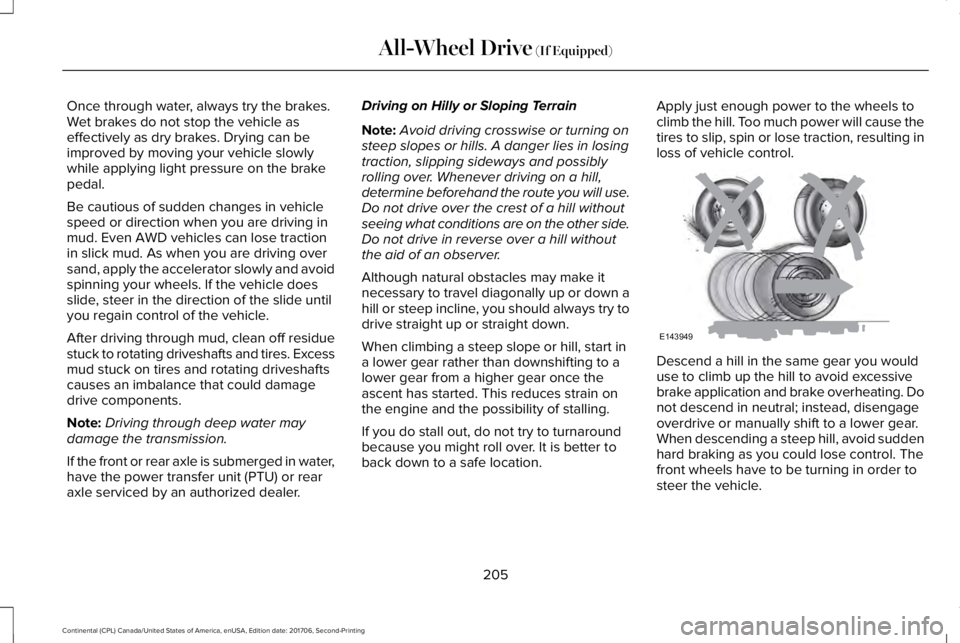
Apply just enough power to the wheels toclimb the hill. Too much power will cause thetires to slip, spin or lose traction, resulting inloss of vehicle control.
Descend a hill in the same gear you woulduse to climb up the hill to avoid excessivebrake application and brake overheating. Donot descend in neutral; instead, disengageoverdrive or manually shift to a lower gear.When descending a steep hill, avoid suddenhard braking as you could lose control. Thefront wheels have to be turning in order tosteer the vehicle.
205
Continental (CPL) Canada/United States of America, enUSA, Edition date: 201706, Second-Printing
All-Wheel Drive (If Equipped)E143949
Page 212 of 615
GENERAL INFORMATION
Note:Occasional brake noise is normal. If ametal-to-metal, continuous grinding orcontinuous squeal sound is present, thebrake linings may be worn-out. Have thesystem checked by an authorized dealer. Ifyour vehicle has continuous vibration orshudder in the steering wheel while braking,have it checked by an authorized dealer.
Note:Brake dust may accumulate on thewheels, even under normal drivingconditions. Some dust is inevitable as thebrakes wear and does not contribute tobrake noise. See Cleaning the Wheels(page 341).
Note:Depending on applicable laws andregulations in the country for which yourvehicle was originally built, your brake lampsmay flash during heavy braking. Followingthis, your hazard lights may also flash whenyour vehicle comes to a stop.
See Warning Lamps andIndicators (page 110).
Wet brakes result in reduced brakingefficiency. Gently press the brake pedal afew times when driving from a car wash orstanding water to dry the brakes.
Brake Over Accelerator
In the event the accelerator pedal becomesstuck or entrapped, apply steady and firmpressure to the brake pedal to slow thevehicle and reduce engine power. If youexperience this condition, apply the brakesand bring your vehicle to a safe stop. Movethe transmission to park (P), switch theengine off and apply the parking brake.Inspect the accelerator pedal for anyinterference. If none are found and thecondition persists, have your vehicle towedto the nearest authorized dealer.
Brake Assist
Brake assist detects when you brake rapidlyby measuring the rate at which you press thebrake pedal. It provides maximum brakingefficiency as long as you press the pedal,and can reduce stopping distances in criticalsituations.
Anti-lock Brake System
This system helps you maintain steeringcontrol during emergency stops by keepingthe brakes from locking.
If it illuminates when you aredriving, this indicates amalfunction. Your vehiclecontinues to have normal braking withoutthe anti-lock brake system function. Haveyour vehicle checked as soon as possible.
It also momentarily illuminates when youswitch the ignition on to confirm the lamp isfunctional. If it does not illuminate when youswitch the ignition on, or begins to flash atany time, have the system checked by anauthorized dealer.
It illuminates when you engage theparking brake and the ignition ison.
If it illuminates when your vehicle is moving,make sure the parking brake is disengaged.If the parking brake is disengaged, thisindicates low brake fluid level or a brakesystem fault. Have your vehicle immediatelychecked.
209
Continental (CPL) Canada/United States of America, enUSA, Edition date: 201706, Second-Printing
BrakesE144522 E144522
Page 215 of 615
Manual release
WARNING: If the brake system warninglight remains illuminated or flashes for morethan four seconds after you have releasedthe parking brake, there could be a problemwith your braking system. Have your vehiclechecked as soon as possible.
You can manually release the electric parkingbrake by:
1. Switching the ignition on.
2. Pressing the brake pedal.
3. Pressing the electric parking brakeswitch.
When the electric parking brake is released,the brake system warning lamp turns off.
Automatic release - drive away release
Your vehicle automatically releases theparking brake if all of the following conditionsexist:
•The driver door is closed.
•The accelerator pedal is pressed.
•There are no faults detected in theparking brake system.
Note:If the electric parking brake warninglamp stays illuminated, the electric parkingbrake will not automatically release. Youmust release the electric parking brake usingthe electric parking brake switch while yourfoot is on the brake and the ignition is on.
The brake system warning lamp will go offto confirm that you have released the electricparking brake.
Note:The electric parking brake drive awayrelease makes starting on a hill easier. Thisfeature releases the parking brakeautomatically when the vehicle has sufficienttorque force to move up the hill. To assuredrive away release when starting uphill,press the accelerator pedal quickly.
Driving with a Trailer
Depending on the slope and the weight ofthe trailer, your vehicle and trailer may rollbackwards slightly when you start on a slope.
To prevent this from happening, do thefollowing:
1. Pull the switch up and hold it in thisposition.
2.Accelerate your vehicle, then release theswitch when you notice that the enginehas developed sufficient driving force.
Battery With No Charge
WARNING: You will not be able toapply or release the electric parking brakeif the battery is low or has no charge.
If the battery is low or has no charge, usejumper cables and a booster battery.
212
Continental (CPL) Canada/United States of America, enUSA, Edition date: 201706, Second-Printing
Brakes
Page 216 of 615
HILL START ASSIST
WARNING: The system does notreplace the parking brake. When you leaveyour vehicle, always apply the parking brakeand shift the transmission into park (P) forautomatic transmission or first gear formanual transmission.
WARNING: You must remain in yourvehicle when the system turns on. At alltimes, you are responsible for controllingyour vehicle, supervising the system andintervening, if required. Failure to take caremay result in the loss of control of yourvehicle, serious personal injury or death.
WARNING: The system turns off if thereis a malfunction or if you excessively rev theengine.
The system makes it easier to pull awaywhen your vehicle is on a slope without theneed to use the parking brake.
When the system activates, your vehicleremains stationary on a slope for a fewseconds after you release the brake pedal.This allows you time to move your foot fromthe brake to the accelerator pedal. Thebrakes release when the engine hasdeveloped sufficient torque to prevent yourvehicle from rolling down the slope. This isan advantage when pulling away on a slope,for example from a car park ramp, trafficlights or when reversing uphill into a parkingspace.
The system activates on any slope thatcauses your vehicle to roll.
Note:There is no warning lamp to indicatethe system is either on or off.
Using Hill Start Assist
1. Press the brake pedal to bring yourvehicle to a complete standstill. Keep thebrake pedal pressed and shift into firstgear when facing uphill or reverse (R)when facing downhill.
2. The system activates if the sensorsdetect that your vehicle is on a slope.
3. When you remove your foot from thebrake pedal, your vehicle remains on theslope without rolling away for a fewseconds. This hold time increases if youare in the process of driving off.
4. Pull away in the normal manner.
Switching the System On and Off
Vehicles with Manual Transmission
You can switch this feature on or off in theinformation display. The system remembersthe last setting when you start your vehicle.
Vehicles with Automatic Transmission
The system turns on when you switch theignition on and you cannot switch the systemoff.
AUTO HOLD
WARNING: The system does notreplace the parking brake. When you leaveyour vehicle, always apply the parking brake.
213
Continental (CPL) Canada/United States of America, enUSA, Edition date: 201706, Second-Printing
Brakes
Page 217 of 615
WARNING: You must remain in yourvehicle when the system turns on. At alltimes, you are responsible for controllingyour vehicle, supervising the system andintervening, if required. Failure to take caremay result in the loss of control of yourvehicle, serious personal injury or death.
WARNING: The system will turn off ifa malfunction is apparent or if you rev theengine excessively. Failure to take care mayresult in the loss of control of your vehicle,serious personal injury or death.
Auto Hold uses your vehicle's brake to holdyour vehicle at a stop once your vehicle hasreached a standstill condition. For example,Auto Hold can assist you while stopping attraffic lights or while in traffic jams by holdingthe brake pressure for you once you bringyour vehicle to a stop.
Switch Auto Hold off during vehicle or trailertowing.
Note:In case of a malfunction in the systemwhile Auto Hold actively holds the vehicle(for example, low power supply), a messageappears in the information display askingyou to press the brake pedal. If you see thismessage, press the brake pedalimmediately.
Note: Auto Hold only activates if the systemrecognizes it is applying enough brakepressure. On a steep hill or slope, make sureyou press the brake pedal sufficiently toactivate the Auto Hold system.
Note:In some cases, Auto Hold might handover to the parking brake. When the parkingbrake applies, the red brake lamp appears.This is normal. When you press theaccelerator pedal, the drive away releasefeature releases the parking brake.
Note:Auto Hold works on all road grades.
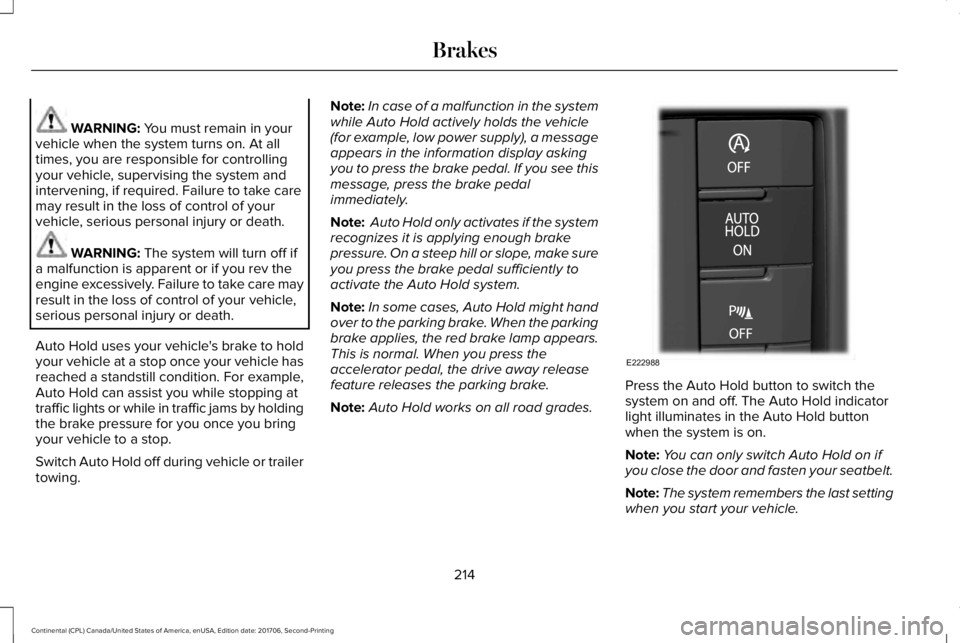
Press the Auto Hold button to switch thesystem on and off. The Auto Hold indicatorlight illuminates in the Auto Hold buttonwhen the system is on.
Note:You can only switch Auto Hold on ifyou close the door and fasten your seatbelt.
Note:The system remembers the last settingwhen you start your vehicle.
214
Continental (CPL) Canada/United States of America, enUSA, Edition date: 201706, Second-Printing
BrakesE222988