engine LINCOLN CONTINENTAL 2018 User Guide
[x] Cancel search | Manufacturer: LINCOLN, Model Year: 2018, Model line: CONTINENTAL, Model: LINCOLN CONTINENTAL 2018Pages: 615, PDF Size: 5.31 MB
Page 91 of 615
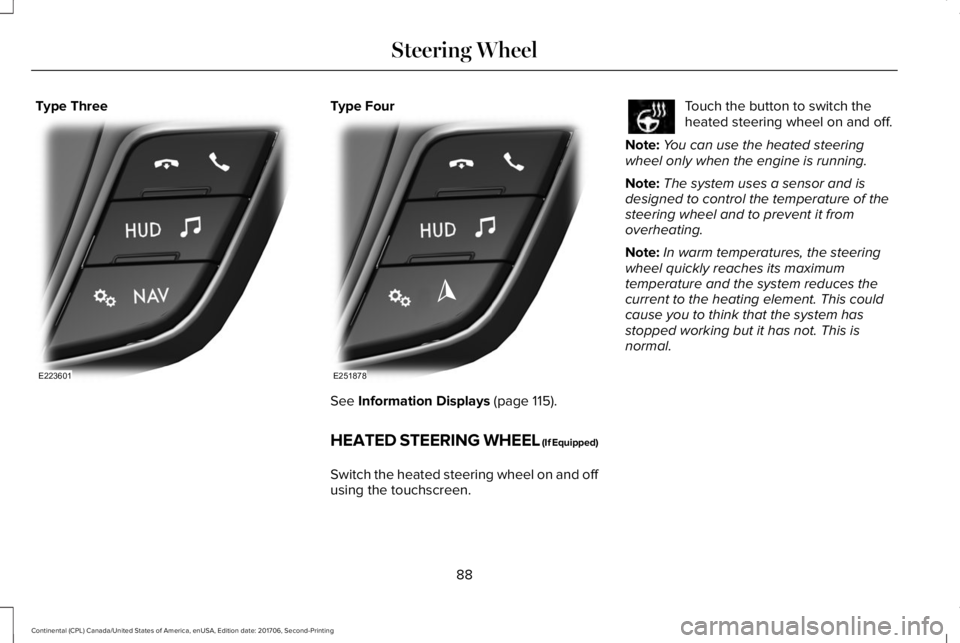
Type ThreeType Four
See Information Displays (page 115).
HEATED STEERING WHEEL (If Equipped)
Switch the heated steering wheel on and offusing the touchscreen.
Touch the button to switch theheated steering wheel on and off.
Note:You can use the heated steeringwheel only when the engine is running.
Note:The system uses a sensor and isdesigned to control the temperature of thesteering wheel and to prevent it fromoverheating.
Note:In warm temperatures, the steeringwheel quickly reaches its maximumtemperature and the system reduces thecurrent to the heating element. This couldcause you to think that the system hasstopped working but it has not. This isnormal.
88
Continental (CPL) Canada/United States of America, enUSA, Edition date: 201706, Second-Printing
Steering WheelE223601 E251878
Page 104 of 615
POWER WINDOWS
WARNING: Do not leave childrenunattended in your vehicle and do not letthem play with the power windows. Failureto follow this instruction could result inpersonal injury.
WARNING: When closing the powerwindows, verify they are free of obstructionand make sure that children and pets are notin the proximity of the window openings.
Note: You may hear a pulsing noise whenjust one of the windows is open. Lower theopposite window slightly to reduce thisnoise.
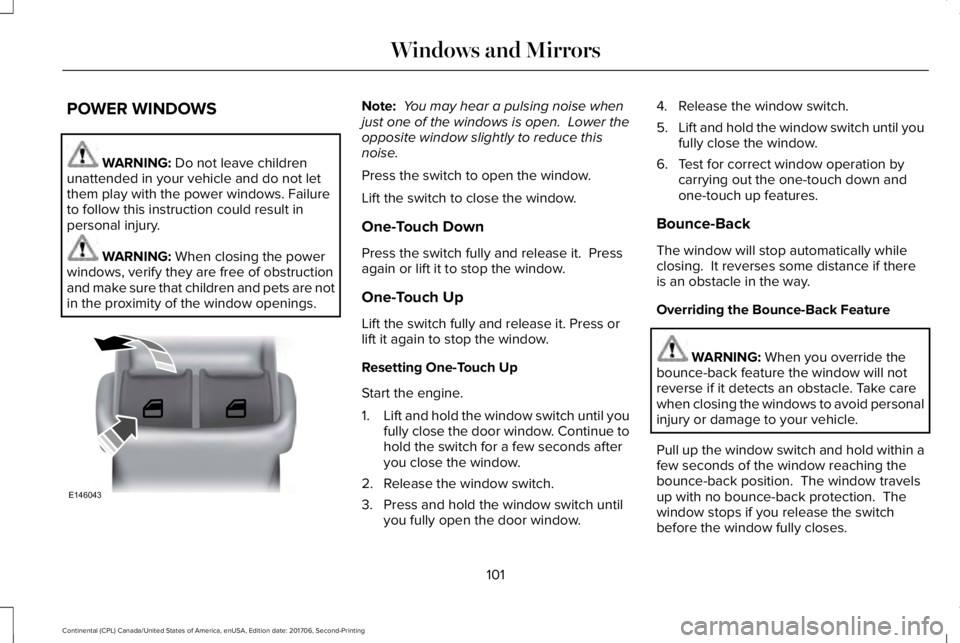
Press the switch to open the window.
Lift the switch to close the window.
One-Touch Down
Press the switch fully and release it. Pressagain or lift it to stop the window.
One-Touch Up
Lift the switch fully and release it. Press orlift it again to stop the window.
Resetting One-Touch Up
Start the engine.
1.Lift and hold the window switch until youfully close the door window. Continue tohold the switch for a few seconds afteryou close the window.
2. Release the window switch.
3. Press and hold the window switch untilyou fully open the door window.
4. Release the window switch.
5.Lift and hold the window switch until youfully close the window.
6. Test for correct window operation bycarrying out the one-touch down andone-touch up features.
Bounce-Back
The window will stop automatically whileclosing. It reverses some distance if thereis an obstacle in the way.
Overriding the Bounce-Back Feature
WARNING: When you override thebounce-back feature the window will notreverse if it detects an obstacle. Take carewhen closing the windows to avoid personalinjury or damage to your vehicle.
Pull up the window switch and hold within afew seconds of the window reaching thebounce-back position. The window travelsup with no bounce-back protection. Thewindow stops if you release the switchbefore the window fully closes.
101
Continental (CPL) Canada/United States of America, enUSA, Edition date: 201706, Second-Printing
Windows and MirrorsE146043
Page 114 of 615
Adaptive Steering Off (yellow, solid): Theadaptive steering system is off. It is possiblethat the steering wheel may not be straightwhen you drive straight ahead. If thismessage persists, see an authorized dealer.
Adaptive Steering Loss (red, solid): Theadaptive steering system integrity cannot beverified. Do not drive the vehicle and contactan authorized dealer immediately. SeeSteering (page 259).
Anti-Lock Braking System
If it illuminates when you aredriving, this indicates amalfunction. You continue to havethe normal braking system (without ABS)unless the brake system warning lamp is alsoilluminated. Have the system checked byyour authorized dealer.
Autohold Active
Illuminates when the system holdsyour vehicle stationary.
Autohold Unavailable
Illuminates when the system is on,but unavailable to hold yourvehicle stationary.
Battery
It illuminates when you switch theignition on.
If it illuminates when the engine isrunning this indicates a malfunction. Haveyour vehicle checked as soon as possible.
Blind Spot Monitor (If Equipped)
It illuminates when you switch thisfeature off or in conjunction with amessage. See Blind SpotInformation System (page 253).
Brake System
It illuminates when you engage theparking brake with the ignition on.
If it illuminates when you are driving, checkthat the parking brake is not engaged. If theparking brake is not engaged, this indicateslow brake fluid level or a brake systemmalfunction. Have the system checkedimmediately by your authorized dealer.
WARNING: Driving your vehicle withthe warning lamp on is dangerous. Asignificant decrease in braking performancemay occur. It may take you longer to stopyour vehicle. Have your vehicle checked assoon as possible. Driving extended distanceswith the parking brake engaged can causebrake failure and the risk of personal injury.
Cruise Control (If Equipped)
Illuminates when you switch thisfeature on.
111
Continental (CPL) Canada/United States of America, enUSA, Edition date: 201706, Second-Printing
Instrument Cluster E197933 E197934 E151262 E144522 E71340
Page 115 of 615
Direction Indicator
Illuminates when the left or rightturn signal or the hazard warningflasher is turned on. If theindicators stay on or flash faster, check for aburned out bulb. See Changing a Bulb(page 329).
Door Ajar
Displays when the ignition is onand any door is not completelyclosed.
Also displays when there is a lack of batterypower to the electronic door system. If thisdisplays with all doors closed, have yourvehicle serviced by an authorized dealerimmediately.
Electric Park Brake
Illuminates or flashes when theelectric parking brake has amalfunction. See Electric ParkingBrake (page 210).
Engine Coolant Temperature
Illuminates when the enginecoolant temperature is high. Stopthe vehicle as soon as possible,switch off the engine and let cool. SeeEngine Coolant Check (page 319).
Engine Oil
If it illuminates with the enginerunning or when you are driving,this indicates a malfunction. Stopyour vehicle as soon as it is safe to do soand switch the engine off. Check the engineoil level.
See Engine Oil Check (page 317).
Note:Do not resume your journey if itilluminates despite the level being correct.Have the system checked by your authorizeddealer immediately.
Fasten Seatbelt
Illuminates and a chime sounds toremind you to fasten your seatbelt.See Seatbelt Reminder (page 42).
Front Airbag
If it fails to illuminate when youstart your vehicle, continues toflash or remains on, it indicates amalfunction. Have the system checked byyour authorized dealer.
Head Up Display (If Equipped)
A red beam of lights illuminates onthe windshield in certain instanceswhen using adaptive cruise controlor the collision warning system. It alsoilluminates momentarily when you start yourvehicle to make sure the display works.
High Beam
Illuminates when you switch thehigh beam headlamps on. It flasheswhen you use the headlampflasher.
112
Continental (CPL) Canada/United States of America, enUSA, Edition date: 201706, Second-Printing
Instrument Cluster E146190 E71880 E67017 E156133
Page 116 of 615
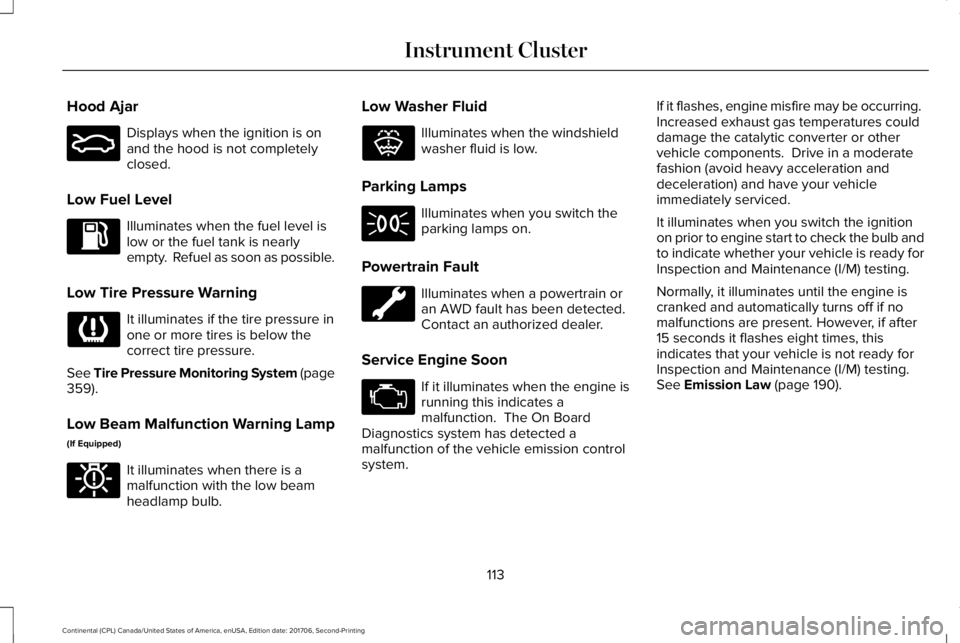
Hood Ajar
Displays when the ignition is onand the hood is not completelyclosed.
Low Fuel Level
Illuminates when the fuel level islow or the fuel tank is nearlyempty. Refuel as soon as possible.
Low Tire Pressure Warning
It illuminates if the tire pressure inone or more tires is below thecorrect tire pressure.
See Tire Pressure Monitoring System (page359).
Low Beam Malfunction Warning Lamp
(If Equipped)
It illuminates when there is amalfunction with the low beamheadlamp bulb.
Low Washer Fluid
Illuminates when the windshieldwasher fluid is low.
Parking Lamps
Illuminates when you switch theparking lamps on.
Powertrain Fault
Illuminates when a powertrain oran AWD fault has been detected. Contact an authorized dealer.
Service Engine Soon
If it illuminates when the engine isrunning this indicates amalfunction. The On BoardDiagnostics system has detected amalfunction of the vehicle emission controlsystem.
If it flashes, engine misfire may be occurring. Increased exhaust gas temperatures coulddamage the catalytic converter or othervehicle components. Drive in a moderatefashion (avoid heavy acceleration anddeceleration) and have your vehicleimmediately serviced.
It illuminates when you switch the ignitionon prior to engine start to check the bulb andto indicate whether your vehicle is ready forInspection and Maintenance (I/M) testing.
Normally, it illuminates until the engine iscranked and automatically turns off if nomalfunctions are present. However, if after15 seconds it flashes eight times, thisindicates that your vehicle is not ready forInspection and Maintenance (I/M) testing.See Emission Law (page 190).
113
Continental (CPL) Canada/United States of America, enUSA, Edition date: 201706, Second-Printing
Instrument ClusterE159324 E181350 E132353
Page 121 of 615
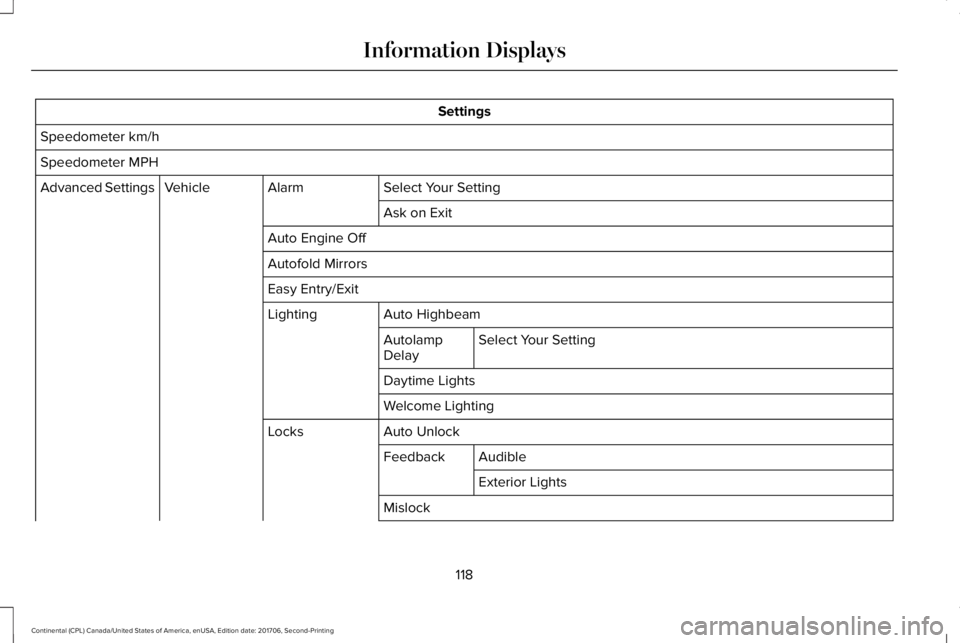
Settings
Speedometer km/h
Speedometer MPH
Select Your SettingAlarmVehicleAdvanced Settings
Ask on Exit
Auto Engine Off
Autofold Mirrors
Easy Entry/Exit
Auto HighbeamLighting
Select Your SettingAutolampDelay
Daytime Lights
Welcome Lighting
Auto UnlockLocks
AudibleFeedback
Exterior Lights
Mislock
118
Continental (CPL) Canada/United States of America, enUSA, Edition date: 201706, Second-Printing
Information Displays
Page 124 of 615
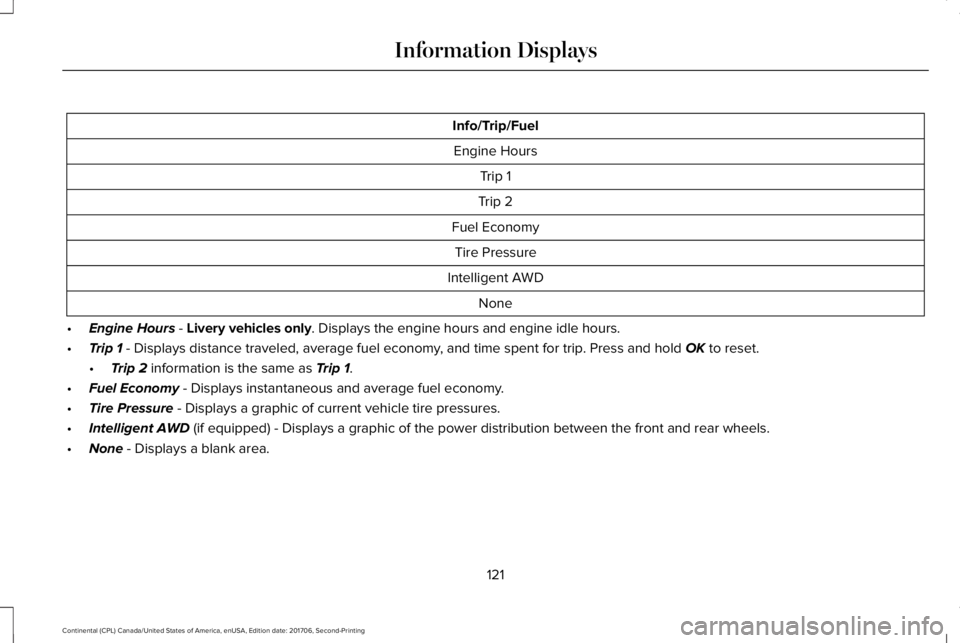
Info/Trip/Fuel
Engine Hours
Trip 1
Trip 2
Fuel Economy
Tire Pressure
Intelligent AWD
None
•Engine Hours - Livery vehicles only. Displays the engine hours and engine idle hours.
•Trip 1 - Displays distance traveled, average fuel economy, and time spent for trip. Press and hold OK to reset.
•Trip 2 information is the same as Trip 1.
•Fuel Economy - Displays instantaneous and average fuel economy.
•Tire Pressure - Displays a graphic of current vehicle tire pressures.
•Intelligent AWD (if equipped) - Displays a graphic of the power distribution between the front and rear wheels.
•None - Displays a blank area.
121
Continental (CPL) Canada/United States of America, enUSA, Edition date: 201706, Second-Printing
Information Displays
Page 125 of 615
Gauges
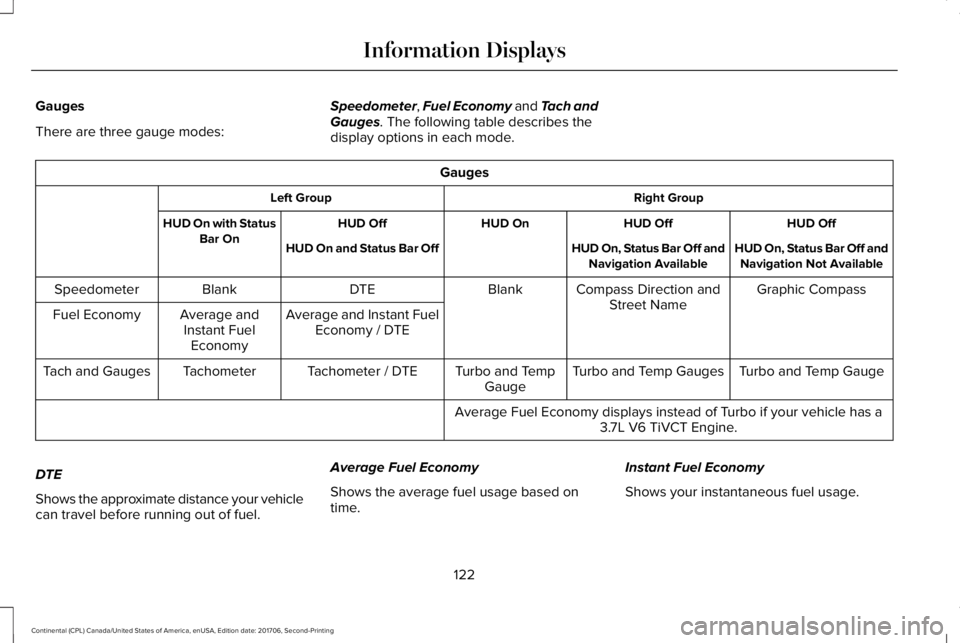
There are three gauge modes:
Speedometer, Fuel Economy and Tach andGauges. The following table describes thedisplay options in each mode.
Gauges
Right GroupLeft Group
HUD OffHUD OffHUD OnHUD OffHUD On with StatusBar OnHUD On, Status Bar Off andNavigation Not AvailableHUD On, Status Bar Off andNavigation AvailableHUD On and Status Bar Off
Graphic CompassCompass Direction andStreet NameBlankDTEBlankSpeedometer
Average and Instant FuelEconomy / DTEAverage andInstant FuelEconomy
Fuel Economy
Turbo and Temp GaugeTurbo and Temp GaugesTurbo and TempGaugeTachometer / DTETachometerTach and Gauges
Average Fuel Economy displays instead of Turbo if your vehicle has a3.7L V6 TiVCT Engine.
DTE
Shows the approximate distance your vehiclecan travel before running out of fuel.
Average Fuel Economy
Shows the average fuel usage based ontime.
Instant Fuel Economy
Shows your instantaneous fuel usage.
122
Continental (CPL) Canada/United States of America, enUSA, Edition date: 201706, Second-Printing
Information Displays
Page 126 of 615
Tachometer
Indicates the engine speed in revolutionsper minute. Driving with your tachometerpointer continuously at the top of the scalemay damage the engine.
Turbo Gauge (If Equipped)
Indicates the amount of manifold air pressurein the engine.
Temperature Gauge
Indicates engine coolant temperature. Atnormal operating temperature, the levelindicator will be in the normal range. If theengine coolant temperature exceeds thenormal range, stop your vehicle as soon assafely possible, switch off the engine and letthe engine cool.
WARNING: Do not remove the coolantreservoir cap when the cooling system is hot.Wait 10 minutes for the cooling system tocool down. Cover the coolant reservoir capwith a thick cloth to prevent the possibilityof scalding and slowly remove the cap.Failure to follow this instruction could resultin personal injury.
Head Up Display (If Equipped)
See Head Up Display (page 142).
Phone
See General Information (page 413).
Audio
See General Information (page 413).
Navigation (If Equipped)
See General Information (page 413).
INFORMATION MESSAGES
Note: Depending on your vehicle optionsand instrument cluster type, not all of themessages will display or be available.Certain messages may be abbreviated orshortened depending upon which clustertype you have.
Press the OK button to acknowledge andremove some messages from the informationdisplay. Other messages will be removedautomatically after a short time.
Certain messages need to be confirmedbefore you can access the menus.
123
Continental (CPL) Canada/United States of America, enUSA, Edition date: 201706, Second-Printing
Information DisplaysE222314
Page 129 of 615
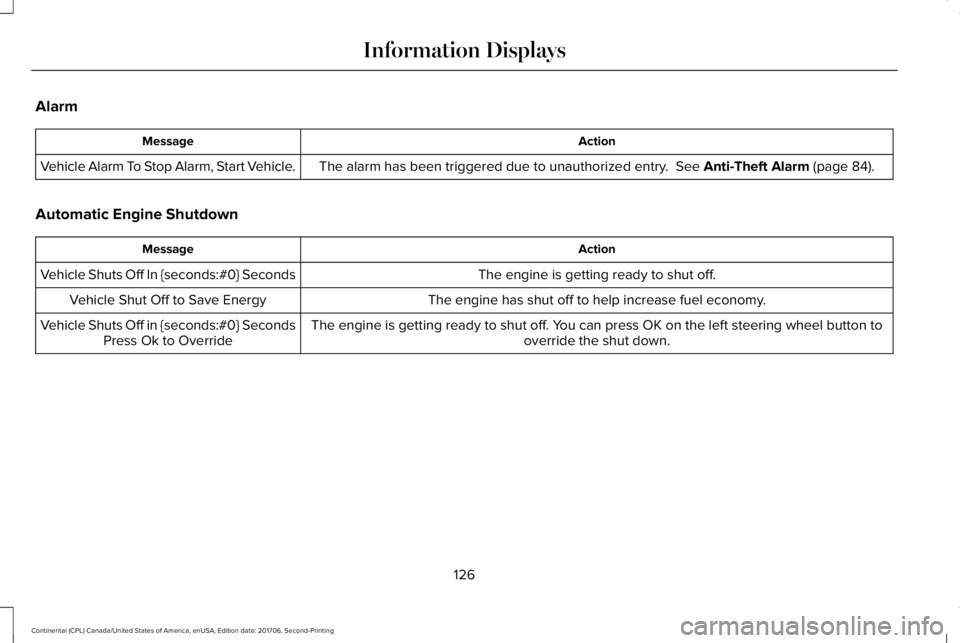
Alarm
ActionMessage
The alarm has been triggered due to unauthorized entry. See Anti-Theft Alarm (page 84).Vehicle Alarm To Stop Alarm, Start Vehicle.
Automatic Engine Shutdown
ActionMessage
The engine is getting ready to shut off.Vehicle Shuts Off In {seconds:#0} Seconds
The engine has shut off to help increase fuel economy.Vehicle Shut Off to Save Energy
The engine is getting ready to shut off. You can press OK on the left steering wheel button tooverride the shut down.Vehicle Shuts Off in {seconds:#0} SecondsPress Ok to Override
126
Continental (CPL) Canada/United States of America, enUSA, Edition date: 201706, Second-Printing
Information Displays