sensor LINCOLN CONTINENTAL 2018 Workshop Manual
[x] Cancel search | Manufacturer: LINCOLN, Model Year: 2018, Model line: CONTINENTAL, Model: LINCOLN CONTINENTAL 2018Pages: 615, PDF Size: 5.31 MB
Page 306 of 615
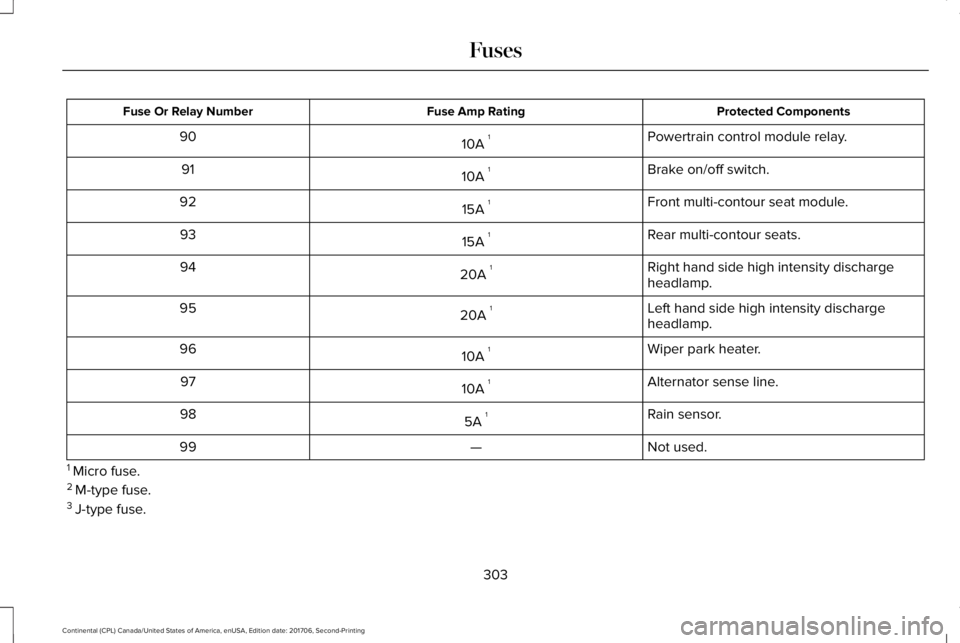
Protected ComponentsFuse Amp RatingFuse Or Relay Number
Powertrain control module relay.10A 190
Brake on/off switch.10A 191
Front multi-contour seat module.15A 192
Rear multi-contour seats.15A 193
Right hand side high intensity dischargeheadlamp.20A 194
Left hand side high intensity dischargeheadlamp.20A 195
Wiper park heater.10A 196
Alternator sense line.10A 197
Rain sensor.5A 198
Not used.—99
1 Micro fuse.2 M-type fuse.3 J-type fuse.
303
Continental (CPL) Canada/United States of America, enUSA, Edition date: 201706, Second-Printing
Fuses
Page 308 of 615
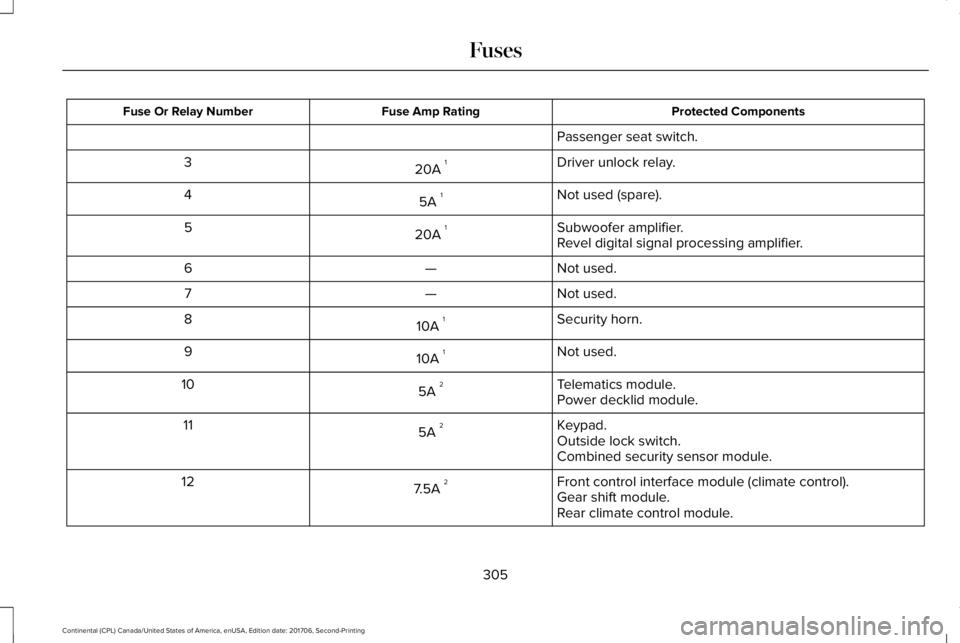
Protected ComponentsFuse Amp RatingFuse Or Relay Number
Passenger seat switch.
Driver unlock relay.20A 13
Not used (spare).5A 14
Subwoofer amplifier.20A 15Revel digital signal processing amplifier.
Not used.—6
Not used.—7
Security horn.10A 18
Not used.10A 19
Telematics module.5A 210Power decklid module.
Keypad.5A 211Outside lock switch.Combined security sensor module.
Front control interface module (climate control).7.5A 212Gear shift module.Rear climate control module.
305
Continental (CPL) Canada/United States of America, enUSA, Edition date: 201706, Second-Printing
Fuses
Page 309 of 615
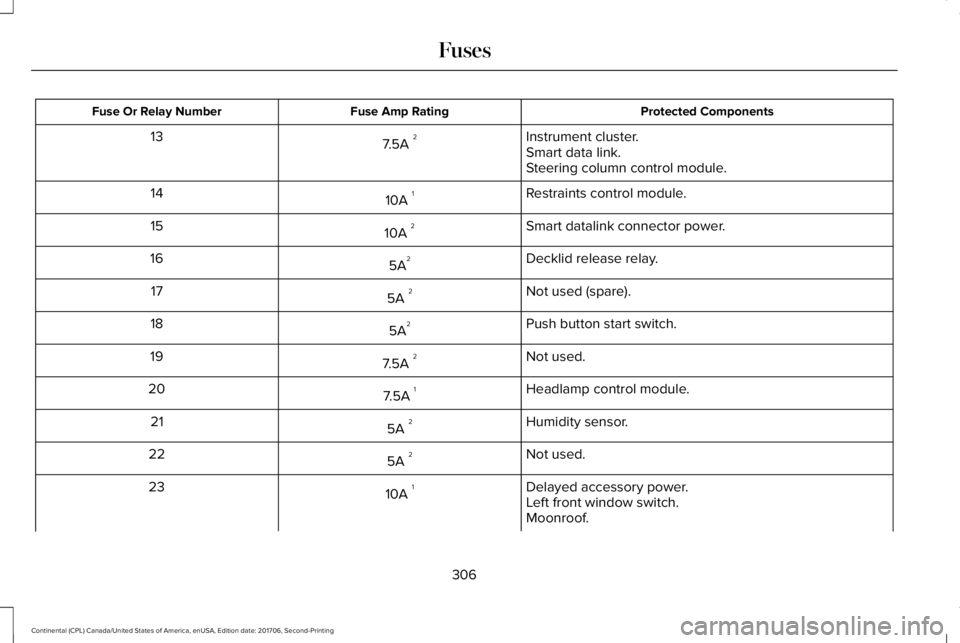
Protected ComponentsFuse Amp RatingFuse Or Relay Number
Instrument cluster.7.5A 213Smart data link.Steering column control module.
Restraints control module.10A 114
Smart datalink connector power.10A 215
Decklid release relay.5A216
Not used (spare).5A 217
Push button start switch.5A218
Not used.7.5A 219
Headlamp control module.7.5A 120
Humidity sensor.5A 221
Not used.5A 222
Delayed accessory power.10A 123Left front window switch.Moonroof.
306
Continental (CPL) Canada/United States of America, enUSA, Edition date: 201706, Second-Printing
Fuses
Page 359 of 615
WARNING: 2. Lubricate the tirebead and wheel bead seat area again.
WARNING: 3. Stand at a minimumof 12 ft (3.66 m) away from the wheeland tire assembly.
WARNING: 4. Use both eye andear protection.
WARNING: For a mountingpressure more than 20 psi (1.38 bar)greater than the maximum pressure, aFord dealer or other tire serviceprofessional should do the mounting.
WARNING: Always inflate steelcarcass tires with a remote air fill withthe person inflating standing at aminimum of 12 ft (3.66 m) away from thewheel and tire assembly.
Important: Remember to replace thewheel valve stems when the road tiresare replaced on your vehicle
It is recommended that the two fronttires or two rear tires generally bereplaced as a pair.
The tire pressure sensors mounted inthe wheels (originally installed on yourvehicle) are not designed to be used inaftermarket wheels.
The use of wheels or tires notrecommended by Ford Motor Companymay affect the operation of your tirepressure monitoring system.
If the tire pressure monitoring systemindicator is flashing, your system ismalfunctioning. Your replacement tiremight be incompatible with your tirepressure monitoring system, or somecomponent of the system may bedamaged.
Safety Practices
WARNING: If your vehicle is stuckin snow, mud or sand, do not rapidly spinthe tires; spinning the tires can tear thetire and cause an explosion. A tire canexplode in as little as three to fiveseconds.
WARNING: Do not spin the wheelsat over 34 mph (55 km/h). The tires mayfail and injure a passenger or bystander.
Driving habits have a great deal to dowith your tire mileage and safety.
•Observe posted speed limits
•Avoid fast starts, stops and turns
•Avoid potholes and objects on theroad
•Do not run over curbs or hit the tireagainst a curb when parking
356
Continental (CPL) Canada/United States of America, enUSA, Edition date: 201706, Second-Printing
Wheels and Tires
Page 362 of 615
The tires on your vehicle may haveall-weather treads to provide traction in rainand snow. However, in some climates youmay need to use snow chains.
Your vehicle may not be compatible withsnow chain or cable usage with thefactory-fitted wheels and tires. Only certainchains or snow cables have been approvedby Ford as safe for use on your vehicle withthe following tire size: 235/50R18. Youshould only install chains or cables sized at10 mm or less in dimension as measured onthe sidewall of your tire. Not all S-class snowchains meet these restrictions. Chains of thissize restriction will include a tensioningdevice. The chains should be mounted inpairs on the front tires only. If you need touse chains, it is recommended that steelwheels (of the same size and specification)be used, as chains may chip aluminumwheels.
Follow these guidelines when using tractiondevices:
•If possible, avoid fully loading yourvehicle
•Purchase chains or cables from amanufacturer that clearly labels body totire dimension restrictions.
•When driving with snow chains or cables,do not exceed 30 mph (48 km/h) or themaximum speed recommended by thechain manufacturer; whichever is less.
•Drive cautiously. If you hear the chainsor cables rub or bang against the vehicle,stop and retighten them. If this does notwork, remove the chains or cables andprevent vehicle damage.
•Remove the chains or cables when theyare no longer needed. Do not use thechains or cables on dry roads.
•If a temporary spare tire is mounted onyour vehicle, do not use snow chains onthe axle with the temporary spare tire.
If you have any questions regarding snowtires or snow chains, please contact yourauthorized dealer.
TIRE PRESSURE MONITORING
SYSTEM
WARNING: The tire pressuremonitoring system is not a substitute formanually checking tire pressures. You shouldperiodically check tire pressures using apressure gauge. Failure to correctly maintaintire pressures could increase the risk of tirefailure, loss of control, vehicle rollover andpersonal injury.
Note: You should only use tire sealants inroadside emergencies as they may causedamage to the tire pressure monitoringsystem sensor.
Note: If the tire pressure monitoring systemsensor becomes damaged, it may notfunction.
359
Continental (CPL) Canada/United States of America, enUSA, Edition date: 201706, Second-Printing
Wheels and Tires
Page 364 of 615
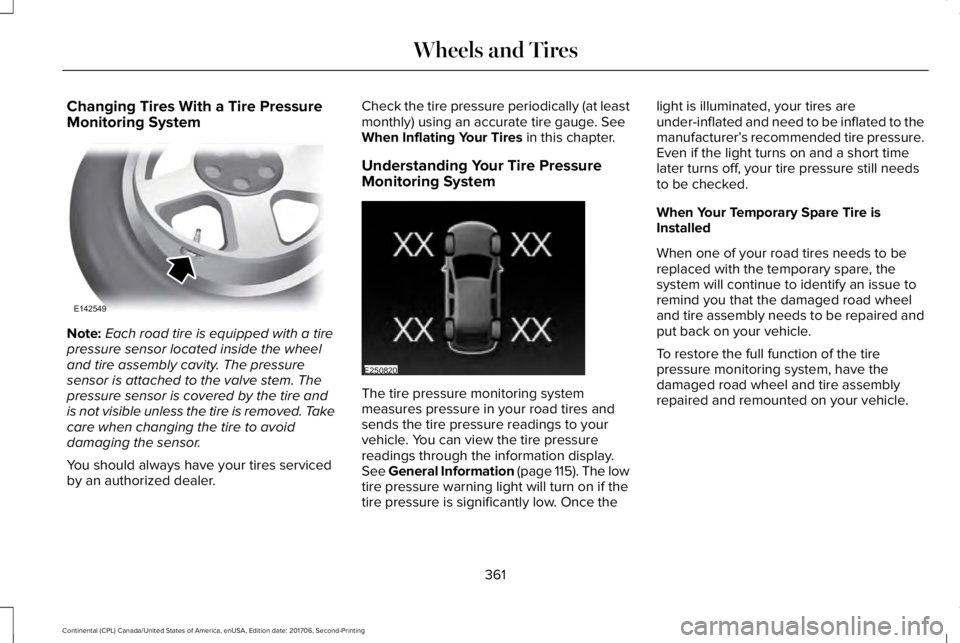
Changing Tires With a Tire PressureMonitoring System
Note:Each road tire is equipped with a tirepressure sensor located inside the wheeland tire assembly cavity. The pressuresensor is attached to the valve stem. Thepressure sensor is covered by the tire andis not visible unless the tire is removed. Takecare when changing the tire to avoiddamaging the sensor.
You should always have your tires servicedby an authorized dealer.
Check the tire pressure periodically (at leastmonthly) using an accurate tire gauge. SeeWhen Inflating Your Tires in this chapter.
Understanding Your Tire PressureMonitoring System
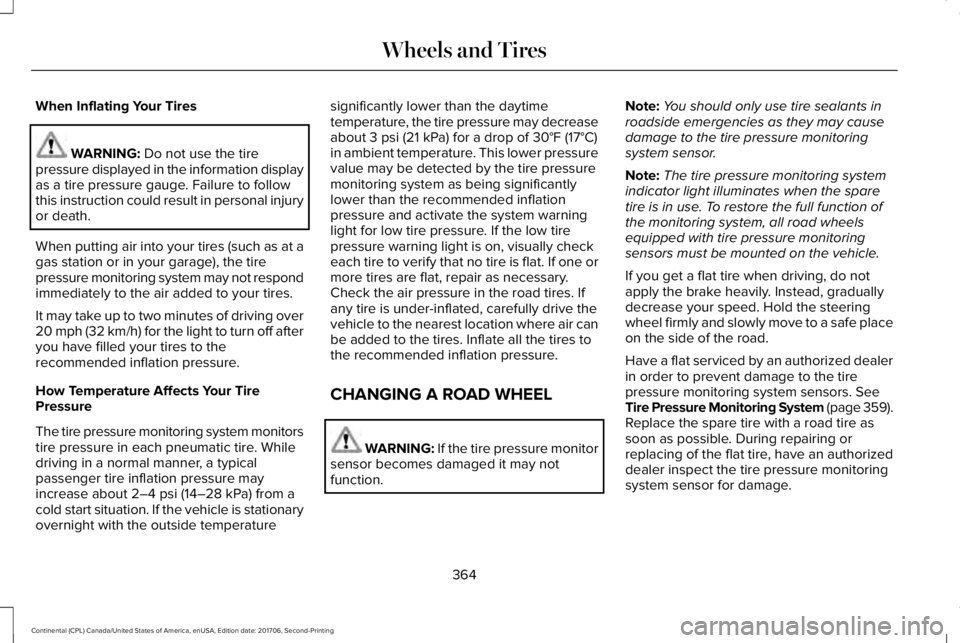
The tire pressure monitoring systemmeasures pressure in your road tires andsends the tire pressure readings to yourvehicle. You can view the tire pressurereadings through the information display.See General Information (page 115). The lowtire pressure warning light will turn on if thetire pressure is significantly low. Once the
light is illuminated, your tires areunder-inflated and need to be inflated to themanufacturer’s recommended tire pressure.Even if the light turns on and a short timelater turns off, your tire pressure still needsto be checked.
When Your Temporary Spare Tire isInstalled
When one of your road tires needs to bereplaced with the temporary spare, thesystem will continue to identify an issue toremind you that the damaged road wheeland tire assembly needs to be repaired andput back on your vehicle.
To restore the full function of the tirepressure monitoring system, have thedamaged road wheel and tire assemblyrepaired and remounted on your vehicle.
361
Continental (CPL) Canada/United States of America, enUSA, Edition date: 201706, Second-Printing
Wheels and TiresE142549 E250820
Page 367 of 615
When Inflating Your Tires
WARNING: Do not use the tirepressure displayed in the information displayas a tire pressure gauge. Failure to followthis instruction could result in personal injuryor death.
When putting air into your tires (such as at agas station or in your garage), the tirepressure monitoring system may not respondimmediately to the air added to your tires.
It may take up to two minutes of driving over20 mph (32 km/h) for the light to turn off afteryou have filled your tires to therecommended inflation pressure.
How Temperature Affects Your TirePressure
The tire pressure monitoring system monitorstire pressure in each pneumatic tire. Whiledriving in a normal manner, a typicalpassenger tire inflation pressure mayincrease about 2–4 psi (14–28 kPa) from acold start situation. If the vehicle is stationaryovernight with the outside temperature
significantly lower than the daytimetemperature, the tire pressure may decreaseabout 3 psi (21 kPa) for a drop of 30°F (17°C)in ambient temperature. This lower pressurevalue may be detected by the tire pressuremonitoring system as being significantlylower than the recommended inflationpressure and activate the system warninglight for low tire pressure. If the low tirepressure warning light is on, visually checkeach tire to verify that no tire is flat. If one ormore tires are flat, repair as necessary.Check the air pressure in the road tires. Ifany tire is under-inflated, carefully drive thevehicle to the nearest location where air canbe added to the tires. Inflate all the tires tothe recommended inflation pressure.
CHANGING A ROAD WHEEL
WARNING: If the tire pressure monitorsensor becomes damaged it may notfunction.
Note:You should only use tire sealants inroadside emergencies as they may causedamage to the tire pressure monitoringsystem sensor.
Note:The tire pressure monitoring systemindicator light illuminates when the sparetire is in use. To restore the full function ofthe monitoring system, all road wheelsequipped with tire pressure monitoringsensors must be mounted on the vehicle.
If you get a flat tire when driving, do notapply the brake heavily. Instead, graduallydecrease your speed. Hold the steeringwheel firmly and slowly move to a safe placeon the side of the road.
Have a flat serviced by an authorized dealerin order to prevent damage to the tirepressure monitoring system sensors. SeeTire Pressure Monitoring System (page 359).Replace the spare tire with a road tire assoon as possible. During repairing orreplacing of the flat tire, have an authorizeddealer inspect the tire pressure monitoringsystem sensor for damage.
364
Continental (CPL) Canada/United States of America, enUSA, Edition date: 201706, Second-Printing
Wheels and Tires
Page 593 of 615
SUNA Products and/or Services are intendedas an aid to personal motoring and travelplanning, and do not provide comprehensiveor accurate information on all occasions. Onoccasions, you may experience additionaldelay as a result of using SUNA Productsand/or Services. You acknowledge that it isnot intended, or suitable, for use inapplications where time of arrival or drivingdirections may impact the safety of the publicor yourself.
4. Use of SUNA Products and Serviceswhile driving
You, and other authorised drivers of thevehicle in which SUNA Products and/orServices are available or installed and active,remain at all times responsible for observingall relevant laws and codes of safe driving.In particular, you agree to only activelyoperate SUNA Products and/or Serviceswhen the Vehicle is at a complete stop andit is safe to do so.
5. Service Continuity and Reception of theSUNA Traffic Channel
We will use reasonable endeavours toprovide the SUNA Traffic Channel 24 hoursa day, 365 days a year. The SUNA TrafficChannel may occasionally be unavailable fortechnical reasons or for plannedmaintenance. We will try to performmaintenance at times when congestion islight. We reserve the right to withdraw SUNAProducts and/or Services at any time.
Also, we cannot assure the uninterruptedreception of the SUNA Traffic ChannelRDS-TMC signal at any particular location.
6. Limitation of Liability
Neither Intelematics (nor its suppliers or themanufacturer of your device (the“Suppliers”)) shall be liable to you or to anythird party for any damages either direct,indirect, incidental, consequential orotherwise arising out of the use of or inabilityto use SUNA Products and/or Services evenif Intelematics or a Supplier has been advisedof the possibility of such damages. You alsoacknowledge that the neither Intelematicsnor any Supplier guarantees nor make anywarranties that relate to the availability,accuracy or completeness of SUNA Products
and/or Services, and to the extent which itis lawful to do so, both Intelematics and eachSupplier excludes any warranties whichmight otherwise be implied by any State orFederal legislation in relation to SUNAProducts and/or Services.
7. Please Note
Great care has been taken in preparing thismanual. Constant product development maymean that some information is not entirelyup-to-date. The information in this documentis subject to change without notice.
TYPE APPROVALS
Radio Frequency Certification Logosfor Tire Pressure Monitoring Sensor(s)
590
Continental (CPL) Canada/United States of America, enUSA, Edition date: 201706, Second-Printing
AppendicesE207816
Page 606 of 615
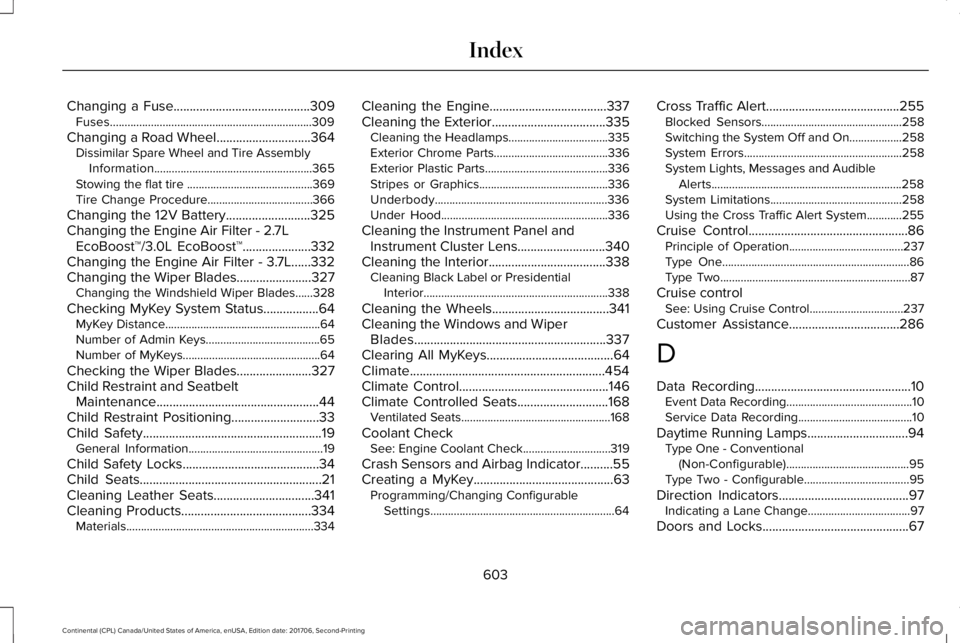
Changing a Fuse..........................................309Fuses.....................................................................309
Changing a Road Wheel.............................364Dissimilar Spare Wheel and Tire AssemblyInformation......................................................365Stowing the flat tire ...........................................369Tire Change Procedure....................................366
Changing the 12V Battery..........................325Changing the Engine Air Filter - 2.7LEcoBoost™/3.0L EcoBoost™.....................332Changing the Engine Air Filter - 3.7L......332Changing the Wiper Blades.......................327Changing the Windshield Wiper Blades......328
Checking MyKey System Status.................64MyKey Distance.....................................................64Number of Admin Keys.......................................65Number of MyKeys...............................................64
Checking the Wiper Blades.......................327Child Restraint and SeatbeltMaintenance..................................................44Child Restraint Positioning...........................33Child Safety.......................................................19General Information..............................................19
Child Safety Locks..........................................34Child Seats........................................................21Cleaning Leather Seats...............................341Cleaning Products........................................334Materials................................................................334
Cleaning the Engine....................................337Cleaning the Exterior...................................335Cleaning the Headlamps..................................335Exterior Chrome Parts.......................................336Exterior Plastic Parts..........................................336Stripes or Graphics............................................336Underbody...........................................................336Under Hood.........................................................336
Cleaning the Instrument Panel andInstrument Cluster Lens...........................340Cleaning the Interior....................................338Cleaning Black Label or PresidentialInterior...............................................................338
Cleaning the Wheels....................................341Cleaning the Windows and WiperBlades...........................................................337Clearing All MyKeys.......................................64Climate............................................................454Climate Control..............................................146Climate Controlled Seats............................168Ventilated Seats...................................................168
Coolant CheckSee: Engine Coolant Check..............................319
Crash Sensors and Airbag Indicator..........55Creating a MyKey...........................................63Programming/Changing ConfigurableSettings...............................................................64
Cross Traffic Alert.........................................255Blocked Sensors................................................258Switching the System Off and On..................258System Errors......................................................258System Lights, Messages and AudibleAlerts.................................................................258System Limitations.............................................258Using the Cross Traffic Alert System............255
Cruise Control.................................................86Principle of Operation.......................................237Type One................................................................86Type Two.................................................................87
Cruise controlSee: Using Cruise Control................................237
Customer Assistance..................................286
D
Data Recording................................................10Event Data Recording...........................................10Service Data Recording.......................................10
Daytime Running Lamps...............................94Type One - Conventional(Non-Configurable)..........................................95Type Two - Configurable....................................95
Direction Indicators........................................97Indicating a Lane Change...................................97
Doors and Locks.............................................67
603
Continental (CPL) Canada/United States of America, enUSA, Edition date: 201706, Second-Printing
Index
Page 614 of 615
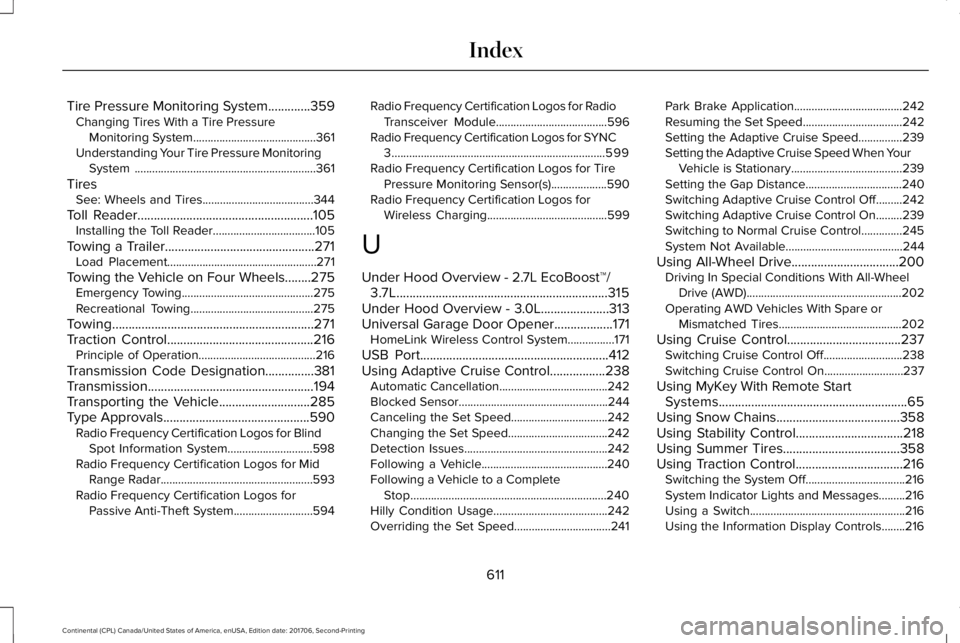
Tire Pressure Monitoring System.............359Changing Tires With a Tire PressureMonitoring System..........................................361Understanding Your Tire Pressure MonitoringSystem ..............................................................361
TiresSee: Wheels and Tires......................................344
Toll Reader......................................................105Installing the Toll Reader...................................105
Towing a Trailer..............................................271Load Placement...................................................271
Towing the Vehicle on Four Wheels........275Emergency Towing.............................................275Recreational Towing..........................................275
Towing..............................................................271Traction Control.............................................216Principle of Operation........................................216
Transmission Code Designation...............381Transmission...................................................194Transporting the Vehicle............................285Type Approvals.............................................590Radio Frequency Certification Logos for BlindSpot Information System.............................598Radio Frequency Certification Logos for MidRange Radar....................................................593Radio Frequency Certification Logos forPassive Anti-Theft System...........................594
Radio Frequency Certification Logos for RadioTransceiver Module......................................596Radio Frequency Certification Logos for SYNC3.........................................................................599Radio Frequency Certification Logos for TirePressure Monitoring Sensor(s)...................590Radio Frequency Certification Logos forWireless Charging.........................................599
U
Under Hood Overview - 2.7L EcoBoost™/3.7L.................................................................315Under Hood Overview - 3.0L.....................313Universal Garage Door Opener..................171HomeLink Wireless Control System................171
USB Port..........................................................412Using Adaptive Cruise Control.................238Automatic Cancellation.....................................242Blocked Sensor...................................................244Canceling the Set Speed.................................242Changing the Set Speed..................................242Detection Issues.................................................242Following a Vehicle...........................................240Following a Vehicle to a CompleteStop...................................................................240Hilly Condition Usage.......................................242Overriding the Set Speed.................................241
Park Brake Application.....................................242Resuming the Set Speed..................................242Setting the Adaptive Cruise Speed...............239Setting the Adaptive Cruise Speed When YourVehicle is Stationary......................................239Setting the Gap Distance.................................240Switching Adaptive Cruise Control Off.........242Switching Adaptive Cruise Control On.........239Switching to Normal Cruise Control..............245System Not Available........................................244
Using All-Wheel Drive.................................200Driving In Special Conditions With All-WheelDrive (AWD).....................................................202Operating AWD Vehicles With Spare orMismatched Tires..........................................202
Using Cruise Control...................................237Switching Cruise Control Off...........................238Switching Cruise Control On...........................237
Using MyKey With Remote StartSystems..........................................................65Using Snow Chains......................................358Using Stability Control.................................218Using Summer Tires....................................358Using Traction Control.................................216Switching the System Off..................................216System Indicator Lights and Messages.........216Using a Switch.....................................................216Using the Information Display Controls........216
611
Continental (CPL) Canada/United States of America, enUSA, Edition date: 201706, Second-Printing
Index