sensor LINCOLN CONTINENTAL 2018 Service Manual
[x] Cancel search | Manufacturer: LINCOLN, Model Year: 2018, Model line: CONTINENTAL, Model: LINCOLN CONTINENTAL 2018Pages: 615, PDF Size: 5.31 MB
Page 247 of 615
System Not Available
The system may not turn on if there is:
•A blocked sensor.
•High brake temperature.
•A failure in the system or a relatedsystem.
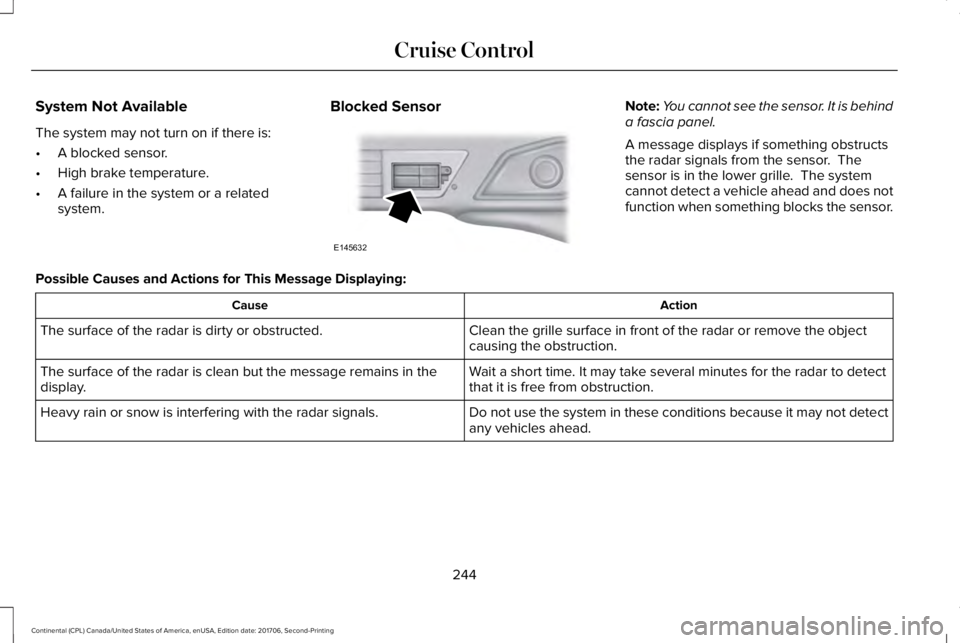
Blocked SensorNote:You cannot see the sensor. It is behinda fascia panel.
A message displays if something obstructsthe radar signals from the sensor. Thesensor is in the lower grille. The systemcannot detect a vehicle ahead and does notfunction when something blocks the sensor.
Possible Causes and Actions for This Message Displaying:
ActionCause
Clean the grille surface in front of the radar or remove the objectcausing the obstruction.The surface of the radar is dirty or obstructed.
Wait a short time. It may take several minutes for the radar to detectthat it is free from obstruction.The surface of the radar is clean but the message remains in thedisplay.
Do not use the system in these conditions because it may not detectany vehicles ahead.Heavy rain or snow is interfering with the radar signals.
244
Continental (CPL) Canada/United States of America, enUSA, Edition date: 201706, Second-Printing
Cruise ControlE145632
Page 249 of 615
DRIVER ALERT (If Equipped)
WARNING: The system is designed toaid the driver. It is not intended to replaceyour attention and judgment. You are stillresponsible to drive with due care andattention.
WARNING: At all times, you areresponsible for controlling your vehicle,supervising the system and intervening, ifrequired. Failure to take care may result inthe loss of control of your vehicle, seriouspersonal injury or death.
WARNING: The system may notfunction if the sensor is blocked.
WARNING: Take regular rest breaks ifyou feel tired. Do not wait for the system towarn you.
WARNING: Certain driving styles mayresult in the system warning you even if youare not feeling tired.
WARNING: In cold and severe weatherconditions the system may not function. Rain,snow and spray can all limit sensorperformance.
WARNING: The system will not operateif the sensor cannot track the road lanemarkings.
WARNING: If damage occurs in theimmediate area surrounding the sensor, haveyour vehicle checked as soon as possible.
WARNING: The system may notcorrectly operate if your vehicle is fitted witha suspension kit not approved by us.
Note:Keep the windshield free fromobstructions. For example, bird droppings,insects and snow or ice.
Note:If the camera is blocked or if thewindshield is damaged, the system may notfunction.
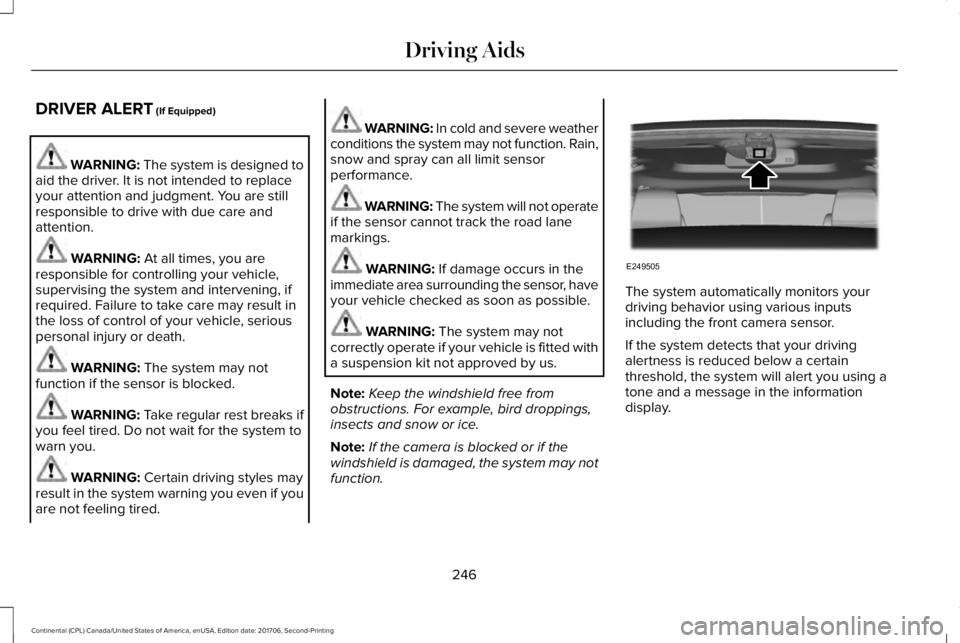
The system automatically monitors yourdriving behavior using various inputsincluding the front camera sensor.
If the system detects that your drivingalertness is reduced below a certainthreshold, the system will alert you using atone and a message in the informationdisplay.
246
Continental (CPL) Canada/United States of America, enUSA, Edition date: 201706, Second-Printing
Driving AidsE249505
Page 250 of 615
Using Driver Alert
Switching the system on and off
You may switch the system on or off throughthe information display. See GeneralInformation (page 115). When activated, thesystem will monitor your alertness levelbased upon your driving behavior in relationto the lane markings and other factors.
System Warnings
Note:The system will not issue warningsbelow approximately 40 mph (64 km/h).
The warning system is in two stages. At firstthe system issues a temporary warning thatyou need to take a rest. This message willonly appear for a short time. If the systemdetects further reduction in driving alertness,another warning may be issued which willremain in the information display for a longertime. Press OK on the steering wheel controlto clear the warning
System Display
When active the system will run automaticallyin the background and only issue a warningif required.
Resetting the System
You can reset the system by either:
•Switching the ignition off and on.
•Stopping the vehicle and then openingand closing the driver’s door.
LANE KEEPING SYSTEM (If Equipped)
WARNING: You are responsible forcontrolling your vehicle at all times. Thesystem is designed to be an aid and doesnot relieve you of your responsibility to drivewith due care and attention. Failure to followthis instruction could result in the loss ofcontrol of your vehicle, personal injury ordeath.
WARNING: Always drive with due careand attention when using and operating thecontrols and features on your vehicle.
WARNING: In cold and severe weatherconditions the system may not function. Rain,snow and spray can all limit sensorperformance.
WARNING: The system will not operateif the sensor cannot track the road lanemarkings.
WARNING: The sensor may incorrectlytrack lane markings as other structures orobjects. This can result in a false or missedwarning.
WARNING: The system may notoperate properly if the sensor is blocked.Keep the windshield free from obstruction.
WARNING: If damage occurs in theimmediate area surrounding the sensor, haveyour vehicle checked as soon as possible.
247
Continental (CPL) Canada/United States of America, enUSA, Edition date: 201706, Second-Printing
Driving Aids
Page 257 of 615
System Lights and Messages
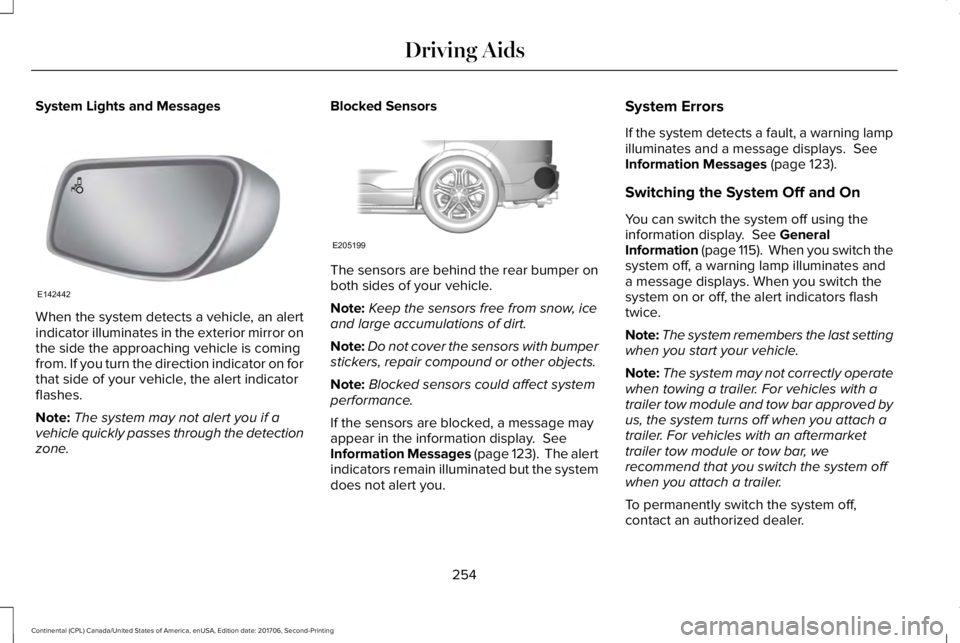
When the system detects a vehicle, an alertindicator illuminates in the exterior mirror onthe side the approaching vehicle is comingfrom. If you turn the direction indicator on forthat side of your vehicle, the alert indicatorflashes.
Note:The system may not alert you if avehicle quickly passes through the detectionzone.
Blocked Sensors
The sensors are behind the rear bumper onboth sides of your vehicle.
Note:Keep the sensors free from snow, iceand large accumulations of dirt.
Note:Do not cover the sensors with bumperstickers, repair compound or other objects.
Note:Blocked sensors could affect systemperformance.
If the sensors are blocked, a message mayappear in the information display. SeeInformation Messages (page 123). The alertindicators remain illuminated but the systemdoes not alert you.
System Errors
If the system detects a fault, a warning lampilluminates and a message displays. SeeInformation Messages (page 123).
Switching the System Off and On
You can switch the system off using theinformation display. See GeneralInformation (page 115). When you switch thesystem off, a warning lamp illuminates anda message displays. When you switch thesystem on or off, the alert indicators flashtwice.
Note:The system remembers the last settingwhen you start your vehicle.
Note:The system may not correctly operatewhen towing a trailer. For vehicles with atrailer tow module and tow bar approved byus, the system turns off when you attach atrailer. For vehicles with an aftermarkettrailer tow module or tow bar, werecommend that you switch the system offwhen you attach a trailer.
To permanently switch the system off,contact an authorized dealer.
254
Continental (CPL) Canada/United States of America, enUSA, Edition date: 201706, Second-Printing
Driving AidsE142442 E205199
Page 258 of 615
CROSS TRAFFIC ALERT (If Equipped)
WARNING: Do not use the cross trafficalert system as a replacement for using theinterior and exterior mirrors or looking overyour shoulder before reversing out of aparking space. The cross traffic alert systemis not a replacement for careful driving.
WARNING: The system may notoperate properly during severe weatherconditions, for example snow, ice, heavy rainand spray. Always drive with due care andattention. Failure to take care may result ina crash.
The system is designed to alert you ofvehicles approaching from the sides whenyou shift into reverse (R).
Using the Cross Traffic Alert System
The system is designed to detect vehiclesthat approach with a speed up to 37 mph(60 km/h). Coverage decreases when thesensors are partially, mostly or fullyobstructed. Slowly reversing helps increasethe coverage area and effectiveness.
The system turns on when you start theengine and you shift into reverse (R). Thesystem turns off when you shift out of reverse(R).
255
Continental (CPL) Canada/United States of America, enUSA, Edition date: 201706, Second-Printing
Driving Aids
Page 259 of 615
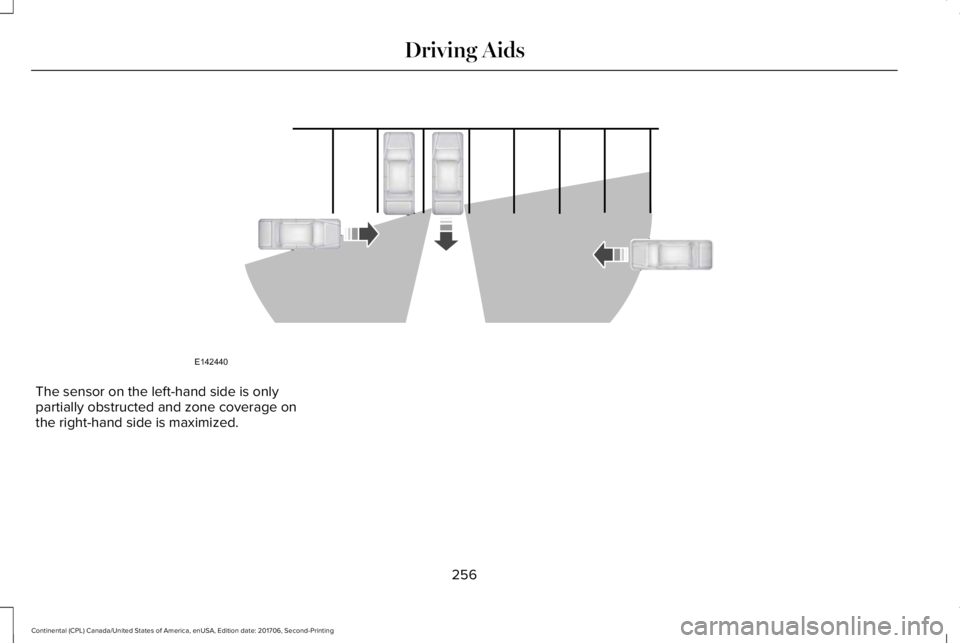
The sensor on the left-hand side is onlypartially obstructed and zone coverage onthe right-hand side is maximized.
256
Continental (CPL) Canada/United States of America, enUSA, Edition date: 201706, Second-Printing
Driving AidsE142440
Page 260 of 615
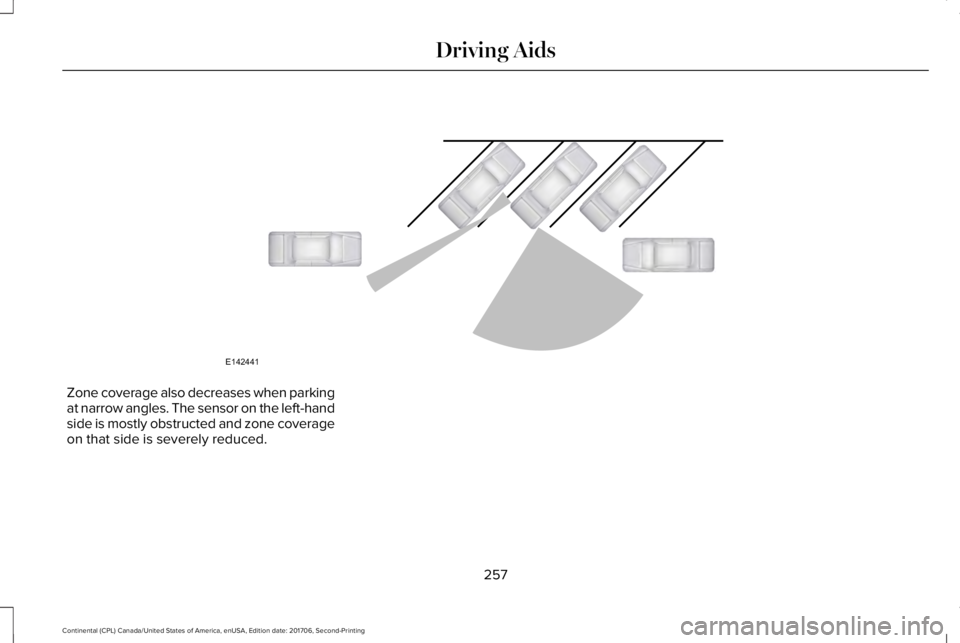
Zone coverage also decreases when parkingat narrow angles. The sensor on the left-handside is mostly obstructed and zone coverageon that side is severely reduced.
257
Continental (CPL) Canada/United States of America, enUSA, Edition date: 201706, Second-Printing
Driving AidsE142441
Page 261 of 615
System Lights, Messages and AudibleAlerts
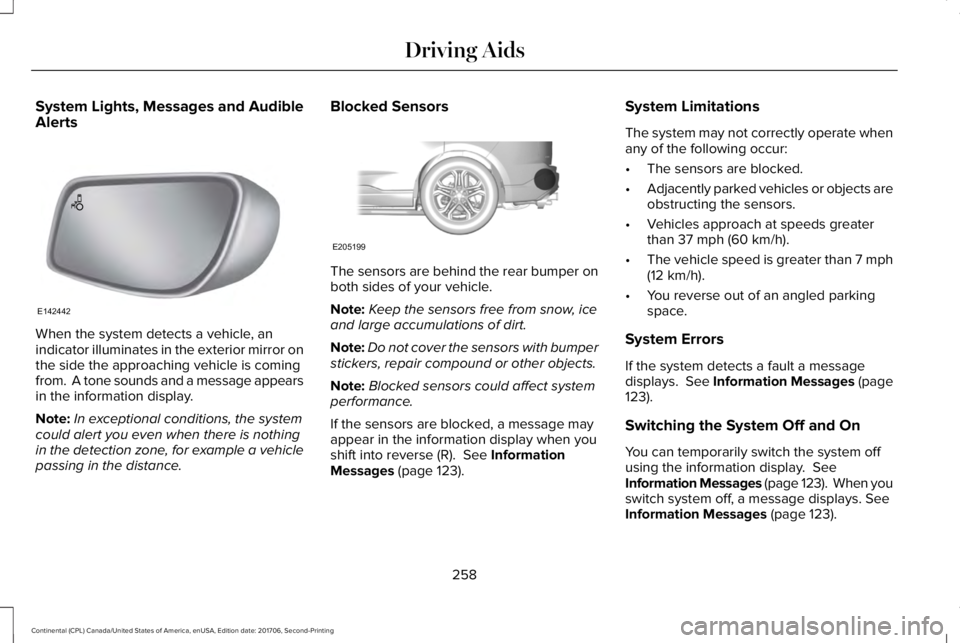
When the system detects a vehicle, anindicator illuminates in the exterior mirror onthe side the approaching vehicle is comingfrom. A tone sounds and a message appearsin the information display.
Note:In exceptional conditions, the systemcould alert you even when there is nothingin the detection zone, for example a vehiclepassing in the distance.
Blocked Sensors
The sensors are behind the rear bumper onboth sides of your vehicle.
Note:Keep the sensors free from snow, iceand large accumulations of dirt.
Note:Do not cover the sensors with bumperstickers, repair compound or other objects.
Note:Blocked sensors could affect systemperformance.
If the sensors are blocked, a message mayappear in the information display when youshift into reverse (R). See InformationMessages (page 123).
System Limitations
The system may not correctly operate whenany of the following occur:
•The sensors are blocked.
•Adjacently parked vehicles or objects areobstructing the sensors.
•Vehicles approach at speeds greaterthan 37 mph (60 km/h).
•The vehicle speed is greater than 7 mph(12 km/h).
•You reverse out of an angled parkingspace.
System Errors
If the system detects a fault a messagedisplays. See Information Messages (page123).
Switching the System Off and On
You can temporarily switch the system offusing the information display. SeeInformation Messages (page 123). When youswitch system off, a message displays. SeeInformation Messages (page 123).
258
Continental (CPL) Canada/United States of America, enUSA, Edition date: 201706, Second-Printing
Driving AidsE142442 E205199
Page 265 of 615
Note:If you perceive Pre-Collision Assistalerts as being too frequent or disturbing,then you can reduce the alert sensitivity,though the manufacturer recommends usingthe highest sensitivity setting where possible.Setting lower sensitivity would lead to fewerand later system warnings.
Adjusting the Pre-Collision Assist Settings
You can adjust the Alert sensitivity to one ofthree possible settings by using theinformation display control. See GeneralInformation (page 115).
If required, you can switch Active Braking offusing the information display control. SeeGeneral Information (page 115).
Note:Active braking automatically turns onevery time you switch the ignition on.
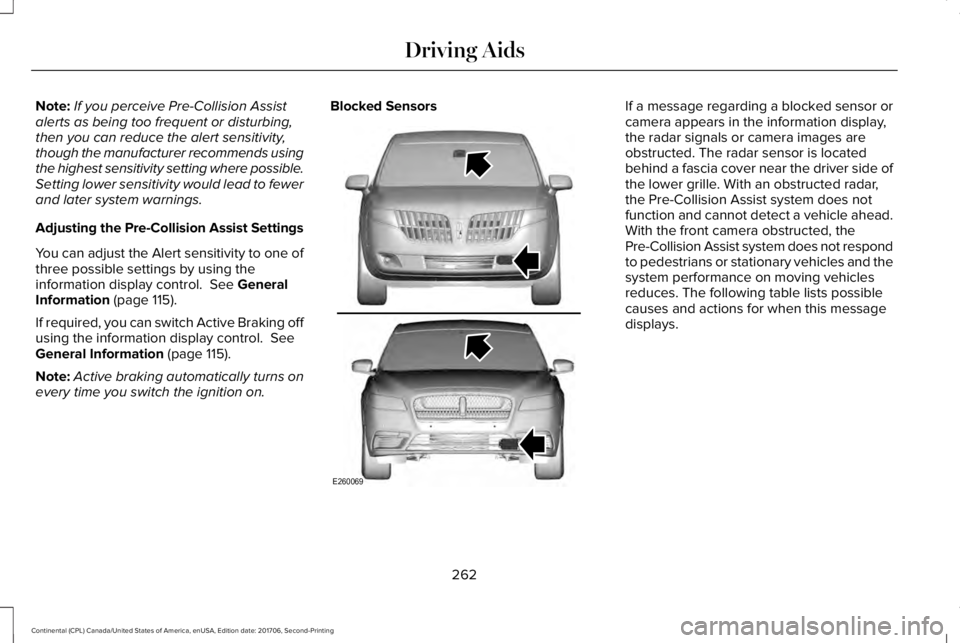
Blocked SensorsIf a message regarding a blocked sensor orcamera appears in the information display,the radar signals or camera images areobstructed. The radar sensor is locatedbehind a fascia cover near the driver side ofthe lower grille. With an obstructed radar,the Pre-Collision Assist system does notfunction and cannot detect a vehicle ahead.With the front camera obstructed, thePre-Collision Assist system does not respondto pedestrians or stationary vehicles and thesystem performance on moving vehiclesreduces. The following table lists possiblecauses and actions for when this messagedisplays.
262
Continental (CPL) Canada/United States of America, enUSA, Edition date: 201706, Second-Printing
Driving AidsE260069
Page 267 of 615
Note:If something hits the front end of yourvehicle or damage occurs, the radar sensingzone may change. This could cause missedor false vehicle detections. Contact anauthorized dealer to have the radar checkedfor proper coverage and operation.
Note:If your vehicle detects excessive heatat the camera or a potential misalignmentcondition, a message may display in theinformation display indicating temporarysensor unavailability. This messagedeactivates automatically when operationalconditions are correct. For example, whenthe ambient temperature around the sensordecreases or the sensor automaticallyrecalibrates.
DRIVE CONTROL
LINCOLN DRIVE CONTROL
The system delivers a driving experiencethrough a suite of sophisticated electronicvehicle systems. These systems continuouslymonitor your driving inputs and the roadconditions to optimize ride comfort, steering,handling, powertrain response and sound.
You can preset your preferences for thesesystems within the information display. Thesystem responds to your preferences basedon what gear position you select. Thisprovides a single location to control multiplesystems performance settings.
Lincoln Drive Control consists of thefollowing systems:
•Continuously controlled dampingdynamically adjusts the shock absorbersstiffness in real time to match the roadsurface and driver inputs. This systemcontinuously monitors your vehicle’smotion (roll, pitch, bounce), suspensionposition, load, speed, road conditions,and steering to adjust the suspensiondamping for optimal vehicle control.
•Electronically power-assisted steeringadjusts steering effort and feel based onyour vehicle speed and your inputs.
•Adaptive steering optimizes yourvehicle's steering response based onyour steering wheel input, changes invehicle speed and other conditions.
•Active noise control utilizes your vehicleelectronics to enhance the acousticexperience.
•Electronic stability control and tractioncontrol maintain your vehicle control inadverse conditions or high performancedriving.
•Electronic throttle control enhances thepowertrain response to your inputs.
Using Lincoln Drive Control
You can configure which of the Drive Controlmodes are active when your vehicle is indrive (D) or in sport (S). The configurationremains active until modified from the mainmenu on the information display.
264
Continental (CPL) Canada/United States of America, enUSA, Edition date: 201706, Second-Printing
Driving Aids