display LINCOLN CORSAIR 2021 User Guide
[x] Cancel search | Manufacturer: LINCOLN, Model Year: 2021, Model line: CORSAIR, Model: LINCOLN CORSAIR 2021Pages: 638, PDF Size: 5.7 MB
Page 77 of 638
2. Using your touchscreen, press Menu.
3. Press
Settings.
4. Press
Vehicle.
5. Press
MyKey.
6. Press
Clearing All MyKeys.
7. Press
Yes to clear all MyKeys from your
vehicle. CHECKING MYKEY SYSTEM
STATUS
You can find information about the distance
traveled using a MyKey, and the number of
admin keys and MyKeys created for your
vehicle.
1. Switch the ignition on.
2. Press
Settings on the touchscreen.
3. Press
Vehicle Settings.
4. Press
MyKey. 5. Press
MyKey Information.
6. Switch the ignition off.
USING MYKEY WITH REMOTE
START SYSTEMS
MyKey is not compatible with unapproved,
aftermarket remote start systems. If you
choose to install a remote start system, see
an authorized dealer for an approved remote
start system.
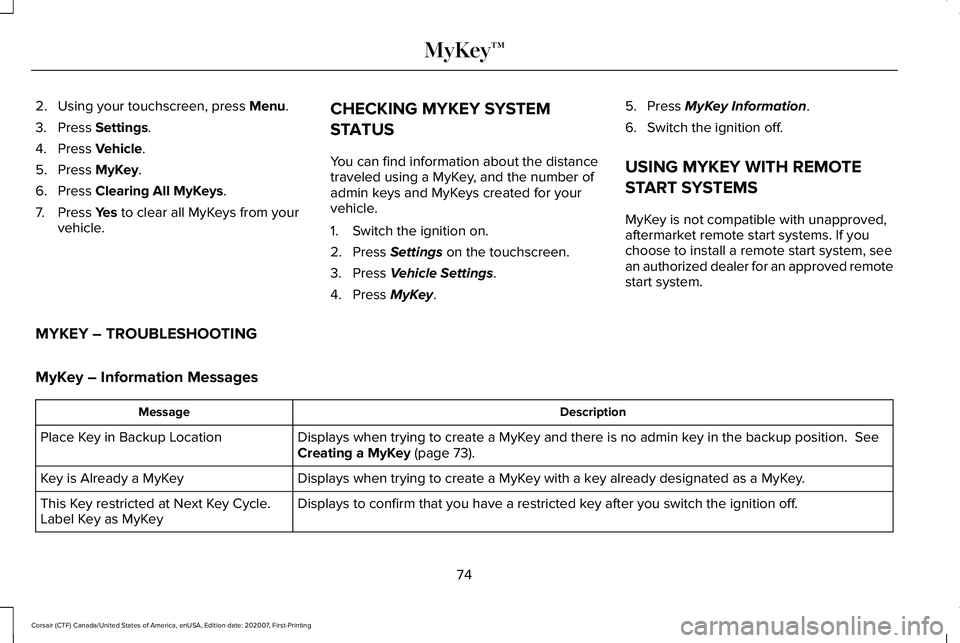
MYKEY – TROUBLESHOOTING
MyKey – Information Messages Description
Message
Displays when trying to create a MyKey and there is no admin key in the backup position.
See
Creating a MyKey (page 73).
Place Key in Backup Location
Displays when trying to create a MyKey with a key already designated as a MyKey.
Key is Already a MyKey
Displays to confirm that you have a restricted key after you switch the ignition off.
This Key restricted at Next Key Cycle.
Label Key as MyKey
74
Corsair (CTF) Canada/United States of America, enUSA, Edition date: 202007, First-Printing MyKey™
Page 84 of 638
LOCATING THE KEYLESS ENTRY
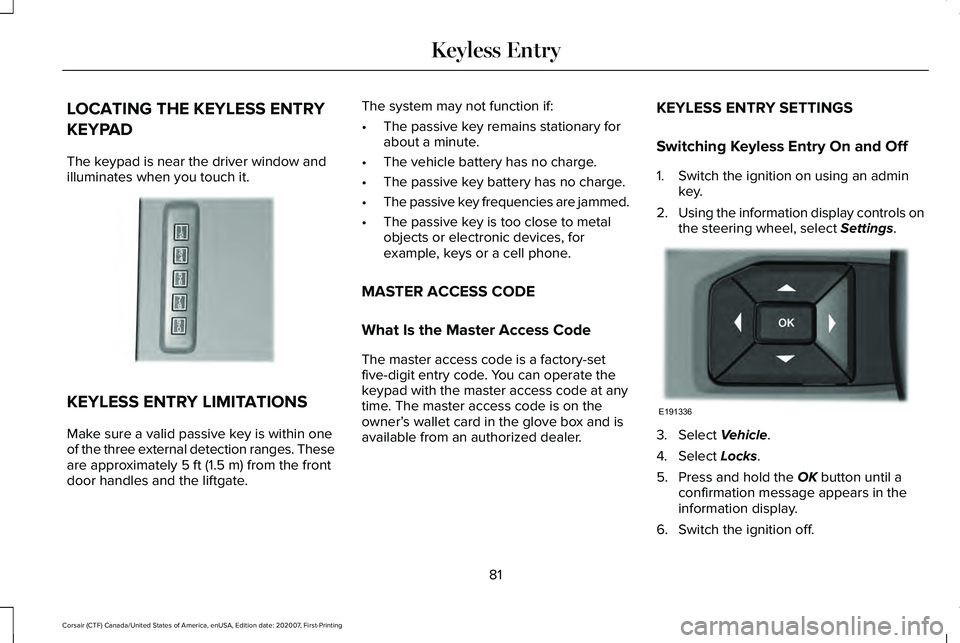
KEYPAD
The keypad is near the driver window and
illuminates when you touch it.
KEYLESS ENTRY LIMITATIONS
Make sure a valid passive key is within one
of the three external detection ranges. These
are approximately 5 ft (1.5 m) from the front
door handles and the liftgate. The system may not function if:
•
The passive key remains stationary for
about a minute.
• The vehicle battery has no charge.
• The passive key battery has no charge.
• The passive key frequencies are jammed.
• The passive key is too close to metal
objects or electronic devices, for
example, keys or a cell phone.
MASTER ACCESS CODE
What Is the Master Access Code
The master access code is a factory-set
five-digit entry code. You can operate the
keypad with the master access code at any
time. The master access code is on the
owner’ s wallet card in the glove box and is
available from an authorized dealer. KEYLESS ENTRY SETTINGS
Switching Keyless Entry On and Off
1. Switch the ignition on using an admin
key.
2. Using the information display controls on
the steering wheel, select
Settings. 3. Select
Vehicle.
4. Select
Locks.
5. Press and hold the
OK button until a
confirmation message appears in the
information display.
6. Switch the ignition off.
81
Corsair (CTF) Canada/United States of America, enUSA, Edition date: 202007, First-Printing Keyless EntryE190936 E191336
Page 86 of 638
LOCKING AND UNLOCKING THE
DOORS USING KEYLESS ENTRY
Unlocking the Doors
Enter the factory-set five-digit code or your
personal code. You must press each number
within five seconds of each other. The
interior lamps illuminate.
Note:
All doors unlock if you disable the
two-stage unlocking feature. To disable the
two-stage unlocking feature:
1. Switch the ignition on using an admin key.
2. Using the information display controls on
the steering wheel, select Settings.
3. Select
Vehicle Settings.
4. Select
Locks.
5. Press and hold the
OK button until a
confirmation message appears in the
information display.
6. Switch the ignition off. To Unlock All Doors
Enter the factory-set code or your personal
code, then press the
3·4 control within five
seconds.
To Release the Liftgate (If Equipped)
Enter the factory-set code or your personal
code, then press the
5·6 control within five
seconds.
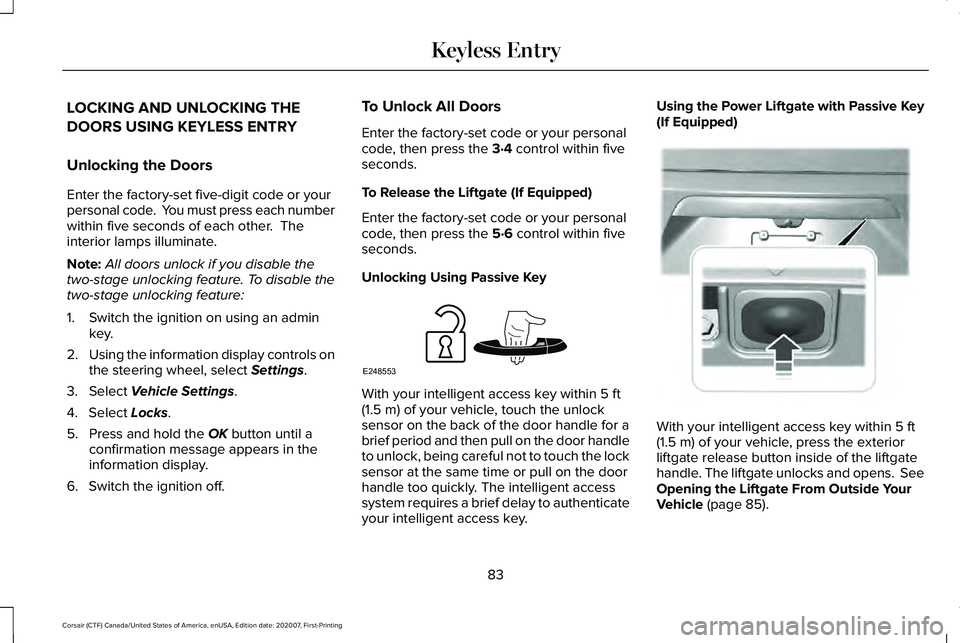
Unlocking Using Passive Key With your intelligent access key within
5 ft
(1.5 m) of your vehicle, touch the unlock
sensor on the back of the door handle for a
brief period and then pull on the door handle
to unlock, being careful not to touch the lock
sensor at the same time or pull on the door
handle too quickly. The intelligent access
system requires a brief delay to authenticate
your intelligent access key. Using the Power Liftgate with Passive Key
(If Equipped)
With your intelligent access key within
5 ft
(1.5 m) of your vehicle, press the exterior
liftgate release button inside of the liftgate
handle. The liftgate unlocks and opens. See
Opening the Liftgate From Outside Your
Vehicle
(page 85).
83
Corsair (CTF) Canada/United States of America, enUSA, Edition date: 202007, First-Printing Keyless EntryE248553 E291352
Page 98 of 638
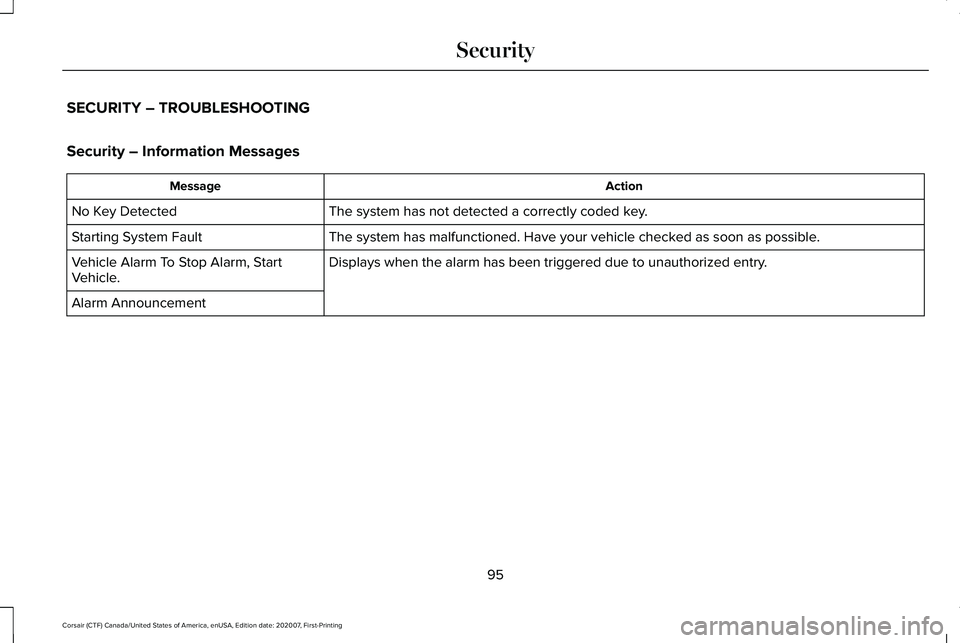
SECURITY – TROUBLESHOOTING
Security – Information Messages
Action
Message
The system has not detected a correctly coded key.
No Key Detected
The system has malfunctioned. Have your vehicle checked as soon as possible.
Starting System Fault
Displays when the alarm has been triggered due to unauthorized entry.
Vehicle Alarm To Stop Alarm, Start
Vehicle.
Alarm Announcement
95
Corsair (CTF) Canada/United States of America, enUSA, Edition date: 202007, First-Printing Security
Page 107 of 638
HEADLAMP EXIT DELAY
After you switch the ignition off, you can
switch the headlamps on by pulling the
direction indicator lever toward you. You will
hear a short tone. The headlamps will switch
off automatically after three minutes with any
door open or 30 seconds after the last door
has been closed. You can cancel this feature
by pulling the direction indicator lever toward
you again or switching the ignition on.
DAYTIME RUNNING LAMPS -
VEHICLES WITH: CONFIGURABLE
DAYTIME RUNNING LAMPS
WARNING: The daytime running
lamps system does not activate the rear
lamps and may not provide adequate
lighting during low visibility driving
conditions. Make sure you switch the
headlamps on, as appropriate, during all
low visibility conditions. Failure to do so
may result in a crash. Switch the daytime running lamps on or off
using the touchscreen:
1.
Select Settings. See Settings
(page 526).
2. Select
Vehicle.
3. Select
Lighting.
The daytime running lamps turn on when:
1. The lamps are on in the information display.
2. You switch the ignition on.
3. The transmission is not in park (P) for vehicles with automatic transmissions or
you release the parking brake for
vehicles with manual transmissions.
4. The lighting control is in the autolamps position.
5. The headlamps are off.
The other lighting control switch positions
do not turn on the daytime running lamps.
If the daytime running lamps are off in the
information display, the lamps stay off in all
switch positions. DAYTIME RUNNING LAMPS -
VEHICLES WITH: DAYTIME
RUNNING LAMPS (DRL) WARNING:
The daytime running
lamps system does not activate the rear
lamps and may not provide adequate
lighting during low visibility driving
conditions. Make sure you switch the
headlamps on, as appropriate, during all
low visibility conditions. Failure to do so
may result in a crash.
The system turns the lamps on in daylight
conditions.
To switch the system on, switch the lighting
control to any position except headlamps.
FRONT FOG LAMPS
(IF EQUIPPED)
Switching the Front Fog Lamps On or
Off
Only switch the front fog lamps on during
reduced visibility.
104
Corsair (CTF) Canada/United States of America, enUSA, Edition date: 202007, First-Printing Lighting
Page 113 of 638
WHAT IS AUTOMATIC HIGH BEAM
CONTROL
The system turns on high beams if it is dark
enough and no other traffic is present. If it
detects an approaching vehicle
’s headlamps
or tail lamps, or street lighting ahead, the
system turns the high beams off. Low beams
remain on.
A camera sensor, centrally mounted behind
the windshield of your vehicle, continuously
monitors conditions to turn the high beams
on and off.
SWITCHING AUTOMATIC HIGH
BEAM CONTROL ON AND OFF WARNING: Do not use the system in
poor visibility, for example fog, heavy rain,
spray or snow.
1. Press
Settings on the touchscreen.
2. Press
Vehicle.
3. Press
Lighting. Activating the Automatic High Beam
Control Switch the lighting control to the
autolamps position.
See
Autolamps (page 103).
Note: The lighting control defaults to
autolamps each time you switch your vehicle
on.
When active, the high beams turn on if:
• The ambient light level is low enough.
• There is no traffic in front of your vehicle.
• The vehicle speed is greater than
approximately
32 mph (51 km/h).
When active, the high beams turn off if:
• The ambient light level is high enough
that high beams are not required.
• The system detects an approaching
vehicle's headlamps or tail lamps.
• The system detects severe rain, snow or
fog.
• The camera is blocked.
• The vehicle speed falls below
approximately
27 mph (44 km/h). Note:
The deactivation speed is lower on
curves.
Note: High beam reactivation may be
delayed in certain curvy road situations.
Note: The system may not operate properly
if the sensor is blocked. Keep the windshield
free from obstruction or damage.
Note: The system may not operate properly
in cold or inclement conditions. You can
switch on the high beams by overriding the
system.
Note: If the system detects a blockage, for
example bird droppings, bug splatter, snow
or ice, the system goes into low beam mode
until you clear the blockage. A message may
appear in the information display if the
camera is blocked.
Note: Using much larger tires or equipping
vehicle accessories such as snowplows can
modify your vehicle's ride height and
degrade automatic high beam control
performance.
110
Corsair (CTF) Canada/United States of America, enUSA, Edition date: 202007, First-Printing Automatic High Beam ControlE281240
Page 116 of 638
Accessory Delay
You can use the window controls for several
minutes after switching off the ignition or
until opening either front door.
GLOBAL OPENING AND CLOSING
You can use the remote control to operate
the windows with the ignition off.
Note:
You can switch this feature on and off
in the information display or contact an
authorized dealer. See General Information
(page 131).
Note: To operate this feature, make sure the
accessory delay is not switched on.
Opening the Windows
You can open the windows only for a short
time after you unlock your vehicle with the
remote control. After you unlock your vehicle,
press and hold the remote control unlock
button to open the windows. Release the
button once movement starts. Press the lock
or unlock button to stop movement. Closing the Windows WARNING:
When closing the
windows, you should verify they are free
of obstructions and make sure that children
and pets are not in the proximity of the
window openings.
To close the windows, press and hold the
remote control lock button. Release the
button once movement starts. Press the lock
or unlock button to stop movement.
EXTERIOR MIRRORS
Power Exterior Mirrors WARNING: Do not adjust the mirrors
when your vehicle is moving. This could
result in the loss of control of your vehicle,
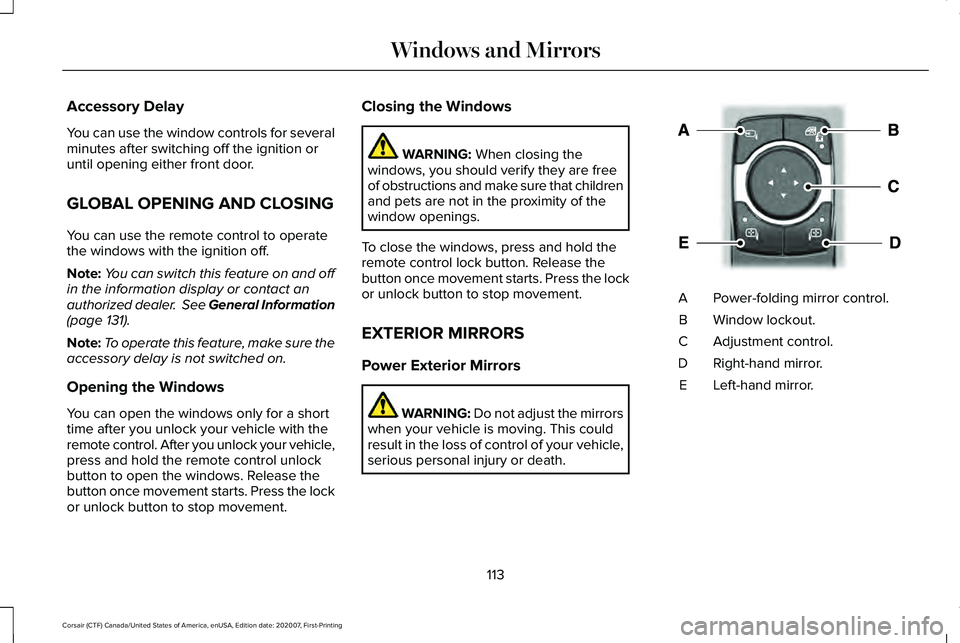
serious personal injury or death. Power-folding mirror control.
A
Window lockout.
B
Adjustment control.
C
Right-hand mirror.
D
Left-hand mirror.
E
113
Corsair (CTF) Canada/United States of America, enUSA, Edition date: 202007, First-Printing Windows and MirrorsE295322
Page 117 of 638
To adjust your mirrors, switch your vehicle
on - with the ignition in accessory mode or
the engine running and then:
1.
Select the mirror you want to adjust. The
control light turns on.
2. Use the adjustment control to adjust the
position of the mirror.
3. Press the mirror control again. The control light turns off.
Fold-Away Exterior Mirrors
Push the mirror toward the door window
glass. Make sure that you fully engage the
mirror in its support when returning it to its
original position.
Auto-Folding Mirrors
The exterior mirrors fold in toward the glass
after you place the transmission into park (P),
turn off the vehicle, open and close the driver
side door and lock the vehicle. The exterior
mirrors unfold and return to their driving
position after you unlock the vehicle and
open and close the driver side door. You can switch this feature on and off
through the information display. See General
Information (page 131).
Note: If you switch this feature off through
the information display, the welcome lighting
also switches off.
You can fold the mirrors on demand by
pressing the power-folding mirror control
located on the door. The control lights and
the mirrors fold in toward the glass. Press
the control again to unfold the mirrors. The
control light turns off.
Note: If you use the power-folding control to
fold the mirrors on demand and the auto fold
feature is switched on, the auto-folding
feature becomes disabled. To re-enable the
auto-folding feature, press the control again
to unfold the mirrors. Loose Mirror
If your auto-folding mirrors are manually
folded or unfolded, they may not work
properly even after you re-position them.
You need to reset them if:
•
The mirrors vibrate when you drive.
• The mirrors feel loose.
• The mirrors do not stay in the folded or
unfolded position.
• One of the mirrors is not in its normal
driving position.
To reset the auto-fold feature, use the
power-folding mirror control to fold and
unfold the mirrors. You may hear a loud noise
as you reset the mirrors. This sound is
normal. Repeat this process as needed each
time the mirrors are manually folded or
unfolded.
Heated Exterior Mirrors
See
Heated Exterior Mirrors (page 168).
114
Corsair (CTF) Canada/United States of America, enUSA, Edition date: 202007, First-Printing Windows and Mirrors
Page 121 of 638
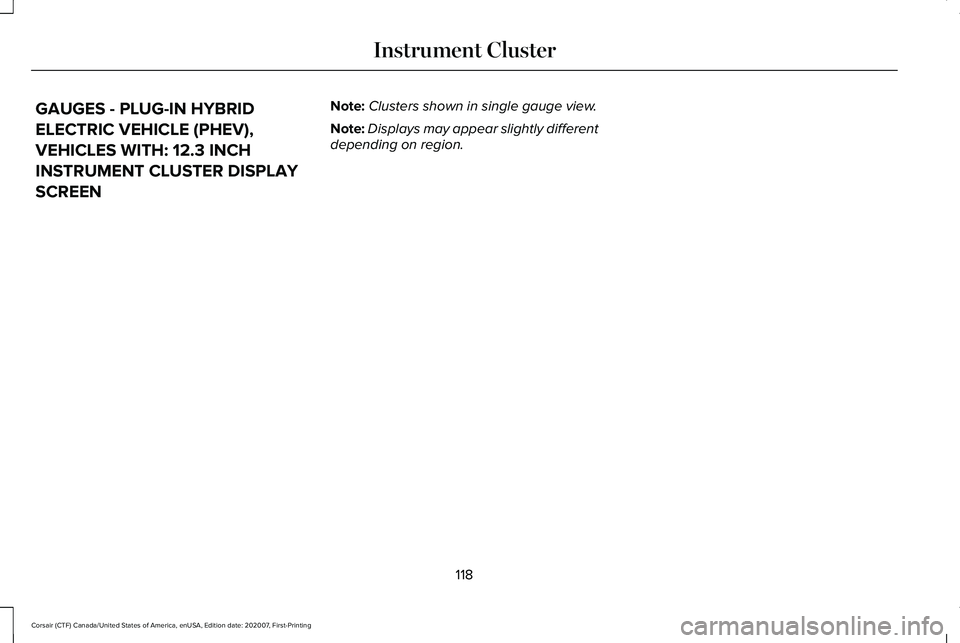
GAUGES - PLUG-IN HYBRID
ELECTRIC VEHICLE (PHEV),
VEHICLES WITH: 12.3 INCH
INSTRUMENT CLUSTER DISPLAY
SCREEN
Note:
Clusters shown in single gauge view.
Note: Displays may appear slightly different
depending on region.
118
Corsair (CTF) Canada/United States of America, enUSA, Edition date: 202007, First-Printing Instrument Cluster
Page 123 of 638
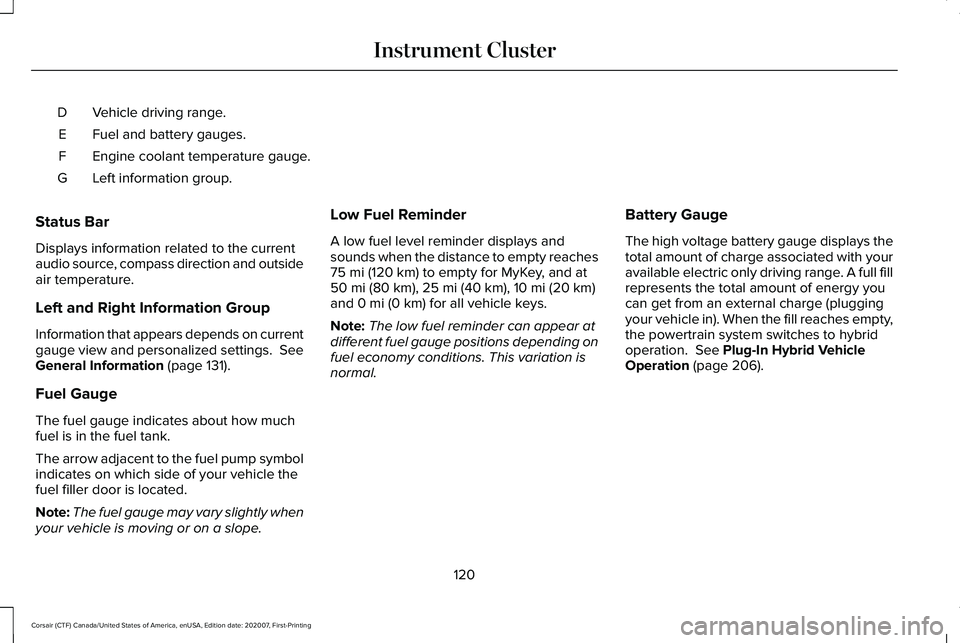
Vehicle driving range.
D
Fuel and battery gauges.
E
Engine coolant temperature gauge.
F
Left information group.
G
Status Bar
Displays information related to the current
audio source, compass direction and outside
air temperature.
Left and Right Information Group
Information that appears depends on current
gauge view and personalized settings. See
General Information (page 131).
Fuel Gauge
The fuel gauge indicates about how much
fuel is in the fuel tank.
The arrow adjacent to the fuel pump symbol
indicates on which side of your vehicle the
fuel filler door is located.
Note: The fuel gauge may vary slightly when
your vehicle is moving or on a slope. Low Fuel Reminder
A low fuel level reminder displays and
sounds when the distance to empty reaches
75 mi (120 km)
to empty for MyKey, and at
50 mi (80 km), 25 mi (40 km), 10 mi (20 km)
and 0 mi (0 km) for all vehicle keys.
Note: The low fuel reminder can appear at
different fuel gauge positions depending on
fuel economy conditions. This variation is
normal. Battery Gauge
The high voltage battery gauge displays the
total amount of charge associated with your
available electric only driving range. A full fill
represents the total amount of energy you
can get from an external charge (plugging
your vehicle in). When the fill reaches empty,
the powertrain system switches to hybrid
operation.
See Plug-In Hybrid Vehicle
Operation (page 206).
120
Corsair (CTF) Canada/United States of America, enUSA, Edition date: 202007, First-Printing Instrument Cluster