traction control LINCOLN CORSAIR 2021 Owner's Manual
[x] Cancel search | Manufacturer: LINCOLN, Model Year: 2021, Model line: CORSAIR, Model: LINCOLN CORSAIR 2021Pages: 638, PDF Size: 5.7 MB
Page 518 of 638
Adjusting the Guidance Prompt Volume
Turn the volume control when a guidance
prompt plays to adjust the volume.
Note:
If you have inadvertently adjusted the
volume to zero, press the turn indicator
button to play the last voice prompt and then
adjust the volume to the desired level.
Muting Guidance Prompts Select the mute option on the
screen to mute guidance prompts.
Note: The system mutes the next and all
future guidance prompts.
Adding Waypoints
You can add a waypoint to a navigation route
as a destination along your route. You can
add up to five waypoints.
1. Select the search option on the map.
2. Set a destination.
3. Select Add Waypoint.
4. Select
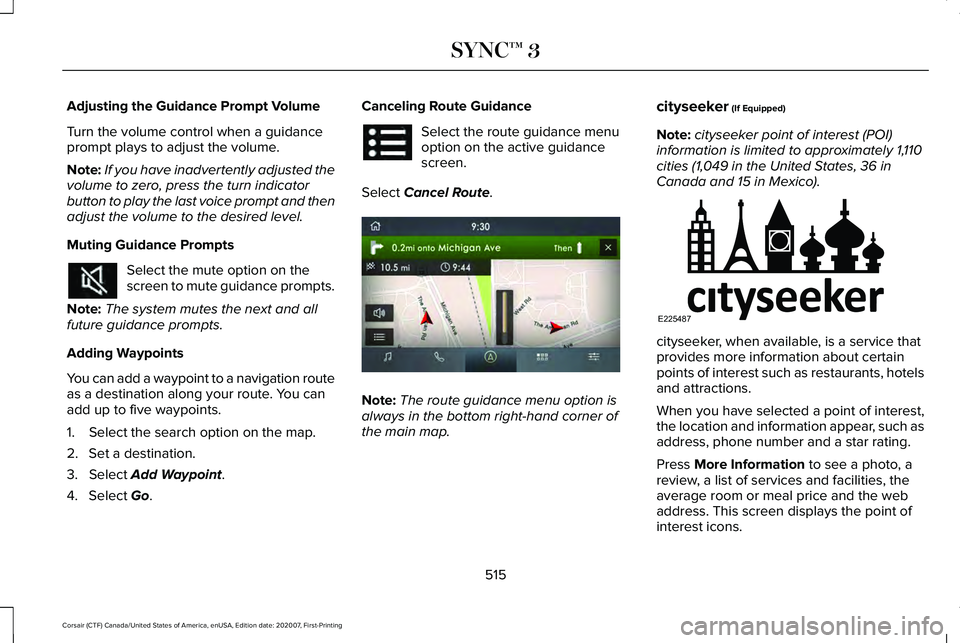
Go. Canceling Route Guidance Select the route guidance menu
option on the active guidance
screen.
Select
Cancel Route. Note:
The route guidance menu option is
always in the bottom right-hand corner of
the main map. cityseeker
(If Equipped)
Note: cityseeker point of interest (POI)
information is limited to approximately 1,110
cities (1,049 in the United States, 36 in
Canada and 15 in Mexico). cityseeker, when available, is a service that
provides more information about certain
points of interest such as restaurants, hotels
and attractions.
When you have selected a point of interest,
the location and information appear, such as
address, phone number and a star rating.
Press
More Information to see a photo, a
review, a list of services and facilities, the
average room or meal price and the web
address. This screen displays the point of
interest icons.
515
Corsair (CTF) Canada/United States of America, enUSA, Edition date: 202007, First-Printing SYNC™ 3 E297860 E225487
Page 576 of 638
•
Navigation Features: Any navigation
features included in the system are
intended to provide turn by turn
instructions to get you to a desired
destination. Please make certain all
persons using this system carefully read
and follow instructions and safety
information fully.
• Distraction Hazard:
Any navigation
features may require manual (non-verbal)
setup. Attempting to perform such set-up
or insert data while driving can distract
your attention and could cause an
accident or other serious injury. Stop the
vehicle in a safe and legal manner before
attempting these operations.
• Let Your Judgment Prevail:
Any
navigation features are provided only as
an aid. Make your driving decisions
based on your observations of local
conditions and existing traffic regulations.
Any such feature is not a substitute for
your personal judgment. Any route
suggestions made by this system should
never replace any local traffic regulations
or your personal judgment or knowledge
of safe driving practices. •
Route Safety:
Do not follow the route
suggestions if doing so would result in
an unsafe or illegal maneuver, if you
would be placed in an unsafe situation,
or if you would be directed into an area
that you consider unsafe. The driver is
ultimately responsible for the safe
operation of the vehicle and therefore,
must evaluate whether it is safe to follow
the suggested directions.
• Potential Map Inaccuracy:
Maps used
by this system may be inaccurate
because of changes in roads, traffic
controls or driving conditions. Always use
good judgment and common sense when
following the suggested routes.
• Emergency Services:
Do not rely on any
navigation features included in the
system to route you to emergency
services. Ask local authorities or an
emergency services operator for these
locations. Not all emergency services
such as police, fire stations, hospitals and
clinics are likely to be contained in the
map database for such navigation
features.
573
Corsair (CTF) Canada/United States of America, enUSA, Edition date: 202007, First-Printing Appendices
Page 628 of 638
Heated Exterior Mirrors...............................168
Heated Rear Window...................................167
Heated Seats..................................................182
Front Seats............................................................182
Rear Seats.............................................................183
Heated Windshield
.......................................167
Windshield Wiper De-Icer.................................167
Heating See: Climate Control..........................................164
High Voltage Battery...................................225 General Information...........................................225
Hill Start Assist..............................................248 Switching the System On and Off..................248
Using Hill Start Assist........................................
248
Hints on Controlling the Interior Climate..........................................................166
Defogging the Side Windows in Cold Weather.............................................................167
General Hints.......................................................166
Quickly Cooling the Interior..............................
167
Quickly Heating the Interior..............................167
Recommended Settings for Cooling..............167
Recommended Settings for Heating..............167
Hints on Driving With Anti-Lock Brakes..........................................................246
Hood Lock See: Opening and Closing the Hood............365
Horn...................................................................98 How Does Adaptive Cruise Control With
Stop and Go Work.....................................278
How Does Speed Sign Recognition Work...............................................................315
How Does the Garage Door Opener Work
...............................................................187
How Does the Rear Occupant Alert System Work...............................................................185
Hybrid Vehicle Frequently Asked Questions....................................................207
I
In California (U.S. Only)...............................344
Information Displays
......................................131
General Information.............................................131
Information Messages
..................................137
Active Park............................................................138
Adaptive Cruise Control....................................138
Adaptive Headlamps..........................................139
AdvanceTrac ™ and Traction Control................139
Alarm......................................................................140
Automatic Engine Shutdown............................140
AWD........................................................................\
.141
Battery and Charging System (12 Volt)..........142
Battery and Charging System (High Voltage).............................................................143 Blind Spot Information and Cross Traffic Alert
System...............................................................144
Doors and Locks..................................................144
Driver Alert............................................................145
Fuel........................................................................\
.146
Hill Start Assist.....................................................146
Keys and Intelligent Access..............................147
Lane Keeping System........................................148
Maintenance.........................................................148
MyKey.....................................................................150
Park Aid...................................................................151
Park Brake.............................................................152
Power Steering....................................................153
Pre-Collision Assist.............................................154
Remote Start.........................................................154
Seats.......................................................................154
Starting System ...................................................155
Tire Pressure Monitoring System....................155
Transmission.........................................................156
Installing Child Restraints.............................28 Child Restraints.....................................................28
Using Lap and Shoulder Belts...........................28
Using Lower Anchors and Tethers for
CHildren (LATCH)..............................................31
Using Tether Straps..............................................33
Instrument Cluster
..........................................118
Instrument Lighting Dimmer.......................103
Instrument Panel
.............................................23
625
Corsair (CTF) Canada/United States of America, enUSA, Edition date: 202007, First-Printing Index
Page 635 of 638

Sun Visors........................................................115
Illuminated Vanity Mirror.....................................116
Supplementary Restraints System
..............51
Principle of Operation..........................................51
Switching Active Park Assist On and Off..................................................................272
Cancelling Active Park Assist..........................
272
Switching Adaptive Cruise Control On and Off
..................................................................282
Automatic Cancellation or Deactivation.......282
Switching Adaptive Cruise Control Off.........282
Switching Adaptive Cruise Control On.........282
Switching Automatic High Beam Control On and Off.....................................................110
Activating the Automatic High Beam Control................................................................110
Switching Cruise Control On and Off..................................................................276
Switching Cruise Control Off...........................276
Switching Cruise Control On...........................276
Switching From Adaptive Cruise Control to Cruise Control.......................................286
Switching Intelligent Mode On and Off..................................................................288
Changing the Set Speed with Intelligent Adaptive Cruise Control..............................
288 Switching Lane Centering On and
Off..................................................................287
Activating Lane Centering................................287
System Alerts and Automatic Cancellation.....................................................287
Switching Rear Occupant Alert System On and Off
...........................................................186
Switching Reverse Braking Assist On and Off..................................................................252
Switching the Heated Steering Wheel On
....................................................................98
Symbols Glossary.............................................11
SYNC™ 3..........................................................478
General Information...........................................478
SYNC™ 3 Troubleshooting.........................528 Additional Information and Assistance.........544
Apps.......................................................................538
Navigation............................................................537
Personal Profiles.................................................542
Phone....................................................................534
Resetting the System........................................544
USB and Bluetooth Audio................................530
Voice Recognition..............................................528
Wi-Fi Connectivity..............................................540 T
Technical Specifications
See: Capacities and Specifications...............
433
The Better Business Bureau (BBB) Auto Line Program (U.S. Only)..........................345
Tire Care.........................................................404 Glossary of Tire Terminology..........................406
Information About Uniform Tire Quality
Grading.............................................................404
Information Contained on the Tire Sidewall............................................................407
Temperature A B C............................................405
Traction AA A B C...............................................405
Treadwear............................................................405
Tire Inflation When Punctured See: Tire Sealant and Inflator Kit....................397
Tire Pressure Monitoring System..............419 Changing Tires With a Tire Pressure
Monitoring System........................................420
Understanding Your Tire Pressure Monitoring System ..............................................................421
Tire Repair Kit See: Tire Sealant and Inflator Kit....................397
Tire Sealant and Inflator Kit.......................397 First Stage: Reinflating the Tire with Sealing
Compound and Air........................................399
General Information...........................................397
632
Corsair (CTF) Canada/United States of America, enUSA, Edition date: 202007, First-Printing Index
Page 636 of 638

Second Stage: Checking Tire Pressure.......402
Tips for Use of the Kit........................................398
What to do after the Tire has been
Sealed...............................................................402
What to do when a Tire Is Punctured...........399
Tires See: Wheels and Tires......................................395
Towing a Trailer.............................................325 Load Placement..................................................325
Towing the Vehicle on Four Wheels - Gasoline, 8-Speed Automatic
Transmission – 8F35/8F40.....................330
Emergency Towing............................................330
Recreational Towing - All-Wheel and
Four-Wheel Drive Vehicles...........................331
Recreational Towing - Front-Wheel Drive Vehicles............................................................330
Recreational Towing - Rear-Wheel Drive Vehicles............................................................330
Towing the Vehicle on Four Wheels - Plug-In Hybrid Electric Vehicle (PHEV),
Automatic Transmission – HF45.............331
Emergency Towing..............................................331
Recreational Towing...........................................331
Towing.............................................................325
Traction Control
............................................255
Principle of Operation.......................................255
Trailer Sway Control....................................326 Transmission..................................................232
Transporting the Vehicle
.............................341
Type Approvals............................................600
Radio Frequency Certification Labels for Body
Control Module..............................................602
Radio Frequency Certifications for Adaptive Cruise Control................................................600
Radio Frequency Certifications for Blind Spot Information System.......................................600
Radio Frequency Certifications for Bluetooth Low Energy Module.......................................601
Radio Frequency Certifications for Garage Door Opener....................................................615
Radio Frequency Certifications for Passive Key.....................................................................603
Radio Frequency Certifications for Radio Transceiver Module.......................................604
Radio Frequency Certifications for SYNC3.2...........................................................604
Radio Frequency Certifications for Telematics Control Unit.....................................................608
Radio Frequency Certifications for Tire Pressure Monitoring System Sensor -
AG2SM3...........................................................609
Radio Frequency Certifications for Tire Pressure Monitoring System Sensor -
AG2SM4............................................................610 Radio Frequency Certifications for Wireless
Accessory Charging Module.......................615
U
Under Hood Overview - 2.0L/2.3L...........367
Under Hood Overview - 2.5L, Plug-In Hybrid Electric Vehicle (PHEV)...............369
Unique Driving Characteristics.................204
USB Port
..........................................................476
Locating the USB Ports.....................................477
Using All-Wheel Drive
.................................240
Driving in Special Conditions With All-Wheel
Drive..................................................................240
Using MyKey With Remote Start Systems...........................................................74
Using Snow Chains
.......................................418
Using Stability Control................................257
Using the Backup Start Passcode..............69
Using the Valet Mode....................................69
Using Traction Control................................255 Switching the System Off.................................255
System Indicator Lights and Messages........
255
Using a Switch....................................................255
Using the Information Display Controls.......255
Using Voice Recognition............................480 Apps.......................................................................489
633
Corsair (CTF) Canada/United States of America, enUSA, Edition date: 202007, First-Printing Index