audio LINCOLN CORSAIR 2021 Service Manual
[x] Cancel search | Manufacturer: LINCOLN, Model Year: 2021, Model line: CORSAIR, Model: LINCOLN CORSAIR 2021Pages: 638, PDF Size: 5.7 MB
Page 535 of 638
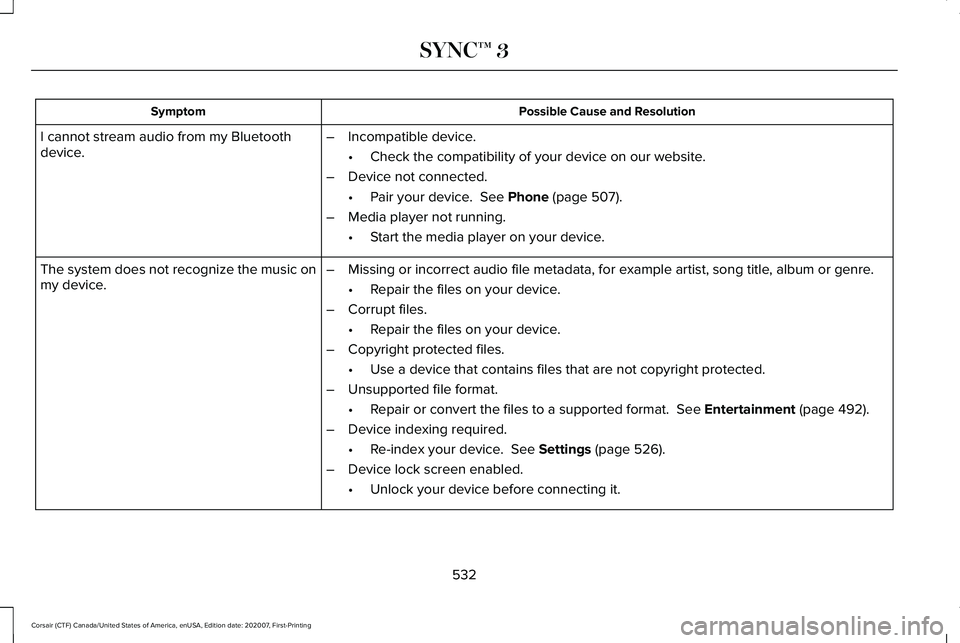
Possible Cause and Resolution
Symptom
I cannot stream audio from my Bluetooth
device. –
Incompatible device.
•Check the compatibility of your device on our website.
– Device not connected.
•Pair your device. See Phone (page 507).
– Media player not running.
•Start the media player on your device.
The system does not recognize the music on
my device. –
Missing or incorrect audio file metadata, for example artist, song title\
, album or genre.
•Repair the files on your device.
– Corrupt files.
•Repair the files on your device.
– Copyright protected files.
•Use a device that contains files that are not copyright protected.
– Unsupported file format.
•Repair or convert the files to a supported format.
See Entertainment (page 492).
– Device indexing required.
•Re-index your device.
See Settings (page 526).
– Device lock screen enabled.
•Unlock your device before connecting it.
532
Corsair (CTF) Canada/United States of America, enUSA, Edition date: 202007, First-Printing SYNC™ 3
Page 536 of 638
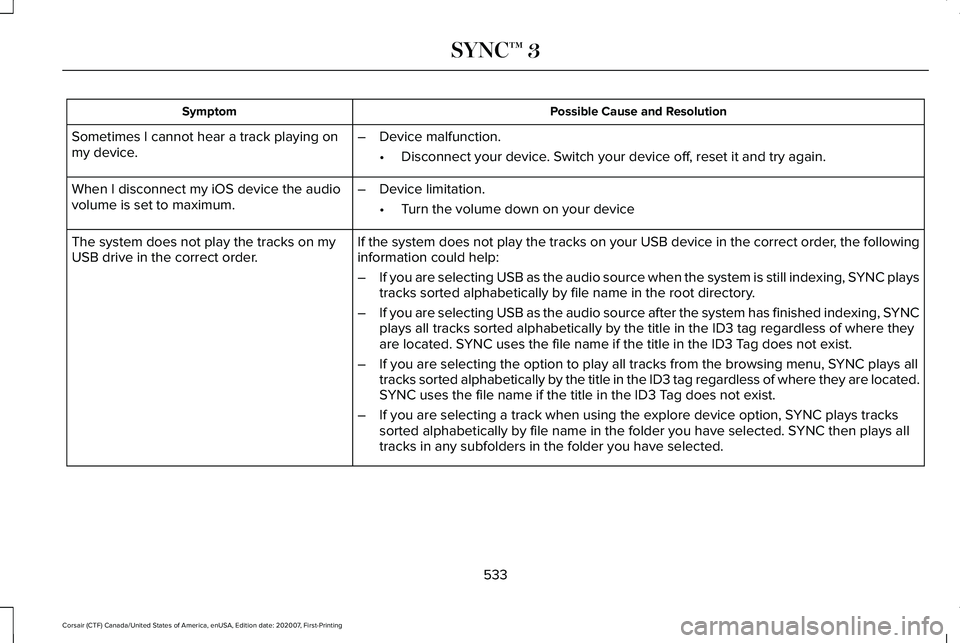
Possible Cause and Resolution
Symptom
Sometimes I cannot hear a track playing on
my device. –
Device malfunction.
•Disconnect your device. Switch your device off, reset it and try again.
When I disconnect my iOS device the audio
volume is set to maximum. –
Device limitation.
•Turn the volume down on your device
If the system does not play the tracks on your USB device in the correct\
order, the following
information could help:
The system does not play the tracks on my
USB drive in the correct order.
–If you are selecting USB as the audio source when the system is still in\
dexing, SYNC plays
tracks sorted alphabetically by file name in the root directory.
– If you are selecting USB as the audio source after the system has finish\
ed indexing, SYNC
plays all tracks sorted alphabetically by the title in the ID3 tag regar\
dless of where they
are located. SYNC uses the file name if the title in the ID3 Tag does not exist.
– If you are selecting the option to play all tracks from the browsing men\
u, SYNC plays all
tracks sorted alphabetically by the title in the ID3 tag regardless of w\
here they are located.
SYNC uses the file name if the title in the ID3 Tag does not exist.
– If you are selecting a track when using the explore device option, SYNC plays tracks
sorted alphabetically by file name in the folder you have selected. SYNC then plays all
tracks in any subfolders in the folder you have selected.
533
Corsair (CTF) Canada/United States of America, enUSA, Edition date: 202007, First-Printing SYNC™ 3
Page 537 of 638
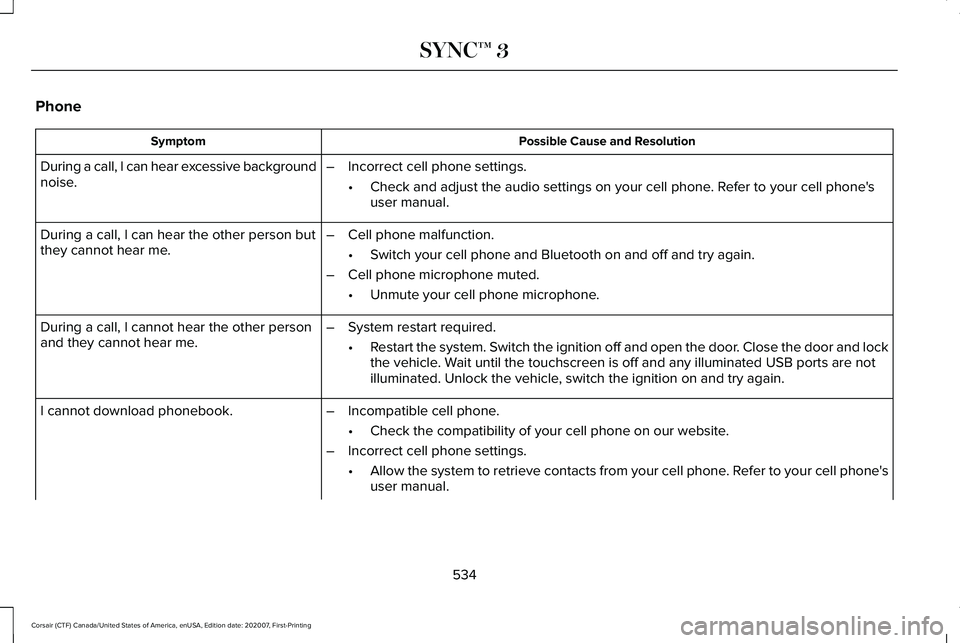
Phone
Possible Cause and Resolution
Symptom
During a call, I can hear excessive background
noise. –
Incorrect cell phone settings.
•Check and adjust the audio settings on your cell phone. Refer to your cell phone's
user manual.
– Cell phone malfunction.
•Switch your cell phone and Bluetooth on and off and try again.
– Cell phone microphone muted.
•Unmute your cell phone microphone.
During a call, I can hear the other person but
they cannot hear me.
During a call, I cannot hear the other person
and they cannot hear me.
–
System restart required.
•Restart the system. Switch the ignition off and open the door. Close the door and lock
the vehicle. Wait until the touchscreen is off and any illuminated USB ports are not
illuminated. Unlock the vehicle, switch the ignition on and try again.
I cannot download phonebook. –Incompatible cell phone.
•Check the compatibility of your cell phone on our website.
– Incorrect cell phone settings.
•Allow the system to retrieve contacts from your cell phone. Refer to your cell phone's
user manual.
534
Corsair (CTF) Canada/United States of America, enUSA, Edition date: 202007, First-Printing SYNC™ 3
Page 547 of 638
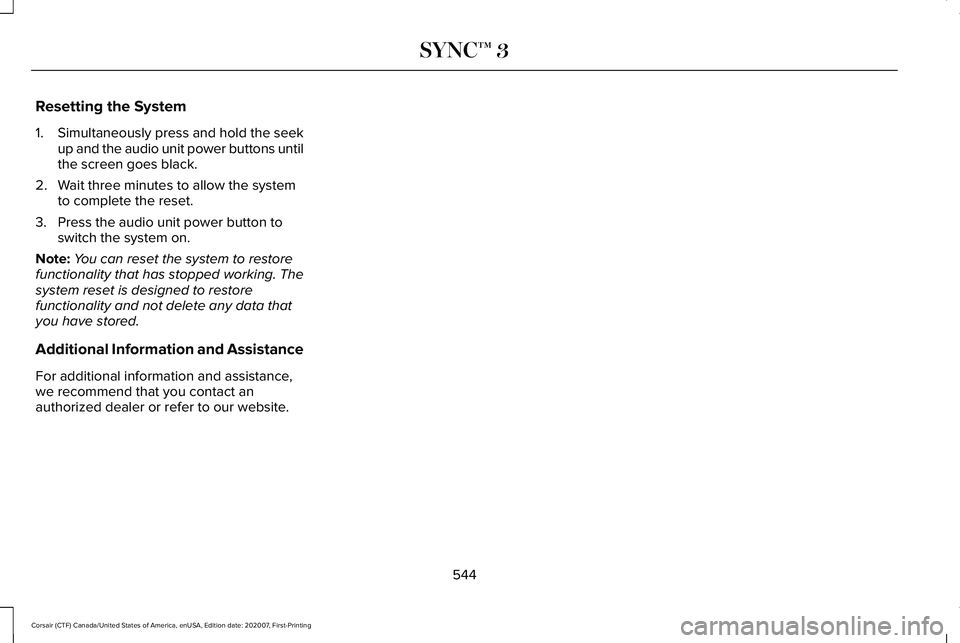
Resetting the System
1.
Simultaneously press and hold the seek
up and the audio unit power buttons until
the screen goes black.
2. Wait three minutes to allow the system to complete the reset.
3. Press the audio unit power button to switch the system on.
Note: You can reset the system to restore
functionality that has stopped working. The
system reset is designed to restore
functionality and not delete any data that
you have stored.
Additional Information and Assistance
For additional information and assistance,
we recommend that you contact an
authorized dealer or refer to our website.
544
Corsair (CTF) Canada/United States of America, enUSA, Edition date: 202007, First-Printing SYNC™ 3
Page 574 of 638
•
Links to Third Party Sites: The
SOFTWARE may provide you with the
ability to link to third party sites. The third
party sites are not under the control of
FORD MOTOR COMPANY, its affiliates
and/or its designated agent. Neither
FORD MOTOR COMPANY nor its
affiliates nor its designated agent are
responsible for (I) the contents of any
third party sites, any links contained in
third party sites, or any changes or
updates to third party sites, or (ii)
webcasting or any other form of
transmission received from any third
party sites. If the SOFTWARE provides
links to third party sites, those links are
provided to you only as a convenience,
and the inclusion of any link does not
imply an endorsement of the third party
site by FORD MOTOR COMPANY, its
affiliates and/or its designated agent.
• Obligation to Drive Responsibly:
You
recognize your obligation to drive
responsibly and keep attention on the
road. You will read and abide with the
DEVICES operating instructions
particularly as they pertain to safety and
you agree to assume any risk associated with the use of the DEVICES.
UPGRADES AND RECOVERY MEDIA: If the
SOFTWARE is provided by FORD MOTOR
COMPANY separate from the DEVICES on
media such as a ROM chip, CD ROM disk(s)
or via web download or other means, and is
labeled "For Upgrade Purposes Only" or "For
Recovery Purposes Only" you may install one
(1) copy of such SOFTWARE onto the
DEVICES as a replacement copy for the
existing SOFTWARE, and use it in
accordance with this EULA, including any
additional EULA terms accompanying the
upgrade SOFTWARE.
INTELLECTUAL PROPERTY RIGHTS:
All
title and intellectual property rights in and to
the SOFTWARE (including but not limited to
any images, photographs, animations, video,
audio, music, text and "applets" incorporated
into the SOFTWARE), the accompanying
printed materials, and any copies of the
SOFTWARE, are owned by FORD MOTOR
COMPANY, or its affiliates or suppliers. The
SOFTWARE is licensed, not sold. You may
not copy the printed materials accompanying
the SOFTWARE. All title and intellectual
property rights in and to the content which may be accessed through use of the
SOFTWARE is the property of the respective
content owner and may be protected by
applicable copyright or other intellectual
property laws and treaties. This EULA grants
you no rights to use such content outside its
intended use. All rights not specifically
granted under this EULA are reserved by
FORD MOTOR COMPANY, its affiliates, and
third party software and service providers
and suppliers. Use of any on-line services
which may be accessed through the
SOFTWARE may be governed by the
respective terms of use relating to such
services. If this SOFTWARE contains
documentation that is provided only in
electronic form, you may print one copy of
such electronic documentation.
571
Corsair (CTF) Canada/United States of America, enUSA, Edition date: 202007, First-Printing Appendices
Page 582 of 638
(b) use your own personal judgment while
driving. If you feel that a route suggested by
the TeleNav Software instructs you to
perform an unsafe or illegal maneuver,
places you in an unsafe situation, or directs
you into an area that you consider to be
unsafe, do not follow such instructions;
(c) do not input destinations, or otherwise
manipulate the TeleNav Software, unless
your vehicle is stationary and parked;
(d) do not use the TeleNav Software for any
illegal, unauthorized, unintended, unsafe,
hazardous, or unlawful purposes, or in any
manner inconsistent with this Agreement;
(e) arrange all GPS and wireless devices and
cables necessary for use of the TeleNav
Software in a secure manner in your vehicle
so that they will not interfere with your
driving and will not prevent the operation of
any safety device (such as an airbag).
You agree to indemnify and hold TeleNav
harmless against all claims resulting from any
dangerous or otherwise inappropriate use
of the TeleNav Software in any moving
vehicle, including as a result of your failure
to comply with the directions above.
2. Account Information
You agree: (a) when registering the TeleNav
Software, to provide TeleNav with true,
accurate, current, and complete information
about yourself, and (b) to inform TeleNav
promptly of any changes to such information,
and to keep it true, accurate, current and
complete.
3. Software License
•
Subject to your compliance with the
terms of this Agreement, TeleNav hereby
grants to you a personal, non-exclusive,
non-transferable license (except as
expressly permitted below in connection
with your permanent transfer of the
TeleNav Software license), without the
right to sublicense, to use the TeleNav
Software (in object code form only) in
order to access and use the TeleNav
Software. This license shall terminate
upon any termination or expiration of this
Agreement. You agree that you will use
the TeleNav Software only for your
personal business or leisure purposes,
and not to provide commercial navigation
services to other parties. 3.1 License Limitations
•
(a) reverse engineer, decompile,
disassemble, translate, modify, alter or
otherwise change the TeleNav Software
or any part thereof; (b) attempt to derive
the source code, audio library or
structure of the TeleNav Software without
the prior express written consent of
TeleNav;
(c) remove from the TeleNav
Software, or alter, any of TeleNav's or its
suppliers' trademarks, trade names,
logos, patent or copyright notices, or
other notices or markings;
(d) distribute,
sublicense or otherwise transfer the
TeleNav Software to others, except as
part of your permanent transfer of the
TeleNav Software; or (e) use the TeleNav
Software in any manner that
I. infringes the intellectual property or
proprietary rights, rights of publicity or
privacy or other rights of any party,
ii. violates any law, statute, ordinance or
regulation, including but not limited to laws
and regulations related to spamming, privacy,
consumer and child protection, obscenity or
defamation, or
579
Corsair (CTF) Canada/United States of America, enUSA, Edition date: 202007, First-Printing Appendices
Page 621 of 638
Switching Adaptive Headlamps On or
Off.......................................................................107
Adjusting the Headlamps ...........................382
Horizontal Aim Adjustment..............................383
Vertical Aim Adjustment...................................382
Adjusting the Set Speed Tolerance - Vehicles With: Intelligent Adaptive Cruise
Control
..........................................................288
Adjusting the Steering Wheel - Vehicles With: Manual Adjustable Steering
Column
............................................................97
Adjusting the Steering Wheel - Vehicles With: Power Adjustable Steering
Column
............................................................97
AFS See: Adaptive Headlamps................................105
Airbag Disposal
...............................................60
Air Conditioning See: Climate Control..........................................164
Air Filter See: Changing the Engine Air Filter - 2.0L/
2.3L....................................................................372
See: Changing the Engine Air Filter - 2.5L, Plug-In Hybrid Electric Vehicle (PHEV)......373
All-Wheel Drive.............................................240
Ambient Lighting
...........................................108
Adjusting the Brightness...................................109
Changing the Color............................................109 Switching Ambient Lighting Off.......................109
Switching Ambient Lighting On.......................109
Anti-Theft Alarm System...............................93 Arming the Anti-Theft Alarm System...............94
Disarming the Anti-Theft Alarm System..........94
How Does the Anti-Theft Alarm System
Work.....................................................................93
What Are the Inclination Sensors.....................93
What Are the Interior Sensors...........................93
What Is the Anti-Theft Alarm System...............93
What Is the Battery Backup Alarm...................94
What Is the Perimeter Alarm..............................93
Anti-Theft Alarm System Settings..............94 Setting the Alarm Security Level......................94
Switching Ask on Exit On and Off....................94
What are the Alarm Security Levels.................94
What Is Ask on Exit...............................................94
Appendices....................................................563
Apps.................................................................523 SiriusXM Traffic and Travel Link.....................525
Using Apps on an Android Device................524
Using Apps on an iOS Device........................524
Using Mobile Navigation on an Android
Device...............................................................524
At a Glance.......................................................23
Audible Warnings and Indicators..............130 Headlamps On Warning Chime.......................130
Keyless Warning Alert........................................130 Parking Brake On Warning Chime..................
130
Audio System
................................................468
General Information...........................................468
Audio Unit
......................................................469
Adjusting the Volume........................................469
Changing Radio Stations..................................469
Selecting the Audio Modes.............................469
Switching the Audio Unit On and Off............
470
Switching the Display On and Off..................470
Using Seek, Fast Forward and Reverse.......470
Auto Hold
.......................................................249
Auto Hold Indicator............................................249
Switching Auto Hold On and Off....................249
Using Auto Hold.................................................249
Autolamps.......................................................103 Windshield Wiper Activated Headlamps......103
Automatic Climate Control..........................164 Accessing the Air Distribution Controls........164
Accessing the Climate Control Menu............164
Setting the Blower Motor Speed.....................164
Setting the Temperature....................................164
Switching Auto Mode On and Off...................164
Switching Maximum Air Conditioning On and
Off.......................................................................165
Switching Maximum Defrost On and Off......166
Switching Recirculated Air On and Off..........166
Switching the Air Conditioning On and Off.......................................................................165
618
Corsair (CTF) Canada/United States of America, enUSA, Edition date: 202007, First-Printing Index
Page 633 of 638

Resuming the Set Speed............................277
Resuming the Set Speed from a Complete
Stop...................................................................285
Reverse Braking Assist Indicators...........252
Reverse Braking Assist Precautions........251
Reverse Braking Assist................................251 Reverse Braking Assist –
Troubleshooting.............................................253
Reverse Braking Assist – Troubleshooting.........................................253
Reverse Braking Assist – Frequently Asked Questions.........................................................254
Reverse Braking Assist – Information Messages.........................................................253
Roadside Assistance...................................336 Vehicles Sold in Canada: Getting Roadside
Assistance........................................................337
Vehicles sold in the United States: Getting Roadside Assistance.....................................336
Vehicles Sold in the United States: Using Roadside Assistance.....................................336
Roadside Emergencies
...............................336
Roof Racks and Load Carriers...................318 Maximum Recommended Load
Amounts............................................................319
Running-In See: Breaking-In.................................................333 Running Out of Fuel.....................................212
Adding Fuel From a Portable Fuel
Container..........................................................212
Filling a Portable Fuel Container.....................212
S
Safety Canopy™...............................................58
Safety Precautions
.......................................209
Satellite Radio................................................473
Satellite Radio Electronic Serial Number
(ESN)..................................................................474
Satellite Radio Reception Factors..................
473
SiriusXM Satellite Radio Service.....................474
Troubleshooting..................................................475
Scheduled Maintenance
............................550
Seatbelt Extensions.......................................48
Seatbelt Height Adjustment.........................45
Seatbelt Reminder..........................................46 Seatbelt Status.......................................................47
Seatbelts............................................................41 Principle of Operation...........................................41
Seatbelt Warning Lamp and Indicator Chime..............................................................45
Conditions of operation......................................46
Seats.................................................................170
Security..............................................................93 Anti-Theft Alarm System.....................................93 Anti-Theft Alarm System Settings.....................94
Passive Anti-Theft System..................................
93
Security – Troubleshooting................................95
Security – Troubleshooting..........................95 Security – Frequently Asked Questions.........96
Security – Information Messages.....................95
Selecting a Drive Mode...............................312
Settings...........................................................526 911 Assist...............................................................527
Ambient Lighting................................................527
Audio.....................................................................526
Automatic Updates............................................527
Bluetooth..............................................................526
Charge Settings..................................................527
Clock ......................................................................526
Display...................................................................527
Driver Assist.........................................................527
General..................................................................527
Lincoln Way..........................................................527
Message Center.................................................527
Mobile Apps.........................................................527
Multi Contour Seats...........................................527
Navigation............................................................527
Personal Profiles.................................................527
Phone....................................................................526
Seats......................................................................527
Sound....................................................................526
Valet Mode...........................................................527
630
Corsair (CTF) Canada/United States of America, enUSA, Edition date: 202007, First-Printing Index
Page 635 of 638

Sun Visors........................................................115
Illuminated Vanity Mirror.....................................116
Supplementary Restraints System
..............51
Principle of Operation..........................................51
Switching Active Park Assist On and Off..................................................................272
Cancelling Active Park Assist..........................
272
Switching Adaptive Cruise Control On and Off
..................................................................282
Automatic Cancellation or Deactivation.......282
Switching Adaptive Cruise Control Off.........282
Switching Adaptive Cruise Control On.........282
Switching Automatic High Beam Control On and Off.....................................................110
Activating the Automatic High Beam Control................................................................110
Switching Cruise Control On and Off..................................................................276
Switching Cruise Control Off...........................276
Switching Cruise Control On...........................276
Switching From Adaptive Cruise Control to Cruise Control.......................................286
Switching Intelligent Mode On and Off..................................................................288
Changing the Set Speed with Intelligent Adaptive Cruise Control..............................
288 Switching Lane Centering On and
Off..................................................................287
Activating Lane Centering................................287
System Alerts and Automatic Cancellation.....................................................287
Switching Rear Occupant Alert System On and Off
...........................................................186
Switching Reverse Braking Assist On and Off..................................................................252
Switching the Heated Steering Wheel On
....................................................................98
Symbols Glossary.............................................11
SYNC™ 3..........................................................478
General Information...........................................478
SYNC™ 3 Troubleshooting.........................528 Additional Information and Assistance.........544
Apps.......................................................................538
Navigation............................................................537
Personal Profiles.................................................542
Phone....................................................................534
Resetting the System........................................544
USB and Bluetooth Audio................................530
Voice Recognition..............................................528
Wi-Fi Connectivity..............................................540 T
Technical Specifications
See: Capacities and Specifications...............
433
The Better Business Bureau (BBB) Auto Line Program (U.S. Only)..........................345
Tire Care.........................................................404 Glossary of Tire Terminology..........................406
Information About Uniform Tire Quality
Grading.............................................................404
Information Contained on the Tire Sidewall............................................................407
Temperature A B C............................................405
Traction AA A B C...............................................405
Treadwear............................................................405
Tire Inflation When Punctured See: Tire Sealant and Inflator Kit....................397
Tire Pressure Monitoring System..............419 Changing Tires With a Tire Pressure
Monitoring System........................................420
Understanding Your Tire Pressure Monitoring System ..............................................................421
Tire Repair Kit See: Tire Sealant and Inflator Kit....................397
Tire Sealant and Inflator Kit.......................397 First Stage: Reinflating the Tire with Sealing
Compound and Air........................................399
General Information...........................................397
632
Corsair (CTF) Canada/United States of America, enUSA, Edition date: 202007, First-Printing Index