remote LINCOLN CORSAIR 2021 Service Manual
[x] Cancel search | Manufacturer: LINCOLN, Model Year: 2021, Model line: CORSAIR, Model: LINCOLN CORSAIR 2021Pages: 638, PDF Size: 5.7 MB
Page 203 of 638
Important Ventilating Information
If you stop your vehicle and the leave the
engine idling for long periods, we
recommend that you do one of the following:
•
Open the windows at least 1 in (2.5 cm).
• Set your climate control to outside air.
STARTING A HYBRID ELECTRIC
VEHICLE SYSTEM
When the engine starts for the first time on
your drive, the idle speed increases, this
helps to warm up the engine. If the engine
idle speed does not slow down, have your
vehicle checked as soon as possible.
Before starting your vehicle, check the
following:
• Make sure all occupants fasten their
seatbelt.
• Make sure the headlamps and electrical
accessories are off.
• Make sure the parking brake is on.
• Make sure the transmission is in park (P). Note:
Do not touch the accelerator pedal.
1. Fully press the brake pedal.
2. Press the push button ignition switch.
Note: The green ready indicator illuminates
letting you know that your vehicle is ready
for driving. Since your vehicle is equipped
with a silent key start, the engine may not
start when your vehicle starts.
The system does not function if:
• The key frequencies are jammed.
• The key battery has no charge.
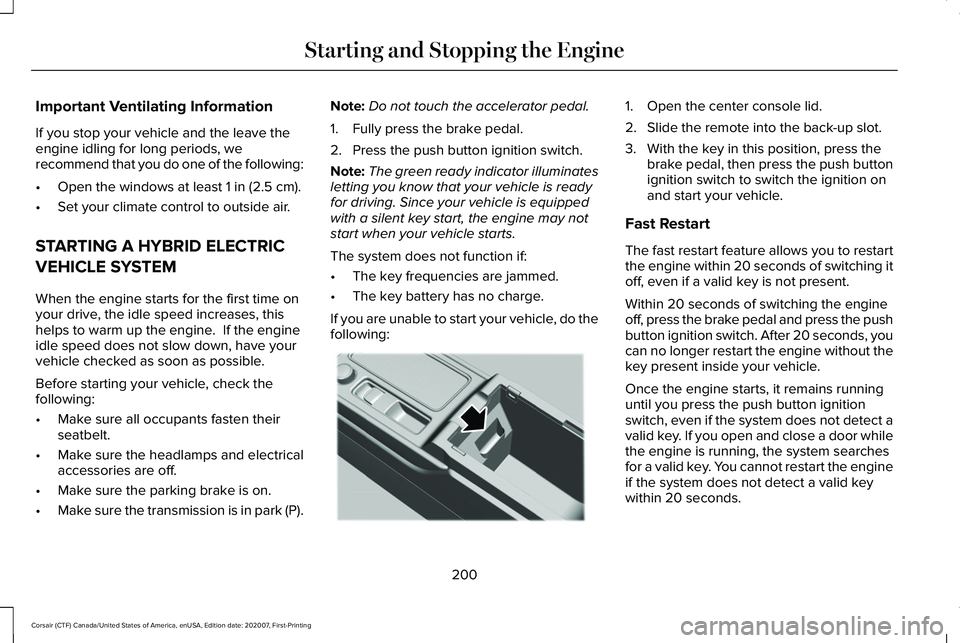
If you are unable to start your vehicle, do the
following: 1. Open the center console lid.
2. Slide the remote into the back-up slot.
3. With the key in this position, press the
brake pedal, then press the push button
ignition switch to switch the ignition on
and start your vehicle.
Fast Restart
The fast restart feature allows you to restart
the engine within 20 seconds of switching it
off, even if a valid key is not present.
Within 20 seconds of switching the engine
off, press the brake pedal and press the push
button ignition switch. After 20 seconds, you
can no longer restart the engine without the
key present inside your vehicle.
Once the engine starts, it remains running
until you press the push button ignition
switch, even if the system does not detect a
valid key. If you open and close a door while
the engine is running, the system searches
for a valid key. You cannot restart the engine
if the system does not detect a valid key
within 20 seconds.
200
Corsair (CTF) Canada/United States of America, enUSA, Edition date: 202007, First-Printing Starting and Stopping the EngineE306288
Page 240 of 638
Note:
If your vehicle has SelectShift™, you
can pull away in second gear.
1. Shift into drive (D).
2. Pull the (+) paddle until 2 shows on the instrument cluster.
AUTOMATIC TRANSMISSION -
PLUG-IN HYBRID ELECTRIC
VEHICLE (PHEV) WARNING: Always fully apply the
parking brake and make sure you shift into
park (P). Failure to follow this instruction
could result in personal injury or death. WARNING:
Do not apply the brake
pedal and accelerator pedal
simultaneously. Applying both pedals
simultaneously for more than a few
seconds will limit engine performance,
which may result in difficulty maintaining
speed in traffic and could lead to serious
injury. WARNING:
When your vehicle is
stationary, keep the brake pedal fully
pressed when shifting gears. Failure to
follow this instruction could result in
personal injury, death or property damage.
Note: The ready to drive indicator may be
off and you may not be able to shift out of
park (P) unless the remote control is inside
your vehicle.
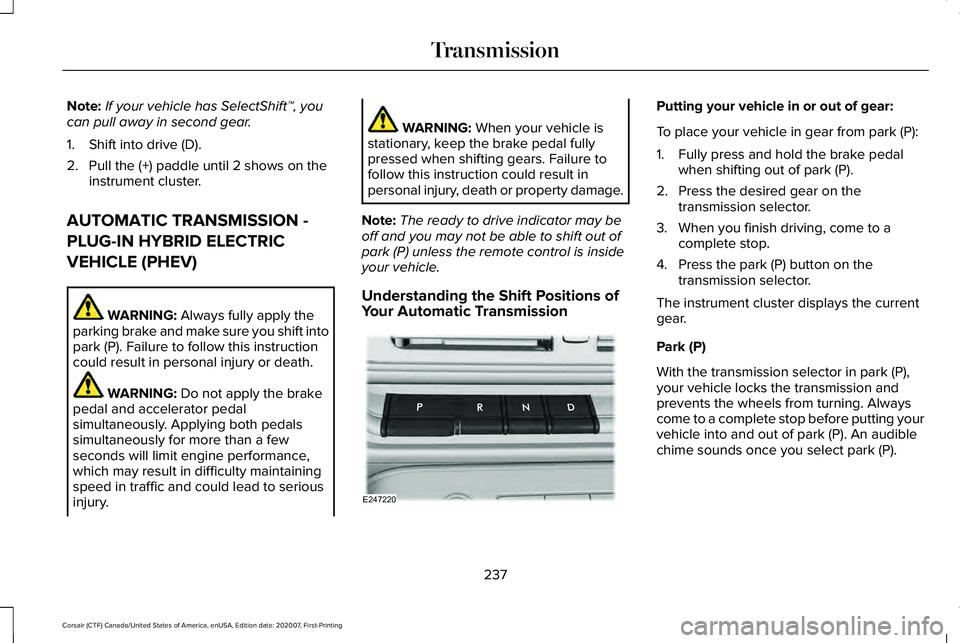
Understanding the Shift Positions of
Your Automatic Transmission Putting your vehicle in or out of gear:
To place your vehicle in gear from park (P):
1. Fully press and hold the brake pedal
when shifting out of park (P).
2. Press the desired gear on the transmission selector.
3. When you finish driving, come to a complete stop.
4. Press the park (P) button on the transmission selector.
The instrument cluster displays the current
gear.
Park (P)
With the transmission selector in park (P),
your vehicle locks the transmission and
prevents the wheels from turning. Always
come to a complete stop before putting your
vehicle into and out of park (P). An audible
chime sounds once you select park (P).
237
Corsair (CTF) Canada/United States of America, enUSA, Edition date: 202007, First-Printing TransmissionE247220
Page 344 of 638
2. Remove the jumper cable on the
negative (-) terminal of the booster
vehicle battery.
3. Remove the jumper cable from the positive (+) terminal of the booster vehicle
battery.
4. Remove the jumper cable from the positive (+) terminal of the disabled
vehicle battery.
5. Allow the engine to idle for at least one minute.
POST-CRASH ALERT SYSTEM
The system flashes the direction indicators
and sounds the horn (intermittently) in the
event of a serious impact that deploys an
airbag (front, side, side curtain or Safety
Canopy) or the seatbelt pretensioners.
The horn and indicators turn off when:
• You press the hazard control button.
• You press the panic button on the remote
entry transmitter (if equipped). •
Your vehicle runs out of power.
• Sounding of the horn is only enabled in
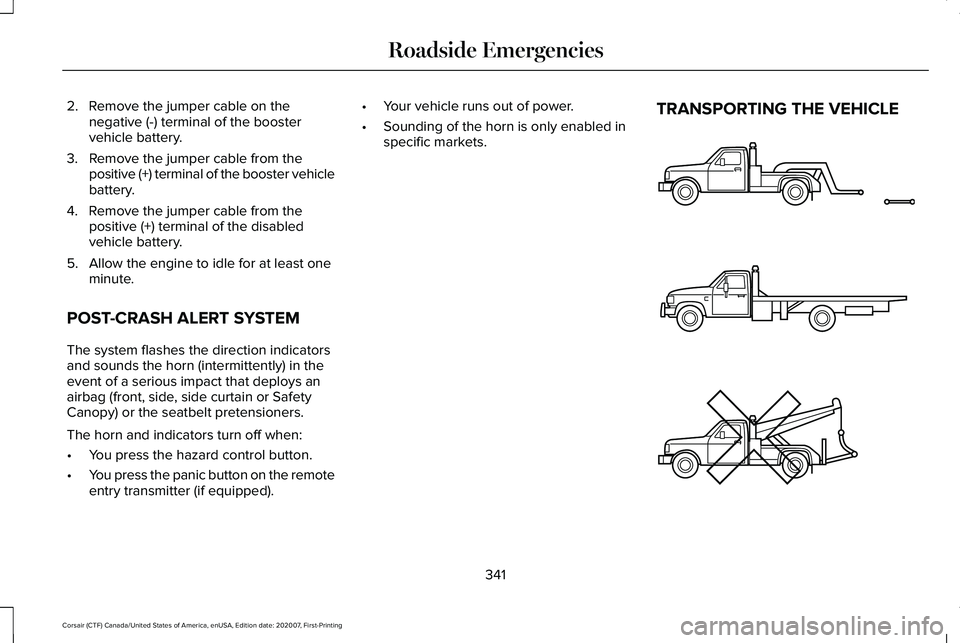
specific markets. TRANSPORTING THE VEHICLE
341
Corsair (CTF) Canada/United States of America, enUSA, Edition date: 202007, First-Printing Roadside EmergenciesE143886
Page 419 of 638
WARNING: When inflating the
tire for mounting pressures up to
20 psi (1.38 bar)
greater than the
maximum pressure on the tire sidewall,
the following precautions must be
taken to protect the person mounting
the tire:
• Make sure that you have the correct
tire and wheel size.
• Lubricate the tire bead and wheel
bead seat area again.
• Stand at a minimum of 12.0 ft (3.66 m)
away from the wheel and tire
assembly.
• Use both eye and ear protection. WARNING:
Always inflate steel
carcass tires with a remote air fill with
the person inflating standing at a
minimum of
12 ft (3.66 m) away from
the wheel and tire assembly. Important:
Remember to replace the
wheel valve stems when the road tires
are replaced on your vehicle.
It is recommended that the two front
tires or two rear tires generally be
replaced as a pair.
The tire pressure sensors mounted in
the wheels (originally installed on your
vehicle) are not designed to be used in
aftermarket wheels.
The use of wheels or tires not
recommended by us, may affect the
operation of your tire pressure
monitoring system.
If the tire pressure monitoring system
indicator is flashing, your system is
malfunctioning. Your replacement tire
might be incompatible with your tire
pressure monitoring system, or some
component of the system may be
damaged. Safety Practices WARNING:
If your vehicle is
stuck in snow, mud or sand, do not
rapidly spin the tires; spinning the tires
can tear the tire and cause an
explosion. A tire can explode in as little
as three to five seconds. WARNING:
Do not spin the
wheels at over 34 mph (55 km/h). The
tires may fail and injure a passenger
or bystander.
Driving habits have a great deal to do
with your tire mileage and safety.
*Observe posted speed limits
*Avoid fast starts, stops and turns
*Avoid potholes and objects on the road
*Do not run over curbs or hit the tire
against a curb when parking
416
Corsair (CTF) Canada/United States of America, enUSA, Edition date: 202007, First-Printing Wheels and Tires
Page 465 of 638
CONNECTING THE VEHICLE TO A
MOBILE NETWORK
What Is the Modem
The modem allows you to connect your
vehicle to the Internet to use when you are
on the road.
If you enable the modem using the Lincoln
Way app, you can access the following
services:
•
Locating and remotely starting, locking
and unlocking your vehicle. See the
information in the Lincoln Way app.
• Automatic system updates. Note:
We may need to update operating
system software on your vehicle to keep
connected services updated without prior
notice to you.
Enabling the Modem Using The Lincoln
Way
1. Open the Lincoln Way app on your device and log in.
2. Select your vehicle.
3. Select the option for vehicle details.
4. Select the option to activate your vehicle.
5. Switch the ignition on. 6. Make sure that the name on the screen
matches the name shown in your Lincoln
Way account.
7. Confirm the association of your vehicle with your Lincoln Way account.
Enabling the Modem Using the
Touchscreen Select the settings option on the
feature bar.
1. Select Lincoln Connect .
2. Select
Connectivity Settings.
3. Switch connectivity features on.
462
Corsair (CTF) Canada/United States of America, enUSA, Edition date: 202007, First-Printing Network ConnectivityE280315
Page 545 of 638
Personal Profiles (If Equipped)
Possible Cause and Solution
Symptom
You have not set up Personal Profiles.
I cannot create a profile. You entered an invalid profile.
You did not select a memory button when prompted.
You did not have the ignition on or in park (P), or you shifted out par\
k (P) when creating a
profile.
Personal Profiles has been switched off.
You did not select the lock button on the remote control.
I cannot link a remote control. The remote control selected was already associated with another profile \
and the system
declined to overwrite.
The system performed a profile recall when linking a remote control.
You did not have the ignition on or in park (P), or you shifted out par\
k (P) when creating a
profile.
You are using the old linking method.
Personal Profiles does not support your unsaved settings.
My personalized settings do not save. A different personal profile is active. Another user changed the settings for the wrong personal profile.
542
Corsair (CTF) Canada/United States of America, enUSA, Edition date: 202007, First-Printing SYNC™ 3
Page 546 of 638
Possible Cause and Solution
Symptom
You did not create a personal profile.
My profile will not recall. Personal Profiles is turned off.
The profile you requested is already active.
You did not link the memory button you are using to a profile.
You did not link the remote control you are using to a profile.
You are using the wrong remote control.
You are pressing a button other than the unlock or remote start on a link\
ed remote control.
You deleted the personal profile.
You switched the personal profiles off.
My preset positions recall, but my profile does
not.
The vehicle is in motion.
My profile recalls but my preset positions do
not. The preset positions are the same as the guest or previously active prof\
ile.
Unlink and relink your remote control in the Personal Profiles menu. You may need to see
your authorized dealer.
I lost a remote control.
You erased and reprogrammed the remote controls. This could happen if you\
let a dealership
add a new remote control to replace a lost one.
I lost all profiles.
Someone performed a master reset without your knowledge.
543
Corsair (CTF) Canada/United States of America, enUSA, Edition date: 202007, First-Printing SYNC™ 3
Page 583 of 638
iii. is harmful, threatening, abusive, harassing,
tortuous, defamatory, vulgar, obscene,
libelous, or otherwise objectionable; and (f )
lease, rent out, or otherwise permit
unauthorized access by third parties to the
TeleNav Software without advanced written
permission of TeleNav.
4. Disclaimers
•
To the fullest extent permissible pursuant
to applicable law, in no event will
TeleNav, its licensors and suppliers, or
agents or employees of any of the
foregoing, be liable for any decision
made or action taken by you or anyone
else in reliance on the information
provided by the TeleNav Software.
TeleNav also does not warrant the
accuracy of the map or other data used
for the TeleNav Software. Such data may
not always reflect reality due to, among
other things, road closures, construction,
weather, new roads and other changing
conditions. You are responsible for the
entire risk arising out of your use of the
TeleNav Software. For example but
without limitation, you agree not to rely on the TeleNav Software for critical
navigation in areas where the well-being
or survival of you or others is dependent
on the accuracy of navigation, as the
maps or functionality of the TeleNav
Software are not intended to support
such high risk applications, especially in
more remote geographical areas.
• TELENAV EXPRESSLY DISCLAIMS AND
EXCLUDES ALL WARRANTIES IN
CONNECTION WITH THE TELENAV
SOFTWARE, WHETHER STATUTORY,
EXPRESS OR IMPLIED, INCLUDING ALL
WARRANTIES WHICH MAY ARISE FROM
COURSE OF DEALING, CUSTOM OR
TRADE AND INCLUDING, BUT NOT
LIMITED TO, THE IMPLIED WARRANTIES
OF MERCHANTABILITY, FITNESS FOR
A PARTICULAR PURPOSE AND
NON-INFRINGEMENT OF THIRD PARTY
RIGHTS WITH RESPECT TO THE
TELENAV SOFTWARE.
• Certain jurisdictions do not permit the
disclaimer of certain warranties, so this
limitation may not apply to you. 5. Limitation of Liability
•
TO THE EXTENT PERMITTED UNDER
APPLICABLE LAW, UNDER NO
CIRCUMSTANCES SHALL TELENAV OR
ITS LICENSORS AND SUPPLIERS BE
LIABLE TO YOU OR TO ANY THIRD
PARTY FOR ANY INDIRECT,
INCIDENTAL, CONSEQUENTIAL,
SPECIAL OR EXEMPLARY DAMAGES
(INCLUDING IN EACH CASE, BUT NOT
LIMITED TO, DAMAGES FOR THE
INABILITY TO USE THE EQUIPMENT OR
ACCESS DATA, LOSS OF DATA, LOSS
OF BUSINESS, LOSS OF PROFITS,
BUSINESS INTERRUPTION OR THE LIKE)
ARISING OUT OF THE USE OF OR
INABILITY TO USE THE TELENAV
SOFTWARE, EVEN IF TELENAV HAS
BEEN ADVISED OF THE POSSIBILITY OF
SUCH DAMAGES. NOTWITHSTANDING
ANY DAMAGES THAT YOU MIGHT
INCUR FOR ANY REASON
WHATSOEVER (INCLUDING, WITHOUT
LIMITATION, ALL DAMAGES
REFERENCED HEREIN AND ALL DIRECT
OR GENERAL DAMAGES IN CONTRACT,
TORT (INCLUDING NEGLIGENCE) OR
580
Corsair (CTF) Canada/United States of America, enUSA, Edition date: 202007, First-Printing Appendices
Page 624 of 638
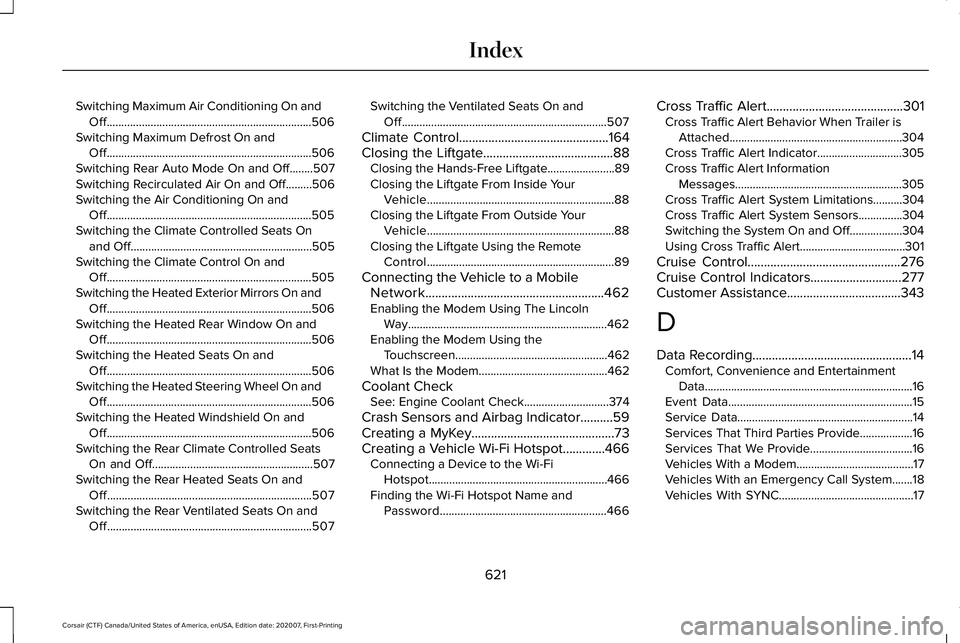
Switching Maximum Air Conditioning On and
Off......................................................................506
Switching Maximum Defrost On and Off......................................................................506
Switching Rear Auto Mode On and Off........507
Switching Recirculated Air On and Off.........506
Switching the Air Conditioning On and Off......................................................................505
Switching the Climate Controlled Seats On and Off..............................................................505
Switching the Climate Control On and Off......................................................................505
Switching the Heated Exterior Mirrors On and Off......................................................................506
Switching the Heated Rear Window On and Off......................................................................506
Switching the Heated Seats On and Off......................................................................506
Switching the Heated Steering Wheel On and Off......................................................................506
Switching the Heated Windshield On and Off......................................................................506
Switching the Rear Climate Controlled Seats On and Off.......................................................507
Switching the Rear Heated Seats On and Off......................................................................507
Switching the Rear Ventilated Seats On and Off......................................................................507 Switching the Ventilated Seats On and
Off......................................................................507
Climate Control..............................................164
Closing the Liftgate........................................88
Closing the Hands-Free Liftgate.......................89
Closing the Liftgate From Inside Your
Vehicle................................................................88
Closing the Liftgate From Outside Your Vehicle................................................................88
Closing the Liftgate Using the Remote Control................................................................89
Connecting the Vehicle to a Mobile Network.......................................................462
Enabling the Modem Using The Lincoln Way....................................................................462
Enabling the Modem Using the Touchscreen....................................................462
What Is the Modem............................................462
Coolant Check See: Engine Coolant Check.............................
374
Crash Sensors and Airbag Indicator..........59
Creating a MyKey
............................................73
Creating a Vehicle Wi-Fi Hotspot.............466 Connecting a Device to the Wi-Fi
Hotspot.............................................................466
Finding the Wi-Fi Hotspot Name and Password.........................................................466 Cross Traffic Alert..........................................301
Cross Traffic Alert Behavior When Trailer is
Attached...........................................................304
Cross Traffic Alert Indicator.............................305
Cross Traffic Alert Information Messages.........................................................305
Cross Traffic Alert System Limitations..........304
Cross Traffic Alert System Sensors...............304
Switching the System On and Off..................304
Using Cross Traffic Alert....................................301
Cruise Control
...............................................276
Cruise Control Indicators............................277
Customer Assistance
...................................343
D
Data Recording
.................................................14
Comfort, Convenience and Entertainment
Data.......................................................................16
Event Data...............................................................15
Service Data............................................................14
Services That Third Parties Provide..................16
Services That We Provide...................................
16
Vehicles With a Modem........................................17
Vehicles With an Emergency Call System.......18
Vehicles With SYNC..............................................17
621
Corsair (CTF) Canada/United States of America, enUSA, Edition date: 202007, First-Printing Index
Page 625 of 638
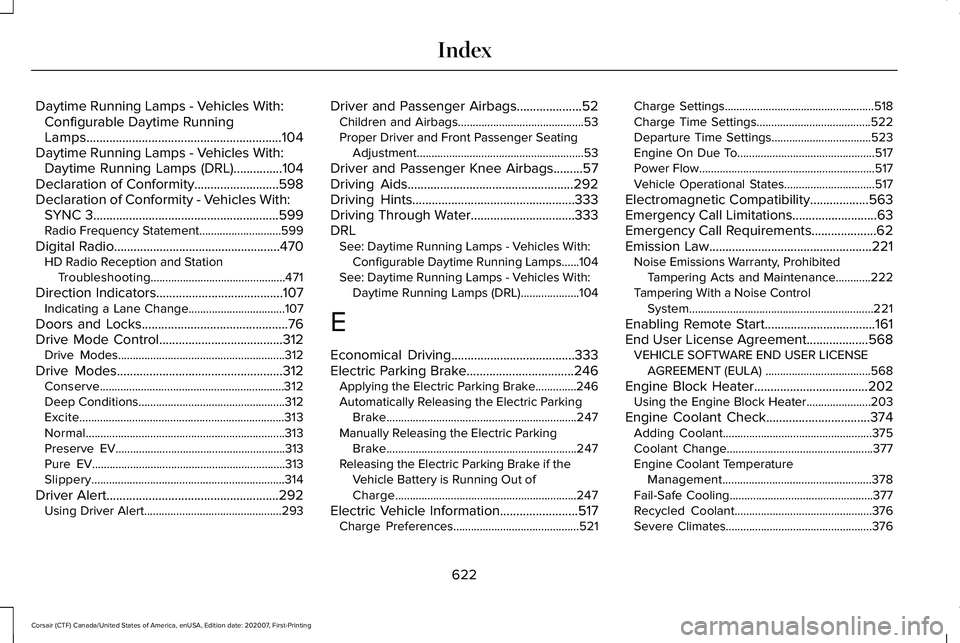
Daytime Running Lamps - Vehicles With:
Configurable Daytime Running
Lamps............................................................104
Daytime Running Lamps - Vehicles With: Daytime Running Lamps (DRL)...............104
Declaration of Conformity..........................598
Declaration of Conformity - Vehicles With: SYNC 3.........................................................599
Radio Frequency Statement............................599
Digital Radio
...................................................470
HD Radio Reception and Station
Troubleshooting..............................................471
Direction Indicators
.......................................107
Indicating a Lane Change.................................107
Doors and Locks.............................................76
Drive Mode Control......................................312 Drive Modes.........................................................312
Drive Modes
...................................................312
Conserve...............................................................312
Deep Conditions..................................................312
Excite......................................................................313
Normal
....................................................................313
Preserve EV..........................................................313
Pure EV..................................................................313
Slippery..................................................................314
Driver Alert
.....................................................292
Using Driver Alert...............................................293 Driver and Passenger Airbags....................52
Children and Airbags...........................................53
Proper Driver and Front Passenger Seating
Adjustment.........................................................53
Driver and Passenger Knee Airbags.........57
Driving Aids...................................................292
Driving Hints
..................................................333
Driving Through Water................................333
DRL See: Daytime Running Lamps - Vehicles With:
Configurable Daytime Running Lamps......104
See: Daytime Running Lamps - Vehicles With: Daytime Running Lamps (DRL)....................
104
E
Economical Driving
......................................333
Electric Parking Brake.................................246 Applying the Electric Parking Brake..............246
Automatically Releasing the Electric Parking
Brake.................................................................247
Manually Releasing the Electric Parking Brake.................................................................247
Releasing the Electric Parking Brake if the Vehicle Battery is Running Out of
Charge..............................................................247
Electric Vehicle Information........................517 Charge Preferences...........................................521 Charge Settings...................................................518
Charge Time Settings.......................................522
Departure Time Settings..................................
523
Engine On Due To...............................................517
Power Flow............................................................517
Vehicle Operational States...............................517
Electromagnetic Compatibility
..................563
Emergency Call Limitations..........................63
Emergency Call Requirements....................62
Emission Law
..................................................221
Noise Emissions Warranty, Prohibited
Tampering Acts and Maintenance............222
Tampering With a Noise Control System...............................................................221
Enabling Remote Start
..................................161
End User License Agreement...................568 VEHICLE SOFTWARE END USER LICENSE
AGREEMENT (EULA) ....................................568
Engine Block Heater
...................................202
Using the Engine Block Heater......................203
Engine Coolant Check................................374 Adding Coolant...................................................375
Coolant Change..................................................377
Engine Coolant Temperature
Management...................................................378
Fail-Safe Cooling.................................................377
Recycled Coolant...............................................376
Severe Climates..................................................376
622
Corsair (CTF) Canada/United States of America, enUSA, Edition date: 202007, First-Printing Index