lock LINCOLN CORSAIR 2022 Manual Online
[x] Cancel search | Manufacturer: LINCOLN, Model Year: 2022, Model line: CORSAIR, Model: LINCOLN CORSAIR 2022Pages: 676, PDF Size: 7.67 MB
Page 291 of 676

Note:
If you switch traction control off, the
side sensing system also turns off.
Note: Some accessories, for example large
trailer hitches or bike or surfboard racks can
cause reduced performance or false alerts.
To reinitialize the system, you may have to
drive your vehicle approximately 10 ft (3 m). The sensor coverage area is up to
24 in
(60 cm) from the side of your vehicle. When the system detects an object within
the coverage area and the driving path of
your vehicle, an audible warning sounds. As
your vehicle moves closer to the object, the
rate of the tone increases.
Note:
The system does not detect an object
that is moving toward the side of your
vehicle, for example another vehicle moving
at low speed, if it does not pass a front or
rear sensor. Object Distance Indicator
(If Equipped) The system provides object distance
indication through the information display.
•
As the distance to the object decreases,
the indicator blocks illuminate and move
toward the vehicle icon.
• If there is no object detected, the
distance indicator blocks are gray.
288
2022 Corsair (CTF) Canada/United States of America, enUSA, Edition date: 202106, First-Printing Parking AidsE190458 E190459
Page 292 of 676
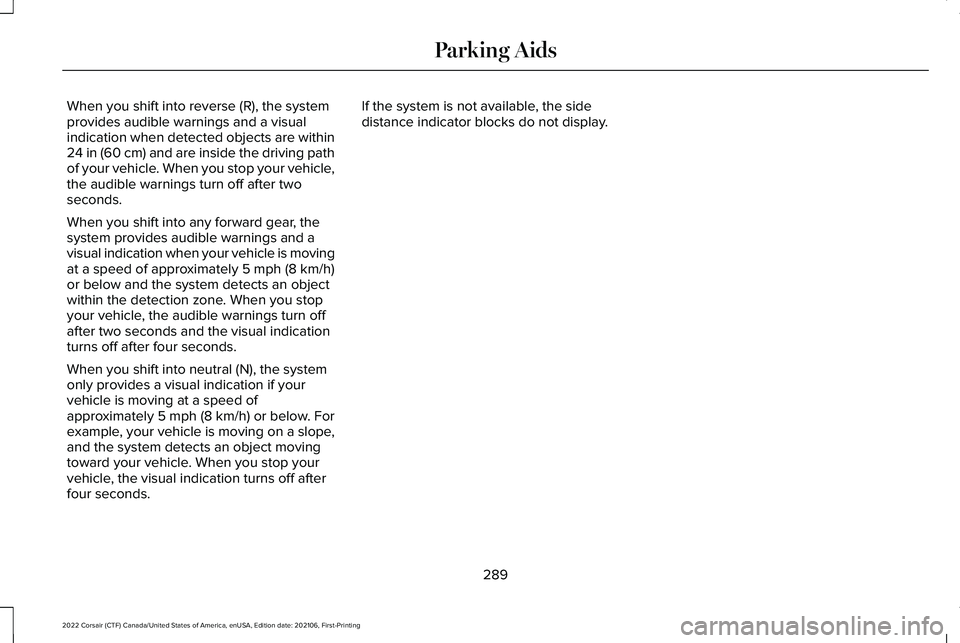
When you shift into reverse (R), the system
provides audible warnings and a visual
indication when detected objects are within
24 in (60 cm) and are inside the driving path
of your vehicle. When you stop your vehicle,
the audible warnings turn off after two
seconds.
When you shift into any forward gear, the
system provides audible warnings and a
visual indication when your vehicle is moving
at a speed of approximately
5 mph (8 km/h)
or below and the system detects an object
within the detection zone. When you stop
your vehicle, the audible warnings turn off
after two seconds and the visual indication
turns off after four seconds.
When you shift into neutral (N), the system
only provides a visual indication if your
vehicle is moving at a speed of
approximately
5 mph (8 km/h) or below. For
example, your vehicle is moving on a slope,
and the system detects an object moving
toward your vehicle. When you stop your
vehicle, the visual indication turns off after
four seconds. If the system is not available, the side
distance indicator blocks do not display.
289
2022 Corsair (CTF) Canada/United States of America, enUSA, Edition date: 202106, First-Printing Parking Aids
Page 302 of 676
ACTIVE PARK ASSIST –
TROUBLESHOOTING
ACTIVE PARK ASSIST – INFORMATION
MESSAGES
Action
Message
The system requiresservice. Have your
vehicle checked as soon as possible.
Active Park Fault
ACTIVE PARK ASSIST – FREQUENTLY
ASKED QUESTIONS
Why does active park assist not operate
correctly? The system is unable to detect a vehicle,
curb or object to park next to or in
between. The system needs boundary
objects to operate correctly.
Why does active park assist not search for
a parking space? You have switched traction control off. Why does active park assist not search for
a parking space?
The transmission is in reverse (R). Your
vehicle must be moving forward to be
able to detect a parking space.
Why does active park assist not offer a
parking space? The sensors could be blocked. For
example, snow, ice or large
accumulations of dirt. Blocked sensors
can affect how the system functions.
Why does active park assist not offer a
parking space? The sensors in the front or rear bumper
could be damaged.
Why does active park assist not offer a
parking space? There is not enough room in the parking
space for your vehicle to safely park.
Why does active park assist not offer a
parking space? There is not enough space for the
parking maneuver on the opposite side
of the parking space. Why does active park assist not offer a
parking space?
The parking space is more than 5 ft
(1.5 m) or less than 2 ft (0.5 m) away from
your vehicle.
Why does active park assist not offer a
parking space? Your vehicle's speed is greater than
22 mph (35 km/h)
for parallel parking or
greater than 19 mph (30 km/h) for
perpendicular parking.
Why does active park assist not offer a
parking space? You recently disconnected or replaced
the battery. After you reconnect the
battery you must drive your vehicle on
a straight road for a short period of time.
Why does active park assist not correctly
position the vehicle into a parking space? An irregular curb along the parking
space prevents the system from
correctly aligning your vehicle.
299
2022 Corsair (CTF) Canada/United States of America, enUSA, Edition date: 202106, First-Printing Active Park Assist
(If Equipped)
Page 309 of 676
WARNING: The system only warns
of vehicles detected by the radar sensor.
In some cases there may be no warning
or a delayed warning. Apply the brakes
when necessary. Failure to follow this
instruction could result in personal injury
or death. WARNING:
The system may not
detect stationary or slow moving vehicles
below
6 mph (10 km/h). WARNING:
The system does not
detect pedestrians or objects in the road. WARNING:
The system does not
detect oncoming vehicles in the same lane. WARNING:
The system may not
operate properly if the sensor is blocked.
Keep the windshield free from obstruction. WARNING:
The sensor may
incorrectly track lane markings as other
structures or objects. This can result in a
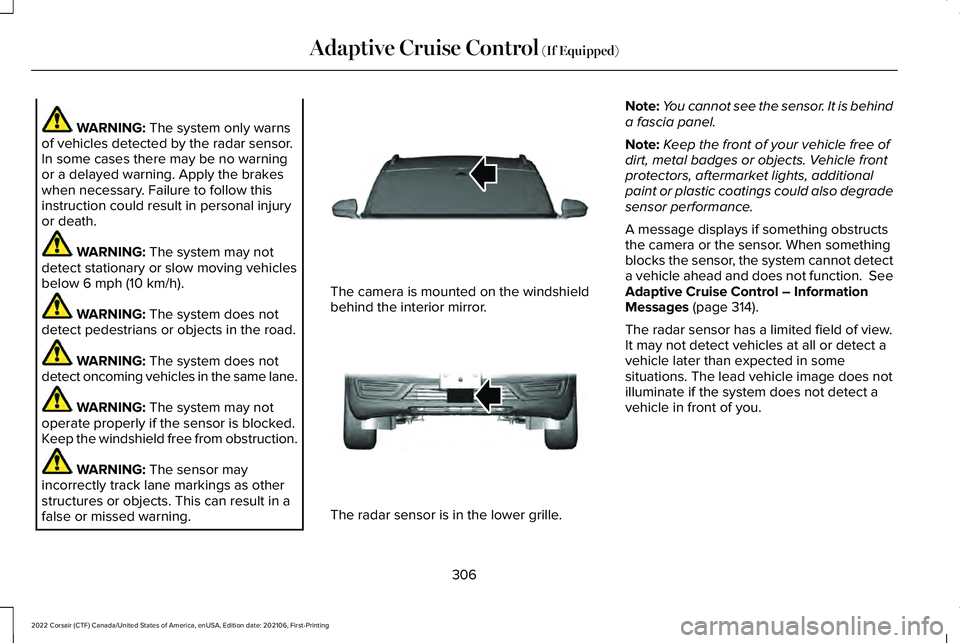
false or missed warning. The camera is mounted on the windshield
behind the interior mirror.
The radar sensor is in the lower grille.Note:
You cannot see the sensor. It is behind
a fascia panel.
Note: Keep the front of your vehicle free of
dirt, metal badges or objects. Vehicle front
protectors, aftermarket lights, additional
paint or plastic coatings could also degrade
sensor performance.
A message displays if something obstructs
the camera or the sensor. When something
blocks the sensor, the system cannot detect
a vehicle ahead and does not function. See
Adaptive Cruise Control – Information
Messages
(page 314).
The radar sensor has a limited field of view.
It may not detect vehicles at all or detect a
vehicle later than expected in some
situations. The lead vehicle image does not
illuminate if the system does not detect a
vehicle in front of you.
306
2022 Corsair (CTF) Canada/United States of America, enUSA, Edition date: 202106, First-Printing Adaptive Cruise Control
(If Equipped)E307893 E307892
Page 310 of 676
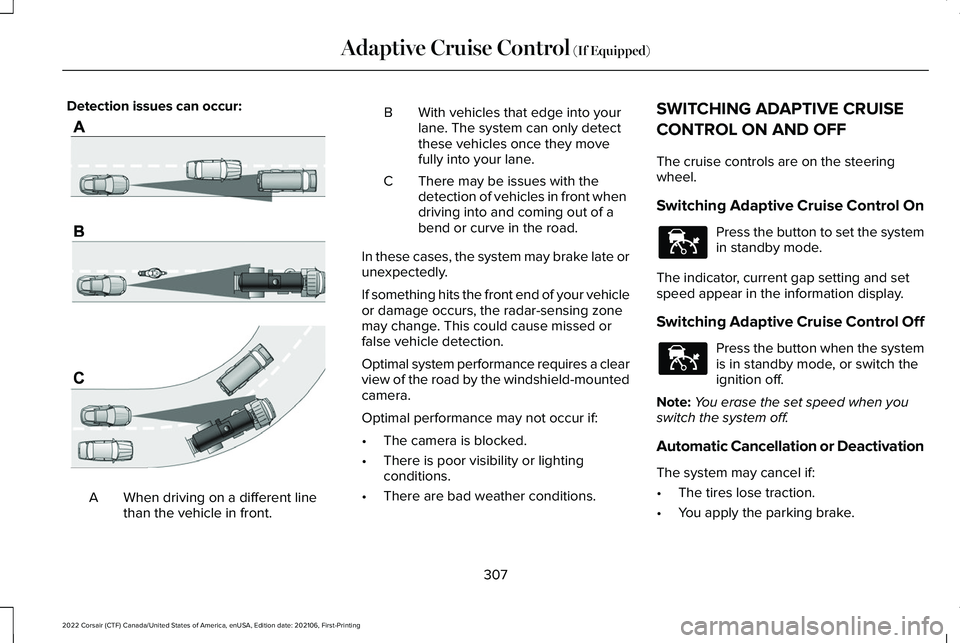
Detection issues can occur:
When driving on a different line
than the vehicle in front.
A B With vehicles that edge into your
lane. The system can only detect
these vehicles once they move
fully into your lane.
There may be issues with the
detection of vehicles in front when
driving into and coming out of a
bend or curve in the road.
C
In these cases, the system may brake late or
unexpectedly.
If something hits the front end of your vehicle
or damage occurs, the radar-sensing zone
may change. This could cause missed or
false vehicle detection.
Optimal system performance requires a clear
view of the road by the windshield-mounted
camera.
Optimal performance may not occur if:
• The camera is blocked.
• There is poor visibility or lighting
conditions.
• There are bad weather conditions. SWITCHING ADAPTIVE CRUISE
CONTROL ON AND OFF
The cruise controls are on the steering
wheel.
Switching Adaptive Cruise Control On
Press the button to set the system
in standby mode.
The indicator, current gap setting and set
speed appear in the information display.
Switching Adaptive Cruise Control Off Press the button when the system
is in standby mode, or switch the
ignition off.
Note: You erase the set speed when you
switch the system off.
Automatic Cancellation or Deactivation
The system may cancel if:
• The tires lose traction.
• You apply the parking brake.
307
2022 Corsair (CTF) Canada/United States of America, enUSA, Edition date: 202106, First-Printing Adaptive Cruise Control (If Equipped)E71621 E144529 E144529
Page 311 of 676
The system may cancel and set the parking
brake if:
•
You unbuckle the seatbelt and open the
driver door after you stop your vehicle.
• Your vehicle is at a stop continuously for
more than three minutes.
The system may turn off or prevent activating
when requested if:
• The vehicle has a blocked sensor.
• The brake temperature is too high.
• There is a failure in the system or a
related system.
SETTING THE ADAPTIVE CRUISE
CONTROL SPEED
Drive to the speed you prefer. Press either button to set the
current speed.
Take your foot off the accelerator pedal. The indicator, current gap setting and set
speed appear in the information display.
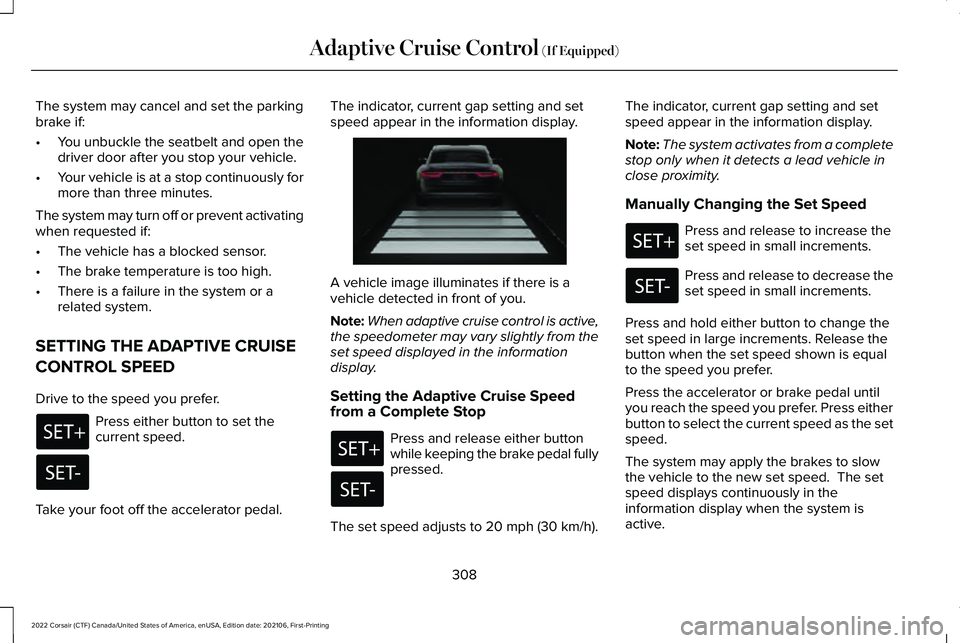
A vehicle image illuminates if there is a
vehicle detected in front of you.
Note:
When adaptive cruise control is active,
the speedometer may vary slightly from the
set speed displayed in the information
display.
Setting the Adaptive Cruise Speed
from a Complete Stop Press and release either button
while keeping the brake pedal fully
pressed.
The set speed adjusts to 20 mph (30 km/h). The indicator, current gap setting and set
speed appear in the information display.
Note:
The system activates from a complete
stop only when it detects a lead vehicle in
close proximity.
Manually Changing the Set Speed Press and release to increase the
set speed in small increments.
Press and release to decrease the
set speed in small increments.
Press and hold either button to change the
set speed in large increments. Release the
button when the set speed shown is equal
to the speed you prefer.
Press the accelerator or brake pedal until
you reach the speed you prefer. Press either
button to select the current speed as the set
speed.
The system may apply the brakes to slow
the vehicle to the new set speed. The set
speed displays continuously in the
information display when the system is
active.
308
2022 Corsair (CTF) Canada/United States of America, enUSA, Edition date: 202106, First-Printing Adaptive Cruise Control (If Equipped) E255686
Page 318 of 676
ADAPTIVE CRUISE CONTROL –
INFORMATION MESSAGES - VEHICLES
WITH: ADAPTIVE CRUISE CONTROL
WITH STOP AND GO
Note:
Depending on your vehicle options
and instrument cluster type, not all messages
display or are available. Note:
The system could abbreviate or
shorten certain messages depending upon
which cluster type you have. Action
Message
A malfunction is preventing the adaptive cruise from engaging.
Adaptive Cruise Malfunction
Front Sensor Not Aligned Contact an authorized dealer to have the radar checked for proper coverage and operation. Conditions exist preventing the system from being available.
Adaptive Cruise Not Available
You have a blocked radar because of poor radar visibility due to inclement weather or ic\
e, mud,or water in front of the radar. You can typically clean the sensor to resolve this.
Adaptive Cruise Not Available Sensor
Blocked See Manual Due to the nature of radar technology, it is possible to get a blockage warning with no actual
block. This happens, for example, when driving in sparse rural or desert environments. A false blocked condition either self clears, or clears after you restart your vehicl\
e.
You have selected normal cruise control. The system does not brake or react to traffic.
Normal Cruise Active Adaptive Braking Off
Displays when the adaptive cruise control is going to cancel and you mus\
t take control.
Adaptive Cruise - Driver Resume Control
Displays when the vehicle speed is too slow to activate the adaptive cru\
ise control and there isno lead vehicle in range.
Adaptive Cruise Speed Too Low to
Activate
315
2022 Corsair (CTF) Canada/United States of America, enUSA, Edition date: 202106, First-Printing Adaptive Cruise Control (If Equipped)
Page 320 of 676
DRIVER ALERT
WARNING: You are responsible for
controlling your vehicle at all times. The
system is designed to be an aid and does
not relieve you of your responsibility to
drive with due care and attention. Failure
to follow this instruction could result in the
loss of control of your vehicle, personal
injury or death. WARNING:
The system may not
function if the sensor is blocked. WARNING: Take regular rest breaks
if you feel tired. Do not wait for the system
to warn you. WARNING:
Certain driving styles may
result in the system warning you even if
you are not feeling tired. WARNING:
In cold and severe
weather conditions the system may not
function. Rain, snow and spray can all limit
sensor performance. WARNING:
The system will not
operate if the sensor cannot track the road
lane markings. WARNING:
If damage occurs in the
immediate area surrounding the sensor,
have your vehicle checked as soon as
possible. WARNING:
The system may not
correctly operate if your vehicle is fitted
with a suspension kit not approved by us.
Note: If enabled in the menu, the system
activates at speeds above 40 mph (64 km/h).
When below the activation speed, the
information display informs the driver that
the system is unavailable.
Note: Keep the windshield free from
obstructions. For example, bird droppings,
insects and snow or ice.
Note: If the camera is blocked or if the
windshield is damaged, the system may not
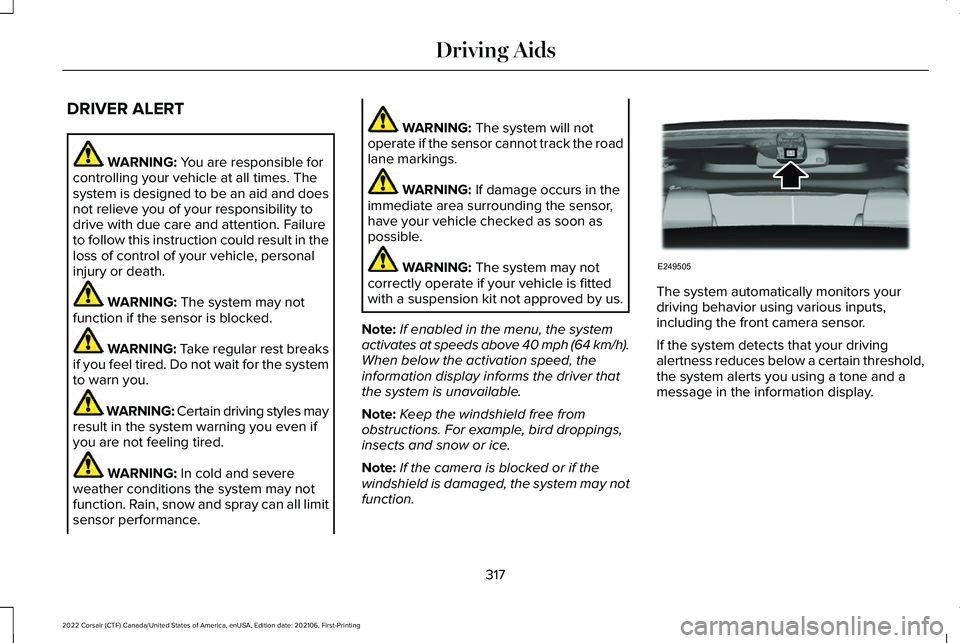
function. The system automatically monitors your
driving behavior using various inputs,
including the front camera sensor.
If the system detects that your driving
alertness reduces below a certain threshold,
the system alerts you using a tone and a
message in the information display.
317
2022 Corsair (CTF) Canada/United States of America, enUSA, Edition date: 202106, First-Printing Driving AidsE249505
Page 322 of 676
WARNING: The system will not
operate if the sensor cannot track the road
lane markings. WARNING:
The sensor may
incorrectly track lane markings as other
structures or objects. This can result in a
false or missed warning. WARNING:
The system may not
operate properly if the sensor is blocked.
Keep the windshield free from obstruction. WARNING:
If damage occurs in the
immediate area surrounding the sensor,
have your vehicle checked as soon as
possible. WARNING:
The system may not
correctly operate if your vehicle is fitted
with a suspension kit not approved by us.
Note: The system works above
40 mph
(64 km/h).
Note: The system works as long as the
camera can detect one lane marking. Note:
When you select aid or alert and aid
mode and the system detects no steering
activity for a short period, the system alerts
you to put your hands on the steering wheel.
The system may detect a light grip or touch
on the steering wheel as hands off driving.
Note: The system may not function with a
blocked camera, or if the windshield is
damaged or dirty. When you switch the system on and it
detects an unintentional drift out of your lane
is likely to occur, the system notifies or
assists you to stay in your lane through the
steering system and information display. In
alert mode, the system provides a warning
by vibrating the steering wheel. In aid mode,
the system provides steering assistance by
gently counter steering your vehicle back
into the lane.
When the system is functioning in the
combined alert and aid mode, the system
first provides steering assistance by gently
counter steering your vehicle back into the
lane, followed by a warning that vibrates the
steering wheel if the vehicle is still out of the
lane markings.
Switching the System On and Off
Note:
Unless the system detects a MyKey,
the system stores the on or off setting, until
manually changed. If the system detects a
MyKey, it defaults to on and the mode sets
to alert.
319
2022 Corsair (CTF) Canada/United States of America, enUSA, Edition date: 202106, First-Printing Driving AidsE249505
Page 324 of 676
If your vehicle stays to one side of the lane
after the lane keeping aid corrects your
vehicle and then subsequently drifts out of
the lane again, the system only provides an
alert at the steering wheel.
Note:
The alert and aid diagrams illustrate
general zone coverage. They do not provide
exact zone parameters.
Intensity: This setting affects the intensity of
the steering wheel vibration used for the alert
and alert and aid modes.
This setting does
not affect the aid mode.
• Low.
• Normal.
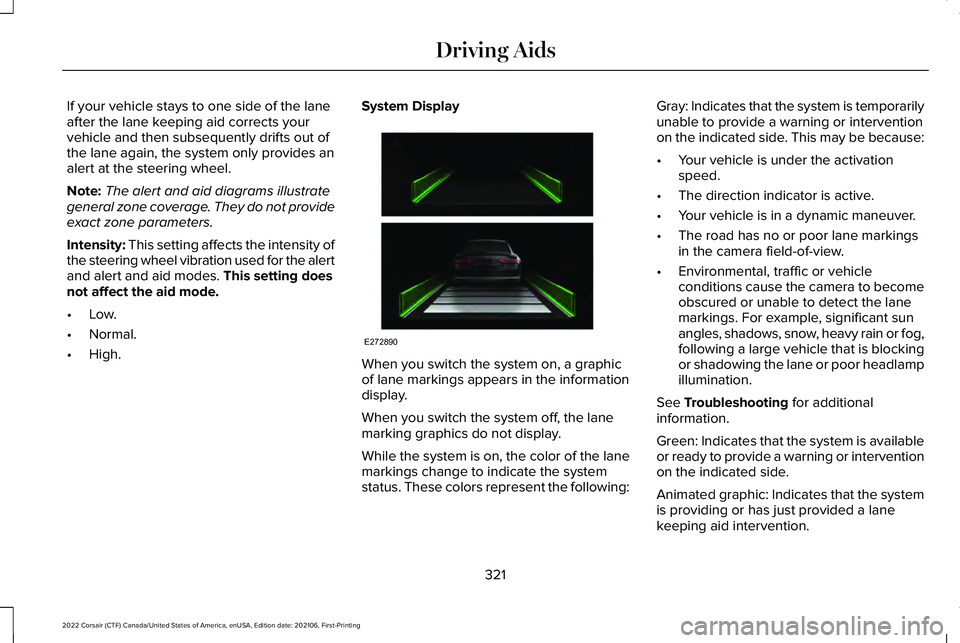
• High. System Display
When you switch the system on, a graphic
of lane markings appears in the information
display.
When you switch the system off, the lane
marking graphics do not display.
While the system is on, the color of the lane
markings change to indicate the system
status. These colors represent the following:Gray: Indicates that the system is temporarily
unable to provide a warning or intervention
on the indicated side. This may be because:
•
Your vehicle is under the activation
speed.
• The direction indicator is active.
• Your vehicle is in a dynamic maneuver.
• The road has no or poor lane markings
in the camera field-of-view.
• Environmental, traffic or vehicle
conditions cause the camera to become
obscured or unable to detect the lane
markings. For example, significant sun
angles, shadows, snow, heavy rain or fog,
following a large vehicle that is blocking
or shadowing the lane or poor headlamp
illumination.
See
Troubleshooting for additional
information.
Green: Indicates that the system is available
or ready to provide a warning or intervention
on the indicated side.
Animated graphic: Indicates that the system
is providing or has just provided a lane
keeping aid intervention.
321
2022 Corsair (CTF) Canada/United States of America, enUSA, Edition date: 202106, First-Printing Driving AidsE272890