lock LINCOLN CORSAIR 2022 Repair Manual
[x] Cancel search | Manufacturer: LINCOLN, Model Year: 2022, Model line: CORSAIR, Model: LINCOLN CORSAIR 2022Pages: 676, PDF Size: 7.67 MB
Page 211 of 676

Vehicles using Phone as a Key
1. Shift into park (P).
2. Press the push button ignition switch.
3. Apply the parking brake.
Note:
This switches off the ignition, all
electrical circuits, warning lamps and
indicators.
Note: If the engine is idling for 30 minutes,
the ignition and engine shut down.
Switching Off Your Vehicle When It Is
Moving WARNING: Switching off the engine
when your vehicle is still moving results in
a significant decrease in braking
assistance. Higher effort is required to
apply the brakes and to stop your vehicle.
A significant decrease in steering
assistance could also occur. The steering
does not lock, but higher effort could be required to steer your vehicle. When you
switch the ignition off, some electrical
circuits, for example airbags, also turn off.
If you unintentionally switch the ignition
off, shift into neutral (N) and restart the
engine.
1. Press and hold the push button ignition switch for one second, or press it three
times within two seconds.
2. Put the transmission into neutral (N) and
use the brakes to bring your vehicle to a
safe stop.
3. When your vehicle has stopped, shift into
park (P).
4. Apply the parking brake.
Vehicles using Phone as a Key
1. Press and hold the push button ignition switch, or press it three times within two
seconds.
2. Put the transmission into neutral (N) and
use the brakes to bring your vehicle to a
safe stop. 3.
When your vehicle has stopped, shift into
park (P).
4. Apply the parking brake.
Guarding Against Exhaust Fumes WARNING: Exhaust leaks may result
in entry of harmful and potentially lethal
fumes into the passenger compartment. If
you smell exhaust fumes inside your
vehicle, have your vehicle inspected
immediately. Do not drive if you smell
exhaust fumes.
Important Ventilating Information
If you stop your vehicle and then leave the
engine idling for long periods of time, we
recommend that you do one of the following:
• Open the windows at least
1 in (3 cm).
• Set your climate control to outside air.
208
2022 Corsair (CTF) Canada/United States of America, enUSA, Edition date: 202106, First-Printing Starting and Stopping the Engine
Page 212 of 676
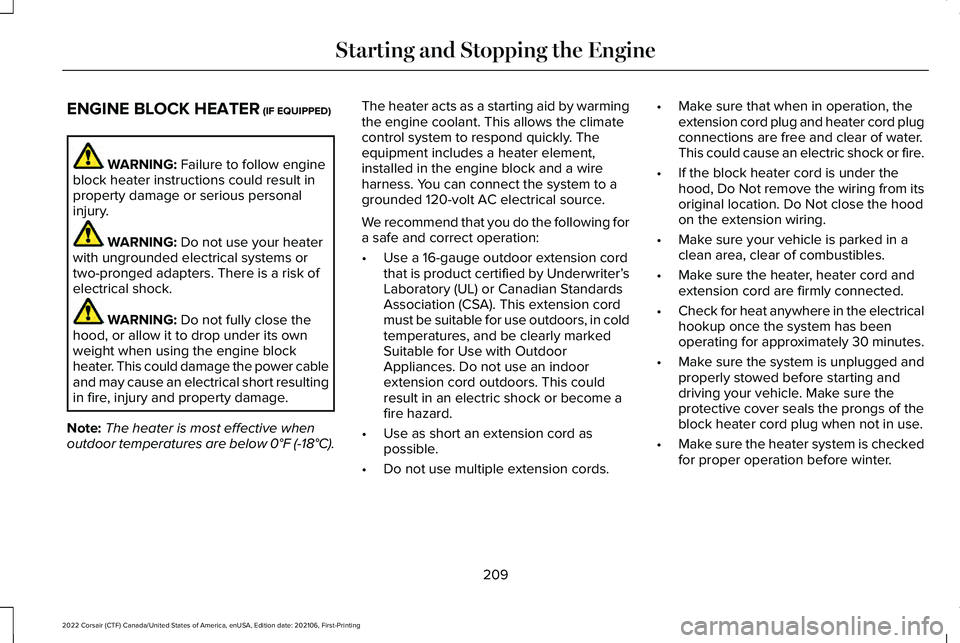
ENGINE BLOCK HEATER (IF EQUIPPED)
WARNING:
Failure to follow engine
block heater instructions could result in
property damage or serious personal
injury. WARNING:
Do not use your heater
with ungrounded electrical systems or
two-pronged adapters. There is a risk of
electrical shock. WARNING:
Do not fully close the
hood, or allow it to drop under its own
weight when using the engine block
heater. This could damage the power cable
and may cause an electrical short resulting
in fire, injury and property damage.
Note: The heater is most effective when
outdoor temperatures are below
0°F (-18°C). The heater acts as a starting aid by warming
the engine coolant. This allows the climate
control system to respond quickly. The
equipment includes a heater element,
installed in the engine block and a wire
harness. You can connect the system to a
grounded 120-volt AC electrical source.
We recommend that you do the following for
a safe and correct operation:
•
Use a 16-gauge outdoor extension cord
that is product certified by Underwriter’ s
Laboratory (UL) or Canadian Standards
Association (CSA). This extension cord
must be suitable for use outdoors, in cold
temperatures, and be clearly marked
Suitable for Use with Outdoor
Appliances. Do not use an indoor
extension cord outdoors. This could
result in an electric shock or become a
fire hazard.
• Use as short an extension cord as
possible.
• Do not use multiple extension cords. •
Make sure that when in operation, the
extension cord plug and heater cord plug
connections are free and clear of water.
This could cause an electric shock or fire.
• If the block heater cord is under the
hood, Do Not remove the wiring from its
original location. Do Not close the hood
on the extension wiring.
• Make sure your vehicle is parked in a
clean area, clear of combustibles.
• Make sure the heater, heater cord and
extension cord are firmly connected.
• Check for heat anywhere in the electrical
hookup once the system has been
operating for approximately 30 minutes.
• Make sure the system is unplugged and
properly stowed before starting and
driving your vehicle. Make sure the
protective cover seals the prongs of the
block heater cord plug when not in use.
• Make sure the heater system is checked
for proper operation before winter.
209
2022 Corsair (CTF) Canada/United States of America, enUSA, Edition date: 202106, First-Printing Starting and Stopping the Engine
Page 213 of 676
Using the Engine Block Heater
Make sure the receptacle terminals are clean
and dry prior to use. Clean them with a dry
cloth if necessary.
The heater uses 0.4 to 1.0 kilowatt-hours of
energy per hour of use. The system does not
have a thermostat. It achieves maximum
temperature after approximately three hours
of operation. Using the heater longer than
three hours does not improve system
performance and unnecessarily uses
electricity.
210
2022 Corsair (CTF) Canada/United States of America, enUSA, Edition date: 202106, First-Printing Starting and Stopping the Engine
Page 244 of 676
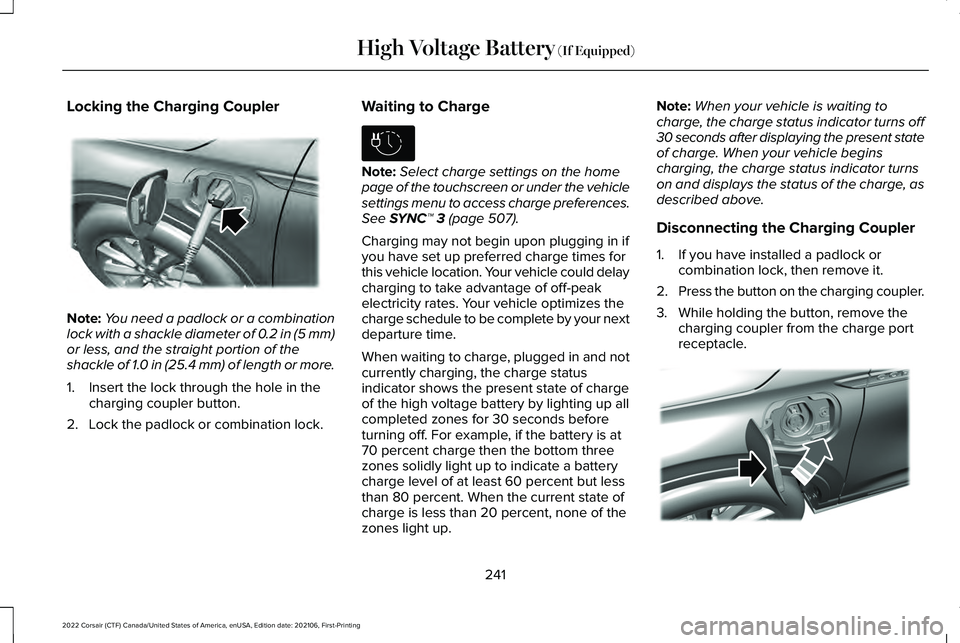
Locking the Charging Coupler
Note:
You need a padlock or a combination
lock with a shackle diameter of 0.2 in (5 mm)
or less, and the straight portion of the
shackle of 1.0 in (25.4 mm) of length or more.
1. Insert the lock through the hole in the charging coupler button.
2. Lock the padlock or combination lock. Waiting to Charge Note:
Select charge settings on the home
page of the touchscreen or under the vehicle
settings menu to access charge preferences.
See SYNC™ 3 (page 507).
Charging may not begin upon plugging in if
you have set up preferred charge times for
this vehicle location. Your vehicle could delay
charging to take advantage of off-peak
electricity rates. Your vehicle optimizes the
charge schedule to be complete by your next
departure time.
When waiting to charge, plugged in and not
currently charging, the charge status
indicator shows the present state of charge
of the high voltage battery by lighting up all
completed zones for 30 seconds before
turning off. For example, if the battery is at
70 percent charge then the bottom three
zones solidly light up to indicate a battery
charge level of at least 60 percent but less
than 80 percent. When the current state of
charge is less than 20 percent, none of the
zones light up. Note:
When your vehicle is waiting to
charge, the charge status indicator turns off
30 seconds after displaying the present state
of charge. When your vehicle begins
charging, the charge status indicator turns
on and displays the status of the charge, as
described above.
Disconnecting the Charging Coupler
1. If you have installed a padlock or combination lock, then remove it.
2. Press the button on the charging coupler.
3. While holding the button, remove the charging coupler from the charge port
receptacle. 241
2022 Corsair (CTF) Canada/United States of America, enUSA, Edition date: 202106, First-Printing High Voltage Battery
(If Equipped)E295451 E306678 E295444
Page 258 of 676
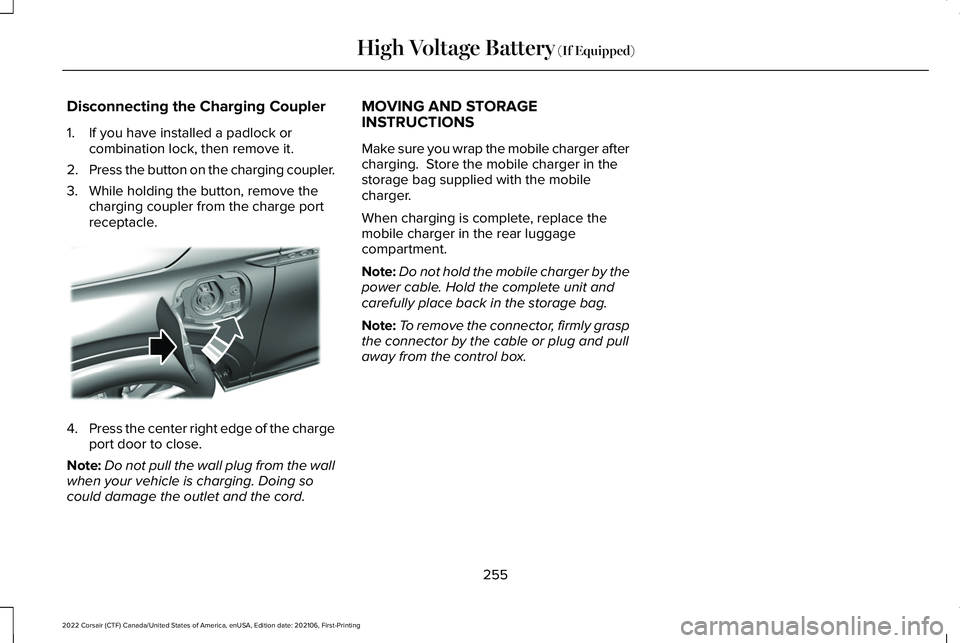
Disconnecting the Charging Coupler
1. If you have installed a padlock or
combination lock, then remove it.
2. Press the button on the charging coupler.
3. While holding the button, remove the charging coupler from the charge port
receptacle. 4.
Press the center right edge of the charge
port door to close.
Note: Do not pull the wall plug from the wall
when your vehicle is charging. Doing so
could damage the outlet and the cord. MOVING AND STORAGE
INSTRUCTIONS
Make sure you wrap the mobile charger after
charging. Store the mobile charger in the
storage bag supplied with the mobile
charger.
When charging is complete, replace the
mobile charger in the rear luggage
compartment.
Note:
Do not hold the mobile charger by the
power cable. Hold the complete unit and
carefully place back in the storage bag.
Note: To remove the connector, firmly grasp
the connector by the cable or plug and pull
away from the control box.
255
2022 Corsair (CTF) Canada/United States of America, enUSA, Edition date: 202106, First-Printing High Voltage Battery (If Equipped)E295444
Page 259 of 676
AUTOMATIC TRANSMISSION -
EXCLUDING: PLUG-IN HYBRID
ELECTRIC VEHICLE (PHEV)
WARNING: Apply the parking brake,
shift into park (P), switch the ignition off
and remove the key before you leave your
vehicle. Failure to follow this instruction
could result in personal injury or death. WARNING: When your vehicle is
stationary, keep the brake pedal fully
pressed when shifting gears. Failure to
follow this instruction could result in
personal injury, death or property damage. WARNING:
Do not apply the brake
pedal and accelerator pedal
simultaneously. Applying both pedals
simultaneously for more than a few
seconds will limit engine performance,
which may result in difficulty maintaining
speed in traffic and could lead to serious
injury. Note:
You may not be able to shift out of
park (P) unless the intelligent access key is
inside your vehicle.
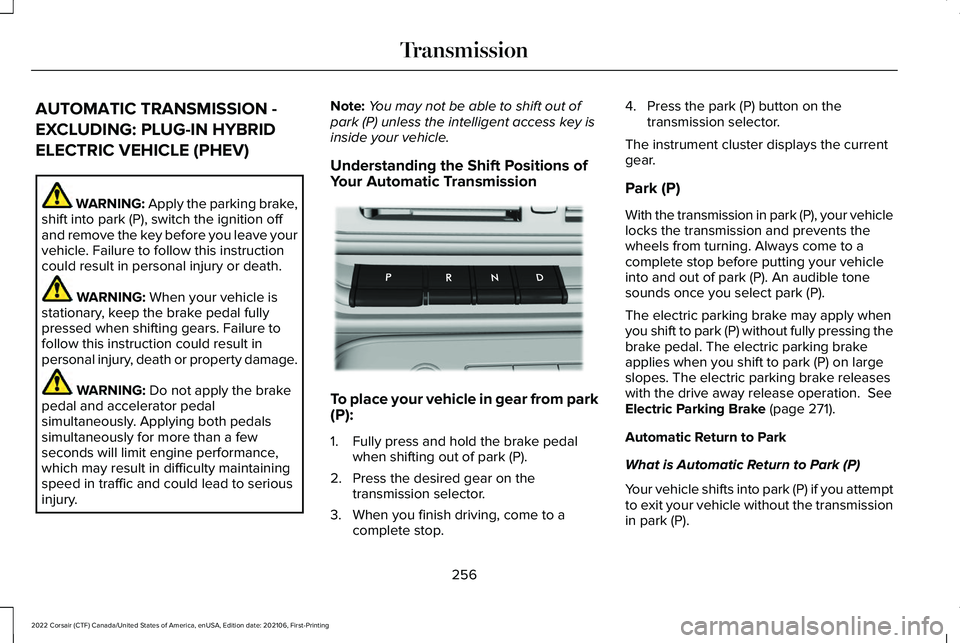
Understanding the Shift Positions of
Your Automatic Transmission To place your vehicle in gear from park
(P):
1. Fully press and hold the brake pedal
when shifting out of park (P).
2. Press the desired gear on the transmission selector.
3. When you finish driving, come to a complete stop. 4. Press the park (P) button on the
transmission selector.
The instrument cluster displays the current
gear.
Park (P)
With the transmission in park (P), your vehicle
locks the transmission and prevents the
wheels from turning. Always come to a
complete stop before putting your vehicle
into and out of park (P). An audible tone
sounds once you select park (P).
The electric parking brake may apply when
you shift to park (P) without fully pressing the
brake pedal. The electric parking brake
applies when you shift to park (P) on large
slopes. The electric parking brake releases
with the drive away release operation. See
Electric Parking Brake (page 271).
Automatic Return to Park
What is Automatic Return to Park (P)
Your vehicle shifts into park (P) if you attempt
to exit your vehicle without the transmission
in park (P).
256
2022 Corsair (CTF) Canada/United States of America, enUSA, Edition date: 202106, First-Printing TransmissionE247220
Page 260 of 676
How Does Automatic Return to Park (P)
Work
Your vehicle shifts into park (P) when your
vehicle is stationary and any of the following
occur:
•
You switch the vehicle off.
• You open the driver door with your
seatbelt unlatched.
• You unlatch the driver seatbelt when the
driver door is open.
Note: Do not use automatic return to park
(P) when your vehicle is moving, except in
an emergency.
Automatic Return to Park (P) Limitations
Automatic return to park (P) may not work if
the door ajar switch is malfunctioning.
See an authorized dealer if any of the
following occur: •
Door ajar indicator does not illuminate
with the driver door open.
• Door ajar indicator illuminates with the
driver door closed.
• Transmission not in park message
appears with the driver door closed, after
you shift out of park (P).
Reverse (R)
With the selector in reverse (R), your vehicle
moves backward. Always come to a
complete stop before shifting into and out
of reverse (R).
Neutral (N) WARNING: In neutral (N) your vehicle
is free to roll.
In neutral (N), power does not transmit to the
driven wheels, but the transmission does not
lock. You can start the engine with the
transmission in this position. Temporary Neutral Mode
What is Temporary Neutral Mode
This mode keeps your vehicle in neutral (N)
when you switch your vehicle off. Use this
mode at an automatic car wash if you exit
your vehicle, or switch your vehicle off.
Note:
Do not tow your vehicle in this mode.
Note: Automatic return to park (P) delays
when your vehicle is in this mode.
Temporary Neutral Mode Limitations
Your vehicle could shift to park (P) after 30
minutes, or when the vehicle battery charge
level is low. Prolonged use of this mode can
cause the vehicle battery to run out of
charge.
Do not tow your vehicle in this mode. Failure
to follow these instructions could result in
vehicle damage not covered by the vehicle
warranty.
Entering Temporary Neutral Mode
1. Power your vehicle on.
2. Bring your vehicle to a complete stop.
257
2022 Corsair (CTF) Canada/United States of America, enUSA, Edition date: 202106, First-Printing Transmission
Page 263 of 676
3. Using a tool or the key blade, carefully
remove the access cover.
Note: Do not pull the tether until you are in
the driver seat.
4. Switch the ignition on.
Note: Do not activate the manual park
release when you start the engine.
5. Once in the driver seat, fully press the brake pedal and hold. Do not release.
Pull the orange tether towards the driver
seat until it locks the tether in the
override position. Then leave the tether.
6. Keep the tether extended while in the override position.
7. If done correctly, a message on the instrument cluster displays Park Not
Available, Transmission Not in Park, or
Shift System Fault.
Note: Your vehicle is now out of the park (P)
position and is free to roll.
8. With your foot still fully applied on the brake pedal, disengage the parking
brake. See Electric Parking Brake (page
271). 9. Switch off the ignition.
10. Disconnect the negative battery cable
from the battery.
Note: If your vehicle detects wheel
movement before you disconnect the
battery, the electric parking brake could
apply.
Returning Your Vehicle to Normal Mode
1. Once it is safe to do so, reconnect the negative, black, battery cable to the
battery.
2. Apply the parking brake.
See Electric
Parking Brake (page 271).
Note: If your vehicle detects wheel
movement, the electric parking brake could
apply.
Note: If the vehicle battery runs out of
charge, use an external power source to
apply the parking brake.
3. Fully apply the brake pedal and hold, do
not release. Pull the orange tether
outward toward the driver seat to remove
it from the override position. 4. The cable releases and retracts back to
its original rest position.
5. Stow the manual park release cable tether back inside the instrument panel
dash hole and install the access cover
by pressing it back in position.
6. With your foot fully applied on the brake
pedal, start your vehicle. Confirm that
your vehicle is in the park (P) position and
that the instrument cluster indicates park
(P).
7. If the instrument cluster is not displaying
the park (P) position or there is a
message stating Park Not Available,
Transmission Not In Park, or Shift System
Fault, apply the parking brake before
exiting your vehicle. Contact an
authorized dealer for service.
260
2022 Corsair (CTF) Canada/United States of America, enUSA, Edition date: 202106, First-Printing Transmission
Page 265 of 676
To place your vehicle in gear from park
(P):
1. Fully press and hold the brake pedal
when shifting out of park (P).
2. Press the desired gear on the transmission selector.
3. When you finish driving, come to a complete stop.
4. Press the park (P) button on the transmission selector.
The instrument cluster displays the current
gear.
Park (P)
With the transmission in park (P), your vehicle
locks the transmission and prevents the
wheels from turning. Always come to a
complete stop before putting your vehicle
into and out of park (P). An audible tone
sounds once you select park (P). The electric parking brake may apply when
you shift to park (P) without fully pressing the
brake pedal. The electric parking brake
applies when you shift to park (P) on large
slopes. The electric parking brake releases
with the drive away release operation. See
Electric Parking Brake (page 271).
Automatic Return to Park
What is Automatic Return to Park (P)
Your vehicle shifts into park (P) if you attempt
to exit your vehicle without the transmission
in park (P).
How Does Automatic Return to Park (P)
Work
Your vehicle shifts into park (P) when your
vehicle is stationary and any of the following
occur:
• You switch the vehicle off.
• You open the driver door with your
seatbelt unlatched.
• You unlatch the driver seatbelt when the
driver door is open. Note:
Do not use automatic return to park
(P) when your vehicle is moving, except in
an emergency.
Automatic Return to Park (P) Limitations
Automatic return to park (P) may not work if
the door ajar switch is malfunctioning.
See an authorized dealer if any of the
following occur:
• Door ajar indicator does not illuminate
with the driver door open.
• Door ajar indicator illuminates with the
driver door closed.
• Transmission not in park message
appears with the driver door closed, after
you shift out of park (P).
Reverse (R)
With the selector in reverse (R), your vehicle
moves backward. Always come to a
complete stop before shifting into and out
of reverse (R).
262
2022 Corsair (CTF) Canada/United States of America, enUSA, Edition date: 202106, First-Printing Transmission
Page 266 of 676
Neutral (N)
WARNING: In neutral (N) your vehicle
is free to roll.
In neutral (N), power does not transmit to the
driven wheels, but the transmission does not
lock. You can start the engine with the
transmission in this position.
Temporary Neutral Mode
What is Temporary Neutral Mode
This mode keeps your vehicle in neutral (N)
when you switch your vehicle off. Use this
mode at an automatic car wash if you exit
your vehicle, or switch your vehicle off.
Note: Do not tow your vehicle in this mode.
Note: Automatic return to park (P) delays
when your vehicle is in this mode. Temporary Neutral Mode Limitations
Your vehicle could shift to park (P) after 30
minutes, or when the vehicle battery charge
level is low. Prolonged use of this mode can
cause the vehicle battery to run out of
charge.
Do not tow your vehicle in this mode. Failure
to follow these instructions could result in
vehicle damage not covered by the vehicle
warranty.
Entering Temporary Neutral Mode
1. Power your vehicle on.
2. Bring your vehicle to a complete stop.
3. Press and hold the brake pedal.
4. Press the neutral (N) button.
Note:
A confirmation message appears
when your vehicle enters the mode.
5. Release the brake pedal.
Note: Your vehicle is free to roll.
6. Switch your vehicle off.
Note: Do not tow your vehicle in this mode. Note:
The neutral (N) indicator on the
transmission selector may flash in this mode.
Exiting Temporary Neutral Mode
1. Press the brake pedal.
2. Shift into park (P), or power your vehicle on and shift into drive (D), or reverse (R).
Drive (D)
Drive (D) is the normal driving position for
the best fuel economy.
Transmission Not in Park (P) Audible
Warning
Sounds if you open the driver door before
shifting into park (P).
Park Selection Audible Warning
Sounds when you shift into park (P).
263
2022 Corsair (CTF) Canada/United States of America, enUSA, Edition date: 202106, First-Printing Transmission