lock LINCOLN CORSAIR 2022 Owners Manual
[x] Cancel search | Manufacturer: LINCOLN, Model Year: 2022, Model line: CORSAIR, Model: LINCOLN CORSAIR 2022Pages: 676, PDF Size: 7.67 MB
Page 325 of 676
Red: Indicates that the system is providing
or has just provided a lane keeping alert
warning.
The system can temporarily suppress itself
at any time by the following:
•
Quick braking.
• Fast acceleration. •
Using the direction indicator.
• Evasive steering maneuver.
• Driving too close to the lane markings.
Troubleshooting Why is the feature not available (line markings are gray) when I can s\
ee the lane markings on the road?
Your vehicle speed is outside the operational range of the feature.
The sun is shining directly into the camera lens.
A quick intentional lane change has occurred.
Your vehicle stays too close to the lane markings.
Driving at high speeds in curves.
The last alert warning or aid intervention occurred a short time ago.
Ambiguous lane markings, for example, in construction zones.
Rapid transition from light to dark, or from dark to light.
Sudden offset in lane markings.
ABS or AdvanceTrac ™ is active.
There is a camera blockage due to dirt, grime, fog, frost or water on the windshield.
322
2022 Corsair (CTF) Canada/United States of America, enUSA, Edition date: 202106, First-Printing Driving Aids
Page 328 of 676
System Lights and Messages
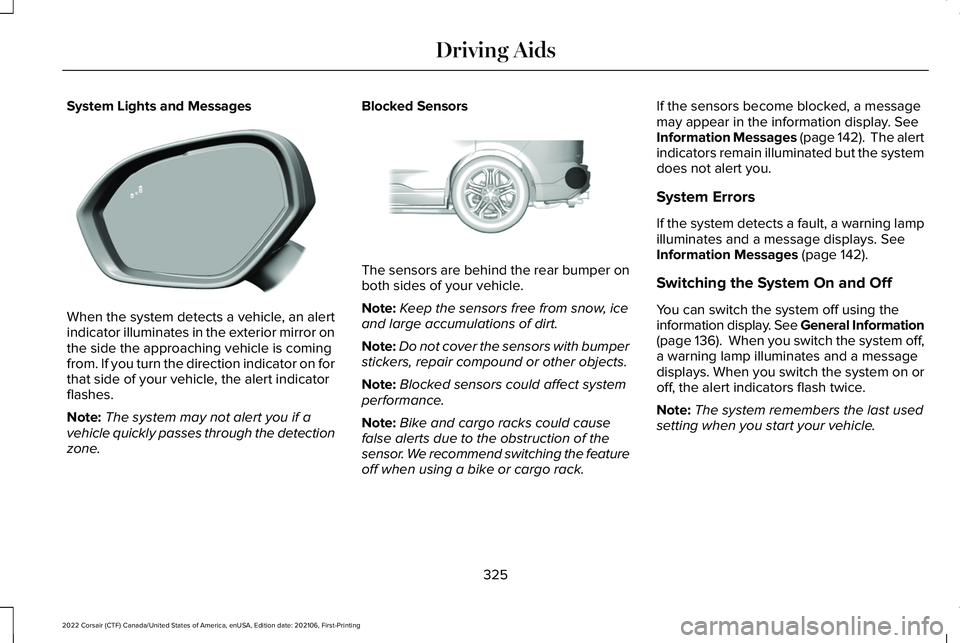
When the system detects a vehicle, an alert
indicator illuminates in the exterior mirror on
the side the approaching vehicle is coming
from. If you turn the direction indicator on for
that side of your vehicle, the alert indicator
flashes.
Note:
The system may not alert you if a
vehicle quickly passes through the detection
zone. Blocked Sensors
The sensors are behind the rear bumper on
both sides of your vehicle.
Note:
Keep the sensors free from snow, ice
and large accumulations of dirt.
Note: Do not cover the sensors with bumper
stickers, repair compound or other objects.
Note: Blocked sensors could affect system
performance.
Note: Bike and cargo racks could cause
false alerts due to the obstruction of the
sensor. We recommend switching the feature
off when using a bike or cargo rack. If the sensors become blocked, a message
may appear in the information display. See
Information Messages (page 142). The alert
indicators remain illuminated but the system
does not alert you.
System Errors
If the system detects a fault, a warning lamp
illuminates and a message displays.
See
Information Messages (page 142).
Switching the System On and Off
You can switch the system off using the
information display. See General Information
(page
136). When you switch the system off,
a warning lamp illuminates and a message
displays. When you switch the system on or
off, the alert indicators flash twice.
Note: The system remembers the last used
setting when you start your vehicle.
325
2022 Corsair (CTF) Canada/United States of America, enUSA, Edition date: 202106, First-Printing Driving AidsE309221 E205199
Page 331 of 676
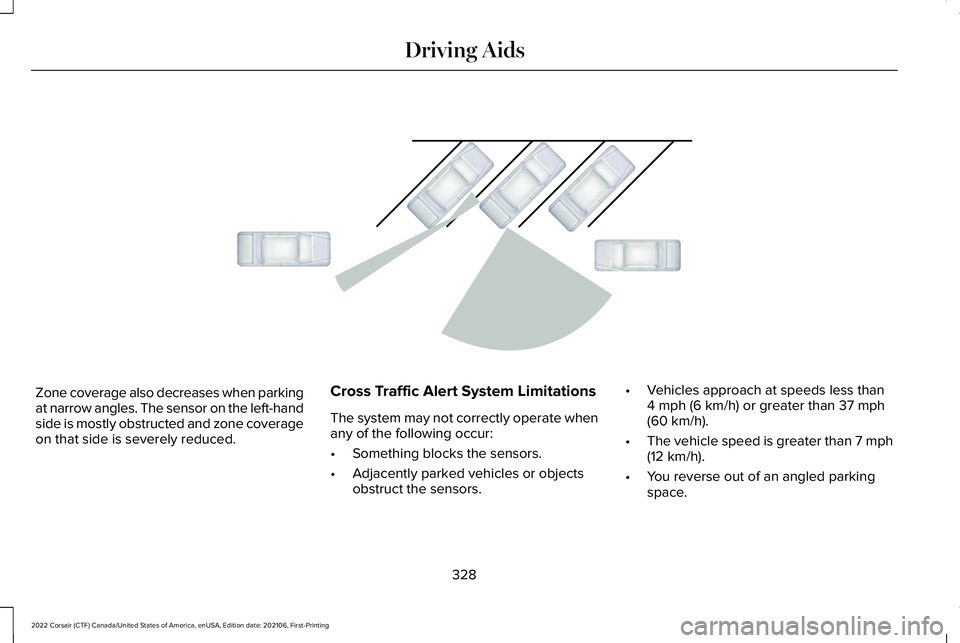
Zone coverage also decreases when parking
at narrow angles. The sensor on the left-hand
side is mostly obstructed and zone coverage
on that side is severely reduced.
Cross Traffic Alert System Limitations
The system may not correctly operate when
any of the following occur:
•
Something blocks the sensors.
• Adjacently parked vehicles or objects
obstruct the sensors. •
Vehicles approach at speeds less than
4 mph (6 km/h) or greater than 37 mph
(60 km/h).
• The vehicle speed is greater than 7 mph
(12 km/h)
.
• You reverse out of an angled parking
space.
328
2022 Corsair (CTF) Canada/United States of America, enUSA, Edition date: 202106, First-Printing Driving AidsE142441
Page 332 of 676
Switching the System On and Off
To switch the system on or off, adjust the
settings using the touchscreen. See Settings
(page 555).
Note: The system turns on every time you
switch the ignition on. To permanently switch
the system off, contact an authorized dealer.
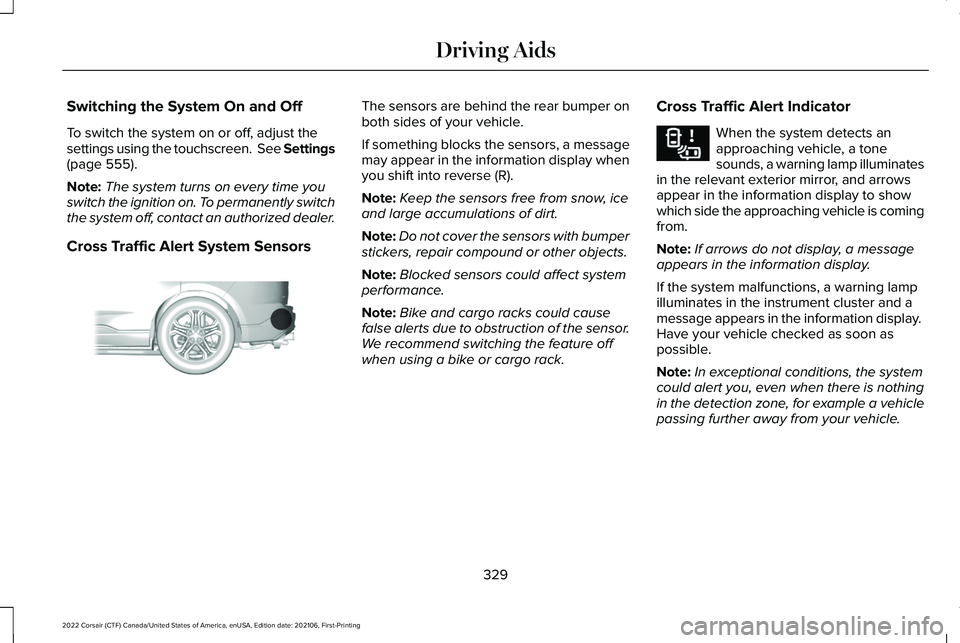
Cross Traffic Alert System Sensors The sensors are behind the rear bumper on
both sides of your vehicle.
If something blocks the sensors, a message
may appear in the information display when
you shift into reverse (R).
Note:
Keep the sensors free from snow, ice
and large accumulations of dirt.
Note: Do not cover the sensors with bumper
stickers, repair compound or other objects.
Note: Blocked sensors could affect system
performance.
Note: Bike and cargo racks could cause
false alerts due to obstruction of the sensor.
We recommend switching the feature off
when using a bike or cargo rack. Cross Traffic Alert Indicator When the system detects an
approaching vehicle, a tone
sounds, a warning lamp illuminates
in the relevant exterior mirror, and arrows
appear in the information display to show
which side the approaching vehicle is coming
from.
Note: If arrows do not display, a message
appears in the information display.
If the system malfunctions, a warning lamp
illuminates in the instrument cluster and a
message appears in the information display.
Have your vehicle checked as soon as
possible.
Note: In exceptional conditions, the system
could alert you, even when there is nothing
in the detection zone, for example a vehicle
passing further away from your vehicle.
329
2022 Corsair (CTF) Canada/United States of America, enUSA, Edition date: 202106, First-Printing Driving AidsE205199 E268294
Page 333 of 676
Cross Traffic Alert Information Messages
Action
Message
Displays instead of indication arrows when the system detects a vehicle. Check for approaching
traffic.
Cross Traffic Alert
Indicates blocked cross traffic alert system sensors. Clean the sensors. If the message\
continues
to appear, have your vehicle checked as soon as possible.
Cross Traffic Not Available Sensor
Blocked See Manual
The system has malfunctioned. Have your vehicle checked as soon as possible.
Cross Traffic System Fault
Displays if you attach a trailer to your vehicle.
Cross Traffic Alert Deactivated Trailer
Attached
STEERING
Electric Power Steering WARNING: The electric power
steering system has diagnostic checks that
continuously monitor the system. If a fault
is detected, a message displays in the
information display. Stop your vehicle as
soon as it is safe to do so. Switch the ignition off. After at least 10 seconds,
switch the ignition on and watch the
information display for a steering system
warning message. If a steering system
warning message returns, have the system
checked as soon as possible.
WARNING: If the system detects an
error, you may not feel a difference in the
steering, however a serious condition may
exist. Have your vehicle checked as soon
as possible. Failure to do so may result in
loss of steering control. Your vehicle is equipped with an electric
power-assisted steering system. There is no
fluid reservoir to check or fill.
If your vehicle loses electrical power while
you are driving (or if the ignition is turned
off ), you can steer the vehicle manually, but
it takes more effort. You must adapt your
speed and driving behavior to reduced
steering assist. Extreme continuous steering
may increase the effort it takes for you to
steer. This occurs to prevent internal
overheating and permanent damage to your
steering system. If this should occur, you will
330
2022 Corsair (CTF) Canada/United States of America, enUSA, Edition date: 202106, First-Printing Driving Aids
Page 338 of 676
•
If required, switch active braking on or
off.
• If required, switch evasive steering assist
on or off.
See Settings (page 555).
Note: Active braking and evasive steering
assist turn on every time you switch the
ignition on.
Note: If you switch active braking off, evasive
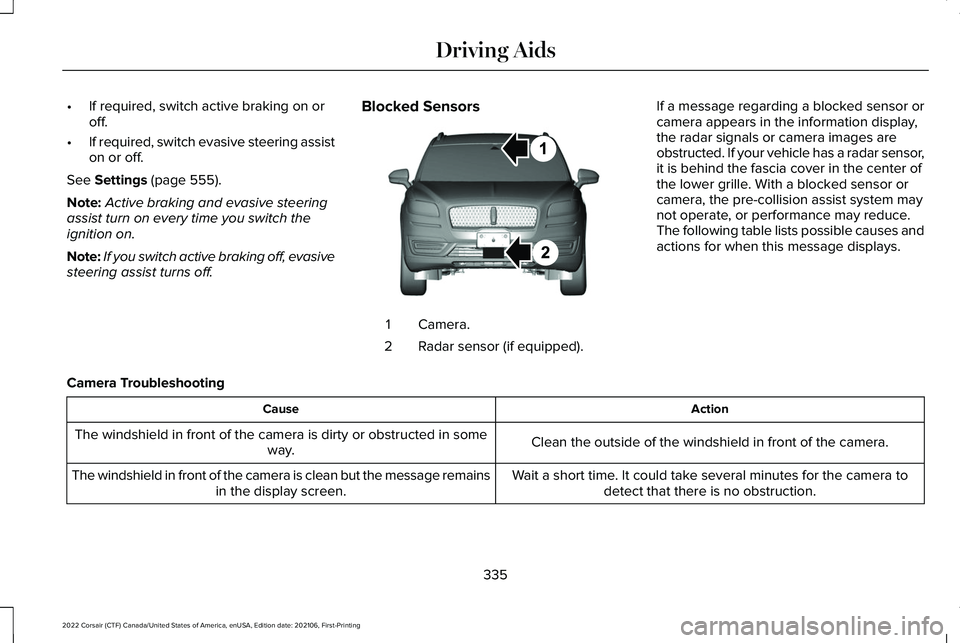
steering assist turns off. Blocked Sensors Camera.
1
Radar sensor (if equipped).
2 If a message regarding a blocked sensor or
camera appears in the information display,
the radar signals or camera images are
obstructed. If your vehicle has a radar sensor,
it is behind the fascia cover in the center of
the lower grille. With a blocked sensor or
camera, the pre-collision assist system may
not operate, or performance may reduce.
The following table lists possible causes and
actions for when this message displays.
Camera Troubleshooting Action
Cause
Clean the outside of the windshield in front of the camera.
The windshield in front of the camera is dirty or obstructed in some
way.
Wait a short time. It could take several minutes for the camera todetect that there is no obstruction.
The windshield in front of the camera is clean but the message remains
in the display screen.
335
2022 Corsair (CTF) Canada/United States of America, enUSA, Edition date: 202106, First-Printing Driving AidsE268024
Page 343 of 676
WHAT IS SPEED SIGN
RECOGNITION
Speed sign recognition detects speed limit
signs to inform you of the current speed limit.
Detected speed signs appear in the
information display.
HOW DOES SPEED SIGN
RECOGNITION WORK
Speed sign recognition uses a sensor behind
the interior mirror to detect speed signs.
If your vehicle has speed sign recognition
with navigation, stored speed sign data may
influence the indicated speed limit value.
SPEED SIGN RECOGNITION
PRECAUTIONS WARNING: You are responsible for
controlling your vehicle at all times. The
system is designed to be an aid and does
not relieve you of your responsibility to
drive with due care and attention. Failure
to follow this instruction could result in the
loss of control of your vehicle, personal
injury or death. WARNING:
In cold and severe
weather conditions the system may not
function. Rain, snow and spray can all limit
sensor performance. WARNING:
The system may not
operate properly if the sensor is blocked.
Keep the windshield free from obstruction.
Note: Do not carry out windshield repairs in
the immediate area surrounding the sensor.
Note: If your vehicle has a suspension kit
not approved by us, the system may not
correctly function. Note:
The system may not detect all speed
signs and may incorrectly read signs.
Note: Always fit our original parts when
replacing headlamp bulbs. Other bulbs may
reduce system performance.
SPEED SIGN RECOGNITION
LIMITATIONS
Speed sign recognition may not operate
correctly due to:
• Outdated map data.
• Incorrect recognition of speed limits by
the sensor of signs on parallel roads or
exit ramps.
• Missed recognition of faded, dirty, or
distorted signs.
340
2022 Corsair (CTF) Canada/United States of America, enUSA, Edition date: 202106, First-Printing Speed Sign Recognition
(If Equipped)
Page 358 of 676
Note:
Reconnect the wiring to the trailer
after removing the trailer from the water.
When backing down a ramp during boat
launching or retrieval:
• Do not allow the static water level to rise
above the bottom edge of the rear
bumper.
• Do not allow waves to break higher than
6 in (15 cm)
above the bottom edge of
the rear bumper.
Exceeding these limits may allow water to
enter vehicle components:
• Causing internal damage to the
components.
• Affecting driveability, emissions, and
reliability.
Replace the rear axle lubricant anytime you
submerge the rear axle in water. Water may
contaminate the rear axle lubricant, which is
not a normal maintenance inspection item
unless there is a possibility of a leak or other
axle repair is required. TOWING THE VEHICLE ON FOUR
WHEELS - GASOLINE, 8-SPEED
AUTOMATIC TRANSMISSION –
8F35/8F40
Emergency Towing
WARNING: If your vehicle has a
steering wheel lock make sure the ignition
is in the accessory or on position when
being towed.
If your vehicle becomes inoperable without
access to wheel dollies or a vehicle transport
trailer, it can be flat-towed with all wheels on
the ground, regardless of the powertrain and
transmission configuration, under the
following conditions:
• Your vehicle is facing forward for towing
in a forward direction.
• Refer to the Manual Park Release
procedure. See Automatic Transmission
(page
256). Failing to do so could result
in damage to the transmission. •
Maximum speed is
35 mph (56 km/h).
• Maximum distance is
50 mi (80 km).
Note: If you are unsure of the vehicle ’s
configuration, contact an authorized dealer.
Recreational Towing - Front-Wheel
Drive Vehicles
(If Equipped)
You cannot recreational tow your vehicle
with all wheels on the ground because
vehicle or transmission damage could occur.
Place the front wheels on a two-wheel tow
dolly. If you are using a tow dolly, follow the
instructions specified by the equipment
provider.
Recreational Towing - Rear-Wheel
Drive Vehicles
(If Equipped)
You cannot recreational tow your vehicle
with all wheels on the ground because
vehicle or transmission damage could occur.
We recommend towing your vehicle with all
four wheels off the ground, such as when
using a car-hauling trailer. Otherwise, you
cannot recreational tow your vehicle.
355
2022 Corsair (CTF) Canada/United States of America, enUSA, Edition date: 202106, First-Printing Towing
Page 364 of 676
To install floor mats that have eyelets,
position the floor mat eyelet over the
retention post and press down to lock in
position. Repeat for all eyelets on the floor
mat.
To remove the floor mats, reverse the
installation procedure.
Note:
Regularly check the floor mats to make
sure they are secure.
361
2022 Corsair (CTF) Canada/United States of America, enUSA, Edition date: 202106, First-Printing Driving Hints
Page 365 of 676
ROADSIDE ASSISTANCE
Vehicles sold in the United States:
Getting Roadside Assistance
To fully assist you should you have a vehicle
concern, Lincoln offers a complimentary
roadside assistance program. This program
is separate from the New Vehicle Limited
Warranty.
The service is available:
•
Throughout the life of the vehicle for
original owners.
• For six years or 70,000 mi (110,000 km)
(whichever comes first) for subsequent
owners.
Roadside Assistance covers:
• A flat tire change with a good spare
(except vehicles supplied with a tire
inflation kit).
• Battery jump start.
• Lock-out assistance (key replacement
cost is the client's responsibility). •
Fuel delivery — independent service
contractors, if not prohibited by state,
local or municipal law shall deliver up to
2 gal (8 L)
of gasoline fuel to a disabled
vehicle. Roadside Assistance limits fuel
delivery service to two no-charge
occurrences within a 12-month period.
• Winch out — available within 100 ft (30 m)
of a paved or county maintained road,
no recoveries. •
Towing — independent service
contractors, if not prohibited by state,
local or municipal law shall tow Lincoln
eligible vehicles to the client's selling or
preferred dealer within 100 mi (160 km)
of the disablement location or to the
nearest Lincoln dealer. If a client requests
a tow to a selling or preferred dealer that
is more than
100 mi (160 km) from the
disablement location, the client is
responsible for any mileage costs in
excess of
100 mi (160 km).
• Roadside Assistance includes up to $200
for a towed trailer if the disabled eligible
vehicle requires service at the nearest
authorized dealer. If the towing vehicle
is operational but the trailer is not, then
the trailer does not qualify for any
roadside services.
Vehicles Sold in the United States:
Using Roadside Assistance
United States clients who require roadside
assistance, call 1-800-521-4140 or contact
Roadside Assistance using the Lincoln Way
mobile app.
362
2022 Corsair (CTF) Canada/United States of America, enUSA, Edition date: 202106, First-Printing Roadside Emergencies