battery LINCOLN CORSAIR 2022 Owners Manual
[x] Cancel search | Manufacturer: LINCOLN, Model Year: 2022, Model line: CORSAIR, Model: LINCOLN CORSAIR 2022Pages: 676, PDF Size: 7.67 MB
Page 2 of 676

The information contained in this publication was correct at the time of\
going to print. In the interest of continuous development, we reserve \
the right to change specifications,
design or equipment at any time without notice or obligation. No part o\
f this publication may be reproduced, transmitted, stored in a retrieval\
system or translated into any language
in any form by any means without our written permission. Errors and omi\
ssions excepted.
© Ford Motor Company 2021
All rights reserved.
Part Number: 202106 20210914162101
California Proposition 65
WARNING: Operating, servicing and maintaining a passenger vehicle or off-highway \
motor
vehicle can expose you to chemicals including engine exhaust, carbon mon\
oxide, phthalates,
and lead, which are known to the State of California to cause cancer and birth defects or other
reproductive harm. To minimize exposure, avoid breathing exhaust, do not idle the engine except
as necessary, service your vehicle in a well-ventilated area and wear gloves or wash\
your hands
frequently when servicing your vehicle. For more information go to
www.P65Warnings.ca.gov/passenger-vehicle. WARNING:
Battery posts, terminals and related accessories contain lead and lead
compounds, chemicals known to the State of California to cause cancer and reproductive harm.
Wash your hands after handling
.
Page 8 of 676
Plug-In Hybrid Vehicle Operation - Plug-In
Hybrid Electric Vehicle (PHEV) .............215
Hybrid Vehicle Frequently Asked Questions ..................................................
216
Fuel and Refueling
Safety Precautions .......................................
218
Fuel Quality - Gasoline ...............................
219
Fuel Quality - Plug-In Hybrid Electric Vehicle (PHEV) ........................................
220
Fuel Filler Funnel Location .......................
220
Running Out of Fuel ....................................
221
Refueling - Plug-In Hybrid Electric Vehicle (PHEV) ........................................................
222
Refueling - Gasoline ...................................
226
Fuel Consumption ......................................
229
Engine Emission Control
Emission Law .................................................
231
Catalytic Converter .....................................
232
High Voltage Battery
General Information ....................................
235
Charging the High Voltage Battery ........
235Transmission
Automatic Transmission - Excluding:
Plug-In Hybrid Electric Vehicle (PHEV)
......................................................................
256
Automatic Transmission - Plug-In Hybrid Electric Vehicle (PHEV) ...........................
261
All-Wheel Drive
Using All-Wheel Drive ................................
265
Brakes
General Information ....................................
270
Hints on Driving With Anti-Lock Brakes .......................................................................
271
Electric Parking Brake .................................
271
Hill Start Assist .............................................
273
Auto Hold ......................................................
274
Reverse Braking Assist
What Is Reverse Braking Assist ...............
276
Reverse Braking Assist Precautions ......
276
Switching Reverse Braking Assist On and Off ................................................................
277
Overriding Reverse Braking Assist .........
277Reverse Braking Assist Indicators
...........
277
Reverse Braking Assist – Troubleshooting ......................................................................
278
Traction Control
Principle of Operation ................................
280
Using Traction Control ...............................
280
Stability Control
Principle of Operation .................................
281
Using Stability Control ...............................
282
Parking Aids
Principle of Operation ................................
283
Rear Parking Aid ..........................................
283
Front Parking Aid ........................................
285
Side Sensing System ..................................
287
Rear View Camera
What Is the Rear View Camera ...............
290
Rear View Camera Precautions ..............
290
Locating the Rear View Camera .............
290
Rear View Camera Guide Lines ..............
290
5
2022 Corsair (CTF) Canada/United States of America, enUSA, Edition date: 202106, First-Printing Table of Contents
Page 11 of 676
The Better Business Bureau (BBB) Auto
Line Program (U.S. Only) ........................371
Utilizing the Mediation/Arbitration Program (Canada Only) ..........................................
372
Getting Assistance Outside the U.S. and Canada .......................................................
373
Ordering Additional Owner's Literature ......................................................................
375
Reporting Safety Defects (U.S. Only) ......
376
Reporting Safety Defects (Canada Only) ......................................................................
376
Fuses
Fuse Specification Chart ...........................
378
Changing a Fuse .........................................
389
Maintenance
General Information .....................................
391
Opening and Closing the Hood ...............
391
Under Hood Overview - 2.0L/2.3L .........
393
Under Hood Overview - Plug-In Hybrid Electric Vehicle (PHEV) ..........................
395
Engine Oil Dipstick .....................................
396
Engine Oil Check ........................................
396Oil Change Indicator Reset
.......................
397
Changing the Engine Air Filter - 2.0L/2.3L ......................................................................
397
Changing the Engine Air Filter - 2.5L, Plug-In Hybrid Electric Vehicle (PHEV)
......................................................................
399
Engine Coolant Check ...............................
400
Automatic Transmission Fluid Check ......
404
Brake Fluid Check ......................................
405
Power Steering Fluid Check ....................
406
Changing the 12V Battery .........................
406
Adjusting the Headlamps .........................
409
Washer Fluid Check ....................................
410
Fuel Filter .......................................................
410
Checking the Wiper Blades .......................
410
Changing the Wiper Blades .......................
411
Removing a Headlamp ...............................
412
Changing a Bulb ...........................................
412
Vehicle Care
General Information .....................................
413
Cleaning Products ........................................
413
Cleaning the Exterior ...................................
414
Waxing ............................................................
415Cleaning the Engine
....................................
416
Cleaning the Windows and Wiper Blades .......................................................................
416
Cleaning the Interior ....................................
417
Cleaning the Instrument Panel and Instrument Cluster Lens .........................
417
Cleaning Leather Seats ..............................
418
Repairing Minor Paint Damage .................
419
Cleaning the Wheels ...................................
419
Vehicle Storage ............................................
419
Body Styling Kits ...........................................
421
Wheels and Tires
General Information ....................................
422
Tire Sealant and Inflator Kit ......................
424
Tire Care .........................................................
431
Using Snow Chains .....................................
445
Tire Pressure Monitoring System ............
446
Changing a Road Wheel ............................
451
Technical Specifications ............................
459
Capacities and Specifications
Engine Specifications - 2.0L ......................
461
8
2022 Corsair (CTF) Canada/United States of America, enUSA, Edition date: 202106, First-Printing Table of Contents
Page 15 of 676
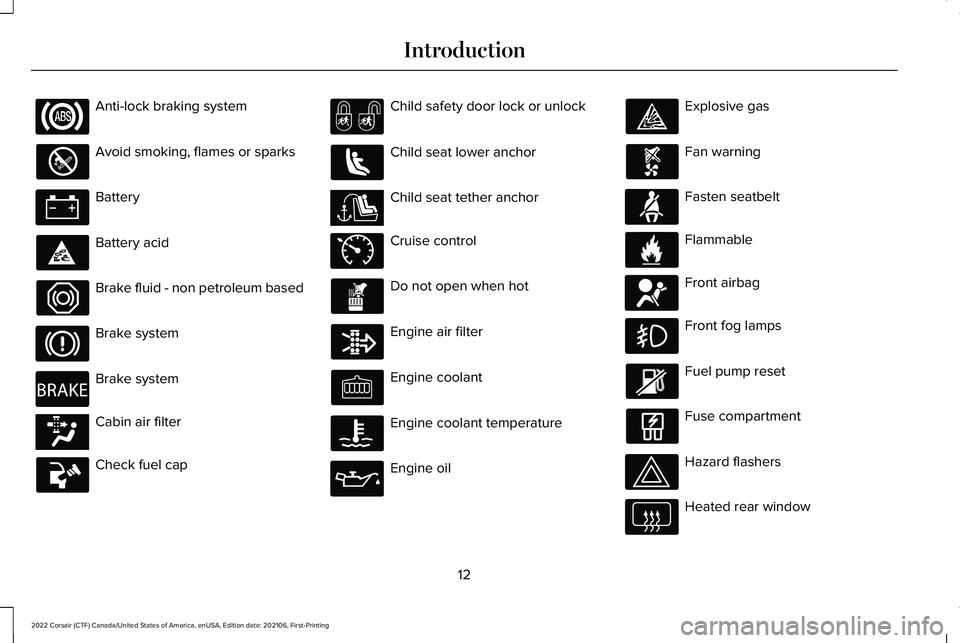
Anti-lock braking system
Avoid smoking, flames or sparks
Battery
Battery acid
Brake fluid - non petroleum based
Brake system
Brake system
Cabin air filter
Check fuel cap Child safety door lock or unlock
Child seat lower anchor
Child seat tether anchor
Cruise control
Do not open when hot
Engine air filter
Engine coolant
Engine coolant temperature
Engine oil Explosive gas
Fan warning
Fasten seatbelt
Flammable
Front airbag
Front fog lamps
Fuel pump reset
Fuse compartment
Hazard flashers
Heated rear window
12
2022 Corsair (CTF) Canada/United States of America, enUSA, Edition date: 202106, First-Printing Introduction E270480 E139223 E141128 E71340 E71880 E231160 E67017
Page 17 of 676

DATA RECORDING
WARNING: Do not connect wireless
plug-in devices to the data link connector.
Unauthorized third parties could gain
access to vehicle data and impair the
performance of safety related systems.
Only allow repair facilities that follow our
service and repair instructions to connect
their equipment to the data link connector.
We respect your privacy and are committed
to protecting it. The information contained
in this manual was correct at the time of
publication but as technology rapidly
changes, we recommend that you visit the
regional Lincoln website for the latest
information. Your vehicle has electronic control units that
have data recording functionality and the
ability to permanently or temporarily store
data. This data could include information on
the condition and status of your vehicle,
vehicle maintenance requirements, events
and malfunctions. The types of data that can
be recorded are described in this section.
Some of the data recorded is stored in event
logs or error logs.
Note:
Error logs are reset following a service
or repair.
Note: We may provide information in
response to requests from law enforcement,
other government authorities and third
parties acting with lawful authority or through
a legal process. Such information could be
used by them in legal proceedings.
Data recorded includes, for example:
• Operating states of system components,
for example, fuel level, tire pressure and
battery charge level.
• Vehicle and component status, for
example, wheel speed, deceleration,
lateral acceleration and seatbelt status. •
Events or errors in essential systems, for
example, headlamps and brakes.
• System responses to driving situations,
for example, airbag deployment and
stability control.
• Environmental conditions, for example,
temperature.
Some of this data, when used in combination
with other information, for example, an
accident report, damage to a vehicle or
eyewitness statements, could be associated
with a specific person.
Service Data
Service data recorders in your vehicle are
capable of collecting and storing diagnostic
information about your vehicle. This
potentially includes information about the
performance or status of various systems
and modules in the vehicle, such as engine,
throttle, steering or brake systems. In order
to properly diagnose and service your
vehicle, Lincoln (Lincoln of Canada, in
Canada), and service and repair facilities may
access or share among them vehicle
diagnostic information received through a
14
2022 Corsair (CTF) Canada/United States of America, enUSA, Edition date: 202106, First-Printing Introduction
Page 67 of 676
•
SYNC must be powered and working
properly at the time of the incident and
throughout feature activation and use.
• The 911 Assist feature must be set on
before the incident.
• You must pair and connect a Bluetooth®
enabled and compatible cell phone to
SYNC.
• A connected Bluetooth® enabled phone
must have the ability to make and
maintain an outgoing call at the time of
the incident.
• A connected Bluetooth® enabled phone
must have adequate network coverage,
battery power and signal strength.
• The vehicle must have battery power and
be located in the U.S., Canada or in a
territory in which 911 is the emergency
number.
Note: If any user sets 911 Assist to on or off,
that setting applies for all paired phones. If
911 Assist is switched off and the phone is
connected to SYNC, an icon displays on the
status bar. Note:
Every phone operates differently.
While SYNC 911 Assist works with most
cellular phones, some may have trouble
using this feature.
EMERGENCY CALL LIMITATIONS
The SYNC 911 Assist feature only operates
in the U.S., Canada or in a territory in which
911 is the emergency number.
• Your cellular phone or 911 Assist
hardware sustains damage in a crash.
• The vehicle's battery or the SYNC system
has no power.
• The phone(s) thrown from your vehicle
are the ones paired and connected to
the system.
64
2022 Corsair (CTF) Canada/United States of America, enUSA, Edition date: 202106, First-Printing 911 Assist
Page 68 of 676
GENERAL INFORMATION ON
RADIO FREQUENCIES
This device complies with Part 15 of the FCC
Rules and with Industry Canada
license-exempt RSS standard(s). Operation
is subject to the following two conditions: (1)
This device may not cause harmful
interference, and (2) This device must accept
any interference received, including
interference that may cause undesired
operation.
WARNING: Changes or modifications
not expressively approved by the party
responsible for compliance could void the
user's authority to operate the equipment.
The term "IC:" before the radio certification
number only signifies that Industry Canada
technical specifications were met.
The typical operating range for your
transmitter is approximately 33 ft (10 m).
Vehicles with the remote start feature will
have a greater range. One of the following could cause a decrease
in operating range:
•
Weather conditions.
• Nearby radio towers.
• Structures around the vehicle.
• Other vehicles parked next to your
vehicle.
The radio frequency used by your remote
control can also be used by other radio
transmitters, for example amateur radios,
medical equipment, wireless headphones,
wireless remote controls, cell phones, battery
chargers and alarm systems. If the
frequencies are jammed, you will not be able
to use your remote control. You can lock and
unlock the doors with the key.
Note: Make sure to lock your vehicle before
leaving it unattended.
Note: If you are in range, the remote control
will operate if you press any button
unintentionally.
Note: The remote control contains sensitive
electrical components. Exposure to moisture
or impact may cause permanent damage. Intelligent Access
(If Equipped)
The system uses a radio frequency signal to
communicate with your vehicle and authorize
your vehicle to unlock when one of the
following conditions are met:
• You activate the front exterior door
handle switch.
• You press the luggage compartment
button.
• You press a button on the transmitter.
If excessive radio frequency interference is
present in the area or if the transmitter
battery is low, you may need to mechanically
unlock your door. You can use the
mechanical key blade in your intelligent
access key to open the driver door in this
situation.
See Remote Control (page 65).
REMOTE CONTROL
Passive Key
Note: You may not be able to shift out of
park (P) unless the passive key is inside your
vehicle.
65
2022 Corsair (CTF) Canada/United States of America, enUSA, Edition date: 202106, First-Printing Keys and Remote Controls
Page 69 of 676
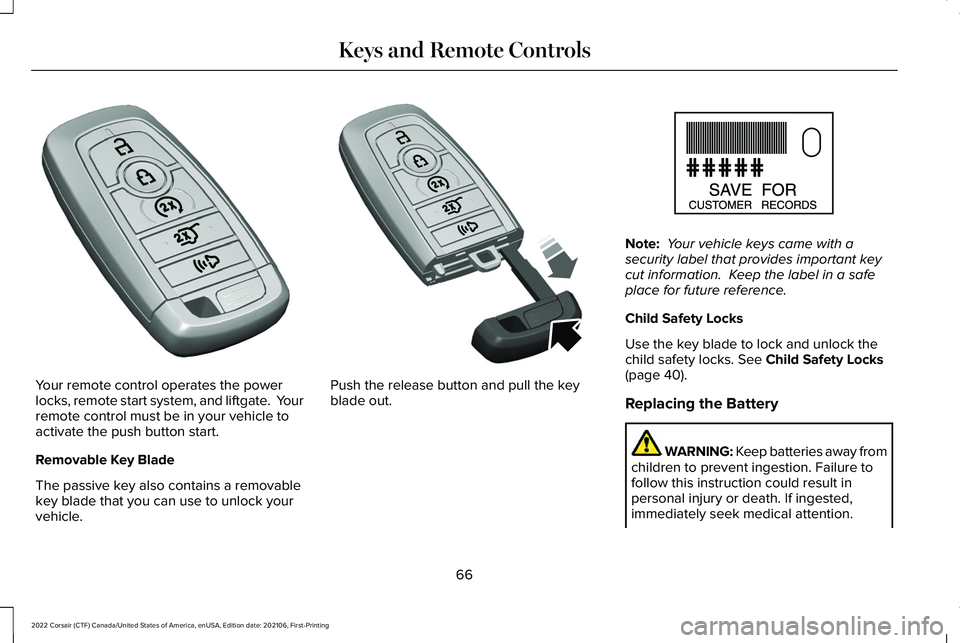
Your remote control operates the power
locks, remote start system, and liftgate. Your
remote control must be in your vehicle to
activate the push button start.
Removable Key Blade
The passive key also contains a removable
key blade that you can use to unlock your
vehicle. Push the release button and pull the key
blade out. Note:
Your vehicle keys came with a
security label that provides important key
cut information. Keep the label in a safe
place for future reference.
Child Safety Locks
Use the key blade to lock and unlock the
child safety locks. See Child Safety Locks
(page 40).
Replacing the Battery WARNING: Keep batteries away from
children to prevent ingestion. Failure to
follow this instruction could result in
personal injury or death. If ingested,
immediately seek medical attention.
66
2022 Corsair (CTF) Canada/United States of America, enUSA, Edition date: 202106, First-Printing Keys and Remote ControlsE305198 E305199 E151795
Page 70 of 676
WARNING: If the battery
compartment does not securely close, stop
using the remote control and replace it as
soon as possible. In the meantime, keep
the remote control away from children.
Failure to follow this instruction could result
in personal injury or death.
Note: Refer to local regulations before you
dispose of the remote control batteries.
Note: Do not wipe off any grease on the
battery terminals or on the back surface of
the circuit board.
Note: Replacing the remote control battery
does not erase the programmed key from
your vehicle. The remote control operates
as normal.
A message appears in the information
display when the remote control battery is
low.
See Information Messages (page 142).
The remote control uses one coin-type
three-volt lithium battery, CR2450, or
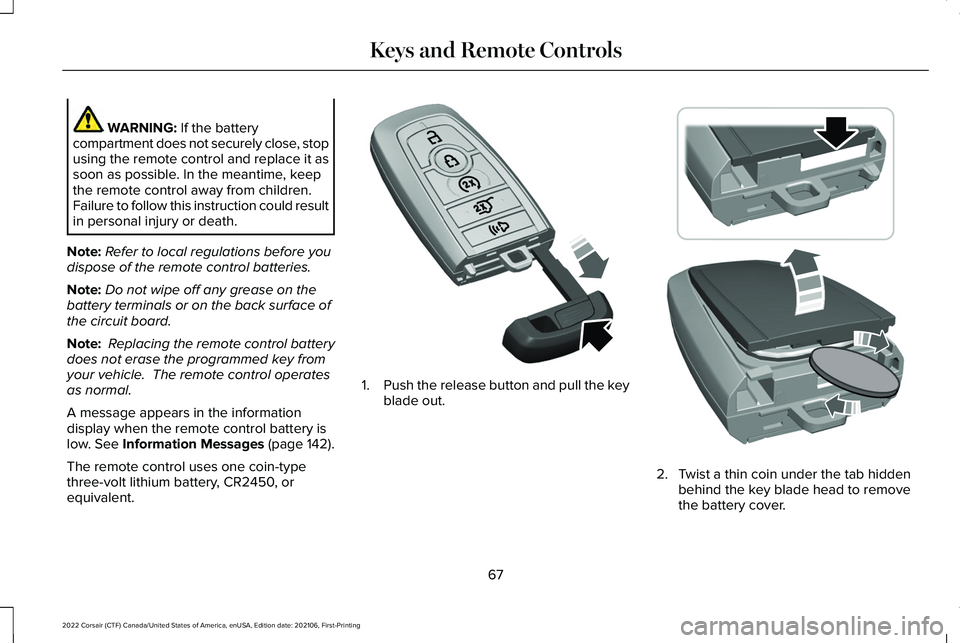
equivalent. 1.
Push the release button and pull the key
blade out. 2. Twist a thin coin under the tab hidden
behind the key blade head to remove
the battery cover.
67
2022 Corsair (CTF) Canada/United States of America, enUSA, Edition date: 202106, First-Printing Keys and Remote ControlsE305199 E303824
Page 71 of 676
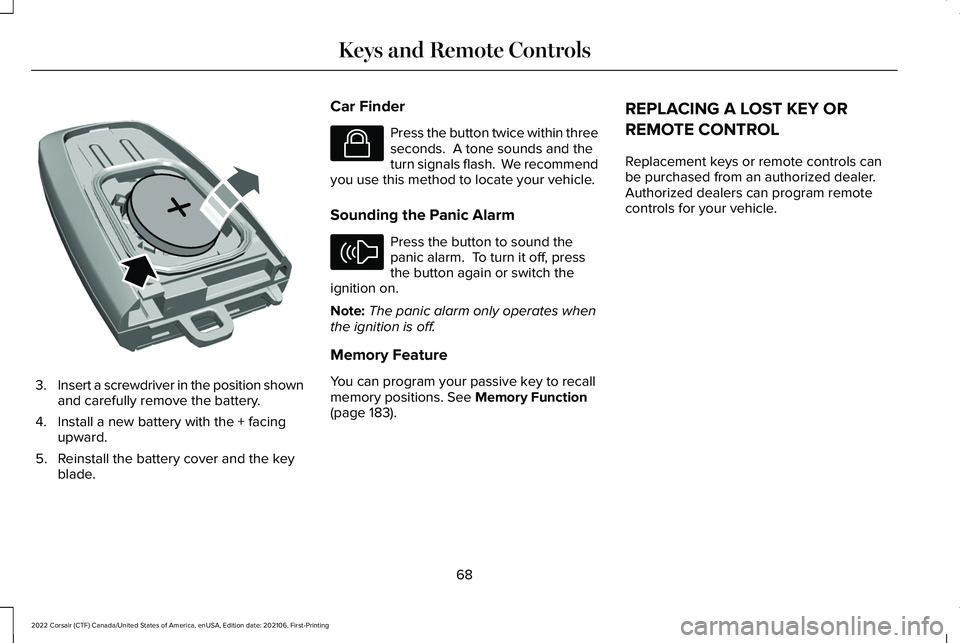
3.
Insert a screwdriver in the position shown
and carefully remove the battery.
4. Install a new battery with the + facing upward.
5. Reinstall the battery cover and the key blade. Car Finder Press the button twice within three
seconds. A tone sounds and the
turn signals flash. We recommend
you use this method to locate your vehicle.
Sounding the Panic Alarm Press the button to sound the
panic alarm. To turn it off, press
the button again or switch the
ignition on.
Note: The panic alarm only operates when
the ignition is off.
Memory Feature
You can program your passive key to recall
memory positions. See Memory Function
(page 183). REPLACING A LOST KEY OR
REMOTE CONTROL
Replacement keys or remote controls can
be purchased from an authorized dealer.
Authorized dealers can program remote
controls for your vehicle.
68
2022 Corsair (CTF) Canada/United States of America, enUSA, Edition date: 202106, First-Printing Keys and Remote ControlsE218402 E138623 E138624