buttons LINCOLN CORSAIR 2023 User Guide
[x] Cancel search | Manufacturer: LINCOLN, Model Year: 2023, Model line: CORSAIR, Model: LINCOLN CORSAIR 2023Pages: 690, PDF Size: 15.04 MB
Page 201 of 690
3.Hold your handheld garage doortransmitter 1–3 in (2–8 cm) away from theHomeLink button you want to program.
4.Press and hold the handheld transmitterbutton you want to program whilewatching the indicator on HomeLink.Continue to hold the handheld buttonuntil the HomeLink indicator flashesrapidly or is continuously on.
Note:You may need to use a differentmethod if you live in Canada or havedifficulties programming your gate operatoror garage door opener.
5.Press and hold the HomeLink button youprogrammed for two seconds, thenrelease. You may need to do this twiceto activate the door.
Note:If the indicator stays on, theprogramming is complete.
Note:If the HomeLink indicator flashesrapidly, repeat Step 5.
Note:If your device still does not operate,you must program your garage door.
6.To program additional buttons, repeatSteps 1–4.
Note:Make sure you keep the originalremote control transmitter for use in othervehicles as well as for future systemprogramming.
Programming the Garage Door Openerto your Garage Door Opener Motor
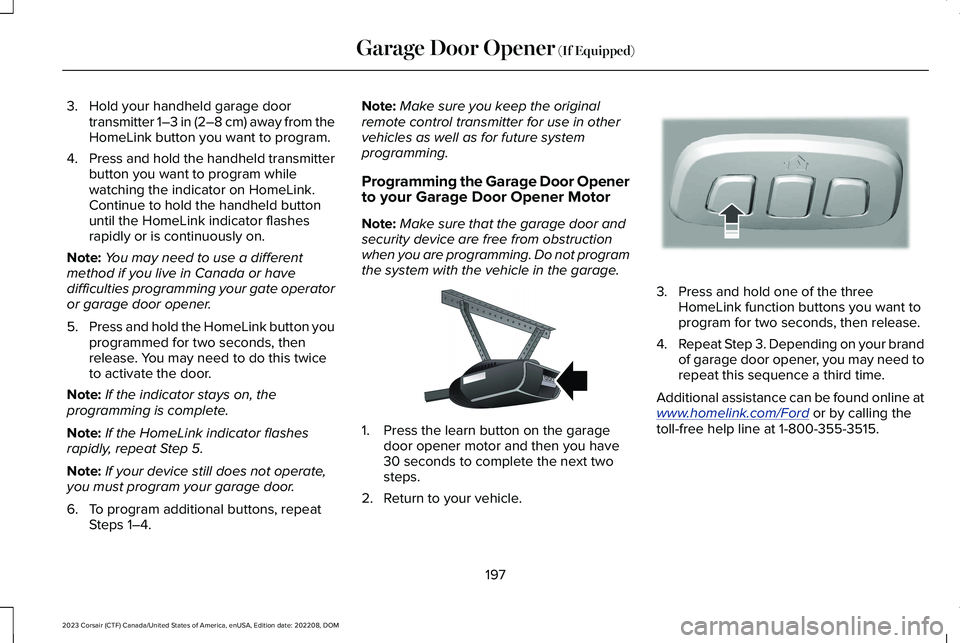
Note:Make sure that the garage door andsecurity device are free from obstructionwhen you are programming. Do not programthe system with the vehicle in the garage.
1.Press the learn button on the garagedoor opener motor and then you have30 seconds to complete the next twosteps.
2.Return to your vehicle.
3.Press and hold one of the threeHomeLink function buttons you want toprogram for two seconds, then release.
4.Repeat Step 3. Depending on your brandof garage door opener, you may need torepeat this sequence a third time.
Additional assistance can be found online atwww.homelink.com/Ford or by calling thetoll-free help line at 1-800-355-3515.
197
2023 Corsair (CTF) Canada/United States of America, enUSA, Edition date: 202208, DOMGarage Door Opener (If Equipped)E142659 E188212
Page 202 of 690
Programming the Garage Door Openerto your Gate Opener Motor
Gate Operator / Canadian Programming
Canadian radio-frequency laws requiretransmitter signals to time-out (or quit) afterseveral seconds of transmission – which maynot be long enough for HomeLink to pick upthe signal during programming. Similar tothis Canadian law, some U.S. gate operatorsare designed to time-out in the same manner.
Note:If programming a garage door openeror gate operator, it is advised that youunplug the device during the cycling processto prevent possible overheating.
1.Press and release your handheldtransmitter, every two seconds, until theHomeLink indicator flashes rapidly or iscontinuously on.
2.Release the handheld transmitter button.
3.Press and hold the HomeLink functionbutton you want to program for twoseconds, then release. You may need todo this twice to activate the door.
Note:If the indicator stays on, theprogramming is complete.
Note:If the HomeLink indicator flashesrapidly, repeat Step 3.
4.To program additional buttons, repeatSteps 1–4.
Additional assistance can be found online atwww.homelink.com/Ford or by calling thetoll-free help line at 1-800-355-3515.
GARAGE DOOR OPENER
ADDITIONAL ASSISTANCE
Video Setup Instructions
Universal Garage Door Opener: HomeLink
Universal Garage Door Opener: HomeLinkfor Genie Intellicode 2
Universal Garage Door Opener Homelinkfor Genie Intellicode
Additional assistance can be found online atwww.homelink.com/Ford or by calling thetoll-free help line at 1-800-355-3515.
198
2023 Corsair (CTF) Canada/United States of America, enUSA, Edition date: 202208, DOMGarage Door Opener (If Equipped)
Page 214 of 690
ACCESSING THE PASSIVE KEY
BACKUP POSITION
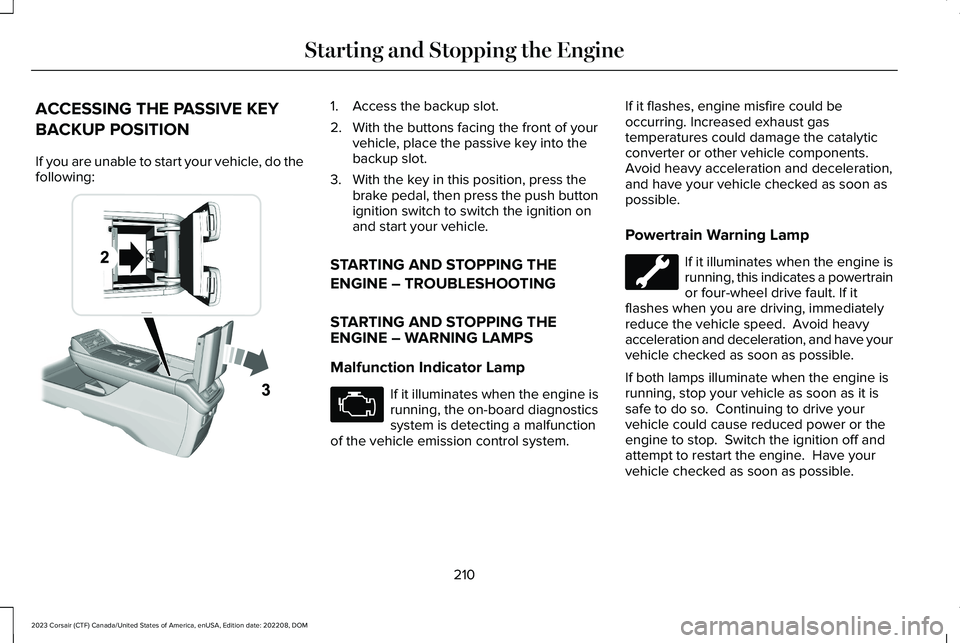
If you are unable to start your vehicle, do thefollowing:
1.Access the backup slot.
2.With the buttons facing the front of yourvehicle, place the passive key into thebackup slot.
3.With the key in this position, press thebrake pedal, then press the push buttonignition switch to switch the ignition onand start your vehicle.
STARTING AND STOPPING THE
ENGINE – TROUBLESHOOTING
STARTING AND STOPPING THEENGINE – WARNING LAMPS
Malfunction Indicator Lamp
If it illuminates when the engine isrunning, the on-board diagnosticssystem is detecting a malfunctionof the vehicle emission control system.
If it flashes, engine misfire could beoccurring. Increased exhaust gastemperatures could damage the catalyticconverter or other vehicle components.Avoid heavy acceleration and deceleration,and have your vehicle checked as soon aspossible.
Powertrain Warning Lamp
If it illuminates when the engine isrunning, this indicates a powertrainor four-wheel drive fault. If itflashes when you are driving, immediatelyreduce the vehicle speed. Avoid heavyacceleration and deceleration, and have yourvehicle checked as soon as possible.
If both lamps illuminate when the engine isrunning, stop your vehicle as soon as it issafe to do so. Continuing to drive yourvehicle could cause reduced power or theengine to stop. Switch the ignition off andattempt to restart the engine. Have yourvehicle checked as soon as possible.
210
2023 Corsair (CTF) Canada/United States of America, enUSA, Edition date: 202208, DOMStarting and Stopping the EngineE247437 E67028
Page 319 of 690
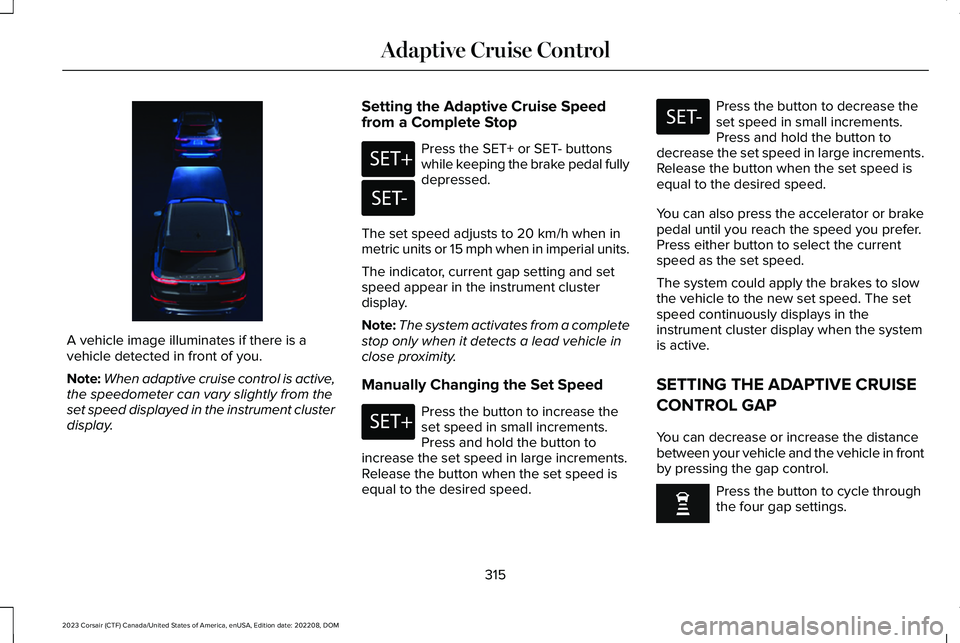
A vehicle image illuminates if there is avehicle detected in front of you.
Note:When adaptive cruise control is active,the speedometer can vary slightly from theset speed displayed in the instrument clusterdisplay.
Setting the Adaptive Cruise Speedfrom a Complete Stop
Press the SET+ or SET- buttonswhile keeping the brake pedal fullydepressed.
The set speed adjusts to 20 km/h when inmetric units or 15 mph when in imperial units.
The indicator, current gap setting and setspeed appear in the instrument clusterdisplay.
Note:The system activates from a completestop only when it detects a lead vehicle inclose proximity.
Manually Changing the Set Speed
Press the button to increase theset speed in small increments.Press and hold the button toincrease the set speed in large increments.Release the button when the set speed isequal to the desired speed.
Press the button to decrease theset speed in small increments.Press and hold the button todecrease the set speed in large increments.Release the button when the set speed isequal to the desired speed.
You can also press the accelerator or brakepedal until you reach the speed you prefer.Press either button to select the currentspeed as the set speed.
The system could apply the brakes to slowthe vehicle to the new set speed. The setspeed continuously displays in theinstrument cluster display when the systemis active.
SETTING THE ADAPTIVE CRUISE
CONTROL GAP
You can decrease or increase the distancebetween your vehicle and the vehicle in frontby pressing the gap control.
Press the button to cycle throughthe four gap settings.
315
2023 Corsair (CTF) Canada/United States of America, enUSA, Edition date: 202208, DOMAdaptive Cruise ControlE371375 E246884 E246885 E246884 E246885
Page 335 of 690
Using Activation Prompts
When the prompt appears, pressthe button to switch ActiveGlideon.
The indicator appears in the instrumentcluster. When the system is on, the color ofthe indicator changes to indicate the systemstatus.
Note:You must enable activation promptsin the touchscreen.
Using Steering Wheel Controls
Using the adaptive cruise controland lateral support buttons, makesure both systems are active.ActiveGlide activates.
Switching ActiveGlide Off
Press either the lateral support oradaptive cruise control buttonwhen system is active or instandby mode.
ActiveGlide turns off through eachignition cycle.
ACTIVEGLIDE™ ALERTS
When ActiveGlide is providing hands-ondriving or transitioning to hands-on drivingfrom hands-free driving and detects nosteering activity for a certain period of time,the system alerts you with a message in theinstrument cluster to put your hands on thesteering wheel. After the first alert, thesystem alerts you with a message in theinstrument cluster and an audible warning.
When ActiveGlide is providing hands-on orhands-free driving and detects you are notlooking at the road for a certain period oftime, the system alerts you to return youreyes to the road. Depending on where youare looking, the alert can be a message inthe instrument cluster and an audiblewarning.
If you do not react to the warnings,ActiveGlide cancels, quickly activates andreleases the brakes, and slows your vehicledown to low speeds while maintainingsteering control.
If your vehicle slows down and you resumecontrol, a message appears to prompt youto press the accelerator pedal to allow thesystem to resume.
Note:If the system detects repeatedinactivity, it disables until the next key cycle.
ACTIVEGLIDE™ AUTOMATIC
CANCELLATION
When an external condition cancelsActiveGlide, for example, no lane markingsavailable, a tone sounds and a messageappears in the instrument cluster.
If your vehicle starts to slow down,you must take control of steeringand press and release the buttonto reactivate ActiveGlide.
System cancellation can also occur if:
•The lane becomes too narrow.
•The system cannot detect valid lanemarkings.
331
2023 Corsair (CTF) Canada/United States of America, enUSA, Edition date: 202208, DOMActiveGlide™ (If Equipped)E144529 E308131 E144529 E308131 E144529 E281472
Page 525 of 690
AUDIO SYSTEM PRECAUTIONS
WARNING: Driving while distractedcan result in loss of vehicle control, crashand injury. We strongly recommend thatyou use extreme caution when using anydevice that may take your focus off theroad. Your primary responsibility is the safeoperation of your vehicle. We recommendagainst the use of any hand-held devicewhile driving and encourage the use ofvoice-operated systems when possible.Make sure you are aware of all applicablelocal laws that may affect the use ofelectronic devices while driving.
Listening to loud audio for long periods oftime could damage your hearing.
SWITCHING THE AUDIO UNIT ON
AND OFF
Press the button on the volumecontrol.
SELECTING THE AUDIO SOURCE
Audio Unit
Press the button to open the mediasource menu.
You can press this multiple times to changeto the audio source or scroll through themedia sources.
Touchscreen
Press Sources on the touchscreen to openthe media source menu.
PLAYING OR PAUSING THE AUDIO
SOURCE
Touchscreen
Press to pause playback. Pressagain to resume playback.
Note:Not all sources can be paused.
ADJUSTING THE VOLUME
Turn to adjust the volume.
Some vehicles may be able to adjust thevolume using buttons on the steering wheel.
521
2023 Corsair (CTF) Canada/United States of America, enUSA, Edition date: 202208, DOMAudio System E308143 E248939
Page 659 of 690
ELECTROMAGNETIC
COMPATIBILITY
WARNING: Do not place objects ormount equipment on or near the airbagcover, on the side of the front or rearseatbacks, or in areas that may come intocontact with a deploying airbag. Failure tofollow these instructions may increase therisk of personal injury in the event of acrash.
WARNING: Do not fasten antennacables to vehicle wiring, fuel pipes andbrake pipes.
WARNING: Keep antenna and powercables at least 4 in (10 cm) from anyelectronic modules and airbags.
Note:We test and certify your vehicle tomeet electromagnetic compatibilitylegislation. It is your responsibility to makesure that any equipment an authorizeddealer installs on your vehicle complies withapplicable local legislation and otherrequirements. Installation of someaftermarket electronic devices coulddegrade the performance of vehiclefunctions, which use radio frequency signalssuch as broadcast radio receiver, tirepressure monitoring system, push buttonstart, Bluetooth® connectivity or satellitenavigation.
Note:Any radio frequency transmitterequipment in your vehicle (such as cellulartelephones and amateur radio transmitters)must keep to the parameters in the followingillustrations and table. We do not provideany other special provisions or conditionsfor installations or use.
655
2023 Corsair (CTF) Canada/United States of America, enUSA, Edition date: 202208, DOMAppendices
Page 678 of 690
Locating the Cross Traffic AlertSensors........................................................358Locating the Fuel Filler Funnel.................224Locating the Keyless Entry Keypad............94Locating the Memory FunctionButtons..........................................................192Locating the Power Outlets........................201Locating the Pre-Collision AssistSensors........................................................365Locating the Rear View Camera..............299Locating the Safety ComplianceCertification Labels....................................379Locating the Tire label................................460Locating the Tire Sealant and InflatorKit...................................................................475Locating the USB Ports................................199Locating the Wireless AccessoryCharger........................................................202Locating Your Vehicle....................................79Locking the Rear Window Controls..........132Luggage Compartment AnchorPoints............................................................385Locating the Luggage Compartment AnchorPoints................................................................385Luggage Compartment Anchor PointPrecautions......................................................385
Luggage Compartment...............................383Luggage Compartment Anchor Points.........385
Luggage Compartment Precautions.......383
M
Maintenance..................................................42612V Battery...........................................................44212V Battery – Troubleshooting.......................446Coolant..................................................................437Engine Air Filter...................................................434Engine Oil.............................................................432Exterior Bulbs......................................................450Interior Bulbs.......................................................450
Maintenance Precautions..........................426Maintenance Videos...................................450Making and Receiving a Phone Call.......540Manually Releasing the Electric ParkingBrake.............................................................272Manually Shifting Gears.............................259Shifting Using the Paddle Shifters.................259
Manual Park Release - Gasoline..............262Manual Park Release Precautions.................262Using Manual Park Release.............................262What Is Manual Park Release..........................262
Manual Seats..................................................185Adjusting the Head Restraint...........................185Adjusting the Seat Backrest.............................186Folding the Seat Backrest.................................186Head Restraint Components............................185
Installing the Head Restraint............................186Moving the Seat Backward andForward.............................................................186Removing the Head Restraint..........................185Unfolding the Seat Backrest.............................187
Massage Seats...............................................182Adjusting the Massage Seat Settings............182Massage Seat Limitations.................................182
Memory Function..........................................192Memory Function Precautions...................192Mislock..............................................................89Mislock Limitations...............................................89Switching Mislock On and Off...........................89What Is Mislock.....................................................89
Mobile Communications Equipment........621Mobile Device Data........................................29Moonroof Bounce-Back...............................137Overriding Moonroof Bounce-Back................137What Is Moonroof Bounce-Back......................137
Moonroof.........................................................136Moonroof Bounce-Back.....................................137
Motorcraft Parts - 2.0L EcoBoost™...........497Motorcraft Parts - 2.5L, Plug-In HybridElectric Vehicle (PHEV)............................498Muting the Audio..........................................522
674
2023 Corsair (CTF) Canada/United States of America, enUSA, Edition date: 202208, DOMIndex