key LINCOLN CORSAIR 2023 Owner's Manual
[x] Cancel search | Manufacturer: LINCOLN, Model Year: 2023, Model line: CORSAIR, Model: LINCOLN CORSAIR 2023Pages: 690, PDF Size: 15.04 MB
Page 104 of 690
Note:Allow the power system to open theliftgate. Manually pushing or pulling theliftgate could activate the system’s obstacledetection feature and stop the poweroperation or reverse its direction, replicatea strut failure, or damage mechanicalcomponents.
Note:Be careful when opening or closingthe liftgate in a garage or other enclosedarea to avoid damaging the liftgate.
Note: Do not hang anything, for example abike rack, from the glass or liftgate. Thiscould damage the liftgate and itscomponents.
Note: Do not leave the liftgate open whiledriving. This could damage the liftgate andits components.
Switching the Power Liftgate On or Off
You can switch the power liftgate on or offthrough the vehicle settings on yourtouchscreen.
When switched off, the liftgate only unlatchesand does not power open or close.
OPENING THE LIFTGATE USING THEREMOTE CONTROL
Press the remote control buttontwice within a few seconds.
OPENING THE HANDS-FREE LIFTGATE
(If Equipped)
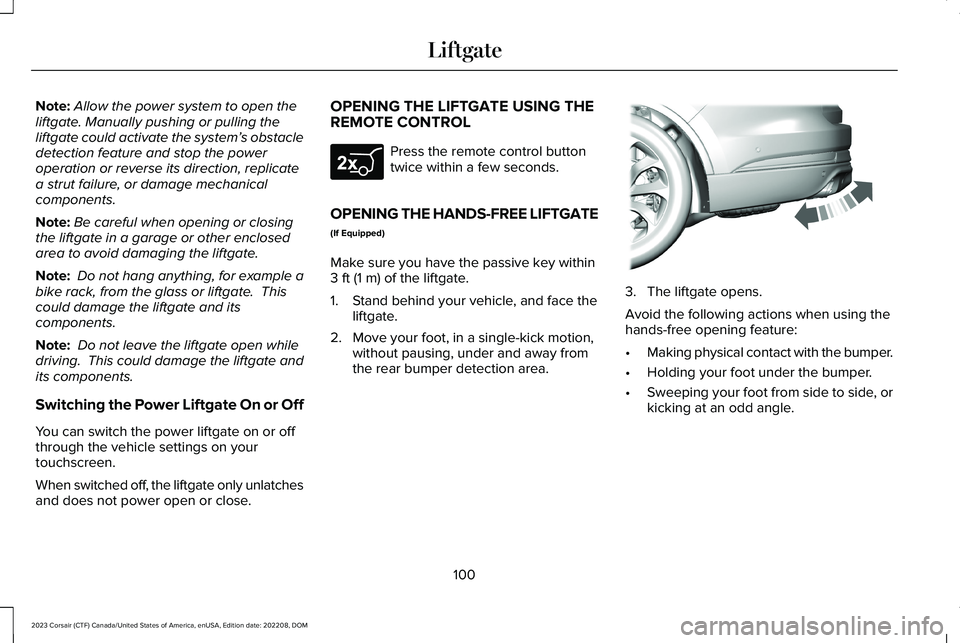
Make sure you have the passive key within3 ft (1 m) of the liftgate.
1.Stand behind your vehicle, and face theliftgate.
2.Move your foot, in a single-kick motion,without pausing, under and away fromthe rear bumper detection area.
3.The liftgate opens.
Avoid the following actions when using thehands-free opening feature:
•Making physical contact with the bumper.
•Holding your foot under the bumper.
•Sweeping your foot from side to side, orkicking at an odd angle.
100
2023 Corsair (CTF) Canada/United States of America, enUSA, Edition date: 202208, DOMLiftgateE267940 E300799
Page 105 of 690
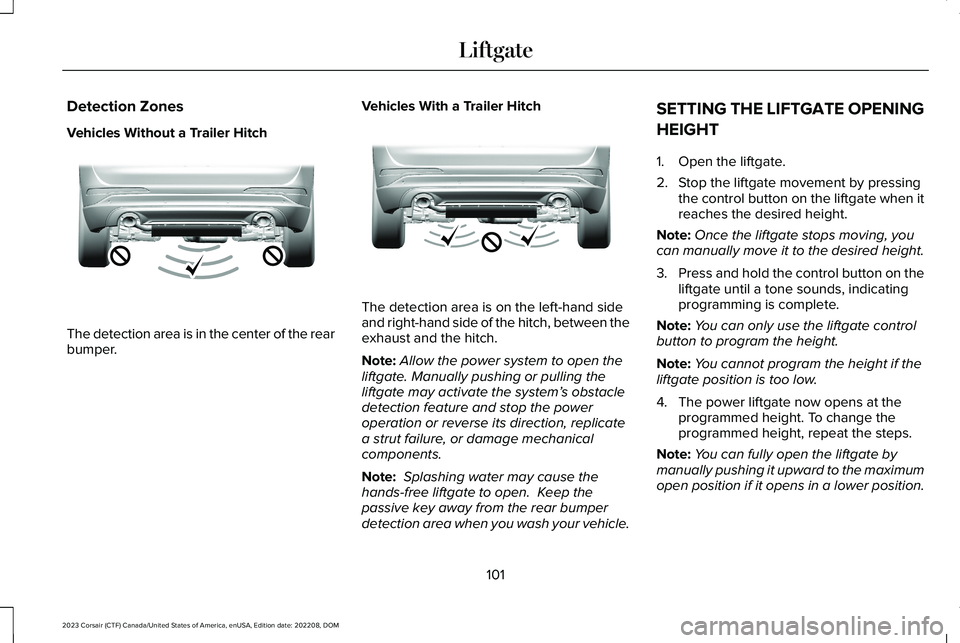
Detection Zones
Vehicles Without a Trailer Hitch
The detection area is in the center of the rearbumper.
Vehicles With a Trailer Hitch
The detection area is on the left-hand sideand right-hand side of the hitch, between theexhaust and the hitch.
Note:Allow the power system to open theliftgate. Manually pushing or pulling theliftgate may activate the system’s obstacledetection feature and stop the poweroperation or reverse its direction, replicatea strut failure, or damage mechanicalcomponents.
Note: Splashing water may cause thehands-free liftgate to open. Keep thepassive key away from the rear bumperdetection area when you wash your vehicle.
SETTING THE LIFTGATE OPENING
HEIGHT
1.Open the liftgate.
2.Stop the liftgate movement by pressingthe control button on the liftgate when itreaches the desired height.
Note:Once the liftgate stops moving, youcan manually move it to the desired height.
3.Press and hold the control button on theliftgate until a tone sounds, indicatingprogramming is complete.
Note:You can only use the liftgate controlbutton to program the height.
Note:You cannot program the height if theliftgate position is too low.
4.The power liftgate now opens at theprogrammed height. To change theprogrammed height, repeat the steps.
Note:You can fully open the liftgate bymanually pushing it upward to the maximumopen position if it opens in a lower position.
101
2023 Corsair (CTF) Canada/United States of America, enUSA, Edition date: 202208, DOMLiftgateE310717 E310718
Page 107 of 690
Note:Make sure you fully close the liftgateto prevent cargo from falling out.
CLOSING THE LIFTGATE USING THEREMOTE CONTROL
Press the remote control buttontwice within three seconds.
CLOSING THE HANDS-FREE LIFTGATE
(If Equipped)
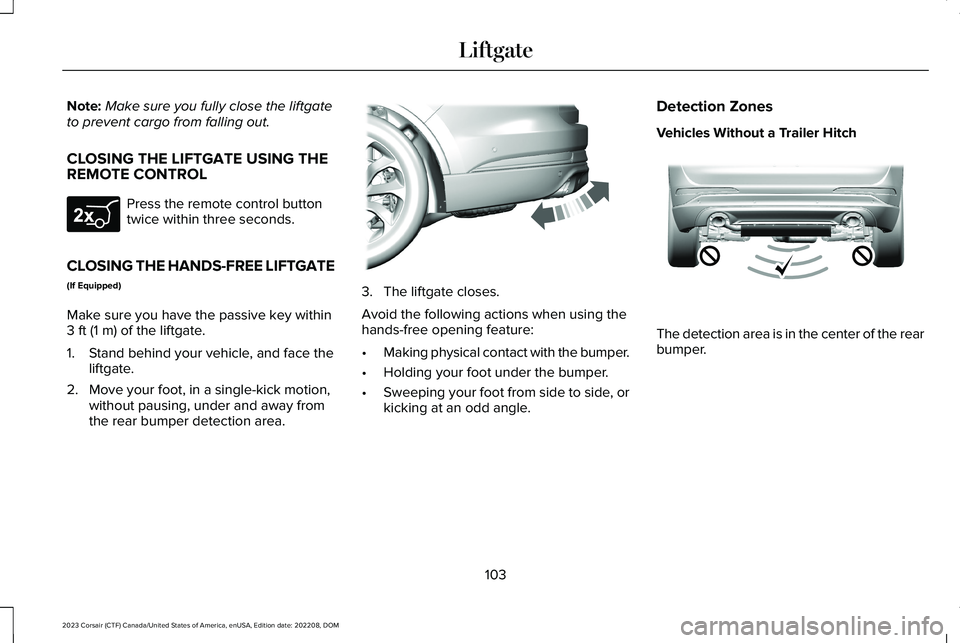
Make sure you have the passive key within3 ft (1 m) of the liftgate.
1.Stand behind your vehicle, and face theliftgate.
2.Move your foot, in a single-kick motion,without pausing, under and away fromthe rear bumper detection area.
3.The liftgate closes.
Avoid the following actions when using thehands-free opening feature:
•Making physical contact with the bumper.
•Holding your foot under the bumper.
•Sweeping your foot from side to side, orkicking at an odd angle.
Detection Zones
Vehicles Without a Trailer Hitch
The detection area is in the center of the rearbumper.
103
2023 Corsair (CTF) Canada/United States of America, enUSA, Edition date: 202208, DOMLiftgateE267940 E300799 E310717
Page 108 of 690
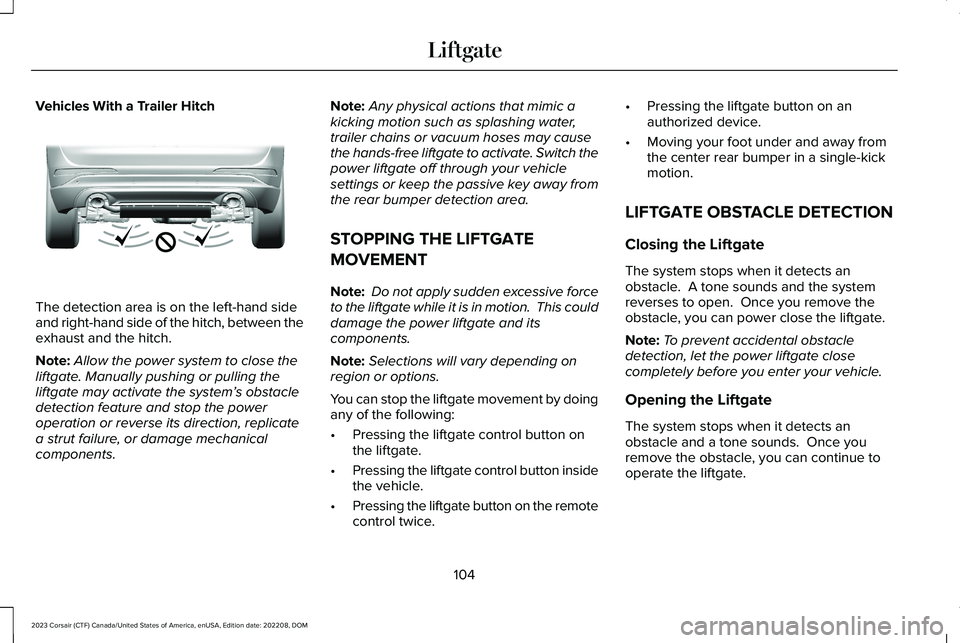
Vehicles With a Trailer Hitch
The detection area is on the left-hand sideand right-hand side of the hitch, between theexhaust and the hitch.
Note:Allow the power system to close theliftgate. Manually pushing or pulling theliftgate may activate the system’s obstacledetection feature and stop the poweroperation or reverse its direction, replicatea strut failure, or damage mechanicalcomponents.
Note:Any physical actions that mimic akicking motion such as splashing water,trailer chains or vacuum hoses may causethe hands-free liftgate to activate. Switch thepower liftgate off through your vehiclesettings or keep the passive key away fromthe rear bumper detection area.
STOPPING THE LIFTGATE
MOVEMENT
Note: Do not apply sudden excessive forceto the liftgate while it is in motion. This coulddamage the power liftgate and itscomponents.
Note:Selections will vary depending onregion or options.
You can stop the liftgate movement by doingany of the following:
•Pressing the liftgate control button onthe liftgate.
•Pressing the liftgate control button insidethe vehicle.
•Pressing the liftgate button on the remotecontrol twice.
•Pressing the liftgate button on anauthorized device.
•Moving your foot under and away fromthe center rear bumper in a single-kickmotion.
LIFTGATE OBSTACLE DETECTION
Closing the Liftgate
The system stops when it detects anobstacle. A tone sounds and the systemreverses to open. Once you remove theobstacle, you can power close the liftgate.
Note:To prevent accidental obstacledetection, let the power liftgate closecompletely before you enter your vehicle.
Opening the Liftgate
The system stops when it detects anobstacle and a tone sounds. Once youremove the obstacle, you can continue tooperate the liftgate.
104
2023 Corsair (CTF) Canada/United States of America, enUSA, Edition date: 202208, DOMLiftgateE310718
Page 111 of 690
PASSIVE ANTI-THEFT SYSTEM
WHAT IS THE PASSIVE ANTI-THEFTSYSTEM
The passive anti-theft system preventssomeone from starting the vehicle with anincorrectly coded key.
Note:Do not leave a duplicate coded keyin your vehicle. Always take the keys andlock all the doors when leaving your vehicle.
HOW DOES THE PASSIVE ANTI-THEFTSYSTEM WORK
The passive anti-theft system arms when youswitch the ignition off.
It disarms when the ignition is switched onwith a correctly coded key.
Note:The system is not compatible withnon-Ford aftermarket remote start systems.
Note:Do not leave a duplicate coded keyin your vehicle. Always take the keys andlock all doors when leaving your vehicle.
ARMING THE PASSIVE ANTI-THEFTSYSTEM
The passive anti-theft system arms yourvehicle after a short period of time when youswitch the power off.
DISARMING THE PASSIVE ANTI-THEFTSYSTEM
The passive anti-theft system disarms whenyou switch the power on with a correctlycoded key.
Note:You could have difficulty starting thevehicle if you have metallic objects,electronic devices or a second coded keyon the same key chain.
ANTI-THEFT ALARM SYSTEM
WHAT IS THE ANTI-THEFT ALARMSYSTEM
The anti-theft alarm system warns you of anunauthorized entry to your vehicle.
HOW DOES THE ANTI-THEFT ALARMSYSTEM WORK
When armed, the anti-theft alarm is triggeredin any of the following ways:
•If someone opens a door, the liftgate orthe hood without a correctly coded keyor remote control.
•If you turn the power on without acorrectly coded key.
•If the interior sensors detect movementinside your vehicle.
•If the inclination sensors detect anattempt to raise your vehicle.
•If someone disconnects the vehiclebattery or the battery backup alarm.
If the anti-theft alarm is triggered, the alarmhorn sounds for 30 seconds and thedirection indicators flash for 5 minutes.
Any further attempts to carry out one of theabove sounds the alarm again.
107
2023 Corsair (CTF) Canada/United States of America, enUSA, Edition date: 202208, DOMSecurity
Page 113 of 690
SETTING THE ALARM SECURITYLEVEL
1.Press Settings on the touchscreen.
2.Press Vehicle Settings.
3.Press Alarm System.
4.Press Sensor Set.
5.Press a setting.
WHAT IS ASK ON EXIT
You can choose which level of security yourequire after you switch the ignition off.
Note:If you do not choose a setting, thesystem defaults to all sensors.
SWITCHING ASK ON EXIT ON ANDOFF
1.Press Settings on the touchscreen.
2.Press Vehicle.
3.Press Alarm System.
4.Switch Ask on Exit on or off.
SECURITY – TROUBLESHOOTING
SECURITY – INFORMATION MESSAGES
DetailsMessage
The system has not detected a correctly coded key.No Key Detected
The system has malfunctioned. Have your vehicle checked as soon as possible.Starting System Fault
Displays when the alarm has been triggered due to unauthorized entry.Vehicle Alarm To Stop Alarm, StartVehicle.
Alarm Announcement
109
2023 Corsair (CTF) Canada/United States of America, enUSA, Edition date: 202208, DOMSecurity
Page 114 of 690
SECURITY – FREQUENTLY ASKEDQUESTIONS
What should I do if there is any potentialalarm problem with my vehicle?
Take all remote controls to anauthorized dealer if there is anypotential alarm problem with yourvehicle.
What should I do if the vehicle is unable tostart with a correctly coded key?
Have your vehicle checked as soon aspossible.
110
2023 Corsair (CTF) Canada/United States of America, enUSA, Edition date: 202208, DOMSecurity
Page 143 of 690
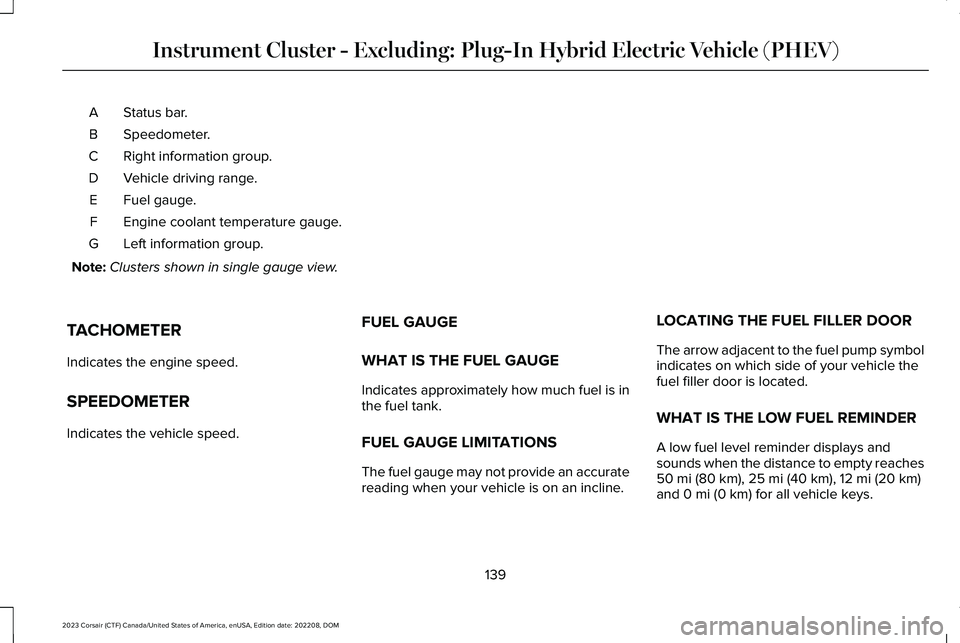
Status bar.A
Speedometer.B
Right information group.C
Vehicle driving range.D
Fuel gauge.E
Engine coolant temperature gauge.F
Left information group.G
Note:Clusters shown in single gauge view.
TACHOMETER
Indicates the engine speed.
SPEEDOMETER
Indicates the vehicle speed.
FUEL GAUGE
WHAT IS THE FUEL GAUGE
Indicates approximately how much fuel is inthe fuel tank.
FUEL GAUGE LIMITATIONS
The fuel gauge may not provide an accuratereading when your vehicle is on an incline.
LOCATING THE FUEL FILLER DOOR
The arrow adjacent to the fuel pump symbolindicates on which side of your vehicle thefuel filler door is located.
WHAT IS THE LOW FUEL REMINDER
A low fuel level reminder displays andsounds when the distance to empty reaches50 mi (80 km), 25 mi (40 km), 12 mi (20 km)and 0 mi (0 km) for all vehicle keys.
139
2023 Corsair (CTF) Canada/United States of America, enUSA, Edition date: 202208, DOMInstrument Cluster - Excluding: Plug-In Hybrid Electric Vehicle (PHEV)
Page 151 of 690
WHAT IS THE LOW FUEL REMINDER
A low fuel level reminder displays andsounds when the distance to empty reaches50 mi (80 km), 25 mi (40 km), 12 mi (20 km)and 0 mi (0 km) for all vehicle keys.
Note:The low fuel reminder can appear atdifferent fuel gauge positions depending onfuel economy conditions. This variation isnormal.
VEHICLE RANGE DISPLAY
Displays the approximate range your vehiclecan travel with the energy currently onboard.Estimates vary based on the energy usedwhen driving.
Changes in driving pattern can cause thevalues to not only decrease but also increaseor stay constant for periods of time.
The amount of energy being used whendriving is affected by:
•Mild or aggressive acceleration orbraking.
•Your vehicle's speed.
•Use of accessories, such as climatecontrol.
•Ambient temperature and weatherconditions.
•Driving in a city or on a highway.
•Driving on hilly road conditions.
•Towing.
Note:It is normal for vehicle range estimatesto vary due to changes in average energyusage. This could cause different rangeestimates each time you fully charge yourbattery or fill your tank.
Note:Electric range is lower in coldtemperatures due to reduced energycapacity in the high voltage battery. Set adeparture time and cabin temperature tomaintain battery temperature for best rangeand performance. See What is a HybridElectric Vehicle (page 213). See Setting theCharging Schedule and Preferences (page250).
Gasoline Distance to Empty
Indicates the approximate distance yourvehicle can travel on the fuel remaining inthe tank.
Electric Range
Indicates the approximate distance yourvehicle can travel on electric power only withthe engine off.
ENGINE COOLANT TEMPERATURE
GAUGE
Indicates the engine coolant temperature.
WHAT ARE THE INSTRUMENT
CLUSTER WARNING LAMPS
Warning lamps alert you to a vehiclecondition that could become serious. Somelamps illuminate when you start your vehicleto make sure they work. If any lamps remainon after starting your vehicle, refer to therespective system warning lamp for furtherinformation.
147
2023 Corsair (CTF) Canada/United States of America, enUSA, Edition date: 202208, DOMInstrument Cluster - Plug-In Hybrid Electric Vehicle (PHEV)
Page 169 of 690
WHAT IS REMOTE START
The system allows you to remotely start yourvehicle and therefore to heat or cool theinterior to a predetermined temperature.
REMOTE START PRECAUTIONS
WARNING: Do not start the enginein a closed garage or in other enclosedareas. Exhaust fumes are toxic. Alwaysopen the garage door before you start theengine. Failure to follow this instructioncould result in personal injury or death.
REMOTE START LIMITATIONS
Remote start does not work if:
•The alarm horn is sounding.
•The hood is open.
•The transmission is not in park (P).
•Remote start is not enabled.
•The ignition is on.
Note:Do not use remote start if your fuellevel is low.
ENABLING REMOTE START
1.Press Settings on the touchscreen.
2.Press Vehicle Settings.
3.Press Remote Start Setup.
4.Switch System on or off.
Note:To use remote start, make sure thatthe modem is enabled. See Enabling andDisabling the Modem (page 514).
REMOTELY STARTING AND
STOPPING THE VEHICLE
Remotely Starting the Vehicle
Press the button on the remotecontrol.
Within three seconds, press thebutton on the remote control.
Within three seconds, press thebutton again.
Note:You can also use the Lincoln Way appto start the vehicle.
Note:The turn signals flash twice.
Note:The parking lamps turn on when thevehicle is running.
Note:The horn sounds if the system fails tostart.
Note:All other vehicle systems remain offwhen you have remotely started the vehicle.
Note:The vehicle remains secured whenyou have remotely started the vehicle. Avalid key must be inside your vehicle toswitch your vehicle on and drive yourvehicle.
Remotely Stopping the Vehicle
Within three seconds, press thebutton on the remote control.
Within three seconds, press thebutton again.
165
2023 Corsair (CTF) Canada/United States of America, enUSA, Edition date: 202208, DOMRemote StartE138623 E138625 E138625