steering LINCOLN CORSAIR 2023 Owner's Guide
[x] Cancel search | Manufacturer: LINCOLN, Model Year: 2023, Model line: CORSAIR, Model: LINCOLN CORSAIR 2023Pages: 690, PDF Size: 15.04 MB
Page 171 of 690
2.Press Vehicle Settings.
3.Press Remote Start Setup.
4.Press Seats and Steering Wheel.
5.Press Auto or Off.
Note:If you switch the heated steering wheelsettings on, the heated steering wheel turnson during cold weather.
Note:You cannot adjust the heated steeringwheel settings when you remotely start yourvehicle.
Remote Start Duration
1.Press Settings on the touchscreen.
2.Press Vehicle Settings.
3.Press Remote Start Setup.
4.Press Duration.
5.Press the duration you prefer.
167
2023 Corsair (CTF) Canada/United States of America, enUSA, Edition date: 202208, DOMRemote Start
Page 182 of 690
FRONT SEAT PRECAUTIONS
WARNING: Sitting improperly, out ofposition or with the seatback reclined toofar can take weight off the seat cushionand affect the decision of the passengersensing system, resulting in serious injuryor death in the event of a crash. Always situpright against your seat back, with yourfeet on the floor.
WARNING: Do not recline the seatbackrest too far as this can cause theoccupant to slide under the seatbelt,resulting in personal injury in the event ofa crash.
WARNING: Do not place objectshigher than the top of the seat backrest.Failure to follow this instruction could resultin personal injury or death in the event ofa sudden stop or crash.
WARNING: Do not adjust the driverseat or seat backrest when your vehicle ismoving. This may result in sudden seatmovement, causing the loss of control ofyour vehicle.
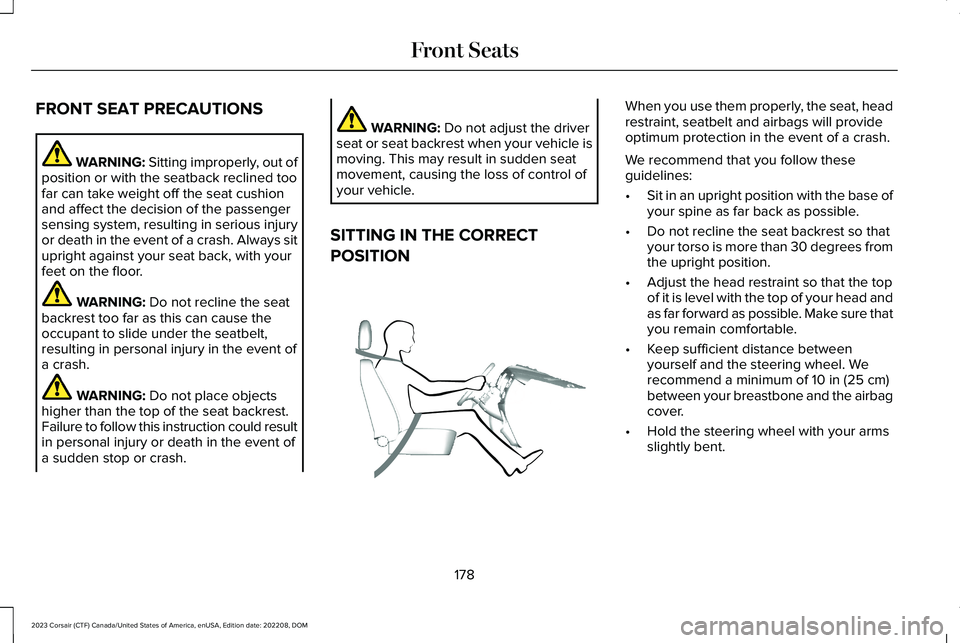
SITTING IN THE CORRECT
POSITION
When you use them properly, the seat, headrestraint, seatbelt and airbags will provideoptimum protection in the event of a crash.
We recommend that you follow theseguidelines:
•Sit in an upright position with the base ofyour spine as far back as possible.
•Do not recline the seat backrest so thatyour torso is more than 30 degrees fromthe upright position.
•Adjust the head restraint so that the topof it is level with the top of your head andas far forward as possible. Make sure thatyou remain comfortable.
•Keep sufficient distance betweenyourself and the steering wheel. Werecommend a minimum of 10 in (25 cm)between your breastbone and the airbagcover.
•Hold the steering wheel with your armsslightly bent.
178
2023 Corsair (CTF) Canada/United States of America, enUSA, Edition date: 202208, DOMFront SeatsE68595
Page 196 of 690
HOW DOES THE MEMORY
FUNCTION WORK
The memory function recalls the position ofthese features:
•Driver seat.
•Power mirrors.
•Optional power steering column.
MEMORY FUNCTION
PRECAUTIONS
WARNING: Before activating thememory seat, make sure that the areaimmediately surrounding the seat is clearof obstructions and that all occupants areclear of moving parts.
WARNING: Do not use the memoryfunction when your vehicle is moving.
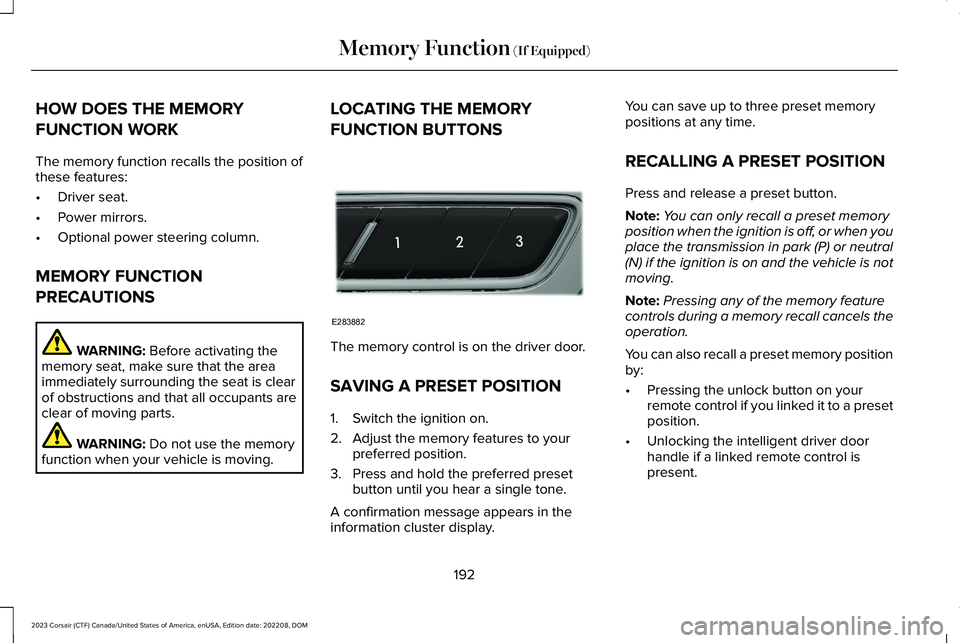
LOCATING THE MEMORY
FUNCTION BUTTONS
The memory control is on the driver door.
SAVING A PRESET POSITION
1.Switch the ignition on.
2.Adjust the memory features to yourpreferred position.
3.Press and hold the preferred presetbutton until you hear a single tone.
A confirmation message appears in theinformation cluster display.
You can save up to three preset memorypositions at any time.
RECALLING A PRESET POSITION
Press and release a preset button.
Note:You can only recall a preset memoryposition when the ignition is off, or when youplace the transmission in park (P) or neutral(N) if the ignition is on and the vehicle is notmoving.
Note:Pressing any of the memory featurecontrols during a memory recall cancels theoperation.
You can also recall a preset memory positionby:
•Pressing the unlock button on yourremote control if you linked it to a presetposition.
•Unlocking the intelligent driver doorhandle if a linked remote control ispresent.
192
2023 Corsair (CTF) Canada/United States of America, enUSA, Edition date: 202208, DOMMemory Function (If Equipped)E283882
Page 197 of 690
Note:Using a linked remote control to recallyour memory position when the ignition isoff moves the seat and steering column tothe easy entry position.
193
2023 Corsair (CTF) Canada/United States of America, enUSA, Edition date: 202208, DOMMemory Function (If Equipped)
Page 212 of 690
•Park your vehicle in a clean area, clearof combustible materials.
•Firmly connect the engine block heatercord and the extension cord.
•Check the extension cord for heatanywhere when the system has beenoperating for approximately 30 minutes.
•Unplug and properly stow the systembefore starting and driving your vehicle.The protective cover seals the terminalsof the engine block heater cord plugwhen not in use.
•Check the engine block heater systemfor proper operation before winter.
HOW DOES THE ENGINE BLOCKHEATER WORK
The engine block heater warms the enginecoolant. This allows the climate controlsystem to quickly respond. The equipmentincludes a heater element installed in theengine block and a wire harness. You canconnect the system to a grounded 110 voltAC electrical source.
Note:The engine block heater is mosteffective when outdoor temperatures arebelow 0°F (-18°C). We recommend the useof engine block heater to improve enginecold start performance.
USING THE ENGINE BLOCK HEATER
Make sure the receptacle terminals are cleanand dry prior to use. Clean them with a drycloth if necessary.
The heater uses 0.4 to 1.0 kilowatt-hours ofenergy per hour of use. The system does nothave a thermostat. It achieves maximumtemperature after approximately three hoursof operation. Using the engine block heaterlonger than three hours does not improvesystem performance and unnecessarily useselectricity.
STOPPING THE ENGINE
STOPPING THE ENGINE WHEN YOURVEHICLE IS STATIONARY
1.Shift into park (P).
2.Apply the parking brake.
3.Wait until the engine reaches idle speed.
4.Press the push button ignition switch.
STOPPING THE ENGINE WHEN YOURVEHICLE IS MOVING
WARNING: Switching off the enginewhen your vehicle is still moving results ina significant decrease in brakingassistance. Higher effort is required toapply the brakes and to stop your vehicle.A significant decrease in steeringassistance could also occur. The steeringdoes not lock, but higher effort could be
208
2023 Corsair (CTF) Canada/United States of America, enUSA, Edition date: 202208, DOMStarting and Stopping the EngineE357998
Page 267 of 690
2.Remove the access cover located to thebottom left hand side of the steeringcolumn on the lower instrument panelusing a plastic wedge or pry tool.
Note:Do not pull the tether.
3.Sit in the driver seat.
4.Power your vehicle on without your footon the brake pedal.
Note: Do not attempt this procedure whenthe engine is running. Failure to follow thisinstruction could result in vehicle damagenot covered by the vehicle warranty.
5.Press and hold the brake pedal.
6.Pull the tether towards you until the leverengages.
Note:Do not use excessive force. Failure tofollow this instruction could result in vehicledamage not covered by the vehiclewarranty.
Note:A message appears when your vehicleis out of park (P). If you do not receive amessage attempt the procedure again.
Note: A warning lamp could illuminate.
7.Release the parking brake. See WhatIs the Electric Parking Brake (page 272).
8.Switch your vehicle off.
9.Release the brake pedal.
Note:Your vehicle is free to roll.
10.Disconnect the negative battery cablefrom the battery as soon as it is safe todo so.
Note:If your vehicle detects wheel speedwhen the battery is connected, the electronicparking brake could apply.
Returning Your Vehicle to NormalMode
1.Connect the negative battery cable tothe battery as soon as it is safe to do so.
Note:If your vehicle detects wheel speedwhen the battery is connected, the electronicparking brake could apply.
2.Apply the parking brake. See What Isthe Electric Parking Brake (page 272).
Note:If the battery has run out of charge,use an external power source to apply theparking brake.
3.Sit in the driver seat.
4.Press and hold the brake pedal.
Note:Do not start your vehicle.
5.Pull the tether towards you until you feela hard stop.
6.Release tension and return tether to thestowed position.
7.Start your vehicle.
8.Confirm the instrument cluster displayspark (P).
Note:If the instrument cluster does notdisplay park (P), the warning lamp remainsilluminated, or a message persists contactan authorized dealer for service.
9.Switch your vehicle off.
10.Release the brake pedal.
11.Install the access cover.
263
2023 Corsair (CTF) Canada/United States of America, enUSA, Edition date: 202208, DOMAutomatic Transmission
Page 272 of 690
BRAKE PRECAUTIONS
Wet brakes result in reduced brakingefficiency. Gently press the brake pedal afew times when leaving a car wash or drivingfrom standing water to dry the brakes.
Note:Depending on applicable laws andregulations in the country where your vehiclewas originally built, the stoplamps could flashduring heavy braking. The hazard warningflashers could also turn on when your vehiclecomes to a stop.
ANTI-LOCK BRAKING SYSTEM
ANTI-LOCK BRAKING SYSTEMLIMITATIONS
The anti-lock braking system does noteliminate the risk of crash when:
•You drive too closely to the vehicle infront of you.
•Your vehicle is hydroplaning.
•You take corners too fast.
•The road surface is poor.
Note: If the system activates, the brakepedal could pulse and travel further. Maintain pressure on the brake pedal.
ANTI-LOCK BRAKING SYSTEMINDICATORS
This system helps you maintain steeringcontrol during emergency stops by keepingthe brakes from locking.
If the warning lamp illuminateswhen you are driving, this indicatesa malfunction. Your vehiclecontinues to have normal braking withoutthe anti-lock brake system function. Haveyour vehicle checked as soon as possible.
The warning lamp also momentarilyilluminates when you switch the ignition onto confirm the lamp is functional. If it doesnot illuminate when you switch the ignitionon, or begins to flash at any time, have thesystem checked by an authorized dealer.
The warning lamp illuminates whenyou engage the parking brake andthe ignition is on.
If it illuminates when your vehicleis moving, make sure the parkingbrake is disengaged. If the parking brake isdisengaged, this indicates low brake fluidlevel or a brake system fault. Have yourvehicle checked as soon as possible.
The warning lamp also momentarilyilluminates when you switch the ignition onto confirm the lamp is functional. If it doesnot illuminate when you switch the ignitionon, or begins to flash at any time, have thesystem checked by an authorized dealer.
BRAKE OVER ACCELERATOR
In the event the accelerator pedal becomesstuck or entrapped, apply steady and firmpressure to the brake pedal to slow thevehicle and reduce engine power. If youexperience this condition, apply the brakesand bring your vehicle to a safe stop. Move
268
2023 Corsair (CTF) Canada/United States of America, enUSA, Edition date: 202208, DOMBrakesE67020 E270480 E67024
Page 275 of 690
Will wet driving conditions effect mybraking abilities?
Wet brakes result in reduced brakingefficiency. Gently press the brake pedala few times when driving from a carwash or standing water to dry thebrakes.
Is brake noise considered normal?
Occasional brake noise is normal. If ametal-to-metal, continuous grinding orcontinuous squeal sound is present, thebrake linings may be worn-out and anauthorized dealer should check them.If the vehicle has continuous vibrationor shudder in the steering wheel whilebraking, an authorized dealer shouldcheck your vehicle.
When should you replace the brake fluid?
Brake fluid absorbs water over timewhich degrades the effectiveness of thebrake fluid. Change the brake fluid atthe specified intervals to preventdegraded braking performance. SeeNormal Scheduled Maintenance (page568).
271
2023 Corsair (CTF) Canada/United States of America, enUSA, Edition date: 202208, DOMBrakes
Page 280 of 690
The system only applies the brakes for ashort period of time when an event occurs.Act as soon as you notice the brakes applyto remain in control of the vehicle. If you donot intervene the vehicle may start to moveagain.
Note:Certain add-on devices around thebumper or fascia may create false alerts. Forexample, large trailer hitches, bicycle orsurfboard racks, license plate brackets,bumper covers or any other device that mayblock the normal detection zone of thesystem. Remove the add-on device toprevent false alerts.
Note:The system does not react to small ormoving objects, particularly those close tothe ground.
Note:The system does not operate duringhard acceleration or steering.
Note:If your vehicle sustains damage to thebumper or fascia leaving it misaligned orbent, it could alter the sensing zone causinginaccurate measurement of obstacles orfalse alerts.
Note:Vehicle loading and suspensionchanges can impact the angle of the sensorsand may change the normal detection zoneof the system resulting in inaccuratemeasurement of obstacles or false alerts.
Note:When you connect a trailer, the systemmay detect the trailer and provide an alert,or the system turns off. If the system doesnot turn off, manually switch the system offafter you connect the trailer.
Note:You may experience reduced systemperformance on road surfaces that limitdeceleration. For example, roads with ice,loose gravel, mud or sand.
SWITCHING REVERSE BRAKING
ASSIST ON AND OFF
1.Press Features on the touchscreen.
2.Press Driver Assistance.
3.Switch Reverse Brake Assist on or off.
Note:The system is unavailable when therear parking aid, cross traffic alert or tractioncontrol is off.
Note:If your vehicle is not equipped withcross traffic alert the reverse braking assistrelies on input from the rear parking aid andrear camera sensors.
Note:The default setting is on in someregions.
OVERRIDING REVERSE BRAKING
ASSIST
There could be instances when unexpectedor unwanted braking occurs. Firmly pressingthe accelerator pedal or switching the featureoff overrides the system.
REVERSE BRAKING ASSIST
INDICATORS
If the system determines that a collision withan obstacle may occur, full braking mayapply.
A message and warning indicatorappear when the system appliesthe brakes.
276
2023 Corsair (CTF) Canada/United States of America, enUSA, Edition date: 202208, DOMReverse Braking Assist (If Equipped)E293490
Page 292 of 690
HOW DOES STABILITY CONTROL
WORK
WARNING: Vehicle modificationsinvolving braking system, aftermarket roofracks, suspension, steering system, tireconstruction and wheel and tire size maychange the handling characteristics of yourvehicle and may adversely affect theperformance of the electronic stabilitycontrol system. In addition, installing anystereo loudspeakers may interfere withand adversely affect the electronic stabilitycontrol system. Install any aftermarketstereo loudspeaker as far as possible fromthe front center console, the tunnel, andthe front seats in order to minimize the riskof interfering with the electronic stabilitycontrol sensors. Reducing theeffectiveness of the electronic stabilitycontrol system could lead to an increasedrisk of loss of vehicle control, vehiclerollover, personal injury and death.
WARNING: Remember that evenadvanced technology cannot defy the lawsof physics. It's always possible to losecontrol of a vehicle due to inappropriatedriver input for the conditions. Aggressivedriving on any road condition can causeyou to lose control of your vehicleincreasing the risk of personal injury orproperty damage. Activation of theelectronic stability control system is anindication that at least some of the tireshave exceeded their ability to grip theroad; this could reduce the operator'sability to control the vehicle potentiallyresulting in a loss of vehicle control, vehiclerollover, personal injury and death. If yourelectronic stability control system activates,SLOW DOWN.
If a driving condition activates either thestability control or the traction control systemyou may experience the following conditions:
•The stability and traction control lightflashes.
•Your vehicle slows down.
•Reduced engine power.
The stability control system has severalfeatures built into it to help you maintaincontrol of your vehicle:
Electronic Stability Control
Electronic stability control enhances yourvehicle’s ability to prevent skids or lateralslides by applying brakes to one or more ofthe wheels individually and, if necessary,reducing engine power.
Roll Stability Control
Roll stability control enhances your vehicle’sability to prevent rollovers by detecting yourvehicle’s roll motion and the rate at which itchanges by applying the brakes to one ormore wheels individually.
288
2023 Corsair (CTF) Canada/United States of America, enUSA, Edition date: 202208, DOMStability Control