steering LINCOLN CORSAIR 2023 Workshop Manual
[x] Cancel search | Manufacturer: LINCOLN, Model Year: 2023, Model line: CORSAIR, Model: LINCOLN CORSAIR 2023Pages: 690, PDF Size: 15.04 MB
Page 325 of 690
LANE CENTERING ALERTS
You must keep your hands on the steeringwheel at all times.
When the system is active and detects nosteering activity for a period of time, thesystem alerts you to put your hands on thesteering wheel. If you do not reactappropriately to the warnings the adaptivecruise control with lane centering systemcancels and slows your vehicle down to idlespeeds while maintaining steering control.See Lane Centering Automatic Cancellation(page 321).
The system also alerts you if your vehiclecrosses lane line markings without detectedsteering activity.
Note:The system could detect a light gripor light touch on the steering wheel ashands-off driving.
LANE CENTERING AUTOMATICCANCELLATION
When an external condition cancels thesystem, for example, no lane line markingsavailable, a tone sounds and a messageappears in the instrument cluster display.
If your vehicle starts to slow downafter system cancellation, you musttake full control of the vehicle. Tore-enable adaptive cruise control with lanecentering after cancellation, press andrelease the resume button.
Automatic cancellation can also occur if:
•The lane becomes too wide or narrow.
•The system cannot detect valid lanemarkings.
•Lane markings cross over one another.
•The curve of the road is too sharp.
Note:If your vehicle slows down due to yourinactivity twice within a key cycle, the systemdisables. To reset the system, when thevehicle is stationary, return the gear selectorto park (P) and turn the vehicle off. Then,restart the vehicle with your foot on thebrake pedal.
LANE CENTERING MANUALCANCELLATION
When you perform the following actions,adaptive cruise control with lane centeringwill cancel:
•The brake pedal is pressed.
•Adaptive cruise control button isswitched off on the steering wheel.
The lane centering system is momentarilysuppressed when either of the followingactions are performed:
•Turn signal indicator is latched or tapped.
•You steer the vehicle out of lane.
321
2023 Corsair (CTF) Canada/United States of America, enUSA, Edition date: 202208, DOMAdaptive Cruise ControlE281472
Page 326 of 690
LANE CENTERING INDICATORS
Illuminates when you switch lanecentering on. The color of theindicator changes to indicate thesystem status.
Gray status indicates the system is on but instandby mode.
Green status indicates the system is enabledand applying steering assistance to keep thevehicle in the center of the lane.
Amber status with an audible tone, that thenchanges to gray status, indicates a systemautomatic cancellation.
PREDICTIVE SPEED ASSIST
HOW DOES PREDICTIVE SPEEDASSIST WORK
Predictive Speed Assist works with adaptivecruise control and adjusts the vehicle speedto the road geometry and to the speed limitdetected by the speed sign recognitionsystem. As the system identifies curves andhighway exits, the vehicle speed temporarilydecreases ahead of and during the changingroad geometry. When passing new speedsigns, the set speed updates. See PredictiveSpeed Assist Precautions (page 322).
There are limitations that affect the accuracyof the speed sign recognition system and itsability to determine the current speed limit.Predictive speed assist and its ability todetermine the current speed limit sharesthese limitations. See Speed SignRecognition (page 374).
Note:The adaptive cruise control gap settingoperates normally when the feature isenabled.
PREDICTIVE SPEED ASSISTPRECAUTIONS
WARNING: You are responsible forcontrolling your vehicle at all times. Thesystem is designed to be an aid and doesnot relieve you of your responsibility todrive with due care and attention. Failureto follow this instruction could result in theloss of control of your vehicle, personalinjury or death.
WARNING: Pay close attention tochanging road conditions. You may needto override the system by pressing thebrake or accelerator pedal if the adjustedspeed becomes higher or lower thannecessary.
WARNING: The system only provideslimited braking. Your vehicle may notalways decelerate quickly enough to avoida crash without driver intervention. Applythe brakes when necessary.
322
2023 Corsair (CTF) Canada/United States of America, enUSA, Edition date: 202208, DOMAdaptive Cruise ControlE297977
Page 330 of 690
ActionMessage
You must return your hands to the steering wheel and provide steering input to cancel themessage.Keep Hands on Steering Wheel
Lane centering is currently not available, due to conditions that prevent the system from becomingactive. To reset the system, when the vehicle is stationary, return the gear selector to park (P)and turn the vehicle off. Then, restart the vehicle with your foot on the brake pedal.
Lane Centering Assist Not Available
Adaptive cruise control with lane centering is about to cancel. You must immediately take fullcontrol of the vehicle.Resume Control
Adaptive cruise control with lane centering is in standby mode. When safe to do so, you canresume adaptive cruise control with lane centering by applying pressure on the acceleratorpedal. Alternatively, you can also re-enable adaptive cruise control with lane centering by pressingthe resume button on the steering wheel.
Press Accelerator Pedal to Resume
ADAPTIVE CRUISE CONTROL –INFORMATION MESSAGES - VEHICLESWITH: STOP AND GO
Note:Depending on your vehicle optionsand instrument cluster type, not all messagesdisplay or are available.
Note:The system could abbreviate orshorten certain messages depending uponwhich cluster type you have.
326
2023 Corsair (CTF) Canada/United States of America, enUSA, Edition date: 202208, DOMAdaptive Cruise Control
Page 332 of 690
WHAT IS ACTIVEGLIDE™
ActiveGlide keeps your vehicle centered inthe lane and offers a hands-free drivingmode in certain situations when usingadaptive cruise control.
HOW DOES ACTIVEGLIDE™ WORK
ActiveGlide uses cameras to monitor yourvehicle position within a lane and appliessteering support to keep your vehiclecentered in the lane.
Using the cameras and location information,ActiveGlide allows you to remove your handsfrom the steering wheel and offers ahands-free driving mode in certain areas.
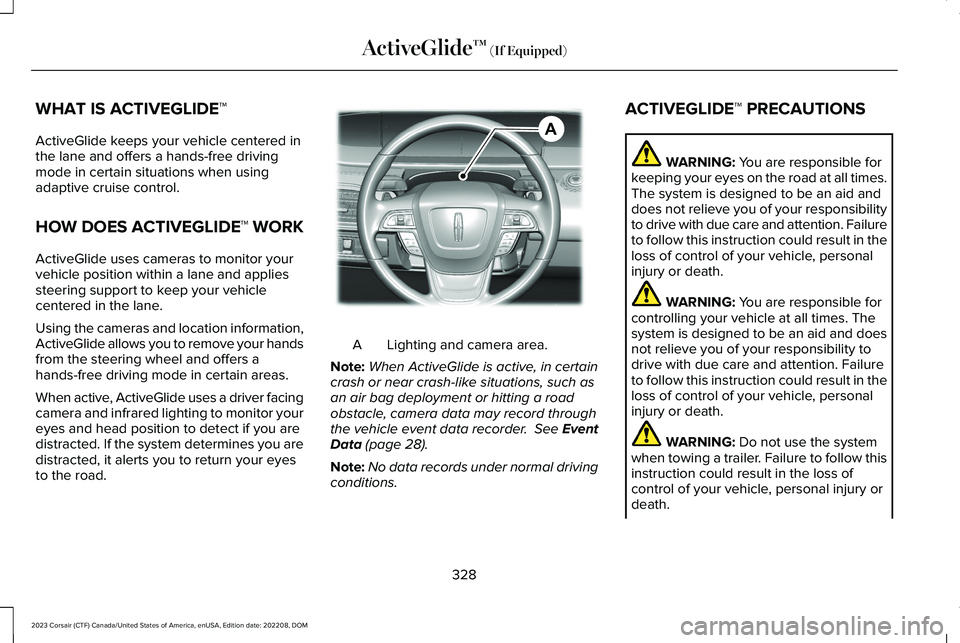
When active, ActiveGlide uses a driver facingcamera and infrared lighting to monitor youreyes and head position to detect if you aredistracted. If the system determines you aredistracted, it alerts you to return your eyesto the road.
Lighting and camera area.A
Note:When ActiveGlide is active, in certaincrash or near crash-like situations, such asan air bag deployment or hitting a roadobstacle, camera data may record throughthe vehicle event data recorder. See EventData (page 28).
Note:No data records under normal drivingconditions.
ACTIVEGLIDE™ PRECAUTIONS
WARNING: You are responsible forkeeping your eyes on the road at all times.The system is designed to be an aid anddoes not relieve you of your responsibilityto drive with due care and attention. Failureto follow this instruction could result in theloss of control of your vehicle, personalinjury or death.
WARNING: You are responsible forcontrolling your vehicle at all times. Thesystem is designed to be an aid and doesnot relieve you of your responsibility todrive with due care and attention. Failureto follow this instruction could result in theloss of control of your vehicle, personalinjury or death.
WARNING: Do not use the systemwhen towing a trailer. Failure to follow thisinstruction could result in the loss ofcontrol of your vehicle, personal injury ordeath.
328
2023 Corsair (CTF) Canada/United States of America, enUSA, Edition date: 202208, DOMActiveGlide™ (If Equipped)AE351152
Page 333 of 690
WARNING: Obstructions to the driverfacing camera or infrared lighting couldprevent the system from properlyoperating. Keep the camera and lightingareas free from obstruction. Failure tofollow this instruction could result in theloss of control of your vehicle, personalinjury or death.
WARNING: Do not use the system ifany changes or modifications to thesteering wheel have been made. Anychanges or modifications to the steeringwheel could affect the functionality orperformance of the system. Failure tofollow this instruction could result in theloss of control of your vehicle, personalinjury or death.
WARNING: The system may notfunction if the sensor is blocked.
WARNING: Pay close attention tochanging road conditions such as enteringor leaving a highway, on roads withintersections or roundabouts, roadswithout visible lanes of travel, roads thatare winding, slippery, unpaved, or steepslopes.
WARNING: The system is not a crashwarning or avoidance system.
WARNING: Large contrasts in outsidelighting can limit sensor performance.
WARNING: The system attempts tokeep your vehicle in the center of the laneas well as maintain speed and gap control.The system may not be able to performthese tasks in all situations. Do not use thesystem in complex or uncertain drivingconditions. Failure to follow this instructioncould result in the loss of control of yourvehicle, personal injury or death.
WARNING: Your vehicle could driftout of the lane of travel. Always beprepared to manually steer your vehicle.Failure to follow this instruction could resultin the loss of control of your vehicle,personal injury or death.
WARNING: The system will notoperate if the sensor cannot track the roadlane markings.
ACTIVEGLIDE™ REQUIREMENTS
ActiveGlide only activates when all of thefollowing occur:
•ActiveGlide is enabled in yourtouchscreen. See ActiveGlide™ Settings(page 330).
•Adaptive cruise control is on.
•The system detects both lane markings.
•Your hands are on the steering wheel.
•Your eyes are on the road.
329
2023 Corsair (CTF) Canada/United States of America, enUSA, Edition date: 202208, DOMActiveGlide™ (If Equipped)
Page 334 of 690
Note:The system must meet certain locationrequirements for the hands-free mode ofActiveGlide to work.
Note:The system may require softwareupdates for hands-free mode. See VehicleSoftware Updates (page 554).
ACTIVEGLIDE™ LIMITATIONS
Any of the following conditions could resultin ActiveGlide not operating correctly:
•You do not have your vehicle centeredin the lane.
•The lane is too narrow or too wide.
•The system does not detect at least onelane marking or when lanes merge orsplit.
•You have limited steering input.
•Using the system in areas underconstruction.
•If you make any aftermarket modificationsto the steering system.
•When using a spare tire.
The driver-facing camera may not operatecorrectly due to any of the following:
•If you have a pre-existing eye condition,such as an eye misalignment, or havehad eye surgery.
•You cover your facial features by a mask,hat or other items.
•The lighting conditions changesignificantly.
•You are not in the field of view of thecamera.
•You position or tilt yourself to one side.
•You are moving around extensively.
•You are wearing glasses or sunglassesthat are too dark or reflective.
Note:The system has limited steeringassistance and may not be sufficient for alldriving situations.
Note:In exceptional conditions, such asinclement weather or direct sunlight, thesystem could deviate from the center line.
Note:The information provided by thenavigation map data could be inaccurate orout of date.
ACTIVEGLIDE™ SETTINGS
Enabling ActiveGlide
1.Press Features on the touchscreen.
2.Press Driver Assistance.
3.Press Cruise Control.
4.Press Adaptive Cruise Control.
5.Press Lane Centering with Hands-Free.
Enabling Activation Prompts
1.Press Features on the touchscreen.
2.Press Driver Assistance.
3.Press Cruise Control.
4.Press Adaptive Cruise Control.
5.Press Activation Prompts.
SWITCHING ACTIVEGLIDE™ ON
AND OFF
Switching ActiveGlide On
The controls are on the steering wheel.
330
2023 Corsair (CTF) Canada/United States of America, enUSA, Edition date: 202208, DOMActiveGlide™ (If Equipped)
Page 335 of 690
Using Activation Prompts
When the prompt appears, pressthe button to switch ActiveGlideon.
The indicator appears in the instrumentcluster. When the system is on, the color ofthe indicator changes to indicate the systemstatus.
Note:You must enable activation promptsin the touchscreen.
Using Steering Wheel Controls
Using the adaptive cruise controland lateral support buttons, makesure both systems are active.ActiveGlide activates.
Switching ActiveGlide Off
Press either the lateral support oradaptive cruise control buttonwhen system is active or instandby mode.
ActiveGlide turns off through eachignition cycle.
ACTIVEGLIDE™ ALERTS
When ActiveGlide is providing hands-ondriving or transitioning to hands-on drivingfrom hands-free driving and detects nosteering activity for a certain period of time,the system alerts you with a message in theinstrument cluster to put your hands on thesteering wheel. After the first alert, thesystem alerts you with a message in theinstrument cluster and an audible warning.
When ActiveGlide is providing hands-on orhands-free driving and detects you are notlooking at the road for a certain period oftime, the system alerts you to return youreyes to the road. Depending on where youare looking, the alert can be a message inthe instrument cluster and an audiblewarning.
If you do not react to the warnings,ActiveGlide cancels, quickly activates andreleases the brakes, and slows your vehicledown to low speeds while maintainingsteering control.
If your vehicle slows down and you resumecontrol, a message appears to prompt youto press the accelerator pedal to allow thesystem to resume.
Note:If the system detects repeatedinactivity, it disables until the next key cycle.
ACTIVEGLIDE™ AUTOMATIC
CANCELLATION
When an external condition cancelsActiveGlide, for example, no lane markingsavailable, a tone sounds and a messageappears in the instrument cluster.
If your vehicle starts to slow down,you must take control of steeringand press and release the buttonto reactivate ActiveGlide.
System cancellation can also occur if:
•The lane becomes too narrow.
•The system cannot detect valid lanemarkings.
331
2023 Corsair (CTF) Canada/United States of America, enUSA, Edition date: 202208, DOMActiveGlide™ (If Equipped)E144529 E308131 E144529 E308131 E144529 E281472
Page 336 of 690
•Lane markings cross.
•Your eyes are not on the road or yourhands are not the steering wheel.
If you have your hands on the steering wheeland your eyes are on the road when thefeature is active and a cancellation occurs,the system sounds a tone and displays acancelled graphic in the instrument cluster.
If you are not paying attention to the road oryour hands are not on the steering wheeland a cancellation occurs, the systemdisplays a message and a tone sounds untilyou resume control. If you do not resumecontrol in time, ActiveGlide quickly activatesand releases the brakes, and slows yourvehicle down to low speeds whilemaintaining steering control. If your vehicleslows down and you resume control, amessage appears to prompt you to press theaccelerator pedal to allow the system toresume.
Note:The system disables until the next keycycle if it detects repeated inactivity.
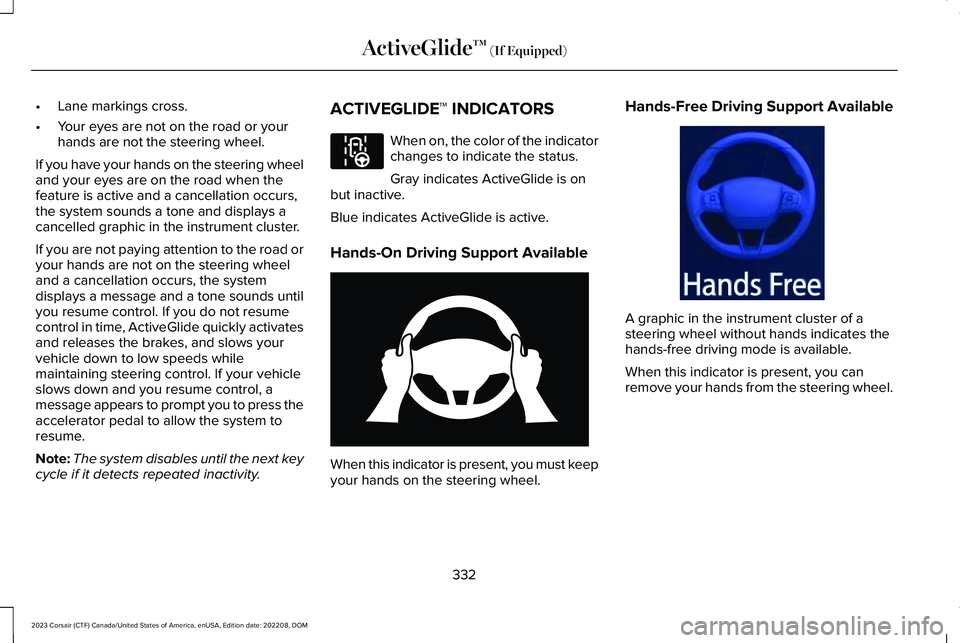
ACTIVEGLIDE™ INDICATORS
When on, the color of the indicatorchanges to indicate the status.
Gray indicates ActiveGlide is onbut inactive.
Blue indicates ActiveGlide is active.
Hands-On Driving Support Available
When this indicator is present, you must keepyour hands on the steering wheel.
Hands-Free Driving Support Available
A graphic in the instrument cluster of asteering wheel without hands indicates thehands-free driving mode is available.
When this indicator is present, you canremove your hands from the steering wheel.
332
2023 Corsair (CTF) Canada/United States of America, enUSA, Edition date: 202208, DOMActiveGlide™ (If Equipped)E297977 E333236 E333232
Page 340 of 690
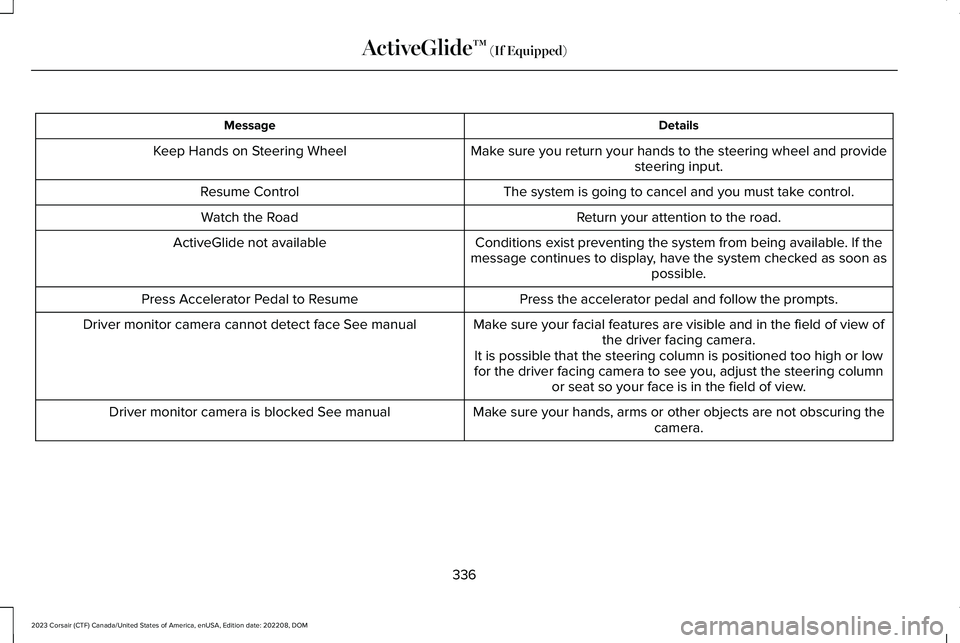
DetailsMessage
Make sure you return your hands to the steering wheel and providesteering input.Keep Hands on Steering Wheel
The system is going to cancel and you must take control.Resume Control
Return your attention to the road.Watch the Road
Conditions exist preventing the system from being available. If themessage continues to display, have the system checked as soon aspossible.
ActiveGlide not available
Press the accelerator pedal and follow the prompts.Press Accelerator Pedal to Resume
Make sure your facial features are visible and in the field of view ofthe driver facing camera.Driver monitor camera cannot detect face See manual
It is possible that the steering column is positioned too high or lowfor the driver facing camera to see you, adjust the steering columnor seat so your face is in the field of view.
Make sure your hands, arms or other objects are not obscuring thecamera.Driver monitor camera is blocked See manual
336
2023 Corsair (CTF) Canada/United States of America, enUSA, Edition date: 202208, DOMActiveGlide™ (If Equipped)
Page 341 of 690
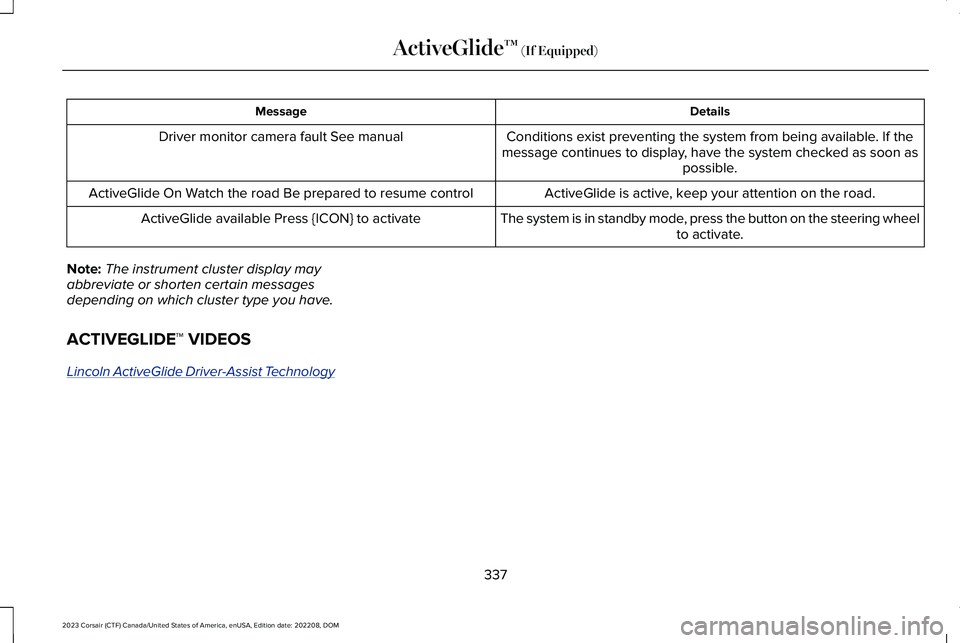
DetailsMessage
Conditions exist preventing the system from being available. If themessage continues to display, have the system checked as soon aspossible.
Driver monitor camera fault See manual
ActiveGlide is active, keep your attention on the road.ActiveGlide On Watch the road Be prepared to resume control
The system is in standby mode, press the button on the steering wheelto activate.ActiveGlide available Press {ICON} to activate
Note:The instrument cluster display mayabbreviate or shorten certain messagesdepending on which cluster type you have.
ACTIVEGLIDE™ VIDEOS
Lincoln ActiveGlide Driver-Assist Technology
337
2023 Corsair (CTF) Canada/United States of America, enUSA, Edition date: 202208, DOMActiveGlide™ (If Equipped)