reset LINCOLN CORSAIR 2023 Service Manual
[x] Cancel search | Manufacturer: LINCOLN, Model Year: 2023, Model line: CORSAIR, Model: LINCOLN CORSAIR 2023Pages: 690, PDF Size: 15.04 MB
Page 542 of 690
PHONE PRECAUTIONS
WARNING: Driving while distractedcan result in loss of vehicle control, crashand injury. We strongly recommend thatyou use extreme caution when using anydevice that may take your focus off theroad. Your primary responsibility is the safeoperation of your vehicle. We recommendagainst the use of any hand-held devicewhile driving and encourage the use ofvoice-operated systems when possible.Make sure you are aware of all applicablelocal laws that may affect the use ofelectronic devices while driving.
CONNECTING YOUR PHONE
Go to the settings menu on your device andswitch Bluetooth® on.
Press the phone option on thefeature bar.
1.Press Add Phone.
Note:A prompt alerts you to search for yourvehicle on your cell phone.
2.Select your vehicle on your cell phone.
Note:A number appears on your cell phoneand on the touchscreen.
3.Confirm the number on your cell phonematches the number on the touchscreen.
Note:The touchscreen indicates that youhave successfully paired your cell phone.
4.Download the phonebook from your cellphone when you are prompted.
Note:If you pair more than one cell phone,use the phone settings on the center displayto specify the primary phone. You canchange this setting at any time.
PHONE MENU
This menu becomes available after pairinga phone.
Recent Call List
Display and select an entry from a list ofprevious calls.
Contacts
Display a smart search form to look up yourcontacts. Use the List button to alphabeticallysort your contacts.
Favorites
Display the list of favorite contacts that areset up on your phone.
Messaging
Displays the list of text messages to read,listen to, or respond to.
Email
Displays the list of emails to read, listen to,or respond to.
Phone List
Display the list of paired or connecteddevices that you can select.
Note:Up to 12 devices can be stored.
538
2023 Corsair (CTF) Canada/United States of America, enUSA, Edition date: 202208, DOMPhone
Page 552 of 690
HOW DO PERSONAL PROFILES
WORK
This feature allows you to create multiplepersonal profiles enabling users topersonalize vehicle’s settings such as seatsand mirrors, as well as non-positional settingslike radio, navigation, driver assist systemsettings. Positional settings are saved byholding a memory seat button.Non-positional settings are saved youchange a setting while a profile is active. Youcan create one profile for each presetmemory seat button along with a guestprofile.
Recalling and Changing a Profile
You can recall a profile using thetouchscreen or the preset button youselected when you created your profile. Youcan also link a remote control and a mobiledevice to your profile, which are used torecall it.
ENABLING OR DISABLING
PERSONAL PROFILES
1.Switch the vehicle on and leave thevehicle in park (P).
2.Press Settings on the touchscreen.
3.Press Personal Profiles.
4.Switch Personal Profiles on or off.
When enabled:
•Unlocking a door with a remote controlor mobile device that is not linked to adriver profile does not change the activeprofile, but remains in the last knownprofile. It does not change the positionalsettings.
•Pressing a memory seat button that isnot linked to a driver profile or saved toa preset setting does not change theactive profile, but remains in the lastknown profile. It does not change thepositional settings.
•Pressing a memory seat button that isnot linked to a driver profile but is savedto a preset setting does not change theactive profile, but remains in the lastknown profile. It recalls the positionalsettings that you saved to that memoryseat button.
548
2023 Corsair (CTF) Canada/United States of America, enUSA, Edition date: 202208, DOMPersonal Profiles
Page 553 of 690
When disabled:
•Unlocking a door with a remote controlor mobile device does not recall anynon-positional settings but still recallspositional settings from the driver profilewhich the remote control or mobiledevice is linked to.
•Pressing a memory seat button that isnot linked to a driver profile or saved toa preset setting does not change thepositional or non-positional settings.
•Pressing a memory seat button that islinked to a driver profile or has saved toa preset setting recalls the positionalsettings that you saved to that memoryseat button.
CREATING A PERSONAL PROFILE
Use the touchscreen to create a personalprofile.
1.Switch the vehicle on and leave thevehicle in park (P).
2.Select the Personal Profiles button underSettings.
3.Follow the instructions on the display.
LINKING OR UNLINKING A
PERSONAL PROFILE TO A REMOTE
CONTROL
You can save preset memory positions forup to three remote controls by assigning aremote control to a personal profile usingthe touchscreen.
Use the touchscreen to link a remote controlto a personal profile.
1.Switch the vehicle on and leave thevehicle in park (P).
2.Select the Personal Profiles button underSettings.
3.Touch the arrow for the profile you wishto link to a remote control.
4.Select remote control.
5.Follow the instructions on the display.
Note:If more than one linked remote controlis in range, the memory function moves tothe settings of the first key to initiate amemory recall.
Note:The guest profile consists of existingsettings when there is no driver profilecreated. After you create a driver profile, theguest profile serves as an additional driverprofile.
Note:You cannot link a remote control to aguest profile.
LINKING OR UNLINKING A
PERSONAL PROFILE TO A DEVICE
Use the touchscreen to link a mobile deviceto a personal profile.
1.Switch the vehicle on and leave thevehicle in park (P).
2.Select the Personal Profiles button underSettings.
3.Touch the arrow for the profile you wishto link to a mobile device.
4.Select mobile device.
5.Follow the instructions on the display.
549
2023 Corsair (CTF) Canada/United States of America, enUSA, Edition date: 202208, DOMPersonal Profiles
Page 561 of 690
PERFORMING A SYSTEM RESET
Performing a system reset allows you toremove all personal information and restoresettings to their factory defaults.
1.Press Settings on the touchscreen.
2.Press General.
3.Press Reset.
4.Press Master Reset.
5.Follow the prompts on the screen tocomplete the reset.
557
2023 Corsair (CTF) Canada/United States of America, enUSA, Edition date: 202208, DOMVehicle System Reset
Page 568 of 690
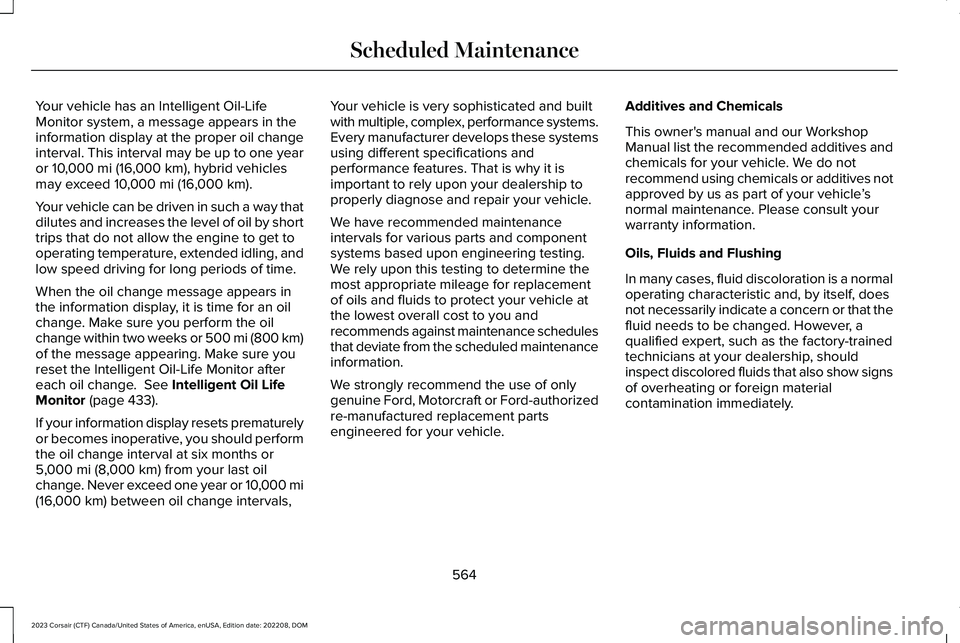
Your vehicle has an Intelligent Oil-LifeMonitor system, a message appears in theinformation display at the proper oil changeinterval. This interval may be up to one yearor 10,000 mi (16,000 km), hybrid vehiclesmay exceed 10,000 mi (16,000 km).
Your vehicle can be driven in such a way thatdilutes and increases the level of oil by shorttrips that do not allow the engine to get tooperating temperature, extended idling, andlow speed driving for long periods of time.
When the oil change message appears inthe information display, it is time for an oilchange. Make sure you perform the oilchange within two weeks or 500 mi (800 km)of the message appearing. Make sure youreset the Intelligent Oil-Life Monitor aftereach oil change. See Intelligent Oil LifeMonitor (page 433).
If your information display resets prematurelyor becomes inoperative, you should performthe oil change interval at six months or5,000 mi (8,000 km) from your last oilchange. Never exceed one year or 10,000 mi(16,000 km) between oil change intervals,
Your vehicle is very sophisticated and builtwith multiple, complex, performance systems.Every manufacturer develops these systemsusing different specifications andperformance features. That is why it isimportant to rely upon your dealership toproperly diagnose and repair your vehicle.
We have recommended maintenanceintervals for various parts and componentsystems based upon engineering testing.We rely upon this testing to determine themost appropriate mileage for replacementof oils and fluids to protect your vehicle atthe lowest overall cost to you andrecommends against maintenance schedulesthat deviate from the scheduled maintenanceinformation.
We strongly recommend the use of onlygenuine Ford, Motorcraft or Ford-authorizedre-manufactured replacement partsengineered for your vehicle.
Additives and Chemicals
This owner's manual and our WorkshopManual list the recommended additives andchemicals for your vehicle. We do notrecommend using chemicals or additives notapproved by us as part of your vehicle’snormal maintenance. Please consult yourwarranty information.
Oils, Fluids and Flushing
In many cases, fluid discoloration is a normaloperating characteristic and, by itself, doesnot necessarily indicate a concern or that thefluid needs to be changed. However, aqualified expert, such as the factory-trainedtechnicians at your dealership, shouldinspect discolored fluids that also show signsof overheating or foreign materialcontamination immediately.
564
2023 Corsair (CTF) Canada/United States of America, enUSA, Edition date: 202208, DOMScheduled Maintenance
Page 574 of 690
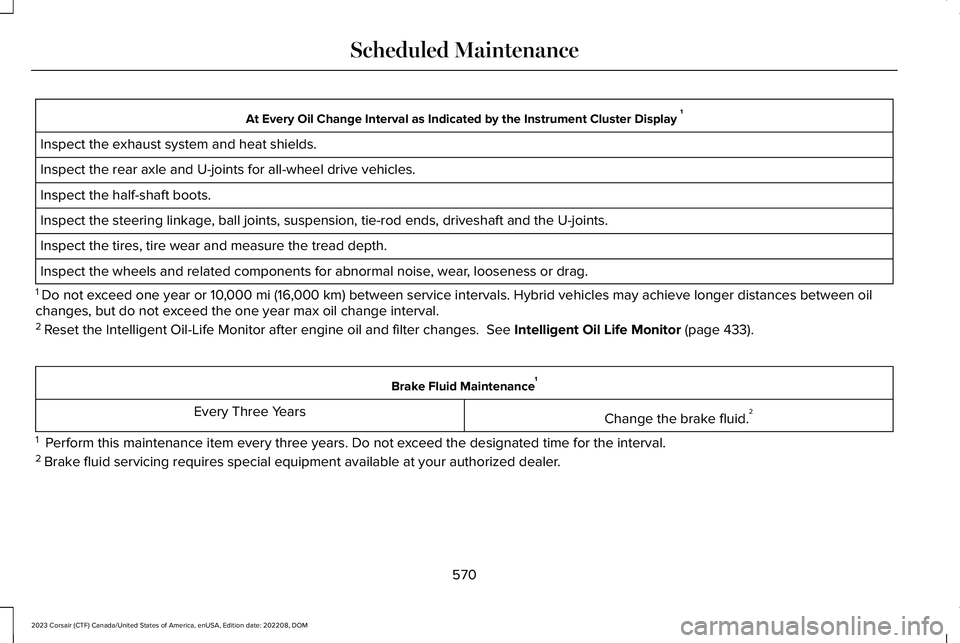
At Every Oil Change Interval as Indicated by the Instrument Cluster Display 1
Inspect the exhaust system and heat shields.
Inspect the rear axle and U-joints for all-wheel drive vehicles.
Inspect the half-shaft boots.
Inspect the steering linkage, ball joints, suspension, tie-rod ends, driveshaft and the U-joints.
Inspect the tires, tire wear and measure the tread depth.
Inspect the wheels and related components for abnormal noise, wear, looseness or drag.
1 Do not exceed one year or 10,000 mi (16,000 km) between service intervals. Hybrid vehicles may achieve longer distances between oilchanges, but do not exceed the one year max oil change interval.2 Reset the Intelligent Oil-Life Monitor after engine oil and filter changes. See Intelligent Oil Life Monitor (page 433).
Brake Fluid Maintenance1
Change the brake fluid.2Every Three Years
1 Perform this maintenance item every three years. Do not exceed the designated time for the interval.2 Brake fluid servicing requires special equipment available at your authorized dealer.
570
2023 Corsair (CTF) Canada/United States of America, enUSA, Edition date: 202208, DOMScheduled Maintenance
Page 576 of 690
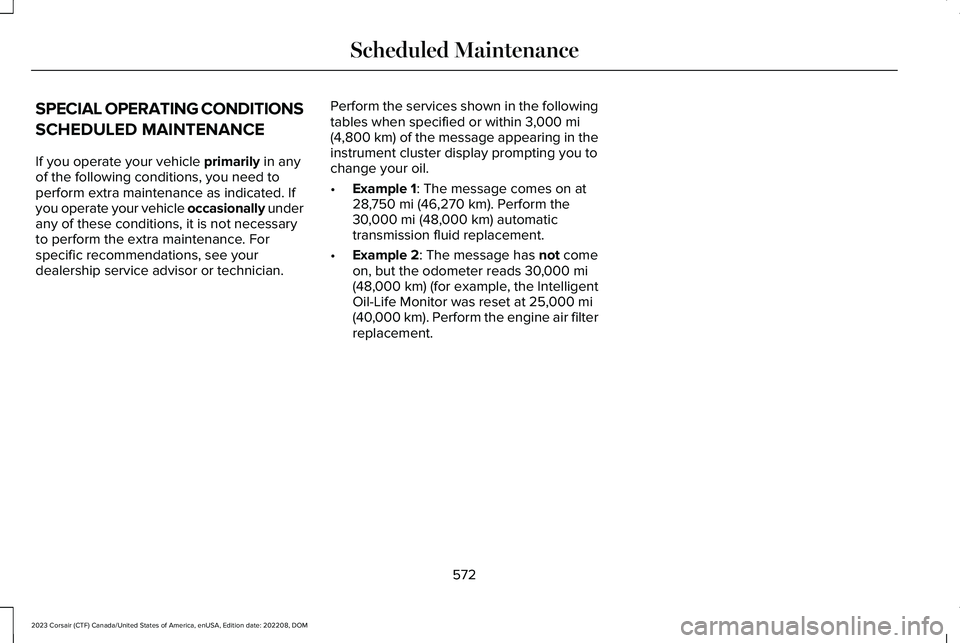
SPECIAL OPERATING CONDITIONS
SCHEDULED MAINTENANCE
If you operate your vehicle primarily in anyof the following conditions, you need toperform extra maintenance as indicated. Ifyou operate your vehicle occasionally underany of these conditions, it is not necessaryto perform the extra maintenance. Forspecific recommendations, see yourdealership service advisor or technician.
Perform the services shown in the followingtables when specified or within 3,000 mi(4,800 km) of the message appearing in theinstrument cluster display prompting you tochange your oil.
•Example 1: The message comes on at28,750 mi (46,270 km). Perform the30,000 mi (48,000 km) automatictransmission fluid replacement.
•Example 2: The message has not comeon, but the odometer reads 30,000 mi(48,000 km) (for example, the IntelligentOil-Life Monitor was reset at 25,000 mi(40,000 km). Perform the engine air filterreplacement.
572
2023 Corsair (CTF) Canada/United States of America, enUSA, Edition date: 202208, DOMScheduled Maintenance
Page 579 of 690
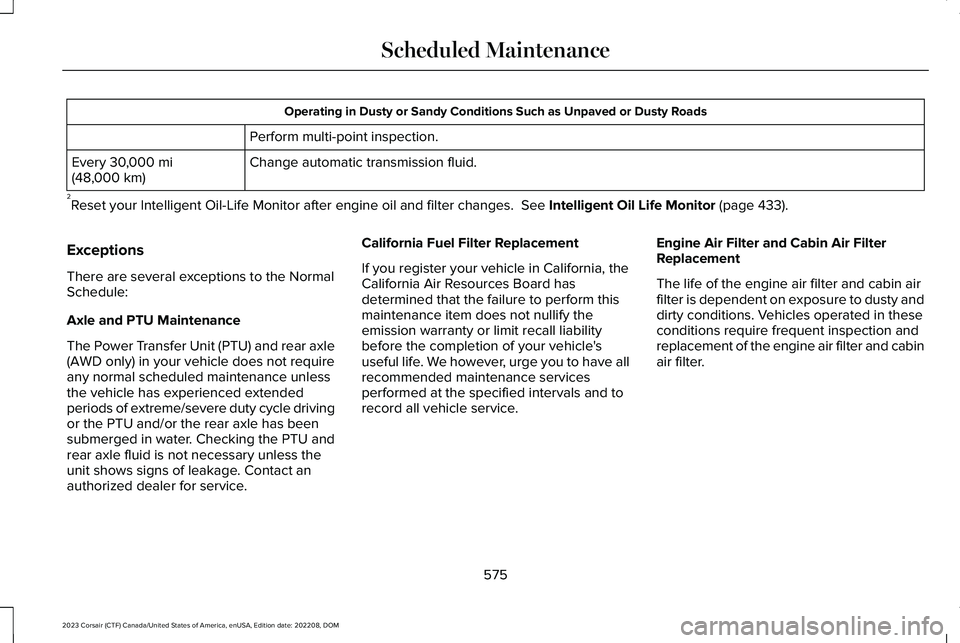
Operating in Dusty or Sandy Conditions Such as Unpaved or Dusty Roads
Perform multi-point inspection.
Change automatic transmission fluid.Every 30,000 mi(48,000 km)
2Reset your Intelligent Oil-Life Monitor after engine oil and filter changes. See Intelligent Oil Life Monitor (page 433).
Exceptions
There are several exceptions to the NormalSchedule:
Axle and PTU Maintenance
The Power Transfer Unit (PTU) and rear axle(AWD only) in your vehicle does not requireany normal scheduled maintenance unlessthe vehicle has experienced extendedperiods of extreme/severe duty cycle drivingor the PTU and/or the rear axle has beensubmerged in water. Checking the PTU andrear axle fluid is not necessary unless theunit shows signs of leakage. Contact anauthorized dealer for service.
California Fuel Filter Replacement
If you register your vehicle in California, theCalifornia Air Resources Board hasdetermined that the failure to perform thismaintenance item does not nullify theemission warranty or limit recall liabilitybefore the completion of your vehicle'suseful life. We however, urge you to have allrecommended maintenance servicesperformed at the specified intervals and torecord all vehicle service.
Engine Air Filter and Cabin Air FilterReplacement
The life of the engine air filter and cabin airfilter is dependent on exposure to dusty anddirty conditions. Vehicles operated in theseconditions require frequent inspection andreplacement of the engine air filter and cabinair filter.
575
2023 Corsair (CTF) Canada/United States of America, enUSA, Edition date: 202208, DOMScheduled Maintenance
Page 665 of 690
1
12V Battery.....................................................44212V Battery Precautions...................................442Battery Management SystemLimitations........................................................443Changing the 12V Battery................................444Charging the 12V Battery.................................446How Does the Battery Management SystemWork..................................................................443Recycling and Disposing of the 12VBattery..............................................................446Resetting the Battery Sensor..........................446What Is the Battery ManagementSystem..............................................................443
12V Battery – Troubleshooting.................44612V Battery – Information Messages.............44712V Battery – Warning Lamps.........................446
3
360 Degree Camera...................................302360 Degree Camera Settings.........................304
360 Degree Camera Guide Lines............303360 Degree Camera Limitations..............303360 Degree Camera Precautions............302
360 Degree Camera Settings...................304Switching the 360 Degree Camera On andOff......................................................................304Switching the 360 Degree CameraView..................................................................304
9
911 Assist...........................................................76
A
A/CSee: Climate Control..........................................168
About This Publication...................................21ABSSee: Brakes..........................................................268
Accessing Apps............................................545Accessing Navigation..................................551Accessing the Passive Key BackupPosition.........................................................210Accessing the Trip Computer....................159Accessories...................................................558AC Charging..................................................248Connecting the Charger...................................248Stopping Charging.............................................249
ActiveGlide™...................................................328ActiveGlide™ – Troubleshooting.....................335
In-Lane Repositioning........................................334Lane Change Assist...........................................333Lane Change Assist - Troubleshooting.........334
ActiveGlide™ Alerts........................................331ActiveGlide™ Automatic Cancellation.......331ActiveGlide™ Indicators...............................332ActiveGlide™ Limitations.............................330ActiveGlide™ Precautions...........................328ActiveGlide™ Requirements.......................329ActiveGlide™ Settings..................................330ActiveGlide™ – Troubleshooting...............335ActiveGlide™ – Information Messages..........335
ActiveGlide™ Videos.....................................337Active Park Assist.........................................305Active Park Assist – Troubleshooting...........307
Active Park Assist Precautions.................305Active Park Assist –Troubleshooting.........................................307Active Park Assist – Frequently AskedQuestions.........................................................307Active Park Assist – InformationMessages.........................................................307
Adaptive Cruise Control..............................310Adaptive Cruise Control –Troubleshooting.............................................325Lane Centering....................................................319Predictive Speed Assist....................................322
661
2023 Corsair (CTF) Canada/United States of America, enUSA, Edition date: 202208, DOMIndex
Page 672 of 690

Drive Belt Routing Overview - 2.0LEcoBoost™....................................................442Drive Mode Control.....................................338Drive Modes.........................................................338
Drive Mode Control Videos.......................340Drive Modes..................................................338Conserve..............................................................338Excite.....................................................................339Normal...................................................................339Preserve EV.........................................................339Pure EV.................................................................339Slippery.................................................................339
Driver Alert.....................................................372Driver Alert – Troubleshooting........................373
Driver Alert Limitations................................373Driver Alert Precautions..............................372Driver Alert – Troubleshooting..................373Driver Alert – Information Messages.............373
Driving Economically...................................394Driving Hints..................................................394Driving in Special Conditions..........................395
Driving in Special Conditions....................395Driving In Sand....................................................396Driving on Hilly or Sloping Terrain.................395Driving Through Mud and Water....................395
Driving on Snow and Ice............................394Driving Through Shallow Water...............396
E
Easy Entry and Exit.........................................98Eco Coach.......................................................341Electric Economy...........................................156Electric Parking Brake AudibleWarning........................................................273Electric Parking Brake.................................272Electric Parking Brake –Troubleshooting.............................................273
Electric Parking Brake –Troubleshooting.........................................273Electric Parking Brake – InformationMessages.........................................................274Electric Parking Brake – WarningLamps................................................................273
Electric Power Steering...............................291Electric Power Steering Precautions..............291How Does Electric Power SteeringWork...................................................................291
Electromagnetic Compatibility.................655Emergency Call Limitations..........................77Emergency Call Requirements....................76Emergency Call System Data......................30Emergency Towing - Gasoline....................411Emergency Towing - Plug-In Hybrid ElectricVehicle (PHEV)............................................410Emission Law..................................................651
Enabling Apps on an AndroidDevice..........................................................545Enabling Apps on an iOS Device.............545Enabling or Disabling PersonalProfiles..........................................................548Enabling Remote Start.................................165End User License Agreement....................621Engine Air Filter............................................434Changing the Engine Air Filter........................434
Engine Block Heater...................................207Engine Block Heater Precautions..................207How Does the Engine Block HeaterWork..................................................................208Using the Engine Block Heater......................208
Engine Coolant Temperature Gauge.......140Engine Oil Capacity and Specification -2.0L EcoBoost™..........................................499Engine Oil Capacity and Specification -2.5L, Plug-In Hybrid Electric Vehicle(PHEV)...........................................................501Engine Oil.......................................................432Adding Engine Oil..............................................432Checking the Engine Oil Level.......................432Engine Oil Capacity and Specification..........434Engine Oil Dipstick Overview..........................432Intelligent Oil Life Monitor................................433Resetting the Intelligent Oil LifeMonitor..............................................................433
668
2023 Corsair (CTF) Canada/United States of America, enUSA, Edition date: 202208, DOMIndex