reset LINCOLN CORSAIR 2023 Owner's Manual
[x] Cancel search | Manufacturer: LINCOLN, Model Year: 2023, Model line: CORSAIR, Model: LINCOLN CORSAIR 2023Pages: 690, PDF Size: 15.04 MB
Page 196 of 690
HOW DOES THE MEMORY
FUNCTION WORK
The memory function recalls the position ofthese features:
•Driver seat.
•Power mirrors.
•Optional power steering column.
MEMORY FUNCTION
PRECAUTIONS
WARNING: Before activating thememory seat, make sure that the areaimmediately surrounding the seat is clearof obstructions and that all occupants areclear of moving parts.
WARNING: Do not use the memoryfunction when your vehicle is moving.
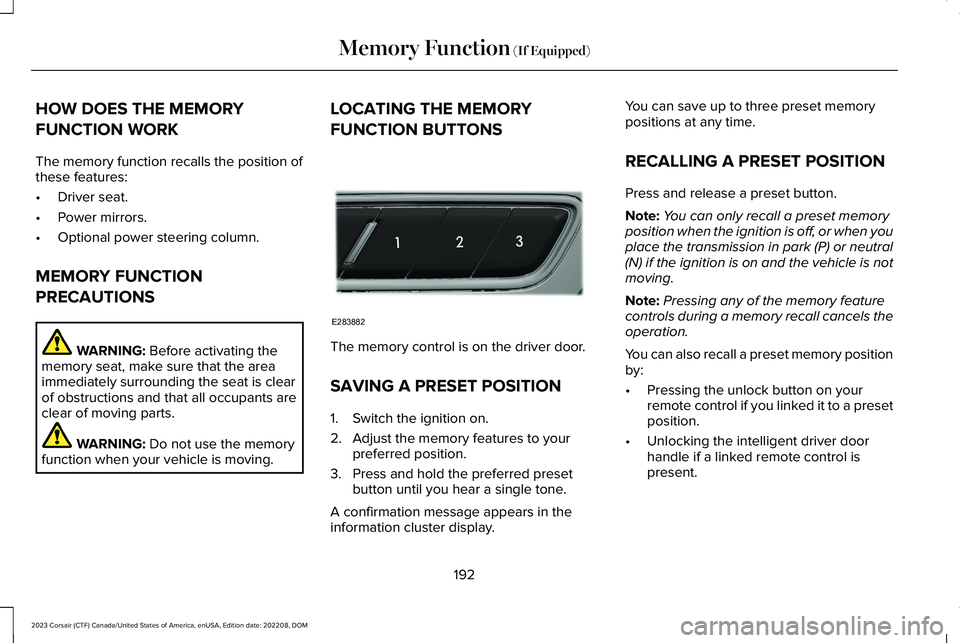
LOCATING THE MEMORY
FUNCTION BUTTONS
The memory control is on the driver door.
SAVING A PRESET POSITION
1.Switch the ignition on.
2.Adjust the memory features to yourpreferred position.
3.Press and hold the preferred presetbutton until you hear a single tone.
A confirmation message appears in theinformation cluster display.
You can save up to three preset memorypositions at any time.
RECALLING A PRESET POSITION
Press and release a preset button.
Note:You can only recall a preset memoryposition when the ignition is off, or when youplace the transmission in park (P) or neutral(N) if the ignition is on and the vehicle is notmoving.
Note:Pressing any of the memory featurecontrols during a memory recall cancels theoperation.
You can also recall a preset memory positionby:
•Pressing the unlock button on yourremote control if you linked it to a presetposition.
•Unlocking the intelligent driver doorhandle if a linked remote control ispresent.
192
2023 Corsair (CTF) Canada/United States of America, enUSA, Edition date: 202208, DOMMemory Function (If Equipped)E283882
Page 213 of 690
required to steer your vehicle. When youswitch the ignition off, some electricalcircuits, for example airbags, also turn off.If you unintentionally switch the ignitionoff, shift into neutral (N) and restart theengine.
1.Press and hold the push button ignitionswitch until the engine stops, or press itthree times within two seconds.
2.Shift into neutral and use the brakes tobring your vehicle to a safe stop.
3.Shift into park (P).
4.Apply the parking brake.
AUTOMATIC ENGINE STOP
WHAT IS AUTOMATIC ENGINE STOP
Automatic engine stop is a feature thatswitches the engine off if it has been idlingfor an extended period to help you save fuel.
HOW DOES AUTOMATIC ENGINESTOP WORK
Automatic engine stop turns the engine off.The ignition also turns off in order to savebattery power. Before the engine shutsdown, a message appears in the informationdisplay showing a timer counting down. Ifyou do not intervene within 30 seconds, theengine shuts down. Another messageappears in the information display to informyou that the engine has shut down in orderto save fuel. Start your vehicle as younormally do.
SWITCHING AUTOMATIC ENGINESTOP ON AND OFF
1.Press Settings on the touchscreen.
2.Press Vehicle Settings.
3.Switch 30min Max Idle on or off.
Note:You cannot permanently switch off theautomatic shutdown. If you switch it off, itturns on each time you switch the ignitionon.
OVERRIDING AUTOMATIC ENGINESTOP
You can stop the engine shutdown, or resetthe timer, at any point before the 30-secondcountdown has expired by doing any of thefollowing:
•Pressing the brake pedal or acceleratorpedal.
•Pressing the OK or RESET button duringthe countdown.
Note: You cannot permanently switch offthe automatic engine shutdown feature. When you switch it off temporarily, it turnson at the next ignition cycle.
209
2023 Corsair (CTF) Canada/United States of America, enUSA, Edition date: 202208, DOMStarting and Stopping the EngineE357998
Page 220 of 690

The engine may not start because yourvehicle has a silent key start feature. Thisfuel saving feature allows your vehicle to beready to drive without requiring the gasengine to be running.
The indicator remains on when your vehicleis on, whether the engine is running or not,to indicate your vehicle is capable ofmovement using the electric motor, gasengine or both.
Typically, the engine does not start unlessthe vehicle is cold, a climate control changeis requested or you press the acceleratorpedal.
WHAT IS LOW ENGINE USE MODE
Low engine use mode maintains properengine lubrication at sufficient temperatureand activates when you drive your vehiclewith limited engine operation.
HOW DOES LOW ENGINE USE MODEWORK
When in low engine use mode, your vehicleruns the engine as necessary. When lowengine use mode begins, a message appearsin the information display. If low engine usemode does not complete before you switchyour vehicle off, it continues the next timeyou start your vehicle and the messagereappears.
Note:Pure EV now mode is not availablewhen in low engine use mode.
Note:Cold temperatures affect the enginewarm up time and the low engine use modemay operate more frequently.
Note:An oil change is not required but givesyou the option of not running a low engineuse cycle. Resetting the oil life monitoringsystem suspends the low engine use mode.
PLUG-IN HYBRID ELECTRIC VEHICLE
INFORMATION – TROUBLESHOOTING
PLUG-IN HYBRID ELECTRIC VEHICLEINFORMATION – WARNING LAMPS
Illuminates if your vehicle'selectrical system requires serviceto identify the cause for yourvehicle to shut down or enter a limitedoperating mode. A message may appear inthe instrument cluster display. Have yourvehicle checked as soon as possible.
216
2023 Corsair (CTF) Canada/United States of America, enUSA, Edition date: 202208, DOMHybrid Electric Vehicle Information - Plug-In Hybrid Electric Vehicle (PHEV)E384927
Page 258 of 690
2.On the charging locations screen selectadd new location. You can also editsettings for previously saved locationslisted on this screen.
3.Select an address from the list of recentcharge locations.
4.Confirm that this is the location you wantto save with the help of the map view.Edit the location name if desired and seta maximum charge limit. Press continueto schedule.
Note:Depending on the GPS location, theaddress on the navigation may not preciselymatch up with your charging location.Confirm on the map that the pin is in theexpected location.
Note:Charging stops when your vehiclereaches the maximum charge limit setting.
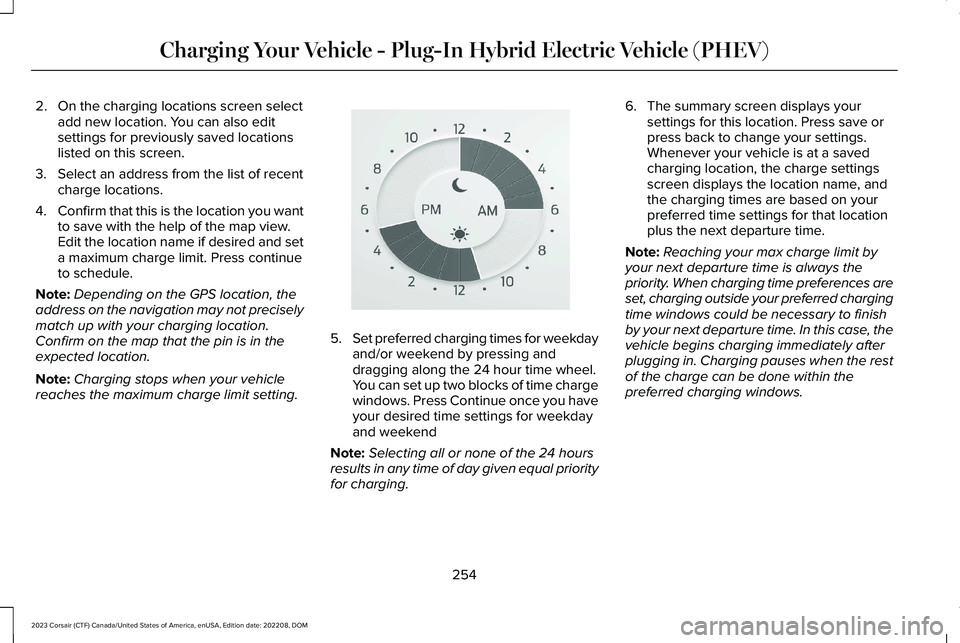
5.Set preferred charging times for weekdayand/or weekend by pressing anddragging along the 24 hour time wheel.You can set up two blocks of time chargewindows. Press Continue once you haveyour desired time settings for weekdayand weekend
Note:Selecting all or none of the 24 hoursresults in any time of day given equal priorityfor charging.
6.The summary screen displays yoursettings for this location. Press save orpress back to change your settings.Whenever your vehicle is at a savedcharging location, the charge settingsscreen displays the location name, andthe charging times are based on yourpreferred time settings for that locationplus the next departure time.
Note:Reaching your max charge limit byyour next departure time is always thepriority. When charging time preferences areset, charging outside your preferred chargingtime windows could be necessary to finishby your next departure time. In this case, thevehicle begins charging immediately afterplugging in. Charging pauses when the restof the charge can be done within thepreferred charging windows.
254
2023 Corsair (CTF) Canada/United States of America, enUSA, Edition date: 202208, DOMCharging Your Vehicle - Plug-In Hybrid Electric Vehicle (PHEV)E359594
Page 300 of 690
FRONT PARKING AID AUDIBLEWARNINGS
A warning tone sounds when there is anobject within 28 in (70 cm) from the frontbumper. As your vehicle moves closer to anobject, the rate of the tone increases.
The warning tone continuously sounds whenan object is 12 in (30 cm) or less from thefront bumper.
Note:If the detected object is 12 in (30 cm)or less from your vehicle, visual indicationremains on.
SIDE PARKING AID
WHAT IS THE SIDE PARKING AID
The front and rear outermost parking aidsensors map objects that are near to thesides of your vehicle.
SIDE PARKING AID LIMITATIONS
The sensor coverage is up to 24 in (60 cm)from the sides of your vehicle.
The side parking aid may not function if:
•Your vehicle remains stationary for overtwo minutes.
•The anti-lock brake system activates.
•The traction control system activates.
•Your vehicle is in park (P).
•The steering wheel angle information isnot available. You must drive at least492 ft (150 m) above 19 mph (30 km/h) toreset the steering wheel angleinformation.
Note:If you switch traction control off, theside sensing system also turns off.
To reinitialize the system, drive the length ofyour vehicle.
The side parking aid does not detect anobject that is moving toward the side of yourvehicle, for example another vehicle movingat a low speed, if it does not pass a front orrear parking aid sensor.
If the transmission is in reverse (R), the sidesensing system provides audible warnings.When your vehicle is moving slowly,obstacles are detected within 24 in (60 cm)and are inside the driving path of yourvehicle. If your vehicle remains stationary fora few seconds, the audible warning turns off.Visual indication is always present in reverse(R).
If your vehicle is in neutral (N), the sidesensing system provides visual indicationonly when your vehicle is moving slowly andthere is a front or rear parking aid obstacledetected, and the side obstacle is within24 in (60 cm) from the side of your vehicle.If your vehicle remains stationary for a fewseconds, the visual indication turns off.
If the transmission is in drive (D) or any otherforward gear, the side sensing systemprovides audible and visual warnings. Whenyour vehicle is moving slowly, obstacles aredetected within 24 in (60 cm) and are insidethe driving path of your vehicle. If yourvehicle remains stationary for a few seconds,the visual indication and audible warningturns off.
296
2023 Corsair (CTF) Canada/United States of America, enUSA, Edition date: 202208, DOMParking Aids
Page 325 of 690
LANE CENTERING ALERTS
You must keep your hands on the steeringwheel at all times.
When the system is active and detects nosteering activity for a period of time, thesystem alerts you to put your hands on thesteering wheel. If you do not reactappropriately to the warnings the adaptivecruise control with lane centering systemcancels and slows your vehicle down to idlespeeds while maintaining steering control.See Lane Centering Automatic Cancellation(page 321).
The system also alerts you if your vehiclecrosses lane line markings without detectedsteering activity.
Note:The system could detect a light gripor light touch on the steering wheel ashands-off driving.
LANE CENTERING AUTOMATICCANCELLATION
When an external condition cancels thesystem, for example, no lane line markingsavailable, a tone sounds and a messageappears in the instrument cluster display.
If your vehicle starts to slow downafter system cancellation, you musttake full control of the vehicle. Tore-enable adaptive cruise control with lanecentering after cancellation, press andrelease the resume button.
Automatic cancellation can also occur if:
•The lane becomes too wide or narrow.
•The system cannot detect valid lanemarkings.
•Lane markings cross over one another.
•The curve of the road is too sharp.
Note:If your vehicle slows down due to yourinactivity twice within a key cycle, the systemdisables. To reset the system, when thevehicle is stationary, return the gear selectorto park (P) and turn the vehicle off. Then,restart the vehicle with your foot on thebrake pedal.
LANE CENTERING MANUALCANCELLATION
When you perform the following actions,adaptive cruise control with lane centeringwill cancel:
•The brake pedal is pressed.
•Adaptive cruise control button isswitched off on the steering wheel.
The lane centering system is momentarilysuppressed when either of the followingactions are performed:
•Turn signal indicator is latched or tapped.
•You steer the vehicle out of lane.
321
2023 Corsair (CTF) Canada/United States of America, enUSA, Edition date: 202208, DOMAdaptive Cruise ControlE281472
Page 330 of 690
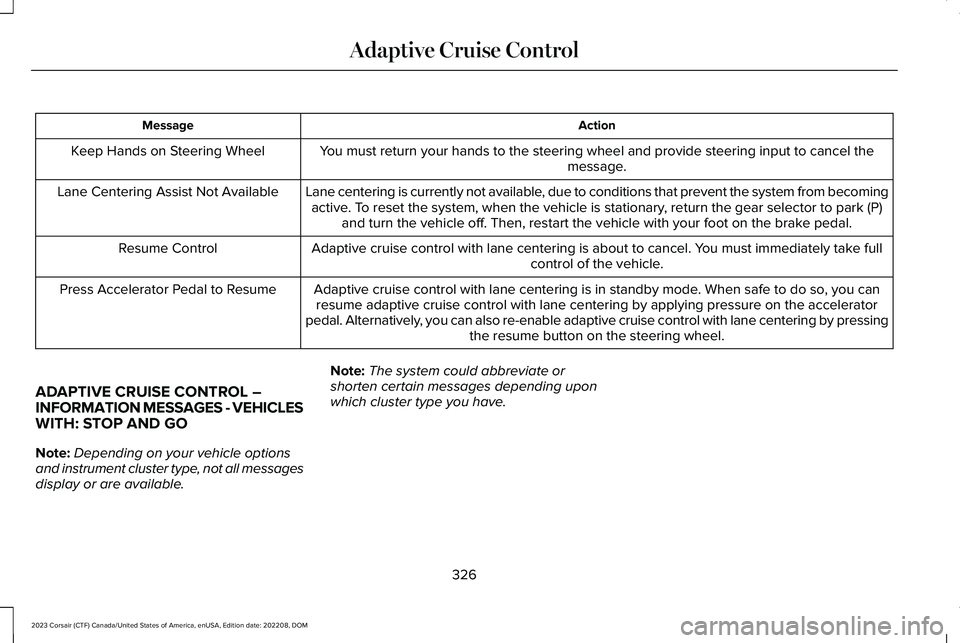
ActionMessage
You must return your hands to the steering wheel and provide steering input to cancel themessage.Keep Hands on Steering Wheel
Lane centering is currently not available, due to conditions that prevent the system from becomingactive. To reset the system, when the vehicle is stationary, return the gear selector to park (P)and turn the vehicle off. Then, restart the vehicle with your foot on the brake pedal.
Lane Centering Assist Not Available
Adaptive cruise control with lane centering is about to cancel. You must immediately take fullcontrol of the vehicle.Resume Control
Adaptive cruise control with lane centering is in standby mode. When safe to do so, you canresume adaptive cruise control with lane centering by applying pressure on the acceleratorpedal. Alternatively, you can also re-enable adaptive cruise control with lane centering by pressingthe resume button on the steering wheel.
Press Accelerator Pedal to Resume
ADAPTIVE CRUISE CONTROL –INFORMATION MESSAGES - VEHICLESWITH: STOP AND GO
Note:Depending on your vehicle optionsand instrument cluster type, not all messagesdisplay or are available.
Note:The system could abbreviate orshorten certain messages depending uponwhich cluster type you have.
326
2023 Corsair (CTF) Canada/United States of America, enUSA, Edition date: 202208, DOMAdaptive Cruise Control
Page 345 of 690
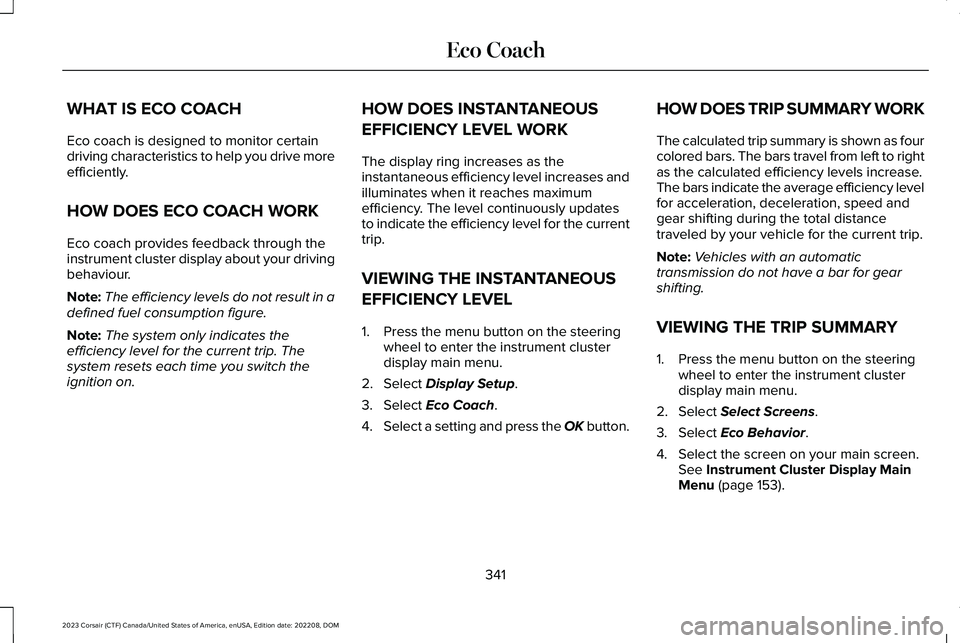
WHAT IS ECO COACH
Eco coach is designed to monitor certaindriving characteristics to help you drive moreefficiently.
HOW DOES ECO COACH WORK
Eco coach provides feedback through theinstrument cluster display about your drivingbehaviour.
Note:The efficiency levels do not result in adefined fuel consumption figure.
Note:The system only indicates theefficiency level for the current trip. Thesystem resets each time you switch theignition on.
HOW DOES INSTANTANEOUS
EFFICIENCY LEVEL WORK
The display ring increases as theinstantaneous efficiency level increases andilluminates when it reaches maximumefficiency. The level continuously updatesto indicate the efficiency level for the currenttrip.
VIEWING THE INSTANTANEOUS
EFFICIENCY LEVEL
1.Press the menu button on the steeringwheel to enter the instrument clusterdisplay main menu.
2.Select Display Setup.
3.Select Eco Coach.
4.Select a setting and press the OK button.
HOW DOES TRIP SUMMARY WORK
The calculated trip summary is shown as fourcolored bars. The bars travel from left to rightas the calculated efficiency levels increase.The bars indicate the average efficiency levelfor acceleration, deceleration, speed andgear shifting during the total distancetraveled by your vehicle for the current trip.
Note:Vehicles with an automatictransmission do not have a bar for gearshifting.
VIEWING THE TRIP SUMMARY
1.Press the menu button on the steeringwheel to enter the instrument clusterdisplay main menu.
2.Select Select Screens.
3.Select Eco Behavior.
4.Select the screen on your main screen.See Instrument Cluster Display MainMenu (page 153).
341
2023 Corsair (CTF) Canada/United States of America, enUSA, Edition date: 202208, DOMEco Coach
Page 377 of 690
DRIVER ALERT LIMITATIONS
Driver alert may not function correctly if:
•The sensor cannot track the road lanemarkings.
•Your vehicle's speed is less thanapproximately 40 mph (65 km/h).
SWITCHING DRIVER ALERT ON
AND OFF
1.Press Features on the touchscreen.
2.Press Driver Assistance.
3.Switch Driver Alert on or off.
Note:The system remains on or offdepending on how it was last set.
Resetting Driver Alert
You can reset the system by either:
•Switching the ignition off and on.
•Opening and closing the driver doorwhen your vehicle is stationary, and it issafe to do so.
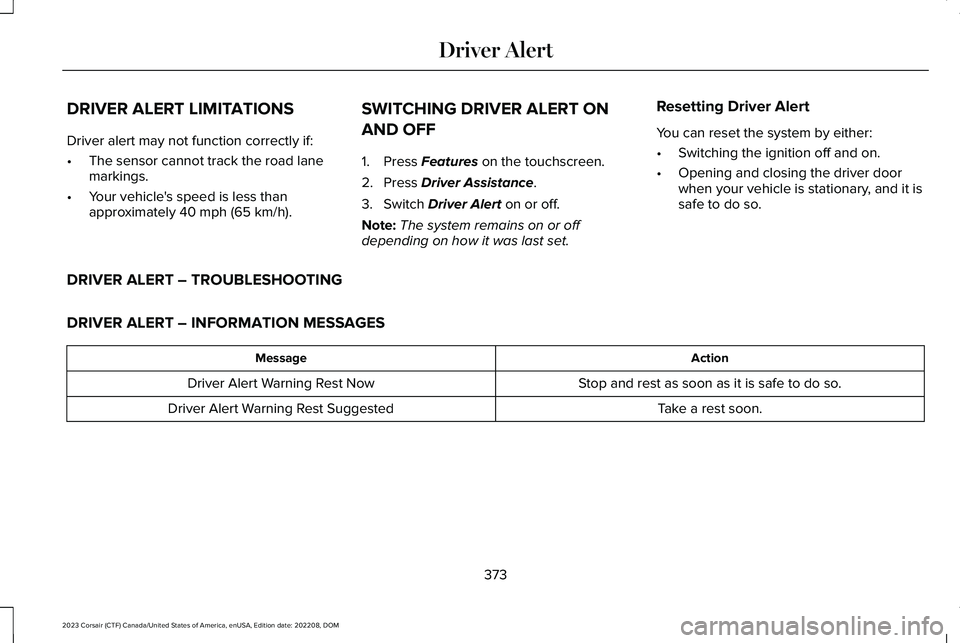
DRIVER ALERT – TROUBLESHOOTING
DRIVER ALERT – INFORMATION MESSAGES
ActionMessage
Stop and rest as soon as it is safe to do so.Driver Alert Warning Rest Now
Take a rest soon.Driver Alert Warning Rest Suggested
373
2023 Corsair (CTF) Canada/United States of America, enUSA, Edition date: 202208, DOMDriver Alert
Page 411 of 690
If you need to tow your vehicle, contact aprofessional towing service or your roadsideassistance service provider.
Your manufacturer produces a towingmanual for all authorized tow truck operators.Have your tow truck operator refer to thismanual for proper hook-up and towingprocedures.
We recommend the use of a wheel lift anddollies or flatbed equipment to tow yourvehicle. Vehicle damage could occur if towedincorrectly, or by any other means.
Front-wheel and rear-wheel drive vehiclesmust have their designated drive wheels offthe ground regardless of towing direction.Use tow dollies to prevent damage to thetransmission.
All-wheel or four-wheel drive vehicles requirethat all wheels be off the ground using awheel lift and dollies or flatbed equipment.This prevents damage to the transmissionand drive system.
Note:You need to switch on the ignition tounlock the steering.
Note:Make sure you check the steeringcolumn before towing. It could lock if thebattery is dead.
FAIL-SAFE COOLING
WHAT IS FAIL-SAFE COOLING
Fail-safe cooling allows you to temporarilydrive your vehicle before any incrementalcomponent damage occurs due tooverheating.
The fail-safe distance depends on outsidetemperature, vehicle load and terrain.
HOW DOES FAIL-SAFE COOLINGWORK
If the engine reaches a presetover-temperature condition, the engineautomatically switches to alternating cylinderoperation. Each disabled cylinder acts as anair pump and cools the engine.
When this occurs, your vehicle still operates,however:
•Engine power is limited.
•The air conditioning system turns off.
Continued operation increases the enginetemperature, causing the engine tocompletely shut down. Your steering andbraking effort increases in this situation.
When the engine temperature cools, you canre-start the engine.
Note:Have your vehicle checked as soonas possible to minimize engine damage.
DRIVING WHEN FAIL-SAFE MODE ISACTIVATED
WARNING: Fail-safe mode is for useduring emergencies only. Operate yourvehicle in fail-safe mode only as long asnecessary to bring your vehicle to rest ina safe location and seek immediate repairs.When in fail-safe mode, your vehicle willhave limited power, will not be able to
407
2023 Corsair (CTF) Canada/United States of America, enUSA, Edition date: 202208, DOMCrash and Breakdown Information