reset LINCOLN CORSAIR 2023 User Guide
[x] Cancel search | Manufacturer: LINCOLN, Model Year: 2023, Model line: CORSAIR, Model: LINCOLN CORSAIR 2023Pages: 690, PDF Size: 15.04 MB
Page 89 of 690
1.Press the brake pedal and the pushbutton ignition switch. If the system doesnot detect a valid phone as a key orremote control, a message appears onthe touchscreen and the system promptsyou for your backup start passcode.
Note:The touchscreen times out after 30seconds with no interaction.
Note:If the backup start passcode screendoes not appear, press the brake pedal andpush button ignition switch again.
2.Use the touchscreen to enter yourbackup start passcode.
3.After entering your backup startpasscode, press Enter within 30 seconds.
4.Once the system validates the backupstart passcode, a message alerts you tostart your vehicle.
5.Press the brake pedal and the pushbutton ignition switch within 20 secondsto start the vehicle.
6.If your vehicle does not start, repeatsteps 1-5.
System Lockout
The system locks after five combinedincorrect attempts of the following:
•Entering a backup start passcode.
•Resetting a current passcode.
•Entering a valet mode passcode.
Note:The system remains locked for fiveminutes. After five minutes the system allowscodes to be entered again.
PHONE AS A KEY –
TROUBLESHOOTING
PHONE AS A KEY – FREQUENTLYASKED QUESTIONS
How can I tell if my vehicle has phoneas a key?
•The touchscreen shows the phone as akey reset option.
•A control button appears on the homescreen of the Lincoln Way app if you haveregistered your vehicle through theLincoln Way app.
What happens if I cannot unlock thevehicle with phone as a key?
•Attempt to move your phone closer tothe vehicle.
•Check that the Lincoln Way app is stillrunning and that the phone as a keycontrol screen shows connected. If thephone is connected, attempt to press theremote unlock button in the Lincoln Wayapp. If the phone is not connected or theremote unlock button does not work inthe Lincoln Way app, attempt to forceclose and restart the app.
85
2023 Corsair (CTF) Canada/United States of America, enUSA, Edition date: 202208, DOMPhone as a Key (If Equipped)
Page 90 of 690
Why do I get a No Key Detectedmessage in the instrument clusterdisplay when I am using phone as akey and my phone is in the car?
•Your phone’s Bluetooth connection hasbeen disrupted or is not connected. Tryreconnecting your phone's Bluetoothconnection.
•Move the phone closer to the center ofthe vehicle near the cup holder or centerconsole.
•Verify your phone as a key is still active,enabled and has not been revoked.
What do I do if my phone is lost,damaged or the battery has depleted?
•Use the backup start passcode that youcreated. See Using the Backup StartPasscode (page 84).
How many phones can I use for phoneas a key?
•You can program and activate up to fourphones with phone as a key to yourvehicle.
How does a valet drive my car if I onlyuse my phone as a key?
•Have the valet use the temporary valetpasscode that you created. See Usingthe Valet Mode (page 84).
I uninstalled my Lincoln Way app andreinstalled it. Why am I not able to geta new phone as a key?
•Remove the phone as a key that waspreviously associated with your phone.
•Reset phone as a key from your vehicle,and then request a new phone as a key.See Programming Your Phone (page83).
Why can I not remotely start thevehicle with my phone as a key?
•Using the Lincoln Way app, verify yourphone as a key setup is complete andenabled via Bluetooth connection on atleast one phone. If Bluetooth hasconnected but phone as a key setup isnot complete, complete the setup of yourphone as a key as prompted from theLincoln Way app. See ProgrammingYour Phone (page 83).
PHONE AS A KEY VIDEOS
Lincoln Phone As A Key Video Link
Phone As A Key: Valet Mode Video Link
86
2023 Corsair (CTF) Canada/United States of America, enUSA, Edition date: 202208, DOMPhone as a Key (If Equipped)
Page 116 of 690
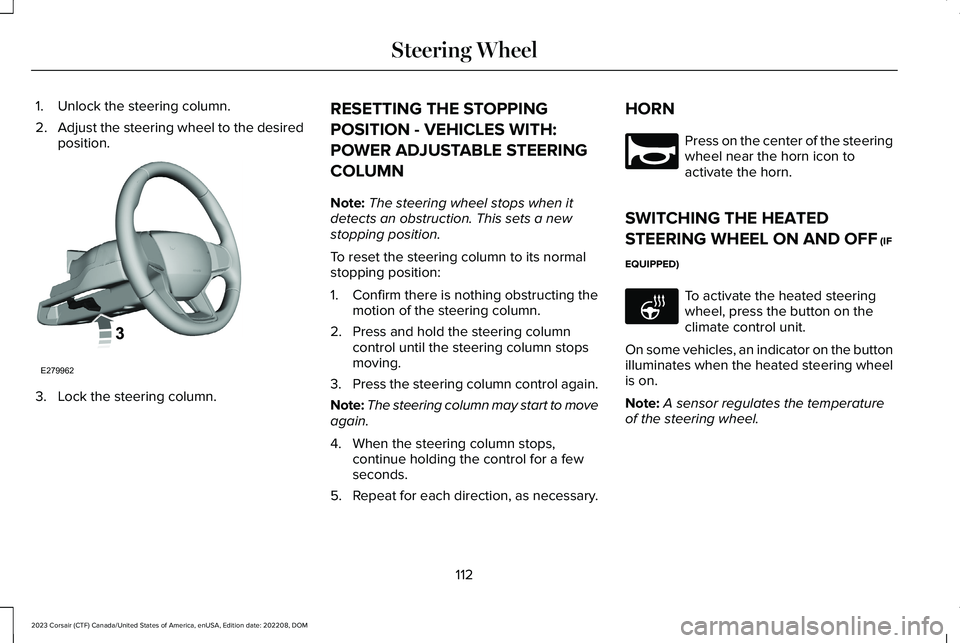
1.Unlock the steering column.
2.Adjust the steering wheel to the desiredposition.
3.Lock the steering column.
RESETTING THE STOPPING
POSITION - VEHICLES WITH:
POWER ADJUSTABLE STEERING
COLUMN
Note:The steering wheel stops when itdetects an obstruction. This sets a newstopping position.
To reset the steering column to its normalstopping position:
1.Confirm there is nothing obstructing themotion of the steering column.
2.Press and hold the steering columncontrol until the steering column stopsmoving.
3.Press the steering column control again.
Note:The steering column may start to moveagain.
4.When the steering column stops,continue holding the control for a fewseconds.
5.Repeat for each direction, as necessary.
HORN
Press on the center of the steeringwheel near the horn icon toactivate the horn.
SWITCHING THE HEATED
STEERING WHEEL ON AND OFF (IF
EQUIPPED)
To activate the heated steeringwheel, press the button on theclimate control unit.
On some vehicles, an indicator on the buttonilluminates when the heated steering wheelis on.
Note:A sensor regulates the temperatureof the steering wheel.
112
2023 Corsair (CTF) Canada/United States of America, enUSA, Edition date: 202208, DOMSteering WheelE279962 E270945 E256621
Page 134 of 690
OPENING AND CLOSING THE
WINDOWS
WARNING: Do not leave childrenunattended in your vehicle and do not letthem play with the power windows. Failureto follow this instruction could result inpersonal injury.
WARNING: When closing the powerwindows, verify they are free of obstructionand make sure that children and pets arenot in the proximity of the windowopenings.
Press the window control switchto open the window. Lift thewindow control switch to close thewindow.
Note:The power windows operate with theignition on, and for several minutes after youswitch the ignition off or until you open afront door.
To reduce wind noise or pulsing noise whenone window is open, slightly open theopposite window.
One-Touch Open
Fully press the window control switch andrelease it. Press again or lift it to stop thewindow.
One-Touch Close
Fully lift the window control switch andrelease it. Press again or lift it to stop thewindow.
Resetting One-Touch Close
Carry out all steps within 30 seconds ofstarting the sequence.
1.Close the window.
2.Press and hold the window control switchuntil the window is fully open. Keep thewindow control switch pressed for a fewseconds.
3.Lift and hold the window control switchuntil the window is fully closed. Keep thewindow control switch held for a fewseconds.
4.Press and hold the window control switchuntil the window is fully open. Keep thewindow control switch pressed for a fewseconds.
5.Lift and hold the window control switchuntil the window is fully closed. Keep thewindow control switch held for a fewseconds.
Note:Repeat the procedure if the windowdoes not close when you use one-touch.
GLOBAL OPENING AND CLOSING
WHAT IS GLOBAL OPENING ANDCLOSING
You can use the remote control to open thewindows with the ignition off.
130
2023 Corsair (CTF) Canada/United States of America, enUSA, Edition date: 202208, DOMWindows
Page 136 of 690
WARNING: Bounce-back is off untilyou reset the memory. Take care whenclosing the windows to avoid personalinjury or damage to your vehicle.
Note:The window stops if you release theswitch before the window fully closes.
Pull up the window switch and hold within afew seconds of the window reaching thebounce-back position. The window travelsup with no bounce-back protection. Thewindow stops if you release the switchbefore the window fully closes.
LOCKING THE REAR WINDOW
CONTROLS
Press the control to lock or unlockthe rear window controls. Itilluminates when you lock the rearwindow controls.
132
2023 Corsair (CTF) Canada/United States of America, enUSA, Edition date: 202208, DOMWindows
Page 139 of 690
Loose Mirror
If you manually fold the power-foldingmirrors, they may not work properly evenafter you re-position them. You need to resetthem if:
•The mirrors vibrate when you drive.
•The mirrors feel loose.
•The mirrors do not stay in the folded orunfolded position.
•One of the mirrors is not in its normaldriving position.
To reset the power-fold feature, use thepower-folding mirror control to fold andunfold the mirrors. You may hear a loud noiseas you reset the power-folding mirrors. Thissound is normal. Repeat this process asneeded each time you manually fold themirrors.
AUTO-DIMMING EXTERIOR MIRROR
(IF EQUIPPED)
WHAT IS THE AUTO-DIMMINGEXTERIOR MIRROR
The driver exterior mirror dims when theinterior auto-dimming mirror turns on.
Memory Mirrors (If Equipped)
You can save and recall the mirror positionsthrough the memory function. See MemoryFunction (page 192).
Heated Exterior Mirrors
See Switching the Heated Mirrors On andOff (page 170).
Signal Indicator Mirrors (If Equipped)
The forward-facing portion of the appropriatemirror housing blinks when you switch onthe direction indicator.
Lincoln Welcome Mat (If Equipped)
Projection lights, on the bottom of the mirrorhousings, project an image onto the grounda short distance from the vehicle.
Blind Spot Monitor
See What Is Blind Spot Information System(page 353).
360 Degree Camera (If Equipped)
See What Is the 360 Degree Camera (page302).
135
2023 Corsair (CTF) Canada/United States of America, enUSA, Edition date: 202208, DOMExterior Mirrors
Page 160 of 690
FUEL ECONOMY DISPLAY
This display comes with an instant fueleconomy gauge, along with the average fueleconomy. The gauge continuously averagesthe fuel economy since your last reset.
The system includes both the electric onlyand the hybrid operation in the calculation.More electric only driving results in a greateraverage fuel economy.
When the gasoline engine is off, changesfrom the instant fuel economy gauge to anelectric driving message.
Note:Press and hold the OK button on thecontrols on the steering wheel to reset youraverage fuel economy.
EV COACH
EV coach can help you get the most out ofyour vehicle's electric driving capabilities.
When you are accelerating or maintainingspeed you see a blue or white solid barindicating vehicle power. You may also seea blue rectangular box which shows thepower level at which the engine turns on.
•When the power level is within the box,the color of the bar is blue. This meansyou are in electric operation and theengine is off.
•When the power level is outside of thebox, the color of the bar is white. Thismeans you are in hybrid operation witha combination of the electric motor andthe engine providing vehicle power.
When you are decelerating with either yourfoot off the accelerator pedal or on the brakepedal, a green or white solid bar displaysindicating the power being used to slowdown your vehicle. You may also see a greenrectangular box which shows the amount ofpower that can be recaptured by theregenerative braking system and returnedto the high voltage battery.
•When the power level is within the box,the color of the bar will be all green. Thismeans that the regenerative brakingsystem is being used to efficiently slowyour vehicle down and return themaximum percentage of energy to thehigh voltage battery.
•When the power level is outside of thebox, then the bar is white. This meansboth the regenerative braking systemand conventional braking system arebeing used.
ELECTRIC ECONOMY
This screen shows your average drivingdistance per kilowatt-hour of electricity usedon your plug-in hybrid vehicle. The value iscalculated only when your available electricrange is being used and the gasoline engineis off.
Distance per full charge is also shown. Thisis an estimate of the electric range you wouldhave if you plugged in and fully charged yourvehicle right now. The higher your electriceconomy, the higher your distance per fullcharge.
156
2023 Corsair (CTF) Canada/United States of America, enUSA, Edition date: 202208, DOMInstrument Cluster Display - Plug-In Hybrid Electric Vehicle (PHEV)
Page 163 of 690
ACCESSING THE TRIP COMPUTER
Using Select Screens
1.Use the instrument cluster displaycontrols to navigate the home menu.
2.Select Select Screens.
3.Use the control on the steering wheel tonavigate the menu. See Customizingthe Instrument Cluster Display (page153).
Using the Home Screen
Once the screens have been added, use theinstrument cluster display controls on thesteering wheel to view each trip screen.
RESETTING THE TRIP COMPUTER
1.Use the instrument cluster displaycontrols to navigate the home screen.
2.Select the trip screen you want to reset.
3.Press and hold the OK button until thesystem reset confirmation appears.
CONFIGURING THE TRIP
COMPUTER
1.Use the instrument cluster displaycontrols to navigate the home screen.
2.Select the trip screen.
3.Press the menu button on the steeringwheel.
4.Select Configure View.
5.Select values to display.
TRIP DATA
Trip 1 and 2
Provides trip timer, trip average fuel economyand total trip distance traveled. For hybridvehicles, the trip also shows the distancetraveled on electric power only with theengine off.
Note:Trip 1 and 2 are selectable screens.See Accessing the Trip Computer (page159).
This Trip
Provides trip timer, trip average fueleconomy, total trip distance traveled, anddistance traveled on electric power only withthe engine off. If the gasoline engine has notturned on during the trip then trip averagefuel economy is not shown. This Trip resetseach time you start your vehicle.
Note:This trip is a selectable screen. SeeAccessing the Trip Computer (page 159).
159
2023 Corsair (CTF) Canada/United States of America, enUSA, Edition date: 202208, DOMTrip Computer
Page 165 of 690
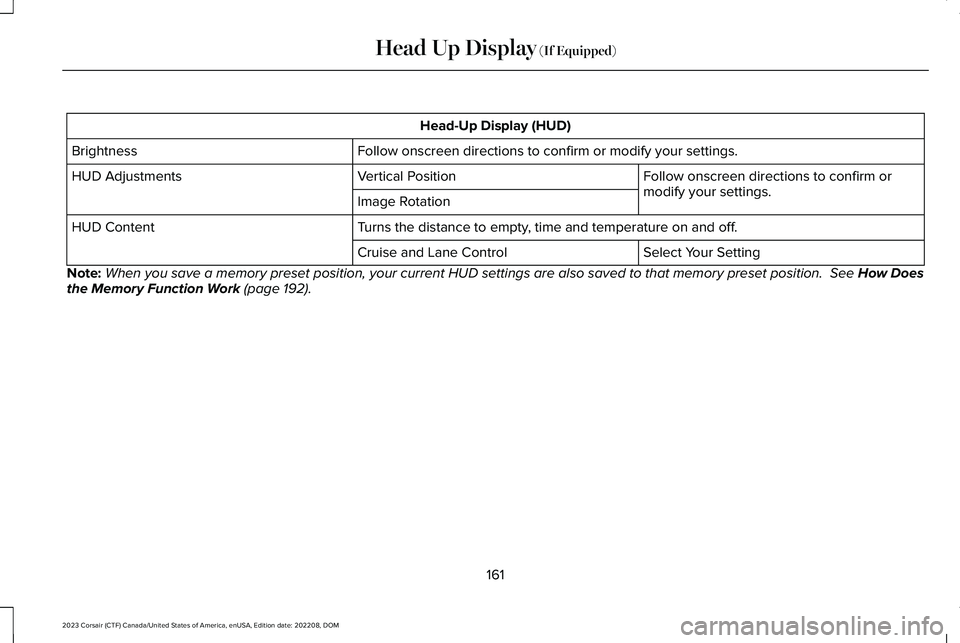
Head-Up Display (HUD)
Follow onscreen directions to confirm or modify your settings.Brightness
Follow onscreen directions to confirm ormodify your settings.Vertical PositionHUD Adjustments
Image Rotation
Turns the distance to empty, time and temperature on and off.HUD Content
Select Your SettingCruise and Lane Control
Note:When you save a memory preset position, your current HUD settings are also saved to that memory preset position. See How Doesthe Memory Function Work (page 192).
161
2023 Corsair (CTF) Canada/United States of America, enUSA, Edition date: 202208, DOMHead Up Display (If Equipped)
Page 194 of 690
REAR OCCUPANT ALERT SYSTEM
PRECAUTIONS
WARNING: On hot days, thetemperature inside the vehicle can risevery quickly. Exposure of people or animalsto these high temperatures for even a shorttime can cause death or serious heatrelated injuries, including brain damage.Small children are particularly at risk.
WARNING: Do not leave children orpets unattended in your vehicle. Failure tofollow this instruction could result inpersonal injury or death.
REAR OCCUPANT ALERT SYSTEM
LIMITATIONS
The system does not detect the presence ofobjects or passengers in the rear seat. Itmonitors the activity of the buckle on the rearseatbelt and the opening and closing of therear doors.
Note:It is possible to receive an alert whenthere is no rear seat occupant, but alertconditions are met.
Note:It is possible to receive no alert whenthere is an occupant in the rear seat, if alertconditions are not met. For example, if a rearseat occupant does not enter the vehiclethrough a rear door.
REAR OCCUPANT ALERT SYSTEM
SETTINGS
Selecting Alerts and Switching RearOccupant Alert System On and Off
1.Press Settings on the touchscreen.
2.Press Vehicle.
3.Press Rear Occupant Alert.
4.Select Alert & Horn or Alert Only or Off.
Note:The default setting is Alert & Horn.Selecting Alert & Horn or Alert Only enablesthe warnings inside the vehicle and theLincoln Way alert.
Note:If you choose Alert Only, the horn doesnot sound even when the alert conditionsare met.
Note:If the driver data or vehicle data isturned off, the vehicle still sends rearoccupant alert Lincoln Way notifications. Ifthe entire connectivity setting is turned off,the vehicle does not send any Lincoln Waymessages including the rear occupant alertLincoln Way notification.
Note:Performing a master reset causes thesystem to switch on again.
Switching Child Seat Installed On andOff
Make sure to switch the Child Seat Installedon when a child restraint is installed in yourvehicle. When the Child Seat Installed isswitched on, the system monitors theopening and closing of the rear doors toindicate the potential presence of anoccupant in the rear seat.
You can switch the Child Seat Installed onor off from the touchscreen.
1.Press Settings on the touchscreen.
190
2023 Corsair (CTF) Canada/United States of America, enUSA, Edition date: 202208, DOMRear Occupant Alert System