light LINCOLN CORSAIR 2023 Workshop Manual
[x] Cancel search | Manufacturer: LINCOLN, Model Year: 2023, Model line: CORSAIR, Model: LINCOLN CORSAIR 2023Pages: 690, PDF Size: 15.04 MB
Page 236 of 690
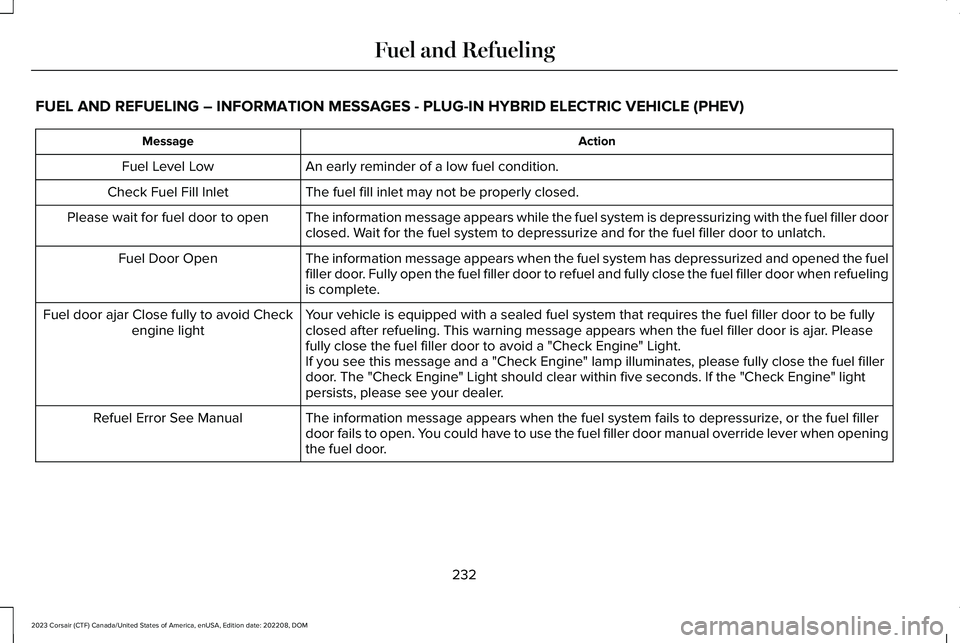
FUEL AND REFUELING – INFORMATION MESSAGES - PLUG-IN HYBRID ELECTRIC VEHICLE (PHEV)
ActionMessage
An early reminder of a low fuel condition.Fuel Level Low
The fuel fill inlet may not be properly closed.Check Fuel Fill Inlet
The information message appears while the fuel system is depressurizing with the fuel filler doorclosed. Wait for the fuel system to depressurize and for the fuel filler door to unlatch.Please wait for fuel door to open
The information message appears when the fuel system has depressurized and opened the fuelfiller door. Fully open the fuel filler door to refuel and fully close the fuel filler door when refuelingis complete.
Fuel Door Open
Your vehicle is equipped with a sealed fuel system that requires the fuel filler door to be fullyclosed after refueling. This warning message appears when the fuel filler door is ajar. Pleasefully close the fuel filler door to avoid a "Check Engine" Light.
Fuel door ajar Close fully to avoid Checkengine light
If you see this message and a "Check Engine" lamp illuminates, please fully close the fuel fillerdoor. The "Check Engine" Light should clear within five seconds. If the "Check Engine" lightpersists, please see your dealer.
The information message appears when the fuel system fails to depressurize, or the fuel fillerdoor fails to open. You could have to use the fuel filler door manual override lever when openingthe fuel door.
Refuel Error See Manual
232
2023 Corsair (CTF) Canada/United States of America, enUSA, Edition date: 202208, DOMFuel and Refueling
Page 241 of 690
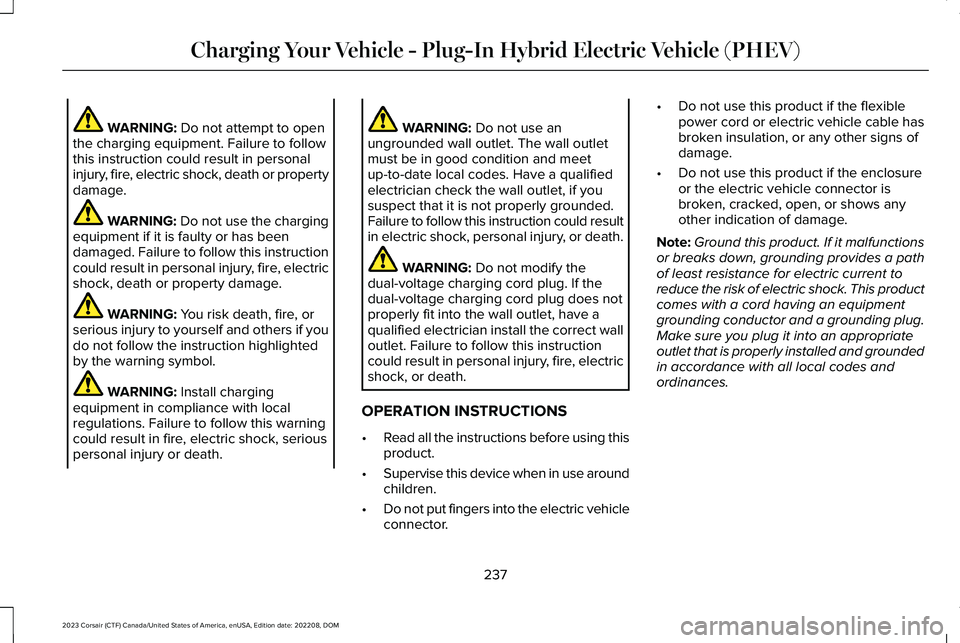
WARNING: Do not attempt to openthe charging equipment. Failure to followthis instruction could result in personalinjury, fire, electric shock, death or propertydamage.
WARNING: Do not use the chargingequipment if it is faulty or has beendamaged. Failure to follow this instructioncould result in personal injury, fire, electricshock, death or property damage.
WARNING: You risk death, fire, orserious injury to yourself and others if youdo not follow the instruction highlightedby the warning symbol.
WARNING: Install chargingequipment in compliance with localregulations. Failure to follow this warningcould result in fire, electric shock, seriouspersonal injury or death.
WARNING: Do not use anungrounded wall outlet. The wall outletmust be in good condition and meetup-to-date local codes. Have a qualifiedelectrician check the wall outlet, if yoususpect that it is not properly grounded.Failure to follow this instruction could resultin electric shock, personal injury, or death.
WARNING: Do not modify thedual-voltage charging cord plug. If thedual-voltage charging cord plug does notproperly fit into the wall outlet, have aqualified electrician install the correct walloutlet. Failure to follow this instructioncould result in personal injury, fire, electricshock, or death.
OPERATION INSTRUCTIONS
•Read all the instructions before using thisproduct.
•Supervise this device when in use aroundchildren.
•Do not put fingers into the electric vehicleconnector.
•Do not use this product if the flexiblepower cord or electric vehicle cable hasbroken insulation, or any other signs ofdamage.
•Do not use this product if the enclosureor the electric vehicle connector isbroken, cracked, open, or shows anyother indication of damage.
Note:Ground this product. If it malfunctionsor breaks down, grounding provides a pathof least resistance for electric current toreduce the risk of electric shock. This productcomes with a cord having an equipmentgrounding conductor and a grounding plug.Make sure you plug it into an appropriateoutlet that is properly installed and groundedin accordance with all local codes andordinances.
237
2023 Corsair (CTF) Canada/United States of America, enUSA, Edition date: 202208, DOMCharging Your Vehicle - Plug-In Hybrid Electric Vehicle (PHEV)
Page 242 of 690
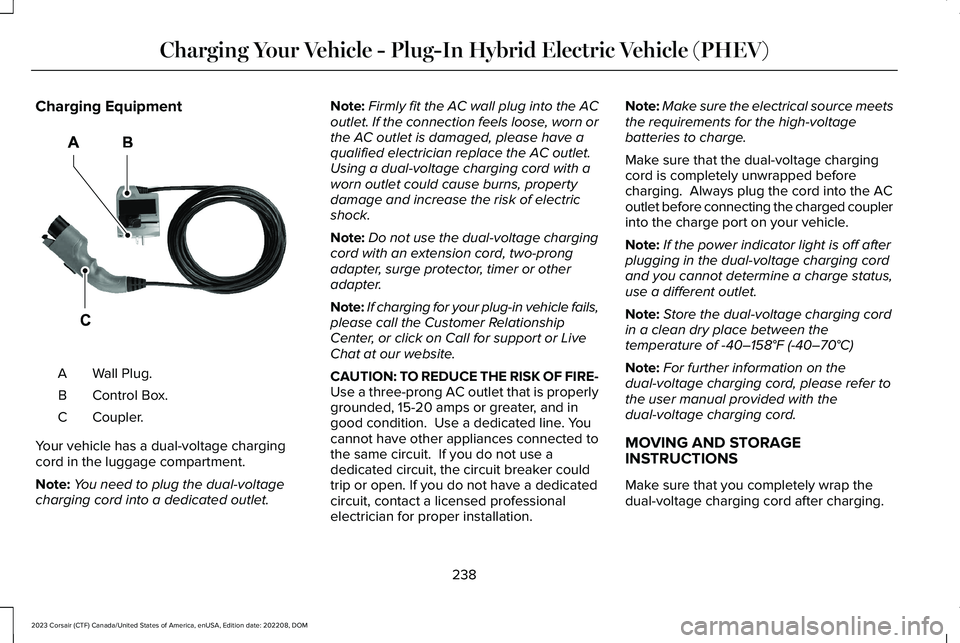
Charging Equipment
Wall Plug.A
Control Box.B
Coupler.C
Your vehicle has a dual-voltage chargingcord in the luggage compartment.
Note:You need to plug the dual-voltagecharging cord into a dedicated outlet.
Note:Firmly fit the AC wall plug into the ACoutlet. If the connection feels loose, worn orthe AC outlet is damaged, please have aqualified electrician replace the AC outlet.Using a dual-voltage charging cord with aworn outlet could cause burns, propertydamage and increase the risk of electricshock.
Note:Do not use the dual-voltage chargingcord with an extension cord, two-prongadapter, surge protector, timer or otheradapter.
Note:If charging for your plug-in vehicle fails,please call the Customer RelationshipCenter, or click on Call for support or LiveChat at our website.
CAUTION: TO REDUCE THE RISK OF FIRE-Use a three-prong AC outlet that is properlygrounded, 15-20 amps or greater, and ingood condition. Use a dedicated line. Youcannot have other appliances connected tothe same circuit. If you do not use adedicated circuit, the circuit breaker couldtrip or open. If you do not have a dedicatedcircuit, contact a licensed professionalelectrician for proper installation.
Note:Make sure the electrical source meetsthe requirements for the high-voltagebatteries to charge.
Make sure that the dual-voltage chargingcord is completely unwrapped beforecharging. Always plug the cord into the ACoutlet before connecting the charged couplerinto the charge port on your vehicle.
Note:If the power indicator light is off afterplugging in the dual-voltage charging cordand you cannot determine a charge status,use a different outlet.
Note:Store the dual-voltage charging cordin a clean dry place between thetemperature of -40–158°F (-40–70°C)
Note:For further information on thedual-voltage charging cord, please refer tothe user manual provided with thedual-voltage charging cord.
MOVING AND STORAGEINSTRUCTIONS
Make sure that you completely wrap thedual-voltage charging cord after charging.
238
2023 Corsair (CTF) Canada/United States of America, enUSA, Edition date: 202208, DOMCharging Your Vehicle - Plug-In Hybrid Electric Vehicle (PHEV)E366554
Page 245 of 690
Your vehicle comes with a mobile powercord that has a low power connector to usewith a 120V plug NEMA 5-15 and a highpower connector to use with a 240V plugNEMA 14-50.
Specification ValueSpecification Type
SAECharger Model
120-240 VACVoltage
32 Amps maxcontinuousMaximum Current
60HzFrequency
< 2 WattsPower draw whenidle
Approximately 20 ft(6.1 m)Cable length
8.6 lb (3.9 kg)Weight
-22°F (-30°C) to 122°F(50°C)Operating temper-ature
Specification ValueSpecification Type
-22°F (-30°C) to 185°F(85°C)Storage temperature
IP67CCID Environmental
Not requiredVentilation
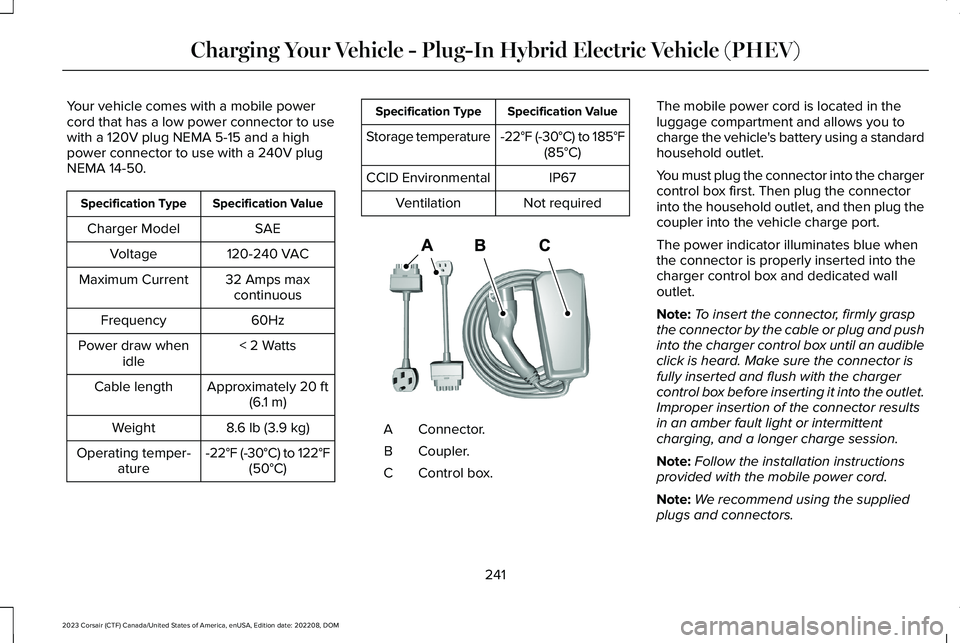
Connector.A
Coupler.B
Control box.C
The mobile power cord is located in theluggage compartment and allows you tocharge the vehicle's battery using a standardhousehold outlet.
You must plug the connector into the chargercontrol box first. Then plug the connectorinto the household outlet, and then plug thecoupler into the vehicle charge port.
The power indicator illuminates blue whenthe connector is properly inserted into thecharger control box and dedicated walloutlet.
Note:To insert the connector, firmly graspthe connector by the cable or plug and pushinto the charger control box until an audibleclick is heard. Make sure the connector isfully inserted and flush with the chargercontrol box before inserting it into the outlet.Improper insertion of the connector resultsin an amber fault light or intermittentcharging, and a longer charge session.
Note:Follow the installation instructionsprovided with the mobile power cord.
Note:We recommend using the suppliedplugs and connectors.
241
2023 Corsair (CTF) Canada/United States of America, enUSA, Edition date: 202208, DOMCharging Your Vehicle - Plug-In Hybrid Electric Vehicle (PHEV)E336365
Page 246 of 690
Note:If you do not use a dedicated circuit,the circuit breaker could trip or open. If adedicated circuit is not available, contact alicensed professional electrician regardingthe installation of a dedicated outlet.
Note:The mobile power cord does notcharge and gives a fault indication if groundis not present.
Note:Plug the connector for the mobilepower cord directly into the wall plugreceptacle. Do not plug the mobile powercord into any form of extension cord.
Note:The wall bracket must be used tosupport the charge control box. The chargecontrol box cannot be hung from the outletor wall plug.
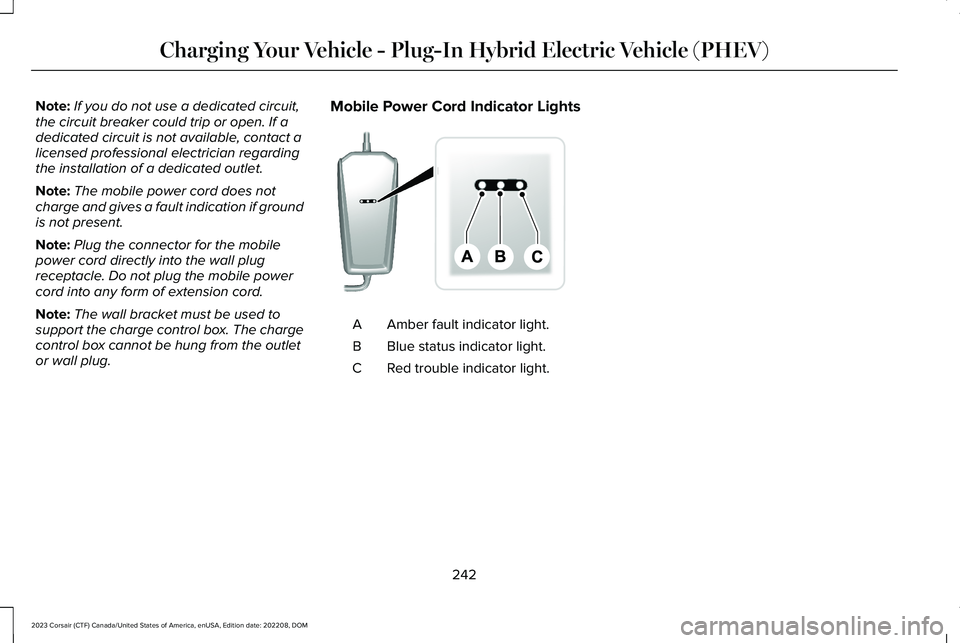
Mobile Power Cord Indicator Lights
Amber fault indicator light.A
Blue status indicator light.B
Red trouble indicator light.C
242
2023 Corsair (CTF) Canada/United States of America, enUSA, Edition date: 202208, DOMCharging Your Vehicle - Plug-In Hybrid Electric Vehicle (PHEV)E336515
Page 250 of 690
Note:When plugging into an unfamiliar walloutlet, let the vehicle charge for severalminutes before leaving it unattended. Thered indicator illuminates if not charging. Theunit turns off if a breaker or infrastructureground fault circuit interrupter (GFCI) istripped. You can view vehicle chargingstatus remotely via the Lincoln Way app.
Mobile Power Cord Auto-Restart
Auto-restart helps make sure that yourvehicle is charged and ready for use whenneeded. A charge could be interrupted iferrors are detected. Charging resumes oncethe error is no longer detected. The redindicator illuminates during an errorcondition.
The exception to the immediate auto-restartis when the interruption is due to a chargerground fault circuit interrupter (GFCI) event.The charger attempts to restart 15 minutesafter a ground fault circuit interrupter (GFCI)event. After the fourth attempt to restart, thecharger shuts down and the red indicatorstays on.
If the fault persists, do not continue to try tocharge your vehicle. Contact your authorizeddealer.
MOVING AND STORAGEINSTRUCTIONS
Make sure you wrap the mobile power cordafter charging. Store the mobile power cordin the storage bag supplied with the mobilepower cord.
When charging is complete, replace themobile power cord in the luggagecompartment.
Note:Do not hold the mobile power cord bythe power cable. Hold the complete unit andcarefully place back in the storage bag.
Note:To remove the connector, firmly graspthe connector by the cable or plug and pullaway from the control box.
CARE INSTRUCTIONS
Do not use cleaners or solvents as this coulddamage your mobile power cord. Do notplace stress on the charger cables. If the unitoverheats, remove the mobile power cordfrom direct sunlight.
SAFETY FEATURES
The charger includes the following safetyfeatures to protect against the risk of electricshock:
•Service ground check: The chargerconstantly checks for the presence of aservice ground connection. If the serviceground ever fails, the charger redindicator turns on and shuts down powerto the vehicle.
•Thermal event sensor: Charger modulesenses out-of-ordinary thermal eventsand decreases the charging current orshuts the unit down if required.
246
2023 Corsair (CTF) Canada/United States of America, enUSA, Edition date: 202208, DOMCharging Your Vehicle - Plug-In Hybrid Electric Vehicle (PHEV)
Page 251 of 690
•Ground fault circuit interrupter (GFCI)Protection: The charger has a groundfault circuit interrupter (GFCI) reactionsystem to protect against electric shock.If the charger module detects an outputground fault, it shuts down power to theoutput cable and illuminates the redindicator.
•Insulation: The charger module,connector, cable assembly, and chargecoupler are completely insulated. Thereare no exposed live parts, to protectagainst electric shock.
•Unintentional disconnection: The chargecoupler is designed to minimizeunintentional disconnection. A pilot signalwire in the cable and charge couplereliminates the possibility of electric shockwhen not connected to a vehicle or if anunintended disconnect occurs during acharge. Disconnection during chargingis safe.
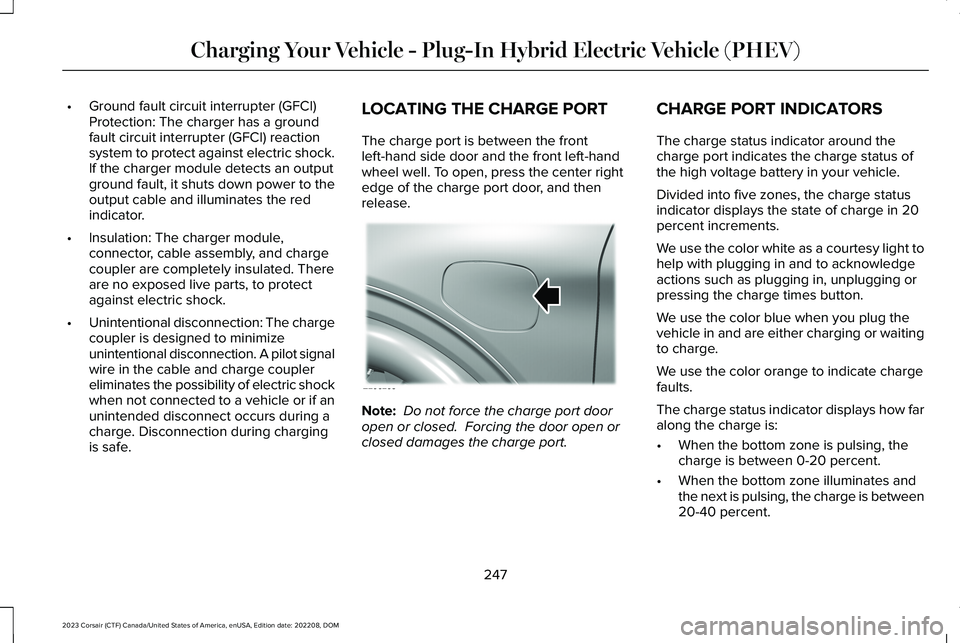
LOCATING THE CHARGE PORT
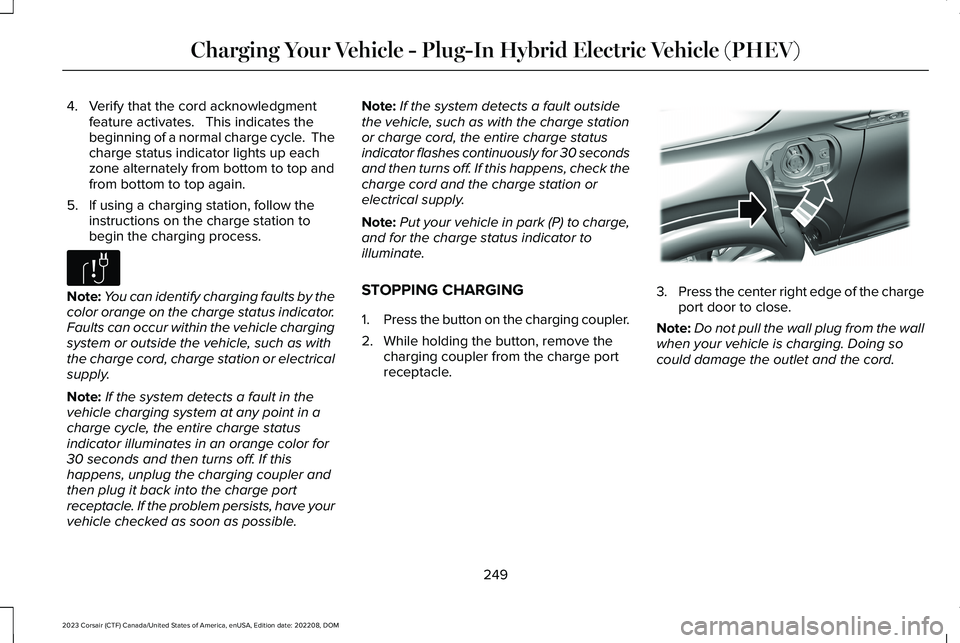
The charge port is between the frontleft-hand side door and the front left-handwheel well. To open, press the center rightedge of the charge port door, and thenrelease.
Note: Do not force the charge port dooropen or closed. Forcing the door open orclosed damages the charge port.
CHARGE PORT INDICATORS
The charge status indicator around thecharge port indicates the charge status ofthe high voltage battery in your vehicle.
Divided into five zones, the charge statusindicator displays the state of charge in 20percent increments.
We use the color white as a courtesy light tohelp with plugging in and to acknowledgeactions such as plugging in, unplugging orpressing the charge times button.
We use the color blue when you plug thevehicle in and are either charging or waitingto charge.
We use the color orange to indicate chargefaults.
The charge status indicator displays how faralong the charge is:
•When the bottom zone is pulsing, thecharge is between 0-20 percent.
•When the bottom zone illuminates andthe next is pulsing, the charge is between20-40 percent.
247
2023 Corsair (CTF) Canada/United States of America, enUSA, Edition date: 202208, DOMCharging Your Vehicle - Plug-In Hybrid Electric Vehicle (PHEV)E295258
Page 252 of 690
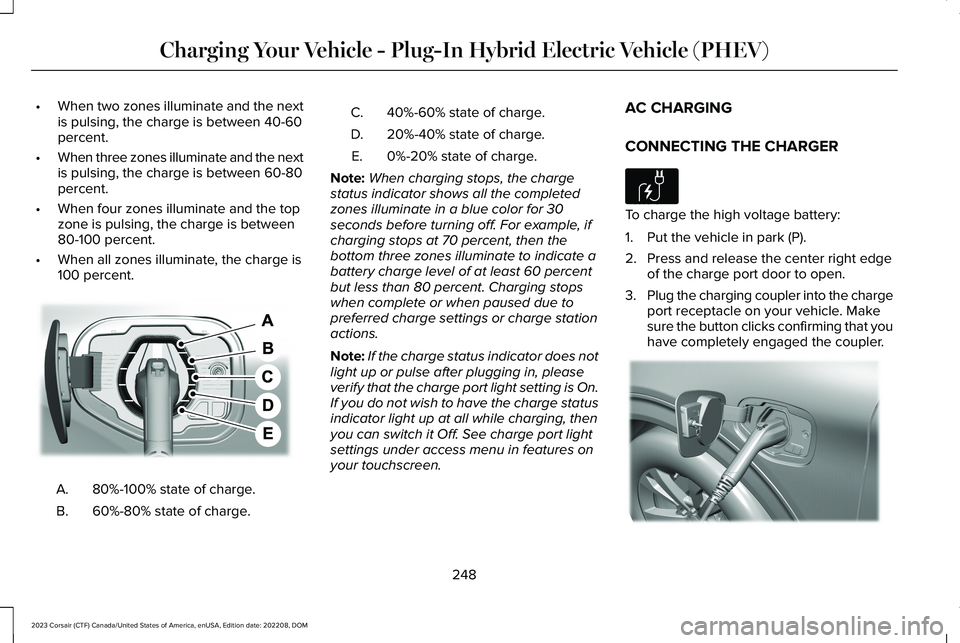
•When two zones illuminate and the nextis pulsing, the charge is between 40-60percent.
•When three zones illuminate and the nextis pulsing, the charge is between 60-80percent.
•When four zones illuminate and the topzone is pulsing, the charge is between80-100 percent.
•When all zones illuminate, the charge is100 percent.
80%-100% state of charge.A.
60%-80% state of charge.B.
40%-60% state of charge.C.
20%-40% state of charge.D.
0%-20% state of charge.E.
Note:When charging stops, the chargestatus indicator shows all the completedzones illuminate in a blue color for 30seconds before turning off. For example, ifcharging stops at 70 percent, then thebottom three zones illuminate to indicate abattery charge level of at least 60 percentbut less than 80 percent. Charging stopswhen complete or when paused due topreferred charge settings or charge stationactions.
Note:If the charge status indicator does notlight up or pulse after plugging in, pleaseverify that the charge port light setting is On.If you do not wish to have the charge statusindicator light up at all while charging, thenyou can switch it Off. See charge port lightsettings under access menu in features onyour touchscreen.
AC CHARGING
CONNECTING THE CHARGER
To charge the high voltage battery:
1.Put the vehicle in park (P).
2.Press and release the center right edgeof the charge port door to open.
3.Plug the charging coupler into the chargeport receptacle on your vehicle. Makesure the button clicks confirming that youhave completely engaged the coupler.
248
2023 Corsair (CTF) Canada/United States of America, enUSA, Edition date: 202208, DOMCharging Your Vehicle - Plug-In Hybrid Electric Vehicle (PHEV)E301197 E306676 E295257
Page 253 of 690
4.Verify that the cord acknowledgmentfeature activates. This indicates thebeginning of a normal charge cycle. Thecharge status indicator lights up eachzone alternately from bottom to top andfrom bottom to top again.
5.If using a charging station, follow theinstructions on the charge station tobegin the charging process.
Note:You can identify charging faults by thecolor orange on the charge status indicator.Faults can occur within the vehicle chargingsystem or outside the vehicle, such as withthe charge cord, charge station or electricalsupply.
Note:If the system detects a fault in thevehicle charging system at any point in acharge cycle, the entire charge statusindicator illuminates in an orange color for30 seconds and then turns off. If thishappens, unplug the charging coupler andthen plug it back into the charge portreceptacle. If the problem persists, have yourvehicle checked as soon as possible.
Note:If the system detects a fault outsidethe vehicle, such as with the charge stationor charge cord, the entire charge statusindicator flashes continuously for 30 secondsand then turns off. If this happens, check thecharge cord and the charge station orelectrical supply.
Note:Put your vehicle in park (P) to charge,and for the charge status indicator toilluminate.
STOPPING CHARGING
1.Press the button on the charging coupler.
2.While holding the button, remove thecharging coupler from the charge portreceptacle.
3.Press the center right edge of the chargeport door to close.
Note:Do not pull the wall plug from the wallwhen your vehicle is charging. Doing socould damage the outlet and the cord.
249
2023 Corsair (CTF) Canada/United States of America, enUSA, Edition date: 202208, DOMCharging Your Vehicle - Plug-In Hybrid Electric Vehicle (PHEV)E306677 E295444
Page 279 of 690
WHAT IS REVERSE BRAKING
ASSIST
Reverse braking assist is designed to reduceimpact damage or assist in avoiding acollision while in reverse (R). Using sensorson the rear of the vehicle, it can detect apossible collision and apply the brakes. If fullbraking occurs, the system attempts to stopthe vehicle a safe distance from the obstacle.
HOW DOES REVERSE BRAKING
ASSIST WORK
Reverse braking assist functions when inreverse (R) and traveling at a speed of1–7 mph (2–12 km/h).
If the system detects an obstacle behind yourvehicle, it provides a warning through therear parking aid or cross traffic alert system.
REVERSE BRAKING ASSIST
PRECAUTIONS
WARNING: You are responsible forcontrolling your vehicle at all times. Thesystem is designed to be an aid and doesnot relieve you of your responsibility todrive with due care and attention. Failureto follow this instruction could result in theloss of control of your vehicle, personalinjury or death.
WARNING: To help avoid personalinjury, always use caution when in reverse(R) and when using the sensing system.
WARNING: The system may notoperate properly during severe weatherconditions, for example snow, ice, heavyrain and spray. Always drive with due careand attention. Failure to take care mayresult in a crash.
WARNING: Traffic control systems,fluorescent lamps, inclement weather, airbrakes, external motors and fans mayaffect the correct operation of the sensingsystem. This may cause reducedperformance or false alerts.
WARNING: Some situations andobjects prevent hazard detection. Forexample low or direct sunlight, inclementweather, unconventional vehicle types, andpedestrians. Apply the brakes whennecessary. Failure to follow this instructioncould result in the loss of control of yourvehicle, personal injury or death.
WARNING: Do not use the systemwith accessories that extend beyond thefront or rear of your vehicle, for example atrailer hitch or bike rack. The system is notable to make corrections for the additionallength of the accessories.
275
2023 Corsair (CTF) Canada/United States of America, enUSA, Edition date: 202208, DOMReverse Braking Assist (If Equipped)