lock LINCOLN CORSAIR 2023 Repair Manual
[x] Cancel search | Manufacturer: LINCOLN, Model Year: 2023, Model line: CORSAIR, Model: LINCOLN CORSAIR 2023Pages: 690, PDF Size: 15.04 MB
Page 280 of 690
The system only applies the brakes for ashort period of time when an event occurs.Act as soon as you notice the brakes applyto remain in control of the vehicle. If you donot intervene the vehicle may start to moveagain.
Note:Certain add-on devices around thebumper or fascia may create false alerts. Forexample, large trailer hitches, bicycle orsurfboard racks, license plate brackets,bumper covers or any other device that mayblock the normal detection zone of thesystem. Remove the add-on device toprevent false alerts.
Note:The system does not react to small ormoving objects, particularly those close tothe ground.
Note:The system does not operate duringhard acceleration or steering.
Note:If your vehicle sustains damage to thebumper or fascia leaving it misaligned orbent, it could alter the sensing zone causinginaccurate measurement of obstacles orfalse alerts.
Note:Vehicle loading and suspensionchanges can impact the angle of the sensorsand may change the normal detection zoneof the system resulting in inaccuratemeasurement of obstacles or false alerts.
Note:When you connect a trailer, the systemmay detect the trailer and provide an alert,or the system turns off. If the system doesnot turn off, manually switch the system offafter you connect the trailer.
Note:You may experience reduced systemperformance on road surfaces that limitdeceleration. For example, roads with ice,loose gravel, mud or sand.
SWITCHING REVERSE BRAKING
ASSIST ON AND OFF
1.Press Features on the touchscreen.
2.Press Driver Assistance.
3.Switch Reverse Brake Assist on or off.
Note:The system is unavailable when therear parking aid, cross traffic alert or tractioncontrol is off.
Note:If your vehicle is not equipped withcross traffic alert the reverse braking assistrelies on input from the rear parking aid andrear camera sensors.
Note:The default setting is on in someregions.
OVERRIDING REVERSE BRAKING
ASSIST
There could be instances when unexpectedor unwanted braking occurs. Firmly pressingthe accelerator pedal or switching the featureoff overrides the system.
REVERSE BRAKING ASSIST
INDICATORS
If the system determines that a collision withan obstacle may occur, full braking mayapply.
A message and warning indicatorappear when the system appliesthe brakes.
276
2023 Corsair (CTF) Canada/United States of America, enUSA, Edition date: 202208, DOMReverse Braking Assist (If Equipped)E293490
Page 282 of 690
REVERSE BRAKING ASSIST –FREQUENTLY ASKED QUESTIONS
Why is reverse braking assist unavailable?
•Make sure the reverse braking assist ison. See Switching Reverse BrakingAssist On and Off (page 276).
•Make sure that all doors, liftgate ortailgate and hood are closed. Drive thevehicle on a straight road for a shortperiod. If the message remains, have thesystem checked.
•If your vehicle has the cross traffic alertsystem, make sure it is on. See SwitchingCross Traffic Alert On and Off (page 358).
•Make sure the rear parking aid system ison. See Rear Parking Aid (page 294).
•Make sure the traction control is on. SeeSwitching Traction Control On and Off(page 286).
Note:The traction control automatically turnsoff if four-wheel drive low and certain drivemodes such as mud/ruts and snow/sand isactivated.
•Your vehicle may have sustained a rearend impact. Have the sensors checkedfor proper coverage and operation.
•An anti-lock brake, traction control orstability control event may have occurred.Reverse braking assist resumesoperation when the event is complete.
•Make sure the rear view camera and 360degree camera are not dirty orobstructed. If dirty, clean the camera. Ifthe message still appears after cleaningthe camera, wait a short time for themessage to clear. If the message doesnot clear, have the system checked.
•Make sure the cross traffic alert, rearparking aid and side parking aid sensorsare not blocked or faulty. See Locatingthe Cross Traffic Alert Sensors (page358). See Locating the Rear Parking AidSensors (page 294). See Locating theSide Parking Aid Sensors (page 297).
•You recently had your vehicle serviced,or the battery disconnected. Drive yourvehicle a short distance to resumesystem operation.
•Reverse braking assist does not functionwhen you connect a trailer. Operationresumes when you disconnect the trailer.
Note:If the answers to why the system isunavailable do not assist in returning reversebraking assist to available, have the systemchecked as soon as possible.
REVERSE BRAKING ASSIST
VIDEOS
Lincoln Reverse Brake Assist Video Link
278
2023 Corsair (CTF) Canada/United States of America, enUSA, Edition date: 202208, DOMReverse Braking Assist (If Equipped)
Page 286 of 690
CROSS TRAFFIC BRAKING –FREQUENTLY ASKED QUESTIONS
Why is cross traffic braking unavailable?
•Make sure the cross traffic alert systemis on. See Cross Traffic Alert (page 357).
•The vehicle has sustained a rear endimpact. Contact an authorized dealer tohave the sensors checked for propercoverage and operation.
•An ABS, traction control or stabilitycontrol event may have occurred. Crosstraffic braking resumes operation whenthe event is complete.
•Make sure there are no blocked orfaulted sensors. See Cross Traffic Alert(page 357).
•You recently had your vehicle serviced,or the battery disconnected. Drive yourvehicle a short distance to resumesystem operation.
Note:If the answers to why the system isunavailable do not assist in returning crosstraffic braking to available, have the systemchecked as soon as possible.
282
2023 Corsair (CTF) Canada/United States of America, enUSA, Edition date: 202208, DOMCross Traffic Braking (If Equipped)
Page 296 of 690
STEERING – INFORMATION MESSAGES
ActionMessage
The power steering system has detected a condition that requiresservice. Have your vehicle checked as soon as possible.Steering Fault Service Now
The power steering system is not working. Stop your vehicle in a safeplace. Have your vehicle checked as soon as possible.Steering Loss Stop Safely
The power steering system has detected a condition that requiresservice. Have your vehicle checked as soon as possible.Steering Assist Fault Service Required
The steering system has detected a condition that requires service. Have your vehicle checked as soon as possible.Steering Lock Malfunction Service Now
292
2023 Corsair (CTF) Canada/United States of America, enUSA, Edition date: 202208, DOMSteering
Page 297 of 690
PARKING AID PRECAUTIONS
WARNING: To help avoid personalinjury, always use caution when in reverse(R) and when using the sensing system.
WARNING: The system may notdetect objects with surfaces that absorbreflection. Always drive with due care andattention. Failure to take care may resultin a crash.
WARNING: Traffic control systems,fluorescent lamps, inclement weather, airbrakes, external motors and fans mayaffect the correct operation of the sensingsystem. This may cause reducedperformance or false alerts.
WARNING: The system may notdetect small or moving objects, particularlythose close to the ground.
WARNING: The parking aid systemcan only assist you to detect objects whenyour vehicle is moving at parking speeds.To help avoid personal injury you musttake care when using the parking aidsystem.
WARNING: The system may notfunction if the sensor is blocked.
WARNING: In cold and severeweather conditions the system may notfunction. Rain, snow and spray can all limitsensor performance.
WARNING: If damage occurs in theimmediate area surrounding the sensor,have your vehicle checked as soon aspossible.
Note:If your vehicle sustains damageleaving the sensors misaligned, this willcause inaccurate measurements or falsealerts.
When you connect a trailer to your vehicle,the rear parking aid detects the trailer andprovides an alert. Disable the parking aidwhen you connect a trailer to prevent thealert.
Note:Connected trailers might be detectedby the vehicle and parking aid turns offautomatically in those instances.
Note:Certain add-on devices installedaround the bumper or fascia may createfalse alerts, for example, large trailer hitches,bike or surfboard racks, license platebrackets, bumper covers or any other devicethat could block the normal detection zoneof the parking aid system. Aftermarket sparetires or spare tire covers mounted to the rearliftgate could cause false alerts from the parkaid system. Remove the add-on device toprevent false alerts.
Note: Keep the sensors free from snow, iceand large accumulations of dirt. If thesensors are covered, the system's accuracycan be affected.
Do not clean the sensors with sharp objects.
293
2023 Corsair (CTF) Canada/United States of America, enUSA, Edition date: 202208, DOMParking Aids
Page 300 of 690
FRONT PARKING AID AUDIBLEWARNINGS
A warning tone sounds when there is anobject within 28 in (70 cm) from the frontbumper. As your vehicle moves closer to anobject, the rate of the tone increases.
The warning tone continuously sounds whenan object is 12 in (30 cm) or less from thefront bumper.
Note:If the detected object is 12 in (30 cm)or less from your vehicle, visual indicationremains on.
SIDE PARKING AID
WHAT IS THE SIDE PARKING AID
The front and rear outermost parking aidsensors map objects that are near to thesides of your vehicle.
SIDE PARKING AID LIMITATIONS
The sensor coverage is up to 24 in (60 cm)from the sides of your vehicle.
The side parking aid may not function if:
•Your vehicle remains stationary for overtwo minutes.
•The anti-lock brake system activates.
•The traction control system activates.
•Your vehicle is in park (P).
•The steering wheel angle information isnot available. You must drive at least492 ft (150 m) above 19 mph (30 km/h) toreset the steering wheel angleinformation.
Note:If you switch traction control off, theside sensing system also turns off.
To reinitialize the system, drive the length ofyour vehicle.
The side parking aid does not detect anobject that is moving toward the side of yourvehicle, for example another vehicle movingat a low speed, if it does not pass a front orrear parking aid sensor.
If the transmission is in reverse (R), the sidesensing system provides audible warnings.When your vehicle is moving slowly,obstacles are detected within 24 in (60 cm)and are inside the driving path of yourvehicle. If your vehicle remains stationary fora few seconds, the audible warning turns off.Visual indication is always present in reverse(R).
If your vehicle is in neutral (N), the sidesensing system provides visual indicationonly when your vehicle is moving slowly andthere is a front or rear parking aid obstacledetected, and the side obstacle is within24 in (60 cm) from the side of your vehicle.If your vehicle remains stationary for a fewseconds, the visual indication turns off.
If the transmission is in drive (D) or any otherforward gear, the side sensing systemprovides audible and visual warnings. Whenyour vehicle is moving slowly, obstacles aredetected within 24 in (60 cm) and are insidethe driving path of your vehicle. If yourvehicle remains stationary for a few seconds,the visual indication and audible warningturns off.
296
2023 Corsair (CTF) Canada/United States of America, enUSA, Edition date: 202208, DOMParking Aids
Page 312 of 690
Why does active park assist not search fora parking space?
The transmission is in reverse (R). Yourvehicle must be moving forward to beable to detect a parking space.
Why does active park assist not offer aparking space?
The sensors could be blocked. Forexample, snow, ice or largeaccumulations of dirt. Blocked sensorscan affect how the system functions.
Why does active park assist not offer aparking space?
The sensors in the front or rear bumpercould be damaged.
Why does active park assist not offer aparking space?
There is not enough room in the parkingspace for your vehicle to safely park.
Why does active park assist not offer aparking space?
There is not enough space for theparking maneuver on the opposite sideof the parking space.
Why does active park assist not offer aparking space?
The parking space is more than 5 ft(1.5 m) or less than 2 ft (0.5 m) away fromyour vehicle.
Why does active park assist not offer aparking space?
Your vehicle's speed is greater than22 mph (35 km/h) for parallel parking orgreater than 19 mph (30 km/h) forperpendicular parking.
Why does active park assist not offer aparking space?
You recently disconnected or replacedthe battery. After you reconnect thebattery you must drive your vehicle ona straight road for a short period of time.
Why does active park assist not correctlyposition the vehicle into a parking space?
An irregular curb along the parkingspace prevents the system fromcorrectly aligning your vehicle.
Why does active park assist not correctlyposition the vehicle into a parking space?
Vehicles or objects bordering the spacecould not be correctly parked.
Why does active park assist not correctlyposition the vehicle into a parking space?
Your vehicle stopped too far past theparking space.
Why does active park assist not correctlyposition the vehicle into a parking space?
The tires are not correctly installed ormaintained. For example, using a sparetire, not inflated correctly, improper size,or of different sizes.
Why does active park assist not correctlyposition the vehicle into a parking space?
A repair or alteration changed thedetection capabilities.
Why does active park assist not correctlyposition the vehicle into a parking space?
A parked vehicle has a high attachment.For example, a salt sprayer, snowplowor moving truck bed.
308
2023 Corsair (CTF) Canada/United States of America, enUSA, Edition date: 202208, DOMActive Park Assist (If Equipped)
Page 315 of 690
Hilly Condition Usage
Select a lower gear when the system isactive in situations such as prolongeddownhill driving on steep slopes, for examplein mountainous areas.
ADAPTIVE CRUISE CONTROL
LIMITATIONS
Sensor Limitations
WARNING: On rare occasions,detection issues can occur due to the roadinfrastructures, for example bridges,tunnels and safety barriers. In these cases,the system may brake late orunexpectedly. At all times, you areresponsible for controlling your vehicle,supervising the system and intervening, ifrequired.
WARNING: If the systemmalfunctions, have your vehicle checkedas soon as possible.
WARNING: Large contrasts in outsidelighting can limit sensor performance.
WARNING: The system only warnsof vehicles detected by the radar sensor.In some cases there may be no warningor a delayed warning. Apply the brakeswhen necessary. Failure to follow thisinstruction could result in personal injuryor death.
WARNING: The system may notdetect stationary or slow moving vehiclesbelow 6 mph (10 km/h).
WARNING: The system does notdetect pedestrians or objects in the road.
WARNING: The system does notdetect oncoming vehicles in the same lane.
WARNING: The system may notoperate properly if the sensor is blocked.Keep the windshield free from obstruction.
WARNING: The sensor mayincorrectly track lane markings as otherstructures or objects. This can result in afalse or missed warning.
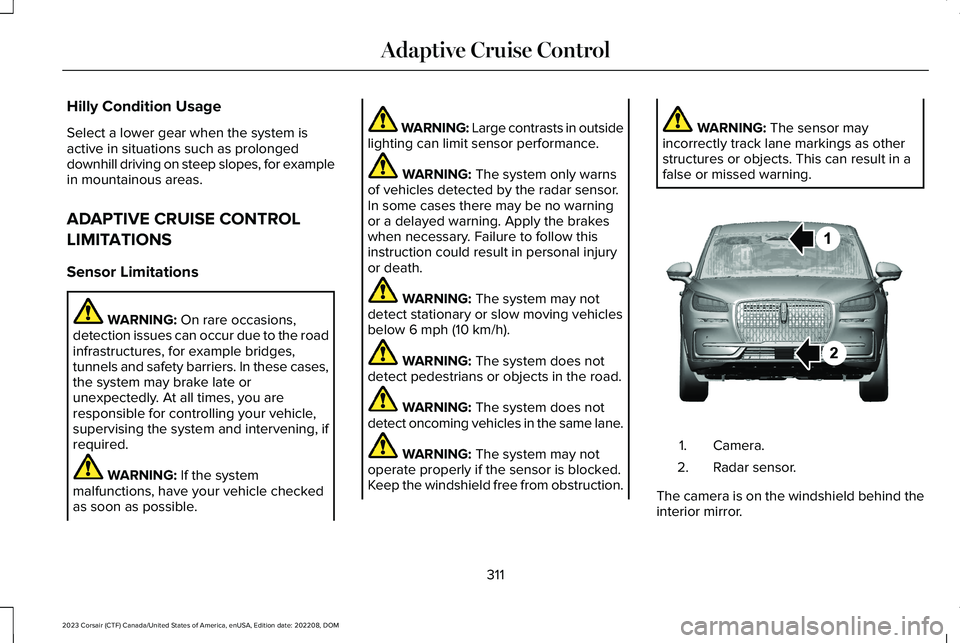
Camera.1.
Radar sensor.2.
The camera is on the windshield behind theinterior mirror.
311
2023 Corsair (CTF) Canada/United States of America, enUSA, Edition date: 202208, DOMAdaptive Cruise ControlE370664
Page 316 of 690
The radar sensor is in the lower grille.
Note:You cannot see the sensor. It is behinda fascia panel.
Note:Keep the front of your vehicle free ofdirt, metal badges or objects. Vehicle frontprotectors, aftermarket lights, additionalpaint or plastic coatings could also degradesensor performance.
A message displays if something obstructsthe camera or the sensor. When somethingblocks the sensor, the system cannot detecta vehicle ahead and does not function. SeeAdaptive Cruise Control – InformationMessages (page 325).
The radar sensor has a limited field of view.It may not detect vehicles at all or detect avehicle later than expected in somesituations. The lead vehicle image does notilluminate if the system does not detect avehicle in front of you.
312
2023 Corsair (CTF) Canada/United States of America, enUSA, Edition date: 202208, DOMAdaptive Cruise Control
Page 317 of 690
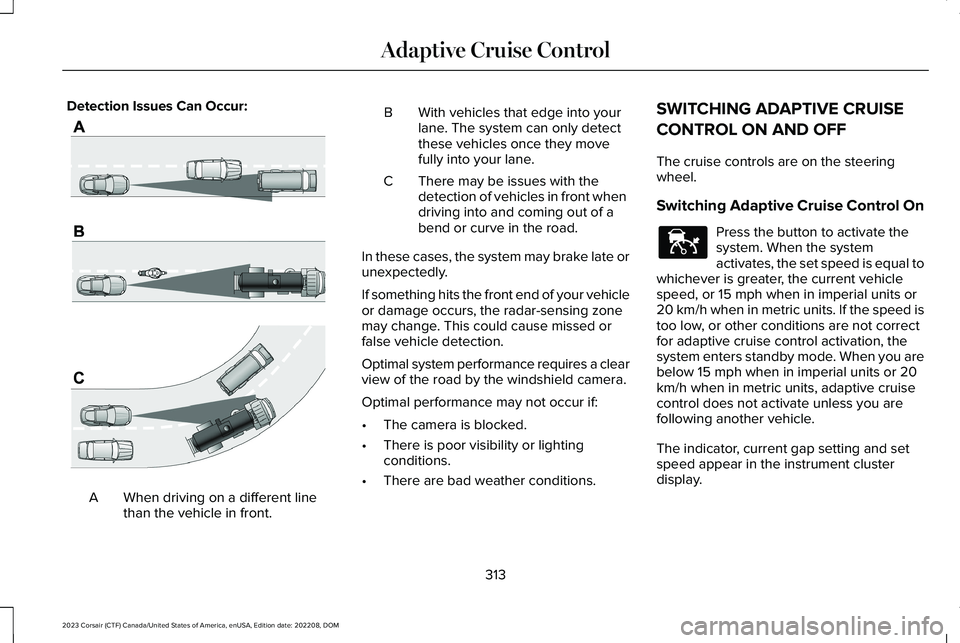
Detection Issues Can Occur:
When driving on a different linethan the vehicle in front.A
BWith vehicles that edge into yourlane. The system can only detectthese vehicles once they movefully into your lane.
There may be issues with thedetection of vehicles in front whendriving into and coming out of abend or curve in the road.
C
In these cases, the system may brake late orunexpectedly.
If something hits the front end of your vehicleor damage occurs, the radar-sensing zonemay change. This could cause missed orfalse vehicle detection.
Optimal system performance requires a clearview of the road by the windshield camera.
Optimal performance may not occur if:
•The camera is blocked.
•There is poor visibility or lightingconditions.
•There are bad weather conditions.
SWITCHING ADAPTIVE CRUISE
CONTROL ON AND OFF
The cruise controls are on the steeringwheel.
Switching Adaptive Cruise Control On
Press the button to activate thesystem. When the systemactivates, the set speed is equal towhichever is greater, the current vehiclespeed, or 15 mph when in imperial units or20 km/h when in metric units. If the speed istoo low, or other conditions are not correctfor adaptive cruise control activation, thesystem enters standby mode. When you arebelow 15 mph when in imperial units or 20km/h when in metric units, adaptive cruisecontrol does not activate unless you arefollowing another vehicle.
The indicator, current gap setting and setspeed appear in the instrument clusterdisplay.
313
2023 Corsair (CTF) Canada/United States of America, enUSA, Edition date: 202208, DOMAdaptive Cruise ControlE71621 E144529