lock LINCOLN CORSAIR 2023 Service Manual
[x] Cancel search | Manufacturer: LINCOLN, Model Year: 2023, Model line: CORSAIR, Model: LINCOLN CORSAIR 2023Pages: 690, PDF Size: 15.04 MB
Page 135 of 690
USING GLOBAL OPENING
1.Press and release the unlock button onthe remote control.
2.Press and hold the unlock button on theremote control.
3.Release the button when the windowsstart to open.
Press the lock or the unlock button on theremote control to stop global opening.
Note:You can use global opening for a shortperiod of time when you unlock your vehicleusing the remote control.
SWITCHING GLOBAL OPENING ONAND OFF
1.Press the menu button on the steeringwheel to enter the information displaymain menu.
2.Select Settings.
3.Select Vehicle.
4.Select Windows.
5.Switch Remote Open on or off.
USING GLOBAL CLOSING
WARNING: When closing the powerwindows, verify they are free of obstructionand make sure that children and pets arenot in the proximity of the windowopenings.
1.Press and hold the lock button on theremote control.
2.Release the button when the windowsstart to close.
Press the lock or the unlock button on theremote control to stop global closing.
Note:Bounce-back is on during globalclosing. See What Is Window Bounce-Back(page 131).
SWITCHING GLOBAL CLOSING ONAND OFF
1.Press the menu button on the steeringwheel to enter the information displaymain menu.
2.Select Settings.
3.Select Vehicle.
4.Select Windows.
5.Switch Remote Close on or off.
WINDOW BOUNCE-BACK
WHAT IS WINDOW BOUNCE-BACK
The window stops and reverses somedistance if it detects an obstacle whenclosing.
OVERRIDING WINDOW BOUNCE-BACK
WARNING: If you overridebounce-back, the window does not reverseif it detects an obstacle. Take care whenclosing the windows to avoid personalinjury or damage to your vehicle.
131
2023 Corsair (CTF) Canada/United States of America, enUSA, Edition date: 202208, DOMWindows
Page 136 of 690
WARNING: Bounce-back is off untilyou reset the memory. Take care whenclosing the windows to avoid personalinjury or damage to your vehicle.
Note:The window stops if you release theswitch before the window fully closes.
Pull up the window switch and hold within afew seconds of the window reaching thebounce-back position. The window travelsup with no bounce-back protection. Thewindow stops if you release the switchbefore the window fully closes.
LOCKING THE REAR WINDOW
CONTROLS
Press the control to lock or unlockthe rear window controls. Itilluminates when you lock the rearwindow controls.
132
2023 Corsair (CTF) Canada/United States of America, enUSA, Edition date: 202208, DOMWindows
Page 137 of 690
INTERIOR MIRROR PRECAUTIONS
WARNING: Do not adjust the mirrorswhen your vehicle is moving. This couldresult in the loss of control of your vehicle,serious personal injury or death.
Note:Do not clean the mirror housing orglass with harsh abrasives, fuel or otherpetroleum-based cleaning products.
AUTO-DIMMING INTERIOR MIRROR
WHAT IS THE AUTO-DIMMINGINTERIOR MIRROR
The mirror dims to reduce the effect of brightlight from behind. It returns to normal whenthe bright light from behind is no longerpresent or if you shift into reverse (R).
AUTO-DIMMING INTERIOR MIRRORLIMITATIONS
Do not block the sensors on the front andback of the mirror.
Note:A rear center passenger or raised rearcenter head restraint could prevent light fromreaching the sensor.
133
2023 Corsair (CTF) Canada/United States of America, enUSA, Edition date: 202208, DOMInterior Mirror
Page 138 of 690
ADJUSTING THE EXTERIOR
MIRRORS
WARNING: Do not adjust the mirrorswhen your vehicle is moving. This couldresult in the loss of control of your vehicle,serious personal injury or death.
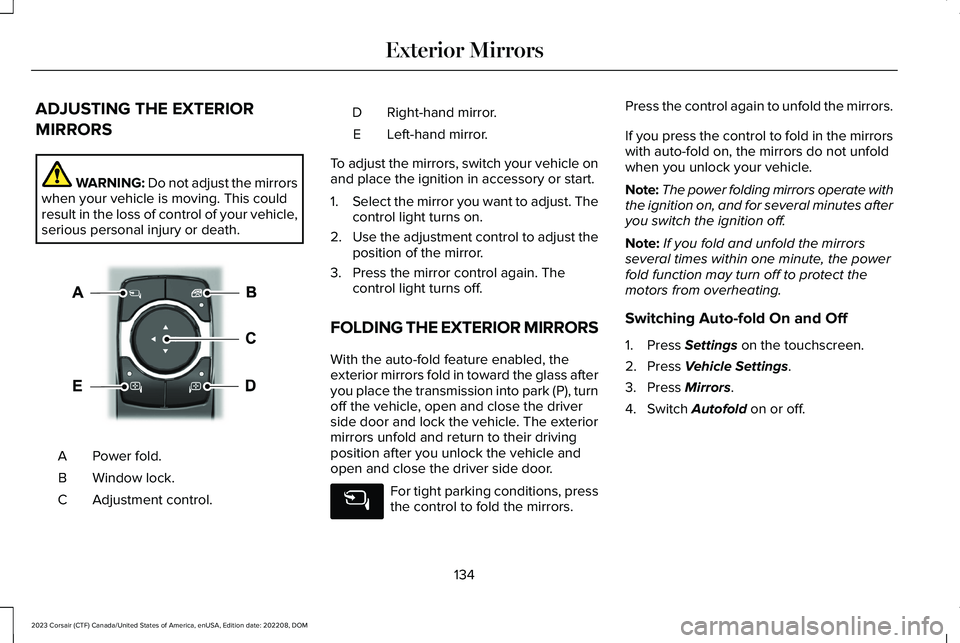
Power fold.A
Window lock.B
Adjustment control.C
Right-hand mirror.D
Left-hand mirror.E
To adjust the mirrors, switch your vehicle onand place the ignition in accessory or start.
1.Select the mirror you want to adjust. Thecontrol light turns on.
2.Use the adjustment control to adjust theposition of the mirror.
3.Press the mirror control again. Thecontrol light turns off.
FOLDING THE EXTERIOR MIRRORS
With the auto-fold feature enabled, theexterior mirrors fold in toward the glass afteryou place the transmission into park (P), turnoff the vehicle, open and close the driverside door and lock the vehicle. The exteriormirrors unfold and return to their drivingposition after you unlock the vehicle andopen and close the driver side door.
For tight parking conditions, pressthe control to fold the mirrors.
Press the control again to unfold the mirrors.
If you press the control to fold in the mirrorswith auto-fold on, the mirrors do not unfoldwhen you unlock your vehicle.
Note:The power folding mirrors operate withthe ignition on, and for several minutes afteryou switch the ignition off.
Note:If you fold and unfold the mirrorsseveral times within one minute, the powerfold function may turn off to protect themotors from overheating.
Switching Auto-fold On and Off
1.Press Settings on the touchscreen.
2.Press Vehicle Settings.
3.Press Mirrors.
4.Switch Autofold on or off.
134
2023 Corsair (CTF) Canada/United States of America, enUSA, Edition date: 202208, DOMExterior MirrorsE368669
Page 144 of 690
Note:The low fuel reminder can appear atdifferent fuel gauge positions depending onfuel economy conditions. This variation isnormal.
WHAT IS DISTANCE TO EMPTY
Indicates the approximate distance yourvehicle can travel on the fuel remaining inthe tank. Changes in driving pattern cancause the value to not only decrease but alsoincrease or stay constant for periods of time.
ENGINE COOLANT TEMPERATURE
GAUGE
Indicates the engine coolant temperature.
WHAT ARE THE INSTRUMENT
CLUSTER WARNING LAMPS
Warning lamps alert you to a vehiclecondition that could become serious. Somelamps illuminate when you start your vehicleto make sure they work. If any lamps remainon after starting your vehicle, refer to therespective system warning lamp for furtherinformation.
INSTRUMENT CLUSTER WARNING
LAMPS
Depending on your vehicle options andinstrument cluster type, not all warning lampsshown are available.
Airbags
See Airbags (page 65).
Anti-Lock Brake System
If it illuminates when you aredriving, this indicates amalfunction. Your vehiclecontinues to have normal braking withoutthe anti-lock brake system function. Haveyour vehicle checked as soon as possible.
Battery
Illuminates when you switch theignition on.
If it illuminates when the engine isrunning, this indicates your vehicle requiresservice. Have your vehicle checked as soonas possible.
140
2023 Corsair (CTF) Canada/United States of America, enUSA, Edition date: 202208, DOMInstrument Cluster - Excluding: Plug-In Hybrid Electric Vehicle (PHEV)E67017 E67020 E67021
Page 152 of 690
INSTRUMENT CLUSTER WARNING
LAMPS
Depending on your vehicle options andinstrument cluster type, not all warning lampsshown are available.
Airbags
See Airbags (page 65).
Anti-Lock Brake System
If it illuminates when you aredriving, this indicates amalfunction. Your vehiclecontinues to have normal braking withoutthe anti-lock brake system function. Haveyour vehicle checked as soon as possible.
Battery
Illuminates when you switch theignition on.
If it illuminates when the engine is running,this indicates your vehicle requires service. Have your vehicle checked as soon aspossible.
Brake System
Illuminates when you apply theparking brake and the ignition ison. If it illuminates when yourvehicle is moving, make sure theparking brake is released. If theparking brake is released, this indicates lowbrake fluid level or the brake system requiresservice. Have your vehicle checked as soonas possible.
Note:Indicators may vary depending onregion.
Door Ajar
Illuminates when you switch theignition on and remains on if anydoor is open.
Electric Parking Brake
Illuminates yellow or flashes whenthe electric parking brake requiresservice.
Note:Indicators may vary depending onregion.
Engine Coolant Temperature
If it illuminates, safely stop yourvehicle and switch it off.
Fasten Seatbelt
Illuminates and a tone sounds untilyou fasten the seatbelts.
Fasten Rear Seatbelt
Illuminates and a tone sounds tosignal the rear seatbelts are notfastened.
148
2023 Corsair (CTF) Canada/United States of America, enUSA, Edition date: 202208, DOMInstrument Cluster - Plug-In Hybrid Electric Vehicle (PHEV)E67017 E67020 E67021 E270480 E67024 E325775 E103308 E71880 E206718
Page 183 of 690
•Bend your legs slightly so that you canpress the pedals fully.
•Position the shoulder strap of the seatbeltover the center of your shoulder andposition the lap strap tightly across yourhips.
Make sure that your driving position iscomfortable and that you can maintain fullcontrol of your vehicle.
POWER SEATS
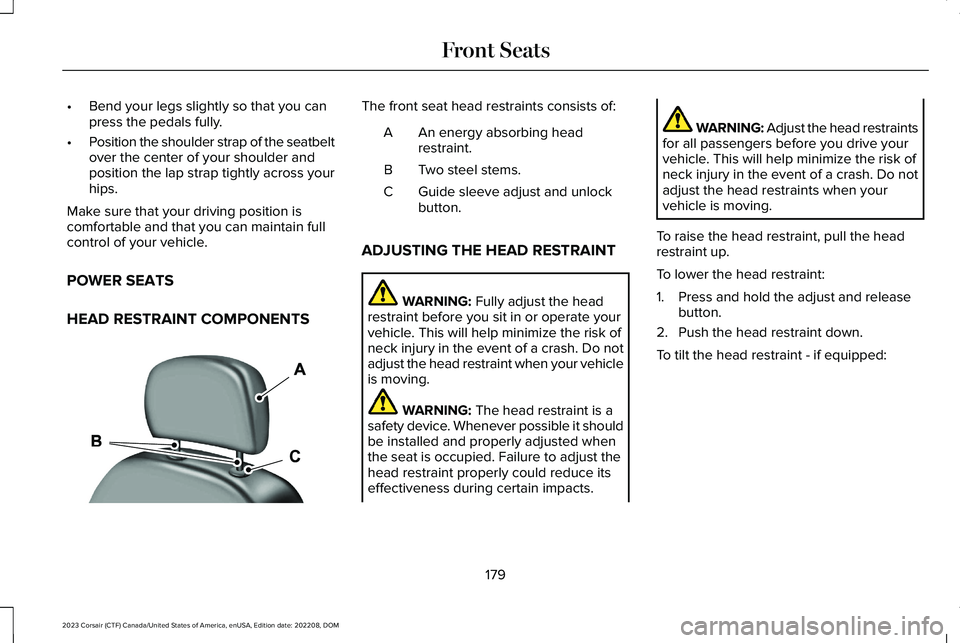
HEAD RESTRAINT COMPONENTS
The front seat head restraints consists of:
An energy absorbing headrestraint.A
Two steel stems.B
Guide sleeve adjust and unlockbutton.C
ADJUSTING THE HEAD RESTRAINT
WARNING: Fully adjust the headrestraint before you sit in or operate yourvehicle. This will help minimize the risk ofneck injury in the event of a crash. Do notadjust the head restraint when your vehicleis moving.
WARNING: The head restraint is asafety device. Whenever possible it shouldbe installed and properly adjusted whenthe seat is occupied. Failure to adjust thehead restraint properly could reduce itseffectiveness during certain impacts.
WARNING: Adjust the head restraintsfor all passengers before you drive yourvehicle. This will help minimize the risk ofneck injury in the event of a crash. Do notadjust the head restraints when yourvehicle is moving.
To raise the head restraint, pull the headrestraint up.
To lower the head restraint:
1.Press and hold the adjust and releasebutton.
2.Push the head restraint down.
To tilt the head restraint - if equipped:
179
2023 Corsair (CTF) Canada/United States of America, enUSA, Edition date: 202208, DOMFront SeatsE291139
Page 184 of 690
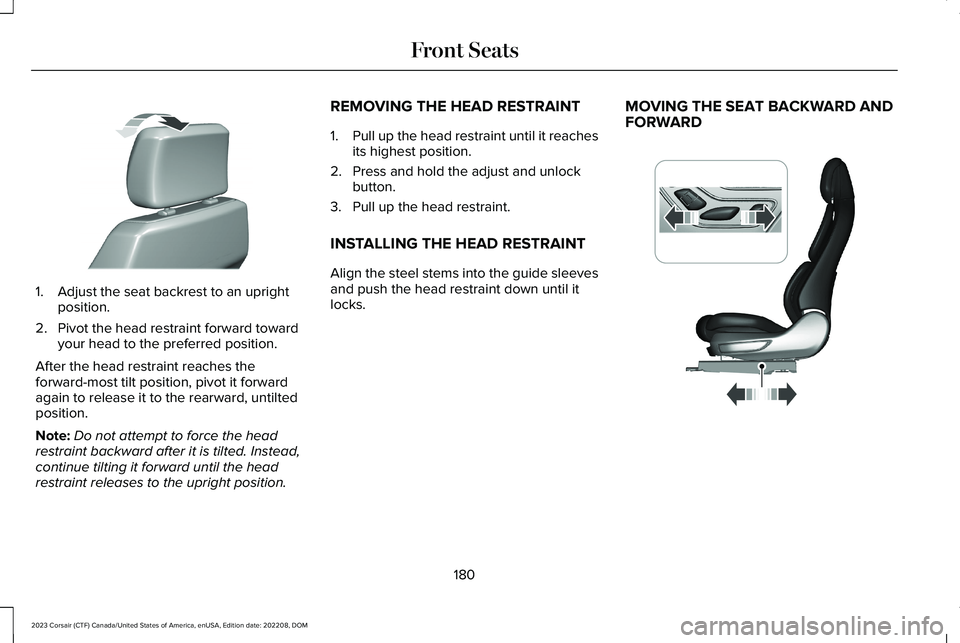
1.Adjust the seat backrest to an uprightposition.
2.Pivot the head restraint forward towardyour head to the preferred position.
After the head restraint reaches theforward-most tilt position, pivot it forwardagain to release it to the rearward, untiltedposition.
Note:Do not attempt to force the headrestraint backward after it is tilted. Instead,continue tilting it forward until the headrestraint releases to the upright position.
REMOVING THE HEAD RESTRAINT
1.Pull up the head restraint until it reachesits highest position.
2.Press and hold the adjust and unlockbutton.
3.Pull up the head restraint.
INSTALLING THE HEAD RESTRAINT
Align the steel stems into the guide sleevesand push the head restraint down until itlocks.
MOVING THE SEAT BACKWARD ANDFORWARD
180
2023 Corsair (CTF) Canada/United States of America, enUSA, Edition date: 202208, DOMFront SeatsE327919 E348863
Page 187 of 690
HEATED SEATS
HEATED SEAT PRECAUTIONS
WARNING: Use caution when usingthe heated seat if you are unable to feelpain to your skin because of advancedage, chronic illness, diabetes, spinal cordinjury, medication, alcohol use, exhaustionor other physical conditions. The heatedseat could cause burns even at lowtemperatures, especially if used for longperiods of time. Failure to follow thisinstruction could result in personal injury.
WARNING: Do not poke sharpobjects into the seat cushion or seatbackrest. This could damage the heatedseat element and cause it to overheat.Failure to follow this instruction could resultin personal injury.
WARNING: Do not place anything onthe seat that blocks the heat, for examplea seat cover or a cushion. This could causethe seat to overheat. Failure to follow thisinstruction could result in personal injury.
Do not:
•Place heavy objects on the seat.
•Operate the heated seat if water or anyother liquid spills on the seat. Allow theseat to dry.
SWITCHING THE HEATED SEATS ONAND OFF
The vehicle must be running to use thisfeature.
Press the seat symbol on the touchscreento switch on the heated seats. Then, slidethe menu bar up to control the heat intensity.The more indicators that display, the warmerthe temperature of the seat.
Note:The heated seats may remain on afteryou remote start your vehicle, based on yourremote start settings.
Note:The heated seats may turn on whenyou start your vehicle if they were on whenyou switched your vehicle off.
Note:Select Auto to heat your seat basedon your climate control settings, humidityand air temperature.
183
2023 Corsair (CTF) Canada/United States of America, enUSA, Edition date: 202208, DOMFront SeatsE368423
Page 189 of 690
MANUAL SEATS
HEAD RESTRAINT COMPONENTS
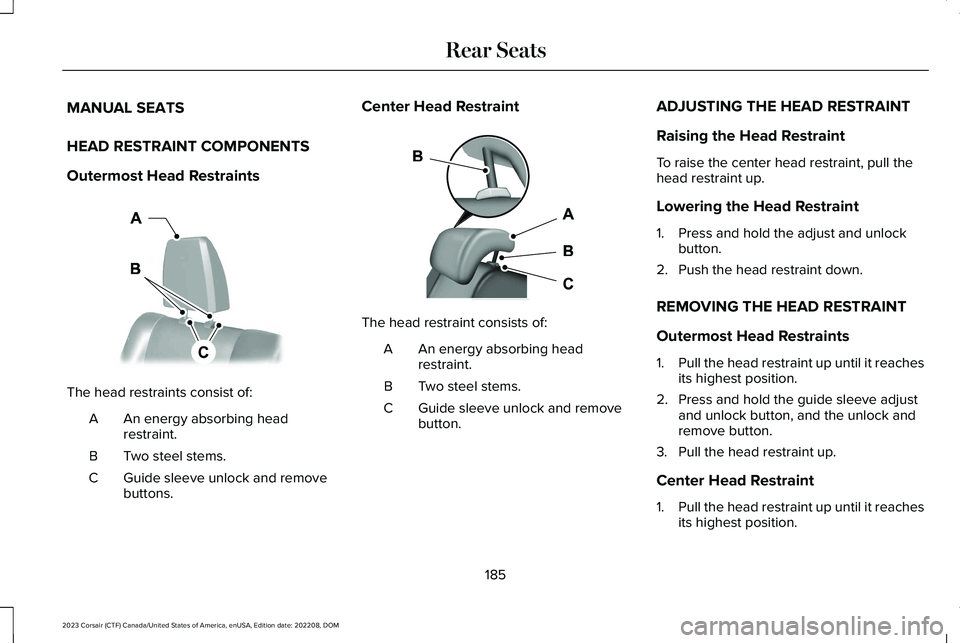
Outermost Head Restraints
The head restraints consist of:
An energy absorbing headrestraint.A
Two steel stems.B
Guide sleeve unlock and removebuttons.C
Center Head Restraint
The head restraint consists of:
An energy absorbing headrestraint.A
Two steel stems.B
Guide sleeve unlock and removebutton.C
ADJUSTING THE HEAD RESTRAINT
Raising the Head Restraint
To raise the center head restraint, pull thehead restraint up.
Lowering the Head Restraint
1.Press and hold the adjust and unlockbutton.
2.Push the head restraint down.
REMOVING THE HEAD RESTRAINT
Outermost Head Restraints
1.Pull the head restraint up until it reachesits highest position.
2.Press and hold the guide sleeve adjustand unlock button, and the unlock andremove button.
3.Pull the head restraint up.
Center Head Restraint
1.Pull the head restraint up until it reachesits highest position.
185
2023 Corsair (CTF) Canada/United States of America, enUSA, Edition date: 202208, DOMRear SeatsE379014 E379015