radio LINCOLN MARK VIII 1997 User Guide
[x] Cancel search | Manufacturer: LINCOLN, Model Year: 1997, Model line: MARK VIII, Model: LINCOLN MARK VIII 1997Pages: 315, PDF Size: 2.18 MB
Page 68 of 315

63
Operating the Shuffle featureWhile in the CD mode, pressing the
ªSHUFFLEº/#6 button will randomly select a track
from the disc currently being played. The display
will indicate ªSHFº followed by the disc and track
number (dd-tt).
The CD Changer will continue to randomly select
tracks for play until the shuffle feature is turned off
by pressing the ªSHUFFLEº button a second time.Operating the ªSCANº functionPress the ªSCANº button to enter the scan mode.
The CD player will begin scanning the disc,
stopping on each listenable track for approximately
an eight second sampling. This continues until you
press the ªSCANº button a second time.Operating the Shuffle and Scan features
simultaneouslyBoth the shuffle and scan features can be activated
simultaneously. In this mode, the player willrandomly pick a selection and play the first eight
seconds. This process is continued until either the
ªSCANº button or ªSHUFFLEº button is pressed a
second time.
How to stop CD playWhile in the CD mode, press the ªAM/FMº button
to stop CD play and resume radio play. Also,
loading a cassette into the cassette deck will stop
CD play and begin cassette play.How to take care of and clean the CD
Changer and discsTo ensure the continued performance of your CD
Changer, carefully read the following precautions:q
Always handle a disc by the edge. Never touch
the playing surface.
File:04fnas8.ex
Update:Wed Jun 19 10:43:44 1996
Page 70 of 315

65
Common Operating Conditions of the
CD PlayerThe following information is designed to help you
recognize typical situations that could be mistakenly
interpreted as mechanical malfunctions of the disc
player.q
A disc is already loaded.
q
The disc is inserted with the label surface
downward.
q
The disc is dusty or defective.
q
The player's internal temperature is above
167ÊF (75ÊC).Allow the player to cool off
before operating.
q
Different manufacturers of compact discs may
produce discs with different dimensions or
tolerances, some of which may not be within
industry standards or in accordance with the
CD format. Because of this, a new disc that is
free of dust and scratches could be defectiveand may not play on your Ford Compact Disc
Player.
If play does not begin after the CD button is
pushed:
q
The radio is not on.
q
The unit is in the stop mode.
q
Moisture may have condensed on the lenses
within the unit. If this occurs, remove the disc
and wait approximately an hour until the
moisture evaporates.
If the sound skips:
q
Badly scratched discs or extremely rough roads
will cause the sound to skip. Skipping will not
damage the disc player or scratch the discs.
File:04fnas8.ex
Update:Wed Jun 19 10:43:44 1996
Page 71 of 315

66AntennaThe antenna for the audio system is integral to the
rear window glass. The AM portion of the antenna
uses the same pattern of lines as the grid for the
rear defroster. The FM portion of the antenna uses
the top three lines on the glass, which are indicated
by the word ªRADIO.ºCommon Radio Reception
ConditionsSeveral conditions prevent FM reception from being
completely clear and noise-free, such as the
following:Distance/StrengthThe strength of the FM signal is directly related to
the distance the signal must travel. The listenable
range of an average FM signal is approximately 24
miles (40 km). Beyond this distance, the radio is
operating in a ªfringeº area and the signal becomes
weaker. Also, ªSignal Modulationº is used by somestations to increase their ªloudnessº relative to other
stations. The difference in loudness can be a result
of signal modulation as well as signal strength.
TerrainThe terrain (hilly, mountainous, tall buildings) of the
area over which the signal travels may prevent the
FM signal from being noise-free.
If there is a building or large structure between the
antenna and station, some of the signal ªbendsº
around the building, but certain spots receive almost
no signal. Moving out of the ªshadowº of the
structure will allow the station to return to normal.
When the radio waves are reflected off objects or
structures, the reflected signal cancels the normal
signal, causing the antenna to pick up noise and
distortion. Cancellation effects are most prominent
in metropolitan areas, but also can become quite
severe in hilly terrain and depressed roadways.
File:04fnas8.ex
Update:Wed Jun 19 10:43:44 1996
Page 72 of 315

67
To minimize these conditions, a stereo/mono blend
circuit has been incorporated into this system. This
feature automatically switches a weak stereo signal
to a clearer monaural signal, which improves the
quality of reception.
Several sources of static are normal conditions on
AM frequencies. These can be caused by power
lines, electric fences, traffic lights and
thunderstorms.
Another reception phenomenon isStrong Signal
Capture and Overload. This can occur when
listening to a weak station and when passing
another broadcast tower. The close station may
capture the more distant station, although the
displayed frequency does not change. While passing
the tower, the station may switch back and forth a
few times before returning to the original station.
When several broadcast towers are present
(common in metropolitan areas), several stations
may overload the receiver, resulting in considerablestation changing, mixing and distortion.
Automatic gain control circuitry for both AM and
FM bands has been incorporated into this system to
reduce strong signal capture and overload.
All About Radio FrequenciesThe Federal Communications Commission (FCC)
and the Canadian Radio Telecommunications
Commission (CRTC) establish the frequencies that
AM and FM radio stations may use for their
broadcasts. The allowable frequencies are, AM: 530,
540...1600, 1610 kHz in 10 kHz steps; FM: 87.9,
88.1...107.7, 107.9 MHz in 0.2 MHz steps.
Not all frequencies will be assigned to a given area.
This radio will tune to each of these frequencies
using manual tune and no fine tuning is necessary
as radio stations may not use other frequencies.
Some FM radio stations advertise a ªrounded-offº
frequency which is not the frequency they actually
broadcast on. For example, a radio station that is
File:04fnas8.ex
Update:Wed Jun 19 10:43:44 1996
Page 73 of 315

68assigned a frequency of 98.7 MHz may call itself
ªRadio 99º even though 99.0 MHz is not an
allowable FM broadcast frequency.Important Warranty and Service
InformationAbout Your WarrantyYour sound system is warranted for four years or
50,000 miles (whichever occurs first). Consult your
vehicle warranty booklet for further information.
Servicing Your Audio SystemAt Ford, we stand behind our audio systems with a
comprehensive service and repair program. If
anything should go wrong with your Ford audio
system, return to your dealer for service. There is a
nationwide network of qualified Ford authorized
repair centers to assist you.
File:04fnas8.ex
Update:Wed Jun 19 10:43:44 1996
Page 81 of 315

76FLRODEF button
Push this button to get air to the floor and
windshield defrosters at the same time. The display
will show the set temperature, FLR and the Defrost
symbol. If the outside temperature is about50ÊF
(10ÊC) andabove, the air will be dehumidified to
remove moisture. This will help to prevent fogging
in humid weather.
DEF button
Press the Defrost Button to obtain maximum airflow
to the windshield. Adjust the temperature setting as
required for defrosting. The Display window will
show the temperature setting with the Defrost
symbol to the left of the temperature. When the
outside temperature is about50ÊF(10ÊC) and
above, the air will be dehumidified to remove
moisture. This will help prevent fogging in humid
weather.OUTSIDE TEMP button
By pressing this button, the temperature of the air
outside of the vehicle will show in the display
window for 4 seconds. Then, the window will
automatically return to the previous display.
NOTE:The outside temperature reading is most
accurate when the vehicle is moving. Higher
readings may be obtained when the vehicle is not
moving. The readings that you get may not agree
with temperatures given on the radio due to
differences in vehicle and station locations.
Operating tipsThe following tips will help you to get the most
satisfaction from your Electronic Automatic
Temperature Control system.q
In humid weather, select DEFVbefore
starting your engine. This will help to prevent
windshield fogging. After a few minutes of
operation, switch to AUTOMATIC or an
override selection of your choice.
File:05fncf8.ex
Update:Thu Jun 27 10:02:20 1996
Page 88 of 315
83
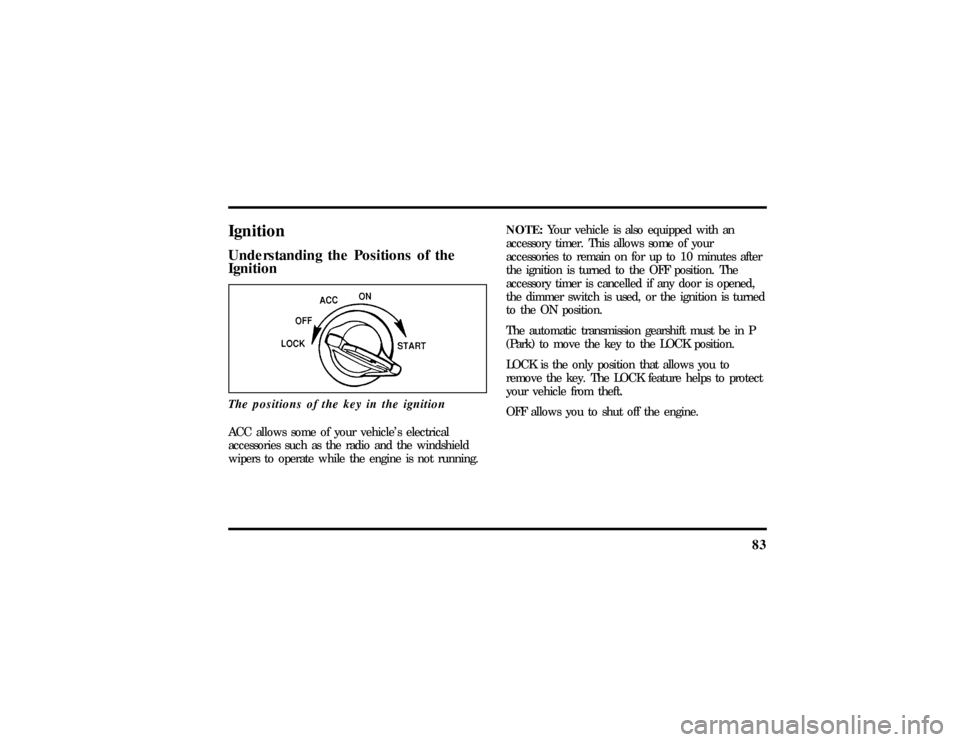
IgnitionUnderstanding the Positions of the
IgnitionThe positions of the key in the ignitionACC allows some of your vehicle's electrical
accessories such as the radio and the windshield
wipers to operate while the engine is not running.NOTE:Your vehicle is also equipped with an
accessory timer. This allows some of your
accessories to remain on for up to 10 minutes after
the ignition is turned to the OFF position. The
accessory timer is cancelled if any door is opened,
the dimmer switch is used, or the ignition is turned
to the ON position.
The automatic transmission gearshift must be in P
(Park) to move the key to the LOCK position.
LOCK is the only position that allows you to
remove the key. The LOCK feature helps to protect
your vehicle from theft.
OFF allows you to shut off the engine.
File:05fncf8.ex
Update:Thu Jun 27 10:02:20 1996
Page 98 of 315
93
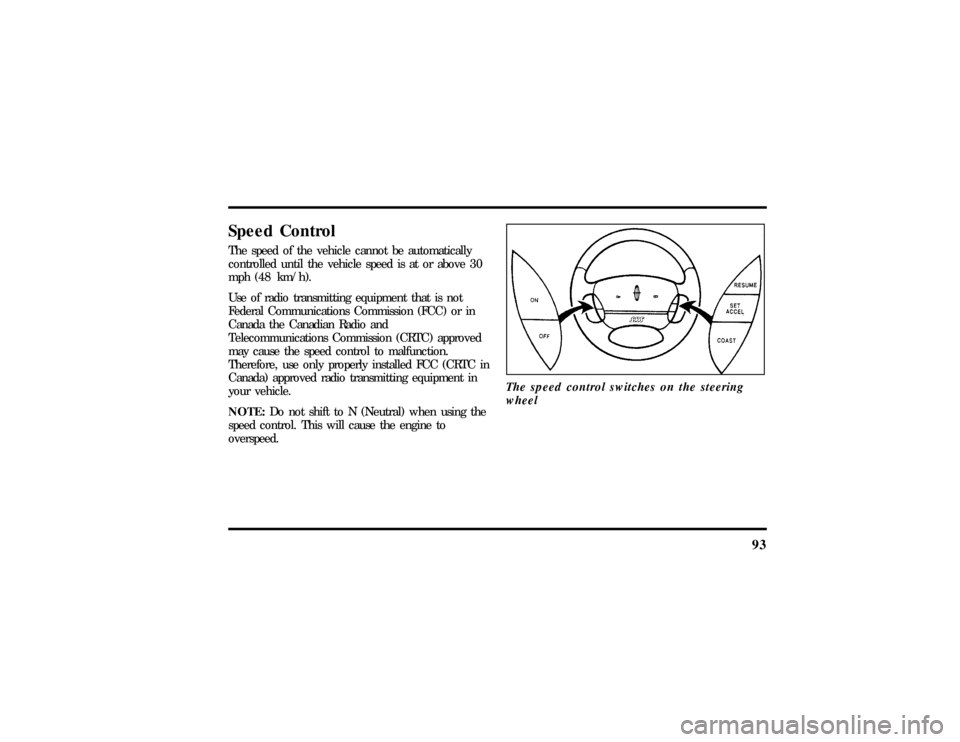
Speed ControlThe speed of the vehicle cannot be automatically
controlled until the vehicle speed is at or above 30
mph (48 km/h).
Use of radio transmitting equipment that is not
Federal Communications Commission (FCC) or in
Canada the Canadian Radio and
Telecommunications Commission (CRTC) approved
may cause the speed control to malfunction.
Therefore, use only properly installed FCC (CRTC in
Canada) approved radio transmitting equipment in
your vehicle.
NOTE:Do not shift to N (Neutral) when using the
speed control. This will cause the engine to
overspeed.The speed control switches on the steering
wheel
File:05fncf8.ex
Update:Thu Jun 27 10:02:20 1996
Page 130 of 315

125
Replacing the BatteriesThe remote entry transmitter is powered by two
coin type three-volt lithium 1616 batteries
(included) that should last for several years of
normal use. If you notice a significant decrease in
operating range, the batteries should be replaced.
Replacement batteries can be purchased at most
pharmacies, watch stores or at your Ford or
Lincoln-Mercury dealer.
NOTE:The operating range of the remote entry
system can also be affected by weather conditions
(such as very cold temperatures) or structures
around the vehicle (buildings, other vehicles, radio
and TV towers, etc.). Typical operating range will
allow you to be up to 33 feet (10 meters) away
from your vehicle.
The remote can be snapped apart to replace the
batteries by twisting a thin coin between the two
halves of the remote. DO NOT TAKE THE FRONT
PART OF THE REMOTE APART. When installing
the new batteries, be sure to place the positive (+)side down as marked. Snap the two halves back
together.
Replacement/additional remotesIn the event a remote is lost, return the remaining
remotes to your dealer for reprogramming of your
remote entry system. This is necessary to prevent
further unauthorized use of the lost remote.
Additional remotes may be purchased from your
dealer (remote entry system will work with up to
four remotes). Return your existing remotes to your
dealer so the remote entry system can be
reprogrammed with your new and existing remotes.
THIS DEVICE COMPLIES WITH PART 15 OF
THE FCC RULES. OPERATION IS SUBJECT TO
THE FOLLOWING TWO CONDITIONS: (1)
THIS DEVICE MAY NOT CAUSE HARMFUL
INTERFERENCE, AND (2) THIS DEVICE MUST
ACCEPT ANY INTERFERENCE RECEIVED,
INCLUDING INTERFERENCE THAT MAY
CAUSE UNDESIRED OPERATION.
File:05fncf8.ex
Update:Thu Jun 27 10:02:20 1996
Page 176 of 315

171
DrivingBrakesApplying the BrakesYour vehicle has anti-lock disc brakes on all four
wheels. They adjust automatically as the brake pads
wear down.
When you press down hard on the brake pedal, the
wheels will not lock and slide. The Anti-Lock Brake
System (ABS) automatically starts releasing and
reapplying the brakes at each wheel independently
whenever your wheels start to lock. When this
happens, you will feel the brake pedal pulsate. This
is an indication that the ABS is working correctly
and is normal.
Do not drive with your foot resting on the brake
pedal; you will wear out the linings and increase
your vehicle's stopping distance. Brake rotor damage
may also eventually occur.NOTE:If you are driving down a long or steep hill,
shift to a lower gear and do not apply your brakes
continuously. If you apply your brakes continuously,
they may overheat and become less effective.
Occasional brake squeal during light to moderate
stops does not affect the function of the brake
system and is normal. However, if the squeal
becomes louder or more frequent, have your brakes
inspected by your dealer or a qualified service
technician.
Ford Motor Company has not found any
detrimental effects of popular mobile radio
transmitting equipment installed on vehicles with
the anti-lock brake system, if the equipment is
installed according to the manufacturer's
instructions. However, if mobile radio transmitting
equipment is installed in your vehicle and, if either
the anti-lock brake system cycles or the ANTI-LOCK
File:09fngf8.ex
Update:Wed Jun 19 10:45:23 1996