wheel LINCOLN MARK VIII 1997 User Guide
[x] Cancel search | Manufacturer: LINCOLN, Model Year: 1997, Model line: MARK VIII, Model: LINCOLN MARK VIII 1997Pages: 315, PDF Size: 2.18 MB
Page 98 of 315
93
Speed ControlThe speed of the vehicle cannot be automatically
controlled until the vehicle speed is at or above 30
mph (48 km/h).
Use of radio transmitting equipment that is not
Federal Communications Commission (FCC) or in
Canada the Canadian Radio and
Telecommunications Commission (CRTC) approved
may cause the speed control to malfunction.
Therefore, use only properly installed FCC (CRTC in
Canada) approved radio transmitting equipment in
your vehicle.
NOTE:Do not shift to N (Neutral) when using the
speed control. This will cause the engine to
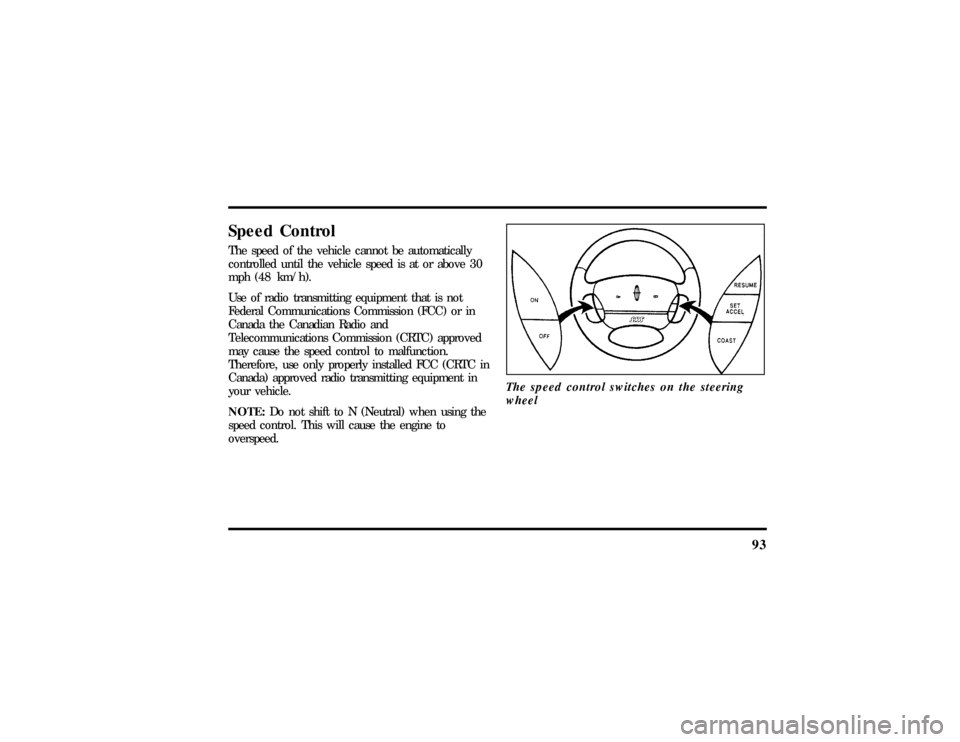
overspeed.The speed control switches on the steering
wheel
File:05fncf8.ex
Update:Thu Jun 27 10:02:20 1996
Page 176 of 315

171
DrivingBrakesApplying the BrakesYour vehicle has anti-lock disc brakes on all four
wheels. They adjust automatically as the brake pads
wear down.
When you press down hard on the brake pedal, the
wheels will not lock and slide. The Anti-Lock Brake
System (ABS) automatically starts releasing and
reapplying the brakes at each wheel independently
whenever your wheels start to lock. When this
happens, you will feel the brake pedal pulsate. This
is an indication that the ABS is working correctly
and is normal.
Do not drive with your foot resting on the brake
pedal; you will wear out the linings and increase
your vehicle's stopping distance. Brake rotor damage
may also eventually occur.NOTE:If you are driving down a long or steep hill,
shift to a lower gear and do not apply your brakes
continuously. If you apply your brakes continuously,
they may overheat and become less effective.
Occasional brake squeal during light to moderate
stops does not affect the function of the brake
system and is normal. However, if the squeal
becomes louder or more frequent, have your brakes
inspected by your dealer or a qualified service
technician.
Ford Motor Company has not found any
detrimental effects of popular mobile radio
transmitting equipment installed on vehicles with
the anti-lock brake system, if the equipment is
installed according to the manufacturer's
instructions. However, if mobile radio transmitting
equipment is installed in your vehicle and, if either
the anti-lock brake system cycles or the ANTI-LOCK
File:09fngf8.ex
Update:Wed Jun 19 10:45:23 1996
Page 179 of 315
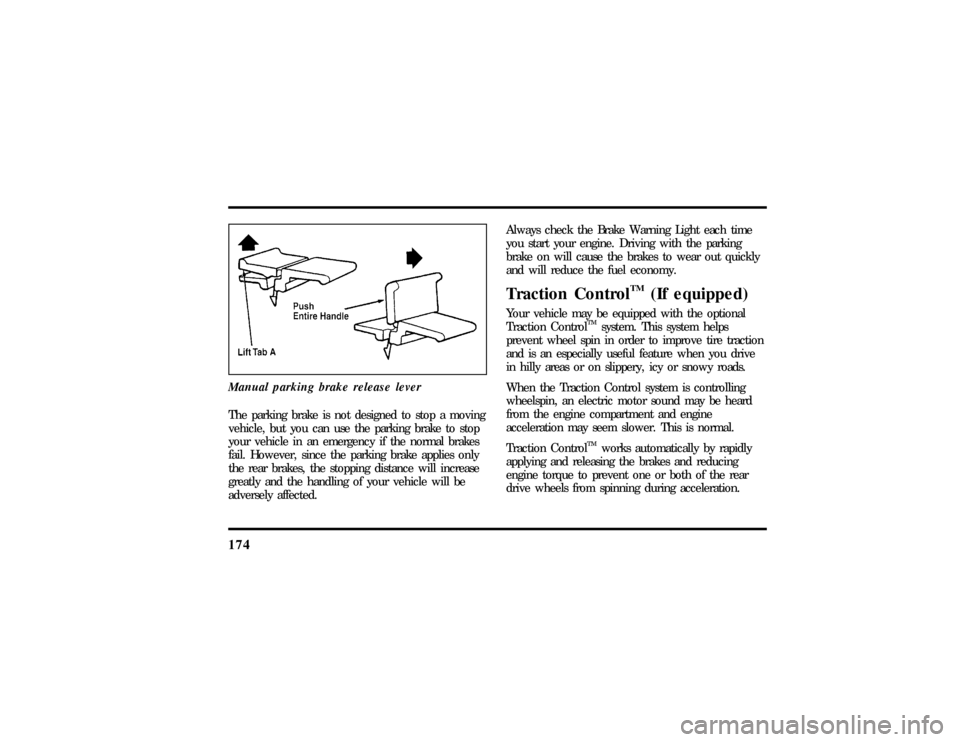
174Manual parking brake release leverThe parking brake is not designed to stop a moving
vehicle, but you can use the parking brake to stop
your vehicle in an emergency if the normal brakes
fail. However, since the parking brake applies only
the rear brakes, the stopping distance will increase
greatly and the handling of your vehicle will be
adversely affected.Always check the Brake Warning Light each time
you start your engine. Driving with the parking
brake on will cause the brakes to wear out quickly
and will reduce the fuel economy.
Traction Control
TM
(If equipped)
Your vehicle may be equipped with the optional
Traction Control
TM
system. This system helps
prevent wheel spin in order to improve tire traction
and is an especially useful feature when you drive
in hilly areas or on slippery, icy or snowy roads.
When the Traction Control system is controlling
wheelspin, an electric motor sound may be heard
from the engine compartment and engine
acceleration may seem slower. This is normal.
Traction Control
TM
works automatically by rapidly
applying and releasing the brakes and reducing
engine torque to prevent one or both of the rear
drive wheels from spinning during acceleration.
File:09fngf8.ex
Update:Wed Jun 19 10:45:23 1996
Page 180 of 315

175
NOTE:Engine torque reduction isNOTactive
when engine coolant temperature is below-10ÊF
(-23ÊC).
During the Traction Control
TM
function, which most
often occurs during low speed acceleration on
slippery surfaces, a noise may be heard coming from
the engine compartment. This is normal and may
last for a few seconds during the acceleration of the
vehicle.
In general, this system improves your vehicle's
stability and acceleration performance when road
conditions warrant. Traction Control
TM
is fully
effective at all vehicle speeds.
If the Traction Control
TM
system is cycled
excessively, the brake portion of the system will
shut down to prevent the rear brakes from
overheating. A limited Traction Control
TM
function
using engine torque will still control wheels from
spinning. A cooling down period is required to
prevent damage to the brakes. This time periodvaries and depends on brake usage during the
cooling down period. Anti-Lock braking is not
affected and will function normally during the cool
down period.
After the cool down period, the full Traction
Control
TM
function is restored.
Air Suspension SystemYour vehicle is equipped with an automatic load
leveling air suspension system. This system
maintains the vehicle height at a constant level by
automatically adding air or releasing air from the air
springs to offset changes in vehicle loads.
A shutoff switch is located in the trunk behind the
left hand vertical trim panel. If this switch is in the
OFF position, the automatic leveling system will not
operate. The switch should be OFF whenever
jacking up the vehicle. ªAIR RIDE SWITCH OFFº
will appear in the Message Center when the
File:09fngf8.ex
Update:Wed Jun 19 10:45:23 1996
Page 186 of 315

181
When to use D (Overdrive)Overdrive is the usual driving position for an
automatic overdrive transmission. It works the same
way Drive works, automatically upshifting or
downshifting as the vehicle speeds or slows.
However, Overdrive also shifts into a fourth gear Ð
an overdrive gear Ð when your vehicle cruises at
an appropriate consistent speed for any length of
time. This fourth gear will increase your fuel
economy when you travel at cruising speeds.When to use Drive (D Ð with
Transmission Control Switch activated)Overdrive may not be appropriate for certain
terrain. If the transmission shifts back and forth
between Third and Fourth gears while you are
driving on hilly roads or if your vehicle does not
have adequate power for climbing hills, depress the
TCS.
You can depress the TCS at any speed.
When to use 2 (Second)Use 2 (Second) for start-up on slippery roads or to
give you more engine braking to slow your vehicle
on downgrades.When to use 1 (Low)Use 1 (Low) when driving down steep grades. It
gives more engine braking to slow your vehicle than
2 (Second) on the downgrades. You can upshift
from 1 (Low) to 2 (Second) or from 1 (Low) to
Overdrive at any speed.P (Park)Always come to a complete stop before you shift
into P (Park). Make sure that the gearshift is
securely latched in P (Park). This locks the
transmission and prevents the rear wheels from
rotating.
Always set the parking brake fully and make sure
the gearshift is latched in P (Park). Turn off the
ignition whenever you leave your vehicle.
File:09fngf8.ex
Update:Wed Jun 19 10:45:23 1996
Page 191 of 315

186Do not use hitches that clamp onto your vehicle's
bumper. The bumper is not designed to bear the
load.
Always check the pressure in all your vehicle's tires
when preparing to tow (see inflation
recommendation on the tire label).Using the hitchYour vehicle uses aload carryinghitch. Because
this type of hitch places the tongue load of a trailer
on the rear wheels of your vehicle, you must
distribute the load in your trailer so that only 10 to
15% of the total weight of the trailer is on the
tongue.
Tie down the load so that it does not shift and
change the weight on the hitch. This will prevent
damage to your vehicle and make your vehicle
easier to handle.
Connecting the safety chainsAlways attach the trailer's safety chains to your
vehicle. They help protect your trailer if the hitch
breaks.
To connect the trailer's safety chains:
1. Cross the chains under the trailer tongue and
attach them to your vehicle's frame or hook
retainers. Never attach the safety chains to your
vehicle's bumper. The bumper is not designed
to bear the weight of a trailer.
2. Make sure that you leave enough slack in the
chains to allow you to turn corners.
If you use a rental trailer, follow the instructions
that the rental agency gives you.
File:09fngf8.ex
Update:Wed Jun 19 10:45:23 1996
Page 207 of 315

202When you drive with the temporary spare tire,
DO NOT:q
exceed 50 mph (80 km/h) under any
circumstances.
q
load your vehicle so that it is heavier than the
maximum vehicle load rating listed on the tire
decal.
q
tow a trailer.
q
use tire chains on this tire.
q
try to repair the temporary spare tire or remove
it from its wheel.
q
use the wheel for any other type of vehicle.
q
drive through an automatic car wash with this
tire. Because the temporary spare tire is smaller
than a conventional tire, it reduces the ground
clearance. Your vehicle may get caught in the
rails and it could be damaged.
Spare Tire LocationThe spare tire is stored under the carpet on the
floor of the trunk.
You will find additional instructions for the spare
tire on the warning label located on the wheel and
the jacking instructions located on the spare tire
cover.
File:10fner8.ex
Update:Thu Jun 20 14:27:22 1996
Page 208 of 315
203
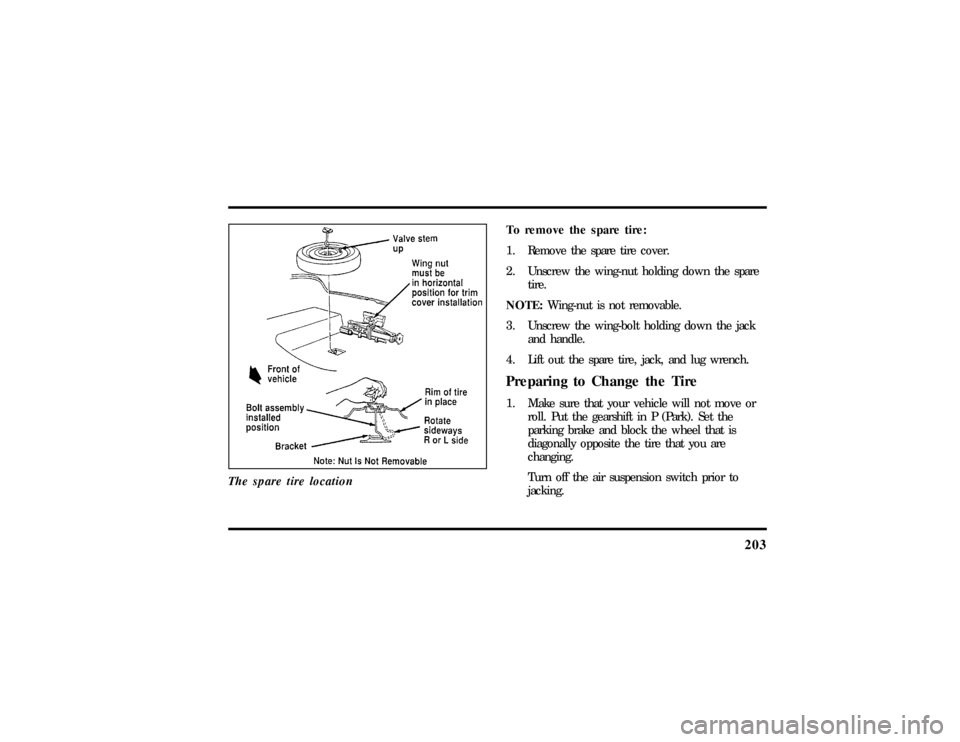
The spare tire location
To remove the spare tire:
1. Remove the spare tire cover.
2. Unscrew the wing-nut holding down the spare
tire.
NOTE:Wing-nut is not removable.
3. Unscrew the wing-bolt holding down the jack
and handle.
4. Lift out the spare tire, jack, and lug wrench.Preparing to Change the Tire1. Make sure that your vehicle will not move or
roll. Put the gearshift in P (Park). Set the
parking brake and block the wheel that is
diagonally opposite the tire that you are
changing.
Turn off the air suspension switch prior to
jacking.
File:10fner8.ex
Update:Thu Jun 20 14:27:22 1996
Page 212 of 315
207
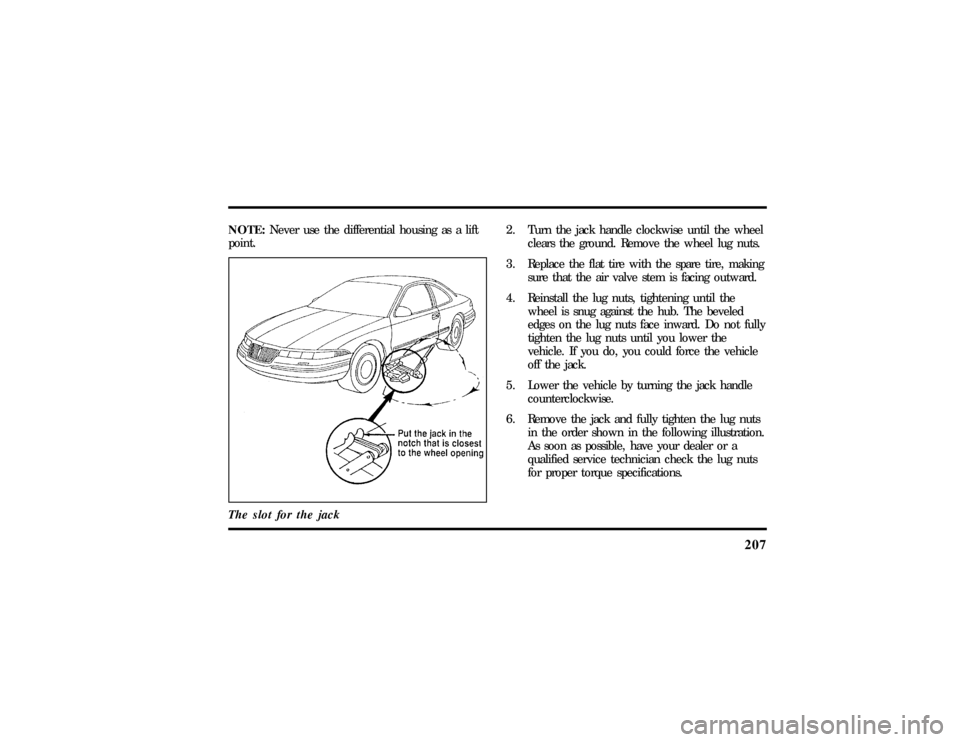
NOTE:Never use the differential housing as a lift
point.
The slot for the jack
2. Turn the jack handle clockwise until the wheel
clears the ground. Remove the wheel lug nuts.
3. Replace the flat tire with the spare tire, making
sure that the air valve stem is facing outward.
4. Reinstall the lug nuts, tightening until the
wheel is snug against the hub. The beveled
edges on the lug nuts face inward. Do not fully
tighten the lug nuts until you lower the
vehicle. If you do, you could force the vehicle
off the jack.
5. Lower the vehicle by turning the jack handle
counterclockwise.
6. Remove the jack and fully tighten the lug nuts
in the order shown in the following illustration.
As soon as possible, have your dealer or a
qualified service technician check the lug nuts
for proper torque specifications.
File:10fner8.ex
Update:Thu Jun 20 14:27:22 1996
Page 213 of 315
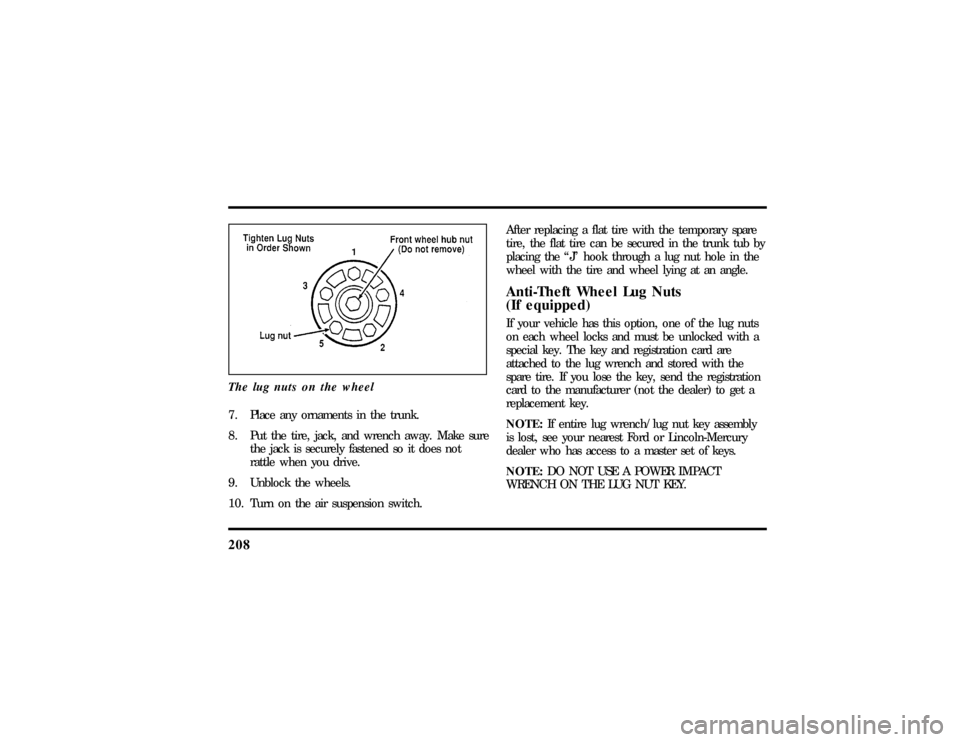
208The lug nuts on the wheel7. Place any ornaments in the trunk.
8. Put the tire, jack, and wrench away. Make sure
the jack is securely fastened so it does not
rattle when you drive.
9. Unblock the wheels.
10. Turn on the air suspension switch.After replacing a flat tire with the temporary spare
tire, the flat tire can be secured in the trunk tub by
placing the ªJº hook through a lug nut hole in the
wheel with the tire and wheel lying at an angle.
Anti-Theft Wheel Lug Nuts
(If equipped)If your vehicle has this option, one of the lug nuts
on each wheel locks and must be unlocked with a
special key. The key and registration card are
attached to the lug wrench and stored with the
spare tire. If you lose the key, send the registration
card to the manufacturer (not the dealer) to get a
replacement key.
NOTE:If entire lug wrench/lug nut key assembly
is lost, see your nearest Ford or Lincoln-Mercury
dealer who has access to a master set of keys.
NOTE:DO NOT USE A POWER IMPACT
WRENCH ON THE LUG NUT KEY.
File:10fner8.ex
Update:Thu Jun 20 14:27:22 1996