airbag LINCOLN MKC 2015 Owner's Manual
[x] Cancel search | Manufacturer: LINCOLN, Model Year: 2015, Model line: MKC, Model: LINCOLN MKC 2015Pages: 490, PDF Size: 4.74 MB
Page 58 of 490
CRASH SENSORS AND AIRBAG
INDICATOR
WARNING
Modifying or adding equipment to the
front end of your vehicle (including
frame, bumper, front end body structure and
tow hooks) may affect the performance of
the airbag system, increasing the risk of
injury. Do not modify the front end of your
vehicle. Your vehicle has a collection of crash and
occupant sensors which provide information
to the restraints control module which
deploys (activates) the front safety belt
pretensioners, driver airbag, passenger
airbag, seat mounted side airbags, and the
Safety Canopy. Based on the type of
accident (frontal impact, side impact or
rollover) the restraints control module will
deploy the appropriate safety devices. The restraints control module also monitors
the readiness of the above safety devices
plus the crash and occupant sensors. The
readiness of the safety system is indicated
by a warning indicator light in the instrument
cluster or by a backup tone if the warning
light is not working. Routine maintenance of
the airbag is not required.
A difficulty with the system is indicated by
one or more of the following:
•
The readiness light will not illuminate
immediately after the ignition is turned
on.
• The readiness light will either flash or
stay lit.
• A series of five beeps will be heard. The
tone pattern will repeat periodically until
the problem, the light or both are
repaired. If any of these things happen, even
intermittently, have the supplemental
restraint system serviced at an authorized
dealer immediately. Unless serviced, the
system may not function properly in the
event of a crash.
The safety belt pretensioners and the airbag
supplemental restraint system is designed
to activate when your vehicle sustains frontal
or sideways deceleration sufficient to cause
the restraints control module to deploy a
safety device or when a certain likelihood of
a rollover event is detected by the rollover
sensor.
55
MKC (TME), enUSA Supplementary Restraints System
Page 59 of 490
The fact that the safety belt pretensioners or
airbags did not activate for both front seat
occupants in a crash does not mean that
something is wrong with the system. Rather,
it means the restraints control module
determined the accident conditions (for
example, crash severity, belt usage) were
not appropriate to activate these safety
devices.
•
The design of the front airbags is to
activate only in frontal and near-frontal
crashes (not rollovers, side impacts or
rear impacts) unless the crash causes
sufficient frontal deceleration.
• The design of the safety belt
pretensioners is to activate in frontal,
near-frontal and side crashes, and in
rollovers.
• The design of the side airbags is to inflate
in certain side impact crashes. Side
airbags may activate in other types of
crashes if your vehicle experiences
sufficient sideways motion or
deformation. •
The design of the Safety Canopy is to
inflate in certain side impact crashes or
rollover events. The Safety Canopy may
activate in other types of crashes if your
vehicle experiences sufficient sideways
motion or deformation, or a certain
likelihood of rollover.
AIRBAG DISPOSAL
Contact your authorized dealer as soon as
possible. Airbags must be disposed of by
qualified personnel.
56
MKC (TME), enUSA Supplementary Restraints System
Page 112 of 490
Engine Coolant Temperature
Illuminates when the engine
coolant temperature is high. Stop
the vehicle as soon as possible,
switch off the engine and let cool. See
Engine Coolant Check (page 284).
Engine Oil If it illuminates with the engine
running or when you are driving,
this indicates a malfunction. Stop
your vehicle as soon as it is safe to do so
and switch the engine off. Check the engine
oil level. See Engine Oil Check (page 283).
Note: Do not resume your journey if it
illuminates despite the level being correct.
Have the system checked by your authorized
dealer immediately.
Fasten Safety Belt It will illuminate and a chime will
sound to remind you to fasten your
safety belt.
See Safety Belt
Minder (page 43). Front Airbag If it fails to illuminate when you
start your vehicle, continues to
flash or remains on, it indicates a
malfunction. Have the system checked by
an authorized dealer.
Heads Up Display
(If Equipped) A red beam of lights will illuminate
on the windshield in certain
instances when using adaptive
cruise control or the collision warning system.
It will also illuminate momentarily when you
start your vehicle to make sure the display
works.
High Beam It will illuminate when you switch
the high beam headlamps on. It
will flash when you use the
headlamp flasher. Hood Ajar Displays when the ignition is on
and the hood is not completely
closed.
Low Fuel Level It will illuminate when the fuel level
is low or the fuel tank is nearly
empty. Refuel as soon as possible.
Low Tire Pressure Warning It will illuminate when your tire
pressure is low. If the lamp remains
on with the engine running or
when driving, check your tire pressure as
soon as possible.
It will also illuminate momentarily when you
switch the ignition on to confirm the lamp is
functional. If it does not illuminate when you
switch the ignition on, or begins to flash at
any time, have the system checked by an
authorized dealer.
109
MKC (TME), enUSA Instrument Cluster E156133 E159324
Page 123 of 490
Airbag
Action
Message
The system detects a malfunction due to a blocked sensor. Remove blockage.
Occupant Sensor BLOCKED Remove
Objects Near Passenger Seat
Alarm Action
Message
Alarm triggered due to unauthorized entry. See Anti-Theft Alarm (page 81).
Vehicle Alarm to Stop Alarm, Start Vehicle
Automatic Engine Shutdown Action
Message
The engine is getting ready to shut off.
Engine Shuts Off in XX Seconds
The engine has shut off to help increase fuel economy.
Engine Shut Off for Fuel Economy
The engine is getting ready to shut off. You can press OK on the left steering wheel button tooverride the shut down.
Engine Shuts Off in XX Seconds Press Ok
to Override
120
MKC (TME), enUSA Information Displays
Page 256 of 490
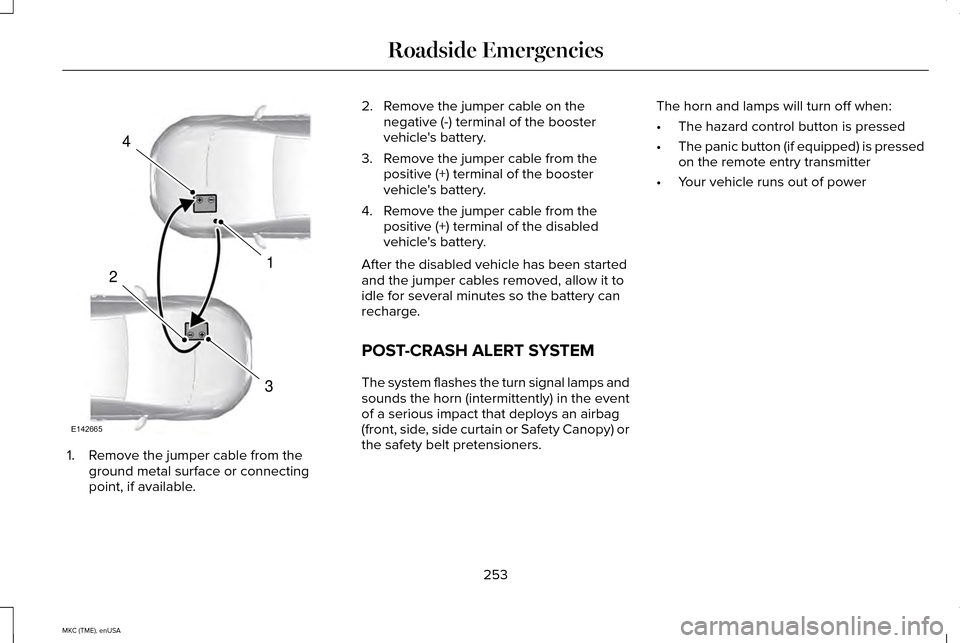
1. Remove the jumper cable from the
ground metal surface or connecting
point, if available. 2. Remove the jumper cable on the
negative (-) terminal of the booster
vehicle's battery.
3. Remove the jumper cable from the positive (+) terminal of the booster
vehicle's battery.
4. Remove the jumper cable from the positive (+) terminal of the disabled
vehicle's battery.
After the disabled vehicle has been started
and the jumper cables removed, allow it to
idle for several minutes so the battery can
recharge.
POST-CRASH ALERT SYSTEM
The system flashes the turn signal lamps and
sounds the horn (intermittently) in the event
of a serious impact that deploys an airbag
(front, side, side curtain or Safety Canopy) or
the safety belt pretensioners. The horn and lamps will turn off when:
•
The hazard control button is pressed
• The panic button (if equipped) is pressed
on the remote entry transmitter
• Your vehicle runs out of power
253
MKC (TME), enUSA Roadside Emergencies4
1
3
2
E142665
Page 305 of 490
CLEANING THE INTERIOR
WARNINGS
Do not use cleaning solvents, bleach
or dye on the vehicle
’s safety belts, as
these actions may weaken the belt webbing. On vehicles equipped with
seat-mounted airbags, do not use
chemical solvents or strong detergents. Such
products could contaminate the side airbag
system and affect performance of the side
airbag in a collision. Note:
Follow the same procedure for
cleaning leather seats when cleaning leather
interior. See Cleaning Leather Seats (page
304). Note:
Do not use household cleaning
products or glass cleaners, which can stain
and discolor the fabric and affect the flame
retardant abilities of the seat materials.
For fabric, carpets, cloth seats, safety belts
and seats equipped with side airbags:
• Remove dust and loose dirt with a
vacuum cleaner.
• Remove light stains and soil with
Motorcraft Professional Strength Carpet
& Upholstery Cleaner.
For grease or tar stains:
• Spot clean the area with Motorcraft Spot
and Stain Remover (Motorcraft
Multi-Purpose Cleaner in Canada).
• If a ring forms on the fabric after spot
cleaning, clean the entire area
immediately (but do not oversaturate) or
the ring will set. Cleaning Black Label Interior (If
Equipped) WARNING
Alcantara faux suede fabric is made of
polyester microfiber with micro-porous
polyurethane. Using commercially available
fabric cleaners can cause permanent
damage. Note:
Lincoln Black Label vehicles may have
Alcantara faux suede fabric on the seats,
headliner, floor mats and door panels.
Depending on the type of stain, use water,
lemon juice or pure ethyl alcohol when
cleaning:
302
MKC (TME), enUSA Vehicle Care
Page 306 of 490
Cleaning Procedure
Type of Stain
Use lukewarm water and rinse by dabbing with clean water.
Fruit juice, jam, jelly, syrup or ketchup.
Use cold water and rinse by dabbing with clean water. Avoid warm
water because it makes these substances coagulate.
Blood, egg, excrement or urine.
Use lukewarm water. If the color remains, treat with lemon juice and
then rinse.
Liquor, alcoholic beverages, wine, beer, cola and tea.
Use lukewarm water and rinse by dabbing with clean water.
Indelible pencil, cocoa, chocolate, pastry with cream or chocolate,
ice-cream or mustard.
Use lemon juice, wipe with lukewarm water and rinse by dabbing with
clean water.
Vinegar, hair gel, tomato sauce or coffee with sugar.
CLEANING THE INSTRUMENT
PANEL AND INSTRUMENT
CLUSTER LENS WARNING
Do not use chemical solvents or strong
detergents when cleaning the steering
wheel or instrument panel to avoid
contamination of the airbag system. Note:
Follow the same procedure as
cleaning leather seats for cleaning leather
instrument panels and leather interior trim
surfaces. See Cleaning Leather Seats (page
304).
Clean the instrument panel and cluster lens
with a clean, damp and soft cloth, then use
a clean, dry and soft cloth to dry these areas. •
Avoid cleaners or polishes that increase
the gloss of the upper portion of the
instrument panel. The dull finish in this
area helps protect you from undesirable
windshield reflection.
• Do not use any household cleaning
products or glass cleaners as these may
damage the finish of the instrument
panel, interior trim and cluster lens.
303
MKC (TME), enUSA Vehicle Care
Page 414 of 490
911 Assist (If Equipped)
WARNINGS
Unless the 911 Assist setting is set on
before a crash, the system will not dial
for help, which could delay response time,
potentially increasing the risk of serious
injury or death after a crash. Do not wait for 911 Assist to make an
emergency call if you can do it yourself.
Dial emergency services immediately to
avoid delayed response time, which could
increase the risk of serious injury or death
after a crash. If you do not hear 911 Assist
within five seconds of the crash, the system
or phone may be damaged or non-functional. Always place your phone in a secure
location in your vehicle so it does not
become a projectile or damaged in a crash.
Failure to do so may cause serious injury to
someone or damage the phone, which could
prevent 911 Assist from working properly. Note:
The SYNC 911 Assist feature must be
set on prior to the incident. Note:
Before setting this feature on, make
sure that you read the 911 Assist Privacy
Notice later in this section for important
information.
Note: If any user turns 911 Assist on or off,
that setting applies for all paired phones. If
911 Assist is turned off, either a voice
message plays or a display message (or
icon) comes on (or both) when your vehicle
is started after a previously paired phone
connects.
Note: Every phone operates differently.
While SYNC 911 Assist works with most
cellular phones, some may have trouble
using this feature.
If a crash deploys an airbag (excludes knee
airbags and rear inflatable safety belts [if
equipped]) or activates the fuel pump
shut-off, your SYNC-equipped vehicle may
be able to contact emergency services by
dialing 911 through a paired and connected
Bluetooth-enabled phone. You can learn
more about the 911 Assist feature, visit
www.SYNCMyRide.com,
www.SYNCMyRide.ca or
www.syncmaroute.ca. See Supplementary Restraints System
(page 47). Important information regarding
airbag deployment is in this chapter.
See
Roadside Emergencies (page 249).
Important information regarding the fuel
pump shut-off is in this chapter.
Setting 911 Assist On If your vehicle is equipped with
Navigation, touch the i
(Information) button to access
these features. If your vehicle is not
equipped with Navigation, touch the corner
of the touchscreen with the green tab.
Touch
Apps > 911 Assist, then select On. You can also access 911 Assist by:
• Pressing the Settings icon >
Settings >
Phone > 911 Assist, or
• Pressing the Settings icon >
Help > 911
Assist.
411
MKC (TME), enUSA MyLincoln Touch™E142608 E142607
Page 415 of 490
To make sure that 911 Assist works properly:
•
SYNC must be powered and working
properly at the time of the incident and
throughout feature activation and use.
• The 911 Assist feature must be set on
prior to the incident.
• You must pair and connect a
Bluetooth-enabled and compatible phone
to SYNC.
• A connected Bluetooth-enabled phone
must have the ability to make and
maintain an outgoing call at the time of
the incident.
• A connected Bluetooth-enabled phone
must have adequate network coverage,
battery power and signal strength.
• The vehicle must have battery power and
be located in the United States, Canada
or in a territory in which 911 is the
emergency number. In the Event of a Crash
Not all crashes deploy an airbag or activate
the fuel pump shut-off (which would trigger
911 Assist); however, SYNC tries to contact
emergency services if 911 Assist triggers. If
a connected phone sustains damage or loses
connection to SYNC, SYNC searches for, and
tries to connect to, any available previously
paired phone and tries to make the call to
911.
Before making the call:
•
SYNC provides a short window of time
(about 10 seconds) to cancel the call. If
you fail to cancel the call, SYNC attempts
to dial 911.
• SYNC says the following, or a similar
message: "SYNC will attempt to call 911,
to cancel the call, press Cancel on your
screen or press and hold the phone
button on your steering wheel." If you do not cancel the call, and SYNC
makes a successful call, a pre-recorded
message plays for the 911 operator, and then
the occupant(s) in your vehicle is able to talk
with the operator. Be prepared to provide
your name, phone number and location
immediately, because not all 911 systems are
capable of receiving this information
electronically.
911 Assist May Not Work If
•
Your cellular phone or 911 Assist
hardware sustains damage in a crash.
• The vehicle's battery or the SYNC system
has no power.
• The phone(s) thrown from your vehicle
are the ones paired and connected to
the system.
911 Assist Privacy Notice
When you turn on 911 Assist, it may disclose
to emergency services that your vehicle has
been in a crash involving the deployment of
an airbag or activation of the fuel pump
shut-off. Certain versions or updates to 911
Assist may also be capable of electronically
412
MKC (TME), enUSA MyLincoln Touch™
Page 441 of 490
account information, as well as other
payment and personal information provided
by you to Telenav (directly or through the
use of the Telenav Software, is subject to
Telenav’
s privacy policy located at
http://www.telenav.com.
Telenav may revise this Agreement and the
privacy policy at any time, with or without
notice to you. You agree to visit
http://www.telenav.com from time to time to
review the then current version of this
Agreement and of the privacy policy.
1. Safe and Lawful Use
You acknowledge that devoting attention to
the Telenav Software may pose a risk of
injury or death to you and others in situations
that otherwise require your undivided
attention, and you therefore agree to comply
with the following when using the Telenav
Software: (a) observe all traffic laws and
otherwise drive safely; (b) use your own
personal judgment while driving. If you feel
that a route suggested by the Telenav
Software instructs you to perform an unsafe
or illegal maneuver, places you in an unsafe
situation, or directs you into an area that you consider to be unsafe, do not follow such
instructions; (c) do not input destinations, or
otherwise manipulate the Telenav Software,
unless your vehicle is stationary and parked;
(d) do not use the Telenav Software for any
illegal, unauthorized, unintended, unsafe,
hazardous, or unlawful purposes, or in any
manner inconsistent with this Agreement; (e)
arrange all GPS and wireless devices and
cables necessary for use of the Telenav
Software in a secure manner in your vehicle
so that they will not interfere with your
driving and will not prevent the operation of
any safety device (such as an airbag).
You agree to indemnify and hold Telenav
harmless against all claims resulting from any
dangerous or otherwise inappropriate use
of the Telenav Software in any moving
vehicle, including as a result of your failure
to comply with the directions above.
2. Account Information
You agree: (a) when registering the Telenav
Software, to provide Telenav with true,
accurate, current, and complete information
about yourself, and (b) to inform Telenav
promptly of any changes to such information,
and to keep it true, accurate, current and
complete.
3. Software License
Subject to your compliance with the terms
of this Agreement, Telenav hereby grants to
you a personal, non-exclusive,
non-transferable license (except as expressly
permitted below in connection with your
permanent transfer of the Telenav Software
license), without the right to sublicense, to
use the Telenav Software (in object code
form only) in order to access and use the
Telenav Software. This license shall
terminate upon any termination or expiration
of this Agreement. You agree that you will
use the Telenav Software only for your
personal business or leisure purposes, and
not to provide commercial navigation
services to other parties.
438
MKC (TME), enUSA Appendices