information displays LINCOLN MKC 2015 Service Manual
[x] Cancel search | Manufacturer: LINCOLN, Model Year: 2015, Model line: MKC, Model: LINCOLN MKC 2015Pages: 490, PDF Size: 4.74 MB
Page 424 of 490
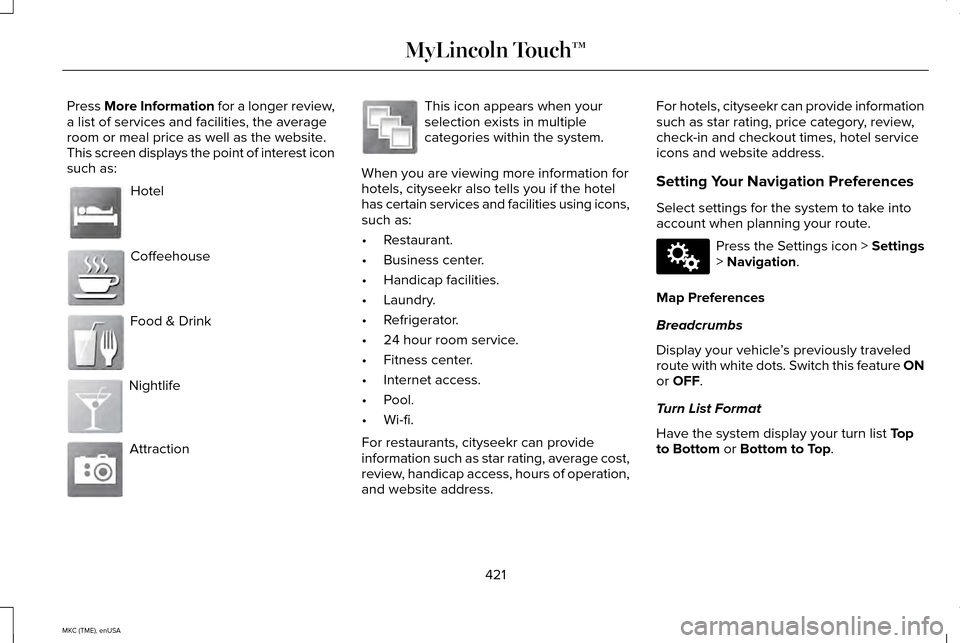
Press More Information for a longer review,
a list of services and facilities, the average
room or meal price as well as the website.
This screen displays the point of interest icon
such as:
Hotel
Coffeehouse
Food & Drink
Nightlife
Attraction This icon appears when your
selection exists in multiple
categories within the system.
When you are viewing more information for
hotels, cityseekr also tells you if the hotel
has certain services and facilities using icons,
such as:
• Restaurant.
• Business center.
• Handicap facilities.
• Laundry.
• Refrigerator.
• 24 hour room service.
• Fitness center.
• Internet access.
• Pool.
• Wi-fi.
For restaurants, cityseekr can provide
information such as star rating, average cost,
review, handicap access, hours of operation,
and website address. For hotels, cityseekr can provide information
such as star rating, price category, review,
check-in and checkout times, hotel service
icons and website address.
Setting Your Navigation Preferences
Select settings for the system to take into
account when planning your route.
Press the Settings icon > Settings
> Navigation.
Map Preferences
Breadcrumbs
Display your vehicle ’s previously traveled
route with white dots. Switch this feature ON
or
OFF.
Turn List Format
Have the system display your turn list
Top
to Bottom or Bottom to Top.
421
MKC (TME), enUSA MyLincoln Touch™E143884 E142636 E142637 E142638 E142639 E142640 E142607
Page 455 of 490
Your vehicle is equipped with the Intelligent
Oil-Life Monitor system, which displays a
message in the information display at the
proper oil change interval. This interval may
be up to one year or 10000 miles (16000
kilometers).
When the oil change message appears in
the information display, it is time for an oil
change. Make sure you perform the oil
change within two weeks or 500 miles (800
kilometers) of the message appearing. Make
sure you reset the Intelligent Oil-Life Monitor
after each oil change. See Oil Change
Indicator Reset (page 284).
If your information display resets prematurely
or becomes inoperative, you should perform
the oil change interval at six months or 5000
miles (8000 kilometers) from your last oil
change. Never exceed one year or 10000
miles (16000 kilometers) between oil change
intervals. Your vehicle is very sophisticated and built
with multiple, complex, performance systems.
Every manufacturer develops these systems
using different specifications and
performance features. That is why it is
important to rely upon your dealership to
properly diagnose and repair your vehicle.
Ford Motor Company has recommended
maintenance intervals for various parts and
component systems based upon engineering
testing. Ford Motor Company relies upon this
testing to determine the most appropriate
mileage for replacement of oils and fluids to
protect your vehicle at the lowest overall cost
to you and recommends against
maintenance schedules that deviate from
the scheduled maintenance information.
We strongly recommend the use of only
genuine Ford, Motorcraft or Ford-authorized
re-manufactured replacement parts
engineered for your vehicle.Additives and Chemicals
This owner's manual and the Ford Workshop
Manual list the recommended additives and
chemicals for your vehicle. We do not
recommend using chemicals or additives not
approved by us as part of your vehicle
’s
normal maintenance. Please consult your
warranty information.
Oils, Fluids and Flushing
In many cases, fluid discoloration is a normal
operating characteristic and, by itself, does
not necessarily indicate a concern or that the
fluid needs to be changed. However, a
qualified expert, such as the factory-trained
technicians at your dealership, should
inspect discolored fluids that also show signs
of overheating or foreign material
contamination immediately.
452
MKC (TME), enUSA Scheduled Maintenance
Page 482 of 490
General Maintenance Information............451
Multi-Point Inspection........................................454
Owner Checks and Services...........................453
Protecting Your Investment..............................451
Why Maintain Your Vehicle?.............................451
Why Maintain Your Vehicle at Your
Dealership?.......................................................451
Getting Assistance Outside the U.S. and Canada.........................................................257
Getting the Services You Need................254
Away From Home..............................................254
Global Opening and Closing.......................98 Closing the Windows...........................................98
Opening the Windows.........................................98
H
Hazard Warning Flashers
...........................250
Headlamp Exit Delay.....................................92
Head Restraints
..............................................141
Adjusting the Head Restraint...........................143
Heated Seats
..................................................147
Rear Heated Seats..............................................148
Heated Steering Wheel
................................85
Heated Windows and Mirrors....................139 Heated Exterior Mirror.......................................139
Heated Rear Window.........................................139 Heating
See: Climate Control..........................................136
Hill Start Assist...............................................185 Using Hill Start Assist.........................................186
Hints on Controlling the Interior Climate..........................................................138
Cooling the Interior Quickly..............................139
General Hints........................................................138
Heating the Interior Quickly.............................139
Recommended Settings for Cooling .............139
Recommended Settings for Heating..............139
Side Window Defogging in Cold Weather.............................................................139
Hints on Driving With Anti-Lock Brakes
...........................................................182
Hood Lock See: Opening and Closing the Hood............279
I
In California (U.S. Only)...............................255
Information Display Control.........................84 Cluster Display Control Features......................84
Information Displays
......................................112
General Information.............................................112 Information.....................................................403
911 Assist.................................................................411
Alerts......................................................................410
Calendar................................................................410
Sirius Travel Link.................................................408
SYNC Services (If Equipped, United States
Only)..................................................................404
Vehicle Health Report........................................413
479
MKC (TME), enUSA Index
Page 484 of 490
Locking and Unlocking.................................68
Activating Intelligent Access .............................70
Autolock Feature....................................................71
Battery Saver..........................................................72
Illuminated Entry....................................................72
Illuminated Exit......................................................72
Mechanical Key.....................................................69
Opening a Rear Door from Inside.....................70
Power Door Locks................................................68
Remote Control.....................................................68
Smart Unlocks.........................................................71
Welcome Lighting.................................................72
Locks..................................................................68
Luggage Covers...........................................229
Lug Nuts See: Changing a Road Wheel.........................328
M
Maintenance..................................................278 General Information...........................................278
Manual Liftgate................................................73 Closing the Liftgate..............................................74
Opening the Liftgate............................................73
Media Hub
......................................................348 Memory Function..........................................145
Easy Entry and Exit Feature..............................146
Linking a Pre-Set Position to your Remote
Control or Intelligent Access Key...............146
Saving a Pre-Set Position..................................145
Message Center See: Information Displays..................................112
Mirrors See: Heated Windows and Mirrors.................139
See: Windows and Mirrors..................................97
Mobile Communications Equipment...........13
Moonroof.........................................................102 Bounce-Back........................................................103
Opening and Closing the Moonroof..............
103
Power Sunscreen................................................103
Venting the Moonroof........................................103
Motorcraft Parts.............................................337
MyKey Troubleshooting
................................66
MyKey™..............................................................62 Principle of Operation.........................................62
MyLincoln Touch ™
.........................................350
General Information...........................................350 N
Navigation.......................................................418
cityseekr...............................................................420
Map Mode............................................................423
Navigation Map Updates.................................426
Navigation Voice Commands..........................426
Point of Interest (POI) Categories..................420
Quick-touch Buttons..........................................425
Setting a Destination..........................................419
Setting Your Navigation Preferences.............421
Normal Scheduled Maintenance
.............455
Intelligent Oil-Life Monitor®.............................455
Maintenance Intervals.......................................457
O
Oil Change Indicator Reset........................284
Oil Check See: Engine Oil Check......................................
283
Opening and Closing the Hood
...............279
Opening the Hood.............................................279
Ordering Additional Owner's Literature.....................................................259
Obtaining a French Owner’ s Manual............259
Overhead Console........................................157
481
MKC (TME), enUSA Index