information displays LINCOLN MKC 2015 Owner's Guide
[x] Cancel search | Manufacturer: LINCOLN, Model Year: 2015, Model line: MKC, Model: LINCOLN MKC 2015Pages: 490, PDF Size: 4.74 MB
Page 135 of 490
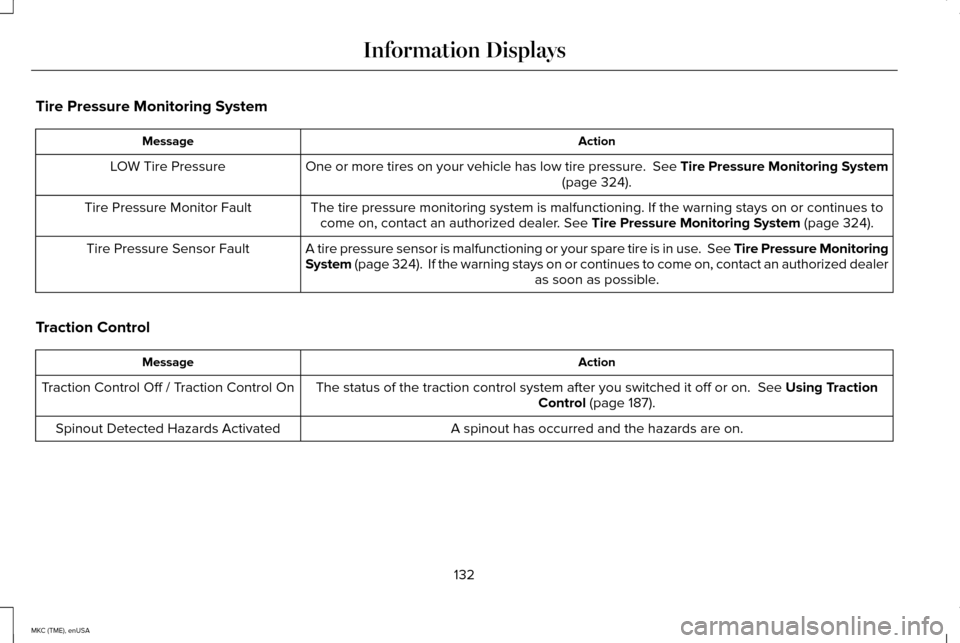
Tire Pressure Monitoring System
Action
Message
One or more tires on your vehicle has low tire pressure. See Tire Pressure Monitoring System (page 324).
LOW Tire Pressure
The tire pressure monitoring system is malfunctioning. If the warning st\
ays on or continues tocome on, contact an authorized dealer.
See Tire Pressure Monitoring System (page 324).
Tire Pressure Monitor Fault
A tire pressure sensor is malfunctioning or your spare tire is in use. See Tire Pressure Monitoring
System (page 324). If the warning stays on or continues to come on, contact\
an authorized dealer as soon as possible.
Tire Pressure Sensor Fault
Traction Control Action
Message
The status of the traction control system after you switched it off or o\
n.
See Using Traction
Control (page 187).
Traction Control Off / Traction Control On
A spinout has occurred and the hazards are on.
Spinout Detected Hazards Activated
132
MKC (TME), enUSA Information Displays
Page 136 of 490
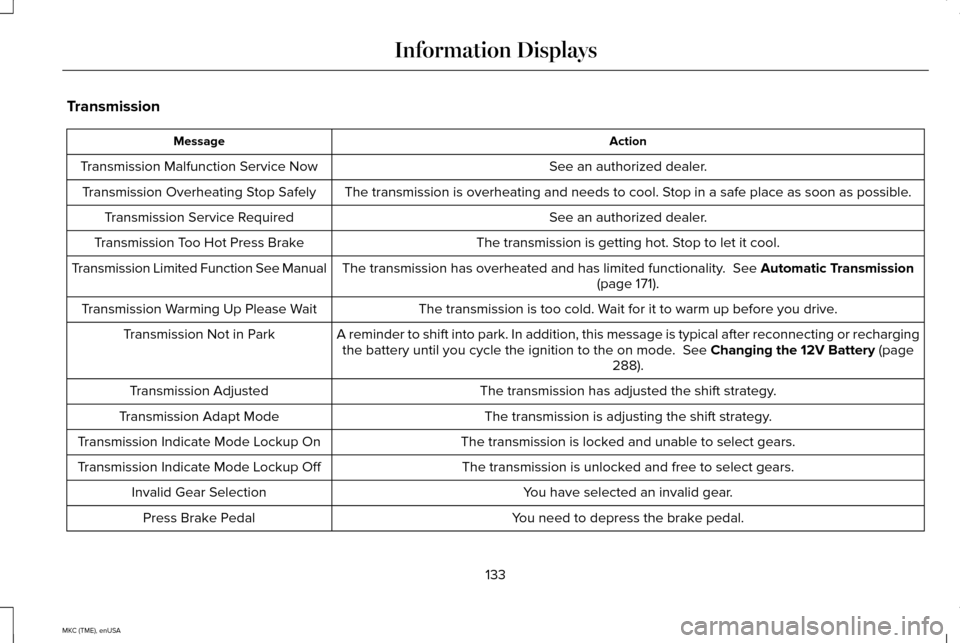
Transmission
Action
Message
See an authorized dealer.
Transmission Malfunction Service Now
The transmission is overheating and needs to cool. Stop in a safe place as soon as possible.
Transmission Overheating Stop Safely
See an authorized dealer.
Transmission Service Required
The transmission is getting hot. Stop to let it cool.
Transmission Too Hot Press Brake
The transmission has overheated and has limited functionality. See Automatic Transmission
(page 171).
Transmission Limited Function See Manual
The transmission is too cold. Wait for it to warm up before you drive.
Transmission Warming Up Please Wait
A reminder to shift into park. In addition, this message is typical afte\
r reconnecting or rechargingthe battery until you cycle the ignition to the on mode.
See Changing the 12V Battery (page
288).
Transmission Not in Park
The transmission has adjusted the shift strategy.
Transmission Adjusted
The transmission is adjusting the shift strategy.
Transmission Adapt Mode
The transmission is locked and unable to select gears.
Transmission Indicate Mode Lockup On
The transmission is unlocked and free to select gears.
Transmission Indicate Mode Lockup Off
You have selected an invalid gear.
Invalid Gear Selection
You need to depress the brake pedal.
Press Brake Pedal
133
MKC (TME), enUSA Information Displays
Page 137 of 490
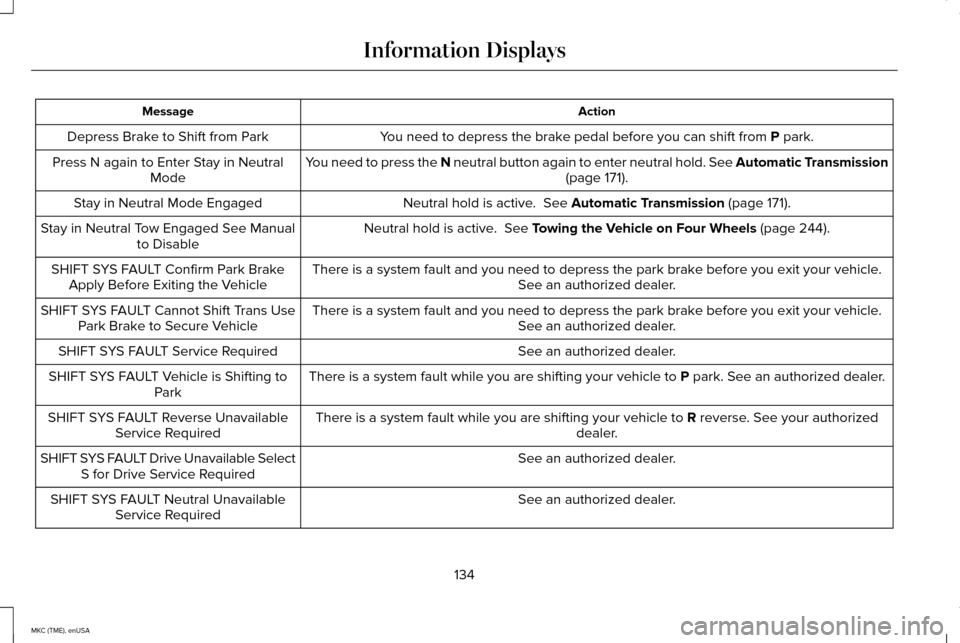
Action
Message
You need to depress the brake pedal before you can shift from P park.
Depress Brake to Shift from Park
You need to press the N neutral button again to enter neutral hold. See Automatic Transmission (page
171).
Press N again to Enter Stay in Neutral
Mode
Neutral hold is active.
See Automatic Transmission (page 171).
Stay in Neutral Mode Engaged
Neutral hold is active.
See Towing the Vehicle on Four Wheels (page 244).
Stay in Neutral Tow Engaged See Manual
to Disable
There is a system fault and you need to depress the park brake before you exit your vehicle. See an authorized dealer.
SHIFT SYS FAULT Confirm Park Brake
Apply Before Exiting the Vehicle
There is a system fault and you need to depress the park brake before you exit your vehicle.See an authorized dealer.
SHIFT SYS FAULT Cannot Shift Trans Use
Park Brake to Secure Vehicle
See an authorized dealer.
SHIFT SYS FAULT Service Required
There is a system fault while you are shifting your vehicle to
P park. See an authorized dealer.
SHIFT SYS FAULT Vehicle is Shifting to
Park
There is a system fault while you are shifting your vehicle to
R reverse. See your authorized
dealer.
SHIFT SYS FAULT Reverse Unavailable
Service Required
See an authorized dealer.
SHIFT SYS FAULT Drive Unavailable Select
S for Drive Service Required
See an authorized dealer.
SHIFT SYS FAULT Neutral Unavailable
Service Required
134
MKC (TME), enUSA Information Displays
Page 138 of 490
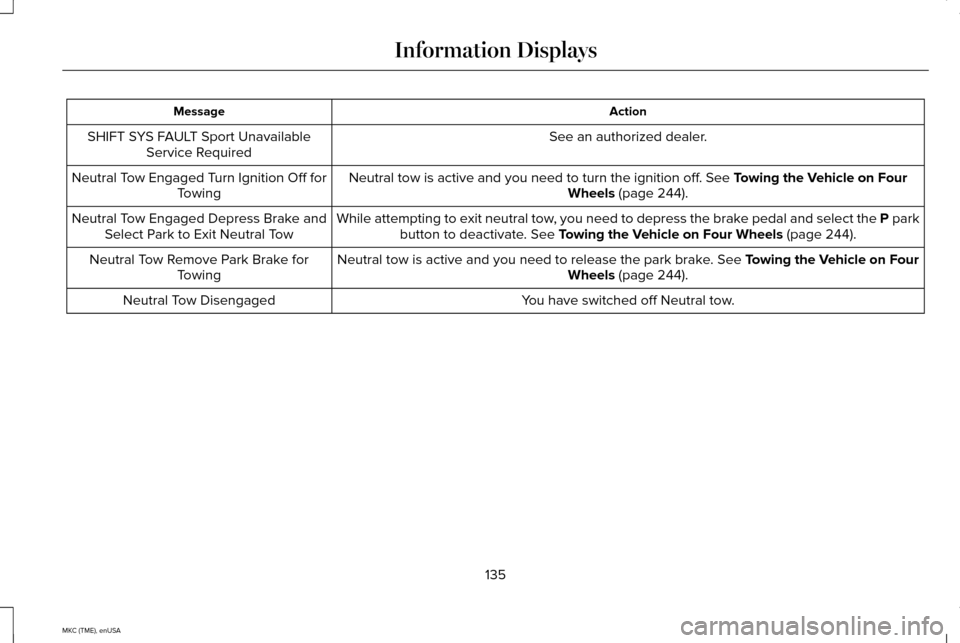
Action
Message
See an authorized dealer.
SHIFT SYS FAULT Sport Unavailable
Service Required
Neutral tow is active and you need to turn the ignition off. See Towing the Vehicle on Four
Wheels (page 244).
Neutral Tow Engaged Turn Ignition Off for
Towing
While attempting to exit neutral tow, you need to depress the brake pedal and select the P parkbutton to deactivate.
See Towing the Vehicle on Four Wheels (page 244).
Neutral Tow Engaged Depress Brake and
Select Park to Exit Neutral Tow
Neutral tow is active and you need to release the park brake.
See Towing the Vehicle on Four
Wheels (page 244).
Neutral Tow Remove Park Brake for
Towing
You have switched off Neutral tow.
Neutral Tow Disengaged
135
MKC (TME), enUSA Information Displays
Page 143 of 490
CABIN AIR FILTER
Your vehicle is equipped with a cabin air
filter. It is located inside the instrument panel
and to the left of the glove box.
The particulate filtration system reduces the
concentration of airborne particles such as
dust, spores and pollen in the air supplied to
the interior of your vehicle.
Note:
Make sure the cabin air filter is in
place at all times. Running the system
without a filter in place could result in
degradation or damage to the system.
The particulate filtration system gives you
and your passengers the following benefits:
• It improves your driving comfort by
reducing particle concentration.
• It improves the interior compartment
cleanliness.
• It protects the climate control
components from particle deposits.
Replace the filter at regular intervals. See
Scheduled Maintenance (page 451). For additional cabin air filter information, or
to replace the filter, see an authorized dealer.
REMOTE START
The remote start feature allows you to
pre-condition the interior of your vehicle. The
climate control system works to achieve
comfort according to your previous settings.
Note:
You cannot adjust the system during
remote start operation.
Turn the ignition on to return the system to
its previous settings. You can now make
adjustments normally, but you need to turn
certain vehicle-dependent features back on,
such as:
• Heated seats.
• Cooled seats.
• Heated steering wheel.
• Heated mirrors.
• Heated rear window. You can adjust the default remote start
settings using the information display
controls.
See Information Displays (page
112).
Automatic Settings
In hot weather, the system is set to 72°F
(22°C). The cooled seats are set to high (if
available, and selected to AUTO in the
information display).
In moderate weather, the system either heats
or cools (based on previous settings). The
rear defroster, heated mirrors and heated
seats do not automatically switch on.
In cold weather, the system is set to 72°F
(22°C). The heated seats are set to high (if
available, and selected to AUTO in the
information display). The rear defroster and
heated mirrors automatically switch on.
140
MKC (TME), enUSA Climate Control
Page 149 of 490
A pre-set memory position can also be
recalled by:
•
Pressing the unlock button on your
intelligent access key fob if it is linked to
a pre-set position.
• Unlocking the intelligent driver door
handle if a linked key fob is present.
• Entering a personal entry code on the
Securicode keypad. See Locks (page
68).
Note: Using a linked key fob to recall your
memory position when the ignition is off will
move the seat and steering column to the
Easy Entry position.
Linking a Pre-Set Position to your
Remote Control or Intelligent Access
Key
Your vehicle can save the pre-set memory
positions for up to three remote controls or
intelligent access (IA) keys.
1. With the ignition on, move the memory positions to the desired positions. 2.
Press and hold the desired pre-set button
for about five seconds. A chime will
sound after about two seconds. Continue
holding until a second chime is heard.
3. Within three seconds, press the lock button on the remote control you are
linking.
To unlink a remote control, follow the same
procedure – except in Step 3, press the
unlock button on the remote control.
Easy Entry and Exit Feature
If you enable the easy entry and exit feature,
it automatically moves the driver seat
position rearward up to two inches (five
centimeters) when you switch the ignition
off. The driver seat will return to the previous
position when you switch the ignition on.
You can enable or disable this feature in the
information display.
See Information
Displays (page 112). REAR SEATS
146
MKC (TME), enUSA SeatsE171298
Page 163 of 490
Failure to Start
If you cannot start the engine after three
attempts, wait 10 seconds and follow this
procedure:
1. Fully press the brake pedal.
2. Fully press the accelerator pedal and
hold it there.
3. Start the engine.
Note: You can crank the engine for a total
of 60 seconds (without the engine starting)
before the starting system temporarily
disables. The 60 seconds does not have to
be all at once. For example, if you crank the
engine three times for 20 seconds each time,
without the engine starting, you reached the
60-second time limit. A message appears in
the information display alerting you that you
exceeded the cranking time. You cannot
attempt to start the engine for at least 15
minutes. After 15 minutes, you are limited to
a 15-second engine cranking time. You need
to wait 60 minutes before you can crank the
engine for 60 seconds again. Automatic Engine Shutdown
If your vehicle is equipped with a keyless
ignition, it has a feature that automatically
shuts down the engine if it has been idling
for an extended period. The ignition also
turns off in order to save battery power.
Before the engine shuts down, a message
appears in the information display showing
a timer counting down from 30 seconds. If
you do not intervene within 30 seconds, the
engine shuts down. Another message
appears in the information display to inform
you that the engine has shut down in order
to save fuel. Start your vehicle as you
normally do.
Automatic Engine Shutdown Override
Note:
You cannot permanently switch off the
automatic engine shutdown feature. When
you switch it off temporarily, it turns on at
the next ignition cycle.
You can stop the engine shutdown, or reset
the timer, at any point before the 30-second
countdown has expired by doing any of the
following: •
You can reset the timer by interacting
with your vehicle (such as pressing the
brake pedal or accelerator pedal).
• You can temporarily switch off the
shutdown feature any time the ignition is
on (for the current ignition cycle only).
Use the information display to do so. See
Information Displays (page 112).
• During the countdown before engine
shutdown, you are prompted to press OK
or RESET (depending on your type of
information display) to temporarily switch
the feature off (for the current ignition
cycle only).
Stopping the Engine When Your
Vehicle is Stationary
1. Put the transmission in position
P.
2. Press the button once.
3. Apply the parking brake.
Note: This switches off the ignition, all
electrical circuits, warning lamps and
indicators.
160
MKC (TME), enUSA Starting and Stopping the Engine
Page 395 of 490
Insert your device and select the
SD Card or USB tab once the
system recognizes it. You can then
select from the following options:
Repeat
This feature replays the currently playing
song or album.
Shuffle
Touch this button to play music on the
selected album or folder in random order.
Similar Music
This feature allows you to choose music
similar to what is currently playing.
More Info
Touch this button to see disc information
such as current track, artist name, album and
genre.
Options
Touch this button to view and adjust various
media settings. Sound Settings allows you to adjust settings
for:
• Bass
• Midrange
• Treble
• Balance and Fade
• THX Deep Note Demo
• DSP (Digital Signal processing)
• Occupancy Mode
• Speed Compensated Volume.
Note: Your vehicle may not have all these
sound settings.
Media Player Settings
allows you to select
more settings, which is under Media Player.
See
Settings (page 363).
Device Information
displays software and
firmware information about the currently
connected media device.
Update Media Index
indexes your device
when you connect it for the first time and
each time the content changes (such as
adding or removing tracks) to make sure you
have the latest voice commands available
for all media on the device. Browse
This feature allows you to view the contents
of the device. It also allows you to search by
categories, such as genre, artist or album.
If you want to view song information such as
Title, Artist, File, Folder, Album, and Genre,
touch the on-screen album art.
You can also touch
What’
s Playing to hear
how the system pronounces the current band
and song. This can be helpful when using
voice commands to make sure the system
correctly plays your request.
SD Card and USB Voice Commands If you are listening to a USB device
or an SD card, press the voice
button on the steering wheel
controls. When prompted, say any of the
following commands.
If you are not listening to a USB device or an
SD card, press the voice button and, after
the tone, say "USB" or "SD card", then any
of the following commands.
392
MKC (TME), enUSA MyLincoln Touch™E142611 E142599
Page 403 of 490
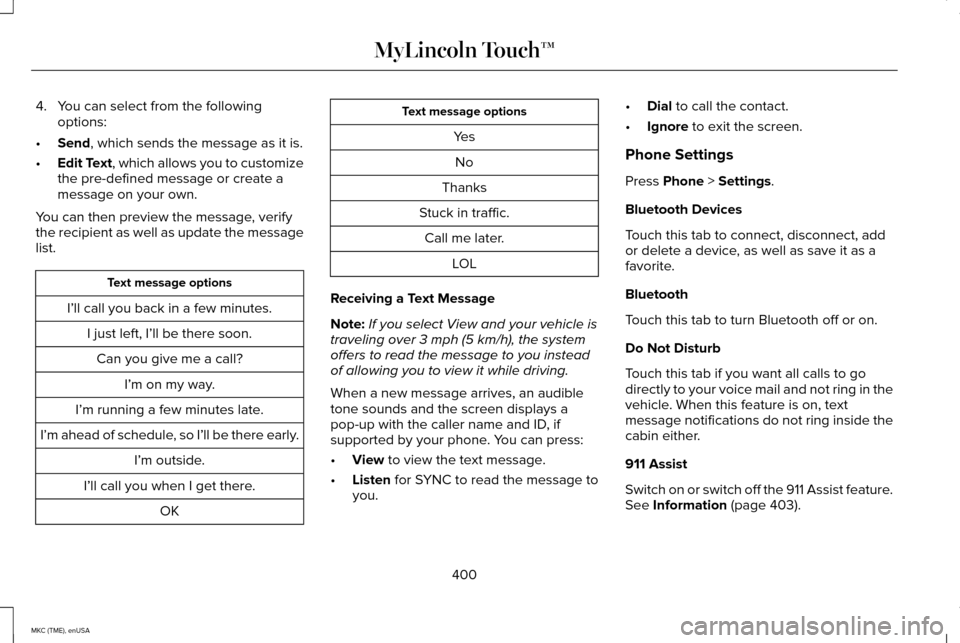
4. You can select from the following
options:
• Send, which sends the message as it is.
• Edit Text
, which allows you to customize
the pre-defined message or create a
message on your own.
You can then preview the message, verify
the recipient as well as update the message
list. Text message options
I’ll call you back in a few minutes. I just left, I’ll be there soon.Can you give me a call? I’m on my way.
I’m running a few minutes late.
I’m ahead of schedule, so I’ll be there early. I’m outside.
I’ll call you when I get there. OK Text message options
YesNo
Thanks
Stuck in traffic. Call me later. LOL
Receiving a Text Message
Note: If you select View and your vehicle is
traveling over 3 mph (5 km/h), the system
offers to read the message to you instead
of allowing you to view it while driving.
When a new message arrives, an audible
tone sounds and the screen displays a
pop-up with the caller name and ID, if
supported by your phone. You can press:
• View
to view the text message.
• Listen
for SYNC to read the message to
you. •
Dial
to call the contact.
• Ignore
to exit the screen.
Phone Settings
Press
Phone > Settings.
Bluetooth Devices
Touch this tab to connect, disconnect, add
or delete a device, as well as save it as a
favorite.
Bluetooth
Touch this tab to turn Bluetooth off or on.
Do Not Disturb
Touch this tab if you want all calls to go
directly to your voice mail and not ring in the
vehicle. When this feature is on, text
message notifications do not ring inside the
cabin either.
911 Assist
Switch on or switch off the 911 Assist feature.
See
Information (page 403).
400
MKC (TME), enUSA MyLincoln Touch™
Page 413 of 490
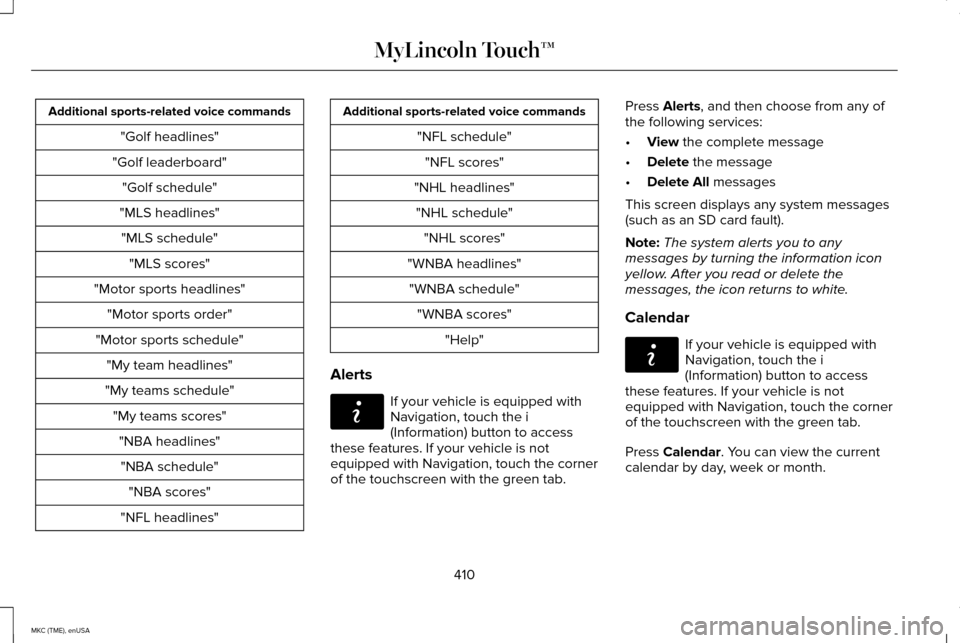
Additional sports-related voice commands
"Golf headlines"
"Golf leaderboard" "Golf schedule"
"MLS headlines" "MLS schedule" "MLS scores"
"Motor sports headlines" "Motor sports order"
"Motor sports schedule" "My team headlines"
"My teams schedule" "My teams scores""NBA headlines""NBA schedule" "NBA scores"
"NFL headlines" Additional sports-related voice commands
"NFL schedule""NFL scores"
"NHL headlines" "NHL schedule" "NHL scores"
"WNBA headlines" "WNBA schedule" "WNBA scores" "Help"
Alerts If your vehicle is equipped with
Navigation, touch the i
(Information) button to access
these features. If your vehicle is not
equipped with Navigation, touch the corner
of the touchscreen with the green tab. Press Alerts, and then choose from any of
the following services:
• View
the complete message
• Delete
the message
• Delete All
messages
This screen displays any system messages
(such as an SD card fault).
Note: The system alerts you to any
messages by turning the information icon
yellow. After you read or delete the
messages, the icon returns to white.
Calendar If your vehicle is equipped with
Navigation, touch the i
(Information) button to access
these features. If your vehicle is not
equipped with Navigation, touch the corner
of the touchscreen with the green tab.
Press
Calendar. You can view the current
calendar by day, week or month.
410
MKC (TME), enUSA MyLincoln Touch™E142608 E142608