Back LINCOLN MKC 2015 Workshop Manual
[x] Cancel search | Manufacturer: LINCOLN, Model Year: 2015, Model line: MKC, Model: LINCOLN MKC 2015Pages: 490, PDF Size: 4.74 MB
Page 202 of 490
![LINCOLN MKC 2015 Workshop Manual The system does not position the vehicle where I want in the space
Your vehicle is rolling in the opposite direction of the transmission (r\
olling forward when Reverse [R] is selected)
An irregular c](/img/15/6901/w960_6901-201.png "LINCOLN MKC 2015 Workshop Manual The system does not position the vehicle where I want in the space
Your vehicle is rolling in the opposite direction of the transmission (r\
olling forward when Reverse [R] is selected)
An irregular c")
The system does not position the vehicle where I want in the space
Your vehicle is rolling in the opposite direction of the transmission (r\
olling forward when Reverse [R] is selected)
An irregular curb along the parking space prevents the system from align\
ing your vehicle properly
Vehicles or objects bordering the space may not be positioned correctly
You pulled your vehicle too far past the parking space. The system performs best when you drive the same distance past the par\
king space
The tires may not be installed or maintained correctly (not inflated co\
rrectly, improper size, or of different sizes)
A repair or alteration has changed detection capabilities
A parked vehicle has a high attachment (salt sprayer, snowplow, moving truck bed, etc.)
The parking space length or position of parked objects changed after your vehicle passed
The temperature around your vehicle changes quickly (driving from a hea\
ted garage into the cold, or after leaving a car wash)
REAR VIEW CAMERA (If Equipped) WARNINGS
The rear view camera system is a
reverse aid supplement device that still
requires the driver to use it in conjunction
with the interior and exterior mirrors for
maximum coverage. WARNINGS
Objects that are close to either corner
of the bumper or under the bumper,
might not be seen on the screen due to the
limited coverage of the camera system. Back up as slow as possible since
higher speeds might limit your reaction
time to stop the vehicle. WARNINGS
Use caution when using the rear video
camera and the liftgate is ajar. If the
liftgate is ajar, the camera will be out of
position and the video image may be
incorrect. All guidelines (if enabled) have
been removed when the liftgate is ajar.
199
MKC (TME), enUSA Parking Aids
Page 203 of 490
WARNINGS
Use caution when turning camera
features on or off while in Reverse (R).
Make sure your vehicle is not moving. The rear view camera system provides a
video image of the area behind your vehicle.
During operation, lines will appear in the
display that represent your vehicle
’s path
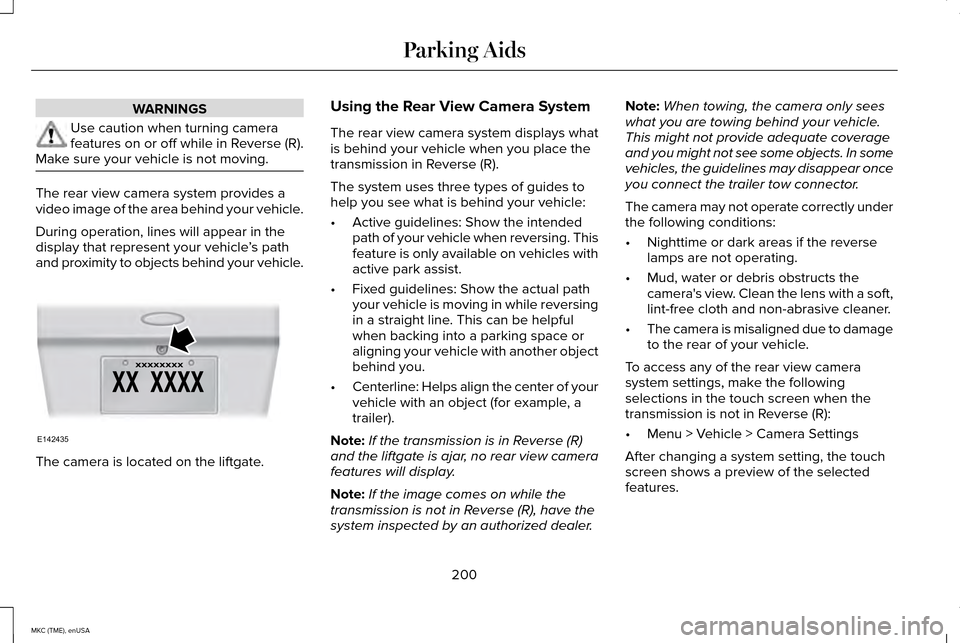
and proximity to objects behind your vehicle. The camera is located on the liftgate. Using the Rear View Camera System
The rear view camera system displays what
is behind your vehicle when you place the
transmission in Reverse (R).
The system uses three types of guides to
help you see what is behind your vehicle:
•
Active guidelines: Show the intended
path of your vehicle when reversing. This
feature is only available on vehicles with
active park assist.
• Fixed guidelines: Show the actual path
your vehicle is moving in while reversing
in a straight line. This can be helpful
when backing into a parking space or
aligning your vehicle with another object
behind you.
• Centerline: Helps align the center of your
vehicle with an object (for example, a
trailer).
Note: If the transmission is in Reverse (R)
and the liftgate is ajar, no rear view camera
features will display.
Note: If the image comes on while the
transmission is not in Reverse (R), have the
system inspected by an authorized dealer. Note:
When towing, the camera only sees
what you are towing behind your vehicle.
This might not provide adequate coverage
and you might not see some objects. In some
vehicles, the guidelines may disappear once
you connect the trailer tow connector.
The camera may not operate correctly under
the following conditions:
• Nighttime or dark areas if the reverse
lamps are not operating.
• Mud, water or debris obstructs the
camera's view. Clean the lens with a soft,
lint-free cloth and non-abrasive cleaner.
• The camera is misaligned due to damage
to the rear of your vehicle.
To access any of the rear view camera
system settings, make the following
selections in the touch screen when the
transmission is not in Reverse (R):
• Menu > Vehicle > Camera Settings
After changing a system setting, the touch
screen shows a preview of the selected
features.
200
MKC (TME), enUSA Parking AidsE142435
Page 215 of 490
DRIVER ALERT (If Equipped)
WARNING
The driver alert system is designed to
aid you. It is not intended to replace
your attention and judgment. You are still
responsible to drive with due care and
attention. Note:
The system will store the on or off
setting in the information display menu
through ignition cycles.
Note: If enabled in the menu, the system will
be active at speeds above 40 mph (64 km/h).
When below the activation speed, the
information display will inform you that the
system is unavailable.
Note: The system works as long as one lane
marking can be detected by the camera.
Note: If the camera is blocked or if the
windshield is damaged, the system may not
function.
Note: The system may not be available in
poor weather or other low visibility
conditions. The system automatically monitors your
driving behavior using various inputs
including the front camera sensor.
If the system detects that your driving
alertness is reduced below a certain
threshold, the system will alert you using a
chime and a message in the information
display.
Using Driver Alert
Switching the system on and off
You may switch the system on or off through
the information display by selecting Settings
then Driver Assist then Driver Alert in the
menu. When activated, the system will
monitor your alertness level based upon your
driving behavior in relation to the lane
markings, and other factors.
System Warnings
Note:
Note: The system will not issue
warnings below approximately 40 mph (64
km/h). The warning system is in two stages. At first
the system issues a temporary warning that
you need to take a rest. This message will
only appear for a short time. If the system
detects further reduction in driving alertness,
another warning may be issued which will
remain in the information display for a longer
time. Press OK on the steering wheel control
to clear the warning
System Display
When active the system will run automatically
in the background and only issue a warning
if required. You can view the status at any
time using the information display.
See
General Information (page 112).
The alertness level is shown by six steps in
a colored bar. 212
MKC (TME), enUSA Driving AidsE131358
Page 220 of 490
 when I can s\
ee the lane markings on the road?
Faint lane markings (partial yellow lane markings on concrete roads)
Lane width too narrow or")
Why is the feature not available (line markings are gray) when I can s\
ee the lane markings on the road?
Faint lane markings (partial yellow lane markings on concrete roads)
Lane width too narrow or too wide
Camera not calibrated after a windshield replacement
Driving on tight roads or on uneven roads Why does the vehicle not come back into the middle of the lane always, a\
s expected, in the Aid or Aid + Alert mode?
High cross winds
Large road crown
Rough roads, grooves, shoulder drop-offs
Heavy uneven loading of the vehicle or improper tire inflation pressure
If the tires have been exchanged (including snow tires), or the suspension has been modified
217
MKC (TME), enUSA Driving Aids
Page 221 of 490
BLIND SPOT INFORMATION
SYSTEM
Blind Spot Information System (BLIS®)
with Cross Traffic Alert (If Equipped)
WARNING
To help avoid injuries, NEVER use the
Blind Spot Information System as a
replacement for using the interior and
exterior mirrors or looking over your shoulder
before changing lanes. The Blind Spot
Information System is not a replacement for
careful driving. The Blind Spot Information System aids you
in detecting vehicles that may have entered
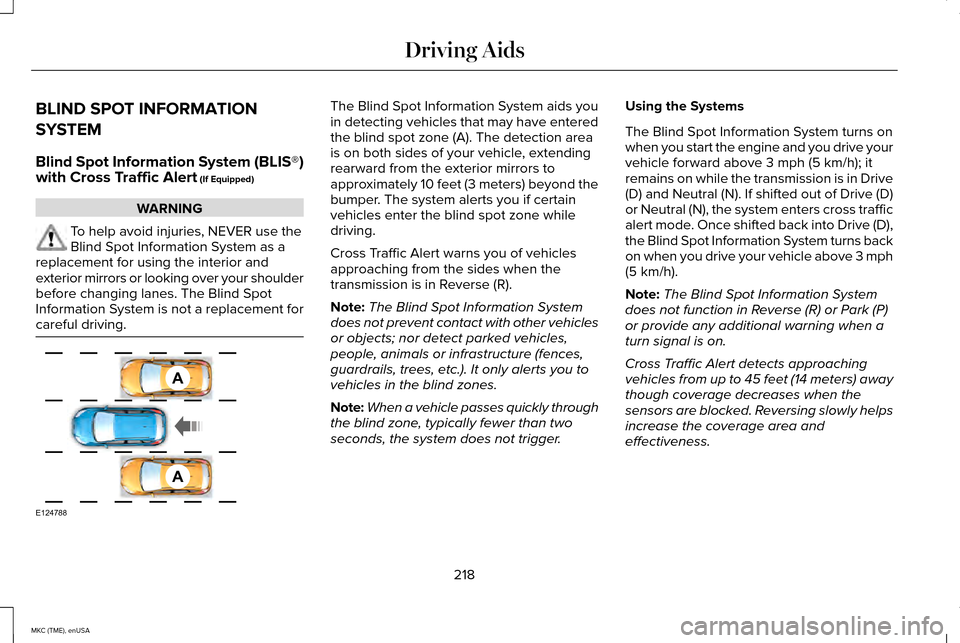
the blind spot zone (A). The detection area
is on both sides of your vehicle, extending
rearward from the exterior mirrors to
approximately 10 feet (3 meters) beyond the
bumper. The system alerts you if certain
vehicles enter the blind spot zone while
driving.
Cross Traffic Alert warns you of vehicles
approaching from the sides when the
transmission is in Reverse (R).
Note:
The Blind Spot Information System
does not prevent contact with other vehicles
or objects; nor detect parked vehicles,
people, animals or infrastructure (fences,
guardrails, trees, etc.). It only alerts you to
vehicles in the blind zones.
Note: When a vehicle passes quickly through
the blind zone, typically fewer than two
seconds, the system does not trigger. Using the Systems
The Blind Spot Information System turns on
when you start the engine and you drive your
vehicle forward above 3 mph (5 km/h); it
remains on while the transmission is in Drive
(D) and Neutral (N). If shifted out of Drive (D)
or Neutral (N), the system enters cross traffic
alert mode. Once shifted back into Drive (D),
the Blind Spot Information System turns back
on when you drive your vehicle above 3 mph
(5 km/h).
Note:
The Blind Spot Information System
does not function in Reverse (R) or Park (P)
or provide any additional warning when a
turn signal is on.
Cross Traffic Alert detects approaching
vehicles from up to 45 feet (14 meters) away
though coverage decreases when the
sensors are blocked. Reversing slowly helps
increase the coverage area and
effectiveness.
218
MKC (TME), enUSA Driving AidsA
A
E124788
Page 225 of 490
When you remove a blockage, you can reset
the system two ways:
•
While driving, the system detects at least
two objects.
• You cycle the ignition from on to off and
then back on.
If the blockage is still present after the key
cycle and driving in traffic, check again for a
blockage. Reasons for messages being displayed
Clean the fascia area in frontof the radar or remove the obstruction.
The radar
surface is dirty or
obstructed
Drive normally in traffic for afew minutes to allow theradar to detect passing
vehicles so it can clear the blocked state.
The radar
surface is
not dirty or obstructed
No action required. The
system automatically resets to an unblocked state once the rainfall or snowfall rate
decreases or stops. Do not use BLIS or Cross Traffic
Alert in these conditions.
Heavy rain-
fall or snow- fall inter-
feres with the radar signals
System Limitations
The Blind Spot Information and Cross Traffic
Alert systems do have their limitations;
situations such as severe weather conditions
or debris build-up on the sensor area may
limit vehicle detection. The following are other situations that may
limit the Blind Spot Information System:
•
Certain maneuvering of vehicles entering
and exiting the blind zone.
• Vehicles passing through the blind zone
at very fast rates.
• When several vehicles forming a convoy
pass through the blind zone.
The following are other situations that may
limit the Cross Traffic Alert system:
• Adjacently parked vehicles or objects
obstructing the sensors.
• Approaching vehicles passing at speeds
greater than 15 mph (24 km/h).
• Driving in reverse faster than 3 mph (5
km/h).
• Backing out of an angled parking spot.
222
MKC (TME), enUSA Driving Aids
Page 226 of 490
False Alerts
Note:
If your vehicle has a factory equipped
tow bar and it is towing a trailer, the sensors
will detect the trailer and turn the Blind Spot
Information and Cross Traffic Alert systems
off to avoid false alerts. For non-factory
equipped tow bars, you may want to turn
the Blind Spot Information System off
manually.
There may be certain instances when there
is a false alert by either the Blind Spot
Information or the Cross Traffic Alert systems
that illuminates the alert indicator with no
vehicle in the coverage zone. Some amount
of false alerts are normal; they are temporary
and self-correct.
System Errors
If either system senses a problem with the
left or right sensor, the Blind Spot Information
System telltale will illuminate and a message
will appear in the information display. See
Information Messages (page 118).
All other system faults will display only with
a message in the information display. Switching the Systems Off and On
You can temporarily switch off one or both
systems in the information display.
See
General Information (page 112). When you
switch off the Blind Spot Information System,
you will not receive alerts and the information
display will display a system off message.
The system switches back on whenever you
switch the ignition on.
You can also have one or both systems
switched off permanently at an authorized
dealer. Once switched off, the system can
only be switched back on at an authorized
dealer.
STEERING
Electric Power Steering WARNINGS
The electric power steering system has
diagnostic checks that continuously
monitor the system to ensure proper
operation. When a system error is detected
a steering message will appear in the
information display. WARNINGS
The electric power steering system has
diagnostic checks that continuously
monitor the system to ensure proper
operation of the electronic system. When an
electronic error is detected, a message will
be displayed in the information display. If this
happens, stop the vehicle in a safe place,
and turn off the engine. After at least 10
seconds, reset the system by restarting the
engine, and watch the information display
for a steering message. If a steering message
returns, or returns while driving, take the
vehicle to your dealer to have it checked. Obtain immediate service if a system
error is detected. You may not notice
any difference in the feel of your steering,
but a serious condition may exist. Failure to
do so may result in loss of steering control. Your vehicle is equipped with an electric
power-assisted steering system. There is no
fluid reservoir to check or fill.
223
MKC (TME), enUSA Driving Aids
Page 245 of 490
Trailer Lamps
WARNING
Never connect any trailer lamp
wiring to the vehicle's tail lamp
wiring; this may damage the electrical
system resulting in fire. Contact your
authorized dealer as soon as possible
for assistance in proper trailer tow wiring
installation. Additional electrical
equipment may be required. Trailer lamps are required on most
towed vehicles. Make sure all running
lights, brake lights, turn signals and
hazard lights are working.
Before Towing a Trailer
Practice turning, stopping and backing
up to get the feel of your vehicle-trailer
combination before starting on a trip.
When turning, make wider turns so the
trailer wheels clear curbs and other
obstacles. When Towing a Trailer
•
Do not drive faster than 70 mph (113
km/h) during the first 500 miles (800
kilometers).
• Do not make full-throttle starts.
• Check your hitch, electrical
connections and trailer wheel lug
nuts thoroughly after you have
traveled 50 miles (80 kilometers).
• When stopped in congested or heavy
traffic during hot weather, place the
gearshift in position P to aid engine
and transmission cooling and to help
A/C performance.
• Turn off the speed control with heavy
loads or in hilly terrain. The speed
control may turn off automatically
when you are towing on long, steep
grades.
• Shift to a lower gear when driving
down a long or steep hill. Do not
apply the brakes continuously, as
they may overheat and become less
effective. •
If your transmission is equipped with
a Grade Assist or Tow/Haul feature,
use this feature when towing. This
provides engine braking and helps
eliminate excessive transmission
shifting for optimum fuel economy
and transmission cooling.
• Allow more distance for stopping
with a trailer attached. Anticipate
stops and brake gradually.
• Avoid parking on a grade. However,
if you must park on a grade:
1. Turn the steering wheel to point your
vehicle tires away from traffic flow.
2. Set your vehicle parking brake.
3. Place the automatic transmission in position
P.
4. Place wheel chocks in front and back
of the trailer wheels. (Chocks not
included with vehicle.)
Launching or Retrieving a Boat or
Personal Watercraft (PWC)
Note: Disconnect the wiring to the trailer
before
backing the trailer into the water.
242
MKC (TME), enUSA Towing
Page 246 of 490
Note:
Reconnect the wiring to the trailer
after removing the trailer from the water.
When backing down a ramp during boat
launching or retrieval:
• Do not allow the static water level to
rise above the bottom edge of the
rear bumper.
• Do not allow waves to break higher
than 6 inches (15 centimeters) above
the bottom edge of the rear bumper.
Exceeding these limits may allow water
to enter vehicle components:
• Causing internal damage to the
components.
• Affecting driveability, emissions, and
reliability.
Replace the rear axle lubricant anytime
the rear axle has been submerged in
water. Water may have contaminated
the rear axle lubricant, which is not
normally checked or changed unless a
leak is suspected or other axle repair is
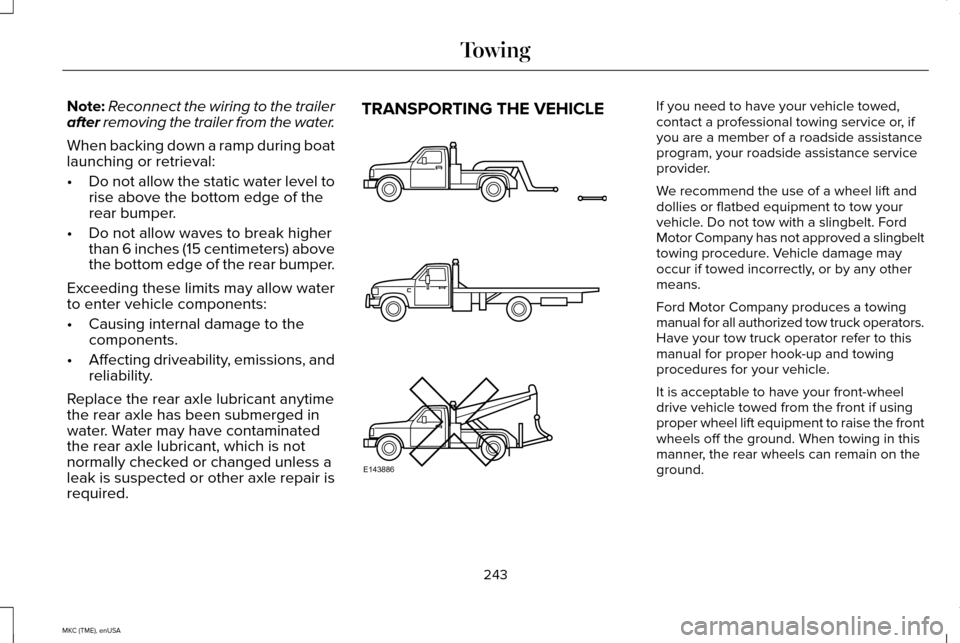
required. TRANSPORTING THE VEHICLE If you need to have your vehicle towed,
contact a professional towing service or, if
you are a member of a roadside assistance
program, your roadside assistance service
provider.
We recommend the use of a wheel lift and
dollies or flatbed equipment to tow your
vehicle. Do not tow with a slingbelt. Ford
Motor Company has not approved a slingbelt
towing procedure. Vehicle damage may
occur if towed incorrectly, or by any other
means.
Ford Motor Company produces a towing
manual for all authorized tow truck operators.
Have your tow truck operator refer to this
manual for proper hook-up and towing
procedures for your vehicle.
It is acceptable to have your front-wheel
drive vehicle towed from the front if using
proper wheel lift equipment to raise the front
wheels off the ground. When towing in this
manner, the rear wheels can remain on the
ground.
243
MKC (TME), enUSA TowingE143886
Page 261 of 490
If you cannot find unleaded fuel or can only
get fuel with an anti-knock index lower than
is recommended for your vehicle, contact
our Customer Relationship Center.
The use of leaded fuel in your vehicle without
proper conversion may damage the
effectiveness of your emission control system
and may cause engine knocking or serious
engine damage. Ford Motor Company or
Ford of Canada is not responsible for any
damage caused by use of improper fuel.
Using leaded fuel may also result in difficulty
importing your vehicle back into the United
States.
If your vehicle must be serviced while you
are traveling or living in Asia-Pacific Region,
Sub-Saharan Africa, U.S. Virgin Islands,
Central America, the Caribbean, and Israel,
contact the nearest authorized dealer. If the
authorized dealer cannot help you, contact:
FORD MOTOR COMPANY
Customer Relationship Center
1555 Fairlane Drive
Fairlane Business Park #3
Allen Park, Michigan 48101
U.S.A.
Telephone: (313) 594-4857
Fax: (313) 390-0804
Email: [email protected]
For customers in Guam, the Commonwealth
of the Northern Mariana Islands (CNMI),
America Samoa, and the U.S. Virgin Islands,
please feel free to call our Toll-Free Number:
(800) 841-FORD (3673).
If your vehicle must be serviced while you
are traveling or living in Puerto Rico, contact
the nearest authorized dealer. If the
authorized dealer cannot help you, contact:
FORD MOTOR COMPANY
Customer Relationship Center
1555 Fairlane Drive
Fairlane Business Park #3
Allen Park, Michigan 48101
U.S.A.
Telephone: (800) 841-FORD (3673)
FAX: (313) 390-0804
Email: [email protected]
www.ford.com.pr
If your vehicle must be serviced while you
are traveling or living in the Middle East,
contact the nearest authorized dealer. If the
authorized dealer cannot help you, contact:
258
MKC (TME), enUSA Customer Assistance