Manual LINCOLN MKC 2017 User Guide
[x] Cancel search | Manufacturer: LINCOLN, Model Year: 2017, Model line: MKC, Model: LINCOLN MKC 2017Pages: 538, PDF Size: 4.8 MB
Page 92 of 538
HEADLAMP EXIT DELAY
After you switch the ignition off, you can
switch the headlamps on by pulling the
direction indicator lever toward you. You will
hear a short tone. The headlamps will switch
off automatically after three minutes with any
door open or 30 seconds after the last door
has been closed. You can cancel this feature
by pulling the direction indicator toward you
again or switching the ignition on.
DAYTIME RUNNING LAMPS (If
Equipped) WARNING
The daytime running lamps system
does not activate the rear lamps and
may not provide adequate lighting during
low visibility driving conditions. Also, the
autolamps switch position may not activate
the headlamps in all low visibility conditions,
such as daytime fog. Make sure the
headlamps are switched to auto or on, as
appropriate, during all low visibility
conditions. Failure to do so may result in a
crash. Type 1 - Conventional (Non-
Configurable)
The daytime running lamps turn on when:
1. The ignition is switched to the on
position.
2. The transmission is not in park (P) for vehicles with automatic transmissions or
the parking brake is released for vehicles
with manual transmissions. 3. The lighting control is in the off, parking
lamp or autolamps positions.
4. The headlamps are off.
Type 2 - Configurable
Switch the daytime running lamps on or off
using the information display controls.
See
Information Displays (page 108).
The daytime running lamps turn on when:
1. They are switched on in the information display. See Information Displays (page
108
).
2. The ignition is switched to the on position.
3. The transmission is not in park (P) for vehicles with automatic transmissions or
the parking brake is released for vehicles
with manual transmissions.
4. The lighting control is in the autolamps position.
5. The headlamps are off.
The other lighting control switch positions
do not activate the daytime running lamps,
and you can use them to temporarily override
autolamp control.
89
MKC (TME) Canada/United States of America, enUSA, Edition date: 01/2016, First Printing Lighting
Page 94 of 538
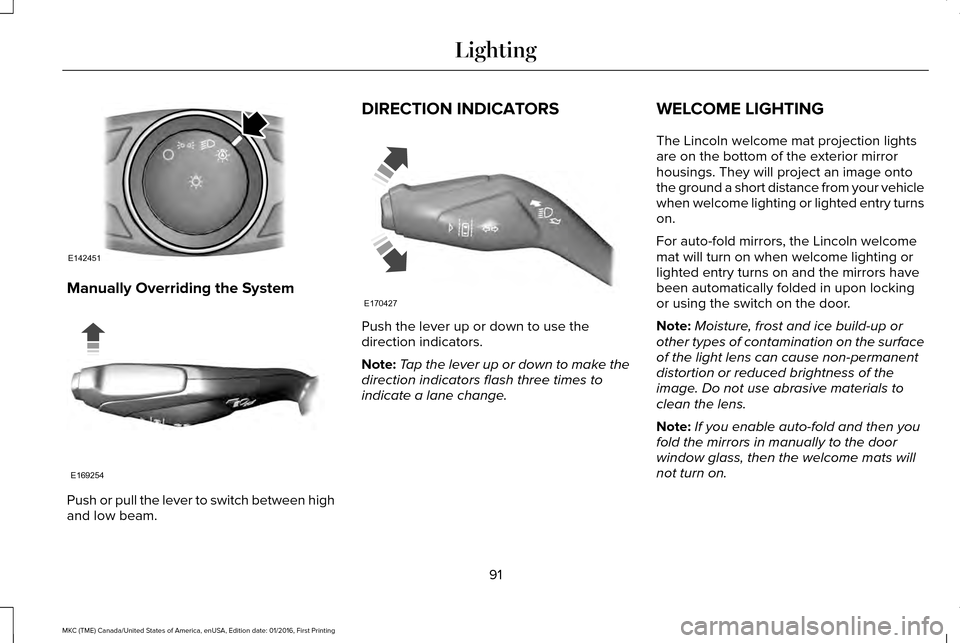
Manually Overriding the System
Push or pull the lever to switch between high
and low beam. DIRECTION INDICATORS
Push the lever up or down to use the
direction indicators.
Note:
Tap the lever up or down to make the
direction indicators flash three times to
indicate a lane change. WELCOME LIGHTING
The Lincoln welcome mat projection lights
are on the bottom of the exterior mirror
housings. They will project an image onto
the ground a short distance from your vehicle
when welcome lighting or lighted entry turns
on.
For auto-fold mirrors, the Lincoln welcome
mat will turn on when welcome lighting or
lighted entry turns on and the mirrors have
been automatically folded in upon locking
or using the switch on the door.
Note:
Moisture, frost and ice build-up or
other types of contamination on the surface
of the light lens can cause non-permanent
distortion or reduced brightness of the
image. Do not use abrasive materials to
clean the lens.
Note: If you enable auto-fold and then you
fold the mirrors in manually to the door
window glass, then the welcome mats will
not turn on.
91
MKC (TME) Canada/United States of America, enUSA, Edition date: 01/2016, First Printing LightingE142451 E169254 E170427
Page 99 of 538
Loose Mirror
If your power-folding mirrors are manually
folded, they may not work properly even
after you re-position them. You need to reset
them if:
•
The mirrors vibrate when you drive.
• The mirrors feel loose.
• The mirrors do not stay in the folded or
unfolded position.
• One of the mirrors is not in its normal
driving position.
To reset the power-fold feature, use the
power-folding mirror control to fold and
unfold the mirrors. You may hear a loud noise
as you reset the power-folding mirrors. This
sound is normal. Repeat this process as
needed each time the mirrors are manually
folded.
Heated Exterior Mirrors
See Heated Windows and Mirrors (page
136). Memory Mirrors
You can save and recall the mirror positions
through the memory function. See Memory
Function
(page 143).
Auto-Dimming Feature
(If Equipped)
The driver’ s exterior mirror automatically
dims when the interior auto-dimming mirror
turns on.
Lincoln Welcome Mat
Projection lights, on the bottom of the mirror
housings, project an image onto the ground
a short distance from the vehicle.
See
Lighting (page 86).
Integrated Blind Spot Mirrors
(If Equipped) WARNING
Objects in the blind spot mirror are
closer than they appear.
The blind spot mirror has a wide-angle mirror
inside the exterior mirror that can increase
visibility along the side of your vehicle.Check the main mirror first before a lane
change, then check the blind spot mirror. If
no vehicles are present in the blind spot
mirror and the traffic in the adjacent lane is
at a safe distance, signal that you intend to
change lanes. Glance over your shoulder to
verify traffic is clear and carefully change
lanes.
96
MKC (TME) Canada/United States of America, enUSA, Edition date: 01/2016, First Printing Windows and Mirrors
Page 118 of 538
.
Adaptive Cruise Malfunction
A condi")
Adaptive Cruise Control
Action
Message
A radar malfunction is preventing the adaptive cruise control from engag\
ing. See Using Adaptive
Cruise Control (page 209).
Adaptive Cruise Malfunction
A condition exists such that the adaptive cruise cannot function properl\
y.
See Using Adaptive
Cruise Control (page 209).
Adaptive Cruise Not Available
You have a blocked sensor due to bad weather, ice, mud or water in front of the radar sensor.
You can typically clean the sensor to resolve.
See Using Adaptive Cruise Control (page 209).
Adaptive Cruise Not Available Sensor
Blocked See Manual
The system has disabled the automatic braking.
Normal Cruise Active Automatic Braking
Turned Off
A radar malfunction is preventing the adaptive cruise control from engag\
ing.
Front Sensor Not Aligned
The adaptive cruise has reinstated controls to the driver.
Adaptive Cruise - Driver Resume Control
The vehicle speed is too slow to activate the adaptive cruise.
Adaptive Cruise Speed Too Low to
Activate
The adaptive cruise is automatically adjusting the gap distance and the \
driver needs to shift the transmission into a lower gear.
Adaptive Cruise Shift Down
115
MKC (TME) Canada/United States of America, enUSA, Edition date: 01/2016, First Printing Information Displays
Page 121 of 538
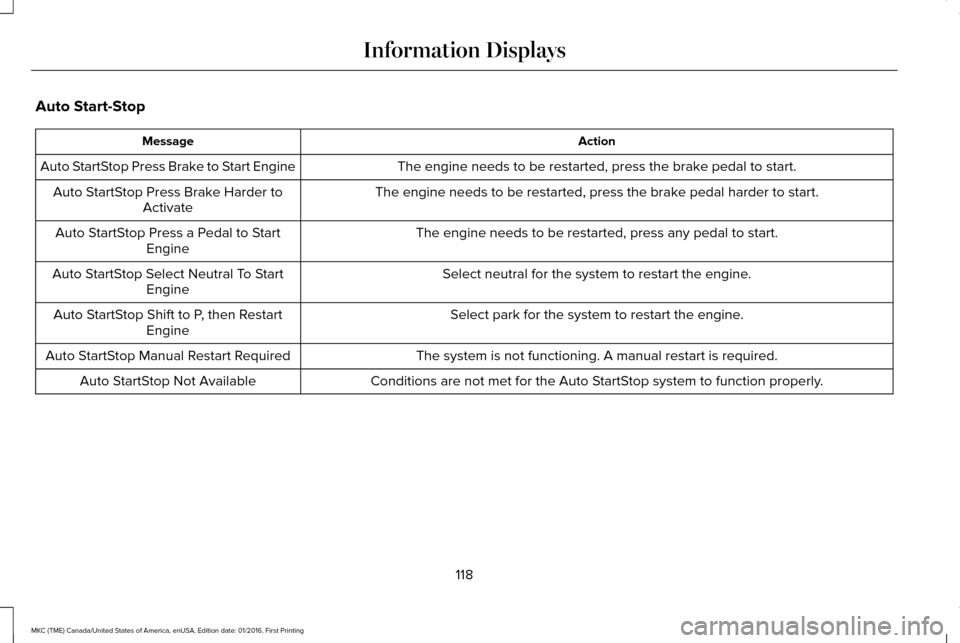
Auto Start-Stop
Action
Message
The engine needs to be restarted, press the brake pedal to start.
Auto StartStop Press Brake to Start Engine
The engine needs to be restarted, press the brake pedal harder to start.
Auto StartStop Press Brake Harder to
Activate
The engine needs to be restarted, press any pedal to start.
Auto StartStop Press a Pedal to Start
Engine
Select neutral for the system to restart the engine.
Auto StartStop Select Neutral To Start
Engine
Select park for the system to restart the engine.
Auto StartStop Shift to P, then Restart
Engine
The system is not functioning. A manual restart is required.
Auto StartStop Manual Restart Required
Conditions are not met for the Auto StartStop system to function properly.
Auto StartStop Not Available
118
MKC (TME) Canada/United States of America, enUSA, Edition date: 01/2016, First Printing Information Displays
Page 123 of 538

Blind Spot Information and Cross Traffic Alert System
Action
Message
A fault with the system has occurred. Contact an authorized dealer as so\
on as possible.
Blindspot System Fault
The system sensors are blocked. See Blind Spot Information System (page 223).
Blindspot Not Available Sensor Blocked
See Manual
The system detects a vehicle.
See Blind Spot Information System (page 223).
Vehicle Coming From X
The blind spot information system and cross traffic alert system sensors\
are blocked. See BlindSpot Information System
(page 223).
Cross Traffic Not Available Sensor Blocked
See Manual
A fault with the system has occurred. Contact an authorized dealer as so\
on as possible.
Cross Traffic System Fault
Collision Warning System Action
Message
A fault with the system has occurred. Contact an authorized dealer as so\
on as possible.
Collision Warning Malfunction
You have a blocked sensor due to bad weather, ice, mud or water in front of the radar sensor.You can typically clean the sensor to resolve.
See Collision Warning System (page 230).
Collision Warning Not Available Sensor
Blocked See Manual
A fault with the system has occurred. Contact an authorized dealer as so\
on as possible.
Collision Warning Not Available
120
MKC (TME) Canada/United States of America, enUSA, Edition date: 01/2016, First Printing Information Displays
Page 127 of 538

Maintenance
Action
Message
Stop your vehicle as soon as safely possible and turn off the engine. Check the oil level. If the
warning stays on or continues to come on with your engine running, conta\
ct an authorized dealer as soon as possible.
Low Engine Oil Pressure
The engine oil life remaining is 10% or less. See Engine Oil Check (page 290).
Change Engine Oil Soon
The oil life left is at 0%.
See Engine Oil Check (page 290).
Oil Change Required
The brake fluid level is low, inspected the brake system immediately.
See Brake Fluid Check
(page 295).
Brake Fluid Level Low
The brake system needs servicing. Stop your vehicle in a safe place. Contact an authorized dealer.
Check Brake System
The engine coolant temperature is excessively high.
Engine Coolant Over Temperature
The washer fluid is low, refill washer fluid.
Washer Fluid Level Low
The engine has reduced power to help reduce high engine temperature.
Power Reduced to Lower Engine Temp
Your vehicle is still in Transport or Factory mode. This may not allow some features to operateproperly. See an authorized dealer.
Transport / Factory Mode Contact Dealer
The powertrain needs service due to a powertrain malfunction.
See Manual
124
MKC (TME) Canada/United States of America, enUSA, Edition date: 01/2016, First Printing Information Displays
Page 133 of 538
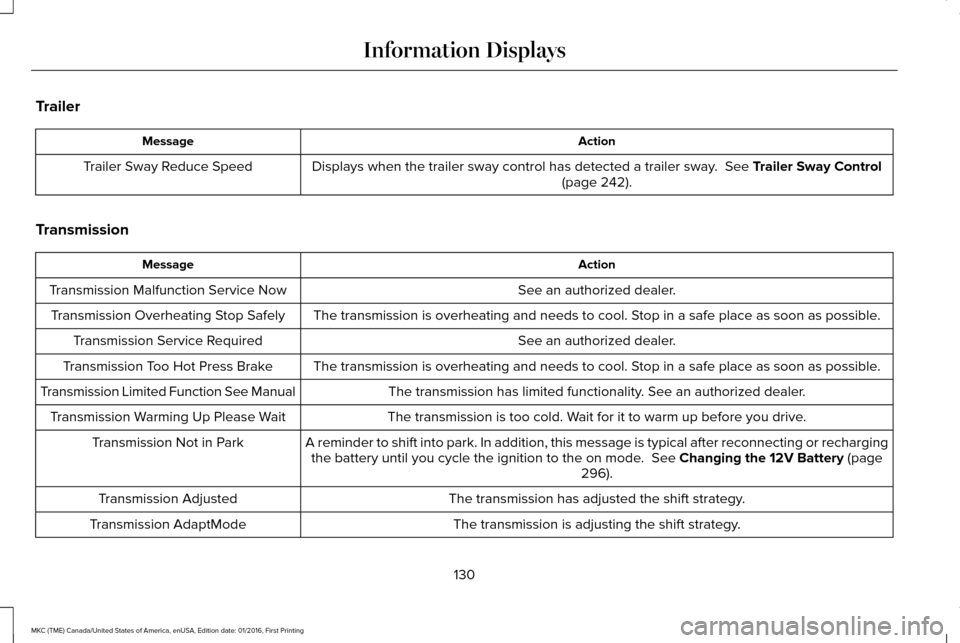
Trailer
Action
Message
Displays when the trailer sway control has detected a trailer sway. See Trailer Sway Control
(page 242).
Trailer Sway Reduce Speed
Transmission Action
Message
See an authorized dealer.
Transmission Malfunction Service Now
The transmission is overheating and needs to cool. Stop in a safe place as soon as possible.
Transmission Overheating Stop Safely
See an authorized dealer.
Transmission Service Required
The transmission is overheating and needs to cool. Stop in a safe place as soon as possible.
Transmission Too Hot Press Brake
The transmission has limited functionality. See an authorized dealer.
Transmission Limited Function See Manual
The transmission is too cold. Wait for it to warm up before you drive.
Transmission Warming Up Please Wait
A reminder to shift into park. In addition, this message is typical afte\
r reconnecting or rechargingthe battery until you cycle the ignition to the on mode.
See Changing the 12V Battery (page
296).
Transmission Not in Park
The transmission has adjusted the shift strategy.
Transmission Adjusted
The transmission is adjusting the shift strategy.
Transmission AdaptMode
130
MKC (TME) Canada/United States of America, enUSA, Edition date: 01/2016, First Printing Information Displays
Page 134 of 538
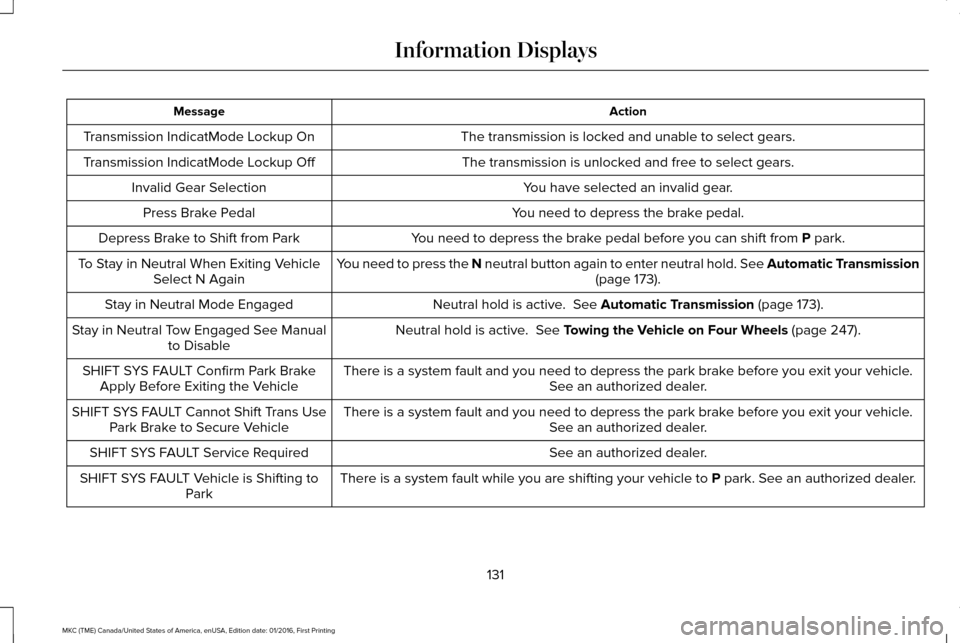
Action
Message
The transmission is locked and unable to select gears.
Transmission IndicatMode Lockup On
The transmission is unlocked and free to select gears.
Transmission IndicatMode Lockup Off
You have selected an invalid gear.
Invalid Gear Selection
You need to depress the brake pedal.
Press Brake Pedal
You need to depress the brake pedal before you can shift from P park.
Depress Brake to Shift from Park
You need to press the N neutral button again to enter neutral hold. See Automatic Transmission (page
173).
To Stay in Neutral When Exiting Vehicle
Select N Again
Neutral hold is active.
See Automatic Transmission (page 173).
Stay in Neutral Mode Engaged
Neutral hold is active.
See Towing the Vehicle on Four Wheels (page 247).
Stay in Neutral Tow Engaged See Manual
to Disable
There is a system fault and you need to depress the park brake before you exit your vehicle. See an authorized dealer.
SHIFT SYS FAULT Confirm Park Brake
Apply Before Exiting the Vehicle
There is a system fault and you need to depress the park brake before you exit your vehicle.See an authorized dealer.
SHIFT SYS FAULT Cannot Shift Trans Use
Park Brake to Secure Vehicle
See an authorized dealer.
SHIFT SYS FAULT Service Required
There is a system fault while you are shifting your vehicle to
P park. See an authorized dealer.
SHIFT SYS FAULT Vehicle is Shifting to
Park
131
MKC (TME) Canada/United States of America, enUSA, Edition date: 01/2016, First Printing Information Displays
Page 166 of 538
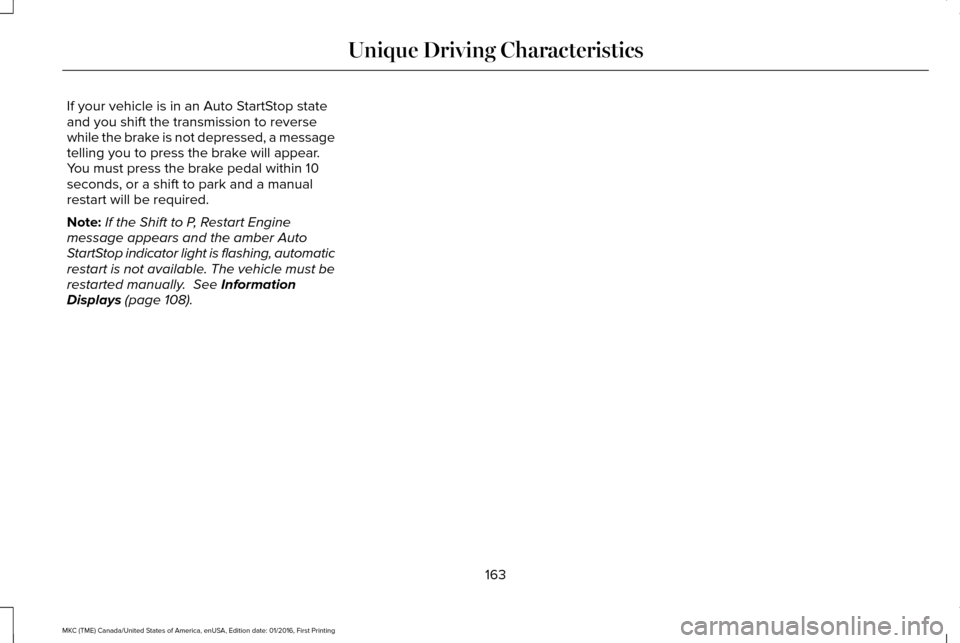
If your vehicle is in an Auto StartStop state
and you shift the transmission to reverse
while the brake is not depressed, a message
telling you to press the brake will appear.
You must press the brake pedal within 10
seconds, or a shift to park and a manual
restart will be required.
Note:
If the Shift to P, Restart Engine
message appears and the amber Auto
StartStop indicator light is flashing, automatic
restart is not available. The vehicle must be
restarted manually. See Information
Displays (page 108).
163
MKC (TME) Canada/United States of America, enUSA, Edition date: 01/2016, First Printing Unique Driving Characteristics