radio LINCOLN MKC 2017 Owners Manual
[x] Cancel search | Manufacturer: LINCOLN, Model Year: 2017, Model line: MKC, Model: LINCOLN MKC 2017Pages: 538, PDF Size: 4.8 MB
Page 4 of 538
Introduction
About This Manual............................................7
Symbols Glossary
..............................................7
Data Recording
..................................................9
California Proposition 65................................11
Perchlorate........................................................12
Lincoln Automotive Financial Services
.........................................................12
Replacement Parts Recommendation........12
Special Notices
.................................................13
Mobile Communications Equipment
...........14
Export Unique Options...................................14
Environment
Protecting the Environment..........................16
Child Safety
General Information
........................................17
Installing Child Restraints
..............................19
Booster Seats..................................................25
Child Restraint Positioning
...........................28
Child Safety Locks..........................................29 Seatbelts
Principle of Operation
.....................................31
Fastening the Seatbelts................................32
Seatbelt Height Adjustment.........................35
Seatbelt Warning Lamp and Indicator Chime
............................................................35
Seatbelt Reminder..........................................36
Child Restraint and Seatbelt Maintenance
................................................38
Seatbelt Extension.........................................39
Personal Safety System ™
Personal Safety System ™
..............................40
Supplementary Restraints System
Principle of Operation
.....................................41
Driver and Passenger Airbags
....................42
Front Passenger Sensing System..............44
Side Airbags.....................................................47
Driver Knee Airbag.........................................48
Safety Canopy™
...............................................48
Crash Sensors and Airbag Indicator
..........49 Airbag Disposal
................................................51
Keys and Remote Controls
General Information on Radio Frequencies.................................................52
Remote Control...............................................53
Replacing a Lost Key or Remote Control...........................................................57
MyKey™
Principle of Operation...................................58
Creating a MyKey...........................................59
Clearing All MyKeys.......................................60
Checking MyKey System Status.................60
Using MyKey With Remote Start Systems..........................................................61
MyKey Troubleshooting
.................................61
Locks
Locking and Unlocking
.................................63
Power Liftgate
.................................................68
Keyless Entry.....................................................71
1
MKC (TME) Canada/United States of America, enUSA, Edition date: 01/2016, First Printing Table of Contents
Page 17 of 538
interference with or even damage to vehicle
systems. We do not recommend or endorse
the use of aftermarket plug-in devices unless
approved by Ford. The vehicle Warranty will
not cover damage caused by an aftermarket
plug-in device.
Notice to Owners of Pickup Trucks and
Utility Type Vehicles
WARNING
Utility vehicles have a significantly
higher rollover rate than other types of
vehicles. Before you drive your vehicle, please read
this Owner’
s Guide carefully. Your vehicle is
not a passenger car. As with other vehicles
of this type, failure to operate this vehicle
correctly may result in loss of vehicle control,
vehicle rollover, personal injury or death.
Using Your Vehicle With a Snowplow
Do not use this vehicle for snowplowing.
Your vehicle is not equipped with a
snowplowing package. Using Your Vehicle as an Ambulance
Do not use this vehicle as an ambulance.
Your vehicle is not equipped with the Ford
Ambulance Preparation Package.
MOBILE COMMUNICATIONS
EQUIPMENT
WARNING
Driving while distracted can result in
loss of vehicle control, crash and injury.
We strongly recommend that you use
extreme caution when using any device that
may take your focus off the road. Your
primary responsibility is the safe operation
of your vehicle. We recommend against the
use of any hand-held device while driving
and encourage the use of voice-operated
systems when possible. Make sure you are
aware of all applicable local laws that may
affect the use of electronic devices while
driving. Using mobile communications equipment is
becoming increasingly important in the
conduct of business and personal affairs.
However, you must not compromise your
own or others
’ safety when using such
equipment. Mobile communications can
enhance personal safety and security when
appropriately used, particularly in emergency
situations. Safety must be paramount when
using mobile communications equipment to
avoid negating these benefits. Mobile
communication equipment includes, but is
not limited to, cellular phones, pagers,
portable email devices, text messaging
devices and portable two-way radios.
EXPORT UNIQUE OPTIONS
For your particular global region, your vehicle
may be equipped with features and options
that are different from the features and
options that are described in this Owner’ s
Manual. A market unique supplement may
be supplied that complements this book. By
referring to the market unique supplement,
if provided, you can properly identify those
features, recommendations and
14
MKC (TME) Canada/United States of America, enUSA, Edition date: 01/2016, First Printing Introduction
Page 55 of 538
GENERAL INFORMATION ON
RADIO FREQUENCIES
This device complies with Part 15 of the FCC
Rules and with Industry Canada
license-exempt RSS standard(s). Operation
is subject to the following two conditions: (1)
This device may not cause harmful
interference, and (2) This device must accept
any interference received, including
interference that may cause undesired
operation.
Note:
Changes or modifications not
expressively approved by the party
responsible for compliance could void the
user's authority to operate the equipment.
The term IC before the radio certification
number only signifies that Industry Canada
technical specifications were met. The typical operating range for your
transmitter is approximately 33 feet (10
meters). Vehicles with the remote start
feature will have a greater range. One of the
following could cause a decrease in
operating range:
•
weather conditions
• nearby radio towers
• structures around the vehicle
• other vehicles parked next to your
vehicle
Other short-distance radio transmitters, such
as amateur radios, medical equipment,
wireless headphones, remote controls and
alarm systems may operate on the same
frequency as your remote control. If other
transmitters are operating on those
frequencies, you may not be able to use your
remote control. Using your remote control
near some types of electronic equipment,
such as USB devices, computers or cell
phones can interfere with remote operation.
Operating your remote control near metal or
metallic-finished purses, bags or clothing can
interfere with remote operation. You can lock
and unlock the doors with the key. Note:
Make sure to lock your vehicle before
leaving it unattended.
Note: If you are in range, the remote control
will operate if you press any button
unintentionally.
Intelligent Access
The system uses a radio frequency signal to
communicate with your vehicle and authorize
your vehicle to unlock when one of the
following conditions are met:
• You touch the inside of any exterior door
handle within
3 ft (1 m) proximity of an
intelligent access key.
• You press the luggage compartment
button.
• You press a button on the transmitter.
If excessive radio frequency interference is
present in the area or if the transmitter
battery is low, you may need to mechanically
unlock your door. You can use the
mechanical key blade in your intelligent
access key to open the driver door in this
situation.
See Remote Control (page 53).
52
MKC (TME) Canada/United States of America, enUSA, Edition date: 01/2016, First Printing Keys and Remote Controls
Page 59 of 538
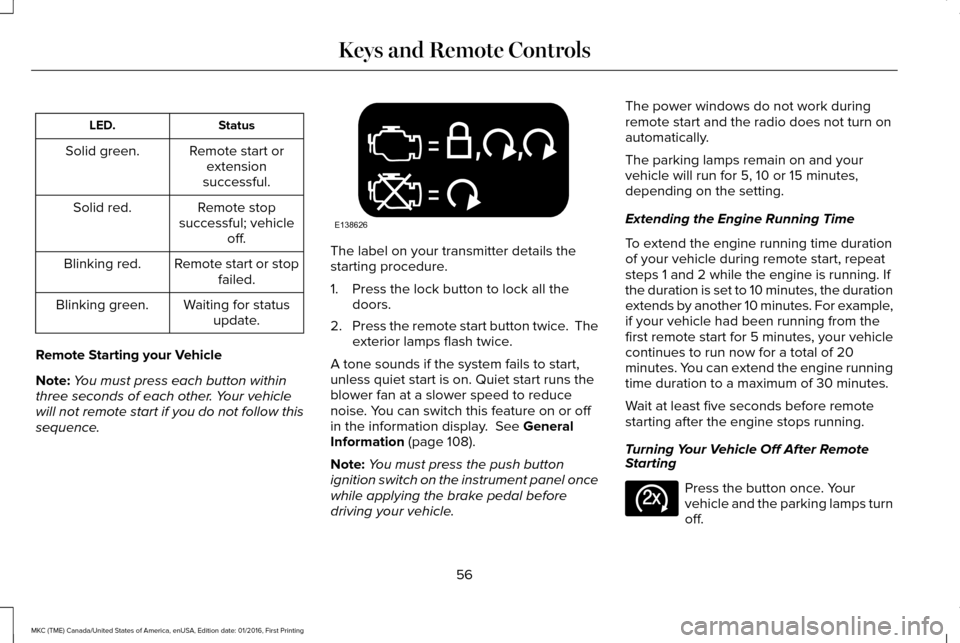
Status
LED.
Remote start orextension
successful.
Solid green.
Remote stop
successful; vehicle off.
Solid red.
Remote start or stopfailed.
Blinking red.
Waiting for statusupdate.
Blinking green.
Remote Starting your Vehicle
Note: You must press each button within
three seconds of each other. Your vehicle
will not remote start if you do not follow this
sequence. The label on your transmitter details the
starting procedure.
1. Press the lock button to lock all the
doors.
2. Press the remote start button twice. The
exterior lamps flash twice.
A tone sounds if the system fails to start,
unless quiet start is on. Quiet start runs the
blower fan at a slower speed to reduce
noise. You can switch this feature on or off
in the information display. See General
Information (page 108).
Note: You must press the push button
ignition switch on the instrument panel once
while applying the brake pedal before
driving your vehicle. The power windows do not work during
remote start and the radio does not turn on
automatically.
The parking lamps remain on and your
vehicle will run for 5, 10 or 15 minutes,
depending on the setting.
Extending the Engine Running Time
To extend the engine running time duration
of your vehicle during remote start, repeat
steps 1 and 2 while the engine is running. If
the duration is set to 10 minutes, the duration
extends by another 10 minutes. For example,
if your vehicle had been running from the
first remote start for 5 minutes, your vehicle
continues to run now for a total of 20
minutes. You can extend the engine running
time duration to a maximum of 30 minutes.
Wait at least five seconds before remote
starting after the engine stops running.
Turning Your Vehicle Off After Remote
Starting
Press the button once. Your
vehicle and the parking lamps turn
off.
56
MKC (TME) Canada/United States of America, enUSA, Edition date: 01/2016, First Printing Keys and Remote ControlsE138626 E138625
Page 61 of 538
PRINCIPLE OF OPERATION
MyKey allows you to program keys with
restricted driving modes to promote good
driving habits. You can program the
restrictions to all keys but one. Any keys that
you did not program are administrator keys
or admin keys.
You can use admin keys to:
•
Create a MyKey with certain vehicle
restrictions.
• Program certain MyKey settings.
• Clear all MyKey restrictions.
After you program a MyKey, you can view
the following information through the
information display:
• The total number of admin keys and
MyKeys for your vehicle.
• The total distance a MyKey driver
traveled with your vehicle.
Note: Every MyKey receives the same
restrictions and settings. You cannot
program them individually. Note:
For vehicles equipped with a
push-button start switch: When both a MyKey
and an admin key are present when you
start your vehicle, the system recognizes the
admin key only.
Standard Settings
Not every vehicle includes the features listed
below. If your vehicle has this equipment,
then you cannot change the following
settings when using a MyKey:
• Seatbelt reminder or Belt-Minder™. MyKey
mutes the audio system until drivers, and
in some instances, passengers, fasten
their seatbelts. Note: If your vehicle
includes an AM/FM radio or a very basic
audio system, then the radio may not
mute.
• Earlier low-fuel warning. The low-fuel
warning activates earlier for MyKey
drivers, giving them more time to refuel. •
Certain driver alerts, stability systems or
parking aids turn on automatically when
you use the MyKey system. For example,
Blind Spot Information System (BLIS),
cross traffic alert, lane departure warning
or forward collision warning. Note: MyKey
drivers may be able to turn the lane
departure warning feature off, but this
feature turns back on automatically with
every new key cycle.
• Restricted touchscreen operation in some
markets. For example, MyKey may
prevent manual navigation destination
input while the vehicle is in any gear
other than park (P) or when the vehicle
reaches a certain rate of speed.
• Satellite radio adult content restrictions,
if this feature is available in your market.
Optional Settings
You can configure certain vehicle feature
settings when you first create a MyKey. You
can also change the settings afterward with
an admin key.
58
MKC (TME) Canada/United States of America, enUSA, Edition date: 01/2016, First Printing MyKey™
Page 62 of 538
Note:
Not every feature applies to every
vehicle in every market. When they are
available for your vehicle, then they appear
in your information display, providing choices
to switch them on or off, or to select a more
specific setting.
• Various vehicle speed limits so the
MyKey driver cannot exceed certain
speeds. The information display shows
warnings followed by an audible tone
when the MyKey driver reaches the set
speed. You cannot override the set
speed by fully depressing the accelerator
pedal. WARNING
Do not set MyKey maximum speed limit
to a limit that will prevent the driver
from maintaining a safe speed considering
posted speed limits and prevailing road
conditions. The driver is always responsible
to drive in accordance with local laws and
prevailing conditions. Failure to do so could
result in accident or injury. •
Various vehicle speed reminders so
MyKey drivers know when their vehicle
speed approaches the limits. Warnings
appear in your information display and a
tone sounds when the MyKey drivers
exceed the set vehicle speed.
• The audio system's maximum volume
limits to 45% so MyKey drivers can
concentrate on the road. A message
appears in the information display when
MyKey drivers attempt to exceed the
limited volume. MyKey also disables the
automatic volume control. Note: If your
vehicle includes an AM/FM radio or a
very basic audio system, then the radio
may not limit.
• Always on setting. This setting forces
certain features to remain on and active
for MyKey drivers. For example, traction
control, AdvanceTrac, E911 or emergency
assistance and the do not disturb
features stay on even if a MyKey driver
uses the feature's control to switch it off. CREATING A MYKEY
Use the information display to create a
MyKey.
1. Switch the ignition on using the key or
the transmitter you want to program.
2. Access the main menu in the information
display and then scroll through the
menus to begin programming your
MyKey. See Information Displays (page
108
).
3. Follow the instructions in the display.
4. A confirmation message appears in the display after you finish programming your
MyKey. The programmed restrictions
apply when you restart your vehicle with
the programmed key or transmitter.
Note: Make sure you label the programmed
MyKey so you can distinguish it from the
admin keys.
You can also program the optional MyKey
settings.
59
MKC (TME) Canada/United States of America, enUSA, Edition date: 01/2016, First Printing MyKey™
Page 82 of 538
Use the control on the side of the steering
column to adjust the position.
To adjust:
•
Tilt: press the top or bottom of the
control.
• Telescope: press the front or rear of the
control.
Memory Feature
You can save and recall the steering column
position with the memory function. See
Memory Function (page 143).
Pressing the adjustment control during
memory recall cancels the operation. The
column responds to the adjustment control.
The steering column sets a stopping position
just short of the end of the column position
to prevent damage to the steering column.
A new stopping position sets if the steering
column encounters an object when tilting or
telescoping.
To reset the steering column to its normal
stopping position: 1. Press the steering column control again
after encountering the new stopping
position.
2. Continue pressing the control until it reaches the end of the column position.
A new stopping position is set. The next time
you tilt or telescope the steering column, it
will stop just short of the end of the column
position.
Easy Entry and Exit Feature
When you switch the ignition off, the steering
column will move to the full up position to
allow extra room to exit your vehicle. The
column will return to the previous setting
when you switch the ignition on. You can
enable or disable this feature in the
information display.
See Information
Displays (page 108).
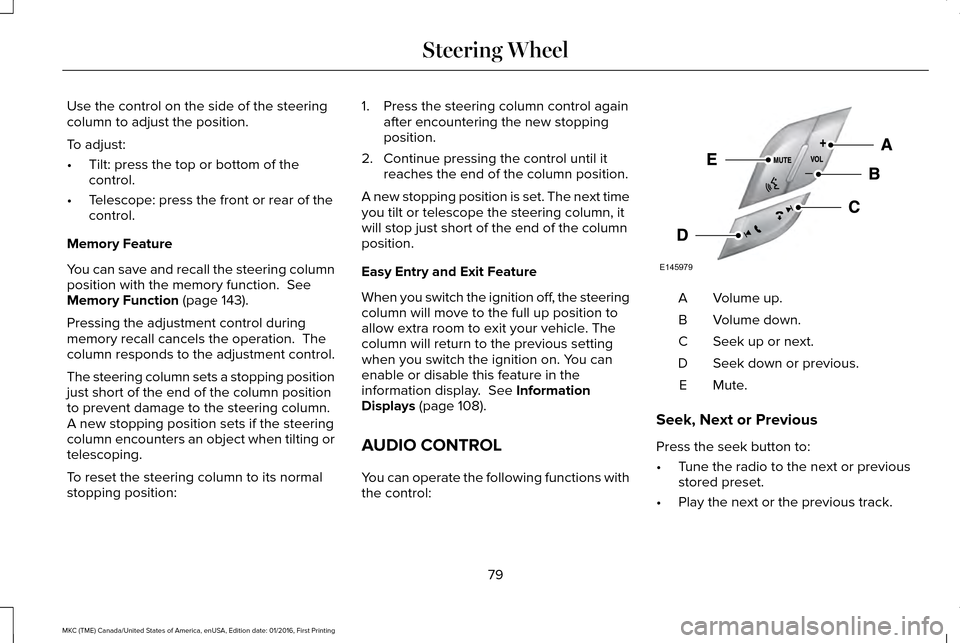
AUDIO CONTROL
You can operate the following functions with
the control: Volume up.
A
Volume down.
B
Seek up or next.
C
Seek down or previous.
D
Mute.E
Seek, Next or Previous
Press the seek button to:
• Tune the radio to the next or previous
stored preset.
• Play the next or the previous track.
79
MKC (TME) Canada/United States of America, enUSA, Edition date: 01/2016, First Printing Steering WheelE145979
Page 83 of 538
Press and hold the seek button to:
•
Tune the radio to the next station up or
down the frequency band.
• Seek through a track.
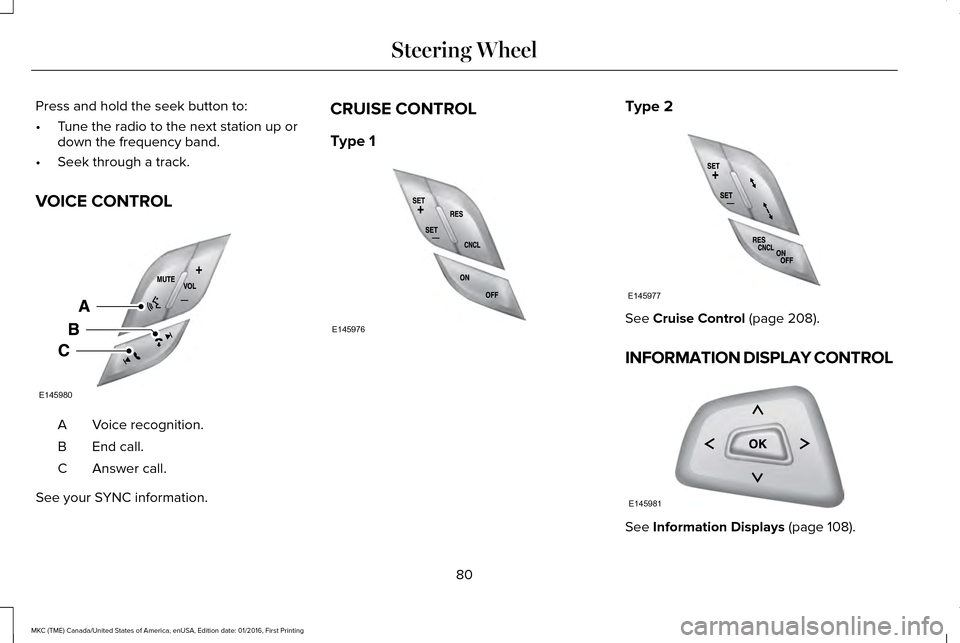
VOICE CONTROL Voice recognition.
A
End call.
B
Answer call.
C
See your SYNC information. CRUISE CONTROL
Type 1 Type 2
See Cruise Control (page 208).
INFORMATION DISPLAY CONTROL See
Information Displays (page 108).
80
MKC (TME) Canada/United States of America, enUSA, Edition date: 01/2016, First Printing Steering WheelE145980 E145976 E145977 E145981
Page 151 of 538
(If Equipped)
HomeLink Wireless Control System
WARNINGS
Make sure that the garage door and
security device are free from
obstruction when you are programming. Do
not program the system with the vehicle in
the garage. Do not use the system with any garage
door opener that does not have the
safety stop and reverse feature as required
by U.S. Federal Safety Standards (this
includes any garage door opener
manufactured before April 1, 1982). A garage
door opener which cannot detect an object,
signaling the door to stop and reverse, does
not meet current federal safety standards.
Using a garage door opener without these
features increases the risk of serious injury
or death. Note:
Make sure you keep the original
remote control transmitter for use in other
vehicles as well as for future system
programming. Note:
We recommend that upon the sale or
lease termination of your vehicle, you erase
the programmed function buttons for security
reasons. See Erasing the Function Button
Codes.
Note: You can program a maximum of three
devices. To change or replace any of the
three devices after it has been initially
programmed, you must first erase the current
settings. See
Erasing the Function Button
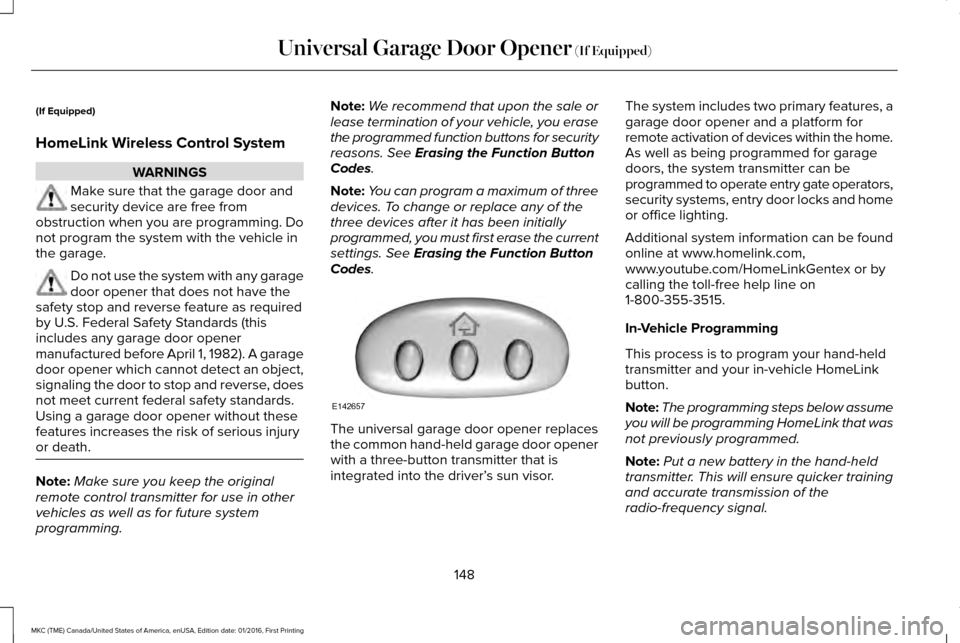
Codes. The universal garage door opener replaces
the common hand-held garage door opener
with a three-button transmitter that is
integrated into the driver’
s sun visor.The system includes two primary features, a
garage door opener and a platform for
remote activation of devices within the home.
As well as being programmed for garage
doors, the system transmitter can be
programmed to operate entry gate operators,
security systems, entry door locks and home
or office lighting.
Additional system information can be found
online at www.homelink.com,
www.youtube.com/HomeLinkGentex or by
calling the toll-free help line on
1-800-355-3515.
In-Vehicle Programming
This process is to program your hand-held
transmitter and your in-vehicle HomeLink
button.
Note:
The programming steps below assume
you will be programming HomeLink that was
not previously programmed.
Note: Put a new battery in the hand-held
transmitter. This will ensure quicker training
and accurate transmission of the
radio-frequency signal.
148
MKC (TME) Canada/United States of America, enUSA, Edition date: 01/2016, First Printing Universal Garage Door Opener
(If Equipped)E142657
Page 153 of 538
3. Press and hold the function button you
want to program for 2 seconds, then
release. Repeat this step. Depending on
your brand of garage door opener, you
may need to repeat this sequence a third
time.
Gate Operator / Canadian Programming
Canadian radio-frequency laws require
transmitter signals to “time-out” (or quit) after
several seconds of transmission – which may
not be long enough for HomeLink to pick up
the signal during programming. Similar to
this Canadian law, some U.S. gate operators
are designed to “time-out” in the same
manner. Note:
If programming a garage door opener
or gate operator, it is advised to unplug the
device during the “cycling” process to
prevent possible overheating.
1. Press and hold the HomeLink button while you press and release, every two
seconds, your hand-held transmitter until
the HomeLink indicator light changes
from a slow to a rapidly blinking light.
2. Release both the HomeLink and hand-held transmitter buttons.
3. Continue programing HomeLink. See In-Vehicle Programming
.
Erasing the Function Button Codes
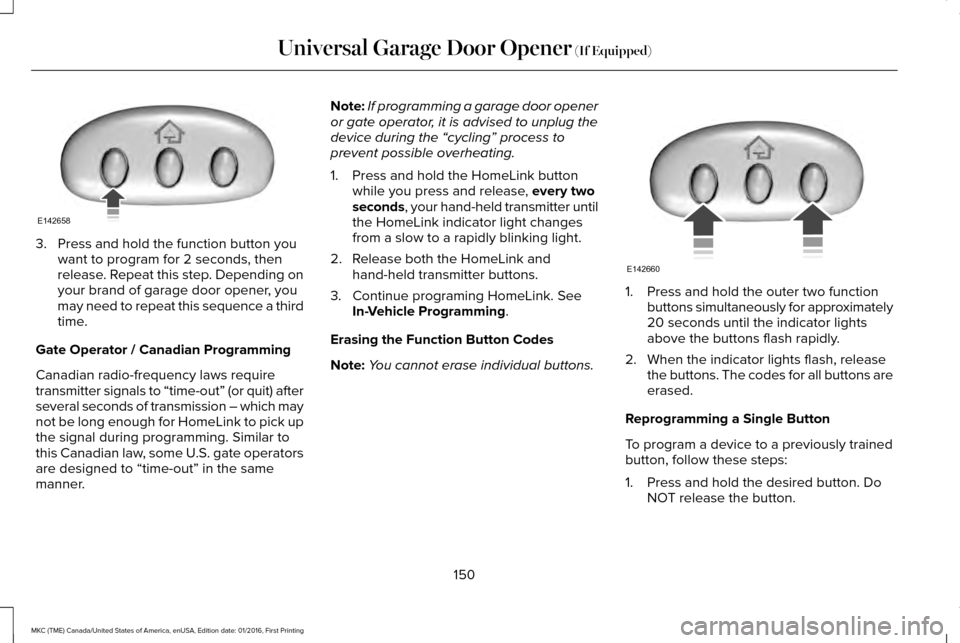
Note: You cannot erase individual buttons. 1. Press and hold the outer two function
buttons simultaneously for approximately
20 seconds until the indicator lights
above the buttons flash rapidly.
2. When the indicator lights flash, release the buttons. The codes for all buttons are
erased.
Reprogramming a Single Button
To program a device to a previously trained
button, follow these steps:
1. Press and hold the desired button. Do NOT release the button.
150
MKC (TME) Canada/United States of America, enUSA, Edition date: 01/2016, First Printing Universal Garage Door Opener
(If Equipped)E142658 E142660