ECO mode LINCOLN MKC 2019 Owners Manual
[x] Cancel search | Manufacturer: LINCOLN, Model Year: 2019, Model line: MKC, Model: LINCOLN MKC 2019Pages: 581, PDF Size: 5.41 MB
Page 468 of 581
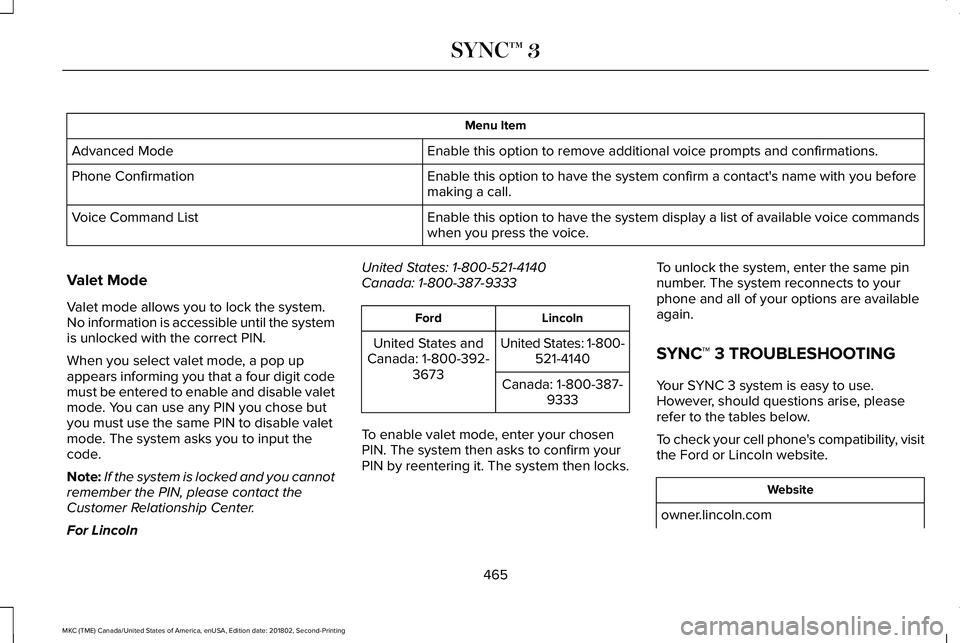
Menu Item
Enable this option to remove additional voice prompts and confirmations.Advanced Mode
Enable this option to have the system confirm a contact's name with you beforemaking a call.Phone Confirmation
Enable this option to have the system display a list of available voice commandswhen you press the voice.Voice Command List
Valet Mode
Valet mode allows you to lock the system.No information is accessible until the systemis unlocked with the correct PIN.
When you select valet mode, a pop upappears informing you that a four digit codemust be entered to enable and disable valetmode. You can use any PIN you chose butyou must use the same PIN to disable valetmode. The system asks you to input thecode.
Note:If the system is locked and you cannotremember the PIN, please contact theCustomer Relationship Center.
For Lincoln
United States: 1-800-521-4140Canada: 1-800-387-9333
LincolnFord
United States: 1-800-521-4140United States andCanada: 1-800-392-3673Canada: 1-800-387-9333
To enable valet mode, enter your chosenPIN. The system then asks to confirm yourPIN by reentering it. The system then locks.
To unlock the system, enter the same pinnumber. The system reconnects to yourphone and all of your options are availableagain.
SYNC™ 3 TROUBLESHOOTING
Your SYNC 3 system is easy to use.However, should questions arise, pleaserefer to the tables below.
To check your cell phone's compatibility, visitthe Ford or Lincoln website.
Website
owner.lincoln.com
465
MKC (TME) Canada/United States of America, enUSA, Edition date: 201802, Second-Printing
SYNC™ 3
Page 471 of 581
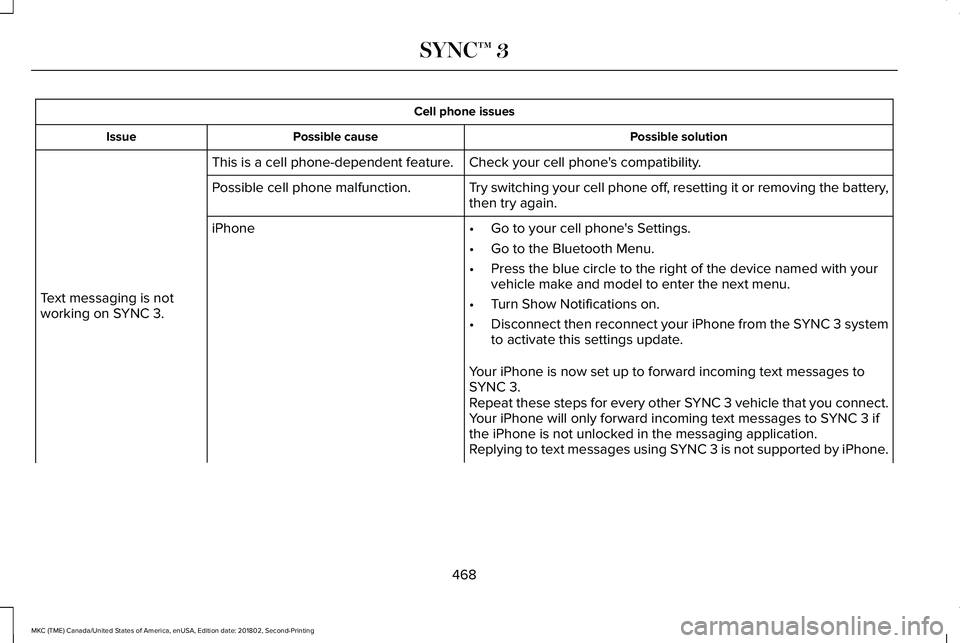
Cell phone issues
Possible solutionPossible causeIssue
Check your cell phone's compatibility.This is a cell phone-dependent feature.
Text messaging is notworking on SYNC 3.
Try switching your cell phone off, resetting it or removing the battery,then try again.Possible cell phone malfunction.
iPhone•Go to your cell phone's Settings.
•Go to the Bluetooth Menu.
•Press the blue circle to the right of the device named with yourvehicle make and model to enter the next menu.
•Turn Show Notifications on.
•Disconnect then reconnect your iPhone from the SYNC 3 systemto activate this settings update.
Your iPhone is now set up to forward incoming text messages toSYNC 3.Repeat these steps for every other SYNC 3 vehicle that you connect.Your iPhone will only forward incoming text messages to SYNC 3 ifthe iPhone is not unlocked in the messaging application.Replying to text messages using SYNC 3 is not supported by iPhone.
468
MKC (TME) Canada/United States of America, enUSA, Edition date: 201802, Second-Printing
SYNC™ 3
Page 472 of 581
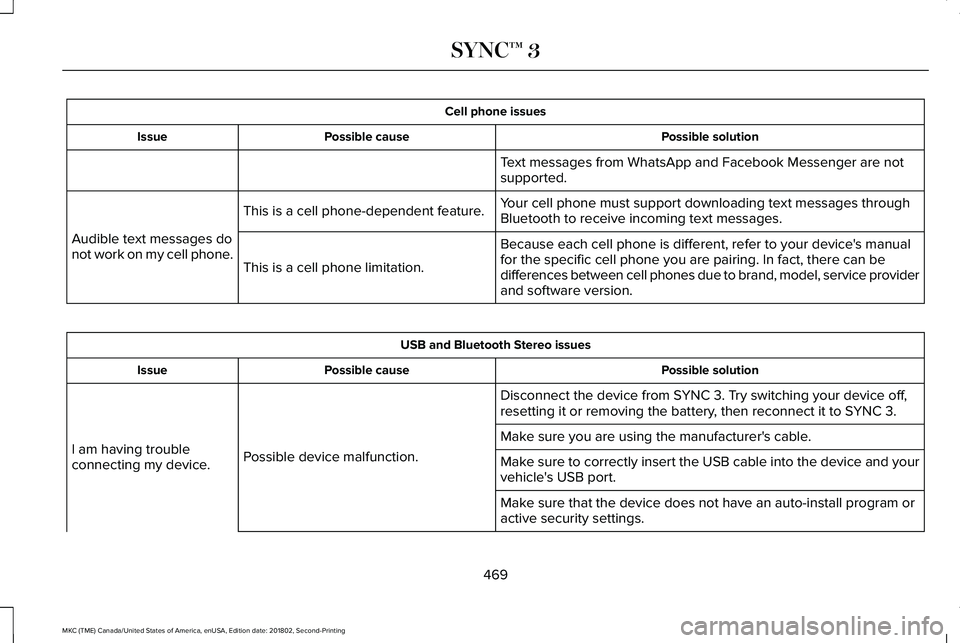
Cell phone issues
Possible solutionPossible causeIssue
Text messages from WhatsApp and Facebook Messenger are notsupported.
Your cell phone must support downloading text messages throughBluetooth to receive incoming text messages.This is a cell phone-dependent feature.
Audible text messages donot work on my cell phone.Because each cell phone is different, refer to your device's manualfor the specific cell phone you are pairing. In fact, there can bedifferences between cell phones due to brand, model, service providerand software version.
This is a cell phone limitation.
USB and Bluetooth Stereo issues
Possible solutionPossible causeIssue
Disconnect the device from SYNC 3. Try switching your device off,resetting it or removing the battery, then reconnect it to SYNC 3.
Possible device malfunction.I am having troubleconnecting my device.
Make sure you are using the manufacturer's cable.
Make sure to correctly insert the USB cable into the device and yourvehicle's USB port.
Make sure that the device does not have an auto-install program oractive security settings.
469
MKC (TME) Canada/United States of America, enUSA, Edition date: 201802, Second-Printing
SYNC™ 3
Page 495 of 581
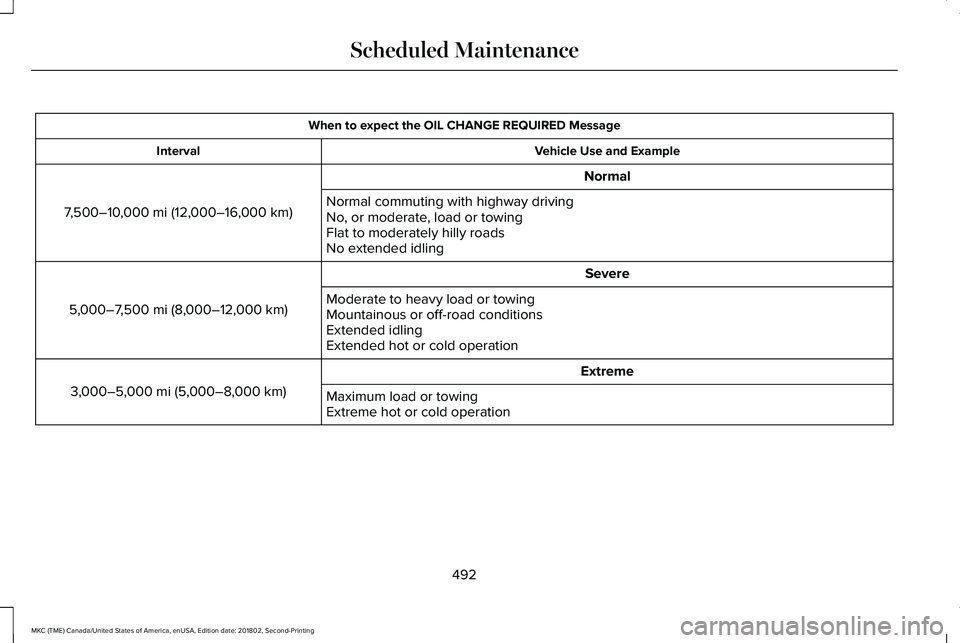
When to expect the OIL CHANGE REQUIRED Message
Vehicle Use and ExampleInterval
Normal
7,500–10,000 mi (12,000–16,000 km)Normal commuting with highway drivingNo, or moderate, load or towingFlat to moderately hilly roadsNo extended idling
Severe
5,000–7,500 mi (8,000–12,000 km)Moderate to heavy load or towingMountainous or off-road conditionsExtended idlingExtended hot or cold operation
Extreme
3,000–5,000 mi (5,000–8,000 km)Maximum load or towingExtreme hot or cold operation
492
MKC (TME) Canada/United States of America, enUSA, Edition date: 201802, Second-Printing
Scheduled Maintenance
Page 526 of 581
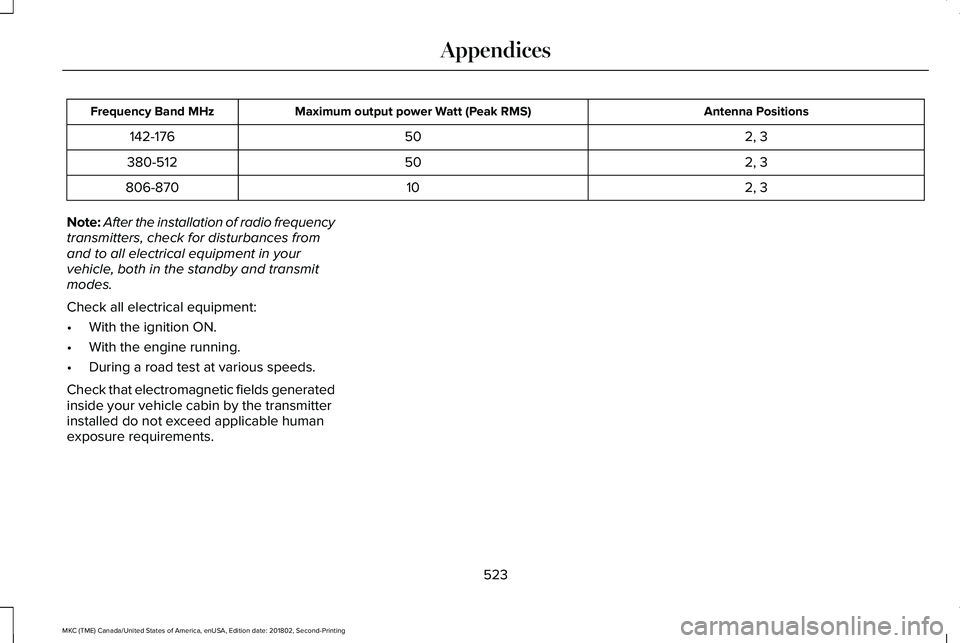
Antenna PositionsMaximum output power Watt (Peak RMS)Frequency Band MHz
2, 350142-176
2, 350380-512
2, 310806-870
Note:After the installation of radio frequencytransmitters, check for disturbances fromand to all electrical equipment in yourvehicle, both in the standby and transmitmodes.
Check all electrical equipment:
•With the ignition ON.
•With the engine running.
•During a road test at various speeds.
Check that electromagnetic fields generatedinside your vehicle cabin by the transmitterinstalled do not exceed applicable humanexposure requirements.
523
MKC (TME) Canada/United States of America, enUSA, Edition date: 201802, Second-Printing
Appendices
Page 556 of 581
Taiwan Territory
Note: In accordance with the managementapproach of low-power radio wave radiationmotors:
Article 12: For approved and certifiedlow-power radiation motor models,companies, firms or users must not alter thefrequency, increase the power or change thecharacteristics and functions of the originaldesign without authorization.
Article 14: The usage of low-powerradio-frequency motors must not affectaviation safety and interfere with legaltelecommunications. Should interference bedetected, immediately stop using the deviceand only resume usage after ensuring thatthere is no longer any interference. For thelegal telecommunication and wirelesstelecommunication of the telco, thelow-power radio frequency motor must beable to tolerate legal limits of interferencefrom telecommunication, industrial, scientificand radio wave equipment.
SUNA TRAFFIC CHANNEL – TERMS ANDCONDITIONS
By activating, using and/or accessing theSUNA Traffic Channel, SUNA Predictive orother content or material provided byIntelematics (together, SUNA Productsand/or Services), you must accept certainterms and conditions. The following is a briefsummary of the terms and conditions thatapply to you. To view the full terms andconditions relevant to your use of the SUNAProducts and/or Services, please consult:
Website
www.sunatraffic.com.au/termsandcondi-tions/
1. Acceptance
By using SUNA Products and/or Services,you will be deemed to have accepted andagreed to be bound by the terms andconditions fully detailed at:
Website
www.sunatraffic.com.au/termsandcondi-tions/
2. Intellectual Property
SUNA Products and/or Services are for yourpersonal use. You may not record, orretransmit the content, nor use the contentin association with any other trafficinformation or route guidance service ordevice not approved by Intelematics. Youobtain no right of ownership in anyIntellectual Property Rights (includingcopyright) in the data that is used to provideSUNA Products and/or Services.
3. Appropriate Use
553
MKC (TME) Canada/United States of America, enUSA, Edition date: 201802, Second-Printing
Appendices
Page 570 of 581
Rear Window Wiper Blade...............................300
Checking MyKey System Status.................62MyKey Distance....................................................62Number of Admin Keys.......................................63Number of MyKeys...............................................63
Checking the Wiper Blades.......................299Child Restraint and SeatbeltMaintenance...................................................41Child Restraint Positioning............................31Child Safety......................................................20General Information.............................................20
Child Safety Locks..........................................32Left-Hand Side.......................................................33Right-Hand Side....................................................33
Cleaning Leather Seats................................311Cleaning Products.......................................305Materials...............................................................305
Cleaning the Engine....................................308Cleaning the Exterior..................................306Cleaning the Headlamps.................................306Exterior Chrome Parts.......................................307Exterior Plastic Parts..........................................307Stripes or Graphics.............................................307Underbody...........................................................307Under Hood.........................................................307
Cleaning the Instrument Panel andInstrument Cluster Lens.............................311
Cleaning the Interior...................................309Cleaning Black Label or PresidentialInterior..............................................................309
Cleaning the Wheels....................................312Cleaning the Windows and WiperBlades...........................................................308Clearing All MyKeys.......................................62Climate............................................................420Accessing Rear Climate Controls..................422Accessing the Climate Control Menu...........420Directing the Airflow..........................................420Rear Climate Control Lock Indicator.............423Setting the Blower Motor Speed.....................421Setting the Temperature....................................421Switching Auto Mode On and Off...................421Switching Dual Zone Mode On and Off........421Switching Maximum Air Conditioning On andOff......................................................................422Switching Maximum Defrost On andOff......................................................................422Switching Rear Auto Mode On and Off........423Switching Recirculated Air On and Off.........422Switching the Air Conditioning On andOff.......................................................................421Switching the Climate Controlled Seats Onand Off...............................................................421Switching the Climate Control On andOff.......................................................................421
Switching the Heated Exterior Mirrors On andOff......................................................................422Switching the Heated Rear Window On andOff......................................................................422Switching the Heated Seats On and Off......422Switching the Heated Steering Wheel On andOff......................................................................422Switching the Rear Climate Controlled SeatsOn and Off.......................................................423Switching the Rear Heated Seats On andOff......................................................................423Switching the Rear Ventilated Seats On andOff......................................................................423Switching the Ventilated Seats On andOff......................................................................422
Climate Control..............................................132Climate Controlled Seats.............................147Cooled Seats........................................................147
Coolant CheckSee: Engine Coolant Check............................292
Crash Sensors and Airbag Indicator..........53Creating a MyKey............................................61Programming or Changing ConfigurableSettings...............................................................62
Cross Traffic Alert.........................................228Blocked Sensors..................................................231Switching the System Off and On...................231System Errors.......................................................231
567
MKC (TME) Canada/United States of America, enUSA, Edition date: 201802, Second-Printing
Index
Page 571 of 581
System Lights, Messages and AudibleAlerts..................................................................231System Limitations..............................................231Using the Cross Traffic Alert System............228
Cruise Control..................................................83Principle of Operation........................................210
Cruise controlSee: Using Cruise Control................................210
Customer Assistance..................................260
D
Data Recording................................................10Comfort, Convenience and EntertainmentData.......................................................................12Event Data................................................................11Service Data............................................................10Services That Third Parties Provide..................12Services That We Provide...................................12Vehicles With a Modem.......................................12Vehicles With SYNC..............................................13
Daytime Running Lamps...............................90Type One - Conventional(Non-Configurable)...........................................91Type Two - Configurable......................................91
Digital Radio...................................................370HD Radio Reception and StationTroubleshooting..............................................371
Direction Indicators........................................92Doors and Locks.............................................65Drive Control..................................................237Lincoln Drive Control.........................................237
Driver Alert......................................................219PRINCIPLE OF OPERATION.............................219USING DRIVER ALERT......................................220
Driver and Passenger Airbags....................45Children and Airbags...........................................46Proper Driver and Front Passenger SeatingAdjustment.........................................................46
Driver Knee Airbag..........................................51Driving Aids....................................................219Driving Hints...................................................251Driving Through Water................................251DRLSee: Daytime Running Lamps...........................90
E
Economical Driving.......................................251Electric Parking Brake..................................189Applying the electric parking brake...............189Applying the electric parking brake when thevehicle is moving............................................190Battery With No Charge.....................................191Releasing the electric parking brake.............190
Electromagnetic Compatibility...................519
Emission Law..................................................173Noise Emissions Warranty, ProhibitedTampering Acts and Maintenance..............174Tampering With a Noise Control System......173
End User License Agreement...................524VEHICLE SOFTWARE END USER LICENSEAGREEMENT (EULA) ....................................524
Engine Block Heater.....................................161Using the Engine Block Heater........................161
Engine Coolant Check................................292Adding Engine Coolant....................................293Checking the Engine Coolant.........................292Recycled Engine Coolant.................................294Severe Climates.................................................294What You Should Know About Fail-SafeCooling.............................................................294
Engine Emission Control.............................173Engine ImmobilizerSee: Passive Anti-Theft System.........................77
Engine Oil Check.........................................290Adding Engine Oil...............................................291
Engine Oil Dipstick......................................290Engine Specifications - 2.0L......................344Drivebelt Routing................................................344
Engine Specifications - 2.3L......................345Drivebelt Routing................................................345
Entertainment................................................406AM/FM Radio.......................................................409
568
MKC (TME) Canada/United States of America, enUSA, Edition date: 201802, Second-Printing
Index
Page 572 of 581
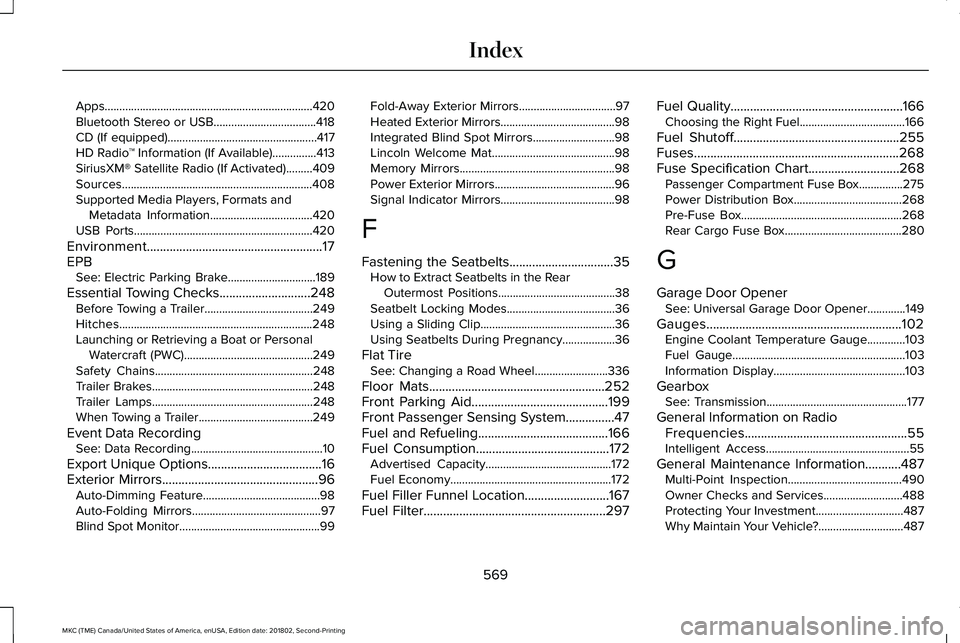
Apps.......................................................................420Bluetooth Stereo or USB...................................418CD (If equipped)...................................................417HD Radio™ Information (If Available)...............413SiriusXM® Satellite Radio (If Activated).........409Sources.................................................................408Supported Media Players, Formats andMetadata Information...................................420USB Ports.............................................................420
Environment......................................................17EPBSee: Electric Parking Brake..............................189
Essential Towing Checks............................248Before Towing a Trailer.....................................249Hitches..................................................................248Launching or Retrieving a Boat or PersonalWatercraft (PWC)............................................249Safety Chains......................................................248Trailer Brakes.......................................................248Trailer Lamps.......................................................248When Towing a Trailer.......................................249
Event Data RecordingSee: Data Recording.............................................10
Export Unique Options...................................16Exterior Mirrors................................................96Auto-Dimming Feature........................................98Auto-Folding Mirrors............................................97Blind Spot Monitor................................................99
Fold-Away Exterior Mirrors.................................97Heated Exterior Mirrors.......................................98Integrated Blind Spot Mirrors............................98Lincoln Welcome Mat..........................................98Memory Mirrors.....................................................98Power Exterior Mirrors.........................................96Signal Indicator Mirrors.......................................98
F
Fastening the Seatbelts................................35How to Extract Seatbelts in the RearOutermost Positions........................................38Seatbelt Locking Modes.....................................36Using a Sliding Clip..............................................36Using Seatbelts During Pregnancy..................36
Flat TireSee: Changing a Road Wheel.........................336
Floor Mats......................................................252Front Parking Aid..........................................199Front Passenger Sensing System...............47Fuel and Refueling........................................166Fuel Consumption.........................................172Advertised Capacity...........................................172Fuel Economy.......................................................172
Fuel Filler Funnel Location..........................167Fuel Filter........................................................297
Fuel Quality.....................................................166Choosing the Right Fuel....................................166
Fuel Shutoff...................................................255Fuses...............................................................268Fuse Specification Chart............................268Passenger Compartment Fuse Box...............275Power Distribution Box.....................................268Pre-Fuse Box.......................................................268Rear Cargo Fuse Box........................................280
G
Garage Door OpenerSee: Universal Garage Door Opener.............149
Gauges............................................................102Engine Coolant Temperature Gauge.............103Fuel Gauge...........................................................103Information Display.............................................103
GearboxSee: Transmission................................................177
General Information on RadioFrequencies..................................................55Intelligent Access.................................................55
General Maintenance Information...........487Multi-Point Inspection.......................................490Owner Checks and Services...........................488Protecting Your Investment..............................487Why Maintain Your Vehicle?.............................487
569
MKC (TME) Canada/United States of America, enUSA, Edition date: 201802, Second-Printing
Index
Page 574 of 581
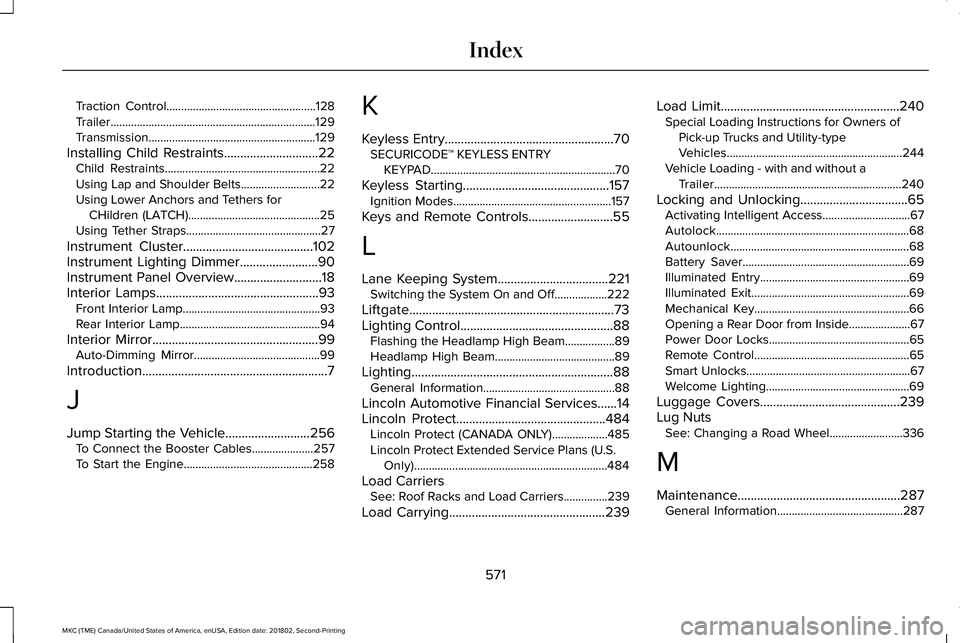
Traction Control...................................................128Trailer......................................................................129Transmission.........................................................129
Installing Child Restraints.............................22Child Restraints.....................................................22Using Lap and Shoulder Belts...........................22Using Lower Anchors and Tethers forCHildren (LATCH).............................................25Using Tether Straps..............................................27
Instrument Cluster........................................102Instrument Lighting Dimmer........................90Instrument Panel Overview...........................18Interior Lamps..................................................93Front Interior Lamp...............................................93Rear Interior Lamp................................................94
Interior Mirror...................................................99Auto-Dimming Mirror...........................................99
Introduction.........................................................7
J
Jump Starting the Vehicle..........................256To Connect the Booster Cables.....................257To Start the Engine............................................258
K
Keyless Entry....................................................70SECURICODE™ KEYLESS ENTRYKEYPAD...............................................................70
Keyless Starting.............................................157Ignition Modes......................................................157
Keys and Remote Controls..........................55
L
Lane Keeping System..................................221Switching the System On and Off..................222
Liftgate...............................................................73Lighting Control...............................................88Flashing the Headlamp High Beam.................89Headlamp High Beam.........................................89
Lighting..............................................................88General Information.............................................88
Lincoln Automotive Financial Services......14Lincoln Protect..............................................484Lincoln Protect (CANADA ONLY)...................485Lincoln Protect Extended Service Plans (U.S.Only)..................................................................484
Load CarriersSee: Roof Racks and Load Carriers...............239
Load Carrying................................................239
Load Limit.......................................................240Special Loading Instructions for Owners ofPick-up Trucks and Utility-typeVehicles............................................................244Vehicle Loading - with and without aTrailer................................................................240
Locking and Unlocking.................................65Activating Intelligent Access..............................67Autolock..................................................................68Autounlock.............................................................68Battery Saver.........................................................69Illuminated Entry...................................................69Illuminated Exit......................................................69Mechanical Key.....................................................66Opening a Rear Door from Inside.....................67Power Door Locks................................................65Remote Control.....................................................65Smart Unlocks........................................................67Welcome Lighting.................................................69
Luggage Covers...........................................239Lug NutsSee: Changing a Road Wheel.........................336
M
Maintenance..................................................287General Information...........................................287
571
MKC (TME) Canada/United States of America, enUSA, Edition date: 201802, Second-Printing
Index